You don’t have to babysit Claude. You can automate the guardrails, enforce your standards, and guarantee your rules are followed — every single time.
The Problem with AI Coding Assistants
AI coding tools are powerful. But there’s a quiet anxiety that comes with using them: what if it does something I didn’t expect?
Maybe it installs a package you haven’t approved. Maybe it writes messy, unformatted code. Maybe it thinks it’s done — but your test suite is still red.
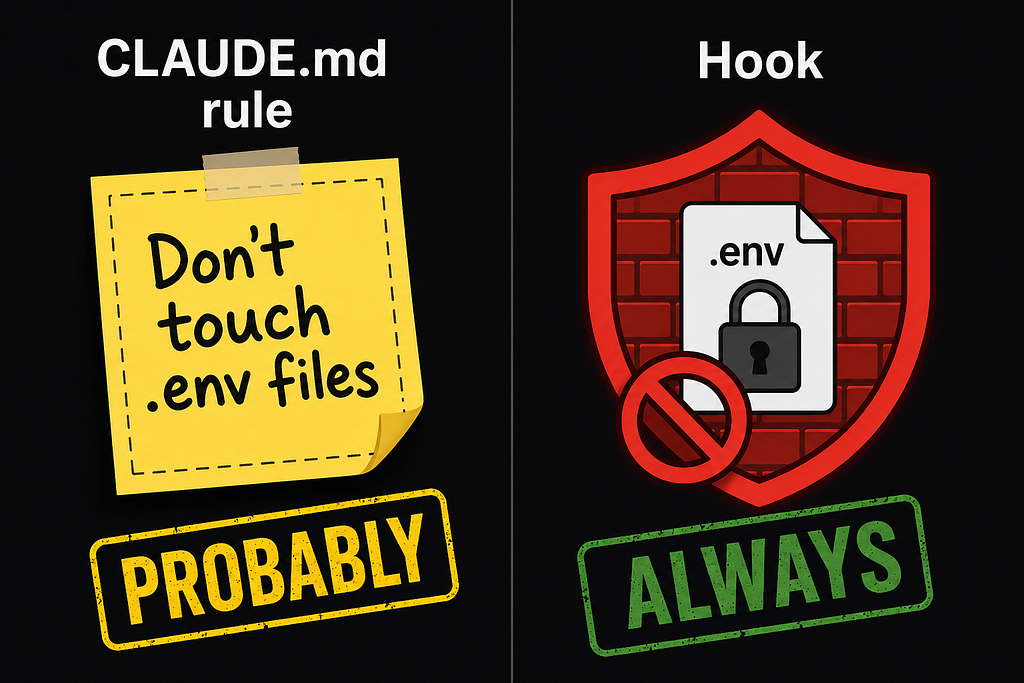
The usual fix is prompt engineering. You add rules to your CLAUDE.md. You write careful instructions. And Claude probably follows them.
But “probably” isn’t good enough in a production codebase.
That’s exactly the problem Claude Code hooks were built to solve.
What Are Claude Code Hooks?
Hooks are shell commands, HTTP endpoints, or LLM prompts that Claude Code automatically runs at specific points in its lifecycle — before a tool executes, after a file is written, when Claude decides it’s finished, and more.
Think of them like event listeners in JavaScript:
// The 'click' event always fires when you click.
// But nothing happens unless you attach a listener.
button.addEventListener('click', () => { doSomething() })
Same idea with hooks. The events always happen — but a hook only fires if you’ve configured one for that event in your settings.json. You write the script once, and Claude Code calls it automatically, every time, at exactly the right moment.
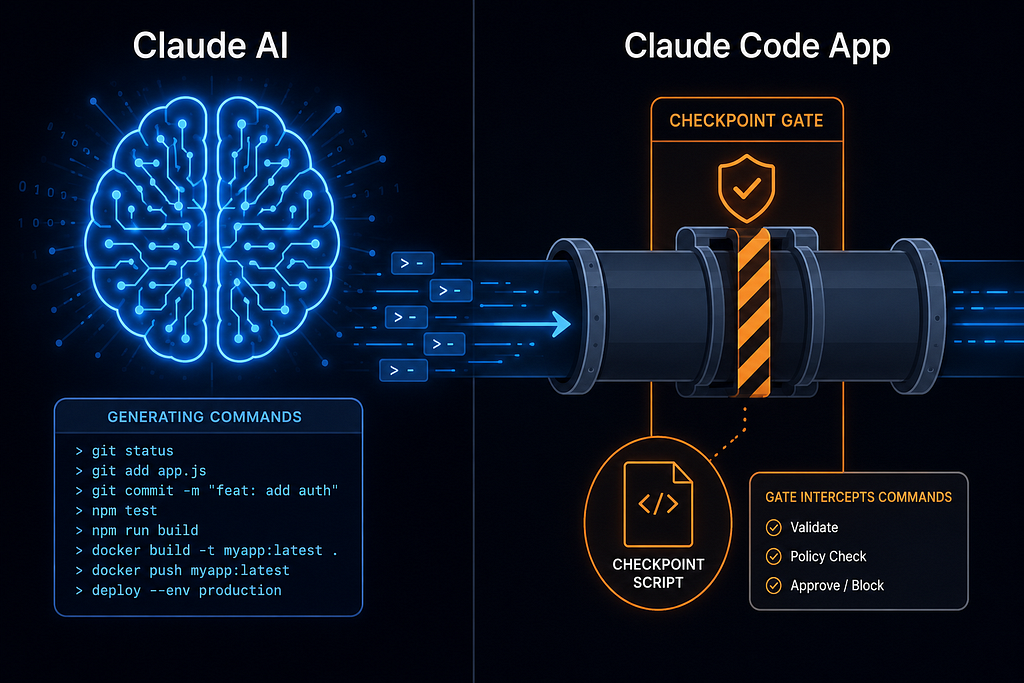
The critical distinction: Claude (the AI) does not trigger hooks. Claude Code (the application) does.
Claude AI decides what to do — “I’ll write this file”, “I’ll run this command”. Claude Code, the application running in your terminal, intercepts that intent and checks your hooks before acting on it. The AI doesn’t know hooks exist. It can’t override them. This is what makes hooks so powerful.
The Lifecycle: Where Hooks Live
Claude Code sessions follow a predictable lifecycle. Hooks can attach to any point in it:
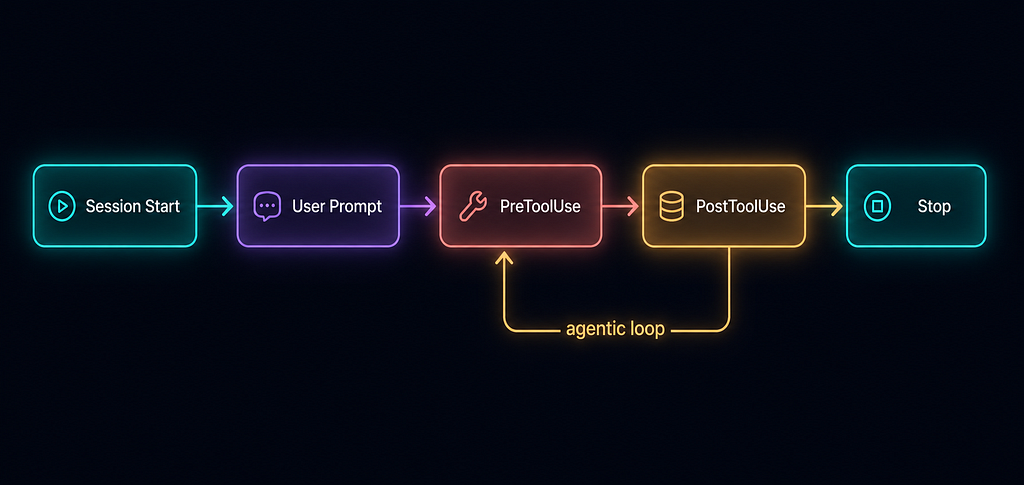
Events fall into three cadences:
- Once per session — SessionStart, SessionEnd
- Once per turn — UserPromptSubmit, Stop, StopFailure
- Every tool call — PreToolUse, PostToolUse
How a Hook Actually Works (Mechanically)
When Claude Code hits a lifecycle event and your hook is registered for it, here’s the exact sequence:
1. EVENT FIRES
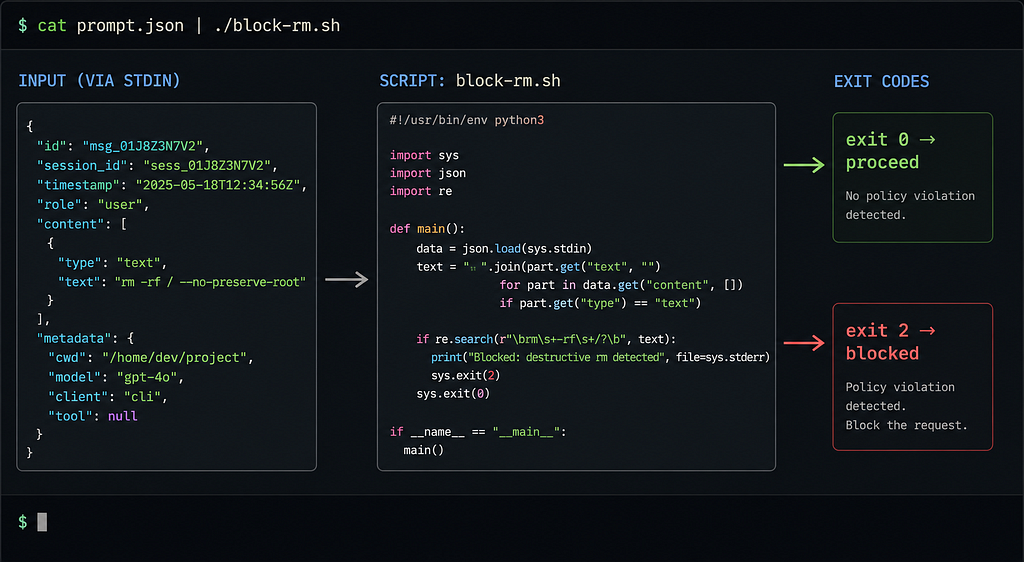
   Claude Code packages event data as JSON
   → sends it to your script via stdin

2. MATCHER CHECKS
   Does the tool name match your "matcher" field?
   → "Bash" matches only Bash tool calls
   → "Write|Edit" matches either tool

3. IF CONDITION CHECKS  (optional, finer filter)
   Does the tool name + arguments match "if"?
   → "Bash(rm *)" matches only rm commands inside Bash
   → Avoids spawning the script unnecessarily

4. YOUR SCRIPT RUNS
   Reads JSON from stdin
   Applies your logic
   Exits with a code:
     exit 0 → proceed (optionally with JSON output)
     exit 2 → BLOCK (stderr fed back to Claude as the reason)

5. CLAUDE CODE ACTS
   Reads the exit code and JSON
   → Allows, blocks, or modifies the action accordingly
Your script is just a normal shell script, Python file, or any executable. There’s nothing Claude-specific about writing one — you read JSON from stdin and exit with a number.
A Real Scenario: Adding a POST /users Endpoint
Let’s walk through a complete, realistic example. Your team asks Claude Code to add a new API endpoint. Here’s every hook that fires:
Step 1 — Session Start
Your SessionStart hook runs a script that injects your CLAUDE.md and prints active environment variables into Claude's context. Claude is project-aware before you type a single word.
# Terminal output when you open Claude Code
✔ Loaded CLAUDE.md (312 tokens)
✔ ENV: NODE_ENV=development, DB=postgres
Step 2 — User Prompt Submit
You type: “Add a POST /users endpoint”
Your UserPromptSubmit hook silently appends your team standards: "Always use TypeScript strict mode. Add JSDoc."
Claude receives the enhanced prompt. You never typed those rules.
Step 3 — PreToolUse (blocked!)
Claude wants to run npm install express-validator. Your hook checks it against an approved-packages allowlist — it's not there. Exit code 2 fires.
✘ Blocked: express-validator not in approved-packages.txt
→ Claude told: "Use zod (already installed) for validation."
→ Claude retries with zod instead
Step 4 — PostToolUse
Claude writes src/routes/users.ts. Your PostToolUse hook immediately runs Prettier and ESLint on the file. Claude's output is clean before you even see it.
✔ prettier --write src/routes/users.ts
✔ eslint src/routes/users.ts — 0 errors
Step 5 — Stop (rejected!)
Claude signals it’s done. Your Stop hook runs the full test suite. Two tests fail. Exit code 2 — Claude is sent back to fix them.
✘ 2 tests failed: POST /users 400 response, duplicate email
→ Exit 2: Claude must fix failures before stopping
✔ [after fix] All 24 tests passed — Stop allowed
The Configuration
All of the above is powered by a single settings.json file:
{
  "hooks": {
    "SessionStart": [{
      "hooks": [{
        "type": "command",
        "command": "cat CLAUDE.md && printenv | grep -E 'NODE_ENV|DB'"
      }]
    }],
    "UserPromptSubmit": [{
      "hooks": [{
        "type": "command",
        "command": "python scripts/append-standards.py"
      }]
    }],
    "PreToolUse": [{
      "matcher": "Bash",
      "hooks": [{
        "type": "command",
        "command": "python scripts/check-packages.py"
      }]
    }],
    "PostToolUse": [{
      "matcher": "Write|Edit",
      "hooks": [{
        "type": "command",
        "command": "npx prettier --write \"$CLAUDE_TOOL_INPUT_FILE_PATH\" && npx eslint \"$CLAUDE_TOOL_INPUT_FILE_PATH\""
      }]
    }],
    "Stop": [{
      "hooks": [{
        "type": "command",
        "command": "npm test || exit 2"
      }]
    }]
  }
}
Notice the matcher field — it's a filter that narrows which tool calls your hook applies to. "Write|Edit" runs Prettier only on file writes and edits. "Bash" only checks package installs on shell commands. This keeps hooks efficient even when Claude is making dozens of tool calls.
There’s also an optional if field for even finer filtering:
{
  "type": "command",
  "if": "Bash(rm *)",
  "command": ".claude/hooks/block-rm.sh"
}
This script only spawns when the Bash command contains rm — avoiding unnecessary process overhead on every other command.
Where to Put Your hooks
Hooks live in a settings.json file. There are two locations:
Global — ~/.claude/settings.json Your personal rules that apply to every project you open. Use for things like "always block dangerous shell commands" or "always notify me when Claude finishes".
Project-level — .claude/settings.json (inside your repo) Project-specific rules you can commit to git, so your whole team shares the same hooks automatically.
Your actual scripts can live anywhere — you just reference them by path in settings.json. A common pattern:
~/.claude/scripts/      ← personal/global scripts
.claude/scripts/        ← project-specific scripts
.claude/settings.json   ← the config that references both
Four Types of Hook Handlers
Hooks aren’t limited to shell scripts. Claude Code supports four handler types:
command — runs a shell script. The workhorse. Receives event JSON via stdin, returns decisions via exit codes and stdout.
http — POSTs event JSON to a URL endpoint. Great for team-wide policy enforcement, remote validation services, or logging to external systems.
prompt — sends a prompt to a Claude model for a yes/no evaluation. No scripting required — just write plain English.
agent — spawns a subagent with access to tools like Read, Grep, and Glob to deeply verify conditions before returning a decision.
The Key Insight: “Probably” vs “Always”
This is the heart of why hooks matter.
If you tell Claude in your CLAUDE.md not to modify .env files, it will probably listen.
If you set up a PreToolUse hook that blocks writes to .env files, it will always block them.
For anyone working on production codebases, regulated environments, or shared team projects — that distinction between “probably” and “always” is everything.
Hooks turn best-practice suggestions into enforced guarantees. You write the script once. Claude Code runs it every single time, without you having to remember, without you having to watch, without Claude having any say in the matter.
That’s the power of Claude Code hooks.
Getting Started
- Create .claude/settings.json in your project root
- Pick the events you care about (PreToolUse for blocking, PostToolUse for automation, Stop for quality gates)
- Write a simple shell script that reads JSON from stdin and exits 0 or 2
- Add your script path to settings.json
- Open Claude Code — your hooks are live
For the full event reference, input schemas, and advanced features like async hooks and MCP tool hooks, check the official docs at code.claude.com/docs/en/hooks.
Have you set up hooks in your project? What automated guardrails have you built? Share in the comments — I’d love to see what the community is building.
Claude Code Hooks: The Developer’s Secret Weapon for AI-Controlled Automation was originally published in Towards AI on Medium, where people are continuing the conversation by highlighting and responding to this story.