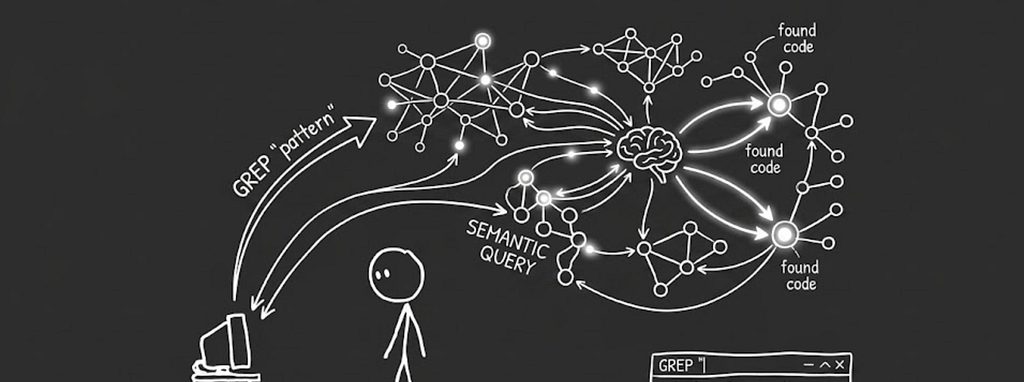
Consider this. You just joined a new company. Day one, they drop a massive codebase on you. Hundreds of files, thousands of lines, and somehow you are expected to “just explore it.”
And you know the logic you need is in there somewhere, but you have no clue what it is called or where it lives. And obviously, you are not about to plug the whole repo into some random AI tool and risk your manager asking why company code is floating outside.
So you do what every developer does. You search. You grep. You open folders one by one like you are on some treasure hunt. Maybe you are looking for retry logic, but the function is named something like BackoffExecutor. The code exists, but your tools cannot think the way you do. They match words, not meaning. And suddenly a simple task turns into 30 minutes of frustration.
That gap exists and can be solved. Because yes, cloud tools can solve this, but they come with their own mess. Permissions, compliance, API limits, costs and, most importantly, your code leaving your machine. No no no, we are not having that.
So I built something for myself. A tool that runs locally, understands the codebase semantically, and lets me ask questions in plain English like I would ask a teammate. It responds with actual answers and points me to the exact files and functions. I called it codemind-edge.
The full implementation is on GitHub CodeMind-edge. You can follow along with the code as you read through this.
So Let’s Get to Know Our Hero- Qdrant Edge
Almost every production vector database follows the same model. You run it as a separate server, often in a Docker container, and your application communicates with it over HTTP or gRPC. This is a sensible design for distributed systems and cloud deployments. For a local developer tool, it is a complete non-starter.
Making a developer install and maintain Docker just to search their own repository is layering infrastructure complexity on top of a problem that is fundamentally about convenience.
The tool would be solving one problem while also creating three more, right?
Qdrant Edge is conceptually what SQLite is for relational databases.
You import it as a Python library like this
pip install qdrant-edge-py
It opens a directory on your local disk as a “shard”. All vector storage, indexing, and querying happens within the memory space of your Python process. The shard directory exists silently on your filesystem and is loaded only when an codemind-edge command runs.
The shard for codemind-edge lives at .qdrant-edge/ in the project root.
When you run the indexer, it creates or reopens that directory and upserts vectors into it.
When you run a query, it opens the same directory and executes a cosine similarity search.
When the process ends, the shard closes cleanly and the data persists to disk, ready for the next invocation.
This “works like a library, persists like a database” design is the foundational decision from which everything else in codemind-edge flows.
Architecture Overview
When you run codemind index ./your-repo, the system does four things in sequence:
- It reads every file in your repository and breaks it into function and class-level chunks using Python’s ast module (or regex for other languages). Not line by line — that’s too granular. Not file by file — that’s too coarse. Function-level is the sweet spot.
- Each chunk gets a one-line summary generated by an LLM. Something like “retries HTTP requests with exponential backoff” or “validates and decodes a JWT token”. This summary is the secret ingredient; the raw code is hard to search semantically, but a plain English description is perfect.
- That summary, combined with the function name, raw code, and file path, gets converted into a vector, a list of numbers that captures the meaning of the chunk. This happens entirely on your CPU using a lightweight model (bge-small-en-v1.5).
- That vector, along with all the original metadata, gets stored on disk inside Qdrant Edge. No server. No Docker. Just a folder on your machine.
When you query it:
- Your question gets embedded into the same vector space.
- Qdrant finds the top-k most similar vectors using cosine similarity.
- Those chunks get handed to an LLM which reads them and writes you a clear explanation.
Here’s the full flow as a diagram:
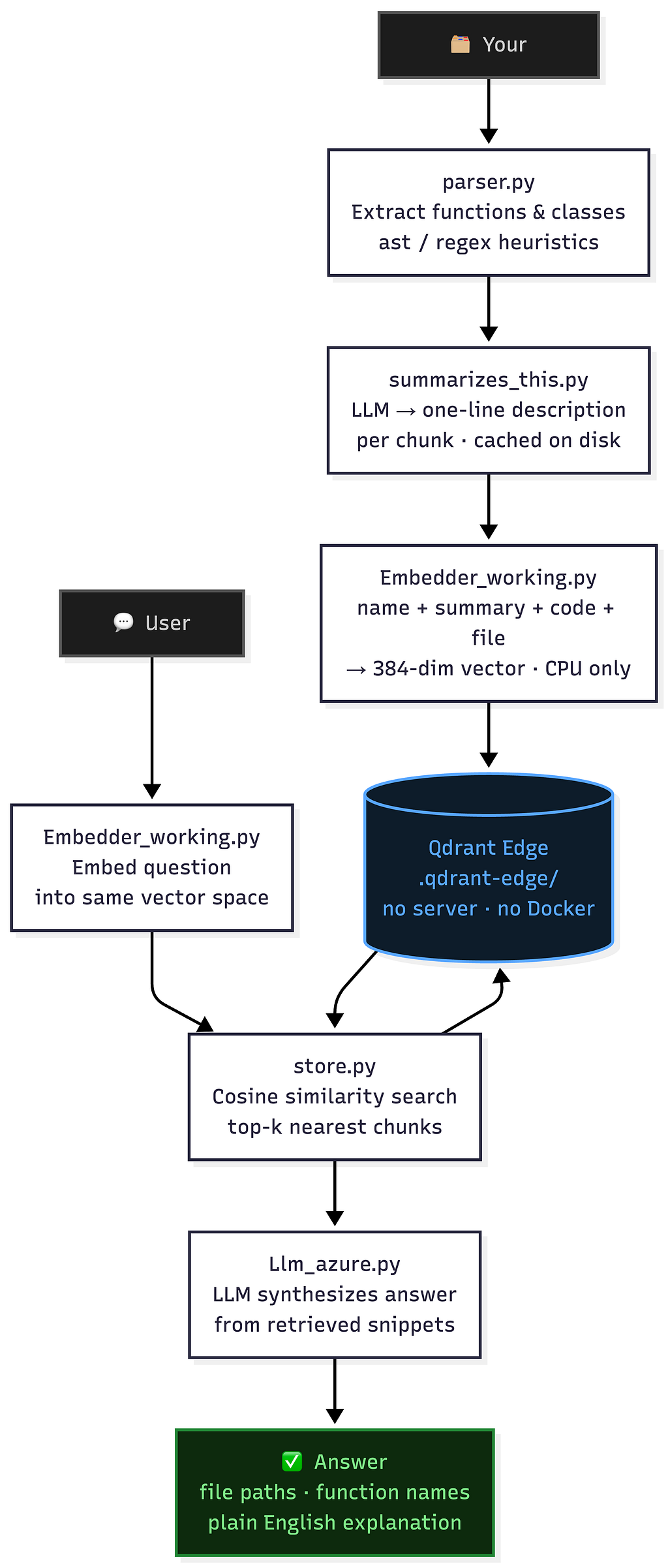
The left side (indexing) runs once.
The right side (querying) runs in under 100ms. The only slow part is the LLM call, and everything else is local.
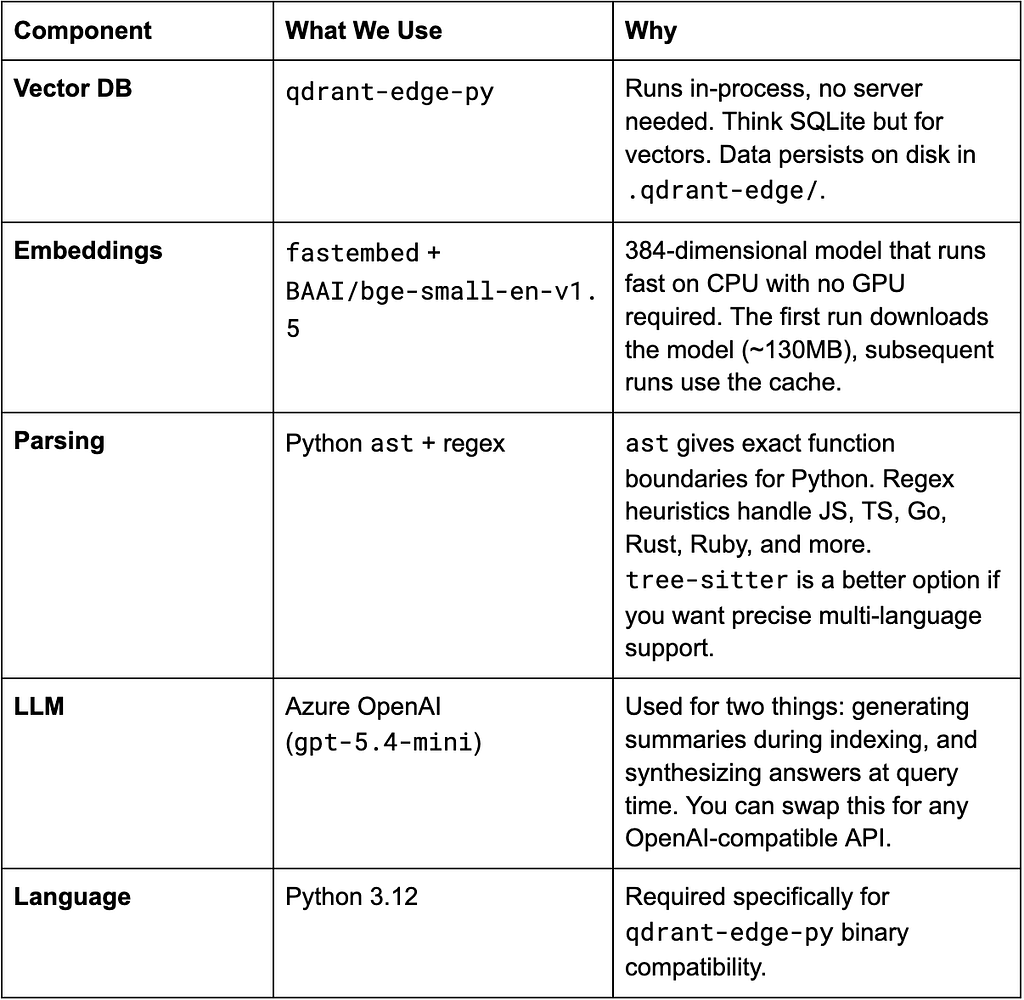
Tech Stack
The goal was to keep the stack small enough that you can read every dependency and know exactly what it does.
Core
Interface
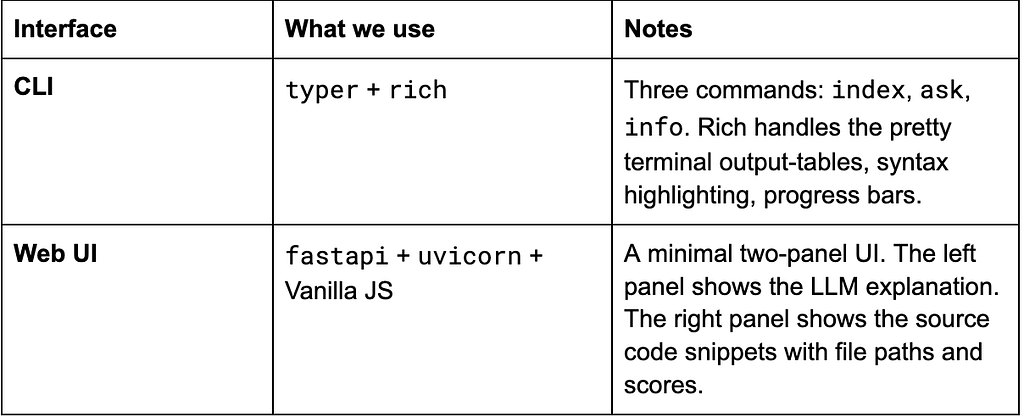
What you could swap in
- Local LLM: Replace Azure OpenAI with Ollama running Mistral or Llama. The embedding model already runs locally, so this would make the entire pipeline fully offline.
- Better parser: tree-sitter provides exact AST parsing for 40+ languages. The regex approach works well but is more brittle.
- Richer UI: A VS Code extension or Electron app would embed this directly into your editor workflow. The FastAPI backend is already in place; the frontend is just a client.
The short version: swap whatever fits your constraints. The pipeline stays the same.
The Indexing Pipeline
Getting a codebase from raw source files to a queryable semantic index involves four distinct stages. Each stage has specific design choices that matter significantly for retrieval quality. Here they are, explained in detail:
1. Parsing into Logical Chunks
The first mistake most people make when building code search is treating code like prose. Code is not continuous text. It has rigid structural boundaries: functions begin and end, classes contain methods, each block has a specific contract and purpose. If you slice a function definition in half to fit a token budget, the resulting vector is nearly meaningless because the embedding model cannot infer intent from a fragment.
Codemind-edge uses the Python native ast module for Python files. It constructs a full syntax tree from the source and then walks with it, extracting every FunctionDef, AsyncFunctionDef, and ClassDef as its own standalone chunk.
import ast

tree = ast.parse(source)
for node in ast.walk(tree):
    if isinstance(node, (ast.FunctionDef, ast.AsyncFunctionDef, ast.ClassDef)):
        # Extract the complete block with line boundaries
        code = "\n".join(lines[node.lineno - 1 : node.end_lineno])
The parser also enforces a hard ceiling of 120 lines per chunk. If a function exceeds this, the parser captures the signature and the first 120 lines, appending a truncation marker. This keeps individual vectors meaningfully scoped rather than trying to represent an 800-line monolith in a single point.
For non-Python files, Go, TypeScript, Java, Rust, Ruby, the parser falls back to a set of language-specific regular expressions that detect function declaration patterns and extract a bounded context window around each match.
Every chunk is assigned a unique ID using uuid.uuid5, generated deterministically from the file path and the function name. This property is critical for re-indexing: if you modify a function and run the indexer again, the system upserts the point with the same ID, overwriting the previous version without creating duplicates or requiring a full re-index of the collection.
The output structure for each chunk looks like this:
{
"id": "a1b2c3d4-…",
"name": "validate_jwt_token",
"kind": "function",
"code": "def validate_jwt_token(token: str) -> dict:\n …",
"file": "demo/sample_repo/auth.py",
"language": "python",
"start_line": 55,
"end_line": 84
}
2. LLM Summarization
Raw code embeddings have a known weakness. A function full of variable assignments, type annotations, and framework-specific boilerplate produces a vector that weighs all of that syntax noise equally alongside the business logic. The result is that similar functions may end up with dissimilar vectors simply because they use different library patterns even if they do logically identical things.
The solution is to have a language model read each function and produce a one-sentence plain English summary of what it does. These summaries are then embedded alongside the code, dramatically improving retrieval precision because the embedding model is working with clean, intention-first language rather than dense syntax.
The summarization prompt in Llm_azure.py is intentionally strict. The model is told to describe what the code does in twenty words or fewer, using concrete terminology. It is explicitly told not to start with “This function.” The resulting summaries look like:
- “Validates an incoming JWT token, checks expiry and blacklist status, raises ValueError on failure.”
- “Executes a callable with exponential backoff and jitter, retrying on configurable exception types.”
These summaries are cached persistently in .summary-cache.json. The cache key is the deterministic chunk ID. On subsequent indexing runs, the system checks the cache first. Only new or modified functions that have no cached summary trigger an LLM call.
On a typical re-index after a small edit, the time spent in the summarization phase drops from minutes to under a second.
# Check cache before calling the LLM
if cid in cache:
    chunk["summary"] = cache[cid]
    return  # No API call needed

summary = summarize_chunk(chunk)  # Only called for new/changed chunks
cache[cid] = summary
3. Building the Composite Embedding
def _build_text(chunk: dict) -> str:
    parts = [
        chunk.get("name", ""),
        chunk.get("summary", ""),
        chunk.get("code", "")[:500],
        chunk.get("file", ""),
    ]
    return "\n".join(p for p in parts if p)
The function name provides an anchor. The summary provides semantic intent in plain language. The first 500 characters of code provide structural context. The file path adds a location signal.
Together, these four fields produce vectors that respond accurately to queries about both the behavior and the location of specific logic.
4. Storing into Qdrant Edge
Crucially, the vector alone is not what gets stored. Each point carries a full payload:
payload = {
"file": chunk["file"],
"name": chunk["name"],
"kind": chunk.get("kind", "function"),
"language": chunk["language"],
"code": chunk["code"],
"summary": chunk.get("summary", ""),
"start_line": chunk.get("start_line", 1),
"end_line": chunk.get("end_line", 1),
}
Storing the full payload inside the database point means that when a search returns a result, you immediately have the code, the file path, the language, and the summary without any secondary disk read. The index is self-contained as a retrieval artifact.
After all batches are upserted, the system calls shard.optimize(). This triggers Qdrant Edge to merge its internal write segments and build the HNSW (Hierarchical Navigable Small World) graph index that enables millisecond-latency nearest-neighbor queries. It is an expensive one-time operation per indexing run but is essential for query performance. After optimization, the shard is cleanly closed.
The Query Pipeline
def search(query: str, top_k: int = 5) -> list[dict]:
    vec = embed_query(query)             # 384-dim vector from bge-small
    results = store.search(vec, top_k)   # cosine similarity against the shard
    return results
The embed_query function runs the exact same model that was used during indexing. Using the same model for both phases is not optional.
The queries and the document vectors need to live in the same semantic space. Mixing models would produce nonsensical similarity scores.
The result list contains each matching chunk’s similarity score alongside its full payload. Scores range from 0 to 1 under cosine similarity. A score above 0.75 generally indicates a strong conceptual match. Below 0.5, the result is likely a loose association.
The LLM Reasoning Layer
Returning a ranked list of code snippets is useful. Returning a reasoned, plain-language answer that cites those snippets and explains how they fit together is significantly more useful. That is what the reasoning layer does.
The async_answer_query function in Llm_azure.py assembles the top-k retrieved snippets into a structured context block, then sends that block to the language model with a tightly constrained prompt.
system = (
"You are an expert code assistant helping a developer understand a codebase. "
"You receive a question and a set of relevant code snippets retrieved via semantic search. "
"Your job is to:\n"
"1. Directly answer the question\n"
"2. Reference specific files and function names\n"
"3. Explain the logic clearly in plain English\n"
"4. Point out any relevant patterns or design decisions\n"
"Be concise but thorough. Always mention the file path and function name."
)
The prompt structure is deliberate. Each retrieved snippet is presented with its file path, line number, function name, summary, and code.
The model is instructed to anchor every claim to a specific file and function. This prevents it from producing plausible-sounding but ungrounded answers.
The output is a paragraph or two of plain English that explains the relevant logic and explicitly references the source location. No guessing. No hallucinated function names. Just a grounded explanation of what your actual code does.
Two Interfaces, One Index
codemind-edge exposes its capabilities through two separate interfaces, both sharing the same underlying Qdrant Edge shard.
CLI
The command line interface is built with Typer and styled with Rich. It is designed to feel like a natural extension of the developer’s existing terminal workflow.
Installing the package makes the codemind command available globally:
pip install -e .
Indexing a repository:
# Index with LLM summaries (recommended, cached after first run)
codemind index ./my-repo
# Force a full re-index from scratch
codemind index ./my-repo - force
# Skip LLM summaries for faster indexing at the cost of retrieval quality
codemind index ./my-repo - no-summarise
Querying the index:
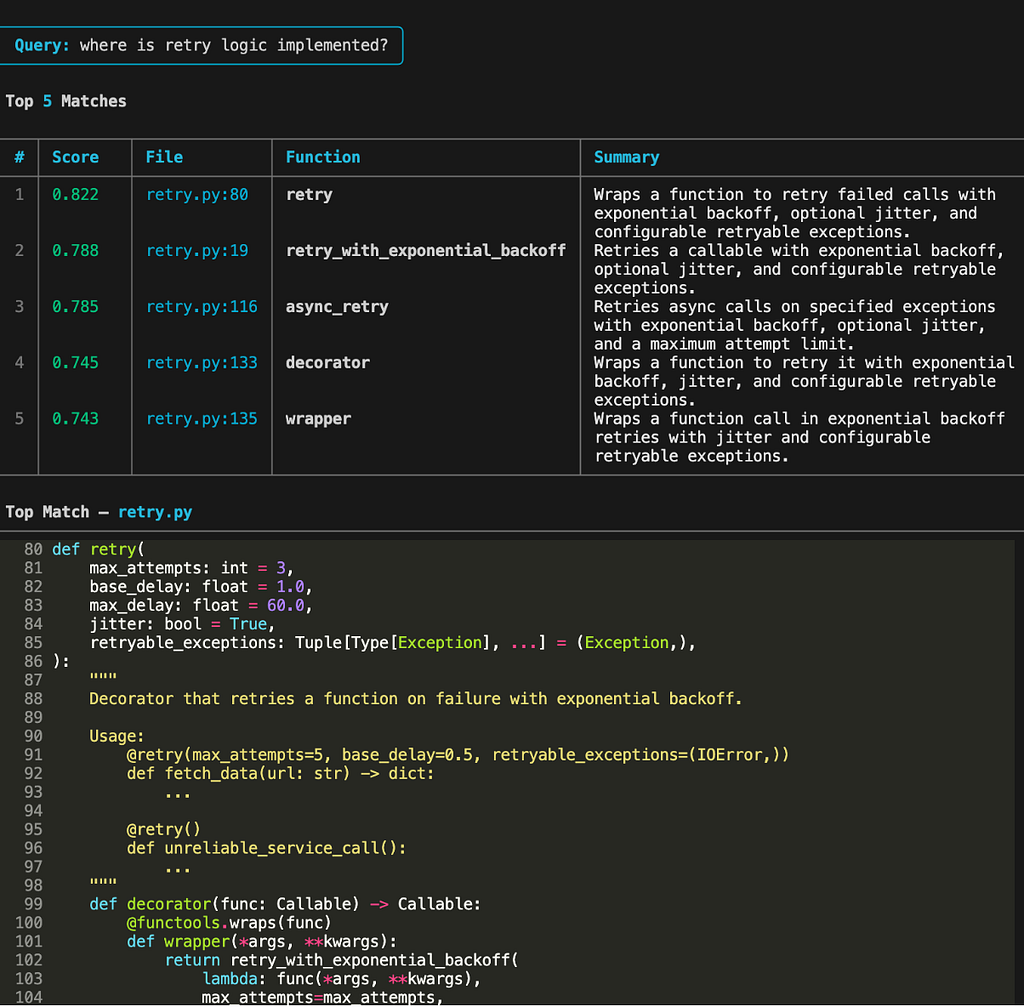
# Full pipeline: semantic search + LLM reasoning
codemind ask "where is retry logic implemented?"
# Ask about architecture-level concerns
codemind ask "how does the authentication flow work?"
# Skip the LLM, just return raw retrieval results
codemind ask "how does caching work?" - no-llm
# Return more results than the default 5
codemind ask "what database operations exist?" - top-k 10
The output is formatted in distinct sections. First, a Rich table lists the top matched functions with their similarity scores, source file, and one-line summaries. Then, the highest-scoring chunk is rendered with full syntax, highlighting using the Monokai theme.
Finally, the LLM reasoning is printed inside a bordered panel, clearly separated from the raw retrieval results.
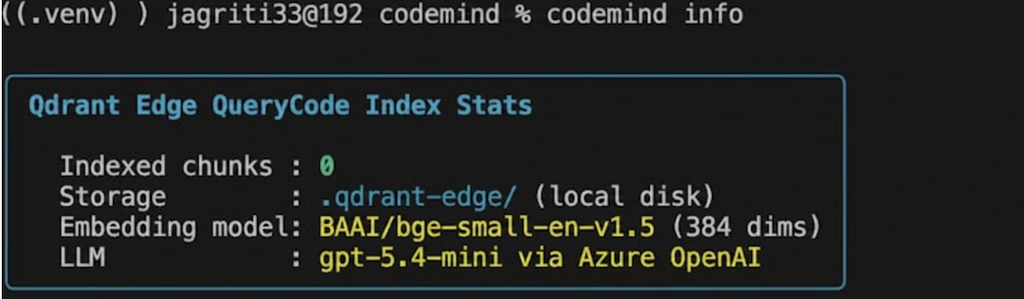
Checking the index:
# See how many chunks are indexed and which model is active
codemind info
Web Interface
The FastAPI server in server.py reads from the same .qdrant-edge shard and serves the same pipeline over HTTP.
python -m qdrant_edge_codemind.server
# Server starts at http://127.0.0.1:8000
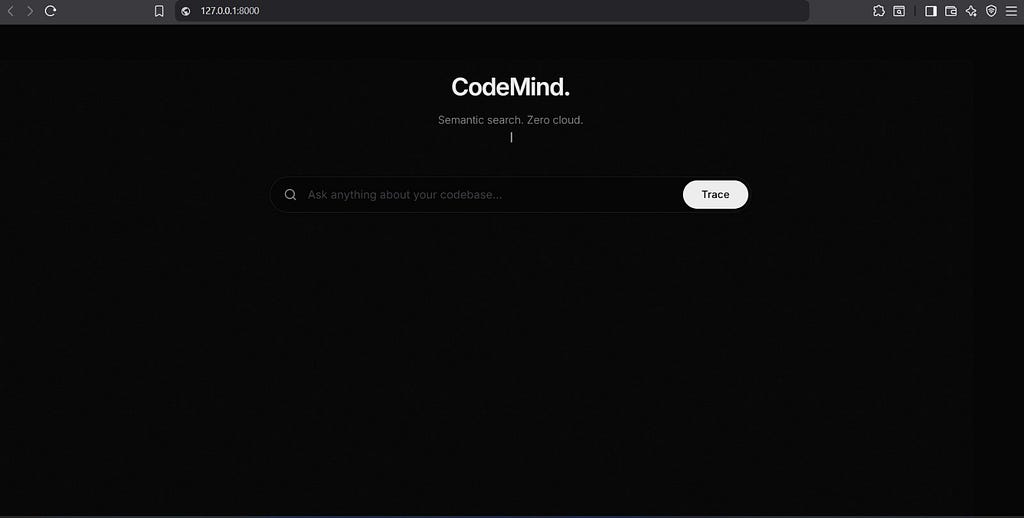
The frontend is intentionally built with zero JavaScript framework dependencies. It is plain HTML, CSS, and vanilla JavaScript. The UI is dark-themed, uses JetBrains Mono for code blocks and Inter for body text, and includes a set of subtle micro-animations: a wave loader while queries are processing, a word-reveal animation on the LLM explanation as it renders, and staggered card entry animations for the code snippet results.
The API contract is a single JSON endpoint:
POST /api/ask
{ "query": "where is auth handled?", "top_k": 5, "no_llm": false }
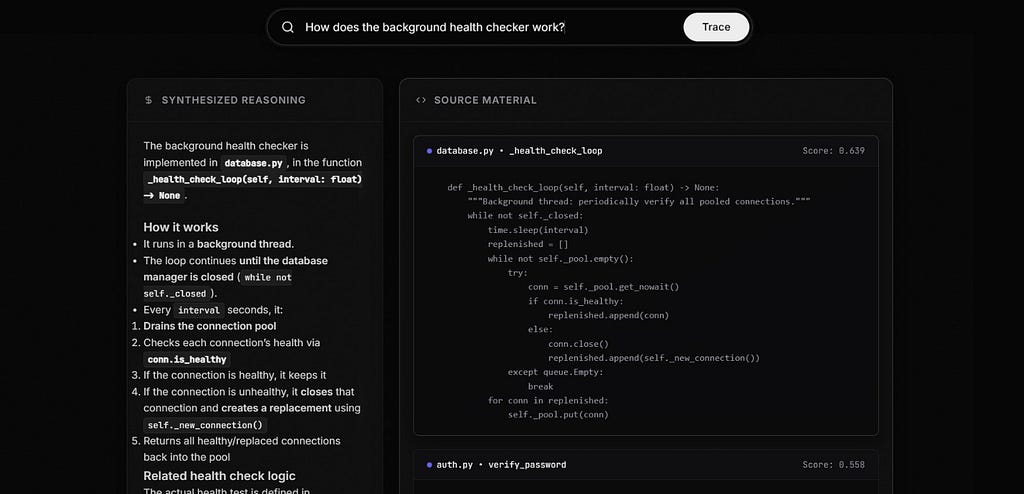
The response returns extracted results with file, name, summary, code, and score, plus the LLM-generated explanation as a separate field.
No separate database server. No Docker Compose file to maintain. The same shard file that the CLI touches is what the web server reads. They are not separate indexes. They are the same embedded file on disk.
Config and Environment Setup
The project reads configuration from a .env file at the project root. An example is provided at .env.example:
AZURE_OPENAI_ENDPOINT=https://your-instance.openai.azure.com/
AZURE_OPENAI_KEY=your_api_key
AZURE_OPENAI_VERSION=2025–01–01-preview
AZURE_OPENAI_DEPLOYMENT=gpt-5.4-mini
The core vector and embedding configuration lives in config.py and requires no changes for standard usage:
EMBED_MODEL = “BAAI/bge-small-en-v1.5”
VECTOR_DIM = 384
SHARD_DIR = ".qdrant-edge"
SUMMARY_CACHE = ".summary-cache.json"
MAX_CHUNK_LINES = 120
TOP_K_DEFAULT = 5
Running It on the Sample Repo
The project ships with a complete sample repository at demo/sample_repo/ containing five realistic Python files covering authentication, retry logic with circuit breaking, database helpers, caching utilities, and a REST API router. These files are specifically designed to be ideal semantic search targets.
# Install the project
pip install -e .
# Index the sample repository
codemind index ./demo/sample_repo
# Ask architecture-level questions
codemind ask "how is the API request routing structured?"
# Ask feature-level questions
codemind ask "how does JWT token validation work?"
# Ask debugging-level questions
codemind ask "what happens when a database call fails repeatedly?"
# Ask about cross-cutting concerns
codemind ask "where is caching applied and what is the eviction strategy?"
The sample repo is a genuine test of semantic retrieval quality. The word “retry” does not appear in the API file, but the handle_create_user function uses the @retry decorator.
A semantic search for “what happens when a request fails” should surface that function even though the connection between “request failure” and @retry(max_attempts=3) is entirely conceptual.
Design Decisions Worth Examining
A few design choices here might not seem obvious at first, but they make a huge difference to how well the system actually works.
- Chunking at the function level is one of them.
Most RAG systems use fixed-size chunks with overlap, which works fine for prose. But code isn’t prose, it has structure. If you split a function in half, you lose the very thing that gives it meaning. A function is the smallest semantically complete unit in code. Go below that, and you’re just embedding fragments that don’t really say anything. - Summaries matter more than model size.
The embedding model used here (bge-small-en-v1.5) is intentionally small: 384 dimensions instead of 768 or 1024. But it works surprisingly well because of the summary layer. A clean, intent-focused sentence gives the model exactly the signal it needs. In practice, the quality of what you embed matters far more than how big your model is. - Deterministic IDs make re-indexing trivial.
Using uuid5 based on file path and function name means there’s no need to check what already exists. The ID is derived from the content itself. So re-running the indexer is naturally idempotent — changed functions overwrite, new ones get added, and nothing duplicates or piles up. - Storing the full payload is a deliberate tradeoff.
At a massive scale, this would be expensive. But for a typical codebase, the overhead is negligible. And the upside is huge: every search result already contains everything you need — code, metadata, context — without extra file reads. The index becomes completely self-contained and portable.
What’s next here?
The biggest architectural gap in codemind-edge today is its reliance on Azure OpenAI for summarization and reasoning. While the vector database and embeddings run locally, every LLM call leaves the machine contradicting the goal of private, local code search.
A natural next step is adding support for Ollama. Lightweight 7B models like Mistral or Llama 3 are more than capable of handling summarization and reasoning locally, making the entire stack truly offline.
The parsing layer can also improve. Regex works for common cases but fails with complex structures. Moving to Tree-sitter would enable accurate AST-based parsing across languages.
Finally, introducing a feedback loop where incorrect results are logged and used to refine summaries or reweight chunks would allow the system to improve over time instead of staying static.
Numbers for Nerds Like Me
The system’s resource profile on a standard development machine:
bge-small-en-v1.5 embedding model ~150 MB
Qdrant Edge shard (memory-mapped) ~50 MB
FastAPI web server baseline ~80 MB
Azure OpenAI (no local runtime) 0 MB
Total baseline ~280 MB
For comparison, a local LLM running through Ollama for the reasoning layer would add approximately 2–4 GB depending on the model chosen.
Even at that range, the complete stack fits comfortably within the memory envelope of a modern development workstation.
Local Running Is Going Big
The premise behind codemind-edge is simple. Your codebase already contains the answers to most of the questions you have about it. The problem has never been a lack of information. It has been a lack of tools capable of understanding what you are actually asking.
Qdrant Edge made it possible to build a genuinely useful semantic search engine that requires nothing beyond a pip install. No containers. No managed services. No infrastructure to maintain.
The vector database, the embeddings, and the persistent index all live inside your project directory and wake up only when you invoke them.
Grep for keywords. Use codemind-edge for everything else.
If you’re curious how CodeMind works under the hood, the full implementation is available on GitHub along with setup instructions. Fork it, break it, rebuild it this project is meant to be experimented with.
References:
Qdrant Edge Documentation: https://qdrant.tech/documentation/edge/
Vector Embeddings: https://developers.openai.com/api/docs/guides/embeddings
FastEmbed — Lightweight Embedding Library https://qdrant.github.io/fastembed/ The library used to run bge-small-en-v1.5 locally without a GPU.
BAAI/bge-small-en-v1.5 — Model Card (HuggingFace) https://huggingface.co/BAAI/bge-small-en-v1.5 The specific embedding model being used. Good reference for readers who want to understand the retrieval quality tradeoffs why this 384-dim model was chosen over larger alternatives like text-embedding-3-large.
Python AST Module — Official Docs https://docs.python.org/3/library/ast.html The actual parser used to extract function and class-level chunks from Python files.
Beyond Grep: A Semantic Memory Engine for Codebases Using Qdrant Edge was originally published in Towards AI on Medium, where people are continuing the conversation by highlighting and responding to this story.