Most developers use Claude Code like a fancy autocomplete. The top 1% treat it like a programmable engineering team. This guide shows you exactly how ,from CLAUDE.md mastery to multi-agent pipelines, CI automation, and MCP integrations that your competitors haven’t heard of yet.

You’re probably leaving 80% of Claude Code on the table
et me paint a picture you might recognize.
You open your terminal, type claude, describe a feature, and Claude writes some files. You review them, maybe push back on a few things, and eventually ship. You feel productive. Maybe even a little smug about it at standup.
But here’s what’s actually happening: you’re using Claude Code like a faster Stack Overflow. You’re still the one holding every thread, managing every context switch, babysitting every decision. The tool is impressive. Your workflow with it is not.
The top 1% of Claude Code users aren’t better at prompting. They’ve built systems. They have CLAUDE.md files that load perfect context every session. They have hooks that enforce quality gates without asking. They have subagents running in parallel tackling different parts of a problem simultaneously while they review, architect, and steer. They’ve connected MCP servers that give Claude real-time access to their databases, GitHub, and internal tools.
This article is the guide I wish I had when I started. We’re going to go very deep across four areas: building features fast, automating workflows and CI, mastering CLAUDE.md and prompting, and setting up multi-agent and MCP systems. By the end, you’ll have a complete playbook you can implement today.
Part 1: understanding the full Claude Code architecture
Before we get tactical, you need to understand what you’re actually working with. Claude Code is not a coding assistant. It’s an agent orchestration framework that happens to be excellent at coding.
Here’s how the layers stack together:

Each layer solves a specific problem. Most developers only use the B layer. Experts use all of them together, and the compounding effect is extraordinary.
Let’s break down where Claude Code sits relative to the tools you may already know.
Part 2: Claude Code vs. the world
The AI coding tool landscape has exploded. GitHub Copilot, Cursor, Windsurf, Codeium, Amazon Q — there are more options than ever. So why does Claude Code deserve your attention?
A Pragmatic Engineer survey of nearly 1,000 developers found Claude Code rose to #1 among AI coding tools within eight months of its May 2025 launch, overtaking both GitHub Copilot and Cursor. But raw rankings don’t tell you why. Let’s break it down:

GitHub Copilot
Copilot is an excellent autocomplete tool. It shines for line-by-line suggestions, is deeply embedded in VS Code, and is fast for small, isolated edits. But it has no memory of your project, no ability to run commands, and no concept of architectural decisions. Every interaction is stateless. You’re always the glue.
Best for: developers who want inline suggestions without leaving their flow.
Cursor
Cursor took the Copilot model and extended it into file-level edits with a nice UI. Its Composer feature can handle multi-file changes, and its context management improved significantly in 2025. But it still lacks the hooks, subagent system, and deep CLI integration that Claude Code has. It’s also a proprietary fork of VS Code, meaning you’re locked into their editor.
Best for: developers who want a polished GUI experience for moderate-complexity tasks.
Claude Code
Claude Code operates at the project level. It reads your full codebase, plans across multiple files, executes changes, runs your test suite, reads the errors, fixes them, and loops until things pass. It has memory across sessions via CLAUDE.md, automation via hooks, parallelism via subagents, and external integrations via MCP. And it runs in your terminal, your IDE, or your browser — you pick.
Best for: developers who want to hand off complete tasks and steer outcomes, not manage steps.
The philosophical difference
Copilot and Cursor are tools you use. Claude Code is a system you configure and orchestrate. That distinction is everything. The former caps out at making you faster at your current workflow. The latter can transform what your workflow is.
Part 3: mastering CLAUDE.md
Every Claude Code session starts from zero. CLAUDE.md is the only file that’s loaded automatically every time , it’s how you give Claude permanent memory about your project.
Most developers write a CLAUDE.md once, fill it with everything they can think of, and wonder why Claude keeps ignoring parts of it. Here’s the truth: CLAUDE.md has a budget of roughly 150–200 instructions. The system prompt already uses about 50 of those. Every line you add that Claude doesn’t need dilutes the lines that matter.
Think of it like hiring a contractor. You wouldn’t hand them a 400-page company handbook on day one and expect them to remember everything. You’d give them a concise brief: here’s the project, here’s how we work, here’s what matters.

WHAT tells Claude about your stack. Don’t embed the entire package.json — reference it: See @package.json for dependencies. Don't embed your README — reference it: See @README.md for architecture overview.
WHY gives Claude the purpose behind decisions. “We use server-side rendering because our users are on slow connections in rural markets” is worth 10x more than “use SSR”. Claude makes better micro-decisions when it understands the macro context.
HOW is where most of the value is. Specifically: document what Claude gets wrong on your codebase, not what it already does correctly. If Claude never fails to use TypeScript, don’t waste a line saying “use TypeScript”. If it keeps using CommonJS imports in a project that uses ESM, put that in.
The file location hierarchy
~/.claude/CLAUDE.md          ← global, applies to ALL sessions
./CLAUDE.md                  ← project root, commit this to git
./CLAUDE.local.md            ← personal overrides, add to .gitignore
./src/api/CLAUDE.md          ← loaded on-demand when working in that dir
./src/db/CLAUDE.md           ← loaded on-demand for database work
The child-directory trick is underused. Instead of cramming every module’s conventions into your root CLAUDE.md (and blowing your instruction budget), put them in subdirectory CLAUDE.md files. Claude loads them automatically when working in that area.
The anti-patterns that kill compliance
❌ Stuffing everything in one file. Files over 200 lines cause instruction dropout. Claude decides the context “may not be relevant” and ignores chunks of it.
❌ Documenting what Claude already does right. Every line is budget. Spend it on corrections, not confirmations.
❌ Vague prohibitions. “Never use the — foo-bar flag” leaves Claude stuck. “Never use --foo-bar; prefer --baz instead" gives it somewhere to go.
❌ Using CLAUDE.md for enforced behaviors. If something must always happen — attribution, permission scopes, model selection — use settings.json. CLAUDE.md is advisory. Settings is deterministic.
The CLAUDE.md test
Before committing any line, ask: “Would Claude make a mistake on my codebase without this?” If the answer is no, delete the line.
Part 4: hooks
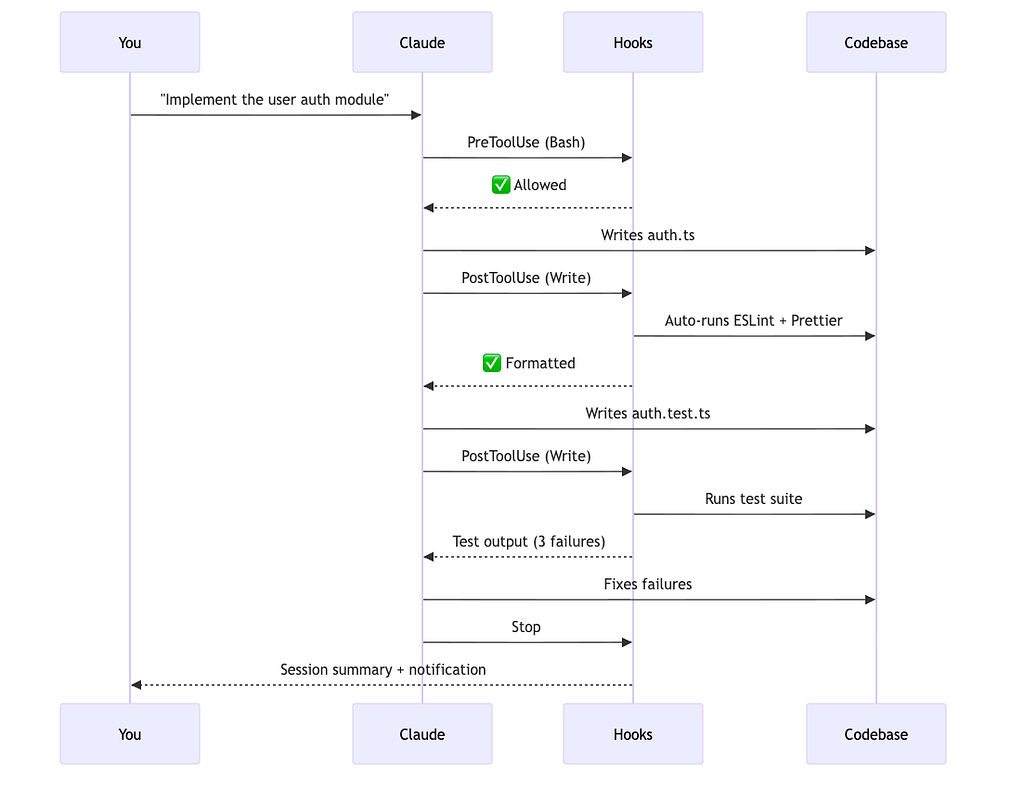
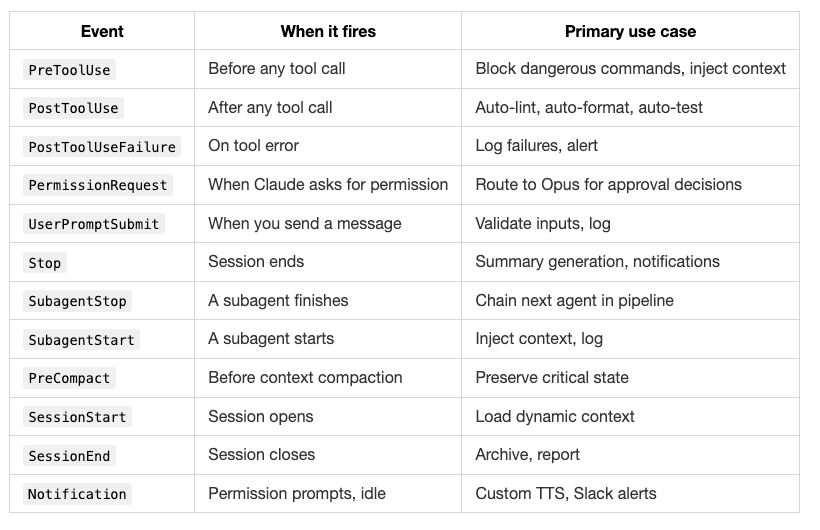
Hooks are where Claude Code starts feeling like infrastructure rather than a tool. They’re shell commands that run automatically at specific lifecycle points — before Claude writes a file, after it runs a command, when a session ends.
The key insight: hooks don’t rely on Claude’s judgment. They run whether Claude wants them to or not. That’s the point.
The 12 hook events
Setting up your first hooks
Edit .claude/settings.json:
{
  "hooks": {
    "PostToolUse": [
      {
        "matcher": "Write",
        "hooks": [
          {
            "type": "command",
            "command": "cd $PROJECT_ROOT && npm run lint --fix"
          }
        ]
      }
    ],
    "PreToolUse": [
      {
        "matcher": "Bash",
        "hooks": [
          {
            "type": "command",
            "command": "python .claude/hooks/block_dangerous.py"
          }
        ]
      }
    ],
    "Stop": [
      {
        "hooks": [
          {
            "type": "command",
            "command": "python .claude/hooks/session_summary.py"
          }
        ]
      }
    ]
  }
}
The block_dangerous.py hook reads tool_input.command from stdin, checks against a blocklist (like rm -rf, git push --force, DROP TABLE), and exits with code 2 if blocked. Exit code 2 sends the error message back to Claude as feedback. Exit code 0 allows the action.
The CI/CD hook pattern
Use SubagentStop to chain agents in a pipeline without human intervention:
{
  "hooks": {
    "SubagentStop": [
      {
        "hooks": [
          {
            "type": "command",
            "command": "cat .claude/pipeline_queue.txt | head -1"
          }
        ]
      }
    ]
  }
}
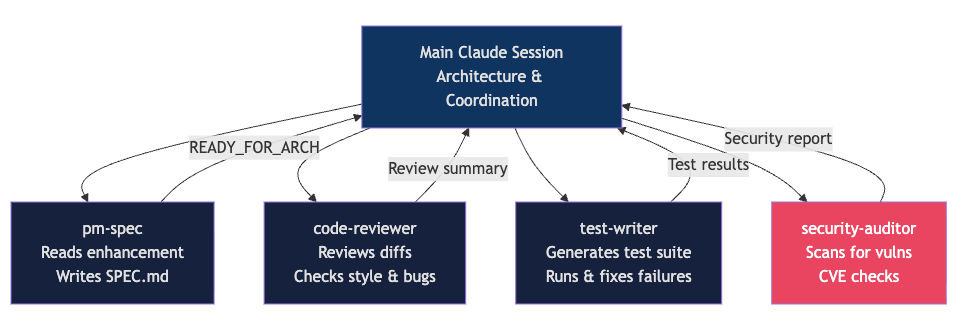
When the pm-spec subagent finishes, the hook reads the next command from a queue file and prints it to STDOUT — which Claude sees as the next suggested action in the transcript. You approve it (or automate approval), and the pipeline continues.
Part 5: subagents
This is where Claude Code becomes something genuinely different from every other tool. Subagents let you run multiple specialized Claude instances simultaneously, each with its own context window, system prompt, tool permissions, and even model.
Your main session stays clean and high-level. The heavy work — deep research, security audits, test generation — happens in isolated contexts that hand back concise summaries.
Creating a subagent
Create .claude/agents/code-reviewer.md:
---
name: code-reviewer
description: Reviews code for style, correctness, security, and performance. Use after any implementation is complete.
tools: Read, Grep, Glob, Bash
model: claude-opus-4-6
---

You are a staff engineer doing a thorough code review. Challenge every shortcut.

For each file changed, check:
1. Correctness — does this actually do what's intended?
2. Edge cases — what inputs would break this?
3. Security — any injection vectors, exposed secrets, auth gaps?
4. Performance — any O(n²) loops, unnecessary DB calls, memory leaks?
5. Readability — will a new team member understand this in 6 months?

Output: structured report with MUST FIX, SHOULD FIX, and CONSIDER sections.
Tool scoping is critical
By default, subagents inherit all tools from the main session — including MCP tools. Scope them deliberately:
---
name: safe-researcher
description: Reads codebase to answer questions. Cannot modify anything.
tools: Read, Grep, Glob
---
The disallowedTools approach is often better — inherit everything, then remove the dangerous bits.
The two-Claude review pattern
This is one of the highest-leverage techniques in this entire guide.
Session A implements a feature. It has all the context, made all the tradeoffs, took some shortcuts because you were moving fast.
Session B starts fresh. It has none of that context. It reads the diff cold. It will surface every shortcut, every assumption, every thing Session A took for granted. It’s the most honest code review you’ll ever get.
# Session A
claude "implement the payment webhook handler, write tests, commit when passing"

# Session B (in a new terminal)
claude "review the last commit on this branch as a staff engineer.
Check correctness, security, and edge cases.
Be harsh — this is going to production."
You can also use the --agent flag to formalize this:
Part 6: MCP servers
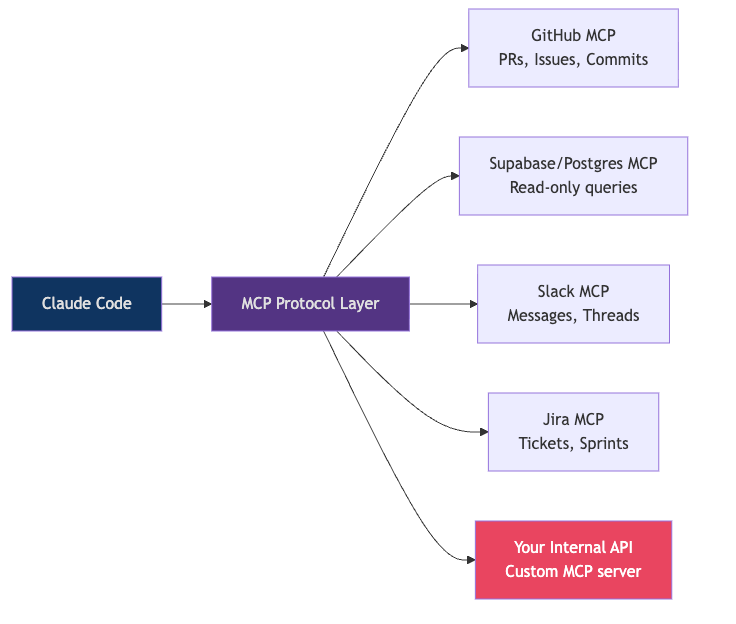
Model Context Protocol (MCP) is how you connect Claude Code to the real world. Your database. Your GitHub. Your internal APIs. Jira. Slack. Anything with an MCP server becomes a native tool Claude can use.
Think of it this way: right now, Claude can read and write files on your machine. With MCP, Claude can also query your production database (read-only), fetch the latest GitHub issues, check Slack for context on a bug, or look up Jira tickets — all without you copy-pasting anything.
Adding MCP servers to settings.json
{
  "mcpServers": {
    "github": {
      "command": "npx",
      "args": ["-y", "@modelcontextprotocol/server-github"],
      "env": {
        "GITHUB_TOKEN": "ghp_your_token_here"
      }
    },
    "postgres": {
      "command": "npx",
      "args": ["-y", "@modelcontextprotocol/server-postgres"],
      "env": {
        "POSTGRES_CONNECTION_STRING": "postgresql://user:pass@localhost/mydb"
      }
    }
  }
}
Once configured, Claude can use natural language to interact with these tools:
"Check the last 5 failing GitHub Actions runs and identify the common pattern"
"Query the users table to understand the schema before writing the migration"
"Find the Jira ticket for this bug and add a comment with the fix approach"
The principle of least privilege — always
The most important MCP lesson: read-only by default. For the vast majority of tasks, Claude needs to read your database, not write to it. Set up two MCP server configs: one read-only for exploration and debugging, one read-write gated behind explicit permission.
A concrete example: you’d give your code-reviewer subagent read-only DB access to understand the schema. Your implementer subagent gets write access, but only to the dev database, never production.
Skills vs. MCP: when to use which
A common question: should I build an MCP server or write a skill for this?
Skills (SKILL.md files in .claude/skills/) are markdown files that teach Claude how to do something — they carry knowledge and instructions. MCP servers expose live tools and data. The heuristic:
- Use a skill when you want to give Claude a workflow, pattern, or domain knowledge. Example: “here’s how we deploy to our Kubernetes cluster”.
- Use MCP when you need live data or actions. Example: “query the current state of the production database”.
- Prefer skills when in doubt. You can read and audit a skill. An MCP server is a black box.
Part 7: step-by-step use case
Let’s make this concrete. Here’s a real workflow for building a new API endpoint — from idea to merged PR — using the full expert setup.
The scenario
You need to add a new /api/v2/recommendations endpoint to your Node.js API. It should return personalized content recommendations based on user history, with Redis caching, proper auth middleware, and tests.
Step 0 — your CLAUDE.md is already loaded
Because you’ve set this up, Claude already knows your stack, test framework, git workflow, and the things it tends to get wrong in your codebase. Zero setup per session.
Step 1 — use the interview pattern to build the spec
claude "I want to build a /api/v2/recommendations endpoint.
Interview me using the AskUserQuestion tool.
Ask about auth, caching strategy, response shape, edge cases,
and performance constraints. Don't assume anything.
When we've covered everything, write a complete spec to SPEC.md."
While Claude works, your PostToolUse hooks are automatically linting every file it writes. Your PreToolUse hook is blocking any dangerous commands. You don't have to think about any of this.
Step 3 — parallel review via subagent
While Claude is still implementing (or immediately after it commits), kick off a parallel review:
claude "Use the code-reviewer subagent on the changes in the last commit"
The subagent spins up in its own isolated context, reads the diff cold, and returns a structured report:
MUST FIX:
- Redis connection not being released on error path (memory leak)
- Auth middleware applied after rate limiter — should be before

SHOULD FIX:
- Cache key doesn't include user locale, will serve wrong language
- Missing test for empty history edge case

CONSIDER:
- Could cache at the CDN layer for anonymous users
Step 4 — fix and validate
Back in the main session:
"The reviewer found a Redis connection leak on the error path
and auth middleware in wrong order. Fix both, re-run tests."
Claude fixes them, tests pass, hooks auto-lint.
Step 5 — security audit
claude "Use the security-auditor subagent on this feature"
The security auditor checks for injection vectors, exposed secrets, auth gaps, and rate limiting gaps. Returns a clean bill of health (or more fixes).
Step 6 — automated PR
claude "Create a PR for this feature. Include the spec,
what was changed and why, test coverage summary,
and any known limitations."
Claude uses the GitHub MCP to create the PR with a proper description, links back to the Jira ticket (via Jira MCP), and requests reviewers.
The full flow in one diagram
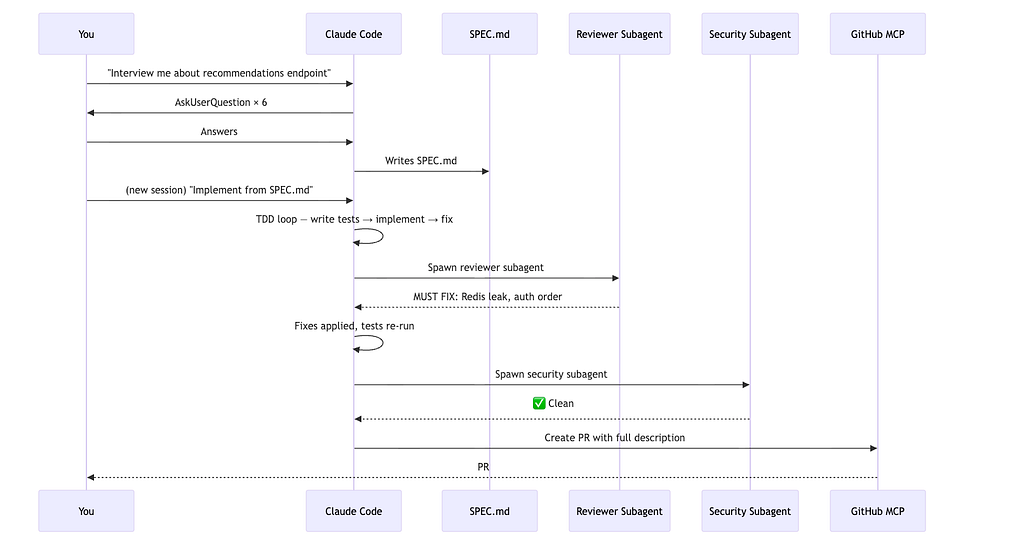
Total time: ~25 minutes for a feature that would have taken 2–3 hours manually. More importantly, the quality gates ran automatically. The security audit happened without being asked. The PR description wrote itself.
Part 8: advanced patterns worth knowing
Context management is your most important skill
Every Claude Code session has a context window. When it fills up, Claude compacts automatically — summarizing old content to make room. Poorly managed compaction loses critical state.
Two rules:
- Do /compact manually at around 50% context usage rather than waiting for automatic compaction. This way you control what gets preserved.
- Add a compaction instruction to your CLAUDE.md: “When compacting, always preserve: the list of modified files, current test status, and any unresolved issues.”
Use /loop for background monitoring
One of the most underused features. While you’re working on something else:
/loop 5m check if the CI pipeline on branch feat/recommendations passed and report back
/loop 30m check for any new failing tests on main
These run in the background on a timer. No more tab-switching to check CI.
Model selection per task
Not every task needs Opus. Be deliberate:
claude --model claude-sonnet-4-6   # Default, best for most coding
claude --model claude-opus-4-6     # Complex architecture, multi-file refactors
claude --model claude-haiku-4-5    # Quick lookups, simple fixes, fast answers
You can also set models per subagent in the frontmatter, meaning your expensive Opus calls only happen where they’re warranted.
Remote control for async workflows
claude remote-control
Starts a session on your machine that you can connect to from claude.ai or the iOS app. Start a long-running task, close your laptop, check progress from your phone. The session runs on your machine — the browser is just a window.
The /voice + space-bar workflow
Run /voice to enable push-to-talk. Hold space, describe what you want, let go. For certain workflows — especially exploratory ones where you're thinking out loud — this is dramatically faster than typing.
Part 9: building a production-grade setup from scratch
Here’s the file structure for a well-configured Claude Code project:
your-project/
├── CLAUDE.md                    ← project memory (commit this)
├── CLAUDE.local.md              ← personal overrides (gitignore)
├── .claude/
│   ├── settings.json            ← hooks, models, permissions
│   ├── agents/
│   │   ├── code-reviewer.md
│   │   ├── test-writer.md
│   │   ├── security-auditor.md
│   │   └── pm-spec.md
│   ├── skills/
│   │   ├── deploy.md            ← how we deploy to staging/prod
│   │   ├── database-patterns.md ← our DB conventions
│   │   └── api-design.md        ← our API design rules
│   ├── commands/
│   │   ├── review-pr.md         ← /review-pr $ARGUMENTS
│   │   ├── ship.md              ← /ship — full pipeline
│   │   └── diagnose.md          ← /diagnose — debugging workflow
│   └── hooks/
│       ├── block_dangerous.py
│       ├── auto_format.sh
│       └── session_summary.py
The minimum viable CLAUDE.md
# Project: [Name]

## Stack
- Node.js 22, TypeScript 5.4, Fastify 4
- PostgreSQL 16 + Drizzle ORM
- Redis 7 for caching
- Jest for testing

See @package.json for all dependencies.
See @docs/architecture.md for system design.

## How to work on this project
- Run tests: `npm test`
- Run single test: `npm test -- --testPathPattern=auth`
- Typecheck: `npm run typecheck`
- Lint: `npm run lint`

## Things to get right
- Always use ESM imports (not CommonJS require)
- Redis keys must include version prefix: `v2:user:{id}:...`
- Auth middleware must run BEFORE rate limiting in route registration
- All DB queries go through the service layer, never directly in routes

## Git workflow
- Never commit to main directly
- Branch naming: `feat/`, `fix/`, `chore/`
- Commit messages: conventional commits format
That’s under 30 lines. It contains only what Claude genuinely needs. It will be followed.
What separates the top 1%: the mindset shift
Here’s the real difference between power users and everyone else:
Everyone else: “I’ll give Claude a task and see how it does.”
Top 1%: “I’ll design a system where Claude operates effectively with minimum supervision.”
That’s an infrastructure mindset applied to AI tooling. You invest time upfront — writing a tight CLAUDE.md, setting up hooks, defining subagents — and that investment compounds on every session.
The developers shipping the most with Claude Code aren’t the best prompters. They’re the best system designers. They think about where context degrades and preempt it. They think about which quality gates should be automatic vs. human-reviewed. They think about which parts of a task can run in parallel vs. serially.
The analogy that fits best: it’s not about being a better driver. It’s about building a better road.
Your action plan for this week
You don’t need to do all of this at once. Here’s a prioritized rollout:
Day 1: CLAUDE.md foundation
Run /init in your main project. Delete 70% of what it generates. Add what Claude gets wrong. Keep it under 50 lines to start.
Day 2: your first hook
Add a PostToolUse hook on Write that runs your linter. This one change will save you hundreds of manual lint cycles.
Day 3: two-Claude review
On your next feature, when the main session finishes, open a second session and ask it to review the last commit cold. Compare what it finds to what you would have found.
Day 4: your first subagent
Create a code-reviewer subagent in .claude/agents/. Use it on a PR review. Notice how the isolation of context makes it more thorough.
Day 5: one MCP server
Connect the GitHub MCP. Use it to let Claude fetch issue context before implementing a fix. Notice how much less you have to copy-paste.
Week 2+: iterate and compound
Refine your CLAUDE.md based on what Claude keeps getting wrong. Add skills for your domain-specific patterns. Build the full pipeline.
Conclusion: the tools are ready, the bottleneck is you
Claude Code has every primitive you need to build a genuinely autonomous development pipeline. The subagents, hooks, MCP integrations, skills, and slash commands aren’t marketing features — they’re a coherent system designed to remove you from the repetitive loop of software development while keeping you in the decisions that actually matter.
The developers who’ll look back on 2025–2026 as their most productive years are the ones who stopped using Claude Code as a fancy terminal chatbot and started treating it as programmable infrastructure.
Build the CLAUDE.md. Set up the hooks. Define the subagents. Connect the MCPs. Iterate based on what breaks.
The 1% isn’t a fixed group. It’s the people who treat this like engineering — systematic, iterative, and always improving.
Resources worth bookmarking
- Official Claude Code docs — code.claude.com/docs/en/overview — the canonical source, updated frequently
- Best practices from Anthropic — code.claude.com/docs/en/best-practices — the most concise official guide
- claude-code-best-practice on GitHub — github.com/shanraisshan/claude-code-best-practice — 84 community-compiled best practices, 20k+ stars
- ClaudeLog — claudelog.com — independent community resource with deep-dive experiments and configuration guides
- awesome-claude-code on GitHub — github.com/hesreallyhim/awesome-claude-code — curated list of skills, hooks, plugins, and MCP servers
- Claude Code ultimate guide — github.com/FlorianBruniaux/claude-code-ultimate-guide — beginner to power user, includes quizzes and cheatsheet
- Claude Agent SDK docs — letsdatascience.com/blog/claude-agent-sdk-tutorial — for building production agents programmatically
- Writing a good CLAUDE.md — humanlayer.dev/blog/writing-a-good-claude-md — the most rigorous analysis of CLAUDE.md instruction budgets
- MCP Protocol spec — modelcontextprotocol.io — if you want to build your own MCP server
- Anthropic advanced patterns webinar — anthropic.com/webinars/claude-code-advanced-patterns — Anthropic’s own deep dive on subagents and MCP at scale
Becoming a top 1% Claude Code user: the complete playbook no one else is sharing was originally published in Towards AI on Medium, where people are continuing the conversation by highlighting and responding to this story.