Lessons from building and shipping Alyx, our AI agent
In traditional software engineering, testing is a solved problem. You write unit tests, set up CI/CD pipelines, and your GitHub Actions ensure nothing breaks before it hits production. But AI agents are a different beast entirely.
When we started building Alyx, we quickly learned that the old playbook doesn’t apply. Small changes to a tool description or a single line in the system prompt can create cascading failures that are nearly impossible to predict.
In this article, we share what we’ve learned about building evals for AI agents, and why we now consider them non-negotiable for any team shipping agents to production. This follows past deep dives into how to build planning into your agent and how to manage memory in agents.
Let’s jump in.
The early days: Google Docs and pain
Let’s be honest about where most teams start: manually testing in a document.
When Alyx was young, our “testing framework” was a Google Doc. We’d write down queries, record the responses, make changes, check if things improved, and repeat. It was painful, inefficient, and didn’t scale.
The core problem? AI agents aren’t deterministic. The same input can produce different outputs. Prompts interact in unexpected ways. And when you’re iterating quickly, there’s no reliable way to know if your “fix” just broke three other workflows.
We knew we needed something better. A way to systematically validate agent behavior that could keep pace with development.
The solution: golden datasets from real production traces
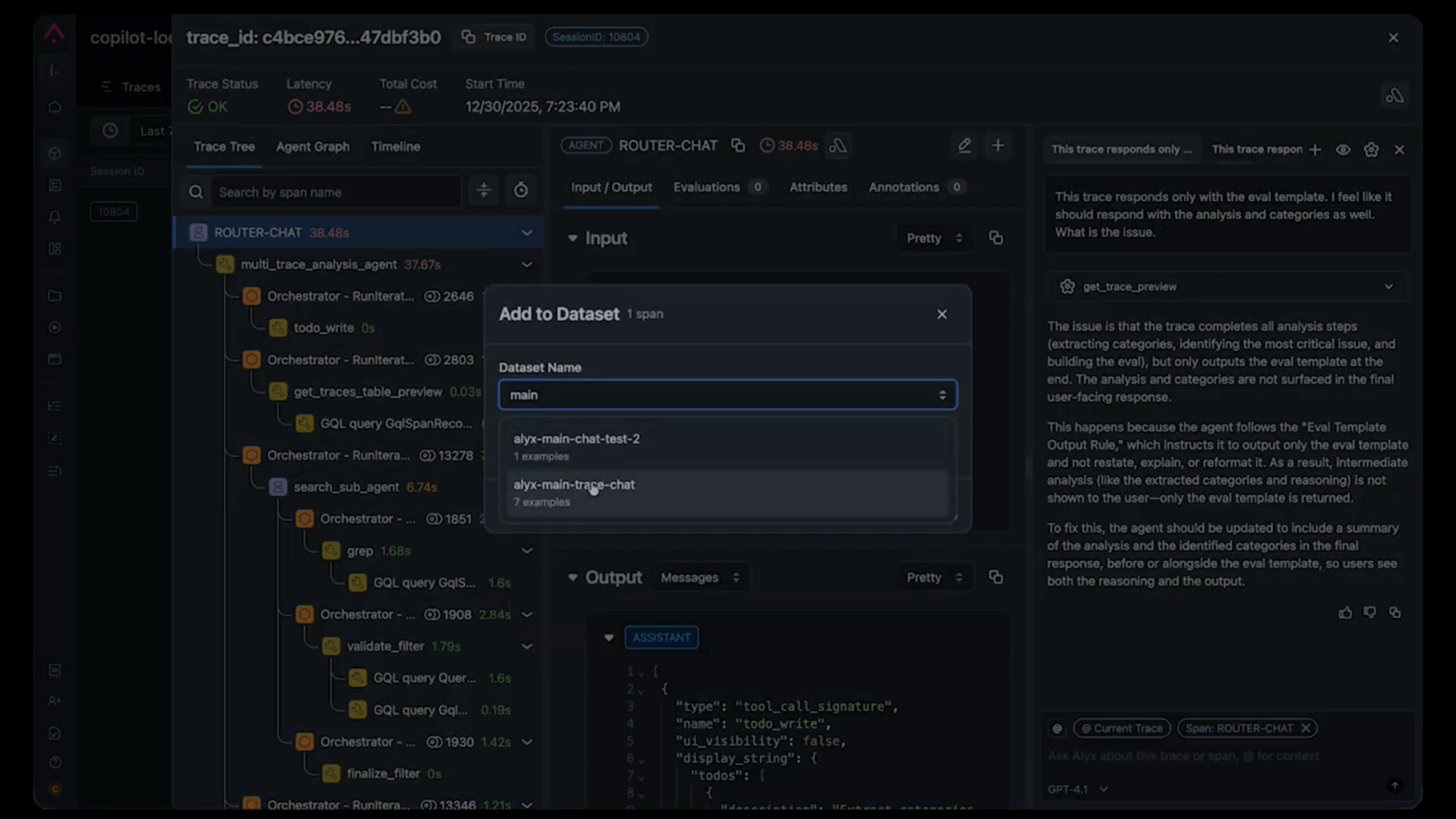
The foundation of our testing approach is deceptively simple:capture real production traces and use them as test cases.
Here’s why this matters:
- Synthetic data misses edge cases. You can generate test cases with LLMs, but they tend to be “happy path” examples. Real users do unexpected things.
- Production traces capture actual failures. When something breaks in production, that trace becomes a test case. You’re testing against the exact conditions that caused the problem.
- It enables team collaboration. When someone finds a bug, they can add the trace to the shared dataset. No more “it works on my machine” debates, everyone is testing against the same data.
How we structure test cases
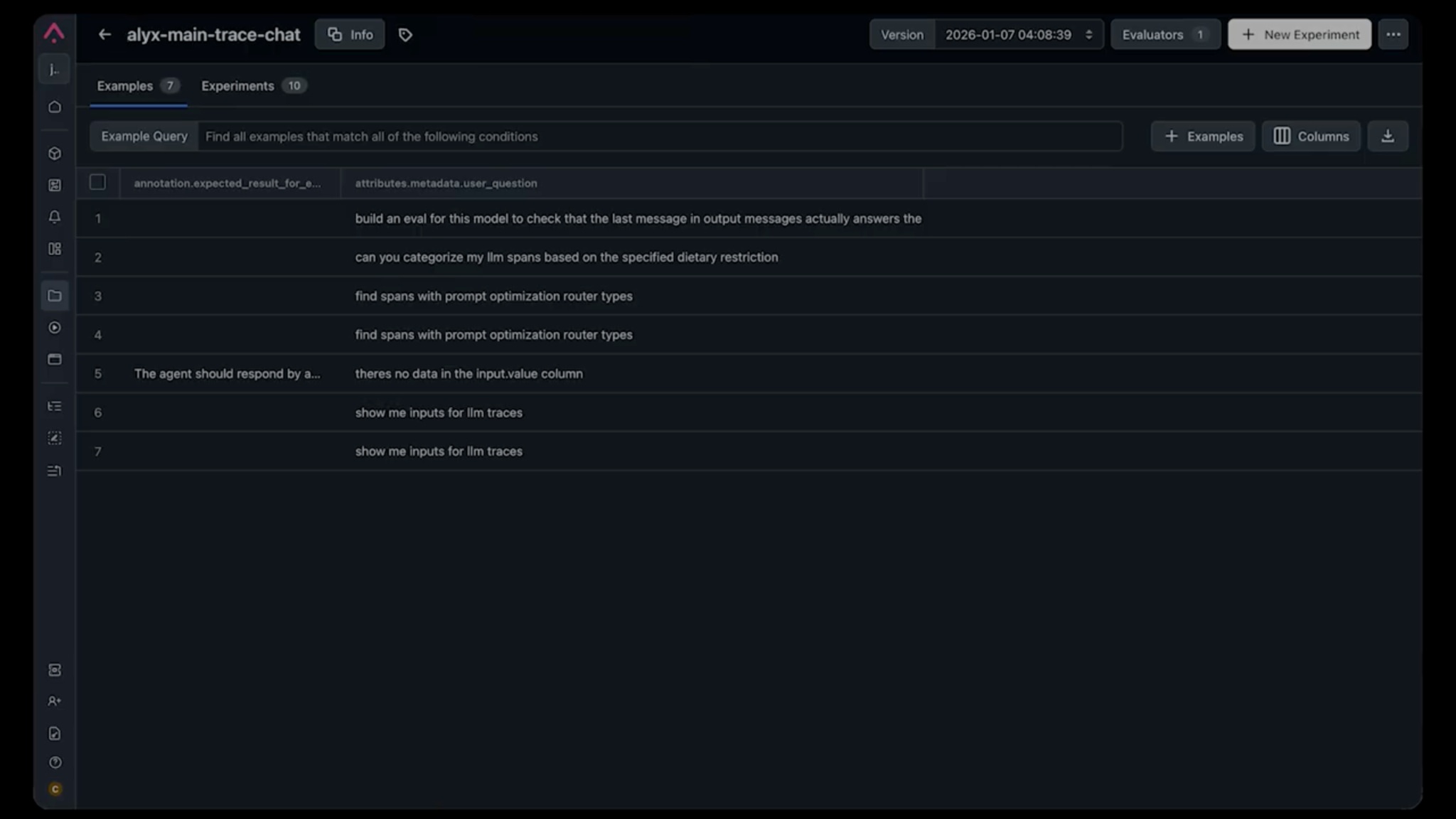
Each test case in our dataset includes:
- The input trace: The exact user query and context that triggered the behavior
- Expected result: A natural language description of what should happen
Notice we said “natural language description”, not a rigid JSON schema. This is intentional. For example, an expected result might be: “After running the categorization tools, the LLM should respond with text explaining the categories before creating the eval template.”
Why not exact output matching? Because AI outputs vary in phrasing, formatting, and structure. Exact matching creates brittle tests that fail on semantically correct responses. Instead, we use LLM-based evaluators that understand intent.
LLM-as-Judge: why we stopped writing assertions
Traditional assertions don’t work for AI outputs. Checking if response == expected_response fails the moment the agent uses slightly different wording.
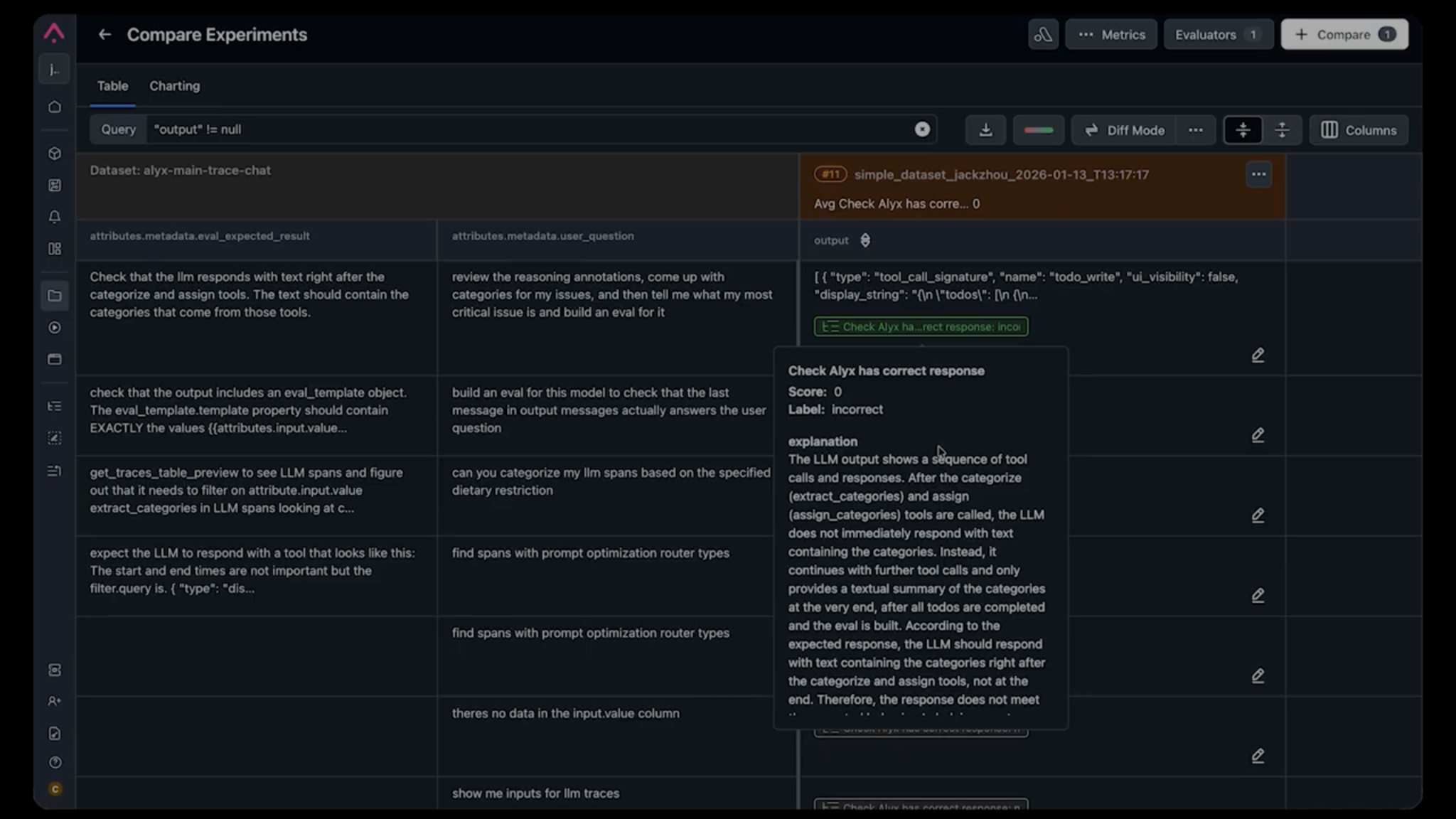
This is where LLM-based evals come in. Our approach: use an LLM to evaluate whether the output meets the expectation. The evaluator is simple: it takes the expected result and the actual output, then returns a pass/fail judgment along with an explanation.
This explanation is often more useful than the binary result, it tells you why something failed in plain language.
For example, when we were debugging a flow where Alyx was skipping the explanation step and jumping straight to generating an eval template, the evaluator told us:
“After categorize_and_assign, the LLM does not immediately respond with text. Instead, it continues with further tool calls without explaining the categories to the user.”
That’s a better bug description than most humans write.
Choosing the right eval type
Not every test needs an LLM judge. Here’s our framework:
| Scenario | Eval Type |
|---|---|
| Output must contain specific data (API responses, extracted values) | Deterministic checks (regex, JSON schema) |
| Output should follow behavioral guidelines | LLM-as-judge |
| Output quality/tone assessment | LLM-as-judge with rubric |
| Tool call sequence validation | Trace analysis (deterministic) |
| Latency/cost requirements | Metric thresholds |
For Alyx, most tests use LLM-as-judge because we’re primarily validating behavior. Did the agent do the right thing in the right order?
Test-driven development for AI agents
Once your agent harness is in place, you can adopt a TDD workflow. Here’s the process that’s transformed how we ship features:
- Identify a failing trace. A user reports an issue, or we notice unexpected behavior in production.
- Add it to the test dataset. The trace becomes a test case with an expected result describing the correct behavior.
- Run the test (it should fail). This validates that your test actually captures the problem. If it passes, your expectation isn’t specific enough.
- Make changes to fix the behavior. Modify the system prompt, tool descriptions, or agent logic.
- Run the test again. Iterate until it passes.
- Run the full eval suite. Ensure your fix didn’t break anything else.
This is TDD for AI. Start with a failing eval, make iterative improvements until it passes.
A real example: the eval template output rule bug
We had a trace where a user asked Alyx to:
- Categorize their issues
- Tell them what the critical issue was
- Build an eval for it
Alyx was skipping step 2. It would categorize the issues, then immediately generate the eval without explaining the analysis to the user.
Using our trace debugging tools, we identified the culprit: a system prompt rule called eval_template_output_rule that instructed:
“When a tool returns the eval template, do not restate or reformat it. Only output a finished call with no text.”
This rule was added months ago to solve a different problem (verbose responses when generating evals), but it was now causing Alyx to skip explanations entirely.
Without our test suite, this would have been nearly impossible to catch systematically. The rule was buried in a long system prompt, and the failure only appeared in specific multi-step workflows.
Experiments: running evals over time
Individual test runs tell you if something works now. But running evals as experiments tells you if things are getting better or worse over time.
Every time we run our test suite, we log the results as an experiment in Arize. This gives us:
- Performance trends: Are we improving or regressing?
- Comparison across changes: Did this prompt change help or hurt?
- Anomaly detection: Sudden drops in pass rates trigger alerts
We don’t expect 100% pass rates (that would be suspicious). But we do expect consistency, and when there’s a sudden drop, we know something is wrong.
Model upgrade testing
This is where experiments become critical.
We learned this the hard way when upgrading from GPT-3.5 to GPT-4. Logically, a smarter model should produce better results, right?
Wrong. Our agent started behaving erratically. Tool calls that worked before were failing. Response formats changed. It took days to discover all the regressions, and our customers found most of them first (unfortunately).
Now, before any model upgrade, we run the full test suite against the new model and compare the experiments side by side.
If the new model causes regressions, we fix them before pushing to production. No more surprise bug reports.
CI/CD integration: automated quality gates
Tests are only useful if they run consistently. This is where agent harness engineering pays off. Once you’ve built the infrastructure to run your agent in isolation, plugging it into CI/CD is straightforward.
We’ve integrated our agent tests into our CI/CD pipeline so that every PR that touches prompts, tools, or agent logic triggers the test suite. If pass rates drop below our threshold, the PR is blocked.
This is especially important as teams grow. New engineers might see a two-line prompt change as harmless, but those two lines might have been added to fix a subtle issue months ago. The test suite catches these regressions before they reach users.
Building your eval dataset: practical advice
Starting from zero? Here’s how to build a useful dataset for your evals:
1. Start with known failures
Every bug report is a potential test case. When users report issues, capture the trace and add it to your dataset with the expected behavior.
2. Cover core workflows
Identify the 5-10 most important things your agent does. Create test cases for each, including:
- Happy path (everything works)
- Edge cases (unusual inputs, missing data)
- Error handling (what happens when tools fail)
The communication benefit
Beyond catching bugs, evals have transformed how our team communicates.
Before: “Hey, this doesn’t work.” “What did you do?” “I asked it to categorize things.” “Show me your screen.” 30 minutes of back-and-forth
After: “I added trace #247 to the dataset. The expected behavior is X, but it’s doing Y. Here’s the failing eval.”
Evals give us a shared language for discussing agent behavior. The trace is the exact input. The expected result is the specification. The eval is the verdict. No ambiguity.
Key takeaways
- Tests are non-negotiable for production agents. The complexity of system prompts and tool interactions makes manual testing insufficient.
- Invest in your agent harness early. The infrastructure to run, capture, and evaluate agent behavior is foundational. Everything else builds on it.
- Use real production traces. Synthetic data misses the edge cases that actually break things.
- LLM-based evals beat exact matching. Natural language expectations are more robust and easier to write.
- Track experiments over time. Single test runs aren’t enough. You need trends to catch regressions.
- Integrate with CI/CD. Automated quality gates prevent regressions from reaching production.
- Test before model upgrades. A smarter model doesn’t guarantee better agent behavior.
- Tests enable team collaboration. They provide a shared language for discussing agent behavior.
We’re still learning, as agent harness engineering is an evolving discipline. But these practices have let us ship confidently, scale our team, and stop playing whack-a-mole with production bugs.
If you’re building agents without a proper test harness, you’re not moving fast, you’re accumulating debt that will slow you down later. Start small, capture your first failing trace, and build from there.
Want to see how Arize helps teams build evals for AI agents?
What’s next in the series
This is part a four-part deep dive series on how we built Alyx. Part one and two is here if you missed it:
- Part 1: How to build planning into your agent
- Part 2: Managing memory in agents
- Coming up: Using Alyx to debug Alyx
- How we use Arize AX to trace Alyx’s planning behavior, catch regressions, and close the loop between what the agent does and what it should have done.
The post AI agent evaluation: How to test, debug, and improve agents in production appeared first on Arize AI.