Building an AI Digital Twin Agent for Scenario Simulation
Most analytics systems today are designed to answer questions about the past. Dashboards and reporting tools help organizations understand what happened, and predictive models attempt to forecast what may happen next. While these capabilities are extremely valuable, decision makers often need something slightly different. They need a way to explore what might happen if a decision is made. In other words, they need the ability to test scenarios before implementing them in the real world.
Consider the types of questions operational leaders frequently ask. What happens if customer demand increases significantly next month? How will inventory behave if supplier lead times increase? What would be the impact of running a major promotion that drives additional store traffic? These questions are not simply about historical analysis. They are about understanding how a system might behave under different conditions.
This is where the concept of a Digital Twin becomes particularly useful. In this post, we will explore what a digital twin is, why AI makes it significantly more powerful, and how the concept fits naturally into an agentic AI pattern. We will then build a simple example of an AI Digital Twin Agent that can simulate operational scenarios and explain their potential impact.
Understanding Digital Twins
A digital twin is essentially a virtual representation of a real-world system that behaves in a similar way to the actual system. It mirrors the structure and dynamics of the real environment and allows organizations to experiment with different conditions without affecting real operations.
Instead of analyzing past data alone, a digital twin provides a way to simulate the behavior of a system as conditions change. By adjusting inputs such as demand, supply, staffing, or operational policies, the twin can generate insights into how the system might respond.
Digital twins have been widely used across multiple industries for this reason. In manufacturing, they help simulate factory operations and production capacity. In supply chain environments, they can model inventory flows and logistics networks. Retail organizations use digital twins to simulate store operations and customer traffic. Even energy infrastructure and healthcare systems increasingly rely on digital twin models to test operational strategies before implementing them in the real world.
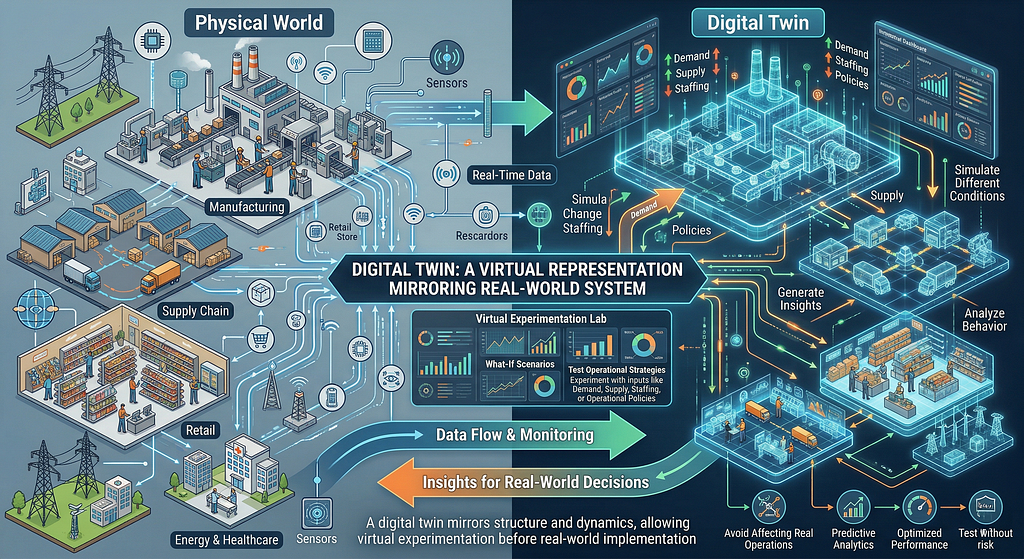
The core idea is simple but powerful. Instead of experimenting with the real system, organizations experiment with the virtual representation of that system.
Why AI Makes Digital Twins More Accessible
Traditional digital twin systems are often built by domain experts who create simulation models using specialized tools. While these models can be extremely powerful, interacting with them usually requires technical expertise. Running a new scenario often involves manually adjusting parameters and interpreting simulation outputs.
Artificial intelligence changes this interaction model significantly. Instead of requiring a specialist to configure simulations, AI systems can act as a layer of intelligence that interprets user questions and translates them into simulation scenarios.
This allows business users to interact with complex models in a far more intuitive way. Rather than adjusting parameters directly, a user can simply ask a question in natural language. The AI system interprets the intent, modifies the simulation environment, runs the scenario, and explains the results.
In other words, AI turns the digital twin into something that behaves more like an interactive decision assistant.
The Agentic Angle
This is where the concept of Agentic AI becomes particularly relevant. In an agentic system, an AI agent does not simply generate text responses. Instead, it goes through a sequence of actions in order to solve a task.
In the case of a digital twin, the agent performs several distinct steps. It first interprets the user’s question and determines what operational parameter needs to change. It then updates the state of the digital twin model to reflect that scenario. Next, it runs the simulation to observe how the system behaves under the new conditions. Finally, it summarizes the results and provides a human-readable explanation of the potential impact.
This pattern highlights an important aspect of agentic design. The language model is not responsible for performing the simulation itself. Instead, it acts as a controller that coordinates the interaction between user intent and analytical tools. The simulation logic remains deterministic and transparent, while the agent handles interpretation and explanation.
A Note on the Approach
In this example, the goal is not to build a fully production-grade digital twin platform, but to demonstrate how the core idea can be implemented using a very simple and transparent architecture. To keep it simple, we rely on familiar Python libraries such as NumPy and Pandas to model system behavior, and layer a lightweight LLM-based interaction on top.
What is interesting here is that even with this minimal setup, we are able to reproduce the essential characteristics of an AI-powered digital twin, and that’s the goal of this blog. The architecture itself is straightforward. A simulation model represents the system and maintains its state over time. A small scenario layer allows us to modify key parameters such as demand. On top of this, an LLM-based agent interprets user questions, translates them into parameter changes, triggers the simulation, and summarizes the results.
There is no complex orchestration framework involved, and yet the system behaves in a way that is consistent with how we would expect an intelligent digital twin to operate. The agent is not replacing the simulation logic. It is acting as a coordination layer that connects user intent with the underlying model.
This highlights an important point. The power of the AI digital twin pattern does not come from architectural complexity, but from how these components are combined. Even a simple pipeline that connects interpretation, simulation, and explanation can enable meaningful scenario-based decision support.
In a follow-up post, we will extend this using an orchestration framework such as CrewAI. This will allow us to introduce multiple agents, more intricate workflows, and better separation of responsibilities, while building on the foundational Digital Twin idea demonstrated here.
A Simple Business Scenario
To demonstrate the idea, we will work with a simplified warehouse inventory system. Warehouses must continuously balance inventory levels against customer demand. If inventory drops too low, stockouts occur and customer orders cannot be fulfilled. On the other hand, holding too much inventory increases storage costs and ties up working capital.
Organizations therefore maintain operational policies such as reorder thresholds and replenishment quantities to keep inventory within acceptable limits.
In our example, the digital twin will simulate the behavior of a warehouse over time. The model will track inventory levels, simulate daily demand, and trigger replenishment when inventory falls below a predefined threshold. While the example is intentionally simple, it captures the core dynamics that many real operational systems exhibit.
Once this digital twin is defined, the agent can begin to explore questions such as how the system behaves when demand increases or decreases. By adjusting the demand parameter and running the simulation again, we can observe how inventory levels evolve and whether stockouts occur more frequently.
The Architecture of the AI Digital Twin Agent
The architecture of this example can be understood as a small pipeline consisting of several components.
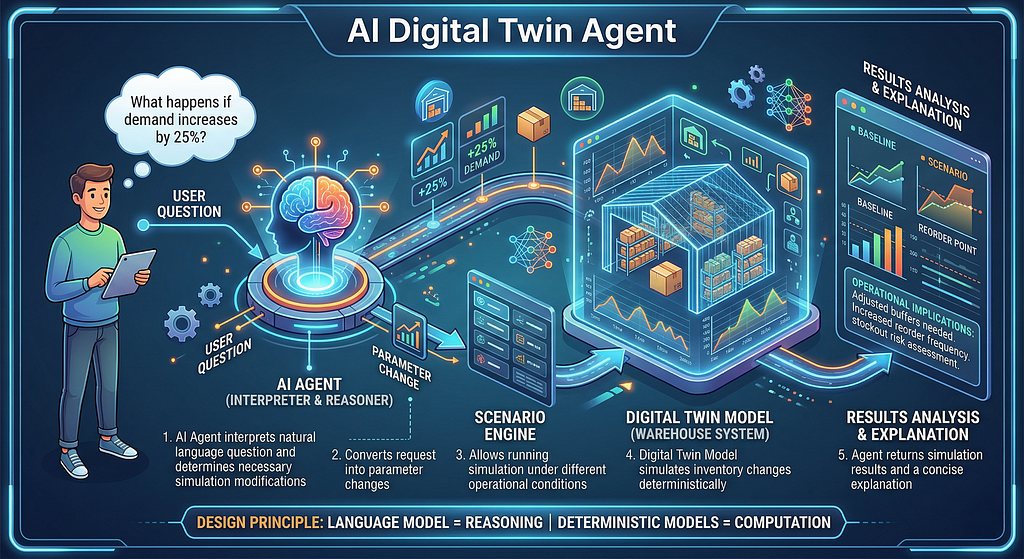
The first component is the digital twin model itself, which represents the warehouse system and defines how inventory changes over time. The second component is a scenario engine that allows the simulation to run under different operational conditions. The third component is the AI agent, which interprets user questions and determines how the simulation parameters should be modified.
When a user asks a question such as “What happens if demand increases by twenty five percent,” the agent interprets the request and converts it into a parameter change. The simulation is then executed with the updated parameters, and the results are returned to the user along with a concise explanation of the operational implications.
This architecture highlights an important design principle in many modern AI systems. The language model is used for interpretation and reasoning, while the actual computation is performed by deterministic models or analytical tools.
Implementation
In the notebook that accompanies this post, we will implement a simplified version of this architecture. The notebook will first define a warehouse digital twin that simulates inventory dynamics. It will then run a baseline simulation to establish normal system behavior.
Next, we will introduce the ability to simulate alternative scenarios by adjusting demand levels. Finally, we will add a lightweight AI agent that interprets natural language questions, executes the appropriate simulation, and generates an explanation of the results.
Step 1 — Install Dependencies

Installs the required Python libraries for simulation, data analysis, visualization, and OpenAI interaction.
Step 2 — Import Required Libraries
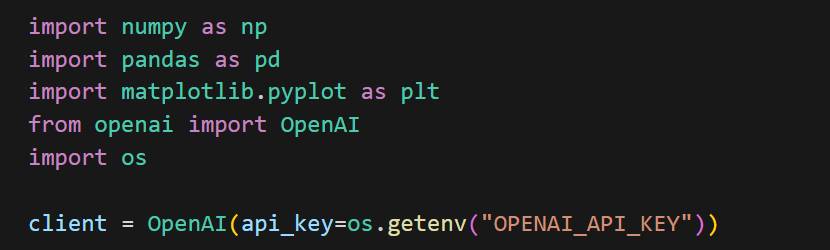
The simulation itself will rely on NumPy for generating demand patterns and Pandas for storing simulation results in a structured format. We will also use Matplotlib to visualize how inventory levels evolve over time within the digital twin. To introduce the agentic component, we use the OpenAI client, which will allow the system to interpret natural language questions and translate them into simulation scenarios. Finally, the os module is used to securely retrieve the API key from the environment.
Step 3 — Define the Digital Twin
This code defines the core of our digital twin by modeling how a warehouse behaves on a day-to-day basis.
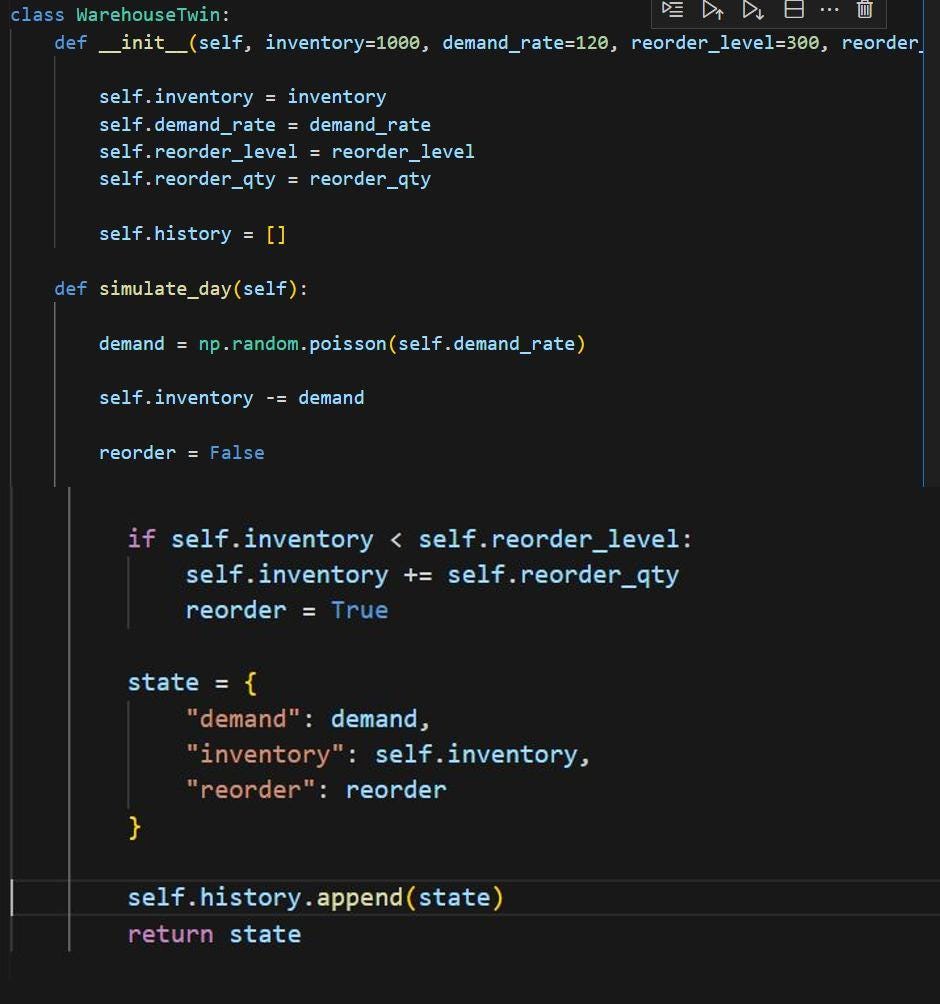
The class initializes the key operational parameters such as starting inventory, average demand, reorder threshold, and replenishment quantity, which together represent how the warehouse is managed.
The simulate_day function then captures the actual system dynamics. For each day, demand is generated using a Poisson distribution to reflect real-world variability rather than a fixed number. This demand is deducted from the available inventory, and if the inventory drops below the defined reorder level, a replenishment is triggered automatically.
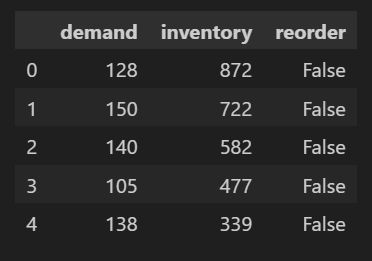
At each step, the system records the state, including how much demand occurred, what the remaining inventory is, and whether a reorder happened. This allows us to track how the system evolves over time and forms the basis for both analysis and simulation.
In effect, this class acts as a simplified but functional digital twin of a warehouse, capturing the key mechanics required to simulate operational behavior under different conditions.
With this model in place, we can now run the simulation across multiple days to observe how the system behaves over time and establish a baseline before introducing scenario variations.
Step 4 — Run a Baseline Simulation
In this step, we instantiate the WarehouseTwin class and run the simulation for thirty days, calling the simulate_day function repeatedly to update the system state.
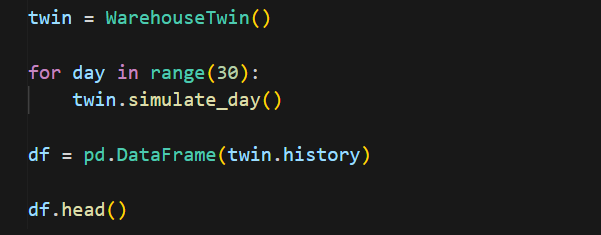
Each iteration represents one day of operations, where demand is generated, inventory is adjusted, and replenishment decisions are applied based on the defined rules. As the simulation progresses, the state of the system is continuously recorded within the twin.
Once the simulation is complete, the collected history is converted into a Pandas DataFrame. This allows us to view and analyze the results in a structured format, making it easier to understand how inventory levels and demand evolved over time. We inspect the first few records below.
Step 5 — Visualize the Digital Twin State
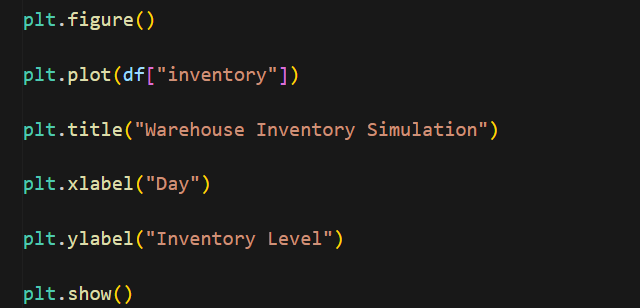
With the baseline simulation complete, we now visualize how the inventory evolves over time. While the raw data gives us the numbers, plotting it makes the system behavior much easier to interpret.
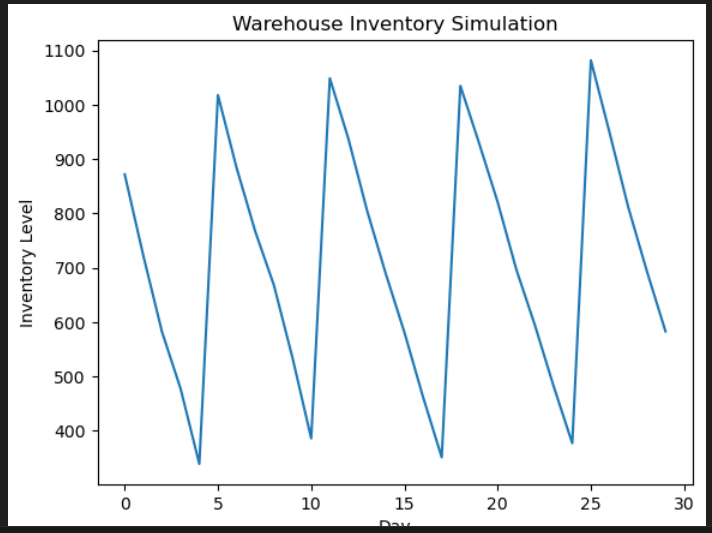
In this step, we plot the inventory levels across the simulated days. The x-axis represents time in days, and the y-axis represents the inventory level at the end of each day. This gives us a continuous view of how inventory fluctuates as demand is realized and replenishment is triggered.
What becomes immediately visible is the cyclical pattern of the system. Inventory gradually declines as daily demand consumes stock, and once it drops below the reorder threshold, it jumps back up due to replenishment. This creates a repeating sawtooth pattern, which is typical of inventory systems governed by reorder policies.
This visualization is important because it helps validate that our digital twin is behaving as expected. We can clearly see the relationship between demand, depletion, and restocking, which confirms that the underlying simulation logic is working correctly.
With this baseline behavior established, we can now move on to introducing different scenarios and observe how these patterns change under varying conditions such as increased demand.
Step 6 — Scenario Simulation
Here, we introduce the ability to simulate different scenarios. Instead of modifying the core model each time, we wrap the simulation logic into a reusable function that allows us to easily test how the system behaves under varying conditions.
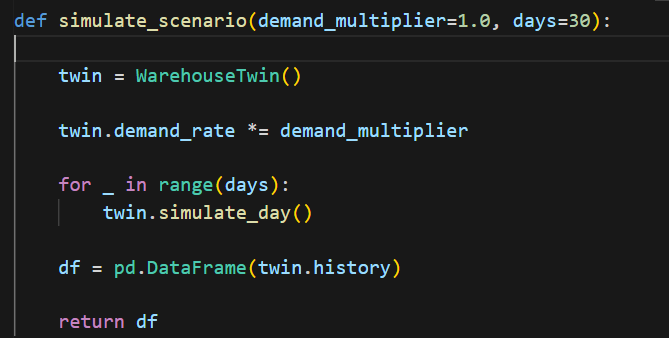
The simulate_scenario function creates a new instance of the warehouse twin and adjusts the demand rate using a multiplier. This is a simple but effective way to represent changes such as increased or decreased customer demand without altering the underlying structure of the model.
Once the demand rate is adjusted, the simulation is run for a specified number of days, just as before. The system continues to track daily demand, inventory levels, and replenishment events, but now under the modified conditions.
The results are again stored in a Pandas DataFrame and returned, making it easy to compare different scenarios side by side.
This introduces the core capability of a digital twin: the ability to experiment with alternative realities. Instead of analyzing a single fixed simulation, we can now systematically explore how the system responds when key parameters change.
With this in place, we can move on to comparing scenarios and observing how shifts in demand impact inventory behavior.
Step 7 — Compare Scenarios
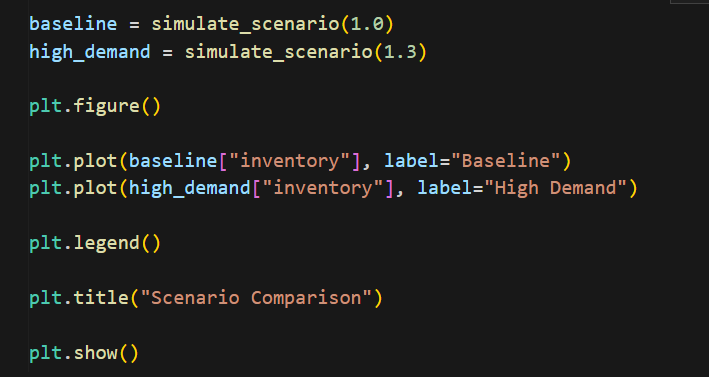
We directly compare how the system behaves under normal conditions versus increased demand. In this step, we run two simulations: one using the baseline demand and another where demand is increased by thirty percent.
Both results are plotted on the same graph, allowing us to visually compare how inventory evolves in each case. While the overall pattern remains similar, the differences in behavior become quite evident when viewed together.
Under higher demand, inventory depletes more quickly, causing the system to hit the reorder threshold more frequently. This leads to more frequent replenishment cycles and sharper fluctuations in inventory levels. In some cases, the inventory also approaches lower levels before replenishment occurs, increasing the risk of potential stockouts.
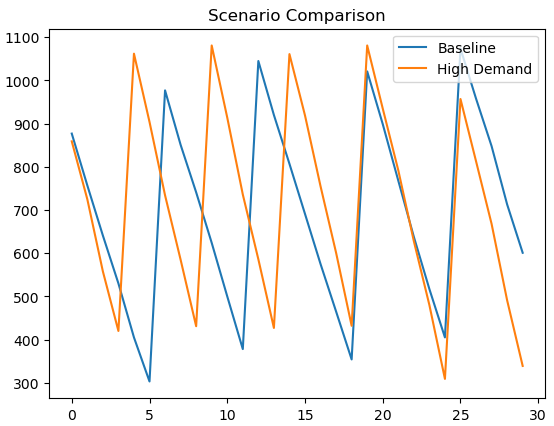
What is important here is not just the visual difference, but what it represents operationally. A relatively small increase in demand can significantly change how the system behaves, affecting replenishment frequency, inventory buffers, and service reliability.
This is where the value of the digital twin becomes clear. Instead of guessing how the system might respond, we can simulate the impact and observe the consequences before making real-world decisions.
Step 8 — Add an LLM Agent
We now introduce the AI agent layer that enables interaction with the digital twin using natural language. Up to this point, scenarios were manually defined by adjusting parameters such as demand. This step removes that manual effort and allows the system to interpret user intent directly.
The interpret_question function acts as the entry point for the agent. It takes a user’s question and uses a language model to extract a key parameter, in this case, the demand multiplier. The prompt is structured to guide the model to behave like an operations analyst, converting qualitative instructions such as “increase demand by twenty percent” into a quantitative value.
The model processes the input question and returns a numeric multiplier, which is then parsed and used to drive the simulation. This effectively bridges the gap between human language and the underlying system model.
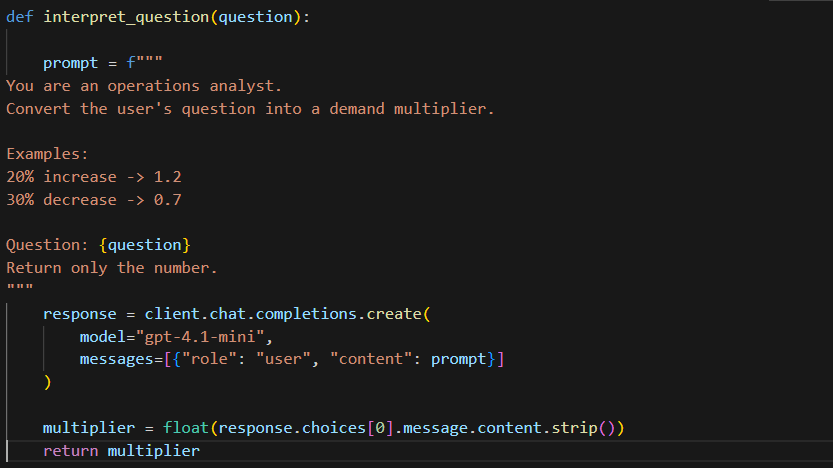
It is key to note that the LLM is not performing the simulation itself, nor is it generating arbitrary answers. Instead, it is acting as an interpretation layer, translating user intent into structured inputs that the digital twin can work with.
This is a key characteristic of agentic systems. The intelligence of the system does not come from the LLM alone, but from how the LLM is combined with deterministic components such as simulation models. The agent coordinates these components, enabling a seamless flow from question to execution.
With this interpretation layer in place, we can now move to the next step, where the agent not only understands the question but also executes the simulation and returns the results.
Step 9 — Agent Executes Simulation
We connect everything into a single flow. This represents the point where the system starts behaving like an actual agent rather than a set of independent components.
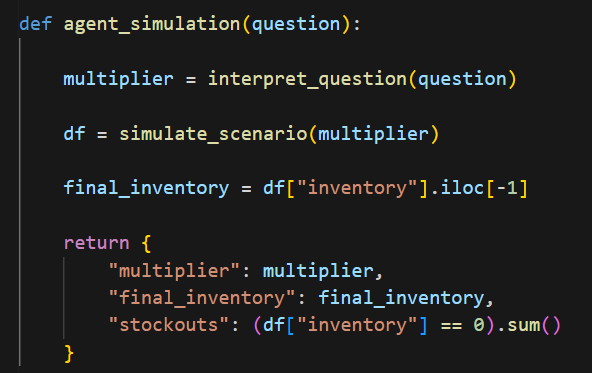
The process begins by taking the user’s question and passing it to the interpretation step. Instead of manually specifying inputs, the system now derives the demand multiplier directly from natural language. This is what allows the interaction to feel intuitive rather than configuration-driven.
Once the multiplier is determined, the simulation is executed using the updated demand conditions. The same digital twin model is reused, but the behavior now reflects the scenario implied by the user’s question. After the simulation runs, the focus shifts to extracting meaningful signals from the output. Rather than returning the entire dataset, the function pulls out key indicators such as the final inventory level and the number of stockouts. These are the kinds of metrics that directly reflect operational impact.
What makes this step interesting is not the individual pieces, but how they come together. The system interprets intent, applies it to a model, runs a simulation, and returns a distilled outcome, all within a single flow. The LLM is only one part of this process, acting as the bridge between user language and system inputs.
At this stage, the digital twin is no longer just a simulation model. It has become an interactive system that can respond to questions and generate outcomes.
The next step is to add an explanation layer, so the results are not just returned, but also interpreted in a way that is easy to understand.
Step 10 — Ask the Digital Twin Agent
We now interact with the system using a natural language question. Instead of manually setting parameters, the question is passed directly to the agent, which interprets it, runs the corresponding simulation, and returns the result.
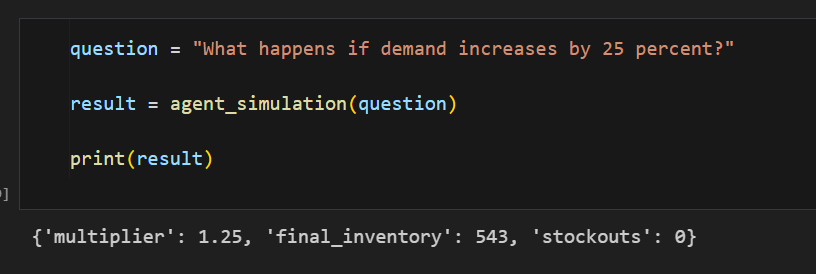
The output provides a structured summary of the scenario, including the interpreted demand multiplier, the final inventory level, and the number of stockouts observed. In this case, the system correctly interprets a 25 percent increase in demand as a multiplier of 1.25. It then simulates the scenario and reports key outcomes, including the final inventory level and the number of stockouts observed.
This illustrates how a simple combination of a simulation model and an LLM can behave like an interactive decision-support system, where questions are translated into executable scenarios and returned as structured insights.
Step 11 — Generate an Explanation
In this step, we add an explanation layer to the system. Instead of returning only numerical outputs, the agent now generates a structured, human-readable interpretation of the results.
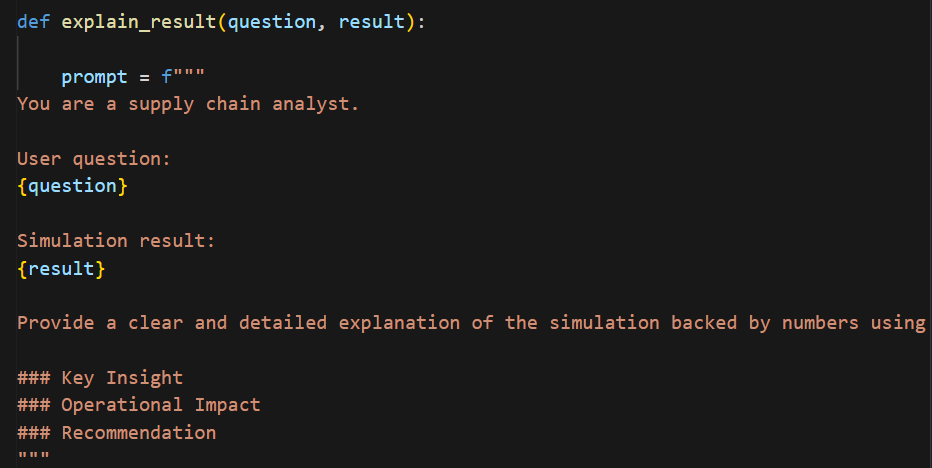
The prompt positions the model as a supply chain analyst and provides both the original user question and the simulation output as context. It then guides the model to organize the response into key sections such as insight, operational impact, and recommendation.
This makes the output more actionable, transforming raw simulation results into something that can directly support decision making.
Step 12 — Final Agent Output
In the final step, the agent not only runs the simulation but also presents the results in a structured and easy-to-read format. Using Markdown rendering, the explanation is displayed clearly within the notebook, making it more intuitive to interpret.
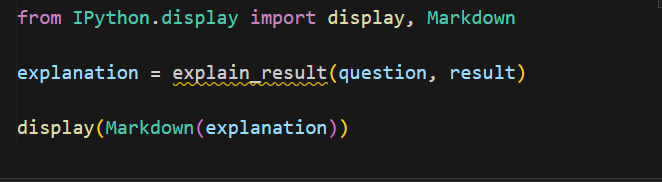
The system now provides a narrative that highlights key insights, explains the operational impact, and suggests possible actions. This is where the digital twin starts to feel less like a model and more like a decision-support assistant.
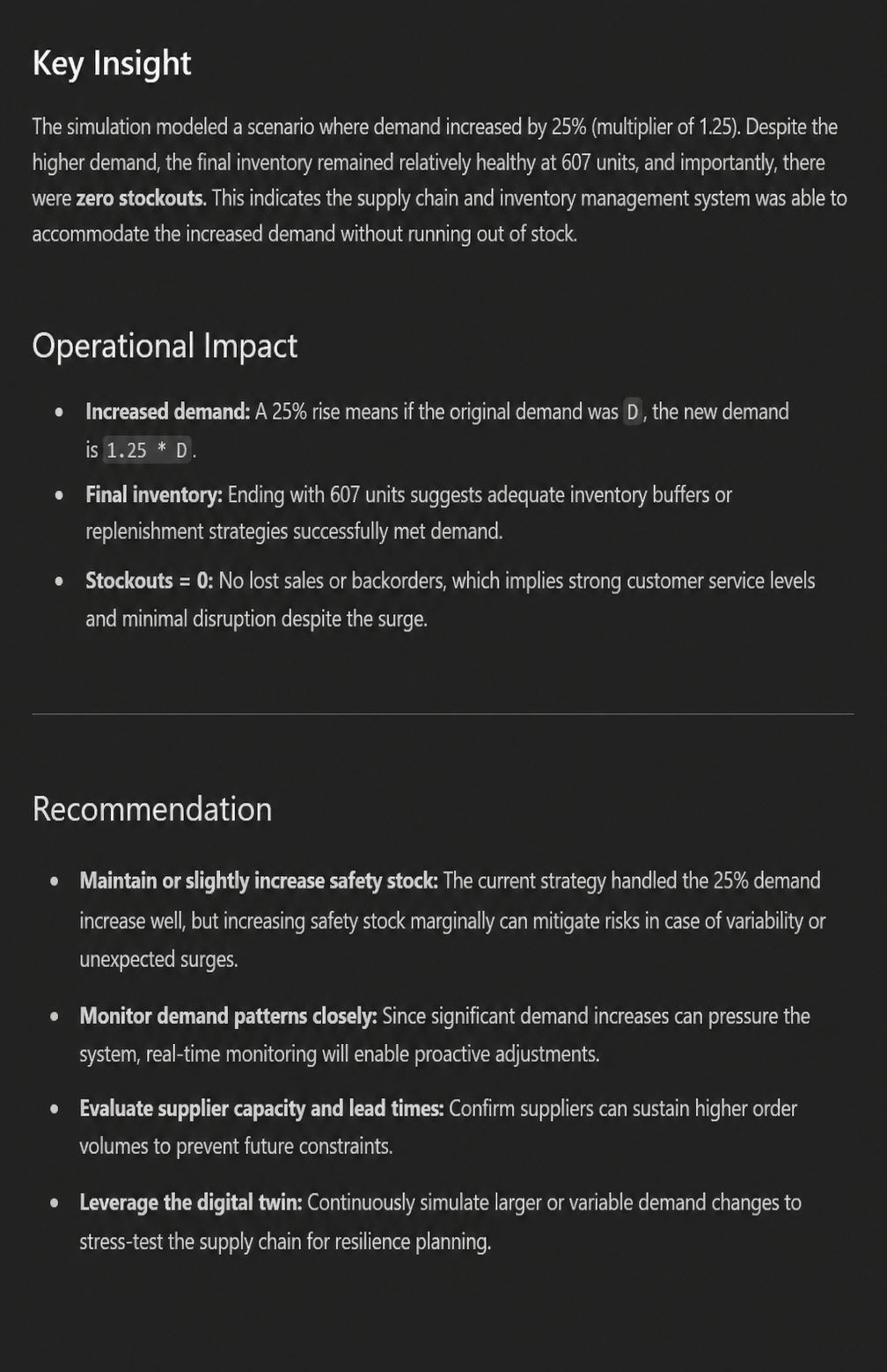
What began as a simple simulation has now evolved into an interactive system that can take a question, run a scenario, and explain the outcome in business terms. This combination of simulation and explanation is what makes the AI digital twin particularly useful in real-world settings, where clarity and context are just as important as accuracy.
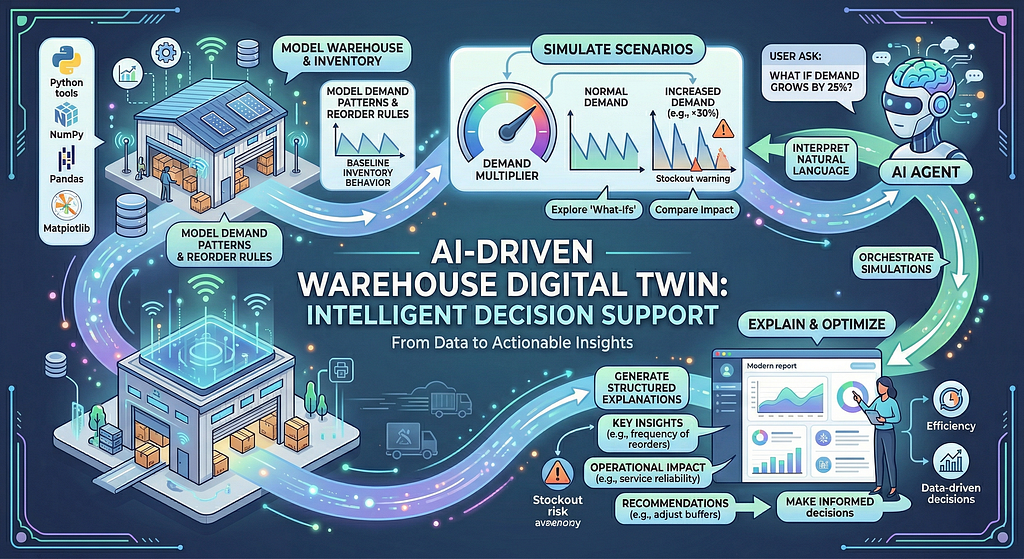
What we have built here is a simple but meaningful step toward more interactive and intelligent decision-support systems. By combining a basic simulation model with an LLM, we were able to move from static analysis to a system that can interpret questions, simulate scenarios, and explain outcomes in a structured way.
The key takeaway is not the complexity of the implementation, but the pattern itself. Even with a lightweight architecture using familiar Python tools, we are able to replicate the core behavior of an AI-powered digital twin. The agent does not replace the underlying model; it enhances it by making it more accessible and easier to interact with.
This approach opens up interesting possibilities. Systems that were previously limited to analysts can now be made accessible to a wider set of users through natural language interfaces. More importantly, decisions can be explored and evaluated before they are implemented, reducing risk and improving operational planning.
From dashboards to decisions, and now to simulation. This is the next step in how we interact with data.
In a subsequent blog, we will extend this idea further by introducing an orchestration layer using frameworks such as CrewAI. This will allow us to move beyond a single agent and build a more structured system with multiple agents collaborating, handling more complex workflows, and operating closer to real-world enterprise scenarios.
The notebook asosciated with this blog can be accessed here.
I share hands-on, implementation-focused perspectives on Generative & Agentic AI, LLMs, Snowflake and Cortex AI, translating advanced capabilities into practical, real-world analytics use cases. Do follow me on LinkedIn and Medium for more such insights. Author of Snowflake Cortex AI for Generative AI Applications)
Agentic AI in Action — Part 20 — Building an AI Digital Twin Agent for Scenario Simulation was originally published in Towards AI on Medium, where people are continuing the conversation by highlighting and responding to this story.