2024 was the year of prompt engineering. 2025 was the year of context engineering. 2026 has been the year of the harness. You can’t read an AI engineering thread without tripping over the word. My problem with how it gets explained: until you’ve actually built one, the definitions never stick.
The fastest way to understand what a “harness” actually is, is to build one. So that is what we are going to do. In twenty lines of Python, using one API call, one tool, and one loop, we’ll have a working coding agent. By the end you’ll also see why scaling that agent up to real users is a different engineering problem, one that needs a platform rather than a bigger harness.
1. What an LLM actually does
An LLM generates text. You give it some text, it produces more text that plausibly continues what you gave it. That is the entire interface.
from anthropic import Anthropic
client = Anthropic()

response = client.messages.create(
    model="claude-sonnet-4-6",
    max_tokens=1024,
    messages=[{"role": "user", "content": "What's 2 + 2?"}],
)
print(response.content[0].text)
# 2 + 2 = **4**
Two properties of the LLM matter for everything below.
It only predicts text. It cannot execute code, read your filesystem, make HTTP calls, or check the time. Ask it what time it is and an honest model will say it does not know. A dishonest one will make something up.
It is stateless. It has no memory between calls. If I call messages.create twice in a row, the second call has no idea what the first call said. Each request is independent. If you want the model to "remember" anything, you have to send it again, inside the text of the next call.
That is the raw material we have to work with, a text function with no hands and no memory. Which raises the obvious question. If that is all it does, how does an AI coding agent write code on my machine? How does a chatbot browse the web? How does any of this “AI agent” stuff work at all?
2. How a text function takes actions
The trick is to make the text the model outputs mean something, and to run code that reacts to what it means.
The mechanism is straightforward. You teach the model a pattern it can emit when it wants to run a tool. Your wrapper code watches the model’s output for that pattern, runs the requested tool when it appears, and pastes the result back so the model can keep going. Here is the teaching part, going into the system prompt:
SYSTEM = """You can run bash commands by outputting exactly:

<tool>bash: <command></tool>

I will run the command and paste the output back to you as a user
message. You can then keep going. When you're done, reply normally
without a <tool> tag."""
That prompt teaches the model a simple contract. If it wants to run a bash command, it wraps the command in <tool>bash: ...</tool>. We watch for that pattern in its output, run the command, and paste the result back as the next user message. The <tool>...</tool> syntax itself is arbitrary, something we came up with; any unambiguous delimiter would do, as long as our parser agrees.
Here are the two utilities that sit on our side of that contract:
import re, subprocess

def extract_tool_call(text: str) -> str | None:
    match = re.search(r"<tool>bash:\s*(.+?)</tool>", text, re.DOTALL)
    return match.group(1).strip() if match else None

def run_bash(cmd: str) -> str:
    r = subprocess.run(cmd, shell=True, capture_output=True,
                       text=True, timeout=30)
    return (r.stdout + r.stderr)[:8000]
The extract_tool_call function scans the model's output for the <tool>bash: ...</tool> pattern and returns the command inside, or None if the model did not ask for a tool. The run_bash function runs that command with a 30-second timeout and returns stdout plus stderr, capped at 8,000 characters so a noisy command does not blow up the next iteration's context.
That is what tool-calling is, stripped of vendor SDKs: a prompt convention telling the model how to ask for something, and a few lines of host-side glue that executes the ask and pastes the answer back.
Notice we picked one tool: bash. That single choice is enough to do almost anything. If the model can run bash on your laptop, it can read files, write files, grep, run git, hit HTTP endpoints, start Python subprocesses, and install packages. Give a smart model one very powerful tool and you'll be surprised what it can do.
3. Add a loop and you have an agent
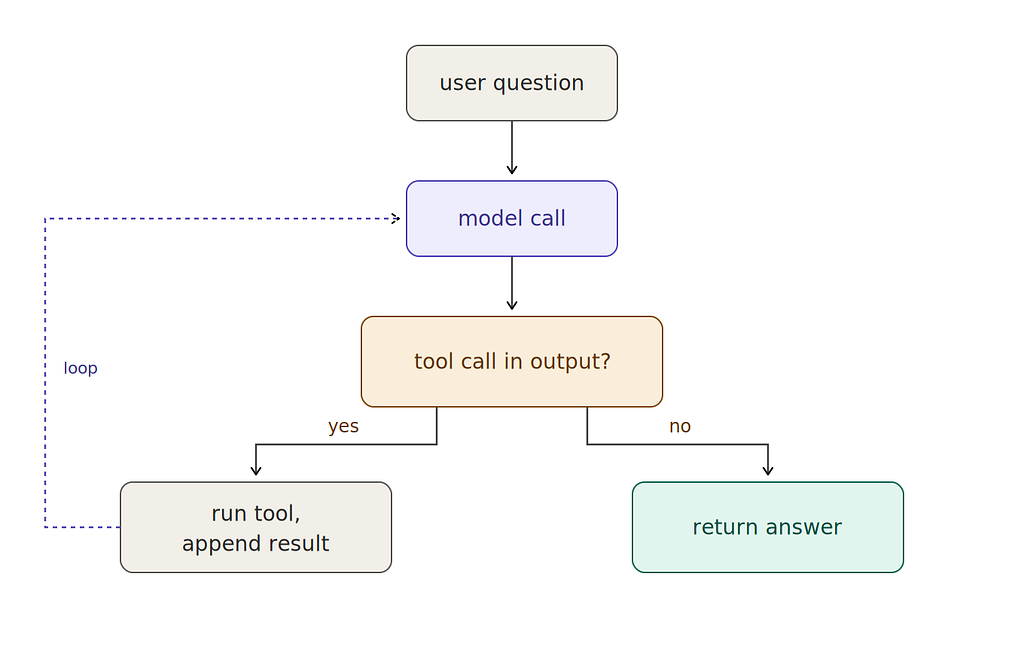
A single call is not interesting. It can ask for one command and get the output, but it cannot use the output. The thing that turns calls into an agent is the loop. You give the model the result, let it decide what to do next, and repeat until it stops asking for tools.
Press enter or click to view image in full size
Here’s the whole thing:
def agent(question: str) -> str:
    messages = [{"role": "user", "content": question}]
    step = 0

    while True:
        step += 1
        response = client.messages.create(
            model="claude-sonnet-4-6",
            max_tokens=2048,
            system=SYSTEM,
            messages=messages,
        )
        text = response.content[0].text
        messages.append({"role": "assistant", "content": text})

        cmd = extract_tool_call(text)
        if cmd is None:
            print(f"\n=== Final answer ===")
            print(text)
            return text

        print(f"[step {step}] $ {cmd}")

        output = run_bash(cmd)
        messages.append({
            "role": "user",
            "content": f"<tool_output>\n{output}\n</tool_output>",
        })
If Python is not your daily driver, here is what is actually happening.
Remember from section 1: the model is stateless. It has no memory between calls. If we made two separate calls, the second call would know nothing about the first. The only way the model can “remember” anything at all is if we send the whole history back to it, inside the text of every call.
That is why the messages list exists. It holds the entire conversation so far: the user's original question, the model's first reply, any tool output we got back, the model's next reply, and so on. On every iteration of the loop we send this whole list to the model, not just the latest turn. Without it, the model would have no idea which commands it had already run, what those commands returned, or what question it was trying to answer in the first place.
The loop itself follows a simple rhythm. We send the current conversation to the model, append the model’s reply to the list, and check whether the reply contains our <tool>bash: ...</tool> pattern. If it does not, the model is done answering, so we print the final response and return. If it does, we run the bash command, append its output to the conversation as a new user message, and loop again.
The model is only “alive” during the client.messages.create(...) call itself. While the tool is running, while bash is executing the command on your machine, the model is completely out of the picture. It does not watch the command run. It does not watch the command run, it cannot intervene, and it has no awareness that time is passing. It sees nothing until we call it again on the next iteration, at which point it gets handed the updated conversation, including the tool’s output, and has to reason from scratch about what to do next. Think of the model as waking up once per loop iteration. It reads the full transcript of what has happened so far, chooses one next step, and then hands control back to the loop and goes silent.
The step counter and print statements do not affect the agent's behavior; they are just so we can watch the loop think.
That is the whole thing. Hand it a question and watch it work. Here is what happens when I point this agent at a real codebase, the one I am using for the book I am writing: designing-ai-systems/designing_ai_systems_repo
>>> agent("What is this repo about in 2-3 sentences?")

[step 1] $ find . -maxdepth 2 -type f | head -50 && echo "---" && cat README* 2>/dev/null || true

=== Final answer ===
This repository is a production-ready Python platform for building
Generative AI applications, accompanying the Manning book Designing
AI Systems. It features a gRPC microservices architecture covering
multi-provider LLM inference (OpenAI, Anthropic), session/conversation
management, a RAG data pipeline with vector search, tool management,
and guardrails for input/output validation. The codebase is organised
around clean Python dataclass APIs, with storage backends ranging
from in-memory (dev) to PostgreSQL with pgvector (production).
The model issued a single command that does two things at once. find . -maxdepth 2 -type f | head -50 prints the top two levels of the directory tree so the model can see the shape of the project, and cat README* 2>/dev/null reads the README if one exists. That is what a human would do when dropped into a new repo: look around, read the README, summarise. With both pieces in its context on the next iteration, the model had enough to write the two-sentence answer in a single pass.
Now something that actually needs the loop:
>>> agent("What's the test coverage like for the codebase? "
...       "Use at most 5 tool calls. Answer in 2-3 sentences.")

[step 1] $ find . -type f -name "*.py" | head -20 && ls
[step 2] $ python -m pytest --cov=. --cov-report=term-missing -q 2>&1 | tail -60

=== Final answer ===
The codebase has 77% overall test coverage across 6,822 statements,
with 394 tests all passing. Coverage varies significantly by module:
core business logic like services/tools/circuit_breaker.py,
services/tools/store.py, and services/tools/models.py hits 100%,
while some service entry points (e.g., services/sessions/service.py,
services/models/main.py) are at 0% since they're server startup files
not exercised in unit tests.
Here the model issued two commands. Step 1 (find + ls) was orientation: confirm this is a Python project, see the shape of the modules, check whether there is a Makefile or config for how tests are run. Step 2 ran the actual coverage report with pytest --cov, piped through tail -60 so the output stayed small enough to reason about. Once both were in its context, it had the raw numbers (77% coverage across 6,822 statements, 394 tests passing) and the per-module breakdown it needed to pick out the 100% and 0% outliers. The first few calls were the model working out how to answer. The last one was it actually answering.
All we did to make this work was give the model one tool, bash, and a loop that kept calling it until the model decided it was done. No special test-running capabilities, no list of sanctioned commands, and no teaching the model where READMEs live or how pytest --cov works. It already knew all of that from training, and bash was the single capability it needed to reach for any of it. One tool, one loop, and two reasonable answers to two non-trivial questions about a codebase it had never seen before.
Twenty-ish lines of Python is all that stands between “a stateless text function” and “a thing that can do real work on your computer.”
4. So what is a harness, really?
Look back at those lines. There is exactly one model call, client.messages.create(...), and that is the piece that thinks. Everything else is scaffolding around that single call: the system prompt telling the model how to ask for things, the regex that spots those requests, the subprocess that carries them out, the loop that feeds results back, and the message list that accumulates context.
The scaffolding has a name: harness. The formulation you’ll see everywhere is:
Agent = Model + Harness
Read that literally. One model, one harness, one agent. One process in memory, one user at the keyboard, one session’s worth of state. That is not a simplification I am imposing on the formula; it is what the formula means.
Having just built one, you now know exactly what the harness is: the system prompt, the regex, the subprocess, the while loop, the message list.
The harness itself can be as thin or as thick as the task calls for. At one end, you have what Garry Tan has been calling thin harness, fat skills, where the harness does only four things (run the model in a loop, read and write files, manage context, enforce safety) and the reusable know-how lives in markdown skill files the model reads on demand.
At the other end, you have tightly scoped harnesses that deliberately keep the model on a short leash for deterministic tasks, with narrow tool interfaces and strict loop conditions.
In between you have the full-featured ones like Claude Code, Cursor, OpenClaw, and Hermes, which have permission pipelines that ask before running rm, memory subsystems that persist learned facts across sessions, smarter context management, retry and recovery logic, and structured tool schemas. Years of engineering work by large teams sits behind each of them. All of these shapes, the thin ones, the tight ones, and the thick ones, are harnesses. A harness is the loop plus whatever engineering you put around it, for one user.
5. What changes when you try to scale this up
Everything we built runs as a single Python process on a single machine for a single user, which is you. That is not a limitation of our twenty lines; it is the shape of any harness. Claude Code and Cursor both run for one user at a time, as does the harness we just built. One harness, one agent, one user. It is baked into “Agent = Model + Harness” the moment you take the formula seriously. Even the orchestrators that spin up a dozen Claude Code sessions in parallel on your laptop do not change this, because every session is still serving the same user, which is still you. The orchestrator coordinates, but each agent underneath it is its own harness, bound to you.
Which means the moment you want this agent to serve other people, hundreds of them, concurrently, inside an organization, you are no longer building a harness. You are building something underneath it.
Picture a chatbot on a company’s website answering questions from people who just want to know when their order will arrive. Picture a travel app where an agent plans a trip for you, books the flights, and remembers what you liked last time. Picture an internal assistant that your whole sales team uses to draft proposals, each rep with their own running thread, each thread pulling from the same product catalog. Each of those users still wants a full-featured harness doing real work on their behalf, with memory, safety, and recovery. But something has to hand each of them their own session, keep them isolated from each other, route their model calls, enforce the organization’s policies uniformly across every call, and let you see what every session did today and whether today was better than last week.
That layer is the platform. It is a different engineering object than the harness on top of it. A clean way to hold the four pieces in your head:
- Model. The stateless text function. One call in, one response out.
- Harness. The code around one model call that turns it into an agent. It holds the conversation, runs the loop, invokes tools, handles errors. A harness belongs to one user at a time. The twenty lines above are a harness. Claude Code is a harness. Cursor is a harness.
- Runtime. The place one harness runs. A process on your laptop, a container on a server, a sandbox in the cloud. Runtimes, like harnesses, are per-user by construction.
- Platform. The shared layer that stands up runtimes on demand, one per user, and gives each of them what they need to do their job: a place to store that user’s sessions, a route to a working model, a controlled set of tools, a trace of what happened. The platform never belongs to one user. It is the thing that hands out user-scoped harnesses and keeps them from stepping on each other.
Press enter or click to view image in full size
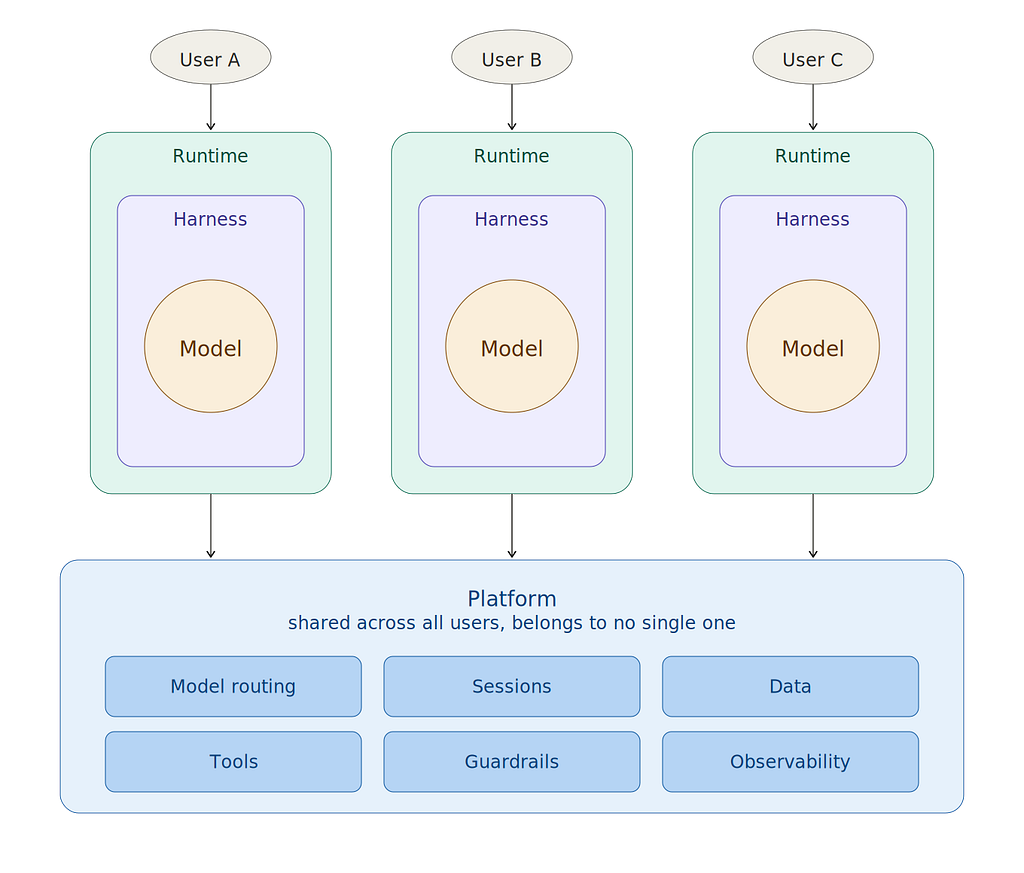
With that distinction in hand, here is where the platform earns its keep. Six concerns show up almost immediately. Each one is a thing the harness does trivially when you are the only user, and each one breaks the moment other users show up.
One model call becomes a model strategy. Hardcoding Anthropic() is fine when only you fail during a bad afternoon at the provider. When a thousand users depend on the agent, you need a backup provider, a cheaper model for the easy questions, and limits so one runaway session doesn't burn the month's budget.
One conversation becomes shared memory. A Python list in one process is fine for you. Your users expect to pick up tomorrow where they left off, or switch from web to mobile mid-sentence, and the list is gone. Conversations have to live somewhere durable that every copy of the agent can reach.
One file on your laptop becomes organizational knowledge. Your users will ask about your products, your policies, your documents, things the model was never trained on. You need to store organizational knowledge that agents can search during a conversation.
One bash command becomes governed tool use. Your agent had bash and full reign because the only person who could break something was you. The moment the agent acts on behalf of users against systems that matter, you need a short deliberate list of things it can touch, credentials stored safely, and tool calls that time out rather than hang.
One permission prompt becomes policy. Claude Code asks before running rm -rf because one developer can say yes or no. When agents act on behalf of thousands of users, the question of what they may and may not do can't be answered one prompt at a time.
One log line becomes the ability to see and improve. A log printing to your terminal is fine when you are the one who ran the command. When a user you have never met has a bad session at three in the morning, you have to be able to reconstruct what happened later, score the agent’s output across thousands of sessions to see if it is getting better, and test changes on a slice of users before rolling them out.
There is also a second benefit. Once the platform exists, building the next agent on top of it is a lot cheaper. The memory is already there, the knowledge store is already there, the tools and the guardrails and the traces are already there. Without the platform, every new agent is a thousand lines of infrastructure wrapped around a hundred lines of what the agent actually does. With the platform, it is just the hundred lines. You won’t always want to build a new harness, because sometimes a thin harness with fat skills is the right answer, and sometimes a small, tightly scoped harness for a narrow task is the right answer. But when you do build one, the platform makes it easier to do so.
Closing
The twenty lines at the top of this post are a skeleton, not a harness you would ship. Real harnesses like Claude Code and Cursor are the product of sustained engineering work by large teams. What the twenty lines give you is the shape of the thing, enough to see that a harness is singular by construction, that “Agent = Model + Harness” is a one-user formula, and that the infrastructure needed to serve the agent to users who aren’t you is a different object living one layer beneath.
That lower layer is the platform. It is what Dewang Sultania and I are writing about in Designing AI Systems, out now in MEAP from Manning. The book builds it one service at a time: a Model Service for routing and fallback, a Session Service for durable conversation memory, a Data Service for organizational knowledge and RAG, a Tool Service and Guardrails Service for governed actions, an Observability Service and Experimentation Service for seeing what is happening and systematically improving it, and a Workflow Service for turning developer code into scaled, deployed HTTP services. The final chapter puts a harness on top of the whole thing and ships a personal assistant that runs on the platform the rest of the book built.
Agent = Model + Harness. What Scales This Agent? was originally published in Towards AI on Medium, where people are continuing the conversation by highlighting and responding to this story.