Part 1 of my Getting Started with Claude series
A beginner-friendly walkthrough of Claude Skills and Cowork Projects, with a complete demo, featuring One Piece!
Navigation
- Intro
- What Are Claude Skills
- What Projects vs Cowork Projects Actually Are
- The Demo: One Piece, Skill and Project Setup
- Outro: When This Setup Is Worth It (And When It Isn’t)
Intro
I am sure you’ve noticed the slow but supreme reign of Claude over the past few months. Anthropic’s been nailing it with update after update. It can get overwhelming, but the important thing is to get the foundations right, rather than getting swept up in every new release.
In my claude series of blogpost, I’ll share what actually worked for me. This is a beginner-friendly series, no prior Claude experience required. By now most of us are familiar with claude.ai. The goal of this tutorial is to:
- Use Skills (launched late 2025)
- Understand Projects in Cowork (newly launched in March 2026)
I have loved One Piece season 2, so I decided to make use of it to keep the demo interesting! Let’s get to it!
What Are Claude Skills
Ask Claude to create a report about something you love and it will, with clean text, reasonable structure. But let’s say you have a more specific use case.
Say for example, I want Claude to produce a digital 8-page zine about One Piece. Without any skill loaded, Claude gave me a plain PDF that felt like a school report. Getting it right would take a lot of back and forth, which is fine for a one-time project. But if I wanted to make a zine every week, I’d need a skill.
A Skill is a set of instructions , a markdown file, that you load into Claude’s context to give it a specific capability it didn’t have before. It’s not a plugin or an extension. It’s more like a detailed recipe: here are the ingredients, here’s the method, here’s what the output should look like.
Anthropic maintains a library of public skills for common tasks like creating Word documents, PDFs, spreadsheets, PowerPoint files, and more. You can also write your own. For this demo, two skills are at work.
Anthropic’s built-in docx skill tells Claude how to produce a properly formatted Word document. A custom zine skill to build a styled HTML file with a specific layout, typography, One Piece’s official color palette, and a page-by-page reveal animation.
In my demo, I will combine the two skills chain together to produce my workflow that will be orchestrated in Claude Cowork project: first the docx skill produces the research document, then the zine skill transforms that research into the finished zine. That chain is what this tutorial is about.
What Projects vs Cowork Projects Actually Are
First we had Projects available as part of claude.ai. Then, more recently, Claude introduced Projects for Cowork. Some loved it, some did not find much value.
As for me, I find it to be useful. When I’m working with local folders on my laptop, I set up a project in Cowork. For everything else, regular Projects in claude.ai work just fine across all my ongoing work.
Here’s the difference. Cowork Projects have a lot more context. Everything related to your goal lives in one place: your conversations, your local files, your instructions, and your skills. When you open a project, Claude already knows what it’s for and how it should behave without you re-explaining anything.
Here’s how the pieces fit together:
- Instructions define the project’s purpose and Claude’s role, one short paragraph is enough, the shorter the better.
- Skills are where your workflows live, load them once and they’re available in every conversation inside that project.
- Memory stores facts Claude needs to remember across sessions.
- Folders are where all your files live on disk.
The mental model that makes this click:
Folders are where your work lives -> Projects are where you do the work -> Skills are how Claude does it well.
The Demo: One Piece, Skill and Project Setup
Season 2 of the One Piece live adaptation just launched on Netflix and I have absolutely loved it. Being a long-time anime fan, I’ve watched Netflix’s anime adaptations from the beginning — Death Note, Avatar — and they’ve always missed the mark somewhere. One Piece was different. Eiichiro Oda launched the series in Weekly Shonen Jump in 1997 at age 22. It has since sold over 500 million copies, making it the best-selling manga in history. The Netflix live-action adaptation premiered August 31, 2023 and became one of the platform’s most-watched debut weeks ever. Season 2, Into the Grand Line, dropped March 10, 2026. It is trending 1 on Neflix, and I absolutely loved it.
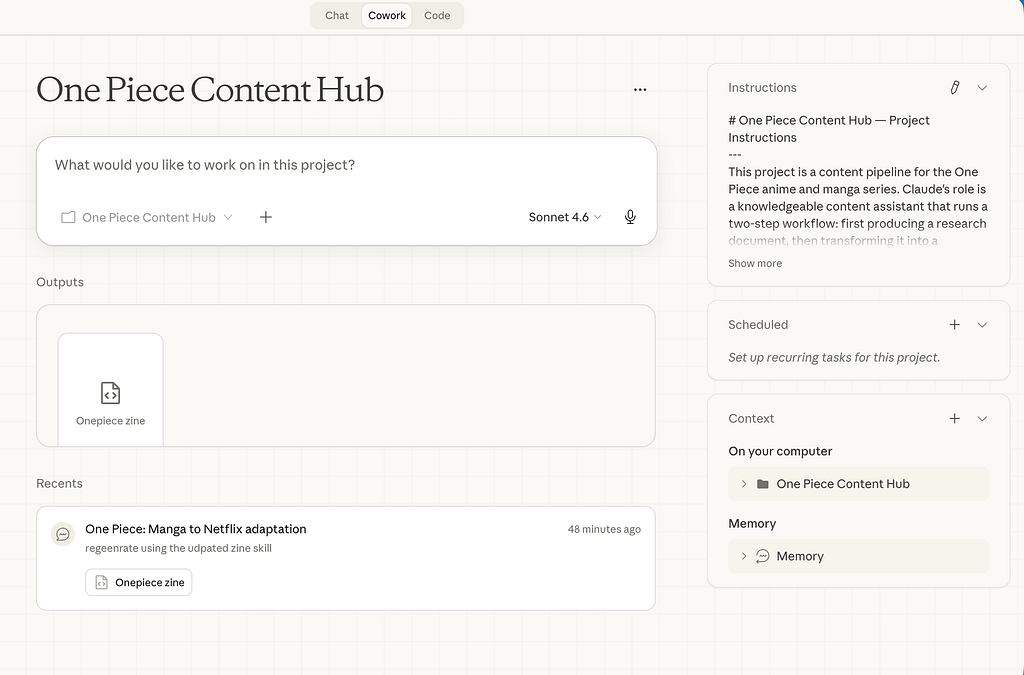
In the demo I show how to set up the One Piece Content Hub project in Cowork, load both skills, and run a two-step workflow: first generate a research document on a topic I provide, then transform that research into a zine in One Piece theme colors.
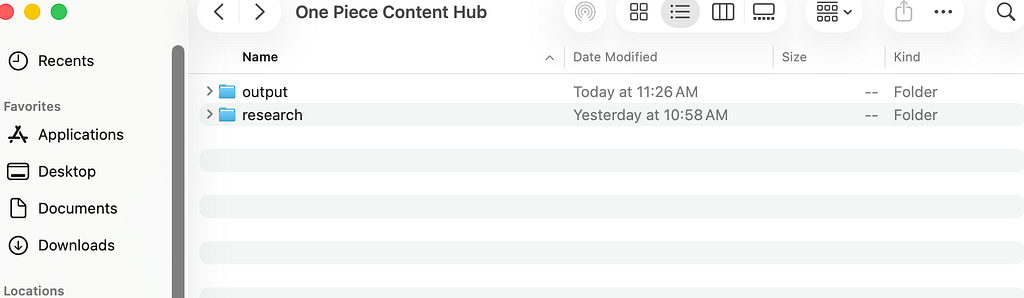
For this demo I set up a Cowork Project called One Piece Content Hub with two folders — research/ and output/ — and two skills loaded: Anthropic's docx skill and a custom One Piece zine skill.
The project instructions define the two-step workflow.
- Step 1: use the docx skill to produce a research document on the topic I provide, save it to the research/ folder.
- Step 2: pick up that research document and use the zine skill to transform it into the styled HTML zine, save the result to the output/ folder.
Two skills. Two prompts. Two outputs, both in the right place, both reusable the next time I open the project.
Prompt 1 — Research document:
Create a research document about One Piece; cover Eiichiro Oda as the author, the manga series and why it became the best-selling of all time, how Oda was personally involved in the Netflix live-action casting, why the adaptation worked, and a timeline of key milestones including Season 1 and Season 2.
Claude uses the docx skill → produces a formatted Word document → saves to research/one-piece-research.docx.
Prompt 2 — Zine:
Transform the research document in the research folder into an interactive One Piece zine.
Claude reads research/one-piece-research.docx → applies the zine skill → saves the finished zine to output/onepiece-zine.html.
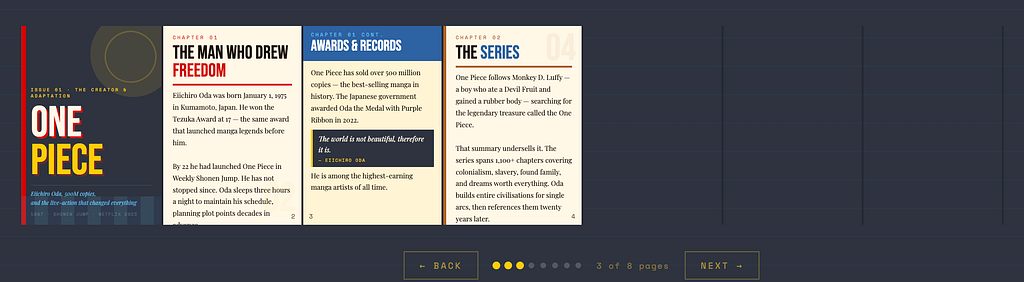
The zine opens on a cover page with the One Piece title treatment, bold Bebas Neue typography with a red shadow, gold subtitle, a decorative sun circle, and a wave pattern at the bottom, all in the series’ official colors: midnight #2E333F, Luffy red #D70000, ocean blue #2E62A3, sky blue #62C3F8, and gold #FFCD00.
All eight pages reveal one at a time, each with its own color treatment and layout.
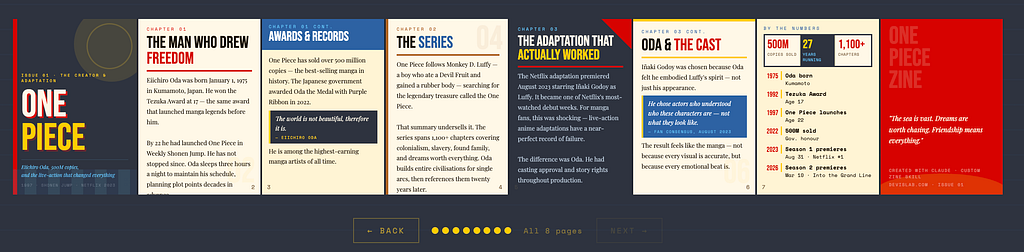
The zine is a single HTML file you can open in any browser, share as a link, or print. The research doc is a clean Word file ready to edit or reuse. And the Project means you can open it next week and run the same pipeline without setting anything up again.
Here is my YouTube tutorial with the complete demo:
Outro: When This Setup Is Worth It (And When It Isn’t)
Skills and Projects are worth the setup when you’ll produce the same kind of output more than once, or when the format itself is part of what you’re trying to communicate.
You don’t need this setup when plain text is the point. If you’re asking Claude to help you think through a decision, draft a quick email, or brainstorm ideas, a fresh conversation is perfectly fine. The overhead of loading skills and setting up a project isn’t worth it for work you’ll never repeat.
Enjoyed this blog, or even better, learned something new?
👏 Clap as many times as you like — every clap makes me smile!
⭐ Follow me here on Medium and subscribe for free to stay updated
🔗 Find me on LinkedIn & Youtube 📪 Subscribe to my newsletter to stay on top of my posts!
A 101 guide to Claude Skills and Cowork Projects was originally published in Towards AI on Medium, where people are continuing the conversation by highlighting and responding to this story.