A weekend, $6 of Baseten credits, three workloads, three open models, and one preliminary opinion: receipts matter more than recommendations.
The most interesting conversation in software right now isn’t about model capability. It’s about what happens after model capability stops being the thing that decides anything.
Open models — DeepSeek V3.1, gpt-oss-120b, Kimi K2.6 — have collapsed into a tight band on most public benchmarks. The interesting question isn’t “which one is best.” It’s “given this workload, where do the serving tradeoffs actually bite?” That’s a real architecture question, and it doesn’t have a clean answer yet.
So I built a small tool to figure out how I’d answer it.
I’m calling it Frontier. It’s three workloads, three models on Baseten’s Model APIs, a rule-based recommender, a live benchmark, an analytics tab that closes the loop, and a downloadable memo. It cost me $6 in Baseten credits and a few weekends.
This piece walks through what it does, why it makes the choices it makes, and what I’d build next.
Why I built it
Honestly? Curiosity.
I’ve been spending a lot of time researching inference architecture lately, and a few patterns kept jumping out:
- Capability is converging faster than predicted. The tier list of open models has flattened. The next 12 months won’t be decided by who beats MMLU by another 1.4 points.
- The load-bearing decision has moved down a layer. Now it’s: which model, on what infra, under which constraint, for which workload. That’s an architecture conversation, not a model conversation.
- Most of what I read online stops one level too high. “DeepSeek V3.1 is a strong choice for X” — fine, but is it strong because of cost? Because of TTFT? Because the cached-input pricing makes the math work at volume? Those three answers route to different deployments, and the recipe has to commit.
Reading more about it didn’t get me what I wanted. Building something did.
The shape of the app
Three screens, mapped to the three things a discovery conversation should produce:
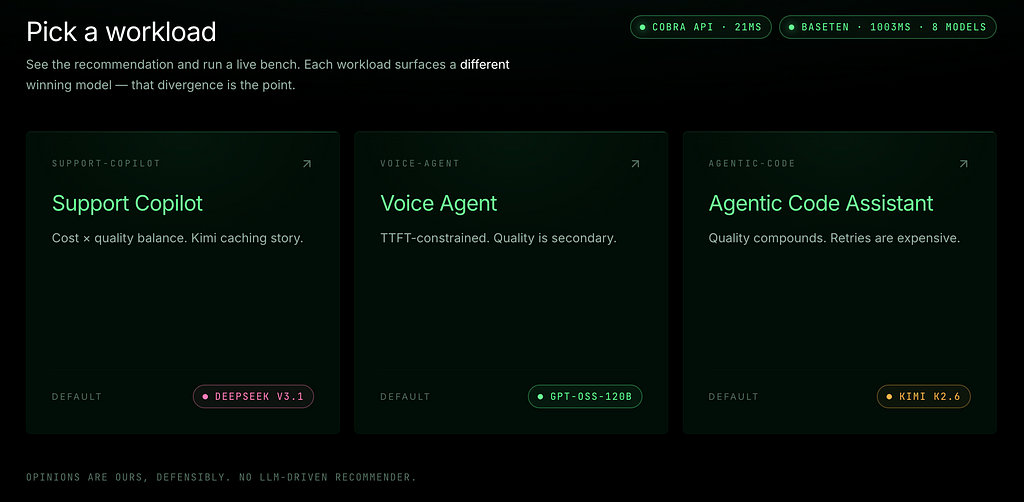
- Workload picker — three real-shaped use cases. Each one lands on a different recommended model. The divergence is the point.
- Architect & Bench — a recommender (rule-based, no LLM) plus a live sweep against Baseten’s Model APIs. Streamed per-call.
- Analytics + Compare + Memo — history, gaps, tradeoffs across runs. Plus a downloadable PDF a customer could circulate internally.
Let me walk through each.
1 · Pick a workload — different models on purpose
Three workloads, picked because they punish different things:
Workload
Default
Where the constraint bites
Support Copilot
DeepSeek V3.1 (Kimi K2.6 at high volume)
Cost × quality balance. Pinning the KB unlocks Kimi’s cached-input discount.
Voice Agent
gpt-oss-120b
TTFT-constrained. The TTS pipeline starves if the first token is late.
Agentic Code Assistant
gpt-oss-120b
Quality compounds across turns. Retries get expensive.
A one-model recommendation across all three would be lazy. The point of having three workloads in the same app is to make the divergence visible.
2 · The recommender — defensible, not probabilistic
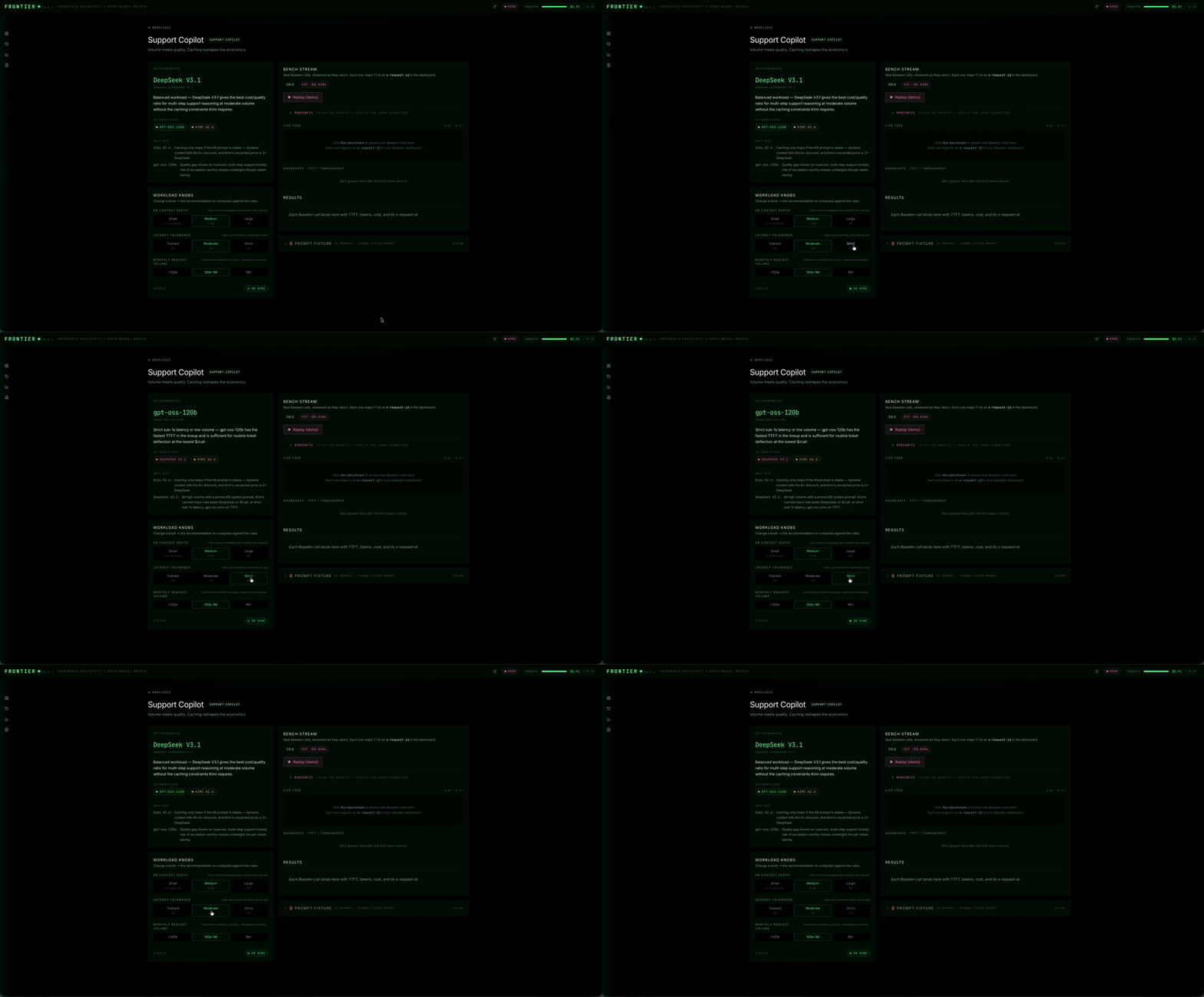
Knobs on the left of each workload page: things like KB context depth, monthly volume, latency tolerance, autonomy level. Move a knob, the recommendation re-computes.
There is no LLM in the recommender. That’s a deliberate choice.
Why no LLM?
Because the moment you put an LLM in the recommendation loop, you’ve made the customer’s choice feel like vibes. You’ve also made the recommendation un-auditable — “the model said so” is not an architecture decision a customer can defend internally.
The recommender is a small set of hand-written rules. If it tells me Kimi wins on a large-context support workload at high monthly volume, it’s because the cached-input price flips the economics, and I can point at the line in configs/pricing.yaml that makes that true. Every rule has a "why not" for the alternative models. The whole thing fits in one Python file you can read end-to-end.
That’s the contract: defensible, not probabilistic. For an architecture decision, those are different categories.
Of course, easy to add LLM-driven recommendations in the future, which makes a lot of sense to do so in parallel of the existing recommender.
3 · Run the bench — live Baseten traffic, every row reconcilable
Click Run benchmark and the results stream in over Server-Sent Events. Every row is one prompt against one model, with TTFT, tokens/sec, total ms, $/prompt, and — critically — the Baseten x-request-id from the response headers.
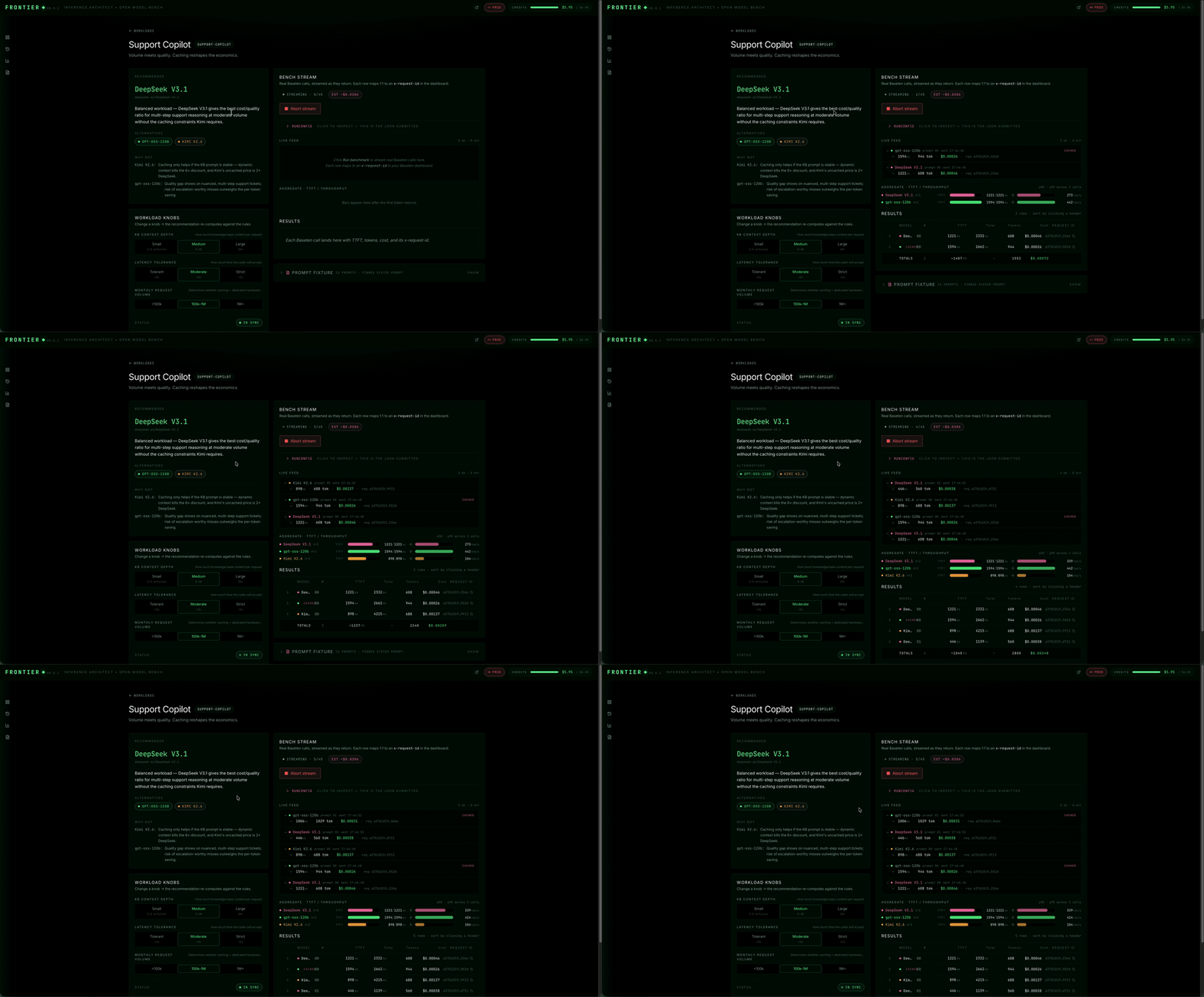
For every call the bench captures: the request ID from Baseten’s response header, time-to-first-token measured client-side from POST to the first streamed token, total wall-clock, input and output token counts, and a flag for whether Baseten matched the input against its cache (which is what triggers the discounted price tier). The aggregate bars at the top roll those per-call numbers into p50 and p95 TTFT plus median throughput per model — that’s where you read what’s actually happening, not what the prior says.
Worth being explicit about what this bench is and isn’t doing, because it’s the single most important framing in the whole app:
- What the bench does: validates that the recommended model can serve the workload. Behavior, latency, error rate, per-call cost at the test scale. If Kimi’s TTFT was 5 seconds when the recommender said it’d be sub-second, the bench would catch that and force you to revisit the recommendation.
- What the bench doesn’t do: validate the cost projection at the customer’s stated scale. Cached-input pricing only realizes its discount across thousands of cache hits — you can’t measure that from fifteen prompts. The recommender is doing the projection; the bench is doing the qualification. They’re complementary, not redundant, and conflating them is the easiest way to lose a customer’s trust on a discovery call.
This distinction will surface again on the Compare tab, where DeepSeek will look like the cost winner for Support Copilot at bench scale even though the recommender picks Kimi for our 1M+ scenario. That’s not a bug — that’s two signals doing two jobs. More on that in §7.
A few other things about the numbers, because they aren’t always obvious from the bars:
- TTFT is wall-clock from POST to first token, measured server-side. It includes Baseten’s routing + the Model API’s first-token latency. Doesn’t normalize for region — running this from Europe against us-east-1 Baseten? Add the round trip.
- Tokens/sec is a decode-only estimate: output_tokens / (total_ms - ttft_ms). Comparative signal across models, not absolute throughput.
- Cost uses cached-input pricing whenever Baseten’s response says cached_tokens > 0. Kimi's cached discount is the entire pricing story for support copilot at volume. The cost column reflects that the moment the cache warms — but at fifteen prompts, it usually hasn't warmed enough to swing the per-call cost. That's the math the recommender does, and the projection lives in the memo.
Click any row, you see the exact prompt that was sent. Trust starts with being able to point at the source text. Persistence layer is SQLite — re-running the same RunConfig replays from cache, so I built this whole portfolio piece on six dollars of Baseten credits.
4 · Reconciliation — the trust slide
This is the feature I’m most opinionated about.
Every bench run links straight to that model’s Metrics tab in your Baseten dashboard. Same model, same window, same percentiles, two independent dashboards saying the same thing.
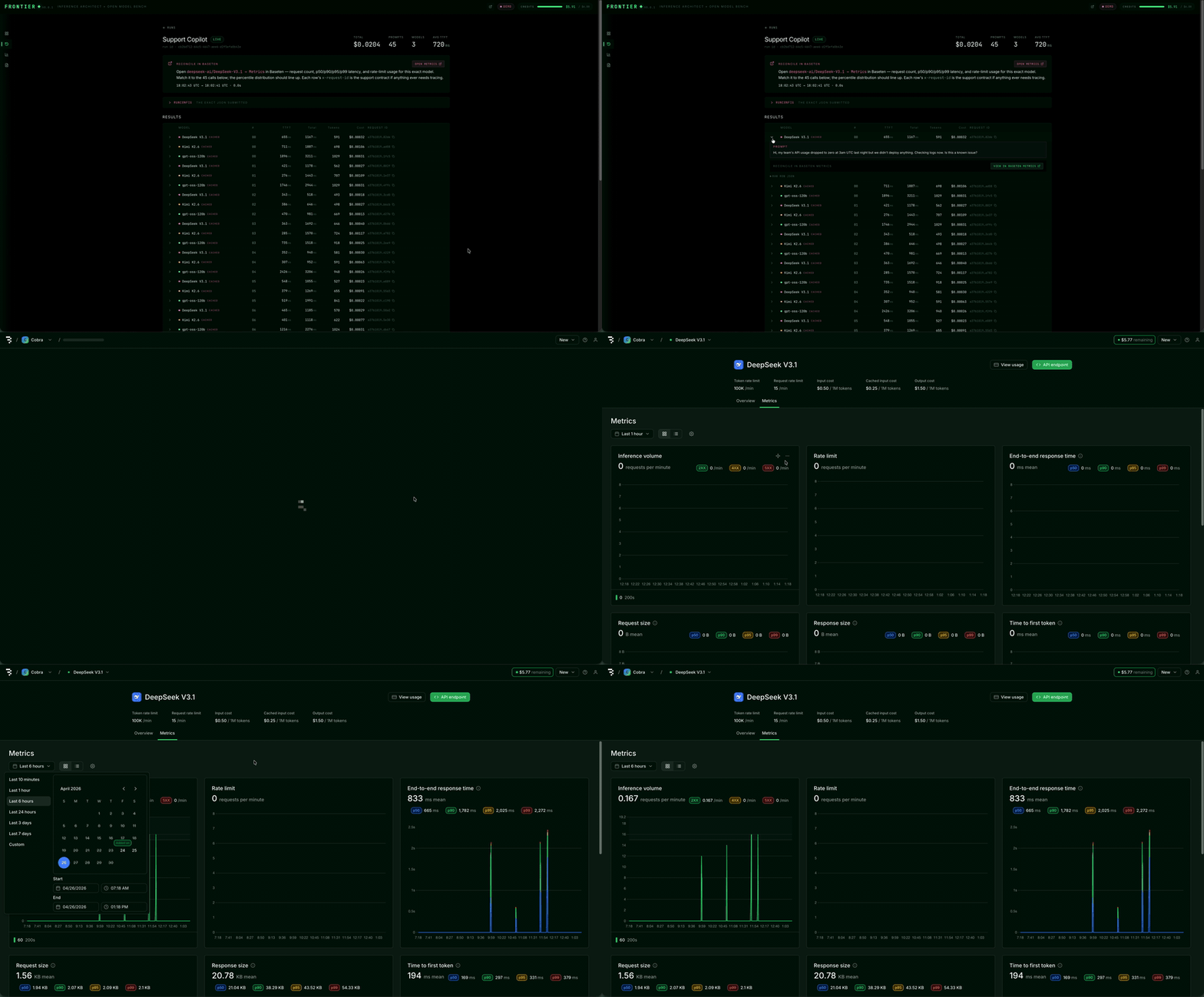
If a customer can’t reconcile the number against their own dashboard, the trust never builds. So the app makes reconciliation a single click — and the memo (more on that below) calls out the UTC window explicitly.
A note: per-request logs aren’t a Baseten Model APIs feature. They live one tier up at dedicated deployments. Knowing where that line is, and walking a customer up to it deliberately, is part of the same conversation.
5 · Analytics — closing the loop
A single bench is one data point. Discovery needs history, gaps, tradeoffs. The Analytics tab is where one bench becomes a body of evidence.
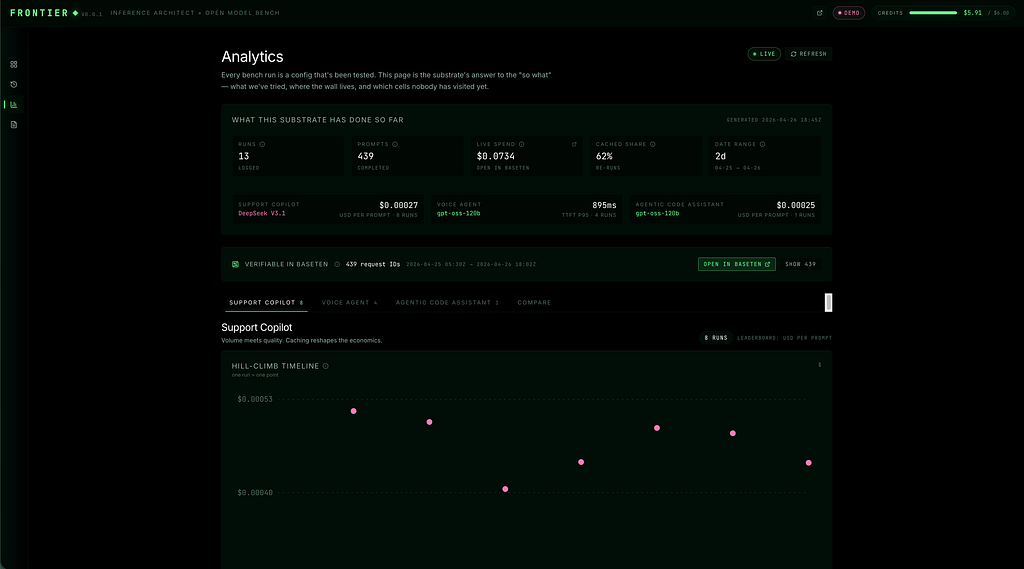
Hero ribbon — runs, prompts, live spend, cached share. The spend tile opens Baseten billing in a new tab, so I’m reconciling against an invoice, not against a number I’m asking you to trust.
Hill-climb timeline. Y-axis is the workload’s leaderboard metric — best-so-far, lower is better. X-axis is run order. Each dot is one run, colored by the model that drove it. Green ring = a new best. The shape is the story: a fast drop early means the rules engine landed quickly.
Cost-vs-latency scatter. X-axis is TTFT p95 in milliseconds — the only latency number a voice agent cares about. Y-axis is dollars per thousand output tokens. Color is model. Bottom-left wins. The cluster shape tells you whether the tradeoff is binary — two clear camps — or continuous, a Pareto curve where every step costs you the other axis.
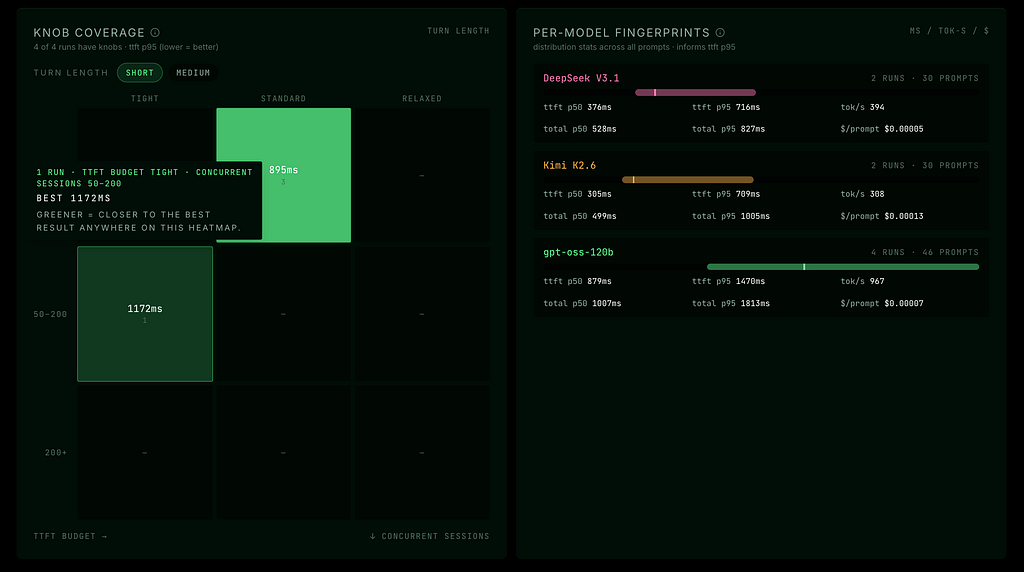
The heatmap. This is the gap finder. Two of the workload’s knobs cross each other (KB depth × monthly volume, for support copilot). Cell color = best metric we’ve found in that corner. Empty cells = corners we haven’t touched. Empty cells are exactly the structured “what should we run next” I want to bring into a customer call.
6 · Compare — one panel per cross-workload question
Discovery usually spans more than one workload, and stacking three single-workload sections doesn’t make a comparison — it just makes a longer page. The Compare tab is built around one panel per cross-workload question.
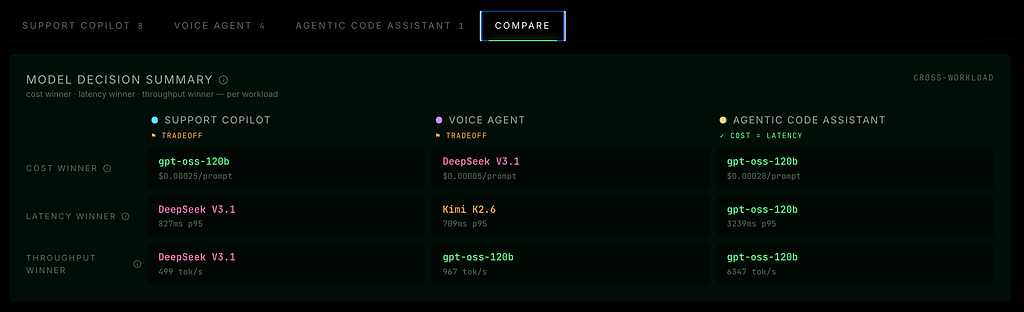
Decision summary. Three rows: cost winner, latency winner, throughput winner. One column per workload. ✓ means cost and latency agree → clean recommendation. ⚑ means they disagree → that’s the tradeoff conversation, and exactly what the recommender’s knobs resolve.
Hill-climb timeline overlay. Y is each run’s % above that workload’s best run. X is normalized run order — so workloads with five runs and twelve runs share the chart width; what matters is the shape of each climb. Dots near zero = the recommender keeps converging on the same answer. Dots scattered upward = the bench is genuinely searching. Different shapes per workload tell you which workloads are settled and which are still in motion.
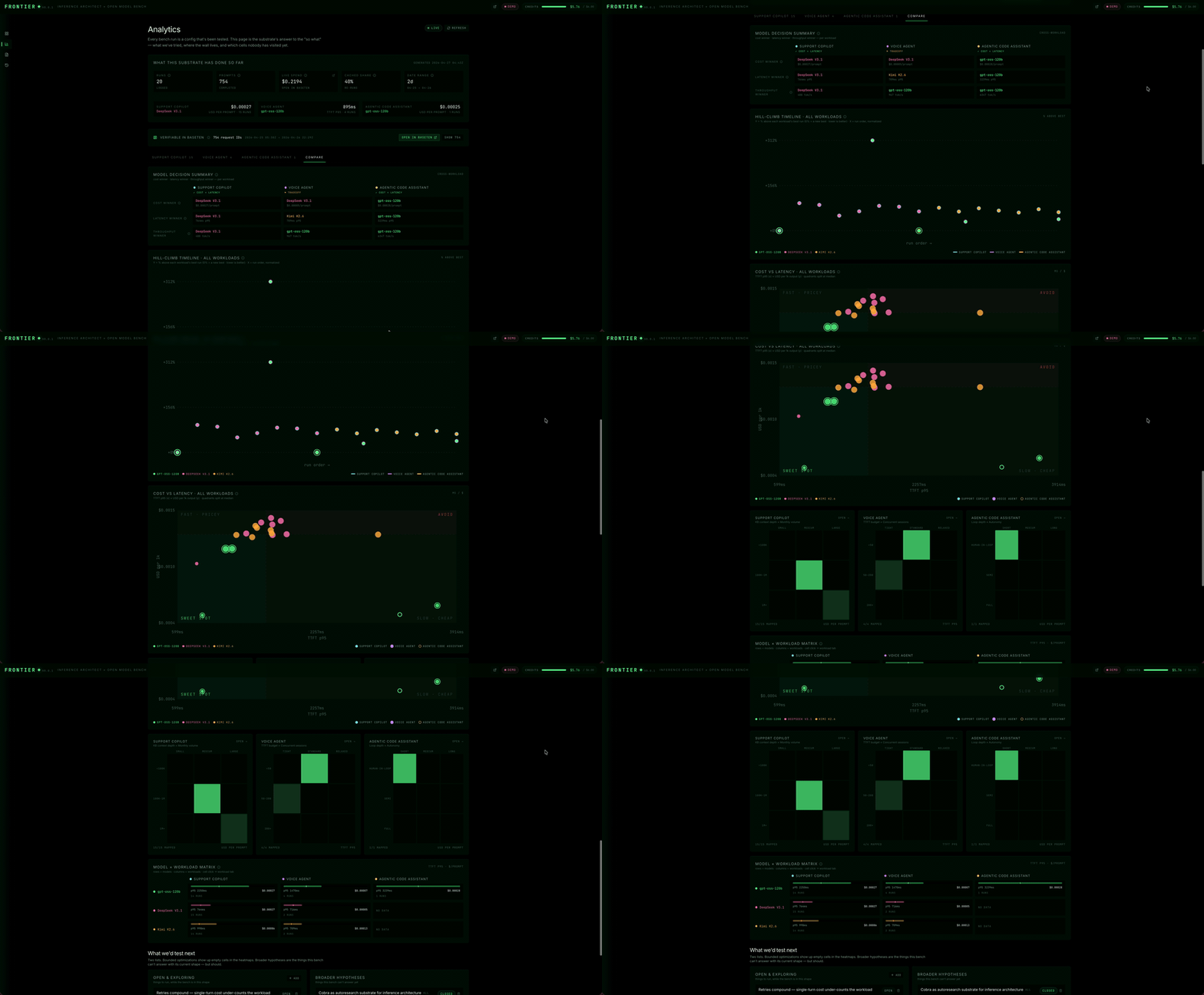
Cost-vs-latency overlay. Same axes as the per-workload scatter, but every workload on one plot. Color is model, marker shape is workload. A solid green dot bottom-left is the sweet spot. A hollow gold dot stranded top-right means agentic code is on a different point of the Pareto frontier. That’s the visual proof of why “one model, one config” isn’t honest SA work.
Heatmap row. One mini heatmap per workload, side by side, same knob axes. The hot corner moves as you scan across — that’s the picture of a single model recommendation falling apart workload by workload. Click any cell and it deep-links into that workload’s tab. That’s the discovery move: “let me pick this thread up over here.”
7 · So what does a real decision look like?
This is the part I almost left out, and that would have been a mistake. Everything above shows you the machinery — recommender, bench, reconciliation, analytics, Compare — but it doesn’t land on a real recommendation for a real customer. And it’s also where the most important framing in the whole app gets concrete.
The customer: A SaaS company running an in-product support copilot. Over a million tickets a month, deep knowledge base — twenty-plus articles per request. Conversational latency budget; sub-second isn’t required.
The knob settings: KB Context Depth → Large · Latency Tolerance → Tolerant · Monthly Volume → 1M+
What the recommender does: Lands on Kimi K2.6. The card spells out why: at that scale with the KB pinned, Baseten gives a 6× cached-input discount on the system prompt — $0.16 vs $0.95 per million tokens. That flips Kimi from the priciest model in the lineup to the cheapest at a million calls a month.
Cached input rate per the Kimi K2.6 Model APIs page in the Baseten dashboard (verified 2026–04–26); aligns with Moonshot’s published K2.6 cached-input rate. Baseten’s public pricing page lists K2.5 today; K2.6 cached pricing surfaces in the dashboard. Cached-input billing on Model APIs went live April 17, 2026 per Baseten’s changelog.
What the bench actually shows:
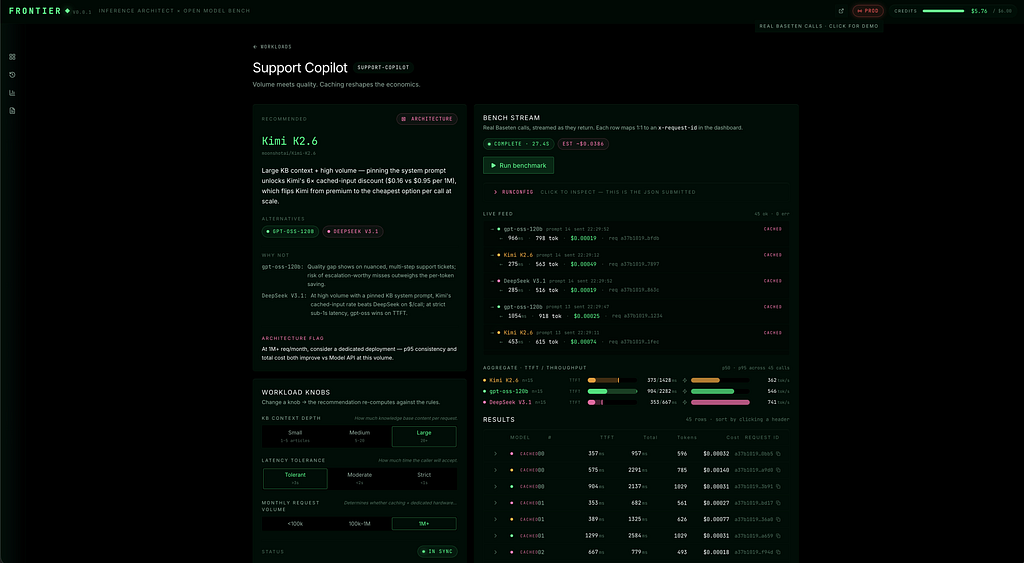
Forty-five real Baseten calls. Per-call request IDs, time-to-first-token, total wall-clock, and cost — all reconcilable to the Baseten dashboard.
Now flip to the Compare tab and look at the cross-workload Decision Summary:
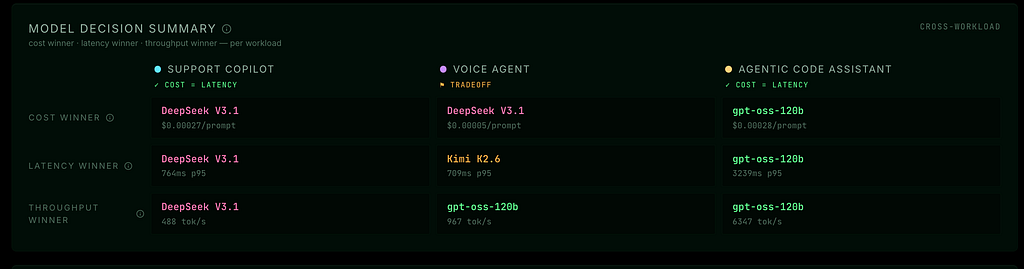
Here’s the part that looks like a contradiction — and isn’t. At the bench scale, DeepSeek wins Support Copilot on cost, latency, and throughput. Clean ✓ alignment, no tradeoff. So why didn’t the recommender pick DeepSeek?
Because the bench and the recommender are doing two different jobs. I flagged this in §3, but it’s worth restating because it’s the load-bearing claim of the whole app:
- The bench’s job is qualification. Forty-five real calls confirm that Kimi can actually serve this workload — TTFT is in range, error rate is zero, per-call behavior matches the prior. If Kimi’s TTFT was 5 seconds when the recommender said sub-second, the bench would catch that and force a different recommendation.
- The recommender’s job is projection at the customer’s stated scale. At fifteen prompts, the cached-input discount can’t materialize — there aren’t enough cache hits to swing the per-call cost. The recommender does the math at a million calls a month using pricing.yaml and the cached vs uncached rates Baseten publishes. At that volume, Kimi flips from priciest to cheapest. That's a math problem, not a measurement problem.
Both signals belong in the conversation. Conflating them is the easiest way to lose a customer’s trust. Naming the distinction is the easiest way to build it.
What ends up in the memo for this customer:
- Pick: Kimi K2.6
- Why: Cached-input pricing × pinned KB × ~1M+ requests/month
- Why not DeepSeek: Bench-scale winner; cedes the cached discount at projected volume
- Why not gpt-oss-120b: TTFT advantage doesn’t pay back when latency tolerance is conversational
- Architecture flag: At 1M+ req/month, escalate from Model APIs to a dedicated deployment — both p95 consistency and total cost improve at this volume
The rest of the panels back the framing up. Voice Agent shows ⚑ TRADEOFF — DeepSeek wins on cost ($0.00005/prompt, the cheapest number on this whole grid), but Kimi wins on TTFT p95 (709 ms). For a voice workload that’s a real fight, and the recommender’s job is to resolve it against the customer’s stated TTFT budget. Agentic Code shows ✓ COST = LATENCY with gpt-oss sweeping all three — clean recommendation, no tradeoff to manage. Different workloads land different ways. That’s the divergence the app exists to make visible.
The honest gap, and what I’d build next: the Compare tab today shows bench-scale measured cost without surfacing the projected scale-cost. The next iteration adds a “project at __ requests/month” toggle to Compare that recomputes the cost column using the same pricing.yaml rules the recommender uses. At that point the Compare tab and the recommender agree at the customer's chosen scale, and the customer can audit the projection math themselves. Naming the gap is part of the discipline; closing it is the next iteration.
For now, the contract is: bench measures, recommender projects, customer sees both. No magic, no vibes, no unilateral “trust me.” The recommendation is defensible because every claim has a number underneath it — measured or projected — and the customer can verify either.
8 · The memo
Customer-deliverable PDF. Picks N runs, makes the case in plain English, includes the reconciliation window and the “what we’d test next” column. This is what I’d generate after a discovery sweep that I might leverage with a customer — recommendation, receipts, next-N hypotheses.
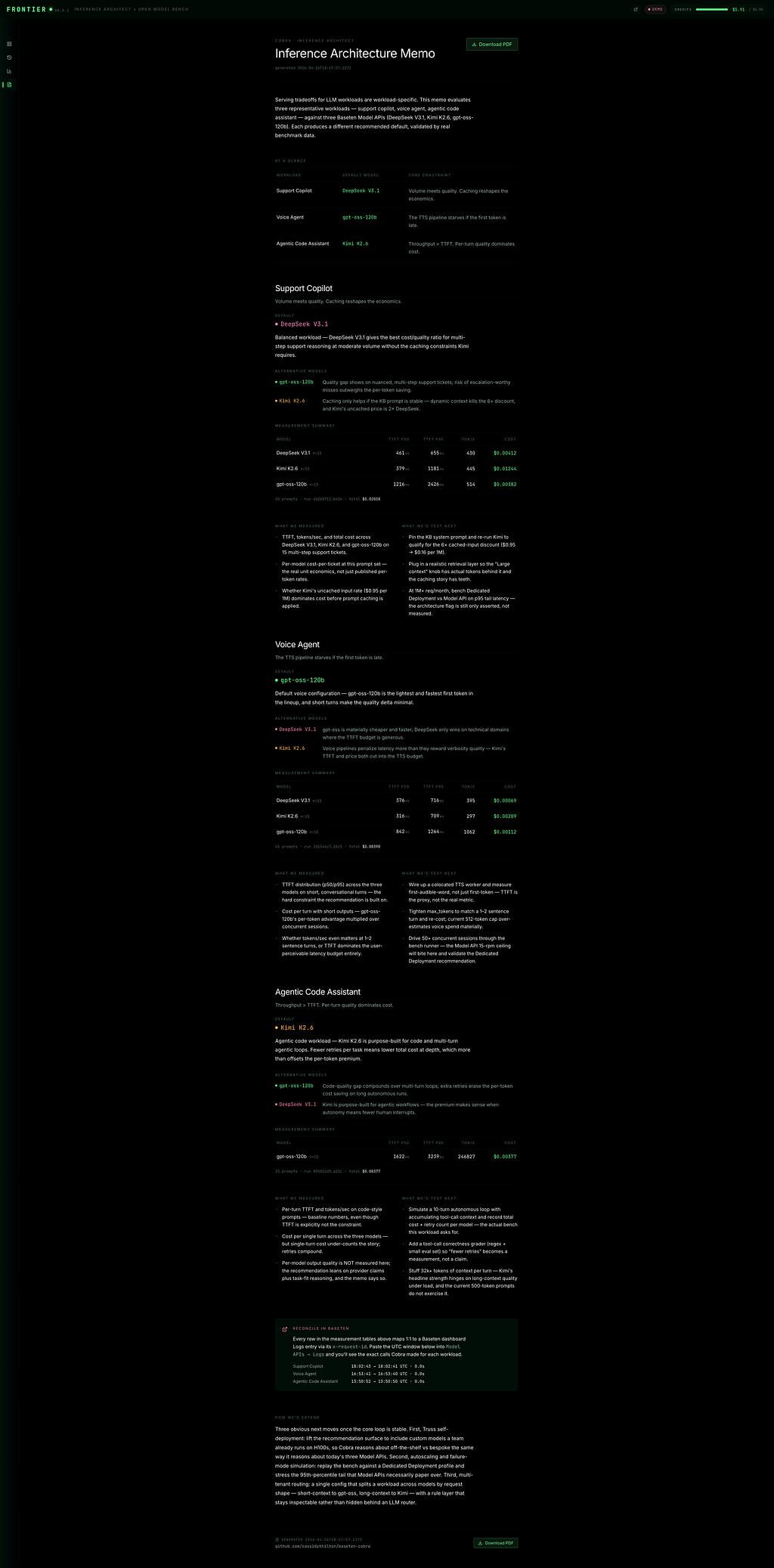
Because the artifact a discovery conversation should produce is not a slide deck. It’s a one-pager-with-charts a customer can defend internally without me in the room.
What I’d build next
These are the honest gaps. The path from portfolio piece to decision tool:
- Quality eval — the missing axis. Right now I track TTFT, tokens/sec, and cost. Quality is narrated in text. The next revision adds a small grader (rubric or LLM-judge) per workload — for agentic code, “did it produce a valid JSON tool call?” Latency-and-cost-only is honest about what it is, but it’s not a complete picture.
- Autoresearch loop. The heatmap’s empty cells are screaming for an agent. Feed unexplored knob combinations into a budget-capped sweep that runs the next bench automatically. That’s an autoresearch substrate scoped to inference architecture, not a generic “agent.”
- Custom-model lane via Truss. Quantized variants, fine-tunes, speculative decoding. Add a deployment_type: model_api | dedicated | truss discriminator and let the recommender fork on it. The "what if a Model API isn't enough?" branch.
- Dedicated-deployment comparison for voice + agentic. Model APIs are a fine early-stage story. Real voice at concurrent scale and real autonomous agent loops both need dedicated + predictable p95 — and the cost / reliability profile is genuinely different.
- MCP integration. Baseten ships an MCP server. The right next step is letting an LLM assistant drive this directly: “recommend a model for this workload, run the bench, download the memo” as a single tool call.
What I learned building this
Three things, useful even if you don’t care about Frontier the app:
1. Every “best practice” falls apart under volume math. Caching turns Kimi from third place to first place at the right monthly volume — but only if the prompt structure qualifies. The heuristic that “Kimi is the cheap one” is wrong by default and right at scale. The math has to commit.
2. The TTFT distribution matters more than the median. A good p50 with a brutal p95 is unusable for voice. Picking a model on average latency and finding out about the tail in production is one of the most expensive mistakes in inference architecture.
3. The receipts matter more than the recommendation. This is the one I came in skeptical of and left convinced of. If a customer can’t reconcile your number against their own dashboard, the trust never builds, and the recommendation becomes assertion. The reconciliation strip is the most important feature in the app, and it’s also the one that took the least code.
4. The bench and the recommender are doing two different jobs. The bench validates that the model can serve the workload at the test scale. The recommender projects economics at the customer’s stated scale. Conflating them is the easiest way to lose a customer’s trust on a discovery call. The decision walkthrough above hinges on naming the distinction out loud — the moment you do, the apparent contradictions in the data turn into evidence of discipline.
Closing
I built Frontier because the inference-architecture conversation is the most interesting one happening in software right now, and I’d rather keep building things in this space and getting better at this kind of reasoning than have an opinion about it from the sidelines.
If you build inference systems, run discovery for them, or care about the same converging-capability shift, I’d love to compare notes. Comments are open below — or come find me on the repo.
— Cassidy
Repo: github.com/cassidythilton/frontier-inference-architecture
I Built a Small Inference-Architecture Tool to Figure Out How I’d Actually Answer The Question was originally published in Towards AI on Medium, where people are continuing the conversation by highlighting and responding to this story.