Most teams don’t have a knowledge problem. They have a retrieval problem.
The answer already exists — in a doc, a query, a dashboard, or someone’s head.
The problem is nobody knows where to look.
In my previous article, I described building a persistent AI assistant that never forgets — a personal memory layer using markdown and local knowledge structures.
That system worked well for individual productivity. But it surfaced a harder question:
What happens when the knowledge isn’t just mine?
Teams accumulate enormous amounts of institutional knowledge — fundamental systems, business contextual knowledge, data tables, SQL queries, investigation playbooks, system architecture decisions, stakeholder quirks, metric definitions, business goals. And at scale, this isn’t dozens of artifacts — it’s thousands. Most of it lives in someone’s head, scattered across internal documents, internal chat threads, and tribal memory.
When that person goes on vacation, changes teams, or leaves the company, the knowledge doesn’t transfer. It evaporates.
So I tried something different. I built a structured knowledge graph for my team — using AI, markdown files, and a trust-scoring system — that any team member (or AI agent) could navigate from day one.
The problem: tribal knowledge doesn’t scale
My work involves driving analytics and science in the supply chain domain — inbound systems, outbound systems, and inventory management. The domain is dense. At a trillion-dollar company’s scale, there are thousands of data tables across dozens of systems, each with their own quirks — column naming inconsistencies, undocumented filters, deprecated fields that still appear in dashboards, tables that look identical but measure different things.
A new team member joining this space faces a brutal onboarding curve. Not because the work is conceptually hard, but because the context required to do the work correctly is scattered and unwritten.
I watched this pattern repeat:
- Someone asks “which table has weekly inventory by warehouse?”
- Three people give three different answers
- Two of those answers are outdated
- The correct answer requires a specific filter that nobody documents
Multiply this across hundreds of tables and dozens of workflows, and you get a team that spends significant time rediscovering what was already known. Some might argue the fix is a better onboarding document — but the problem isn’t limited to new joiners. Even team members who’ve been in the space for years struggle to find the latest source of truth, because the real question is: where do I even start looking?
The design: a structured vault
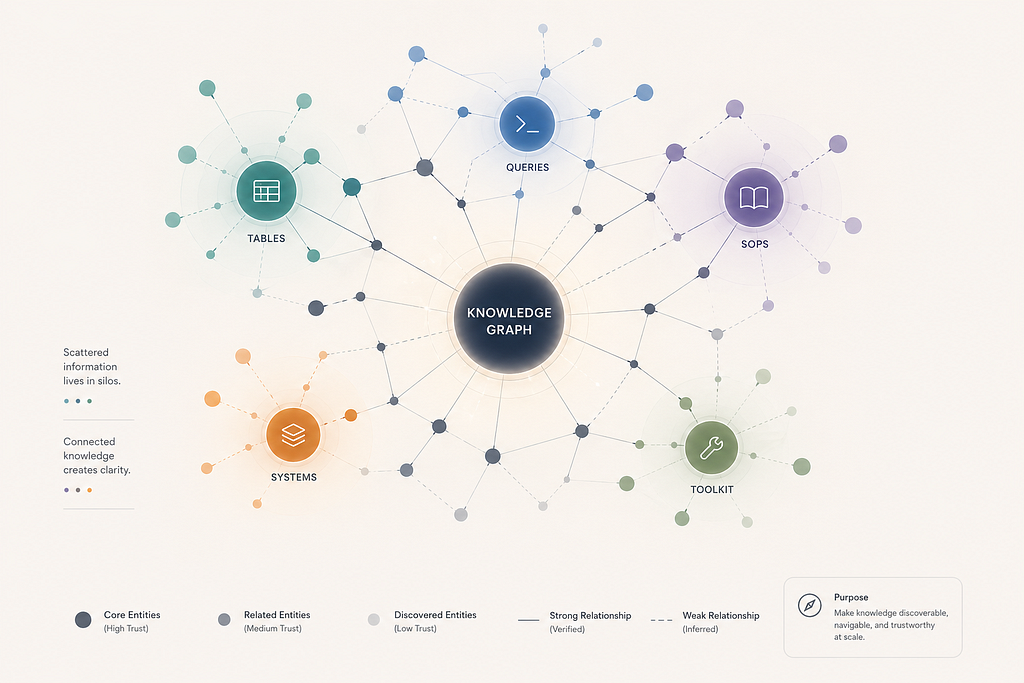
The knowledge graph is built entirely in markdown. No proprietary tools. No databases.
Instead of trying to centralize everything into a single system, I broke the problem into simple, composable units.
The structure is simple:
- Tables → one file per table (schema, trust score, gotchas, related queries)
- Queries → reusable SQL templates organized by domain
- SOPs → step-by-step investigation playbooks linking tables and queries
- Systems → architecture docs for major platforms
- Toolkit → investigation guides, AI configurations, replication templates
Each file follows a consistent template. Each file links to related files. The graph emerges from the links.
Trust scores: not all knowledge is equal
This was the design decision that made the system actually useful.
Every table file carries a trust score in its metadata:
Score Trust Level Meaning 8–10 High Battle-tested — full schema, validated in 3+ real investigations 6–7 Medium Validated — columns confirmed via direct query 4–5 Low Documented — schema present but not yet battle-tested 2–3 Undiscovered Minimal — name and category only
This matters because in a large organization, not all documentation is equally reliable. An artifact written two years ago might describe a table that has since been restructured. A query template might reference columns that were renamed.
Trust scores make staleness visible. And more importantly, they make uncertainty explicit. They tell the reader: this file has been verified recently and used in real work versus this file exists but hasn’t been validated.
When I started, most of the vault was undiscovered. Over several weeks of active investigation work, tables graduated from Undiscovered → Low → Medium → High as they were used, validated, and enriched.
The distribution shifted from mostly stubs to a healthy pyramid — a growing base of high and medium enriched files, with low and undiscovered files shrinking over time.
How AI built (and maintains) the graph
Building hundreds of table profiles manually would take months. AI made it feasible in weeks. This relied on LLM-driven extraction, summarization, and linking across repositories and documents.
Here’s what actually happened — step by step:
Step 1: Map the people. I asked AI to find every person reporting up through my organization’s leadership — the full org tree. This gave me the universe of contributors whose work I needed to capture.
Step 2: Find their code. For each person, AI scanned the company’s code repositories — every package, every folder they’d contributed to. For each discovery, it created a file logging the core purpose. Thousands of folders and 5,000+ files appeared.
At that point, the problem stopped being discovery. It became navigation.
Step 3: Find their data. AI then searched for queries, data tables, and any analytical work these individuals had done in the past year. Each discovery got its own file with context. 2,000+ more files appeared.
Step 4: Enrich from documents. AI crawled every accessible internal document published by these individuals — design docs, runbooks, analysis write-ups — and used them to enrich the context in the files from Steps 2 and 3. Stubs became rich profiles.
Step 5: From creation to maintenance. Once the base layer was built, the system shifted from creation to maintenance — indexing, cross-linking, automated refresh, and continuous enrichment. Scheduled jobs pull fresh table metadata weekly, scan for new code commits, and detect org changes automatically. Every newly published internal document enriches existing vault files with clear date stamps. And when running a real investigation, AI identifies holes in written procedures, searches the indexed vault for the right information, and updates the procedure on the fly. The SOPs improve as a byproduct of doing real work.
These steps map to four conceptual layers:
- Scaffolding (Steps 1–3): Build the initial universe of files from people, code, and data
- Enrichment (Step 4): Deepen stubs into rich profiles using existing documentation
- Cross-linking: Connect files bidirectionally — tables link to queries, queries link to SOPs, SOPs link to system docs. Graph connectivity — the percentage of files linked to at least one other file — went from single digits to near-total.
- Living maintenance (Step 5): Automated refresh, continuous enrichment, and self-healing procedures that make the vault smarter every time someone does real work
That last layer is the most important. Knowledge compounds instead of evaporating.
The graph effect
Once the vault reached critical mass, something shifted.
New investigations became faster — not because the AI was smarter, but because the context was already structured. Instead of spending 30 minutes figuring out which table to use, the AI (or a human) could navigate the graph: SOP → Step → Table → Query → Known Gotchas.
A multi-phase investigation that previously required deep tribal knowledge became navigable by anyone with access to the vault.
The graph also surfaced patterns that weren’t obvious before.
Before this system, every investigation started with uncertainty — where do I begin?
After the graph, investigations start with navigation — where in the graph does this live?
That shift alone changed how quickly the team could operate.
Tables that appeared in many investigations but had low trust scores became obvious enrichment priorities. Queries that were duplicated across SOPs got consolidated. System docs that contradicted each other got flagged.
What makes it portable
The vault is just a folder of markdown files. That’s the point.
It works in Obsidian (a markdown-based knowledge management app). It works in VS Code. It works as a Git repository. It works as input to any AI agent that can read files.
When I pointed a completely different AI interface at the same folder, it inherited the full graph — navigation, trust scores, cross-links, investigation history — without any reconfiguration.
The knowledge survives the tool.
Scalability
Once I pushed the graph to a shared repository, every single member of my 50+ person team cloned it within 24 hours.
Within two weeks, I ran three training sessions explaining how team members could maintain and extend the vault locally. The adoption was immediate — not because I mandated it, but because people could feel the difference. Investigations that used to start with “who do I ask?” now started with “let me check the vault.”
The signal wasn’t adoption. It was behavior change — people stopped asking “who knows this?” and started asking “where is this in the vault?”
The next step we’re working on: enabling the team to contribute back to the shared repository. Instead of exchanging knowledge through emails or chat messages — where it gets buried and lost — contributions go directly into the graph itself. The knowledge stays structured, discoverable, and permanent.
The cost of not having this
I’ve started thinking about this in terms of time recovery.
Before the vault, a typical investigation required:
- 15–30 minutes identifying the right tables
- 10–20 minutes finding or writing the right query
- 10–15 minutes discovering gotchas that someone else already knew
That’s roughly 30–60 minutes of retrieval overhead per investigation.
The work wasn’t hard. The lookup was.
Multiply across a team running several investigations per week, and the cost compounds quickly.
A conservative estimate: structured knowledge recovery saves the equivalent of one person’s full-time work per team per quarter — not by working faster, but by eliminating redundant rediscovery.
What this is not
This does not replace documentation systems or data catalogs. It fills the gap they consistently miss — how systems actually behave in practice.
Documentation platforms are good for narrative write-ups and long-form guides. Data catalogs are good for schema discovery. This vault captures the operational knowledge layer between them — the gotchas, edge cases, and tribal knowledge that formal systems rarely capture.
How any team can recreate this
The approach is not domain-specific. Any team with:
- recurring analytical workflows
- a set of data tables they query regularly
- investigation or debugging procedures
- institutional knowledge that lives in people’s heads
…can build a version of this.
The ingredients are:
- A consistent markdown template for each knowledge type
- A trust-scoring system to track reliability
- Cross-links between related files
- An AI layer to accelerate scaffolding and enrichment
- A feedback loop where real work enriches the vault
The hardest part isn’t building it. It’s maintaining it. The trust scores help here — they make decay visible, which creates natural pressure to keep things current.
A closing reflection
Knowledge management is often treated as a documentation problem. Write more docs. Update the internal pages. Create a runbook.
But documentation without structure is just text. And text without trust signals is just noise.
What made this system work wasn’t the volume of content. It was the graph — the connections between files, the trust scores that signal reliability, and the feedback loop that makes the system smarter with use.
Teams don’t fail because knowledge is missing.
They fail because knowledge doesn’t compound.
Graphs compound.
Trust compounds.
Structure compounds.
Tools don’t.
This is the fifth article in a series about career growth, product thinking, and building systems that compound. Previously: How I Built a Persistent AI Assistant for Work That Never Forgets.
How I Built a Knowledge Graph for My Team — Using AI and Markdown was originally published in Towards AI on Medium, where people are continuing the conversation by highlighting and responding to this story.