I built a meal-planning agent with LangChain’s deep agents. Turns out, a working kitchen is a good way to explain it.
Sit at the counter of a busy restaurant and watch what happens before a single plate goes out. There’s a person at the pass — the counter between the kitchen and the dining room — and they’re not cooking. They’re reading tickets off a rail, calling orders, checking plates, talking to the grill cook, talking to the sauté cook. A server leans in with a question and gets an answer in two words. Food is moving. Nothing seems rushed, exactly, but nothing stops either.
Now picture the same room with one cook. One pan, one knife, six tickets, a sauce to watch, onions to chop, a starter to plate. Something burns. Something gets forgotten. A ticket slides off the rail and nobody notices for ten minutes.
Same goal — feed the room — but one system scales and the other one doesn’t. Most AI agents today are the second kind: one model, one context window, one long list of things it’s trying to hold in its head. Fine for quick tasks. Not for anything real.
A deep agent is the first kind. It’s not a better cook. It’s a kitchen.
The problem: one agent, too many jobs
Give a regular AI agent a small job and it does fine. “Summarize this email.” “Find me a flight.” One question, a couple of tool calls, an answer. No problem.
Now give it a real job. “Plan my meals for the week around my allergies and what’s in my fridge, then build me a grocery list of the missing items.” Watch what happens.
It forgets what it’s doing. Halfway through Wednesday’s dinner, it’s lost track of Monday’s. There’s no plan written down anywhere — just a running conversation getting longer by the minute. The agent is trying to hold the whole week in its head while it works, and it can’t.
It drowns in its own notes. Every recipe it fetches, every ingredient list, every search result gets dumped into the same growing transcript. By the fourth recipe, the agent is rereading thousands of words of its own history on every step. It slows down. It gets expensive. It starts missing the allergy constraint you mentioned at the top, because that constraint is now buried twenty pages back.
It can’t focus. Planning meals is a different kind of thinking than building a grocery list. One is creative and comparative; the other is arithmetic. When both happen in the same context — same model, same conversation, same running memory — they interfere. The meal planning gets sloppy. The grocery list gets weird.
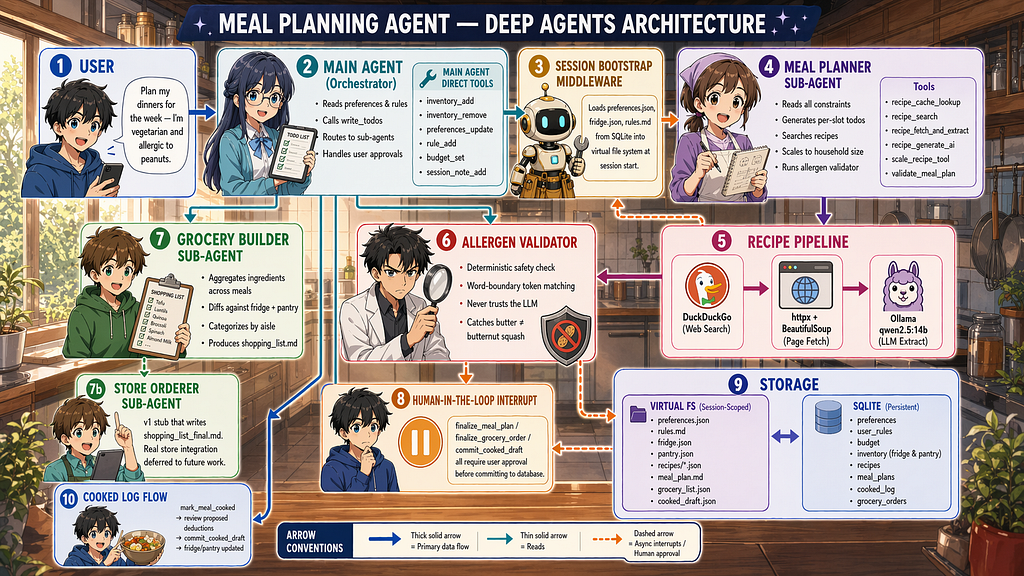
These aren’t bugs. They’re what happens when you ask one cook to run a dinner service. The fix isn’t a smarter cook. It’s a kitchen. We will see the implementation overview in the last section and find the codebase in GitHub.
If you are wondering why not orchestrate many agents using CrewAI or BeeAI kind of frameworks, the answer is near the end.
The Kitchen: Deep Agents
A deep agent is a kitchen. Not one person doing everything — a layout.
Deep agents give you this layout. You don’t build it from scratch; you write the recipes that run inside it. The rest of this section walks through each part of the kitchen, what it corresponds to in the framework, and why it’s there.
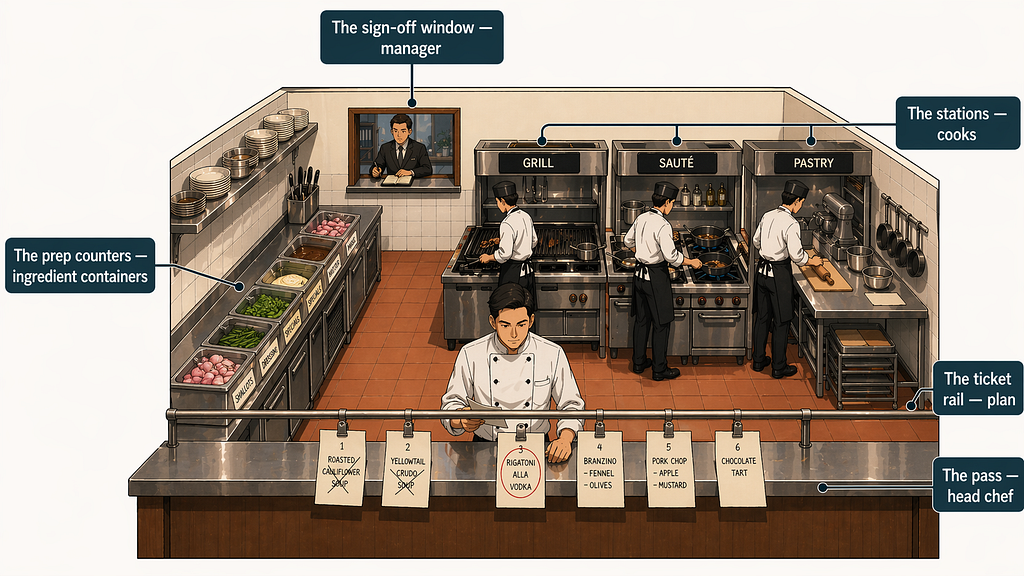
The head chef
The head chef stands at the pass and doesn’t cook. That’s the job.
They read the ticket, decide what needs to happen, call it out to the right station, check the plate when it comes back, and move on. They touch food only at the end — a wipe of the rim, a sprig of something, a final look. The cooking itself belongs to other people.
In a deep agent, this is the main agent. It’s the one the user talks to. It receives the request, figures out the shape of the work, and coordinates everything else. It does call tools directly for small things — jotting something on the rail, grabbing something off a nearby counter — the way a head chef might wipe a rim or taste a sauce on its way out. But the heavy cooking, the focused multi-step work, gets handed off.
This is the first shift in thinking the framework asks of you. You stop building an agent and start building a coordinator that has access to other agents. The main agent’s job isn’t to be good at everything. It’s to know where everything goes.
The ticket rail (Todos)
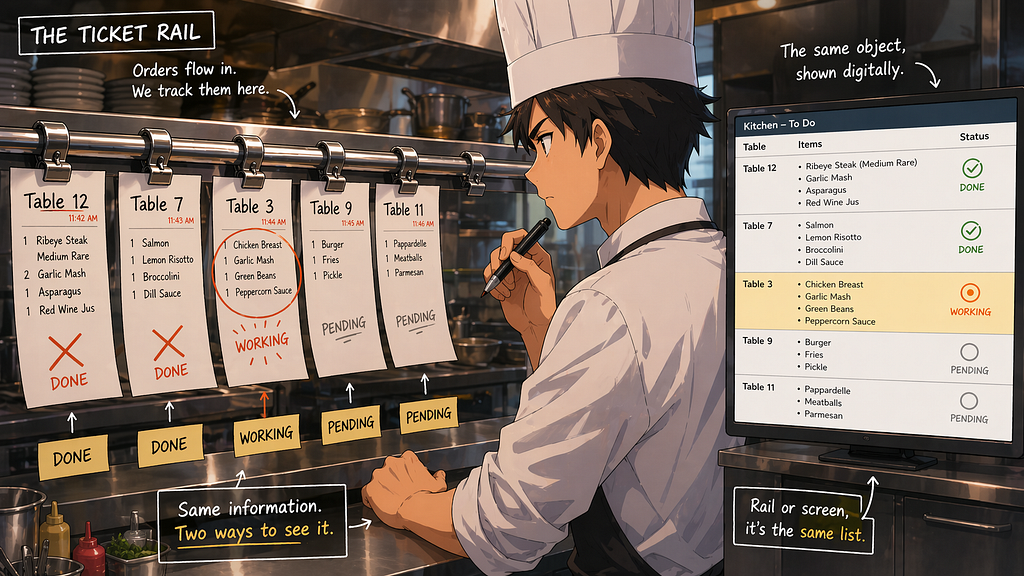
In the above image there is a metal rail with clips on it. Tickets hang in order. Table twelve, four covers, two with dietary notes. one-top, chocolate tart. The chef glances up, sees what’s fired, what’s working, what’s next. When a dish goes out, the ticket comes down.
The rail isn’t a notification system. It’s a visible memory. The chef doesn’t have to hold the service in their head because the service is right there on the rail. When they lose the thread — and they do, during a rush — they look up and find it.
In a deep agent, this is the write_todos tool. The agent writes down its plan, in its own words, as a list of steps — and updates it as it works. Each step starts as pending. As the agent finishes a step, it marks it done. If new work surfaces that wasn't in the original plan, the agent adds it. The plan grows and shrinks through the task the way tickets get hung and cleared through a service.
The key thing is that the plan is external. It lives in the agent’s state, not in its head. Every time the agent takes a turn, it sees the plan the way a chef sees the rail — something to glance at, not something to reconstruct. This is the fix for the forgetting problem. The agent stops losing the thread because the agent isn’t the thing holding the thread anymore.
The prep counters (Virtual File System — VFS)
Before service starts, the prep counters get stocked. Shallots minced and portioned into deli containers. Demi-glace ladled into ramekins and covered. Dressings squeezed into labeled bottles. The specials menu taped up where the line can see it. Butter softening in a tub near the grill.
During service, the chef doesn’t re-chop the shallots. They grab the container labeled shallots and use what’s already prepped. The counter holds things that are big, reusable, and not worth rebuilding every time you need them.
In a deep agent, this is the virtual file system — state["files"]. It's a dictionary of filenames to content, living in the agent's state. The agent has tools to list files, read files, write files, edit files. Long artifacts live here: notes, drafts, fetched data, working documents, reference material the agent keeps coming back to. The agent doesn't carry any of this in its conversation history. It sees a filename and reaches for it when it needs the content.
This is the fix for the drowning-in-notes problem. The agent’s conversation stays short because the big stuff lives on the counter, not in the conversation. The LLM sees “draft.md is on the counter”; it doesn’t see the five hundred lines of the draft every turn. It reads the file when it needs to, and otherwise leaves it alone.
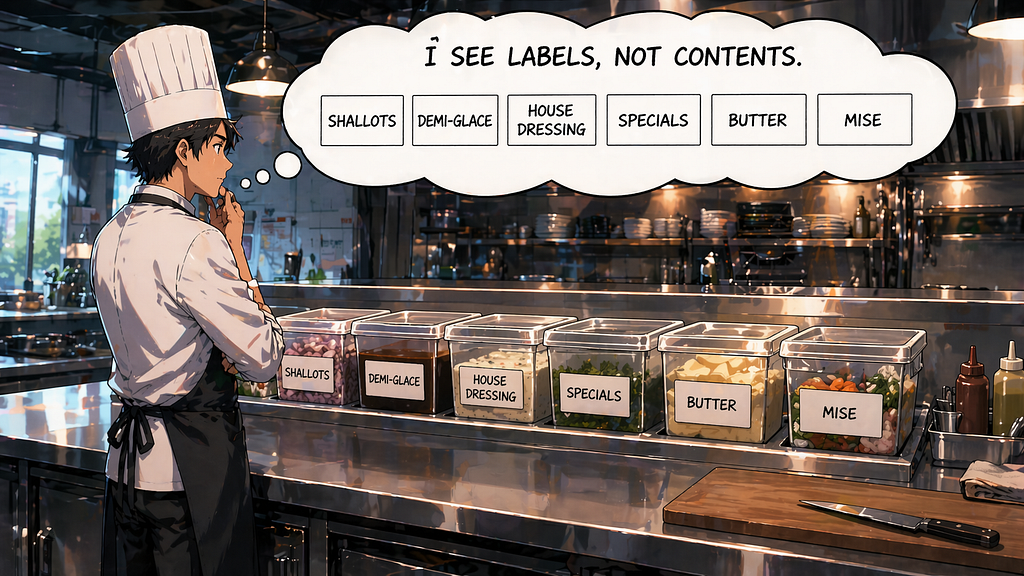
A fair question: if the counters hold all this prepped material, how does any of it get there?
How the counters get stocked before service (middleware)
The cook doesn’t walk into an empty kitchen at service and conjure containers of demi-glace. Someone has to do the prep before service starts.
The framework has a hook for exactly this, called middleware. Specifically, a before_agent hook that runs once, before the first LLM call of a session. You write it to pull whatever the agent will need — from a database, a file store, an API — and drop it onto the counter as files. By the time the agent takes its first turn, the counter is already stocked.
The reason this is middleware and not a tool: tools only run when the LLM decides to call them. You can’t rely on the LLM to ask “is the counter stocked?” every time — that’d be brittle and wasteful. Middleware is the thing that runs before the LLM is even in the room, guaranteed.
Bonus: Why the rail and the counters behave differently
If you ever write tools for a deep agent, you need to know this. The agent’s state holds two things — messages and Files, and they update under different rules — append and replace.
Messages append. When a tool returns a message, it gets added to the conversation. Nothing that was there before gets touched. Think of the ticket rail: every ticket that gets clipped on stays clipped on. This is the add_messages reducer — you hand back one new message, the framework stitches it onto the end.
Files replace (default operation). When a tool returns a files update, it overwrites the entire file dictionary. Think of the prep counter: when you put down a new container in a spot, whatever was in that spot is gone. If you return {"grocery_list.md": "..."}, the framework doesn't helpfully merge it with everything else on the counter. It replaces the counter with a counter that has one item on it. Everything else — the preferences file, the rules file, the recipes — vanishes.
This is the bug people hit. A tool writer, reasonably, returns only the file they changed. The next time the agent reads the counter, everything else is missing. The agent starts making decisions with no preferences, no rules, no inventory. It looks like the agent has gone insane. The actual cause is one tool that forgot to return the whole dictionary.
The pattern that avoids this is simple and mechanical. Every tool that updates files does these three steps (without custom reducers), in order:
files = dict(state.get("files") if state else {})    # 1. copy what's currently on the counter
files["grocery_list.md"] = new_content               # 2. change only what this tool touches
return Command(update={"files": files, ...})         # 3. return the whole copy
Copy, change, return whole. Never return a partial files dict. Never mutate the incoming dict directly — that’s a separate bug, because state is supposed to be immutable from a tool’s perspective.
The reason the two reducers behave differently isn’t arbitrary. Messages are an event log — a record of what happened, in order, and you never want to lose events. Files are a snapshot — the current state of the world, and the current snapshot fully supersedes the previous one. The rail collects. The counter photographs. Once you’ve seen it this way, the three-step tool pattern stops feeling like a gotcha and starts feeling like the only shape that could work.
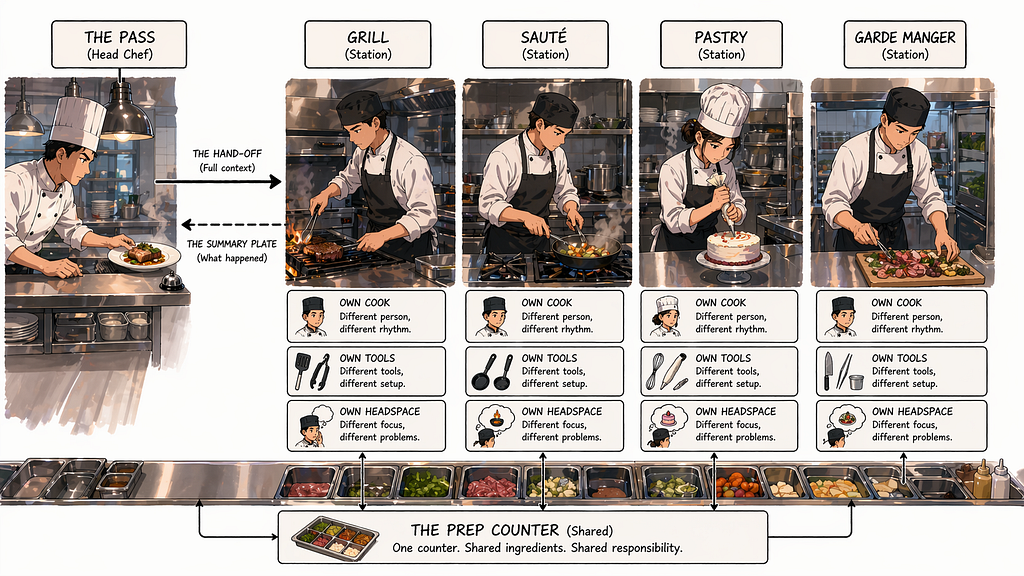
The stations (sub-agents)
The line has stations. Grill. Sauté. Pastry. Garde manger. Each station has one cook, one set of tools, one focus. The grill cook doesn’t plate desserts. The pastry cook doesn’t sear steak. When the expediter calls “fire two salmon,” it goes to sauté, and sauté handles it start to finish. The plate comes back to the pass when it’s done.
Two things make the stations work. First, focus — one cook, one job. The sauté cook isn’t also tracking the grill or the dishwasher. Second, isolation — the chaos at the grill doesn’t cross over to sauté. Each station is its own small world.
In a deep agent, stations are sub-agents. The main agent hands off a focused piece of work to a sub-agent dedicated to that kind of work. The sub-agent has its own system prompt (its training), its own tool subset (the equipment at its station), and runs in its own isolated LLM context (its own headspace). It works through the problem, writes its output to the prep counters, and returns a short summary to the main agent. “Done. Two salmon, medium, plated. Counter has the plating notes.”
This is the fix for the can’t-focus problem. Heavy, multi-step reasoning tasks get their own context — fresh, uncluttered, focused on one job. The main agent doesn’t get polluted by the five hundred tool calls the sub-agent made while working. It just gets the summary.
The other thing stations give you is parallelism of concern. The main agent can call one station, then another, and each one is a clean workspace for one kind of thinking. The main agent stays thin. The work stays deep where it needs to be deep.
How the pass actually calls a station
The mechanism, briefly, since you’ll see it in code.
The main agent calls a built-in tool called task. It looks like task("sauté", "fire two salmon medium"). Under the hood, the framework spins up a fresh sub-graph with the named sub-agent's system prompt, gives it access to the sub-agent's tool subset, and hands it the current file dictionary — the shared counter. The sub-agent runs its own agent loop until it's done. Whatever it writes to files persists. The last message it produces becomes the return value of the task call, which the main agent sees as a tool result.
The important thing: counter is shared, conversations are not. Both agents see the same prep counter. Neither sees the other’s internal conversation. That’s the isolation that makes the pattern work.
Bonus: Designing a good station
Most of the difficulty with sub-agents isn’t the mechanism — it’s deciding what each station should be and how to instruct its cook. Two questions carry most of the weight: what’s on the station? and what does the cook know?
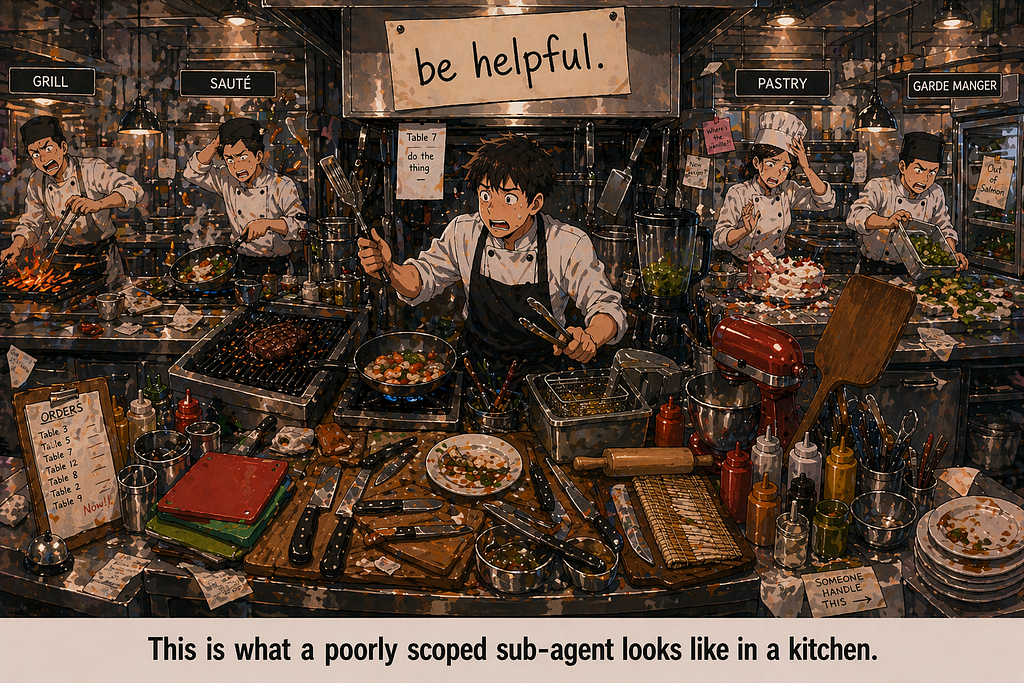
What’s on the station is tool scoping. You don’t hand the pastry cook a sear station. Each sub-agent should get only the tools it actually needs for its job. Narrow tool sets produce focused behavior. Wide tool sets produce agents that wander — a cook with every piece of equipment in reach will improvise, and improvisation isn’t what you want from a station during a rush.
What the cook knows is the system prompt. A sub-agent’s prompt isn’t the same shape as a main agent’s prompt. The main agent’s prompt is about coordination — here are your stations, here’s how to route work. A sub-agent’s prompt is about craft — this is exactly what you do, here are the rules you follow, here’s the format of your output. Specific. Narrow. Opinionated. If your sub-agent starts drifting — making decisions outside its lane, asking questions the main agent should be asking — that’s usually a prompt problem, not a model problem.
One habit worth forming: write the sub-agent’s prompt as if you were handing it to a new line cook on their first night. Not “be helpful.” More like “here’s your job, here’s your counter, here’s the output format, here’s when you stop and hand it back.” The more specific, the more reliable.
The sign-off (Human in the loop)
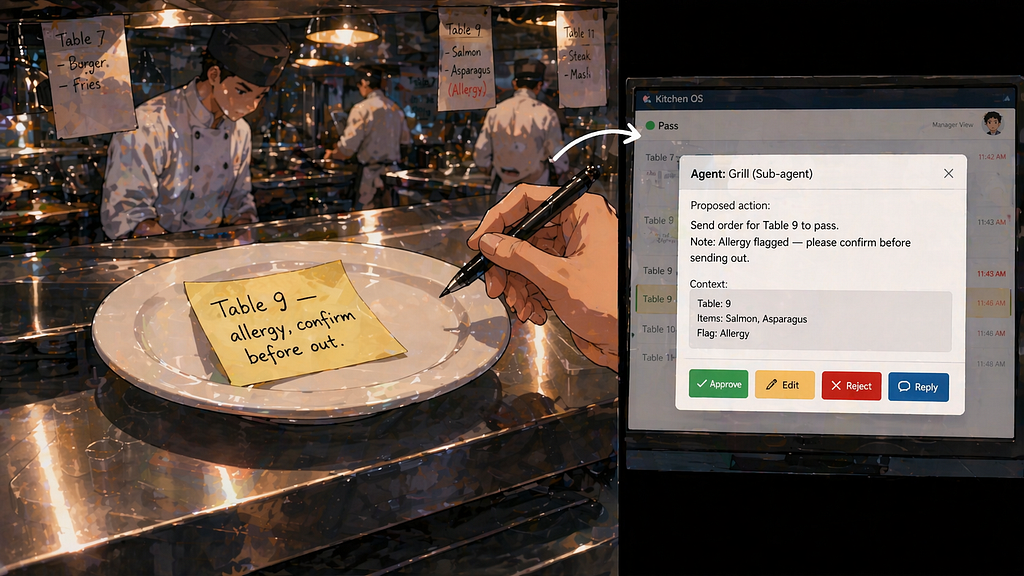
In a good kitchen, some things don’t go out without a second pair of eyes. A dish for a table with a nut allergy. A comp that changes the check. Someone in the back — the manager, the owner, whoever’s accountable — looks at it, nods, and only then does it leave the kitchen.
The sign-off is about the difference between reversible and irreversible. A normal dish, if it’s wrong, comes back and gets redone. An allergy mistake doesn’t come back. A comp on a check that’s been paid is harder to unwind. For those, you pause, you check, you commit on purpose.
In a deep agent, this is interrupts. The framework lets you mark specific tools as needing human approval before they run. When the agent tries to call one of those tools, the whole graph pauses. The tool call and its arguments are handed to the human — the agent wants to do this, here’s what it would do, do you approve? The human approves, edits the arguments, rejects the call outright, or replies with a note the agent has to address. Only then does the tool actually execute, if it executes at all.
You don’t gate every tool. You gate the ones that change things you can’t take back — committed records, outbound orders, messages sent, inventory actually consumed. The day-to-day tools — writing to the counter, updating the rail, calling a station — run freely. The agent gets to do real work, and you only get interrupted when something real is about to leave the kitchen.
How the sign-off is configured
The gate itself is a dictionary. When you build a deep agent, you pass an interrupt_on argument mapping tool names to a config: "send_email": True, "commit_order": True. The True means use the default gate — four options available to the human: approve, edit the arguments, reject outright, or reply with a message the agent has to address.
You can also pass a more detailed config if you want tighter control: {“allow_accept”: True, “allow_edit”: False, “allow_respond”: True}, for instance, if some tools shouldn’t be edit-gated. The defaults are usually what you want. The more important question is which tools to gate in the first place. The rule of thumb: gate any tool whose effect you can’t easily undo. Everything else can run freely.
Bonus: What “paused” actually means
When an interrupt fires, the graph doesn’t just stop in memory. It checkpoints. The agent’s entire state — messages, files, plan, everything — gets serialized and saved, keyed by a thread_id.
The reason is practical. A pause might last seconds, or it might last until tomorrow morning when someone opens the app again. The Python process that was running the agent might not even exist by then — the server could have restarted, the container could have been redeployed. If state only lived in RAM, the pause would lose it. The checkpoint is what lets a pause survive anything.
When you resume — by calling the graph again with the same thread_id and your decision — the framework loads the checkpoint, injects your response at the exact point the agent paused, and carries on. It's a small detail of how the framework is built, but it's what makes the sign-off actually work in a real deployed system.
When you don’t need a deep agent
Le us understand when we need deep agents before looking at the implementation.
Not every task needs a kitchen. Some tasks just need a cook. If what you’re building is a short interaction — answer a question, call one or two tools, respond — a deep agent is overkill. You don’t open a restaurant to make yourself a sandwich. Use create_react_agent directly, or a plain LLM call with a couple of tools. The planning, the files, the sub-agents, the sign-off — none of that earns its weight when the whole task finishes in three turns.
Deep agents also aren’t the right shape when the problem is really a team of peers collaborating. Think: a marketing agent, a legal agent, and an engineering agent negotiating a launch plan. That’s not one coordinator calling specialists; that’s a round table. For that shape, CrewAI is built around role-based collaboration between agents of equal standing, with workflows that let them hand off and critique each other.
A different case: you want agents built in different frameworks, running as independent services, able to talk to each other over a standard protocol. That’s not a single-app problem — it’s an interoperability problem. BeeAI is designed for that, with its Agent Communication Protocol and a catalog model for discovery.
A quick rubric. Use a deep agent when all of these are true:
- The task is long-horizon — many steps, possibly minutes or hours.
- There are large artifacts the agent produces and references repeatedly.
- A human needs to approve specific irreversible actions.
- It’s fundamentally one workflow with one user driving it, not a team negotiating.
Meal planning fits this cleanly. Research agents fit. Code-editing agents fit. Customer support workflows with long context fit.
A marketing launch with five departments doesn’t fit — that’s CrewAI. A fleet of specialist agents across teams needing to interoperate doesn’t fit — that’s BeeAI. A chatbot that answers three questions and stops doesn’t fit — that’s just a ReAct agent, or less.
Pick the shape that matches your problem.
Building a Meal Planner Deep Agent
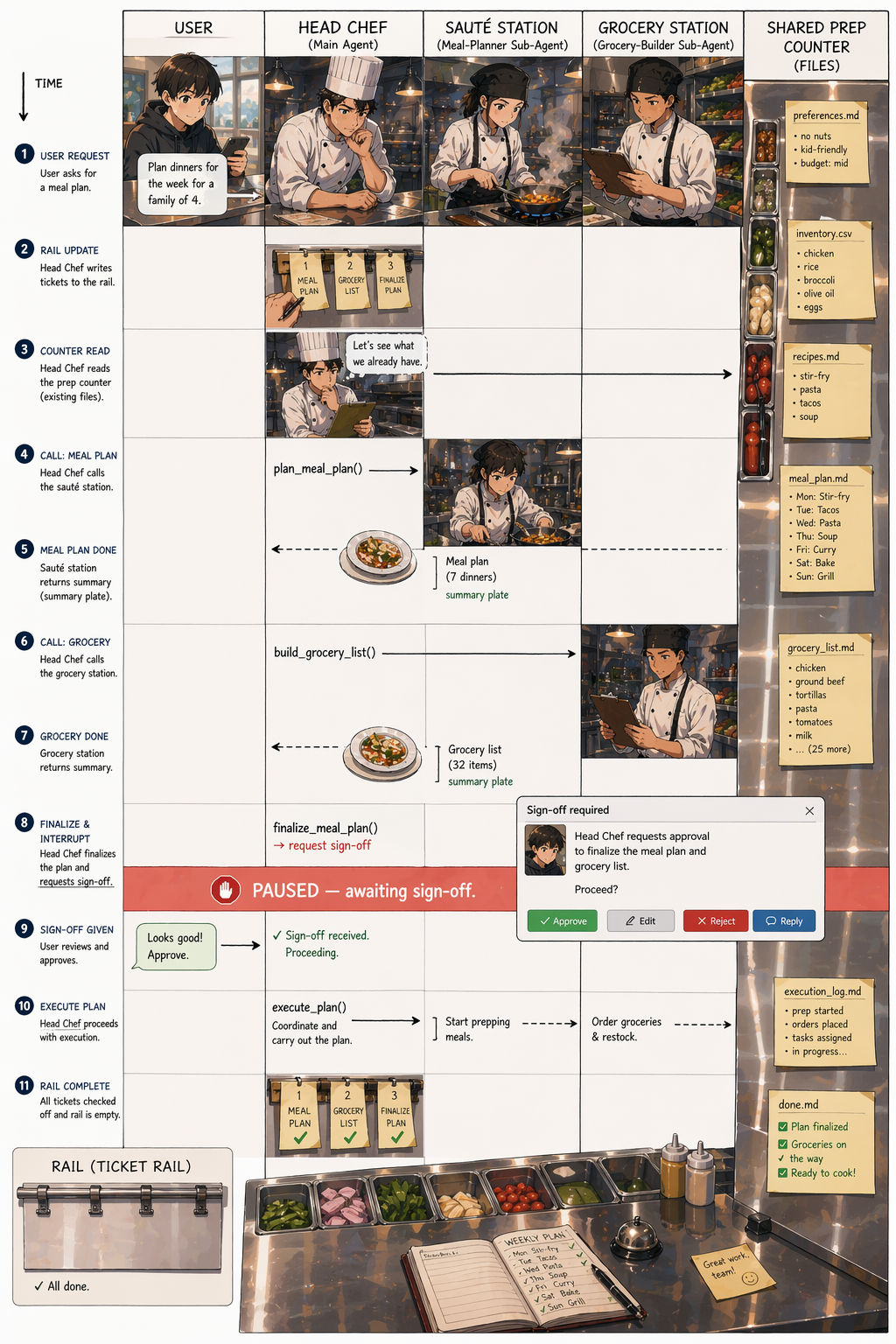
Enough kitchen. Now we’ll trace one request end to end.
The codebase (in GitHub) is a meal-planning agent — built on deepagents, with SQLite behind it for anything that needs to persist. The goal is straightforward: plan the week's dinners, respecting the person (allergies, diet, budget) and what they want this particular week.
The user types:
“Can you plan next week’s dinners for me? Something light on Wednesday, skip Thursday as I’m eating out and have vegan on Sunday.”
Before the agent even sees this message, the counters are already stocked. A middleware hook ran at session start and populated the file dictionary with preferences.json, fridge.json, pantry.json, rules.md, budget.json. The agent doesn’t read any of this yet. It just knows these files are there.
Here’s the kitchen. Six arguments and the whole thing is wired. [Note: Isolate tools to subagents for avoiding hallucinations]
agent = create_deep_agent(
    model=model,
    tools=all_tools,                             # inventory, recipes, cooking, grocery tools
    system_prompt=MAIN_AGENT_PROMPT,             # the head chef's instructions
    subagents=[meal_planner_sub,                 # the stations
               grocery_builder_sub,
               store_orderer_sub],
    middleware=[SessionBootstrapMiddleware()],   # stocks the counter
    interrupt_on={
        "finalize_meal_plan": True,              # sign-off required
        "commit_cooked_draft": True,             # sign-off required
    },
)
Now the trace.
1. The agent writes the rail.
The main agent reads the request and realizes this is a multi-step task. First move: call write_todos with a plan. The call produces a structured list, something like:
write_todos(todos=[
    {"content": "Read preferences and rules",              "status": "in_progress"},
    {"content": "Plan Mon–Sun dinners (light Wed, skip Thu, vegan Sun)", "status": "pending"},
    {"content": "Validate plan against allergies and rules", "status": "pending"},
    {"content": "Write meal_plan.md",                       "status": "pending"},
    {"content": "Present plan to user and finalize",        "status": "pending"},
    {"content": "Build grocery list",                       "status": "pending"},
])
The list goes into state. From this point on, every turn the agent takes, it sees this list. As it finishes each step, it calls write_todos again with the status updated.
2. The agent checks the counter.
It calls read_file on the counter:
read_file(file_path="rules.md")
And gets back the contents, which looks like this (real format, from the codebase’s render_rules_file helper):
# User Rules

- [rule_id=1] No red meat on weekdays
- [rule_id=2] Fish at least once per week
- [rule_id=3] Tuesday is leftover night
It does the same for preferences.json (allergies, household size, dietary tags). The persistent rules go into its working memory for this task. The one-off constraints from this week’s message — light Wed, skip Thu, vegan Sun — aren’t saved as rules; they’re part of the active task, not a policy change. The chef glances at the specials board and today’s notes.
A brief aside on the rules mechanism, since it’s a nice piece of the codebase. Persistent rules live in SQLite and are projected into rules.md on the counter. There's a rule_add tool the user can invoke conversationally — "remember that I don't want red meat on weekdays" — and it looks like this:
@tool
def rule_add(
    text: str,
    tool_call_id: Annotated[str, InjectedToolCallId] = "",
    state: Annotated[dict, InjectedState] = None,
) -> Command:
    """Add a persistent rule to the user's meal-planning profile."""
    rid = store.rule_add(text.strip())                        # write to SQLite
    files = dict(state.get("files") if state else {})
    files["rules.md"] = render_rules_file(store.rules_active())  # re-render counter
    return _cmd(f"Rule added (id={rid}): {text}", tool_call_id, files)
Two things happen in one call: the rule is written to SQLite (persistent), and rules.md on the counter is re-rendered from the database so the updated rules show up immediately. The virtual FS is always a projection of SQLite, not a divergent copy. One-off things like "vegan on Sunday this week" don't trip this machinery — the agent handles them inline.
3. The agent hands off to the meal-planner station.
Too much work to do in the main context:
task(
    subagent_type="meal-planner",
    description=(
        "Plan dinners for next week. User requested: light on Wed, "
        "skip Thu, vegan on Sun. Respect rules and preferences on counter. "
        "Work against current fridge/pantry inventory."
    ),
)
Main agent calls “fire the weekly planner.”
4. The sauté station works.
What does the planner station look like? Just this, from graph.py:
meal_planner_sub = {
    "name": "meal-planner",
    "description": (
        "Plan a week of meals, respecting preferences, rules, allergies, "
        "budget, and what's in the fridge. Writes meal_plan.md and "
        "recipes/*.json. Call this when the user asks for a meal plan."
    ),
    "system_prompt": MEAL_PLANNER_PROMPT,
}
A dict. That’s it. A name the main agent calls, a description that tells the main agent when to call it (this shows up in the main agent’s prompt so it knows the station exists), and a system prompt that’s the cook’s training.
Inside the sub-agent, a whole little world runs. Its own prompt (tight, opinionated). Its own tools — recipe search, recipe fetch, the allergen validator, the file tools. Its own isolated LLM context, so the hundreds of messages it exchanges while planning don’t pollute the main agent. It loops: for each day, search candidate recipes, fetch the most promising, scale to household size, check against allergies and rules. Wednesday gets a light recipe. Thursday is skipped. Sunday gets a vegan recipe. Along the way, it writes each chosen recipe to recipes/monday.json, recipes/tuesday.json, and so on — artifacts going onto the shared counter. When it's done, it runs validate_meal_plan for a deterministic allergen check. If that fails, it revises. If it passes, it writes meal_plan.md and returns a short summary:
“Plan written to meal_plan.md. Six dinners planned (Thursday skipped). All constraints met. Estimated cost: $84.”
5. The main agent shows the plan.
Back in the main context, the agent reads meal_plan.md off the counter and presents it to the user. "Here's your week. Monday's pasta, Tuesday's leftover chicken tray bake from last night, Wednesday's a light miso soup..." The user reads, considers, says "looks good."
6. Sign-off fires.
The user’s approval isn’t enough on its own. The agent now calls:
finalize_meal_plan(plan_id=...)
But this tool is in the interrupt_on dict from the opening create_deep_agent call — so before it runs, the graph pauses. The framework serializes state, hands the proposed tool call and its arguments to the UI, and waits. The user sees a confirmation panel: "The agent wants to finalize the meal plan. [Approve] [Edit] [Reject] [Reply]."
This looks redundant — the user just said “looks good.” But finalize_meal_plan does something irreversible: it commits the plan to SQLite as the active meal plan, which downstream tools (grocery building, cooking deductions) will read from. You want a hard gate before that, not just conversational agreement.
The user clicks Approve. The resume, from the client side, looks like:
graph.invoke(
    Command(resume={"type": "accept"}),
    config={"configurable": {"thread_id": session_id}},
)
7. The next station fires.
With the plan committed, the main agent moves to the next item on the rail and calls task("grocery-builder", ...) — same task pattern as beat 3, different station. That sub-agent reads the recipe files off the counter, aggregates ingredients, subtracts what's already in the fridge, groups by category, and writes grocery_list.md and grocery_list.json. It returns a summary. The main agent shows the list to the user. Another station, another plate.
8. The rail clears
The main agent calls write_todos one last time with every item marked done. The counter still holds everything — the plan, the recipes, the grocery list — available for follow-up ("change Tuesday to something quicker," "add pasta to the list"). The rail is empty. The service is done.
One last thing worth seeing: the shape of a tool. Every tool that modifies state in this codebase follows the same skeleton. Here’s rule_add again, but look at it as a pattern rather than a specific tool:
@tool
def rule_add(
    text: str,
    tool_call_id: Annotated[str, InjectedToolCallId] = "",    # framework fills this in
    state: Annotated[dict, InjectedState] = None,             # framework fills this in
) -> Command:
    rid = store.rule_add(text.strip())                          # 1. persistent write
    files = dict(state.get("files") if state else {})           # 2. copy current counter
    files["rules.md"] = render_rules_file(store.rules_active()) # 3. re-render the file
    return _cmd(                                                # 4. return Command with
        f"Rule added (id={rid}): {text}",                       #    message + files update
        tool_call_id,
        files,
    )
@tool registers it with the framework. InjectedState and InjectedToolCallId are parameters the agent never sees — the framework passes them in automatically. Command(update=...) is how the tool says "here's my message for the rail, and here's the new state of the counter" in one shot. You'll see this exact skeleton repeated across inventory.py, cooking.py, and preferences.py — same four steps every time. Once you recognize it, the whole tools directory reads like variations on one theme.
That’s the full service. One request, eight beats, four primitives. The head chef coordinated. The rail held the plan. The counter held everything big. The station did the heavy lifting. The manager gated the one move that mattered. None of it was particularly complicated on its own. The point is that they compose — and that they compose consistently, so the same pattern works for a meal planner, a research agent, a code-editing agent, or anything else with the same shape.
Conclusion: What “deep” actually means
The word in deep agents isn’t about deeper models, or deeper nesting, or more layers of anything. It’s about depth of reasoning across time.
A shallow agent can handle a small task well. One prompt, a few tool calls, a clean answer. But it runs on a single conversation, with everything it’s ever seen still in its head, and that’s exactly what stops working the moment the task gets long. A deep agent can stay coherent across a long task — many steps, many minutes, many tool calls — because it doesn’t try to hold everything in its head. It externalizes.
That’s the whole trick, really. Look back at the four primitives:
- The plan lives on the rail, not in the agent’s head.
- The artifacts live on the counter, not in the conversation.
- The heavy reasoning lives at the stations, not in the main context.
- The irreversible moves wait for a human, not for the agent to decide alone.
Strip away the library, and what’s left is a pattern. Externalize the plan. Externalize the artifacts. Isolate the workers. Gate the moves you can’t take back. You could implement that in raw LangGraph. You could implement it in plain Python with a dict and a loop. You could implement it in frameworks that don’t exist yet.
deepagents is one implementation of this pattern — a good one, and a convenient one if you're already on LangChain. But the pattern is the thing worth learning. Once it clicks, you start seeing it everywhere. Claude Code works this way. Manus works this way. Devin works this way. The agents that handle long tasks without losing the plot are all, in some form, kitchens.
So if you take one thing from this piece, let it be this: when your agent starts to struggle with long work, don’t reach for a bigger model. Reach for a better layout.
References
- Code in the Github Repo
- Deep Agents Documentation
- BeeAI Framework and Agent Stack Docs
- CrewAI Documentation
Understanding LangChain Deep Agents as a Kitchen was originally published in Towards AI on Medium, where people are continuing the conversation by highlighting and responding to this story.