Every parameter, every provider, every use case — one place, so you never have to Google “top_p vs top_k” again.
I spend most of my days at shipping multi-agent systems. And for the first few months, I had a confession: every time I opened a new API doc, I’d squint at temperature, top_p, presence_penalty, frequency_penalty, stop, response_format, reasoning_effort… and quietly tune by vibes.
Every blog post explains temperature. A few cover top-p. Almost none explain all the parameters, across all providers, with actual settings you can copy into production.
So I built this cheatsheet — the one I wish existed when I started. It’s opinionated. It’s production-oriented. And it’s meant to be the last LLM parameter reference you ever bookmark.
Use the table of contents below like a buffet. You don’t need to read it top to bottom.
Table of Contents
- How to use this cheatsheet
- Mental model: how an LLM actually generates text
- The core sampling trinity (plus one): Temperature, Top-P, Top-K, Min-P
- Length and stopping: max_tokens, stop, n
- Repetition controls: frequency_penalty, presence_penalty, repetition_penalty
- Fine control: logprobs
- Structured output and tool use: response_format, json_schema, tools
- Reasoning models play by different rules: o1, o3, R1, extended thinking
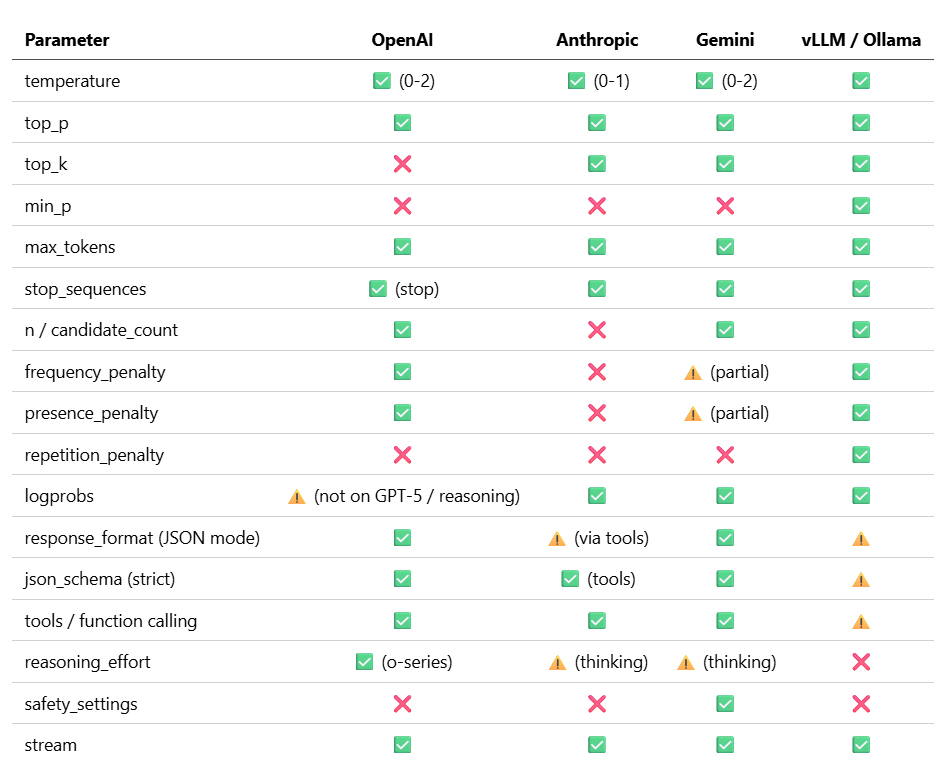
- Provider support matrix
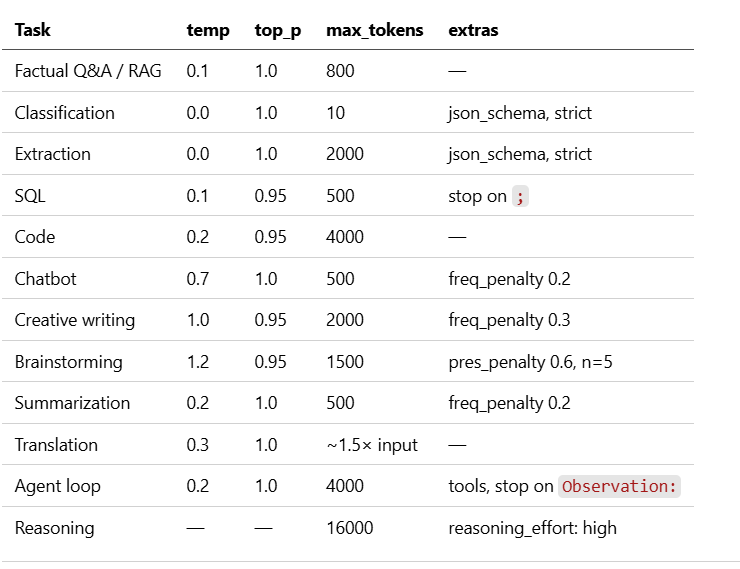
- 12 use-case recipes you can copy-paste
- 9 production pitfalls (and how to avoid them)
- One-page quick reference
1. How to use this cheatsheet
Two rules keep you out of trouble.
Rule 1: Change one parameter at a time. Temperature and top_p both control randomness. Tuning both at once is how you end up in debugging hell with no idea which knob is doing what. The OpenAI docs are blunt about this: “We generally recommend altering this or top_p but not both.”
Rule 2: Start from a recipe, don’t start from zero. Scroll to section 10, copy the recipe closest to your task, then adjust. Every tuning session I’ve wasted started with me picking numbers from my head.
If you only read 10% of this article, read section 10. If you read 20%, add section 11.
2. Mental model: how an LLM actually generates text
Before any parameter makes sense, you need a rough picture of what’s happening under the hood. An LLM generates one token at a time, and at every step it produces a giant vector of logits — raw scores for every token in its vocabulary (~50k to 200k tokens).
Here’s the pipeline those logits go through before a token is picked:
           ┌─────────────────────────────────────────────────────┐
           │  Raw logits from the model (one per vocab token)    │
           └─────────────────────────────────────────────────────┘
                                    │
                  [ frequency_penalty, presence_penalty ]   ← reshape logits
                                    │
                        [ temperature ]                     ← flatten or sharpen
                                    │
                               softmax                      ← logits → probabilities
                                    │
                      [ top_k truncation ]                  ← keep top K only
                                    │
                      [ top_p truncation ]                  ← keep cumulative P only
                                    │
                      [ min_p truncation ]                  ← drop low-confidence tail
                                    │
                      sample a token from what's left
                                    │
                                 repeat
Every parameter you’ll read about below is a specific station on this pipeline. Once you see where a knob sits in the chain, its effect becomes obvious.
A tiny worked example. Say the model is choosing the next word after “The capital of France is”. Its raw logits might look like:
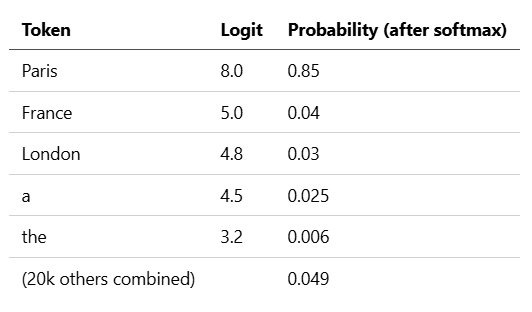
At temperature=0, we pick Paris every time. At temperature=1.5, the distribution flattens, and suddenly London (or something weirder) has a real shot. At top_p=0.9, we keep Paris + France + London (cumulative ≈ 0.92) and drop the rest. At top_k=1, we hard-commit to Paris. These operations compose — that's the whole game.
3. The core sampling trinity (plus one)
3.1 Temperature — the big dial
What it does: Divides every logit by T before softmax. Low T sharpens the distribution (the top token dominates); high T flattens it (more tokens get meaningful probability).
Range: 0.0–2.0 (OpenAI, Gemini) or 0.0–1.0 (Anthropic). Default 1.0 on most providers.
Mental model:
- 0.0 → near-greedy. The most-probable token wins every time.
- 0.3 → very focused. Slight variety.
- 0.7 → balanced. Provider defaults cluster here.
- 1.0 → creative. Good ideas and occasional nonsense.
- 1.5+ → unhinged. Useful for pure brainstorming, dangerous for anything factual.
When to tune:
- Factual tasks, extraction, classification, code → 0.0–0.3
- General chat, summarization → 0.5–0.8
- Creative writing, marketing copy, brainstorming → 0.8–1.2
Gotchas:
- temperature=0 does not guarantee deterministic output. See pitfall #2.
- If temperature is 0, top_p and top_k don’t matter — greedy wins either way.
3.2 Top-P (nucleus sampling) — the smart cutoff
What it does: Sorts tokens by probability in descending order, then keeps only the smallest set whose cumulative probability ≥ P. Everything else gets zero.
Range: 0.0–1.0. Default 1.0 (no filtering) on OpenAI and Anthropic.
Why it exists: Temperature alone can give weird tokens some probability. Top-P chops off that long tail dynamically — the set grows when the model is uncertain and shrinks when it’s confident.
When to tune:
- Leave at 1.0 if you’re tuning temperature.
- Use 0.9–0.95 when you want variety but need to block bizarre tokens.
- Use 0.1–0.3 for focused, on-topic output instead of lowering temperature.
Gotcha: Don’t set both temperature and top_p aggressively at the same time. Pick one.
3.3 Top-K — the hard cap
What it does: Keeps only the top K tokens by probability. K=1 is greedy decoding.
Range: 1 to infinity (often 40 as a default in open-source).
Provider support: Anthropic, Gemini, and every open-source runtime (vLLM, Ollama, llama.cpp) expose it. OpenAI does not.
When to tune:
- Usually leave alone. Anthropic’s own docs say “recommended for advanced use cases only”.
- K=40 is a reasonable safety net alongside temperature + top_p.
- K=1 is just temperature=0 by another name.
3.4 Min-P — the 2026 upgrade
What it does: Instead of a cumulative probability cutoff (top_p), min_p says “drop any token whose probability is less than P × (the most-probable token’s probability)”. It scales with model confidence.
Range: 0.05–0.1 is the sweet spot.
Why it matters: Research shows min-p produces more coherent output at high temperatures than top-p, because it’s confidence-aware. When the model is sure, it becomes stricter automatically. When the model is uncertain, it stays permissive.
Provider support: vLLM, llama.cpp, Ollama, Hugging Face Transformers. Not in OpenAI, Anthropic, or Gemini APIs.
When to tune: If you run your own open-source model, the 2026 consensus is temperature=1.0 + min_p=0.1, and skip top_p and top_k entirely. Simpler, often better.
4. Length and stopping
4.1 max_tokens / max_completion_tokens
What it does: Hard ceiling on how many tokens the model can generate.
Important naming shift: OpenAI’s newer Responses API uses max_completion_tokens. Their older Chat Completions API uses max_tokens. Anthropic uses max_tokens. Gemini uses maxOutputTokens. Read the docs for your exact endpoint.
Rule of thumb: ~4 characters per token in English. 100 tokens ≈ 75 words.
Gotcha: On reasoning models (o1, o3, R1), max_completion_tokens must include your reasoning tokens and your visible output. Set it generously or you'll get truncated answers because the model burned the budget thinking.
4.2 stop / stop_sequences
What it does: Custom strings that immediately terminate generation. The model won’t output the stop string itself.
Up to 4 sequences per request on most providers.
Practical uses:
- Agent loops that end on "Observation:" or "\nHuman:"
- Few-shot completions that should stop at the next example delimiter
- Preventing runaway output in scratch-pad prompts
4.3 n / candidate_count
What it does: Ask for multiple independent completions from the same prompt in one call. OpenAI calls it n, Gemini calls it candidate_count, Anthropic doesn't support it directly (make multiple requests).
When useful: Self-consistency voting, A/B generation for creative tasks, beam-style exploration.
Warning: You pay for every completion. This can multiply costs quickly.
5. Repetition controls
This is where most people confuse themselves. There are three different penalties and they do different things.
5.1 frequency_penalty (word-level)
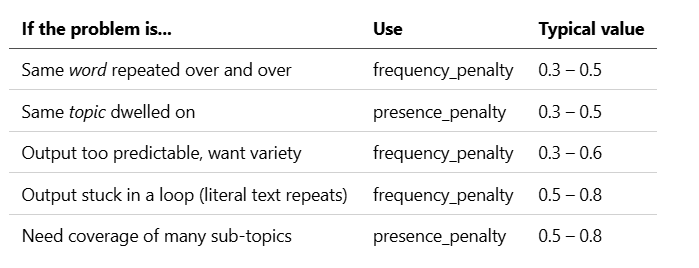
What it does: Penalizes tokens based on how many times they’ve appeared so far. More occurrences → bigger penalty. Scales with the count.
Range: -2.0 to 2.0 (OpenAI). Positive = discourage repetition, negative = encourage it.
Use case: Model keeps saying “very interesting” a dozen times in a long output. Set frequency_penalty = 0.3.
Don’t exceed ~0.7. Above that you start corrupting grammar because common words (the, a, and) get penalized too hard.
5.2 presence_penalty (topic-level)
What it does: A flat, one-time penalty applied to any token that has appeared at all. Doesn’t care how many times — just “have we seen it”.
Range: -2.0 to 2.0 (OpenAI).
Use case: You want the model to keep bringing in new topics / concepts, not dwell on the same ones. Set presence_penalty = 0.3 – 0.5 for brainstorming.
5.3 frequency vs presence — cheat table
5.4 repetition_penalty (open-source flavor)
A multiplicative version used in Hugging Face, vLLM, llama.cpp. Typical value 1.1–1.15. Above 1.2 you’ll see grammar break.
OpenAI and Anthropic don’t expose this — they use frequency/presence instead.
6. Fine control
6.1 logprobs
What it does: Returns the log-probability of each generated token (and optionally, the top N alternatives).
When you need it:
- Building a classifier and comparing the probability of label tokens
- Confidence estimation for RAG (low confidence → trigger fallback)
- Debugging why the model chose something weird
Provider reality check (April 2026):
- OpenAI: deprecated on GPT-5 family and all reasoning models (o1, o3, o4-mini). Still works on older GPT-4 series. If you depend on logprobs, you’re stuck on legacy OpenAI models or you pick a different provider.
- Anthropic Claude: Anthropic’s native API does not currently support logprobs.
- Gemini: responseLogprobs: true + logprobs: 1–20. Response includes avgLogprobs and a logprobsResult object.
- Open-source (vLLM, Ollama, llama.cpp): always supported.
This has real planning implications. If your architecture relies on token-level confidence (classifier heads, RAG fallback triggers, hallucination detection), check provider support before committing — I’ve watched teams hit this wall mid-migration.
7. Structured output and tool use
Three different tools, three different jobs. Pick the right one.
7.1 response_format: json_object
The simplest option. Just guarantees the output parses as valid JSON. You still have to validate the schema yourself.
Works on: OpenAI (legacy), Gemini, most open-source.
7.2 response_format: json_schema (or text.format in the new Responses API)
Enforces a specific Pydantic/JSON Schema. The model cannot produce a response that doesn’t match.
Use this by default for any extraction or classification task. It’s what used to take 200 lines of retry-and-validate code. Now it’s one field.
Important pairing: strict: true + temperature: 0.0. Deterministic decoding cuts variance, and the schema enforces structure.
7.3 tools / tool_choice — function calling
When the model needs to decide which function to call and with what arguments. This is for agent workflows — search APIs, databases, whatever external systems your app talks to.
tool_choice options:
- "auto" — model picks if/which tool
- "none" — no tools allowed
- "required" — must call a tool
- {"type": "function", "function": {"name": "X"}} — force this specific one
Rule of thumb: If you want structured data back, use structured output. If you want the model to trigger an action, use function calling.
8. Reasoning models play by different rules
This is the section that’s missing from 90% of LLM parameter guides, and it’s the one you most need in 2026.
OpenAI’s o1 / o3 / o4-mini, DeepSeek R1, and Claude’s extended thinking mode silently ignore most traditional sampling parameters.
What’s ignored on reasoning models
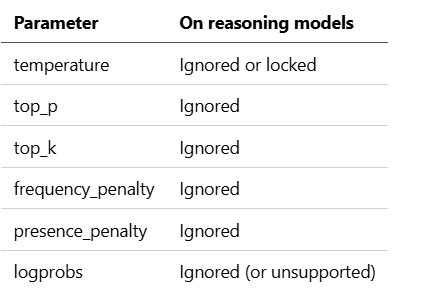
Setting them won’t error — they just do nothing. I’ve wasted hours tuning temperature=0.2 on o3-mini only to realize the parameter was being eaten silently.
What you tune instead
reasoning_effort (OpenAI): minimal, low, medium, high, xhigh. Higher effort = more thinking tokens, slower responses, better answers on hard problems. On o3, only low, medium, high are exposed.
thinking_budget (Claude, Gemini): explicit token cap on the thinking phase.
showThinking (DeepSeek R1): return the reasoning trace alongside the final answer.
Other reasoning-model gotchas
- They need bigger max_completion_tokens — the reasoning eats into the budget.
- They’re expensive. A reasoning_effort=high call can burn 5-20× the tokens of a regular model.
- Prompt engineering matters less. They often do worse with “think step by step” — the scaffolding is already in the model.
- Use them for: math, hard code review, multi-step planning, ambiguous decisions. Don’t use them for: summarization, extraction, chat, anything cheap models nail.
9. Provider support matrix
Quick reference. ✅ = supported, ⚠️ = supported with caveats, ❌ = not exposed.
10. 12 use-case recipes you can copy-paste
These are the payloads I actually use in production. Adjust the model name for your provider.
10.1 RAG / Factual Q&A with citations
{
  "model": "gpt-5.4",
  "temperature": 0.1,
  "top_p": 1.0,
  "max_tokens": 800,
  "presence_penalty": 0,
  "frequency_penalty": 0
}
Why: Retrieved context should dominate. Low temp means the model sticks to what’s in the docs.
10.2 Classification (e.g., intent, sentiment, safety)
{
  "model": "gpt-5-mini",
  "temperature": 0.0,
  "max_tokens": 10,
  "response_format": { "type": "json_schema", "json_schema": { ... }, "strict": true }
}
Why: Deterministic, tiny output, enforced schema. The schema constrains the model to your label vocabulary without any per-token hackery.
10.3 JSON / structured extraction from messy text
{
  "model": "gpt-5.4",
  "temperature": 0.0,
  "response_format": { "type": "json_schema", "json_schema": { ... }, "strict": true },
  "max_tokens": 2000
}
Why: Structure is non-negotiable. Zero temperature + strict schema = one less thing to validate in code.
10.4 SQL generation
{
  "model": "gpt-5.4",
  "temperature": 0.1,
  "top_p": 0.95,
  "max_tokens": 500,
  "stop": [";", "\n\n"]
}
Why: Mostly deterministic, slight headroom for phrasing choices. Stop sequences prevent the model from explaining itself.
10.5 Code generation
{
  "model": "claude-sonnet-4-6",
  "temperature": 0.2,
  "top_p": 0.95,
  "max_tokens": 4000
}
Why: Code needs to be right more than creative. Slight temperature lets the model pick between equivalent idiomatic patterns.
10.6 Chatbot / customer support
{
  "model": "gpt-5.4",
  "temperature": 0.7,
  "top_p": 1.0,
  "max_tokens": 500,
  "presence_penalty": 0.1,
  "frequency_penalty": 0.2
}
Why: Natural-feeling variety across turns. Small frequency penalty keeps the bot from repeating its opening phrases.
10.7 Creative writing (stories, poems, marketing copy)
{
  "model": "claude-opus-4-7",
  "temperature": 1.0,
  "top_p": 0.95,
  "max_tokens": 2000,
  "frequency_penalty": 0.3
}
Why: Full creative range, long-tail tokens filtered by top_p, penalty keeps phrasing fresh over long outputs.
10.8 Brainstorming / ideation
{
  "model": "gpt-5.4",
  "temperature": 1.2,
  "top_p": 0.95,
  "n": 5,
  "presence_penalty": 0.6,
  "frequency_penalty": 0.3
}
Why: High temperature + presence penalty = divergent ideas across topics. n=5 gives you five independent attempts in one call.
10.9 Summarization (factual, extractive)
{
  "model": "gpt-5.4",
  "temperature": 0.2,
  "max_tokens": 500,
  "frequency_penalty": 0.2
}
Why: Faithfulness first. Mild frequency penalty because summaries tend to get repetitive.
10.10 Translation
{
  "model": "gpt-5.4",
  "temperature": 0.3,
  "top_p": 1.0,
  "max_tokens": "<~1.5× input length>"
}
Why: Needs to be accurate but allow for natural phrasing in the target language. Sizing max_tokens correctly matters — translations can be longer than the source.
10.11 Agent / tool-use loop
{
  "model": "claude-sonnet-4-6",
  "temperature": 0.2,
  "max_tokens": 4000,
  "tools": [ ... ],
  "tool_choice": "auto",
  "stop": ["Observation:"]
}
Why: Agents should be decisive, not creative. Low temperature + tool schema + stop on the next observation boundary.
10.12 Reasoning / math / hard problems
{
  "model": "o3",
  "reasoning_effort": "high",
  "max_completion_tokens": 16000
}
Why: Notice what’s missing — no temperature, no top_p. Those are ignored. Just hand the model budget and let it think.
11. 9 production pitfalls (and how to avoid them)
Things I’ve personally gotten wrong, broken, or debugged at 11pm.
Pitfall 1: Tuning temperature AND top_p at the same time
Pick one. Both control randomness, and stacking them makes output unpredictable in a way that’s miserable to debug. OpenAI’s own docs say this explicitly.
Fix: Decide whether you’re tuning how much randomness (temperature) or which tail of the distribution to cut (top_p), and touch only that.
Pitfall 2: Believing temperature=0 is deterministic
It’s not. GPU non-associativity, batch invariance, MoE routing, and occasional model-version hotswaps all introduce drift. In a long output, a single token flip can change the rest of the response.
Fix: Design your app to tolerate small diffs. Pin your model version, assert on structure and semantics in tests, and never rely on exact string equality.
Pitfall 3: Setting frequency_penalty too high
Anything above ~0.7 starts penalizing common words (the, a, and) because they naturally appear a lot. Output gets grammatically broken — you’ll see weird word choices and missing articles.
Fix: Keep frequency_penalty ≤ 0.5 unless you’re specifically experimenting.
Pitfall 4: Confusing presence and frequency penalty
They solve different problems. Frequency = word repetition. Presence = topic exploration. Reaching for the wrong one means the symptom doesn’t go away.
Fix: Read section 5.3 again.
Pitfall 5: Forgetting reasoning models ignore sampling params
You set temperature=0.3 on o3 and the output changes run to run. You assume it's a bug. It's not — the parameter was silently ignored.
Fix: On reasoning models, only reasoning_effort and max_completion_tokens matter. Stop tuning the rest.
Pitfall 6: max_tokens too low on reasoning models
The model thinks for 5000 tokens, tries to answer, hits your 1000-token cap, returns truncated output. You think the model is broken.
Fix: On o-series / R1, budget 4–16× more tokens than you’d expect for the visible answer.
Pitfall 7: Using response_format: json_object without a schema
You get valid JSON, but the shape is whatever the model felt like. Downstream code breaks.
Fix: Use json_schema with strict: true. The schema is the contract.
Pitfall 8: Ignoring provider-specific defaults
Anthropic defaults temperature to 1.0. OpenAI defaults to 1.0. But the models’ internal distributions are different — the same temperature on two providers does not mean the same creativity level.
Fix: Re-tune when you switch providers. Don’t port settings blindly.
Pitfall 9: Not pinning the model version
The base model behind gpt-5.4 or claude-sonnet-4-6 is not the same checkpoint today as it was six months ago. Your carefully-tuned parameters can drift in behavior.
Fix: Pin to specific versions (gpt-5.4-2026-03-05, not gpt-5.4) in production. Set up evals that run on every model release, and re-tune your parameters when you upgrade.
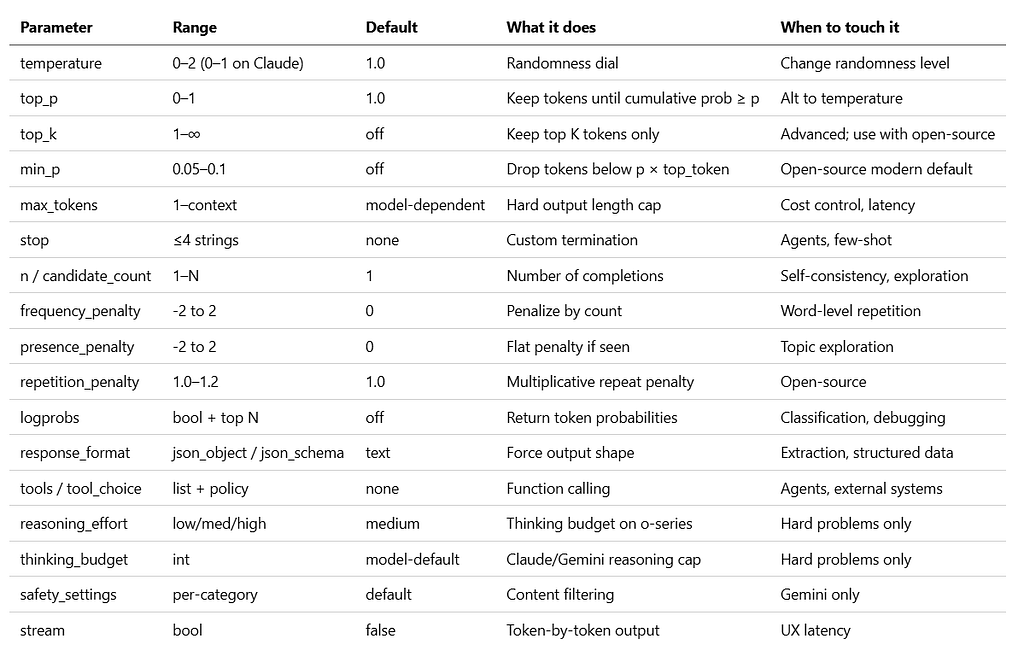
12. One-page quick reference
Pin this. Print it. Tape it to your monitor.
Default starter kits by task
Closing thought
Parameters are leverage. You can double the quality of an LLM app just by replacing three magic numbers. But the opposite is also true — wrong parameters quietly degrade every downstream metric, and you’ll blame the model.
The best engineers I know treat parameters like they treat SQL query plans: something to understand, not tune by vibes.
If this helped, the version I keep pinned at my desk is section 12. Start there. Copy a recipe. Change one thing at a time. And the next time someone on your team asks why the output got weird after they “fixed” the temperature, you’ll know exactly where to look.
I’m Himanshu, shipping production AI agents. I share what I learn building multi-agent systems — the stuff that works, the stuff that breaks, and the numbers behind both. Follow for more in this series.
Further reading
- LLM 11 Core Parameters — Complete Control System (2026)
- LLM Sampling Parameters Explained: Intuition to Math
- Anthropic Messages API Reference
- Google Vertex AI Content Generation Parameters
- OpenAI Reasoning Models Guide
- OpenAI Structured Outputs Guide
- Min-P Sampling for Creative and Coherent LLM Outputs (arXiv)
- DeepSeek-R1 Parameter Settings
- Why Temperature=0 Doesn’t Guarantee Determinism
- Non-Determinism of “Deterministic” LLM Settings (arXiv)
- JSON Mode vs Function Calling vs Structured Output: 2026 Guide
- Vendor-Recommended LLM Parameter Quick Reference
The Complete LLM Parameters Cheatsheet (2026) was originally published in Towards AI on Medium, where people are continuing the conversation by highlighting and responding to this story.