Part 4 of the SQL Query Generator Series — The Self-Correction Retry Loop
This series builds a complete natural language → SQL system step by step. Part 1 built the schema-aware generator. Part 2 added safety validation. Part 3 wired in execution and result formatting. Today we make the system smart enough to recover from its own errors.
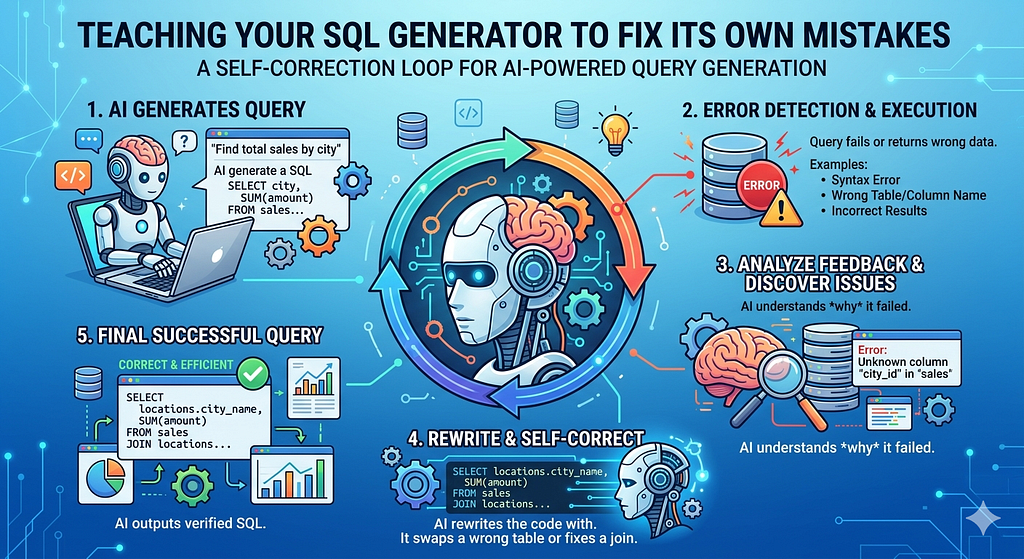
LLMs are impressive — but they’re not infallible SQL writers. Even with a well-crafted prompt and a clean schema, you’ll occasionally get a query that passes validation but fails at runtime: a misspelled alias, an incorrect `GROUP BY`, a `HAVING` clause that references a non-aggregated column. In a demo, that’s an edge case. In production, it’s a support ticket.
The elegant solution isn’t to write more defensive code around the LLM. It’s to close the feedback loop: when execution fails, send the error *back* to the LLM and ask it to fix the query. This is the self-correction pattern, and it’s one of the most practical agentic techniques you can add to any LLM pipeline.
By the end of this article, the pipeline will automatically retry up to N times on execution failure, logging each attempt, and either return a corrected result or fail gracefully with a full audit trail.
The Problem: Runtime Errors the Validator Can’t Catch
Our `SQLValidator` from Part 2 is excellent at what it does — blocking destructive operations, catching injection patterns, enforcing structural rules. But it can’t catch everything, because some errors only surface when the query actually hits the database engine.
Here are three real examples:
**Invalid column alias in ORDER BY**
-- LLM generates this
SELECT c.name, SUM(o.total_amount) AS revenue
FROM customers c
JOIN orders o ON c.customer_id = o.customer_id
GROUP BY c.name
ORDER BY total_revenue DESC;  -- 'total_revenue' doesn't exist


**Ambiguous column reference**
-- Two joined tables both have a 'created_at' column
SELECT customer_id, created_at  -- which table?
FROM customers c
JOIN orders o ON c.customer_id = o.customer_id;


**Missing GROUP BY column**
SELECT c.name, c.email, SUM(o.total_amount)
FROM customers c
JOIN orders o ON c.customer_id = o.customer_id
GROUP BY c.name;  -- c.email is missing from GROUP BY
All three pass the validator. All three fail at runtime. Without self-correction, the user sees a raw database error and the pipeline stops cold.
The Self-Correction Architecture
The idea is simple: treat the LLM as a collaborator that can learn from feedback within a single session.
User Question
│
▼
SchemaExtractor
│
▼
SQLQueryGenerator ──────────────────────────────┐
│                                               │
▼                                               │ feedback:
SQLValidator ── blocked? ──► stop               │ (original SQL
│                                               │ + error message)
▼                                               │
SQLExecutor                                     │
│                                               │
├── success? ──► ResultFormatter ──► output     │
│                                               │
└── failure? ──► attempt < max_retries?    ─────┘
                       │
                       └── no ──► fail with audit trail
The key insight is the **feedback payload** — we don’t just ask the LLM to “try again.” We give it the original SQL, the exact error message from the database engine, and explicit instructions to fix only the broken part. This is far more effective than a blind retry.
SQL Self Corrector
This module wraps the LLM call specifically for correction. It takes the original SQL, the error, and the schema, and returns a corrected query.
# sql_corrector.py
import os
from openai import OpenAI
from dotenv import load_dotenv

load_dotenv(override=True)


def build_correction_prompt(original_sql: str, error_message: str, schema_md: str) -> str:
    return f"""You are an expert MS SQL Server engineer.

A SQL query was generated from a user's question but failed when executed.
Your task is to fix the SQL so it runs correctly.

## Database Schema
{schema_md}

## Original SQL (failed)
```sql
{original_sql}
```

## Error Message from SQL Server
{error_message}

## Instructions
- Fix ONLY the part of the query causing the error.
- Do NOT change the intent of the query.
- Do NOT use any tables or columns not in the schema above.
- Return ONLY the corrected SQL query. No explanation, no markdown fences, no preamble.
"""


def correct_sql(
    original_sql: str,
    error_message: str,
    schema_md: str,
    attempt: int
) -> str:
    """
    Asks the LLM to fix a failed SQL query given its error message.
    Returns the corrected SQL string.
    """
    client = OpenAI(
        api_key=os.getenv("OLLAMA_API_KEY", "ollama"),
        base_url=os.getenv("OLLAMA_BASE_URL", "http://localhost:11434/v1")
    )

    prompt = build_correction_prompt(original_sql, error_message, schema_md)

    print(f"\n[CORRECTION ATTEMPT {attempt}] Sending error feedback to LLM...")

    response = client.chat.completions.create(
        model=os.getenv("OLLAMA_MODEL", "llama3.1"),
        messages=[{"role": "user", "content": prompt}],
        temperature=0.0  # Zero temperature for deterministic fixes
    )

    corrected = response.choices[0].message.content.strip()

    # Strip markdown fences if the LLM adds them despite instructions
    if corrected.startswith("```"):
        lines = corrected.split("\n")
        corrected = "\n".join(
            line for line in lines
            if not line.strip().startswith("```")
        ).strip()

    return corrected
Two design decisions to highlight:
temperature=0.0 For error correction, you want deterministic output. The LLM should reason about the specific error, not explore creative alternatives. Zero temperature locks it in.
Fence stripping Even with explicit instructions not to use markdown fences, some models add them anyway. Defensive stripping here means we never have to debug this downstream.
Let’s Orchestrate
This is the orchestrator. It wraps the full generate → validate → execute flow and adds the retry loop with error feedback.
# retry_pipeline.py
from dataclasses import dataclass, field
from typing import Optional
from schema_extractor import SchemaExtractor
from simple_query_generator import SimpleSQLQueryGenerator
from sql_validator import SQLValidator
from sql_executor import execute_query, ExecutionResult
from sql_corrector import correct_sql


@dataclass
class AttemptLog:
    attempt: int
    sql: str
    validation_passed: bool
    execution_success: bool
    error_message: Optional[str] = None


@dataclass
class PipelineResult:
    success: bool
    final_sql: Optional[str] = None
    execution_result: Optional[ExecutionResult] = None
    total_attempts: int = 0
    attempts: list[AttemptLog] = field(default_factory=list)
    failure_reason: Optional[str] = None


def run_with_retry(
    user_question: str,
    db_params: dict,
    tables: list[str],
    max_retries: int = 3
) -> PipelineResult:
    """
    Runs the full NL → SQL → validate → execute pipeline with
    automatic self-correction on execution failure.

    Returns a PipelineResult with the full attempt log.
    """
    # One-time setup
    extractor = SchemaExtractor(db_params)
    schema_md = extractor.format_schema_for_llm(tables)

    generator = SimpleSQLQueryGenerator()
    validator = SQLValidator()

    attempt_logs = []
    current_sql = None
    last_error = None

    for attempt in range(1, max_retries + 1):
        print(f"\n{'='*60}")
        print(f"ATTEMPT {attempt} of {max_retries}")
        print(f"{'='*60}")

        # Generate or correct
        if attempt == 1:
            print("\n[GENERATE] Sending question to LLM...")
            current_sql = generator.generate(user_question, schema_md)
        else:
            # Feed the previous error back to the LLM
            current_sql = correct_sql(
                original_sql=current_sql,
                error_message=last_error,
                schema_md=schema_md,
                attempt=attempt
            )

        print(f"\n--- SQL (Attempt {attempt}) ---")
        print(current_sql)

        # Validate
        validation = validator.validate(current_sql)
        if not validation.is_valid:
            log = AttemptLog(
                attempt=attempt,
                sql=current_sql,
                validation_passed=False,
                execution_success=False,
                error_message=f"Validation blocked: {validation.reason}"
            )
            attempt_logs.append(log)
            print(f"\n[BLOCKED] Validator rejected query: {validation.reason}")
            # Dangerous SQL shouldn't be retried — stop immediately
            return PipelineResult(
                success=False,
                total_attempts=attempt,
                attempts=attempt_logs,
                failure_reason=f"Query blocked by validator: {validation.reason}"
            )

        print("\n[VALID] Query passed validation.")

        # Execute
        result = execute_query(current_sql, db_params)

        log = AttemptLog(
            attempt=attempt,
            sql=current_sql,
            validation_passed=True,
            execution_success=result.success,
            error_message=result.error_message if not result.success else None
        )
        attempt_logs.append(log)

        if result.success:
            print(f"\n[SUCCESS] Query executed successfully on attempt {attempt}.")
            return PipelineResult(
                success=True,
                final_sql=current_sql,
                execution_result=result,
                total_attempts=attempt,
                attempts=attempt_logs
            )

        # Execution failed — prepare for retry
        last_error = result.error_message
        print(f"\n[FAILED] Execution error: {last_error}")

        if attempt < max_retries:
            print(f"[RETRY] Will attempt self-correction...")
        else:
            print(f"\n[EXHAUSTED] All {max_retries} attempts failed.")

    return PipelineResult(
        success=False,
        final_sql=current_sql,
        total_attempts=max_retries,
        attempts=attempt_logs,
        failure_reason=f"Max retries ({max_retries}) exhausted. Last error: {last_error}"
    )
The retry loop has one important hard stop: if the **validator** blocks a query, we don’t retry. A blocked query means the LLM generated something dangerous — retrying is not appropriate. Only runtime execution failures get the self-correction treatment.
Wiring In the Retry Pipeline
The file `main_executor_with_retry.py` with uses `run_with_retry` and prints the full audit trail:
# main_executor_with_retry.py (updated)
import os
from dotenv import load_dotenv
from retry_pipeline import run_with_retry
from result_formatter import format_as_table, format_as_csv

load_dotenv(override=True)

DB_PARAMS = {
    "SERVER": "(localdb)\\MSSQLLocalDB",
    "DATABASE": "master",
    "Trusted_Connection": "yes",
    "Encrypt": "no"
}
TABLES = ["customers", "orders"]


def run_and_display(question: str, max_retries: int = 3) -> None:
    print(f"\nQuestion: {question}")

    pipeline_result = run_with_retry(
        user_question=question,
        db_params=DB_PARAMS,
        tables=TABLES,
        max_retries=max_retries
    )

    print(f"\n{'='*60}")
    print("PIPELINE SUMMARY")
    print(f"{'='*60}")
    print(f"  Status        : {'SUCCESS' if pipeline_result.success else 'FAILED'}")
    print(f"  Total attempts: {pipeline_result.total_attempts}")

    for log in pipeline_result.attempts:
        status = "✓" if log.execution_success else "✗"
        print(f"  Attempt {log.attempt}     : {status}  {log.error_message or 'OK'}")

    if pipeline_result.success:
        print(format_as_table(pipeline_result.execution_result))

        if pipeline_result.execution_result.row_count > 0:
            csv_output = format_as_csv(pipeline_result.execution_result)
            with open("query_results.csv", "w", newline="") as f:
                f.write(csv_output)
            print("[INFO] Results saved to query_results.csv")

        if pipeline_result.total_attempts > 1:
            print(f"\n[NOTE] Required {pipeline_result.total_attempts} attempts.")
            print(f"Final SQL:\n{pipeline_result.final_sql}")
    else:
        print(f"\n  Failure reason: {pipeline_result.failure_reason}")


def main():
    # Test 1: Query that succeeds first time
    run_and_display("Show me the top 5 customers by total order amount.")

    # Test 2: Query that initially fails (wrong alias) — self-corrects
    run_and_display("Show total revenue per customer, sorted by highest spender.")

    # Test 3: Deliberately dangerous — should be blocked, no retry
    run_and_display("Delete all orders placed today.")


if __name__ == "__main__":
    main()
Terminal Output — Watching Self-Correction in Action
Here’s what Test 2 looks like when the LLM generates a broken alias on the first attempt and self-corrects on the second:
Question: Show total revenue per customer, sorted by highest spender.

============================================================
ATTEMPT 1 of 3
============================================================

[GENERATE] Sending question to LLM...

--- SQL (Attempt 1) ---
SELECT c.customer_id, c.name,
       COALESCE(SUM(o.total_amount), 0) AS total_revenue
FROM customers AS c
LEFT JOIN orders AS o ON c.customer_id = o.customer_id
GROUP BY c.customer_id, c.name
ORDER BY revenue DESC;

[VALID] Query passed validation.

[FAILED] Execution error: SQL error: ('42S22', "[42S22] [Microsoft][ODBC Driver 17
for SQL Server][SQL Server] Invalid column name 'revenue'. (207)")

[RETRY] Will attempt self-correction...

============================================================
ATTEMPT 2 of 3
============================================================

[CORRECTION ATTEMPT 2] Sending error feedback to LLM...

--- SQL (Attempt 2) ---
SELECT c.customer_id, c.name,
       COALESCE(SUM(o.total_amount), 0) AS total_revenue
FROM customers AS c
LEFT JOIN orders AS o ON c.customer_id = o.customer_id
GROUP BY c.customer_id, c.name
ORDER BY total_revenue DESC;

[VALID] Query passed validation.

[SUCCESS] Query executed successfully on attempt 2.

============================================================
PIPELINE SUMMARY
============================================================
  Status        : SUCCESS
  Total attempts: 2
  Attempt 1     : ✗  SQL error: Invalid column name 'revenue'.
  Attempt 2     : ✓  OK

+-------------+------------------+---------------+
| customer_id | name             | total_revenue |
+-------------+------------------+---------------+
| 3           | Alice Nguyen     | 4850.00       |
| 7           | Marcus Webb      | 3210.50       |
| 1           | Sandra Okafor    | 2990.75       |
| 12          | David Park       | 2100.00       |
| 5           | Priya Subramanian| 1875.25       |
+-------------+------------------+---------------+

5 row(s) returned.

[NOTE] Required 2 attempts.
Final SQL:
SELECT c.customer_id, c.name, ...ORDER BY total_revenue DESC;
The LLM received the exact error — `Invalid column name ‘revenue’` — saw that the alias in the SELECT was `total_revenue`, and corrected the ORDER BY accordingly. One targeted fix, no human involvement.
Tuning the Retry Behavior
Three knobs worth knowing about:
max_retries Default is 3. For production, 2 is usually enough. If the LLM can’t fix a query in two attempts, a third rarely succeeds — it usually means the schema is ambiguous or the question is genuinely unanswerable with the available tables.
temperature=0.0 in the corrector This is intentional. During initial generation you might want some temperature for query variety. During correction you want determinism. Keep them separate.
Retry on validation failure vs execution failure We explicitly stop on validation failure. If you want to also retry on validation (e.g., the LLM generated a `DELETE` when it should have generated a `SELECT`), you can pass the validation reason back as feedback. But be careful — this is a more aggressive strategy and needs tight logging.
Series Summary: What We Built Across 4 Parts
| Part | Module(s) added | What it does |
| - - - | - - - - - - - - | - - - - - - - |
| Part 1 | `schema_extractor.py`, `simple_query_generator.py` | Extract schema → generate SQL from natural language |
| Part 2 | `sql_parse.py`, `sql_validator.py` | Parse SQL AST, block dangerous operations |
| Part 3 | `sql_executor.py`, `result_formatter.py` | Execute safely, format results, export CSV |
| Part 4 | `sql_corrector.py`, `retry_pipeline.py` | Self-correct on failure, full audit trail |
You now have a production-grade Text-to-SQL pipeline with four layers of intelligence: generation, validation, execution, and self-correction. Each layer is a single-responsibility module. Swap the LLM, the database, or the formatter — nothing else changes.
GitHub: sainathudata/simple_sql_query_generator_llm
Follow me on Medium and connect on LinkedIn. I write about LLM tooling, ML pipelines, and production data engineering.
Teaching Your SQL Generator to Fix Its Own Mistakes was originally published in Towards AI on Medium, where people are continuing the conversation by highlighting and responding to this story.