Setting Up Hashbrown To Scale Enterprise Design System
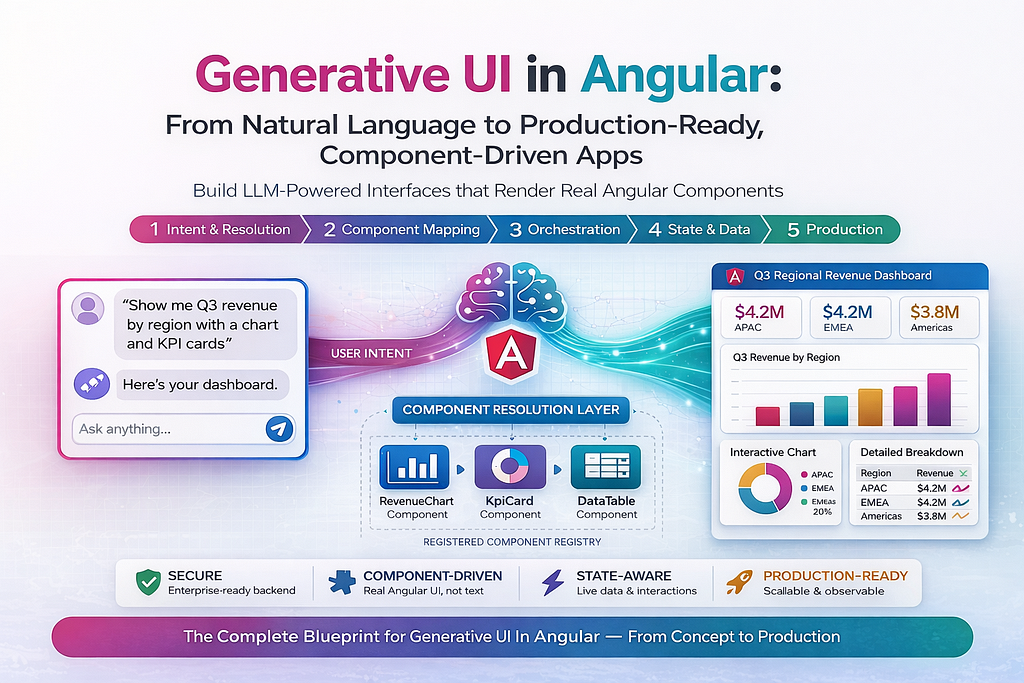
What you’ll learn: How to wire an LLM to your existing Angular component library, so the model autonomously picks the right component for every response and streams it into a conversation in real time. No React. No rewrite. No migration.
The Angular Engineer’s AI Problem
Open any article about generative UI. Any conference talk. Any framework announcement. What do they show?
React components.
<Card />. useChat(). streamUI(). JSX streaming from server to client. The entire generative UI conversation, every demo, every tutorial, every SDK README is built on the assumption that you are writing React.
If you are an enterprise Angular engineer, you have probably felt this as a slow, creeping frustration. Your team has spent years building something substantial: a mature Angular application with a proper design system, a well-structured NgRx store, a DI-wired service layer, Signal-based state (especially v17+), and many components that your business users are now using from quite a while. Then the AI wave hits, and every resource available tells you to rewrite it in Next.js.
You shouldn’t have to. And with Hashbrown, you don’t.
This guide is written specifically for enterprise Angular teams. Every code example in it is Angular. Every pattern respects Angular’s architecture like Signals, DI, standalone components, NgRx. There is no React to translate, no hooks to mentally map back to Angular equivalents, no “this is left as an exercise for the reader” when it comes to the framework you actually work in.
The second problem: your design system is being ignored
Beyond the React-centric ecosystem, there is a more immediate pain. Your Angular app probably has a well-crafted design system. Sortable data tables. KPI cards with trend indicators. Alert banners. Rich charts. Components your team has spent months perfecting to match your brand, meet your accessibility standards, and satisfy your compliance requirements.
Then someone adds an AI assistant.
And it answers every single question in plain text.
“Your Q3 revenue was $4.2M, up 18% year-over-year.”
The data is correct. But you already have a component that renders that beautifully with sparklines, colour-coded trend arrows, and a drill-down button. The AI completely ignores it. Every answer it gives is a step backward from the UI your team spent years building.
This isn’t a prompt engineering problem. It’s an architecture problem. The LLM has no idea your components exist.
Generative UI is the solution. Instead of the model generating text that describes data, it generates a component tree, it picks which of your Angular components best represents each answer and streams them into the conversation. The UI adapts to the answer. Your existing design system becomes an active participant in the AI experience, not a bystander.
Picture this flow in your app:
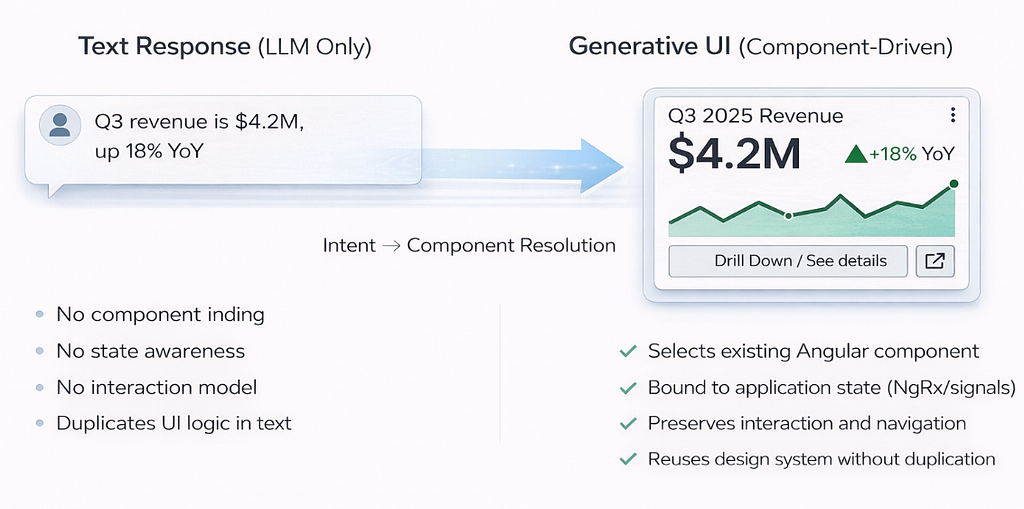
The component is your component with same styles, same logic, same accessibility attributes. The LLM just decided it was the right way to answer.
This article shows you how to build exactly that, using Hashbrown which is the only TypeScript framework that makes generative UI a native Angular citizen.
Your Angular Investment Is Evolving
Before a single line of code: let’s be explicit about what you are not being asked to do here.
You are not migrating to React.
You are not rewriting your design system.
You are not replacing NgRx or your service layer.
You are not wrapping your Angular app in an iframe or a micro-frontend shell.
Everything you have built stays exactly as it is. Let’s take a quick review on what capabilities Hashbrown adds:
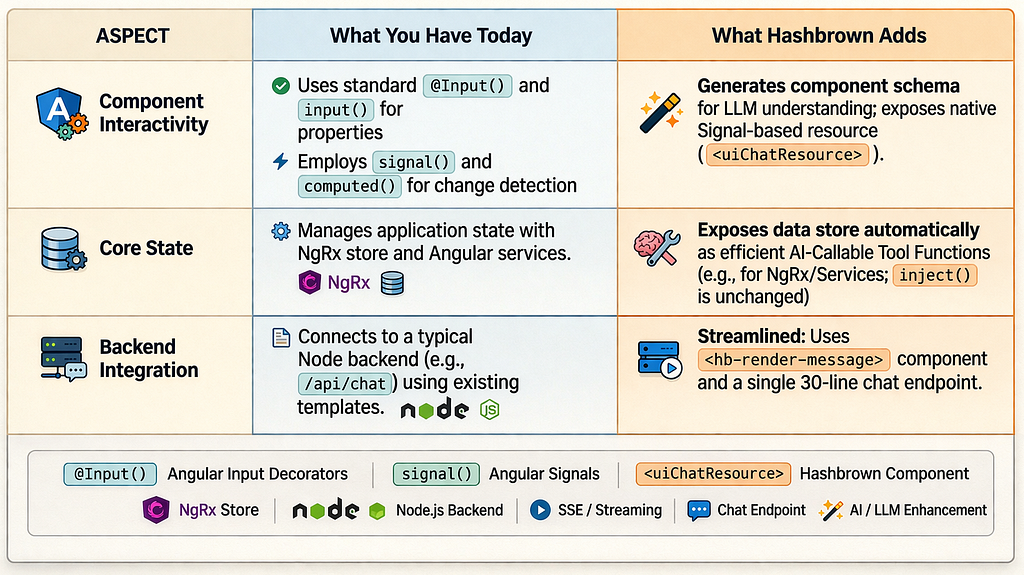
Why Hashbrown and not something else? Because every other generative UI library in this space like Vercel AI SDK, CopilotKit’s core was built React-first, with Angular added as an afterthought or not at all. Hashbrown was built by Angular community contributors (Mike Ryan and Brandon Roberts, both from the NgRx ecosystem) specifically for Angular’s architecture. It uses uiChatResource which is a proper Angular resource built on Signals and not a React hook ported over.
This is the Angular-native path.
How Generative UI Works
The Mechanism
Before writing code, the mechanism is worth understanding deeply. The insight that makes Hashbrown work is deceptively simple:
LLMs are already good at structured JSON output. Generative UI turns component selection into a structured output problem.
Here is the full loop:
1. SESSION INIT
   Your Angular app sends the LLM a manifest describing your
   components: names, descriptions, and typed input schemas.

2. USER SENDS A MESSAGE
   "Show me Q3 revenue by region"

3. MODEL DECIDES
   Based on the manifest, the model responds with JSON and
   not markdown, not prose. JSON describing which component
   to render and what inputs to pass.

4. STREAM PARSE
   Hashbrown's runtime reads the JSON as it streams in and
   begins mounting your Angular component immediately.

5. COMPONENT RENDERS
   Your real <RevenueTableComponent> appears in the
   conversation, populated with AI-supplied data, using
   your design system exactly as built.

6. INTERACTION LOOP (optional)
   User interactions can be fed back to the model as
   context, closing the loop.
The model’s response looks like this:
Hashbrown parses this, maps revenueTableWidget to your registered RevenueTableWidgetComponent, passes the $props as Angular input() signals, and mounts the component in the message bubble, all this while the stream is still in flight.
The Architecture:
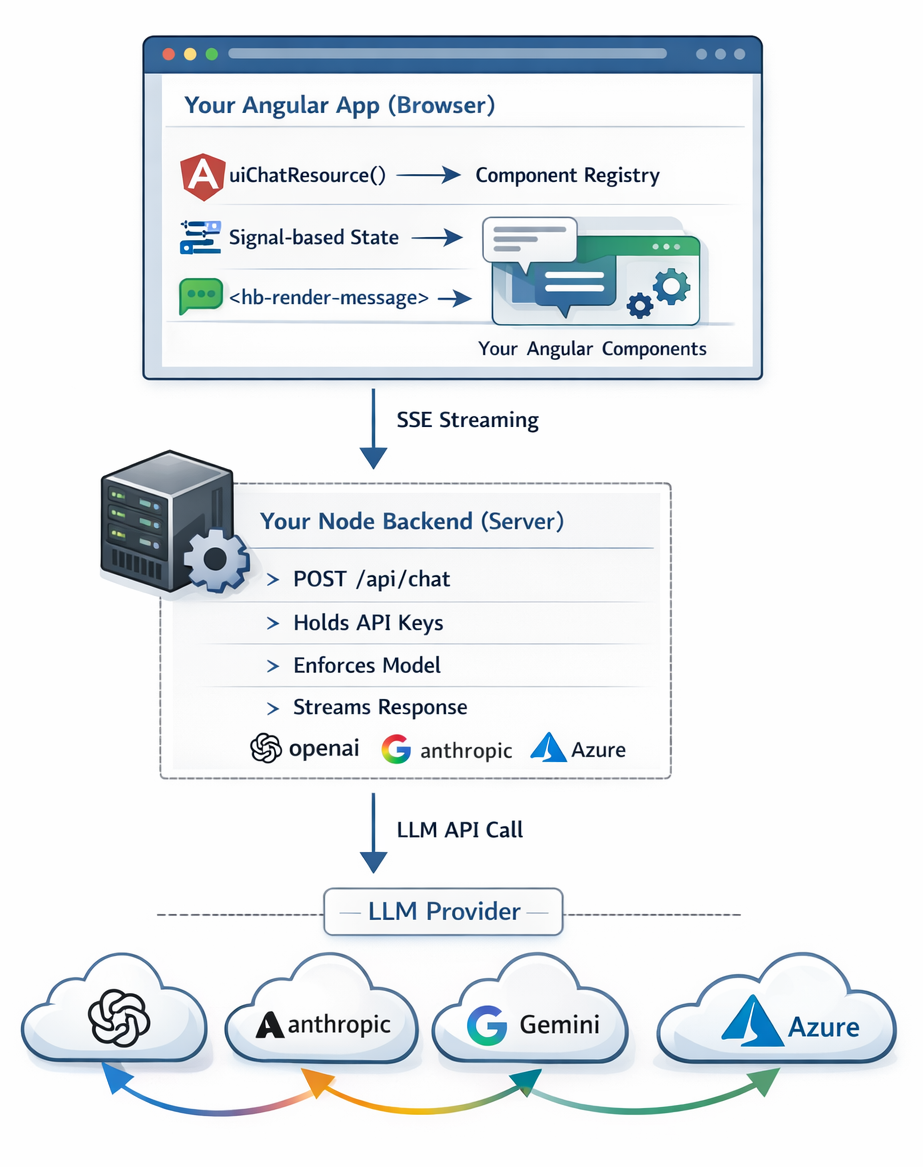
Three packages. One streaming proxy. Zero framework lock-in beyond Angular itself.
Crucially, this creates a clean security boundary. Your API keys never touch the browser. A thin Node proxy holds credentials, enforces the model, and hardcodes the system prompt server-side before streaming the safe response back to the client. This secure proxy approach is visualized here.
Installation
Hashbrown uses a three-package model: a framework-agnostic core, an Angular binding, and a provider adapter.
# Angular + OpenAI
npm install @hashbrownai/core @hashbrownai/angular @hashbrownai/openai


# Angular + Anthropic Claude
npm install @hashbrownai/core @hashbrownai/angular @hashbrownai/anthropic


# Angular + Google Gemini
npm install @hashbrownai/core @hashbrownai/angular @hashbrownai/google


# Angular + Azure OpenAI (enterprise compliance)
npm install @hashbrownai/core @hashbrownai/angular @hashbrownai/azure
Requirements: Angular 17+ (Signals API), Node.js 18+ on the backend.
Step 1: Bootstrap the Angular App
provideHashbrown() registers the Hashbrown runtime into Angular's DI tree. Everything else like component mounting, stream parsing, signal updates is handled automatically from here.
Gemini-Specific Configuration
Google Gemini 2.5 does not yet support combining structured output and tool calling in the same request. When emulateStructuredOutput is true, Hashbrown defines a pseudo-tool representing the component manifest and instructs the model to respond via tool calling instead of structured output. The overhead is roughly 200–400 extra tokens per request which is a reasonable trade-off for provider flexibility.
Step 2: Set Up the Node Backend
This is the secure proxy. It holds API keys, enforces the model, and streams responses. Keep it thin and let Hashbrown handles the protocol.
Why override server-side? If the Angular app sends model: 'gpt-4o' and you're billed per token, a single rogue request could cost significantly. Enforcing model and system prompt server-side is non-negotiable in production.
Step 3: Design Your Widget Components
The recommended enterprise pattern is a smart wrapper around a dumb component. Your dumb component is whatever already exists in your design system. The smart wrapper:
- Accepts typed input() signals that the LLM will supply
- Injects Angular services, stores, and router as needed
- Delegates rendering entirely to the dumb component
The key discipline: the wrapper component’s input() fields define exactly what the LLM can populate. Nothing else. The model cannot inject arbitrary HTML or call Angular services directly, it can only pass data through the typed schema you define.
Step 4: Expose Components with Skillet Schemas
exposeComponent() creates the bridge between your Angular component and the LLM's understanding of it. The Skillet schema you write becomes both the TypeScript type constraint for your component's inputs and the JSON Schema sent to the model.
The description is the most important part. The model uses it to decide when to use each component. Descriptions that say when to use the component (“Use this INSTEAD of listing numbers in text”) massively outperform descriptions that just say what the component does (“Displays financial data”).
Think of it as writing instructions for a capable but literal colleague: be specific, give contrasting examples, and tell them exactly when to reach for this tool.
Step 5: Wire It All Together with uiChatResource
uiChatResource is the Angular primitive at the heart of Hashbrown. It is a Signal-based resource following Angular 17+ patterns and manages the full lifecycle: conversation state, HTTP streaming, tool calls, component mounting, and error handling.
Step 6: The Conversation Template
Step 7: Define Your Tools
Tools give the model access to your data layer. They run client-side in the browser — Hashbrown is the only generative UI framework that does this — meaning your tools call inject(MyService) directly, access NgRx signals, and respond with live app state.
Notice the tool descriptions deliberately says “ALWAYS call before showing…”. LLMs sometimes skip tool calls and hallucinate data. Explicit instructions in the description and system prompt suppress this reliably.
The Skillet Schema Language
Skillet is Hashbrown’s LLM-optimised schema language, built on top of @hashbrownai/core. Every description you write becomes part of the JSON Schema sent to the model, nudging it toward correct component usage.
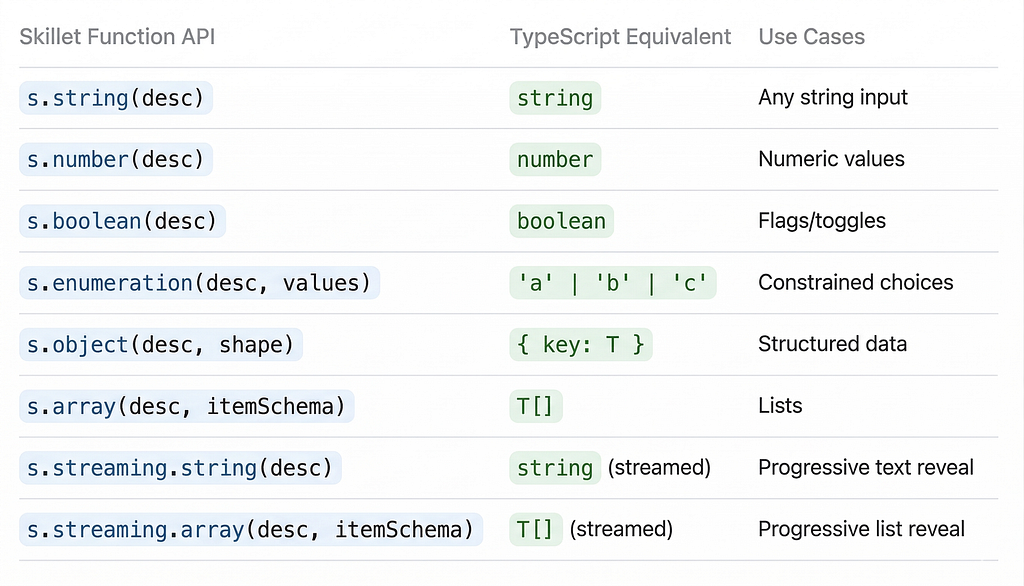
Skillet is type-safe: if your input() field expects number but your schema says s.string(), the compiler will error at build time and not at runtime.
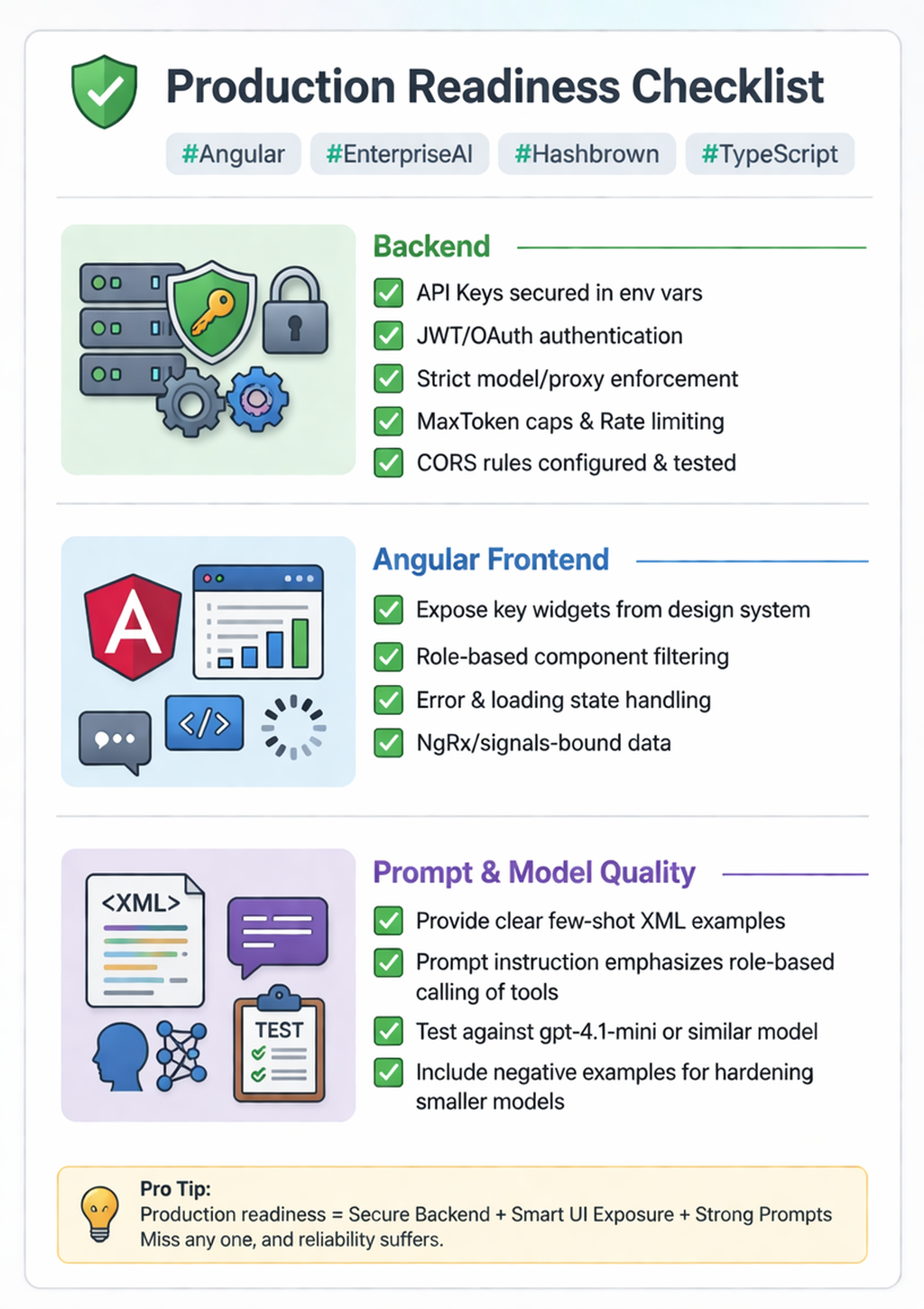
Production Readiness Snapshot
Before going live, run through this list:
What We’ve Built
At this point you have a working generative UI pipeline:
- A secure Node backend proxying to your LLM provider
- An Angular app bootstrapped with Hashbrown
- Real Angular components exposed to the model via typed Skillet schemas
- A uiChatResource driving a Signal-reactive conversation UI
- Client-side tools connecting the LLM to your Angular services
The model receives a user question, fetches data via your tools, selects the right component from your registry, and streams it into the conversation — all using your real design system, your real data, your real routing.
Key Resources
Generative UI in Angular: Rendering AI-Chosen Components in Chat was originally published in Towards AI on Medium, where people are continuing the conversation by highlighting and responding to this story.