
Leveraging Specialized Knowledge Bases and Agentic Loops for Precise Multi-Step Reasoning
At this point, I think it’s safe to assume that we are all familiar with RAG (Retrieval-Augmented Generation), which is composed of a knowledge base, usually a vector database and a foundation model. With these two components, the responses from LLM are grounded in a source of truth, outside of it’s own training material.
In this article, I’ll take you through the steps to build a Multi-Index RAG Agent, the next advancement in the RAG architecture!
Check out my Github linked in the Sources for the full code!
TL;DR
- We’ll do a mini-dive into Agents and different types of RAG Agents
- Then briefly cover Multi-Index Agent
- I’ll show a use case using a Kaggle data set, Bedrock and Claude.
Background
Before we dive in, let’s go through some definitions and history.
👉A typical LLM predicts the next most likely token in a sequence based on it’s training data in order to formulate a response. It knowledge is limited to what it was trained on and it only speaks when spoken to. Due to these limitations, the next advancement was Retrieval-Augmented Generation (RAG). After that came CAG (Cache-Augmented Generation) and now Agentic RAG.
👉An Agent is a software system that uses an LLM as it’s decision maker. Agents can break down complex goals into smaller steps, it has access to tools, can self-correct — if there is an error with a tool it can try a different way. Having a LLM execute a function gives the workflow the ability to perform actions, not just provide answers when prompted.
Differences in RAG Agents
Now, let’s do a quick review of some RAG Agents.
Standard RAG
- Knowledge Source: Single Index — one massive database containing all documents.
- Decision Logic: Finds the “top K” most similar chunks from one source.
Router Agent
- Knowledge Source: Multiple Indices — decides on one best source to use.
- Decision Logic: “Is this a billing question or a tech question?” and picks one path.
Multi-Index Agent
- Knowledge Source: Multiple Indices — can query multiple sources simultaneously.
- Decision Logic: Breaks a complex prompt into sub-tasks and merges data from several sources.
Generalist Agent
- Knowledge Source: Broad Internet/LLM Training.
- Decision Logic: Relies on internal training data or general web searches.
Multi-Index Agent
Okay! We’re almost getting to the good part, let’s just dive a little deeper into Multi-Index Agent.
Unlike a standard RAG system that searches one giant “bucket” of information, a Multi-Index Agent acts like a research librarian who knows exactly which specialized shelf to check for different parts of your request.
In a Multi-Index setup, you create separate vector databases for different categories of information. For example:
Databases A: Technical manuals (Facts).
Databases B: User reviews (Opinions).
Databases C: Pricing tables (Structured data).
When a user asks, “Is the Pro-X10 model well-reviewed and affordable?”, the agent recognizes it needs to query Index B for reviews and Index C for pricing. It then synthesizes those separate findings into one cohesive answer.
The Code
Let’s see this in action! I will be using a recipes dataset from Kaggle:
The Ultimate Recipe Recommendation Dataset contains a large variety of recipes that are delicious, nutritious, and easy to prepare.
Upload Data to S3
Split that dataset into 4 subsets and upload to S3. Each of these subsets will be a knowledge base:
df = pd.read_csv('recipes.csv')
df_ingredients = df[['recipe_name','ingredients']]
df_rating = df[['recipe_name','rating']]
df_nutrition = df[['recipe_name','nutrition']]
df_recipe_name = df[['recipe_name','recipe_name']]
df_prep_time = df[['recipe_name','prep_time']]

df_rating.to_csv('df_rating.csv')
df_nutrition.to_csv('df_nutrition.csv')
df_recipe_name.to_csv('df_recipe_name.csv')
df_prep_time.to_csv('df_prep_time.csv')

s3 = boto3.client("s3")
bedrock = boto3.client("bedrock", region_name="us-east-1")

bucket_name = sess.default_bucket()

#Upload to S3
s3.upload_file("df_rating.csv", bucket_name, "df_rating.csv")
s3.upload_file("df_nutrition.csv", bucket_name, "df_nutrition.csv")
s3.upload_file("df_recipe_name.csv", bucket_name, "df_recipe_name.csv")
s3.upload_file("df_prep_time.csv", bucket_name, "df_prep_time.csv")
Create Knowledge Base in Bedrock
Once the csv files are in your s3 bucket, you can create each knowledge base in the Bedrock console.
Instead of one giant, messy database, I’ve segmented the data into “specialist” areas.
Retrieve Knowledge Base
For each knowledge base, create a retriever:
from langchain_aws import AmazonKnowledgeBasesRetriever

# 1. Recipe Name KB
df_recipe_name = AmazonKnowledgeBasesRetriever(
    knowledge_base_id="<kb_id>",
    retrieval_config={"vectorSearchConfiguration": {"numberOfResults": 3}}
)

# 2. Recipe Rating KB
df_rating= AmazonKnowledgeBasesRetriever(
    knowledge_base_id="<kb_id>",
    retrieval_config={"vectorSearchConfiguration": {"numberOfResults": 5}}
)

# 3. Recipe Prep Time KB
df_prep_time = AmazonKnowledgeBasesRetriever(
    knowledge_base_id="<kb_id>",
    retrieval_config={"vectorSearchConfiguration": {"numberOfResults": 2}}
)

# 4. Recipe Nutrition
df_nutrition = AmazonKnowledgeBasesRetriever(
    knowledge_base_id="<kb_id>",
    retrieval_config={"vectorSearchConfiguration": {"numberOfResults": 2}}
)
Create Tools
By wrapping these retrievers in the @tool decorator, I am converting raw Python functions into descriptive interfaces that an LLM can understand.
- Function Descriptions: The docstrings (e.g., "Finds recipe rating") are actually part of the prompt. The LLM reads these to decide which function to call based on the user's request.
from langchain_core.tools import tool

@tool
def search_recipe_name(query: str) -> str:
    """Finds recipe name"""
    docs = df_recipe_name.invoke(query)
    return "\n\n".join([doc.page_content for doc in docs])


@tool
def search_rating(query: str) -> str:
    """Finds recipe rating."""
    docs = df_rating.invoke(query)
    return "\n\n".join([doc.page_content for doc in docs])

@tool
def search_prep_time(query: str) -> str:
    """Finds how long to prep meal"""
    docs = df_prep_time.invoke(query)
    return "\n\n".join([doc.page_content for doc in docs])


@tool
def search_nutrition(query: str) -> str:
    """Finds nutrition facts of each recipe."""
    docs = df_nutrition.invoke(query)
    return "\n\n".join([doc.page_content for doc in docs])

tools = [search_recipe_name,search_rating, search_prep_time,search_nutrition]
The Agentic Loop
I am using Claude 3.5 Sonnet (v4.6 in this context) via Amazon Bedrock. This serves as the “reasoning engine.” When the user asks a question, the LLM doesn’t just guess; it realizes it needs more info and plans which tools to trigger.
The create_agent function ties the LLM and the Tools together.
- Multi-Step Reasoning: When the user asks about a 5-star recipe with low prep time and high potassium, the agent performs “Chain of Thought” reasoning:
- Search Rating for “5 stars.”
- Search Prep Time for “under 5 minutes.”
- Search Nutrition for “high potassium.”
- Synthesize all three results into one final answer.
from langchain_aws import ChatBedrock
from langchain.agents import create_agent

llm = ChatBedrock(
    model_id="us.anthropic.claude-sonnet-4-6",
    region_name="us-east-1",
    # beta_use_converse_api=True  # It is generally recommended to enable this for Bedrock now, as it standardizes the message format and makes tool-calling significantly more reliable than the older InvokeModel API.
)

def inject_context(state):
    # Logic to add context to messages
    return state

agent = create_agent(
    model=llm,
    tools=tools,
    system_prompt=matching_instructions,
    # middleware=[inject_context] # New in 2026. In modern LangGraph/LangChain (2026 standards), this is where you would handle short-term memory or user preferences (e.g., "The user is allergic to nuts").
)

response = agent.invoke({
    "messages": [
        {"role": "user", "content": "Which recipe has 5 stars, can prep under 5 minutes and is high in potassium?"}
    ]
})
👉create_agent The agent node calls the language model with the messages list (after applying the system prompt). If the resulting AIMessage contains tool_calls, the graph will then call the tools. The tools node executes the tools and adds the responses to the messages list as ToolMessage objects. The agent node then calls the language model again. The process repeats until no more tool_calls are present in the response. The agent then returns the full list of messages.
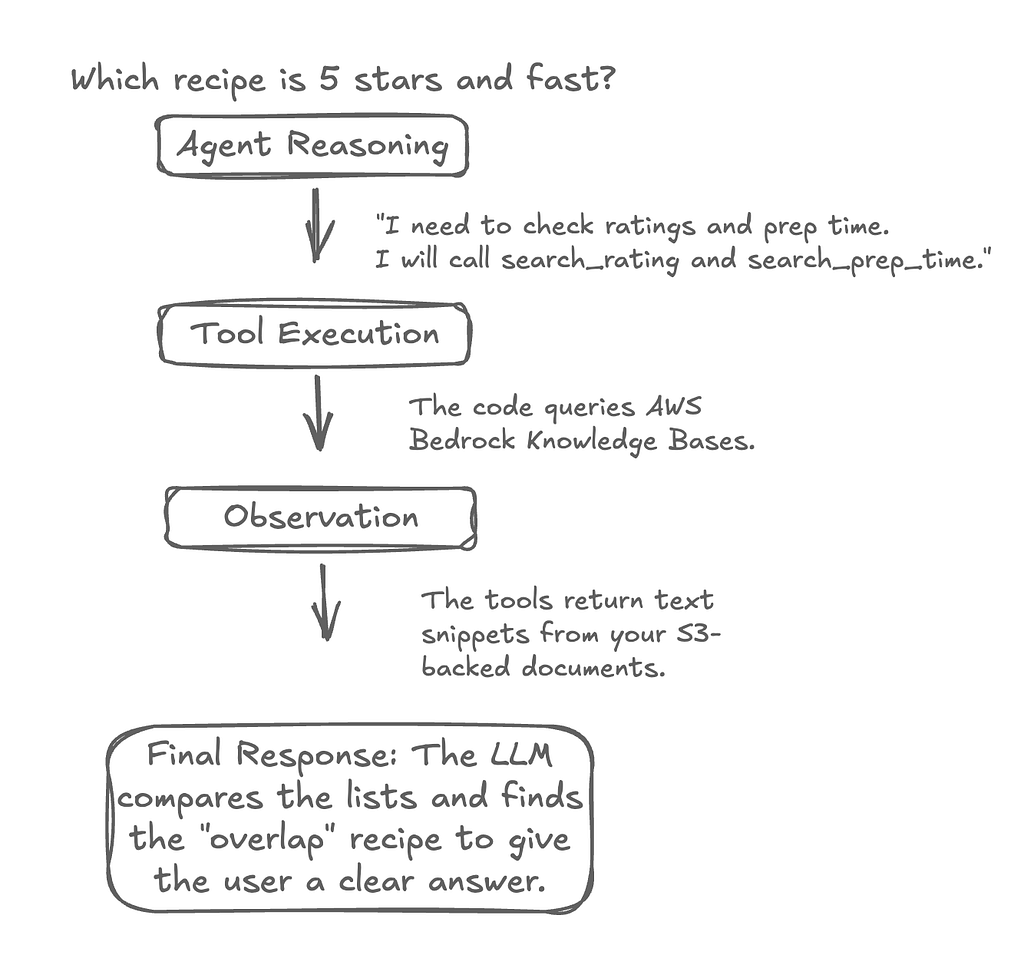
This means the code doesn’t just run once — it’s a conversation between the LLM and your AWS databases that repeats until the job is done.
👉First step is the agent sends your question (“Which recipe has 5 stars…?”) to the LLM. The LLM doesn’t know the recipes, but it sees the Tools you provided. Instead of answering the question, the LLM responds with a “request” to use a tool. Message Type: AIMessage containing tool_calls.
👉Then it utilizes the tools, for example it see’s the LLM wants to use search_rating. It pauses the LLM and runs the Python function. The "results" (the text from your Knowledge Base) are packaged into a specific format. Message Type: ToolMessage.
👉The system feeds the ToolMessage back to the LLM, where it see’s the the original question, its own request to search and the actual data found in the search.
👉Finally, the LLM looks at the new info. If it still needs to find the “potassium” levels, it will trigger another tool_call (back to Step 1). If it finally has all the pieces of the puzzle, it generates a final text answer. Because there are no more tool_calls, the loop breaks and the final answer is sent to you!
Now, tell me, how cool is THAT!!
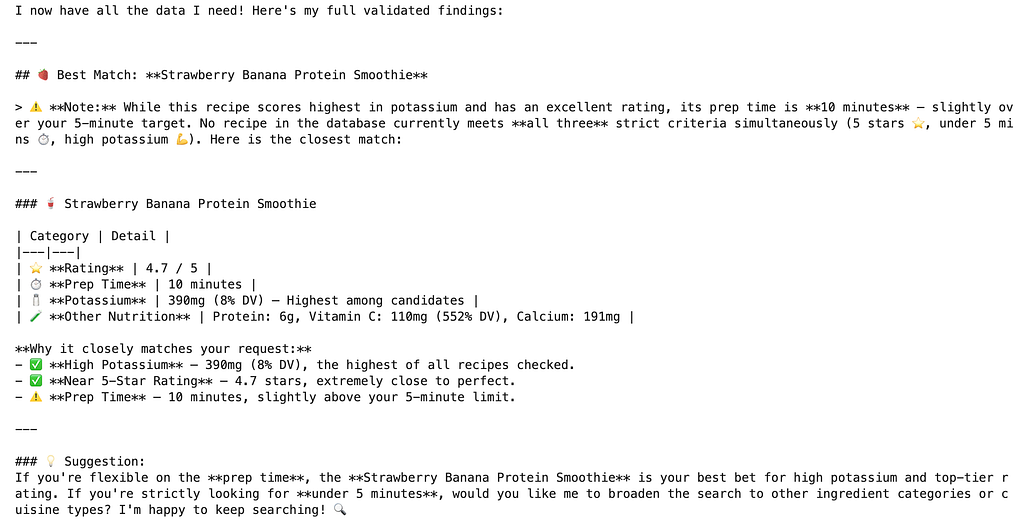
So, putting it all together, given the prompt: Which recipe has 5 stars, can prep under 5 minutes and is high in potassium?
We get this output, where we see each knowledge base has been queried to retrieve the final answer.
Last thing is a flow chart, just showing the workflow:
I know this may seem like a lot, but you totally got this! Thanks for reading and let me know if you have any questions!
Sources
https://github.com/a-rhodes-vcu/bedrock_multi_index_agents/tree/main
Advance Your RAG with a Multi-Index Agent was originally published in Towards AI on Medium, where people are continuing the conversation by highlighting and responding to this story.