Part 3 of the SQL Query Generator Series — From Validated Query to Real Data
*Previously in this series: In Part 1, we built a schema-aware LLM pipeline that turns a plain English question into a T-SQL query. In Part 2, we added a `SQLValidator` that parses the query tree and blocks dangerous operations before anything touches the database. Today, we close the loop: we take that validated SQL and actually run it.*
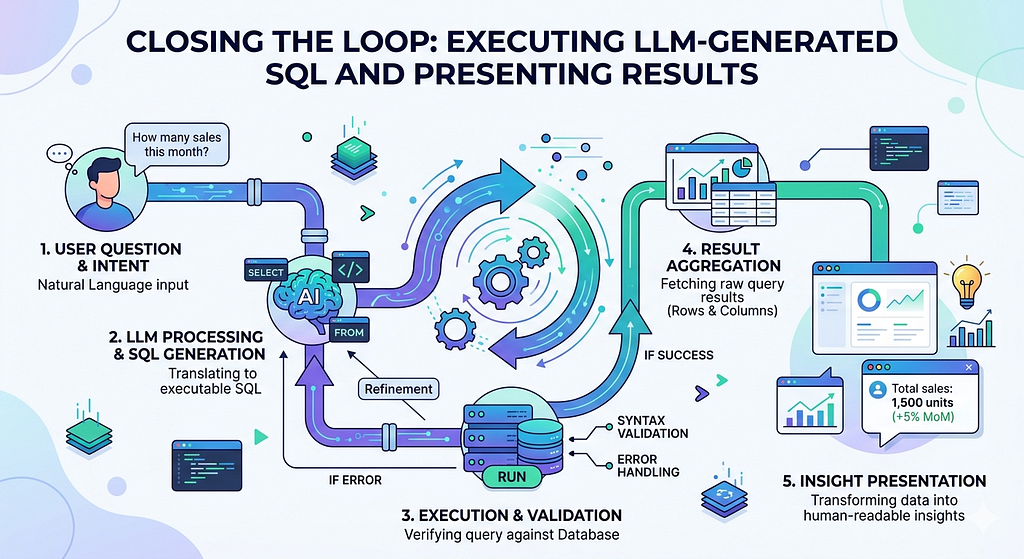
A query sitting in a string variable is just text. It only becomes useful the moment it touches your database and returns rows a human can read. That final step — execution, error handling, and clean result presentation — is where most tutorials stop short. We won’t.
By the end of this article, you’ll have a complete, production-ready pipeline: natural language question → schema extraction → LLM generation → validation → execution → formatted output. The full flow, end to end.
What We’re Adding in Part 3
Here’s the pipeline so far and what we’re completing:
User Question
    │
    ▼
SchemaExtractor          ← Part 1
    │
    ▼
SimpleSQLQueryGenerator  ← Part 1
    │
    ▼
SQLValidator             ← Part 2
    │
    ▼
SQLExecutor              ← Part 3 (new)
    │
    ▼
ResultFormatter          ← Part 3 (new)
Two new modules: `sql_executor.py` handles the database connection and query execution, and `result_formatter.py` turns raw rows into something readable.
SQL Executor
The executor has one job: take a validated SQL string, run it against MS SQL Server, and return a structured result, either the rows and column names, or a clean error message. It never raises an unhandled exception to the caller.
In the previous articles we have used mssql_python library, here we explore pyodbc library. Do add pyodbc to your ‘pyproject.toml’.
# sql_executor.py
import pyodbc
from dataclasses import dataclass, field
from typing import Optional

@dataclass
class ExecutionResult:
    success: bool
    columns: list[str] = field(default_factory=list)
    rows: list[tuple] = field(default_factory=list)
    row_count: int = 0
    error_message: Optional[str] = None


def execute_query(sql: str, db_params: dict) -> ExecutionResult:
    """
    Executes a validated SQL query against MS SQL Server.
    Returns an ExecutionResult dataclass — never raises.

    db_params keys:
      - SERVER, DATABASE, Trusted_Connection, Encrypt  (local dev)
      - or SERVER, DATABASE, UID, PWD                  (server auth)
    """
    conn = None
    try:
        # Build connection string dynamically from db_params
        conn_parts = [f"DRIVER={{ODBC Driver 17 for SQL Server}}"]
        conn_parts.append(f"SERVER={db_params['SERVER']}")
        conn_parts.append(f"DATABASE={db_params['DATABASE']}")

        if db_params.get("Trusted_Connection"):
            conn_parts.append(f"Trusted_Connection={db_params['Trusted_Connection']}")
        if db_params.get("Encrypt"):
            conn_parts.append(f"Encrypt={db_params['Encrypt']}")
        if db_params.get("UID"):
            conn_parts.append(f"UID={db_params['UID']}")
        if db_params.get("PWD"):
            conn_parts.append(f"PWD={db_params['PWD']}")

        conn_str = ";".join(conn_parts)

        conn = pyodbc.connect(conn_str, autocommit=False)
        cursor = conn.cursor()

        cursor.execute(sql)

        # Extract column names from cursor description
        columns = [desc[0] for desc in cursor.description] if cursor.description else []
        rows = cursor.fetchall()

        return ExecutionResult(
            success=True,
            columns=columns,
            rows=[tuple(row) for row in rows],
            row_count=len(rows)
        )

    except pyodbc.ProgrammingError as e:
        return ExecutionResult(success=False, error_message=f"SQL error: {str(e)}")

    except pyodbc.OperationalError as e:
        return ExecutionResult(success=False, error_message=f"Connection error: {str(e)}")

    except Exception as e:
        return ExecutionResult(success=False, error_message=f"Unexpected error: {str(e)}")

    finally:
        if conn:
            conn.close()
A few design decisions worth calling out:
autocommit=False We never auto-commit. Even though the validator already blocked destructive SQL, defence in depth costs nothing.
ExecutionResult dataclass Returning a structured object (not a tuple or dict) keeps the caller code clean. `result.success`, `result.columns`, `result.rows` no magic indexes.
Never raises Every failure path returns an `ExecutionResult` with `success=False` and a message. The caller decides what to do with it, not the executor.
Results Formatter
Raw `pyodbc` rows aren’t human-friendly. This module formats them into a clean table for the terminal, handles edge cases (empty results, nulls), and can optionally export to CSV for downstream use.
# result_formatter.py
import csv
import io
from sql_executor import ExecutionResult


def format_as_table(result: ExecutionResult, max_col_width: int = 30) -> str:
    """
    Formats an ExecutionResult into a readable terminal table.
    Returns a plain string — no external dependencies.
    """
    if not result.success:
        return f"\n[ERROR] {result.error_message}\n"

    if result.row_count == 0:
        return "\n[INFO] Query executed successfully. No rows returned.\n"

    # Determine column widths: max of header length and longest value
    col_widths = []
    for i, col in enumerate(result.columns):
        col_values = [str(row[i]) if row[i] is not None else "NULL" for row in result.rows]
        max_val_width = max((len(v) for v in col_values), default=0)
        col_widths.append(min(max(len(col), max_val_width), max_col_width))

    # Build separator line
    separator = "+" + "+".join("-" * (w + 2) for w in col_widths) + "+"

    # Build header row
    header = "|" + "|".join(
        f" {col:<{col_widths[i]}} " for i, col in enumerate(result.columns)
    ) + "|"

    # Build data rows
    data_rows = []
    for row in result.rows:
        formatted = "|" + "|".join(
            f" {str(val)[:col_widths[i]] if val is not None else 'NULL':<{col_widths[i]}} "
            for i, val in enumerate(row)
        ) + "|"
        data_rows.append(formatted)

    lines = [
        "",
        separator,
        header,
        separator,
        *data_rows,
        separator,
        f"\n{result.row_count} row(s) returned.",
        ""
    ]
    return "\n".join(lines)


def format_as_csv(result: ExecutionResult) -> str:
    """
    Returns result as a CSV string.
    Useful for piping to a file or downstream processing.
    """
    if not result.success or result.row_count == 0:
        return ""

    output = io.StringIO()
    writer = csv.writer(output)
    writer.writerow(result.columns)
    for row in result.rows:
        writer.writerow(["NULL" if v is None else v for v in row])
    return output.getvalue()
The formatter deliberately has zero external dependencies — no `pandas`, no `tabulate`. It’s pure Python, which means it runs in any environment without adding to your `pyproject.toml`.
Let’s Assemble
Now we wire everything together. This is the final `main_executor.py` — the single entry point for the whole system.
# main_executor.py
import os
from dotenv import load_dotenv
from schema_extractor import SchemaExtractor
from simple_query_generator import SimpleSQLQueryGenerator
from sql_validator import SQLValidator
from sql_executor import execute_query
from result_formatter import format_as_table, format_as_csv

load_dotenv(override=True)


def run_pipeline(user_question: str, db_params: dict, tables: list[str]) -> None:
    print(f"\nUser Question: {user_question}")
    print("-" * 60)

    # Step 1: Extract schema
    extractor = SchemaExtractor(db_params)
    schema_md = extractor.format_schema_for_llm(tables)
    print("\n--- Database Schema ---")
    print(schema_md)

    # Step 2: Generate SQL
    generator = SimpleSQLQueryGenerator()
    generated_sql = generator.generate(user_question, schema_md)
    print("\n--- Generated SQL ---")
    print(generated_sql)

    # Step 3: Validate
    validator = SQLValidator()
    validation = validator.validate(generated_sql)
    print("\n--- Validation Result ---")

    if not validation.is_valid:
        print(f"Invalid: {validation.reason}")
        print("\n[STOPPED] Query blocked by validator. Not executed.")
        return

    print("Valid: Query passed all safety checks.")

    # Step 4: Execute
    print("\n--- Executing Query ---")
    result = execute_query(generated_sql, db_params)

    # Step 5: Format and display
    print(format_as_table(result))

    # Optional: save to CSV
    if result.success and result.row_count > 0:
        csv_output = format_as_csv(result)
        output_file = "query_results.csv"
        with open(output_file, "w", newline="") as f:
            f.write(csv_output)
        print(f"[INFO] Results also saved to {output_file}")


def main():
    db_params = {
        "SERVER": "(localdb)\\MSSQLLocalDB",
        "DATABASE": "master",
        "Trusted_Connection": "yes",
        "Encrypt": "no"
    }
    my_tables = ["customers", "orders"]

    # --- Test 1: Valid analytical query ---
    run_pipeline(
        user_question="Show me the top 5 customers by total order amount.",
        db_params=db_params,
        tables=my_tables
    )

    # --- Test 2: Query blocked by validator ---
    run_pipeline(
        user_question="Delete all orders placed today.",
        db_params=db_params,
        tables=my_tables
    )

    # --- Test 3: Empty result set ---
    run_pipeline(
        user_question="Show customers who joined after January 1, 2030.",
        db_params=db_params,
        tables=my_tables
    )


if __name__ == "__main__":
    main()
Running It — Terminal Output
Here’s what the three test cases look like in the terminal:
**Test 1 — Valid query, rows returned:**

User Question: Show me the top 5 customers by total order amount.
------------------------------------------------------------

--- Database Schema ---
# Database Schema (MSSQL)
## Table: customers
...

--- Generated SQL ---
SELECT TOP 5 c.customer_id, c.name,
       COALESCE(SUM(o.total_amount), 0) AS total_order_amount
FROM customers AS c
LEFT JOIN orders AS o ON c.customer_id = o.customer_id
GROUP BY c.customer_id, c.name
ORDER BY total_order_amount DESC;

--- Validation Result ---
Valid: Query passed all safety checks.

--- Executing Query ---

+-------------+------------------+--------------------+
| customer_id | name             | total_order_amount |
+-------------+------------------+--------------------+
| 3           | Alice Nguyen     | 4850.00            |
| 7           | Marcus Webb      | 3210.50            |
| 1           | Sandra Okafor    | 2990.75            |
| 12          | David Park       | 2100.00            |
| 5           | Priya Subramanian| 1875.25            |
+-------------+------------------+--------------------+

5 row(s) returned.

[INFO] Results also saved to query_results.csv


**Test 2 — Dangerous query, blocked before execution:**

User Question: Delete all orders placed today.
------------------------------------------------------------
...
--- Validation Result ---
Invalid: Dangerous operation detected: DELETE

[STOPPED] Query blocked by validator. Not executed.


**Test 3 — Valid query, empty result:**

User Question: Show customers who joined after January 1, 2030.
------------------------------------------------------------
...
--- Validation Result ---
Valid: Query passed all safety checks.

--- Executing Query ---

[INFO] Query executed successfully. No rows returned
All three cases are handled gracefully. No crashes, no unhandled exceptions, no surprises.
Handling Edge Cases in Production
If you’re taking this beyond a demo, here are the three failure modes that bite you most often:
1. The LLM returns markdown-fenced SQL
LLMs sometimes wrap their output in triple backticks. Add a single cleanup step before validation:
import re
def clean_sql(raw: str) -> str:
# Strip ```sql … ``` fences if present
match = re.search(r"```(?:sql)?\s*(.*?)```", raw, re.DOTALL | re.IGNORECASE)
return match.group(1).strip() if match else raw.strip()
2. The LLM hallucinates a column name
The `sqlparse` validator in Part 2 checks structure and safety, not column existence. For production, add a post-validation schema check:
def validate_columns_exist(sql: str, schema: dict) -> list[str]:
"""Returns a list of column names in the SQL that don't exist in the schema."""
  known_columns = {col for table in schema.values() for col in table["columns"]}
  # Simple heuristic: extract identifiers from the SQL
  parsed = sqlparse.parse(sql)[0]
  found = [t.get_name() for t in parsed.flatten() if t.ttype is sqlparse.tokens.Name]
  return [f for f in found if f and f not in known_columns]
3. Result sets that are too large
Add a `TOP N` guard in the query generator prompt if no limit is present, or enforce it in the executor:
def add_safety_limit(sql: str, limit: int = 1000) -> str:
"""Injects TOP N if no LIMIT/TOP clause is detected."""
  upper = sql.upper()
  if "TOP " not in upper and "FETCH NEXT" not in upper:
  return sql.replace("SELECT ", f"SELECT TOP {limit} ", 1)
  return sql
What We Built Across This Series
Three articles, one complete system:
| Part | What we built | Key concept |
| - - - | - - - - - - - | - - - - - - -|
| Part 1 | Schema extractor + LLM SQL generator | Markdown schema as LLM context |
| Part 2 | sqlparse AST + SQLValidator | Block dangerous ops before execution |
| Part 3 | SQLExecutor + ResultFormatter | Execute safely, handle all outcomes |
The architecture is intentionally modular. Each component has a single responsibility, making it easy to swap the LLM provider, database backend, or output format without touching anything else.
What’s Next
Now that you can generate, validate, and execute SQL from plain English, the natural next step is to make the system *smarter about failure*. When execution returns an error, why not feed that error back to the LLM and ask it to self-correct? That retry loop — generate → validate → execute → error → regenerate — is what turns this from a demo into a production tool.
That’s what we’ll build in Part 4.
GitHub: sainathudata/simple_sql_query_generator_llm
If you found this useful, follow me here on Medium and connect on LinkedIn. All feedback welcome in the comments.
Closing the Loop: Executing LLM-Generated SQL and Presenting Results was originally published in Towards AI on Medium, where people are continuing the conversation by highlighting and responding to this story.