A Real-World Binary Classification Project Using Azure Machine Learning Designer
When most people start learning Machine Learning, they focus on algorithms. Logistic Regression, Random Forest, XGBoost, Neural Networks. They spend months learning models, tuning hyperparameters, and improving accuracy scores.
But when they enter real projects, they realize something surprising.
Machine Learning in the real world is not about models. It is about data, preprocessing, pipelines, evaluation, deployment, and system design.
In many real-world projects:
- 60% work is data preprocessing
- 20% feature engineering
- 10% model building
- 10% evaluation and deployment
This is why many beginners who know algorithms struggle in real projects, while people who understand data pipelines and workflows perform much better.
To understand how real machine learning systems are built, I worked on an end-to-end binary classification project using Azure Machine Learning Designer. The goal was not just to build a model, but to build a complete machine learning pipeline from raw data to evaluation.
This article walks through the complete pipeline, architecture, preprocessing steps, model training, evaluation, and key lessons from this project.
Project Overview
This project demonstrates an end-to-end binary classification pipeline built using Azure Machine Learning Designer. The pipeline predicts whether an individual earns more than $50K per year based on demographic and employment attributes from the Adult Census dataset.
The dataset can be accessed from Kaggle:
https://www.kaggle.com/datasets/uciml/adult-census-income
The implementation covers the full machine learning lifecycle:
- Data preprocessing
- Feature engineering
- Handling missing values
- Categorical encoding
- Train-test split
- Model training
- Model evaluation
- Performance analysis
This type of income classification problem is widely used in real-world applications such as:
- Credit risk analysis
- Loan approval systems
- Socio-economic modeling
- Policy decision support
- Customer segmentation
- Financial risk modeling
So even though this is a learning dataset, the problem itself represents real industry use cases.
Case Study: Income Classification Using the Adult Census Dataset
Let us start with the problem statement from a practical perspective.
Assume we have a dataset that contains information about individuals such as their age, education, occupation, work class, marital status, working hours per week, capital gain, capital loss, and other demographic attributes. Along with this information, we also have a column that tells us whether that person earns more than $50K per year or not.
So now the question is:
What are we trying to achieve using this dataset?
The goal is to build a machine learning model that can learn patterns from historical data and predict whether a new individual will earn more than $50K per year based on their demographic and employment information.
In simple words, we want to build a system that can take inputs like:
- Age
- Education
- Occupation
- Hours worked per week
- Marital status
- Workclass
- Capital gain and capital loss
And then predict:
Income <= 50K or Income > 50K
This is a classic binary classification problem in machine learning.
Understanding the Problem Statement
The objective of this project is to classify individuals into two income categories:
- Income less than or equal to $50K
- Income greater than $50K
This is a classic binary classification problem where the model learns patterns from demographic and employment data to predict income category.
In simple terms, the model tries to answer this question:
Based on a person’s education, job, age, work hours, and financial indicators, can we predict whether their income will be above or below $50K?
This type of prediction is useful in many industries:
- Banks predicting loan eligibility
- Insurance companies predicting risk categories
- Governments analyzing income distribution
- Companies performing customer segmentation
So this is not just a dataset problem. This is a real business problem.
Dataset Overview
The Adult Census Income dataset contains a mix of demographic, employment, and financial attributes.
Some important features include:
- Age
- Education
- Occupation
- Workclass
- Hours per week
- Marital status
- Race
- Sex
- Capital gain
- Capital loss
- Native country
The target variable is:
- Income (<=50K or >50K)
One important thing about this dataset is that it contains:
- Numerical features
- Categorical features
- Missing values
- Different data types
- Imbalanced classes
This makes it a very good dataset for understanding real-world data preprocessing challenges.
Because in real life, data is never clean.
Machine Learning Pipeline Architecture
The most important part of this project is not the model.
The most important part is the pipeline.
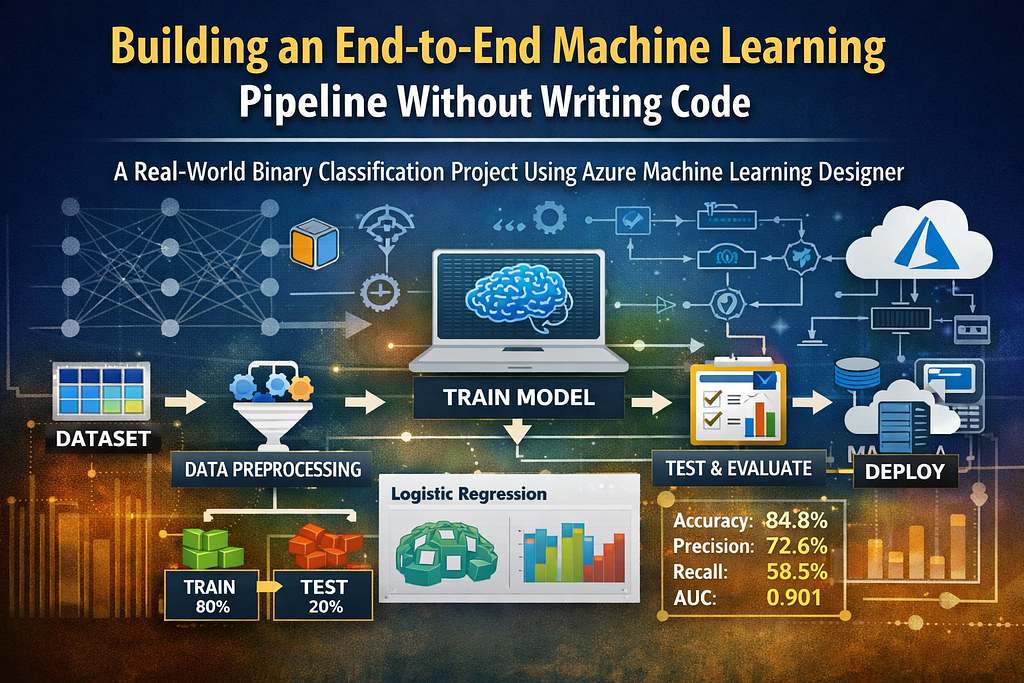
The pipeline built in Azure ML Designer looks like this:
Dataset
→ Select Columns
→ Clean Missing Data
→ Edit Metadata (Categorical Features)
→ One-Hot Encoding
→ Edit Metadata (Label Column)
→ Split Data
→ Train Model
→ Score Model
→ Evaluate Model
This pipeline represents the flow of data from raw dataset to trained model to evaluation metrics.
Understanding pipelines is very important because in real companies, machine learning models are always deployed as pipelines, not standalone scripts.
Step-by-Step Pipeline Explanation
Step 1: Select Columns in Dataset
The first step was selecting relevant columns required for prediction.
This step is important because:
- Removing irrelevant columns improves model performance
- Reduces noise in data
- Reduces computation time
- Prevents overfitting
Feature selection is often ignored by beginners, but in real projects it is very important.
More features do not always mean better models.
Sometimes fewer but relevant features produce better results.
Step 2: Handling Missing Data
Real-world datasets almost always contain missing values.
This dataset also contained missing values in some categorical columns.
Missing values were handled using mode imputation, which replaces missing values with the most frequent value in that column.
Why mode imputation?
- Works well for categorical data
- Simple and stable
- Does not distort distribution much
- Suitable for mixed datasets
Handling missing values is one of the most important steps in data preprocessing. Poor missing value handling can completely destroy model performance.
Step 3: Marking Categorical Features
Azure Machine Learning Designer requires categorical columns to be explicitly marked as categorical before encoding.
The following columns were marked as categorical:
- workclass
- education
- marital-status
- occupation
- relationship
- race
- sex
- native-country
This step is extremely important because encoding depends on metadata configuration.
If categorical columns are not marked properly, encoding will fail or produce incorrect results.
This is something many beginners do not realize when working with visual ML tools.
Step 4: One-Hot Encoding
Machine learning algorithms cannot work directly with text categories. So categorical variables must be converted into numeric format.
This was done using One-Hot Encoding.
One-hot encoding converts categories into binary indicator columns.
For example:
Workclass:
- Private
- Government
- Self-employed
Will become:
- Workclass_Private
- Workclass_Government
- Workclass_SelfEmployed
Each column will contain 0 or 1.
One important rule:
The label column should never be one-hot encoded.
Only feature columns should be encoded.
Step 5: Defining the Label Column
The income column was defined as the label column.
This tells the model:
“This is the column you need to predict.”
Without defining the label correctly, the model cannot train properly.
This step may look small, but it is one of the most important steps in supervised learning pipelines.
Step 6: Train-Test Split
The dataset was split into:
- 80% training data
- 20% testing data
Why do we split data?
Because we want to test the model on data it has never seen before.
If we test on training data, the model may memorize patterns instead of learning patterns.
This is called overfitting.
Train-test split helps measure how well the model generalizes to new data.
Step 7: Model Training
The model used in this project was Two-Class Logistic Regression.
Many people think Logistic Regression is a basic model, but in structured data problems, Logistic Regression is often a very strong baseline model.
Advantages:
- Fast training
- Interpretable
- Works well on structured datasets
- Less prone to overfitting compared to complex models
- Easy to deploy
In many real-world business problems, Logistic Regression performs surprisingly well.
Step 8: Scoring the Model
After training, the model was used to generate predictions on the test dataset.
This step produces:
- Predicted labels
- Probability scores
- Classification results
This output is then used in the evaluation step.
Step 9: Model Evaluation
The model was evaluated using multiple classification metrics.
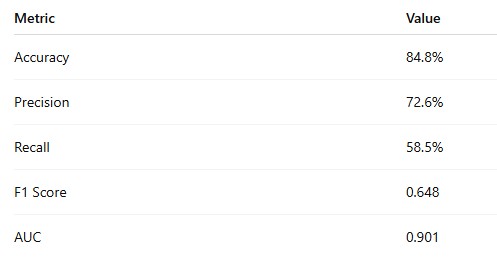
Let us understand what these metrics mean.
- Accuracy :- Percentage of correct predictions.
- Precision :- Out of all predicted positive cases, how many were actually positive.
- Recall :- Out of all actual positive cases, how many were correctly predicted.
- F1 Score :- Balance between precision and recall.
- AUC:- Measures how well the model separates the two classes. An AUC of 0.901 is very good and indicates strong class separation.
Important Lessons From This Project
This project teaches several very important machine learning concepts:
1. Data preprocessing is more important than model selection
A well-prepared dataset with a simple model often performs better than a complex model on poorly prepared data.
2. Categorical encoding is critical
Most real-world datasets contain categorical variables. Encoding must be done properly.
3. Missing value handling affects model performance
Improper handling of missing data can lead to incorrect predictions.
4. Logistic Regression is still a strong baseline model
Many beginners jump directly to complex models, but baseline models are very important.
5. Machine learning is a pipeline, not a model
The biggest takeaway from this project is that machine learning is a workflow or pipeline where data passes through multiple stages before predictions are generated.
This is how real-world machine learning systems work.
How This Project Reflects Real Industry Work
If we compare this pipeline to real industry ML systems, the workflow is very similar:
Real Industry Workflow:
- Data extraction from databases
- Data cleaning
- Feature engineering
- Encoding
- Train-test split
- Model training
- Model evaluation
- Deployment
- Monitoring
- Retraining
This project covers most of these steps.
So this project is not just a tutorial project. It represents how real machine learning pipelines are built.
Future Improvements and Enhancements
This project can be extended in multiple ways:
- Compare Logistic Regression with Random Forest and Gradient Boosting
- Perform hyperparameter tuning
- Handle class imbalance
- Perform feature importance analysis
- Deploy the model as an API
- Build a dashboard for predictions
- Add fairness and bias analysis
- Automate the pipeline
- Build a retraining pipeline
These steps would convert this into a production-level machine learning project.
Final Thoughts
One of the biggest misconceptions about machine learning is that it is all about algorithms. In reality, machine learning is about building systems where data flows through multiple stages before a model makes predictions.
This project demonstrates how an end-to-end machine learning pipeline can be built using Azure Machine Learning Designer while still following proper data science practices like preprocessing, encoding, training, and evaluation.
If someone wants to become a Data Scientist or Machine Learning Engineer, they should focus on:
- Data preprocessing
- Feature engineering
- Model evaluation
- Pipelines
- Deployment
- System design
Because companies do not deploy models. They deploy pipelines and systems.
Understanding how data flows from raw dataset to trained model to evaluation and deployment is what makes someone a real Data Scientist or Machine Learning Engineer.
If You Found This Useful
If this article helped you understand how real machine learning pipelines work, feel free to share your thoughts in the comments.
If you are learning Data Science, Machine Learning, Deep Learning, NLP, or Generative AI, follow for more practical articles based on real projects and real industry workflows.
And if this article was helpful, consider giving some claps. It helps more people discover the article and motivates me to write more practical content.
Building an End-to-End Machine Learning Pipeline Without Writing Code was originally published in Towards AI on Medium, where people are continuing the conversation by highlighting and responding to this story.