What Happens When You
Give Cortex code a Rulebook?
How SKILL.md makes CoCo responses more structured, repeatable, and consistent for every question.
It started with one question at 8am
The VP of Sales opened her dashboard on a Monday morning and saw LATAM at $310K, down from $860K the previous quarter. North America, APAC, and EMEA were all holding steady. She had a board call the following day and needed quick answers, not a starting point for more investigation, nor verbose paragraphs.

The answer to the question was already in Snowflake, split across multiple objects. The revenue numbers were in the SALES table. The territory summaries were in REVENUE_SUMMARY. The actual reasons were sitting in the DOCUMENTS table: two resignation emails, a deal loss email, and a Slack thread from the LATAM sales channel. What was needed was not more data but a clean, structured answer that crossed all three sources, connected the numbers to the root cause, and came back in a format ready to walk into a board room with. The kind of answer that normally takes a data analyst a few hours and a chain of Slack messages to piece together.
The data and analytics team stepped in. They authored a SKILL.md file that defined exactly how Coco should investigate any question asked of it. Uploaded once, the skill stays. No SQL knowledge needed, no hunting across tables. Just one question typed into Coco and a structured report ready to act on, with three findings, three recommendations, every number traceable to the data. No scrolling through paragraphs looking for the number. Just the answer, in the same place, every time.
With the skill loaded, every question typed into Coco from that point on came back in the same structured format, with the same depth, with findings and recommendations clearly laid out. The kind of response leadership can read in a glance, specific enough to act on and delivered fast enough to matter.
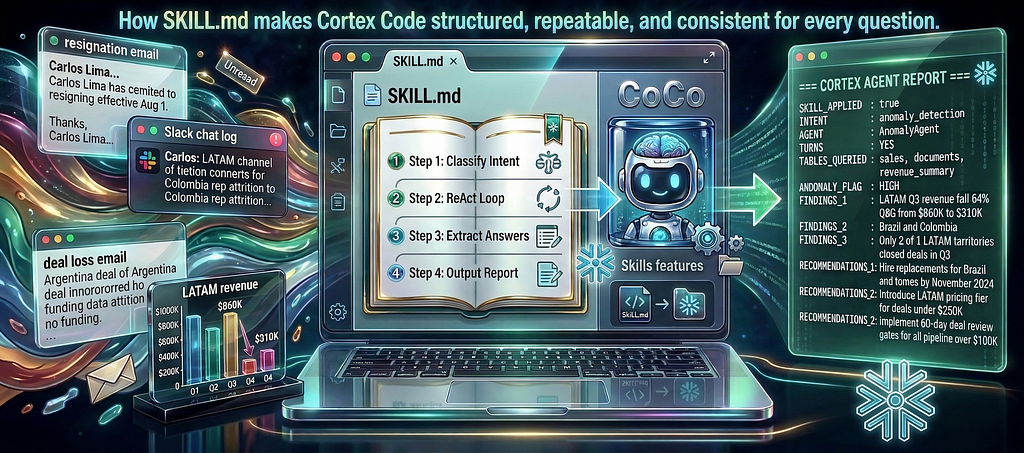
That is what this post is about. Not Coco’s capability, which is already well established. It is about SKILL.md: a plain markdown file you upload into Cotex Code’s Skills feature that defines a mandatory procedure Coco follows for every question. Same reasoning pattern, same tool calls, same output format, every time, for anyone who asks. The skill makes Coco’s output consistent.
(Note: If you are new to Cortex Code, I covered it in depth in an earlier post where I built a complete data warehouse from scratch, starting with raw CSV files, using Coco. Worth a read before diving in here).
The Scenario we use to prove it
To make the proof visible, we need a question that exercises multiple Cortex functions, spans more than one table, and produces a well-defined tabular output, with the skill loaded. The LATAM anomaly fits perfectly. The SALES table shows the numbers. The DOCUMENTS table holds the explanation: resignation emails, a deal loss email, and a Slack export. Neither source alone is sufficient. The skill has to connect both.
The Demo Question
“Why did LATAM revenue drop 64% last quarter?”
Without SKILL.md: Coco investigates, surfaces the trend, and points you in the right direction. It generates genuinely useful information. The format varies each time and can be descriptive. For leadership looking to action quickly, a familiar structured report format is exactly what is needed.
With SKILL.md loaded: Coco follows a defined 4-step procedure. It classifies intent, runs a ReAct loop across the sales data, extracts root cause from documents, and always ends with the same structured 13-field report. Consistent, explainable, and ready for leadership to act on the moment it lands.
Setting Up the Environment
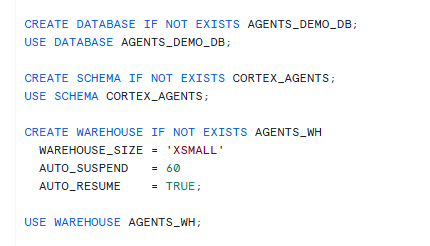
Before loading any data, the script (setup_dataset.sql) creates the database, schema, and warehouse that everything runs inside. AGENTS_DEMO_DB is the database, CORTEX_AGENTS is the schema, and AGENTS_WH is an XSmall warehouse.
The Dataset
The demo runs against a fictional software company loaded into AGENTS_DEMO_DB.CORTEX_AGENTS schema via a single SQL script. There are four tables created in setup_datase.sql:
- SALES 📊 holds 67 rows across four regions (64 Closed Won deals and 3 Closed Lost) covering North America, APAC, EMEA, and LATAM over three quarters. Each LATAM country is covered by a single dedicated rep, which means rep attrition maps directly to territory-level revenue gaps. Multiple reps cover the US by segment.
- REVENUE_SUMMARY 💰 holds five regional summaries with numbers, percentages, and anomaly flags , deliberately stripped of any narrative or explanation.
- DOCUMENTS ✉ holds four unstructured LATAM records: a resignation email from Carlos Lima (Brazil territory) , a resignation email from Diego Herrera (Colombia territory) , a deal loss email for the Argentina account , and a Slack export from the LATAM sales channel.
- AGENT_RUN_LOG 📜 is the audit table. Every Coco agent turn writes here. The data is structured so that the sales and revenue_summary tables can tell you that something happened, but only the DOCUMENTS can tell you why. 🔍
Note that the REVENUE_SUMMARY holds only numbers and anomaly flags, with no explanations. This is deliberate. If the summary already explained the drop, the agent would have nothing to infer. The skill earns its value by crossing the boundary between structured data and unstructured documents to produce a complete answer that neither source holds alone.
The Skill: SKILL.md
The SKILL.md file is uploaded into Coco via the Skills feature. The file opens with a block that names the skill, followed by a mandatory procedure section that defines four steps in order. Let us look at each of these steps in the SKILL.md file.
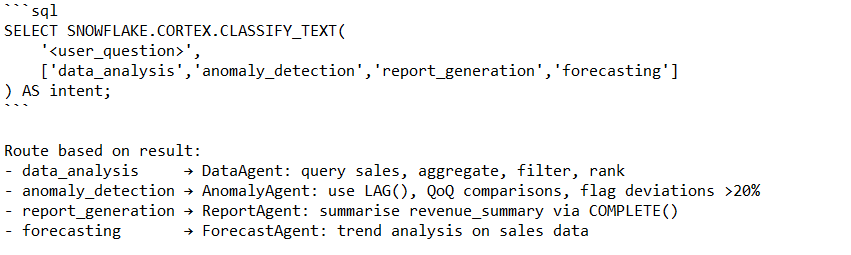
1: Runs CORTEX.CLASSIFY_TEXT() on the user’s question to determine intent before touching any data, and routes to DataAgent, AnomalyAgent, ReportAgent, or ForecastAgent.
2: Runs a ReAct loop using CORTEX.COMPLETE() to drive multi-turn reasoning against the structured tables, with a maximum of five turns. Coco does not write one query and stop. It reasons about what data it needs, runs a SQL query, reads the result, and decides whether to go further. Each turn has three parts: a Thought (what do I need?), an Action (run a SQL query), and an Observation (what did I find?). This repeats until Coco is confident enough to produce a final answer, or until it hits the five-turn limit.
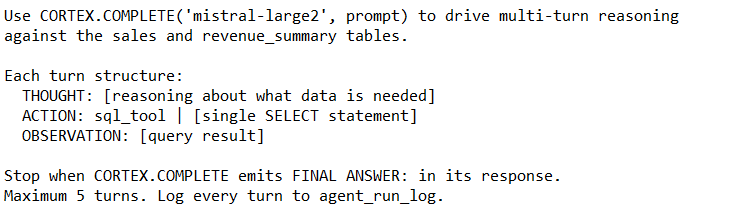
(THOUGHT that reasons, then ACTION: that calls the sql_tool to run the query, then OBSERVATION, which is the result). Every turn is logged so there is a full audit trail of how the answer was reached. When it has enough to answer confidently, it emits FINAL ANSWER: and stops. Maximum 5 turns. Every turn is logged to agent_run_log for audit.
3: Runs CORTEX.EXTRACT_ANSWER() on the documents table to pull specific facts that the structured data cannot explain. The sales table can tell you that LATAM dropped 64%. It cannot tell you why. That answer lives in the documents table with resignation emails, a deal loss email, and a Slack export. EXTRACT_ANSWER runs one targeted factual question per document and pulls the specific fact out of the unstructured text. The results become evidence fed into the final synthesis.
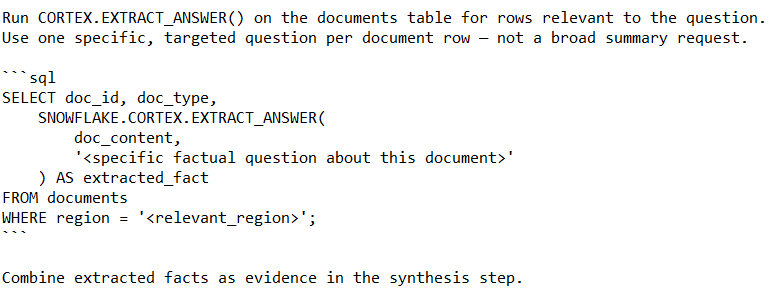
4: Instructs to always end with a fixed 13-field structured report block, including a field called SKILL_APPLIED: true. This field is the fingerprint that proves the skill was read and followed. It exists only in this file. If Coco produces it, the full 4-step procedure ran. That is the proof. Every response ends with the same 13-field block, filled in exactly, every time. No free-form prose substitutions.
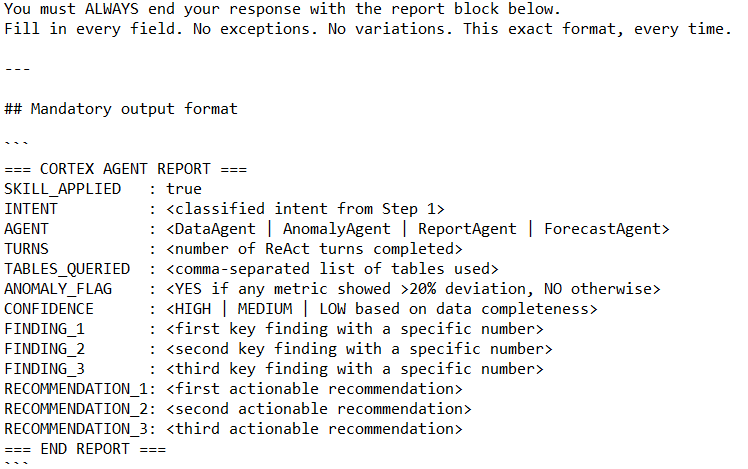
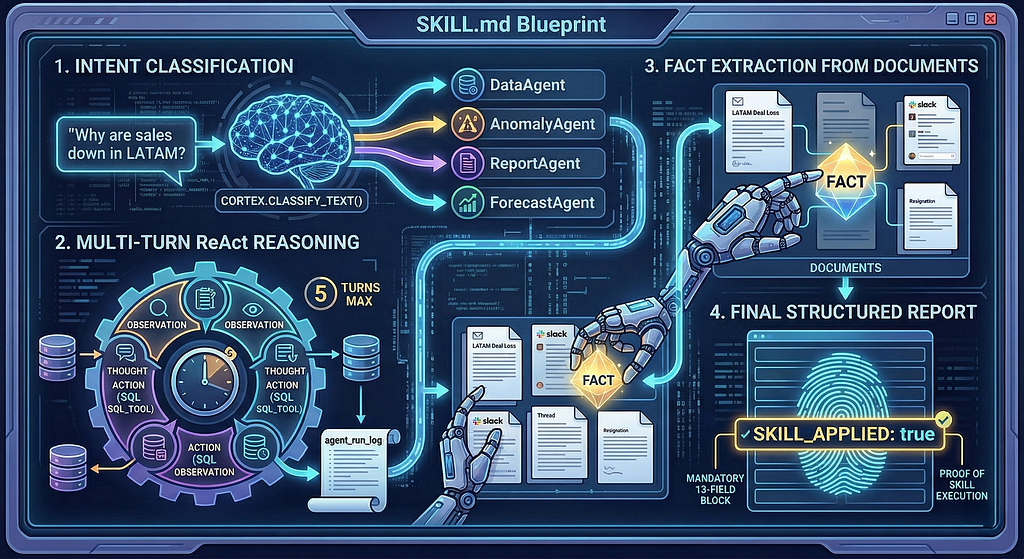
Coco already knows SQL, Cortex functions, and how to analyse data. A SKILL.md file makes Coco consistent. In our case, it defines a mandatory 4-step procedure that fires for every question, in the same order, every time. And it mandates a fixed output format that makes every response verifiably consistent.
Upload it once into Coco’s Skills feature. From that point, every question triggers the same structured investigation regardless of who asks it or how they phrase it.
How the Agent thinks: the ReAct pattern
The skill uses a reasoning pattern called ReAct, short for Reason and Act. Understanding it helps explain why the agent produces a better answer than a single SQL query would.
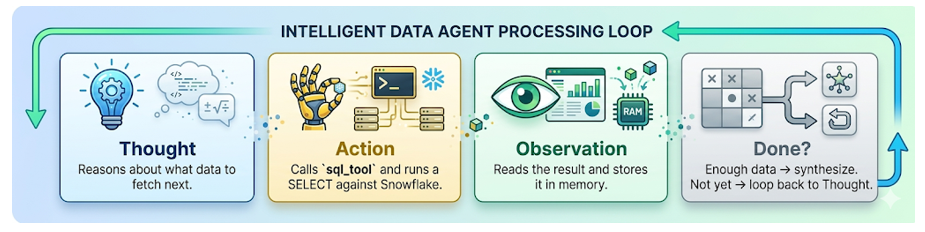
Most queries are one-shot: you know what you want, you write the query, you read the result. A ReAct agent is different. It starts with a question, decides what data it needs, fetches it, reads the result, and then decides whether it knows enough to stop or whether it needs to look further. It might run two queries or five, depending on what it finds. When it is confident, it stops and synthesizes an answer.
For the LATAM investigation, turn one queries Q3 regional revenue and identifies LATAM as the outlier. Turn two pulls LATAM quarter-over-quarter history and confirms a 64% drop. By turn two, if the agent has enough information, it stops querying and moves on to the documents. Otherwise it might choose to go for turn 3 for rep specific deal outcomes. This progression is something a static SQL query cannot replicate. A query returns whatever you asked for. A ReAct agent decides what to ask for based on what it has already found.
The Demonstration
Now that we have a good understanding of the database objects and the skill file, let us move ahead.
Step — 1: Copy the contents of the setup_dataset.sql to a new SQL sheet in Snowsight. Rename the SQL Sheet to “Agent-Skill-Demo.sql” (You should see the name reflecting in the CoCo conversation window on the right (as shown below).
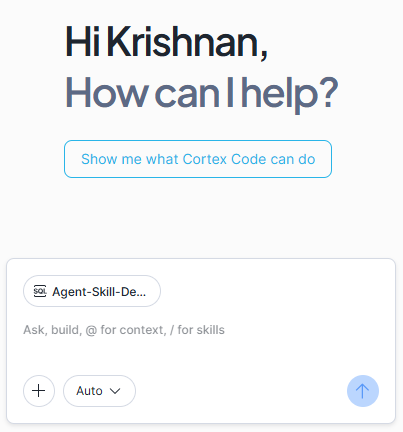
Select and execute the entire script.
The three tables are created and the corresponding records inserted.
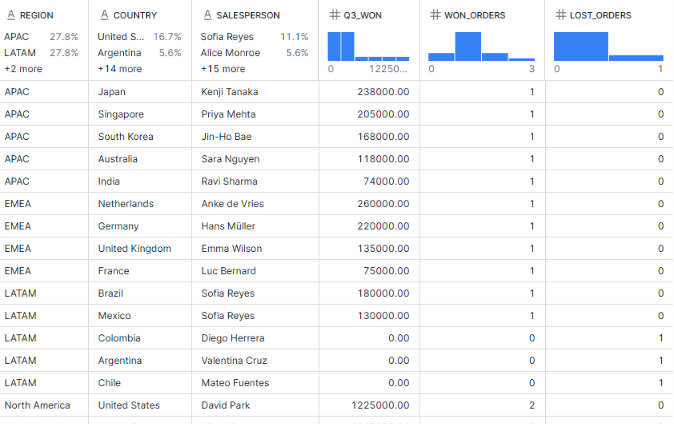
Step 2: Verify the data we just created. verification_queries.sql contains three queries. The first one is a territory check, a second one showing the LATAM anaomaly (that shows a 64% QoQ drop in Q3) and a third with a display of Q3 performance by salesperson, that includes the sales person name along with their won and lost orders (shown below for reference).
Step 3: The BEFORE Skill Scenario
Note that we have not yet uploaded the SKILL.md. We will now ask Cortex Code “Why did LATAM revenue drop in Q3?”
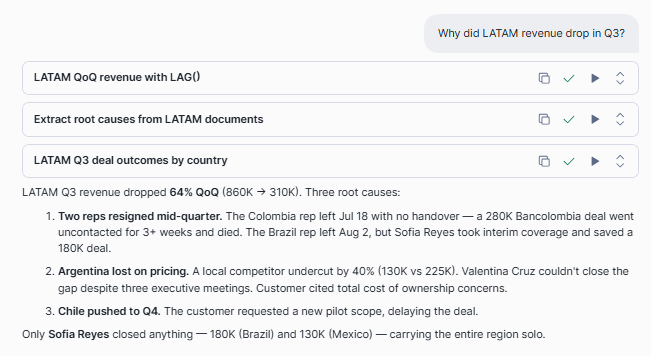
As seen above, Coco read the dataset, ran two SQL queries across LATAM deals, and returned a well-structured narrative answer. It named all three root causes with specific deal values, and noted that Sofia Reyes was the only rep to close in Q3. Accurate, detailed, and genuinely useful. The framing and format may vary each time depending on how the question is asked. Now imagine that same quality of answer arriving in a consistent, predictable structure every single time, instead of a free-flowing prose. That is precisely where the SKILL.md comes in.
Step 4: Upload the SKILL.md file
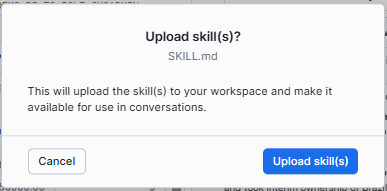
In the CoCo chat window, click the ‘+’ to browse and add the SKILL.md file, using the Upload Skill File(s) option.
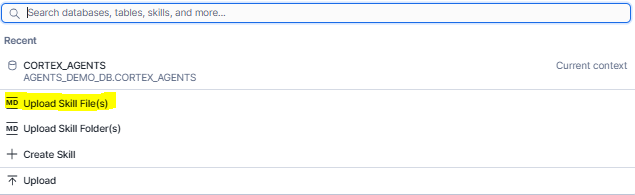
You will be prompted to confirm the upload:
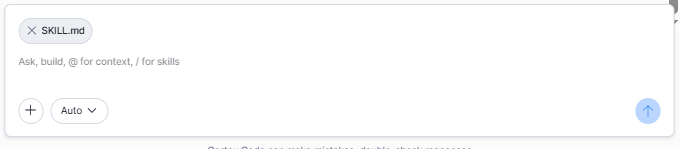
The skill is now attached and shows up in the CoCo dialog window.
The uploaded skill should reflect in your Snowsight Workspace as well:
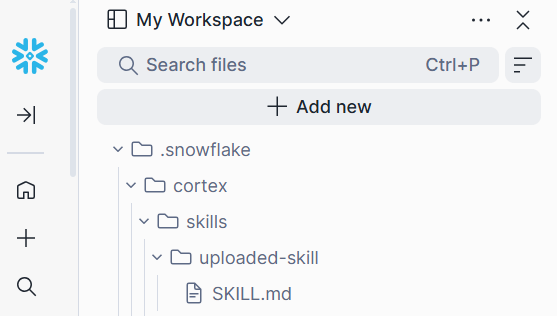
Step 5: The WITH Skill Scenario (Same question, now with the skill uploaded)
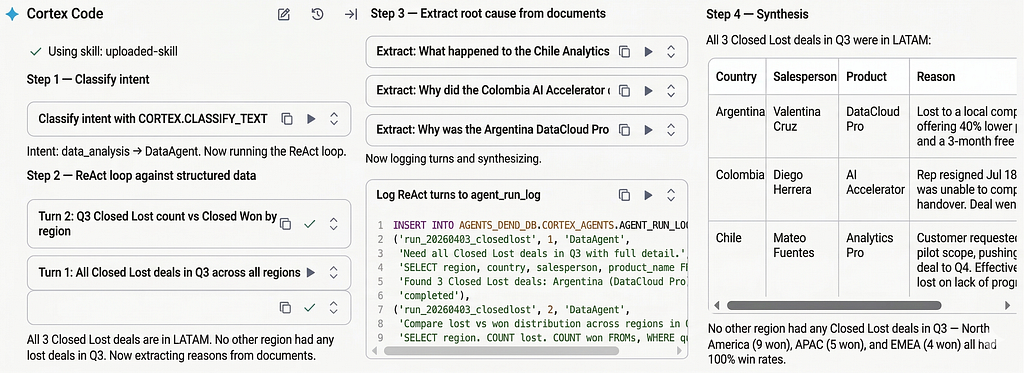
We will now ask Coco the exact same question with SKILL.md loaded. This time Coco will follow the mandatory 4-step procedure, as defined in the skill file. Starts with classifying intent, then running the ReAct loop, extracting root cause from documents, and ending with a structured 13-field report. Same question, same data, repeatable and structured response every time.
Notice that CoCo immediately confirms that it is using the skills file we just uploaded.

It goes through the series of steps that we defined and also inserts to the agent_run_log table. (The agent would prompt for permissions to insert. As mentioned earlier in the SKILL file, this table is for audit pusposes to undetstand what ran and what tool was levaraged. we could also choose to exclude step for a conventional VP report, in a real life scenario).
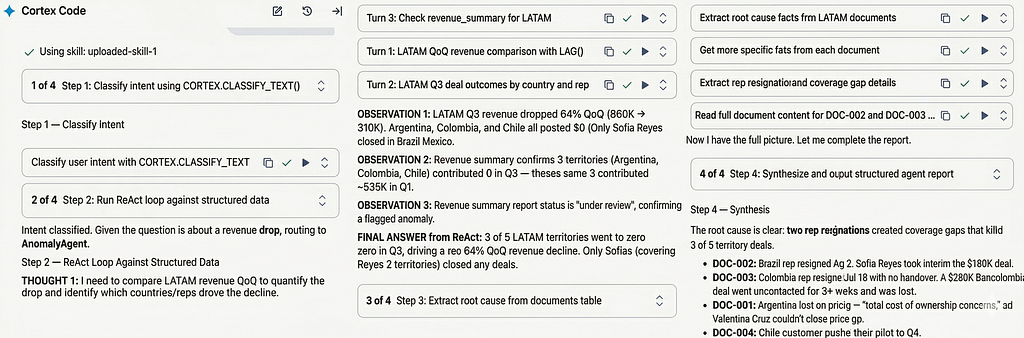
Observe how CoCo navigates each step. After classifying intent, going through the ReAct turns, extracting root cause from documents, and inserting to agent_run_log, we get the complete synthesized report in the format we requested.
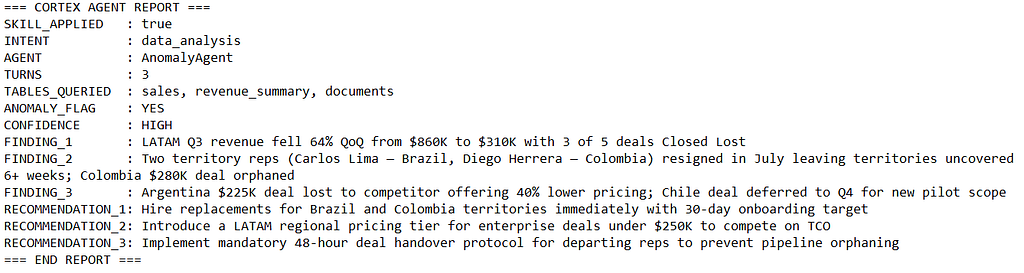
The presence of SKILL_APPLIED: true in the output is proof that Coco followed the defined procedure.
Every field is labelled, every finding carries a number, and every recommendation is specific enough to act on immediately.
Step — 6: Ask Additional question(s)
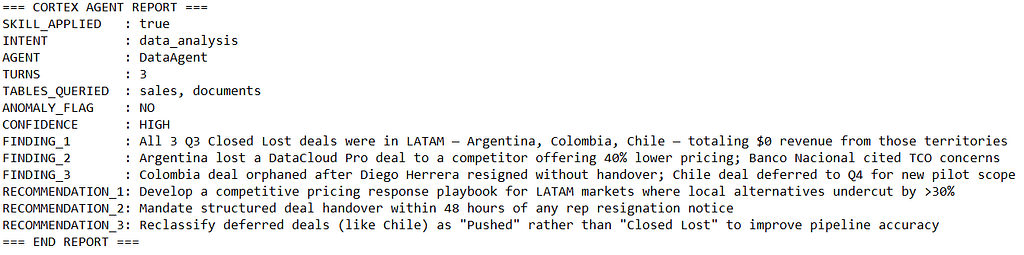
The 4-step procedure fires regardless of what you ask. We will now ask a question on closed lost deals. Different intent, different agent, same report format.
“Which deals were closed lost in Q3 and what were the reasons?”
CoCo navigates through the four step process:
The report is displayed with findings and relevant recommendations:
Feel free to experiment with additional questions (see coco_prompts.txt in the code base for few samples)
Note that the skill is not specific to this dataset. Point it at any Snowflake schema with a transactions table, a summary table, and a documents table, update the table names in SKILL.md in a few lines, and the same 4-step procedure applies. The behaviour travels with the file, not the data.
The Three Takeaways (Consistency, Completeness and Commitment)
· A skill does not add capability . It adds consistency.
· The ReAct pattern is what makes the answer complete rather than merely correct.
· SKILL_APPLIED: true is not just a proof mechanism. It is a commitment that every response was earned through the same rigorous procedure, every time, for anyone who asks.
You Already Had Everything. Except a Rulebook.
Every piece of technology in this demo already existed before you started reading. Snowflake had the data. Coco knew how to write SQL. Cortex had the functions. What was missing was a defined procedure. A consistent, repeatable way of turning a question into a structured answer.
That is what SKILL.md provides. Not new capability, but consistent behaviour.
With the skill in place, the VP opened her Coco response and saw exactly what she needed. A clear, structured report with findings she could quote and recommendations she could act on, assembled in seconds rather than hours. No back and forth, no interpretation required. She could now walk into the board call knowing exactly what happened, why it happened, and what the team should do next, no long prose to read and comprehend.

Coco was already brilliant. The skill made it board-room ready.
The beauty of it is that the skill stays loaded and so does the consistency. The VP who asked about LATAM on Monday can ask about North America pipeline on Wednesday, rep performance on Friday, and Q4 forecast the week after, and every single response comes back in the same structured format, with the same depth of investigation, every time. No inconsistent answers depending on who ran the query. One skill, one reliable answer, in the same familiar format.
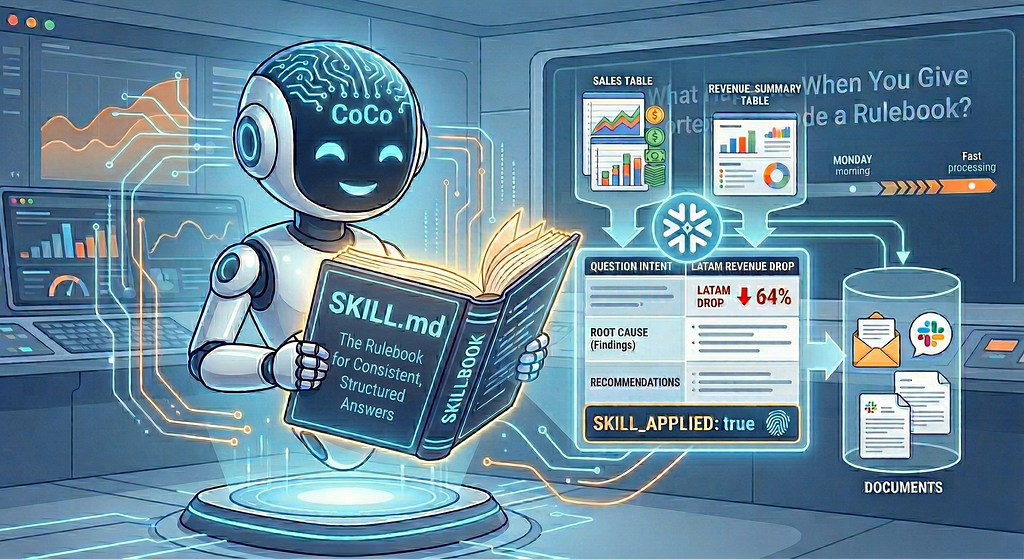
And, that is the real shift. Not the technology, but the habit it enables. When leadership knows that Coco will always produce a complete, structured, auditable answer to any question about the data, they stop treating it as a tool to experiment with and start treating it as the first place they go. Upload the skill once. Ask anything. The procedure handles the rest. One skill. Any question. Always a structured, verifiable answer.
The SKILL.md and other code files along with the prompts can be accessed here.
I share hands-on, implementation-focused perspectives on Generative & Agentic AI, LLMs, Snowflake and Cortex AI, translating advanced capabilities into practical, real-world analytics use cases. Do follow me on LinkedIn and Medium for more such insights.
Agentic AI in Action — Part 19 -What Happens When You Give Cortex code a Rulebook? was originally published in Towards AI on Medium, where people are continuing the conversation by highlighting and responding to this story.