This is Part 2 of a 5-part series on building a production-grade RAG system.
- Part 1 — Hybrid RAG Overview
- Part 2 — Semantic Chunking vs Fixed Chunking (you are here)
- Part 3 — Custom Reranking: Combining Dense and Sparse Scores
- Part 4 — Parent-Child Document Architecture
- Part 5 — Building a Tool-Augmented RAG Agent
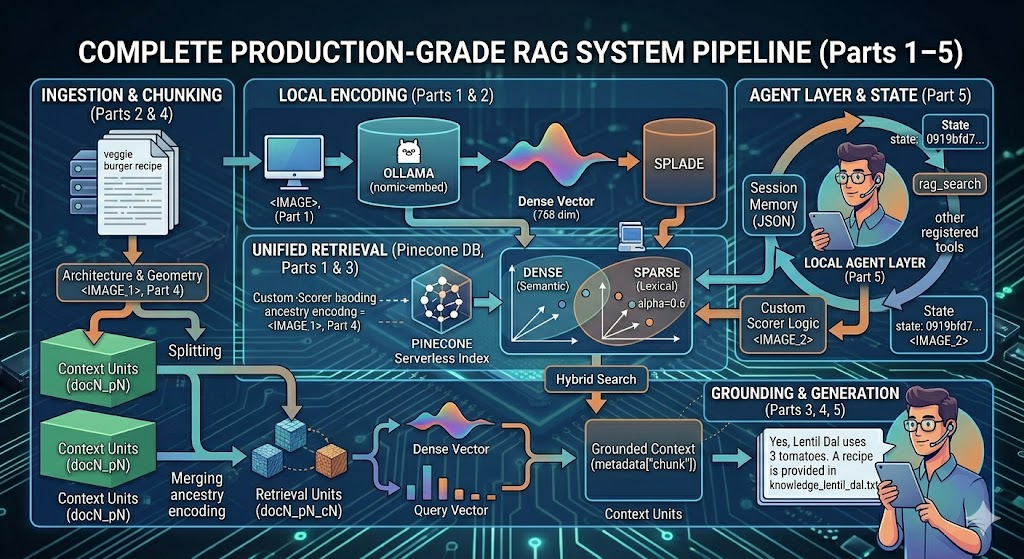
Most RAG failures are not retrieval failures — they’re chunking failures. The vector database returns exactly what you put in. If you split documents at arbitrary character boundaries, you will embed incomplete thoughts, cut off mid-sentence, and force your model to work from fragments. No amount of clever retrieval can fix bad chunks.
This article walks through two chunking strategies used in the same pipeline: a fixed character-based chunker that processes parent documents, and a semantic sliding window chunker that produces final retrieval units. Understanding both — and why you need both — is the key insight behind Part 4’s Parent-Child Architecture.
Strategy 1: Fixed Character Chunking (for Parent Documents)
The first pass over your documents uses a straightforward character-based chunker. It reads through each file in configurable-size blocks with an overlap to avoid cutting sentences at boundaries:
def read_documents_in_chunks(documents: list[str], chunk_size: int = 500, chunk_overlap: int = 50):
    """Read documents and yield chunks with metadata."""
    print(f"Processing {len(documents)} documents with chunk_size={chunk_size}, overlap={chunk_overlap}")

    document_id = 0
    for document in documents:
        chunk_number = 0
        with open(document, "r", encoding="utf-8") as file:
            while True:
                chunk = file.read(chunk_size)
                if len(chunk) == chunk_size and chunk_overlap > 0:
                    file.seek(file.tell() - chunk_overlap)
                if not chunk:
                    break

                yield {
                    "document_id": document_id,
                    "chunk_number": chunk_number,
                    "chunk": chunk,
                    "document_name": str(document)
                }
                chunk_number += 1
        document_id += 1
In the pipeline, this is called with chunk_size=2000, chunk_overlap=400 — producing large parent chunks that preserve substantial context. These are not stored directly in the vector index. They serve as the raw input for the second chunking stage.
The metadata yielded here — document_id, chunk_number, document_name — becomes the parent-level hierarchy later. See Part 4 for how this plays into the full parent-child architecture.
Strategy 2: Sliding Window Chunking (for Child Documents)
Each parent chunk is then split into overlapping word-level windows:
def sliding_windows(words: List[str], window_size=40, overlap=10):
    """Create sliding windows from a list of words."""
    print(f"Creating sliding windows: size={window_size}, overlap={overlap}, words={len(words)}")
    step = window_size - overlap
    windows = []
    for i in range(0, len(words), step):
        windows.append(" ".join(words[i:i + window_size]))
    return windows
In the pipeline this is called as:
sw = sliding_windows(chunk["chunk"].split(), window_size=200, overlap=40)
A 2000-character parent chunk contains roughly 350–400 words. With window_size=200 and overlap=40, this produces around 2–3 windows per parent chunk. The overlap ensures that concepts sitting at window boundaries aren't lost.
Strategy 3: Semantic Merging (the Key Insight)
Sliding windows alone still suffer from arbitrary boundaries. Two adjacent windows that discuss the same topic should be one chunk — and two windows that pivot to a new topic should be separate.
This is where semantic merging comes in. After generating windows, you embed each one and then scan pairs of adjacent windows:
def semantic_merge(windows, embeddings, threshold=0.75):
    """Merge adjacent chunks based on semantic similarity."""
    chunks = []
    current_chunk = windows[0]
    for i in range(1, len(windows)):
        sim = cosine_similarity(
            np.array(embeddings[i - 1]["embedding"].vector).reshape(1, -1),
            np.array(embeddings[i]["embedding"].vector).reshape(1, -1)
        )[0][0]

        if sim >= threshold:
            print(f"Merging chunk {i} (similarity: {sim:.3f})")
            current_chunk += " " + windows[i]
        else:
            print(f"Not merging chunk {i} (similarity: {sim:.3f})")
            chunks.append(current_chunk)
            current_chunk = windows[i]
    chunks.append(current_chunk)
    return chunks
If two adjacent windows have cosine similarity ≥ threshold (the pipeline uses 0.60 to be more aggressive with merging), they are concatenated. The process continues until a semantic boundary is found.
What This Looks Like in Practice
Take a recipe document structured as: Ingredients → Instructions → Storage Tips → FAQ. With fixed chunking, you might land a chunk boundary right between “Instructions” and “Storage Tips,” embedding a fragment that’s neither a complete recipe method nor a coherent storage guide.
With semantic merging, the similarity between the Instructions window and the Storage Tips window will likely be low (different vocabulary, different purpose) — so they stay separate. The Instructions section merges internally across its own windows because adjacent steps share high semantic overlap.
The Two-Stage Embedding Cost
Semantic merging requires embeddings at two points:
- Window-level embeddings — used only for similarity comparison, then discarded
- Merged chunk embeddings — the final representations stored in Pinecone
# Stage 1: embed windows for merging decisions
embeddings = await get_embeddings(tuple(sw))
# Stage 2: merge based on similarity
merged_chunks = semantic_merge(sw, list(embeddings), threshold=0.60)
# Stage 3: embed the final merged chunks for indexing
merged_embeddings = await get_embeddings(tuple(merged_chunks))
This doubles the embedding calls but produces dramatically better chunks. Because embeddings run locally via Ollama — with no API rate limits or per-token costs — this is essentially free. The only cost is local compute time.
The embedding function itself:
async def get_embeddings(chunks):
    """Generate embeddings for a list of text chunks."""
    response = await embeddings_client.get_embeddings(chunks)
    embeddings = []
    for i, chunk in enumerate(chunks):
        embeddings.append({
            "chunk": chunk,
            "embedding": response[i]
        })
    return embeddings
It returns 768-dimensional vectors via Ollama’s nomic-embed-text model running at http://localhost:11434/v1. The full client setup is in Part 1.
Fixed vs Semantic: When to Use Each
Fixed Chunking Semantic Chunking Speed Fast Slower (double embedding pass) Boundary quality Arbitrary Semantically coherent Best for Large parent chunks Small retrieval units Implementation complexity Low Medium Cost with Ollama Free Free
For this system, both are used in sequence: fixed chunking creates parent context units, semantic chunking creates the children that get indexed and retrieved. This is why the doc{n}_p{n}_c{n} ID scheme exists — it encodes the full ancestry.
How Chunk Quality Shows Up in Retrieval
Bad chunks produce retrieval results like this (real output from querying "Indian"):
Chunk doc6_p0_c0:  Dense=0.084, Sparse=0.134, Hybrid=0.114
Chunk doc3_p0_c0:  Dense=0.058, Sparse=0.042, Hybrid=0.048
Low scores across the board — the query is too short for dense embeddings to get a semantic foothold, and sparse scoring only picks up the word “Indian” if it appears verbatim. The agent still surfaces the right documents (Lentil Dal, Chickpea Curry, Sweet Potato Curry), but only because the correct chunks were indexed with coherent content in the first place. Incoherent chunks would make even these modest scores unreliable.
What’s Next
- Part 3 — Custom Reranking: After retrieval, how do you re-score chunks using both dense and sparse signals together?
- Part 4 — Parent-Child Architecture: How the two-stage chunking from this article feeds into a hierarchical document store.
- Part 1 — Hybrid RAG Overview: The full system diagram, Ollama setup, and stack overview, if you haven’t started there.
Semantic Chunking vs Fixed Chunking: Why Your RAG’s Retrieval Quality Starts Before the Query was originally published in Towards AI on Medium, where people are continuing the conversation by highlighting and responding to this story.