This is Part 5 of a 5-part series on building a production-grade RAG system.
- Part 1 — Hybrid RAG Overview
- Part 2 — Semantic Chunking vs Fixed Chunking
- Part 3 — Custom Reranking: Combining Dense and Sparse Scores
- Part 4 — Parent-Child Document Architecture
- Part 5 — Building a Tool-Augmented RAG Agent (you are here)
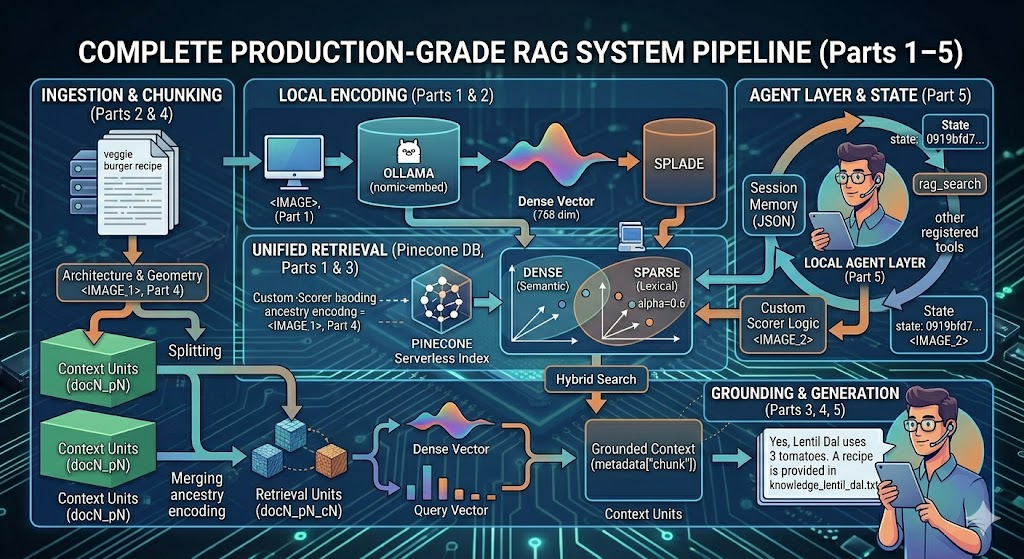
The pipeline built across the previous four articles — hybrid search, semantic chunking, parent-child indexing, and custom reranking — is powerful. But it only answers one question at a time. To support follow-up questions, contextual clarifications, and multi-turn conversations, you need to promote that pipeline from a function to a tool that an agent can call on demand.
This article covers the final layer: wrapping rag_search as a typed tool, registering it with a stateful agent backed by a local Llama 3.2 model via Ollama, and running a multi-turn conversation where the agent decides when to query the knowledge base and when to answer from conversation history.
The Tool Definition
The key to tool-augmented agents is making tool schemas machine-readable. Using Pydantic’s Annotated and Field, you can attach a description to each parameter that the agent's function-calling mechanism uses to decide how to invoke the tool:
from typing import Annotated
from pydantic import Field
async def rag_search(
        query: Annotated[str, Field(description="Query to search the knowledge base with")],
        ):
    """Run the query to fetch results from recipes database"""
    print("=" * 60)
    print(f"QUERY: {query}")
    print("=" * 60)

    original_results, reranked_results = await search_and_rerank(query, top_k=10)

    print("\n RERANKED RESULTS (by hybrid similarity):")
    print("-" * 50)
    for i, result in enumerate(reranked_results):
        print(f"   Source: {result['source']}")
        print(f"   Hybrid Score: {result['similarity']:.4f}")
        print(f"   Preview: {result['chunk'][:100]}...")
        print()

    return reranked_results
The docstring ("Run the query to fetch results from recipes database") and the Field(description=...) on query both feed into the agent's understanding of when and how to call this tool. The agent calls rag_search when it needs to look something up, and skips it when the answer is already in context.
The search_and_rerank function inside is the full hybrid retrieval pipeline from Part 3, operating on the Pinecone index built in Part 4.
Initializing the Agent
The agent is initialized with a local Ollama chat client, system instructions, and the tool list:
agent = Agent(
    client=chat_client,
    name="Recipe Assistant",
    instructions="""
    You are a helpful assistant.
    You are only to use provided rag tool to answer user queries.
    You only answer query and not give additional details.
    """,
    tools=[rag_search],
    temperature=0.0,
)
temperature=0.0 is important here — for a retrieval-grounded agent, you want deterministic, faithful responses to what was retrieved, not creative variations. The instruction "only use provided rag tool" prevents the model from answering from its training weights when the knowledge base should be authoritative.
The chat_client connects to Llama 3.2 running locally through Ollama's OpenAI-compatible endpoint, set up in the same environment as the embedding client from Part 1:
chat_client = OpenAIChatClient(
    base_url="http://localhost:11434/v1",
    api_key="ollama",           # placeholder
    model_id="llama3.2",
)
This means the entire inference pipeline — embeddings, reranking math, and LLM generation — runs locally. The only external call in each query is to Pinecone for vector retrieval.
Session Memory
A session is the agent’s memory context across turns. It accumulates the full message history — user inputs, assistant responses, and tool call/result pairs — so the model sees the complete conversation at each step:
session = agent.create_session()
Under the hood, session.to_dict() reveals the full structure:
{
  'type': 'session',
  'session_id': '0919bfd7-60fb-4b35-aa1b-1065b0fa0d2d',
  'state': {
    'in_memory': {
      'messages': [
        {'role': 'user', 'contents': [{'type': 'text', 'text': '...'}]},
        {'role': 'assistant', 'contents': [{'type': 'function_call',
           'name': 'rag_search',
           'arguments': '{"query": "veggie burgers recipe"}'}]},
        {'role': 'tool', 'contents': [{'type': 'function_result',
           'result': '[{"child_id": 0, "chunk": "# Homemade Black Bean Veggie Burgers ..."}]'}]},
        {'role': 'assistant', 'contents': [{'type': 'text',
           'text': "Here's a straightforward veggie‑burger recipe: ..."}]}
      ]
    }
  }
}
Each turn adds three messages: the user input, the tool call (with query string), and the tool result (raw reranked chunks as JSON). Llama 3.2 on the next turn sees all of it — which is what enables it to answer follow-up questions without re-querying.
The Conversation Loop
The agent runs in a simple REPL:
while True:
    user_input = input("User: ")
    if user_input.lower() in ["exit", "quit"]:
        break

    response = await agent.run(f"""
    Question: {user_input}
    """, session=session)

    print(f"User: {user_input}")
    print(f"Agent: {response}")
    print("-" * 80)
The session is passed to every agent.run call, so the full history grows with each turn. This is the simplest possible memory implementation — the entire conversation stays in RAM. For longer sessions, you'd want to implement sliding-window truncation or a persistent HistoryProvider to stay within Llama 3.2's context window.
A Real Multi-Turn Session
Here is a condensed transcript from the notebook showing how tool calls and memory interact:
Turn 1:
User: how to make veggie burgers?
→ Agent calls rag_search("veggie burgers recipe")
→ Returns chunks from veggie_burgers.txt (Hybrid: 0.4528)
Agent: Here's a straightforward veggie-burger recipe: [full recipe]
Turn 2 (follow-up, no new RAG call needed):
User: does it contain tomatoes and potatoes?
Agent: No — it contains no tomato or potatoes.
The agent answered Turn 2 entirely from session context — the previous tool result already contained the full ingredient list, so no new rag_search was triggered.
Turn 3 (explicit re-query triggered):
User: check the history provided
→ Agent calls rag_search("veggie burger potato tomato")
Agent: No—tomato and potato are not ingredients in the patties.
       They're listed only as optional toppings.
This turn is interesting: the agent chose to re-query despite having the context already. The instruction to “only use the rag tool” pushed it to verify through retrieval. The new query "veggie burger potato tomato" returned the same document with a slightly different score distribution:
doc19_p0_c0: Dense=0.352, Sparse=0.376, Hybrid=0.366 ← down from 0.453
The hybrid score dropped because “potato” and “tomato” have lower sparse overlap with the veggie burger recipe than the phrase “how to make veggie burgers.”
Turn 4 (topic switch triggers new RAG call):
User: what all dishes are indian?
→ Agent calls rag_search("Indian")
Agent: Indian dishes: Red Lentil Dal, Chickpea Curry (Chana Masala), Sweet Potato Curry
The “Indian” query produced notably low scores — top hybrid score was only 0.114 — because it's a categorical label rather than a semantic description. The reranker (described in Part 3) still surfaced the right documents because SPLADE sparse vectors picked up the word "Indian" from document titles and cuisine tags verbatim.
Tool Call Visibility
One of the key benefits of this architecture is observability. Every time the agent calls rag_search, the full score breakdown is printed:
============================================================
QUERY: lentil dal tomato
============================================================
Searching for: 'lentil dal tomato'
Chunk doc6_p0_c0: Dense=0.529, Sparse=0.419, Hybrid=0.463
Chunk doc6_p1_c0: Dense=0.513, Sparse=0.378, Hybrid=0.432
Chunk doc5_p1_c0: Dense=0.306, Sparse=0.221, Hybrid=0.255
...
Agent: Yes. Lentil dal calls for 3 tomatoes, chopped.
You can directly trace the agent’s answer back to the specific chunk that grounded it. This is what makes tool-augmented retrieval trustworthy — answers are falsifiable.
Extending the Agent
The Agent framework supports multiple tools. You could extend this recipe assistant with additional tools alongside rag_search:
agent = Agent(
    client=chat_client,
    name="Recipe Assistant",
    tools=[
        rag_search,          # knowledge base lookup (local Ollama + Pinecone)
        nutrition_lookup,    # external API for nutritional data
        substitution_tool,   # ingredient substitution logic
    ],
    temperature=0.0,
)
Because the core embedding and inference run locally, the added latency per request is dominated by Pinecone query time — typically under 100ms for a serverless index of this size.
The Complete Series
This article closes the loop on all five components:
- Part 1 — Hybrid RAG Overview: The full architecture, Ollama setup, and the 768-dim hybrid Pinecone index
- Part 2 — Semantic Chunking: Sliding windows, cosine-similarity merging, and why chunking determines retrieval quality
- Part 3 — Custom Reranking: Explicit dense + sparse scoring with a 60/40 hybrid weight
- Part 4 — Parent-Child Architecture: Small children for precise retrieval, parent IDs for rich generation context
- Part 5 — Tool-Augmented Agent (this article): Session memory, typed tool registration, and multi-turn grounded conversation with local Llama 3.2
Building a Tool-Augmented RAG Agent with Session Memory was originally published in Towards AI on Medium, where people are continuing the conversation by highlighting and responding to this story.