This is Part 1 of a 5-part series on building a production-grade RAG system.
- Part 1 — Hybrid RAG Overview (you are here)
- Part 2 — Semantic Chunking vs Fixed Chunking
- Part 3 — Custom Reranking: Combining Dense and Sparse Scores
- Part 4 — Parent-Child Document Architecture
- Part 5 — Building a Tool-Augmented RAG Agent
Most RAG tutorials stop at the basics: embed your documents, store them in a vector database, retrieve by cosine similarity. That works — until it doesn’t. If a user asks “black bean veggie burger recipe” and your documents contain the phrase “Homemade Black Bean Veggie Burgers,” pure semantic search may still rank an unrelated document higher because the embedding space doesn’t always reflect exact keyword relevance.
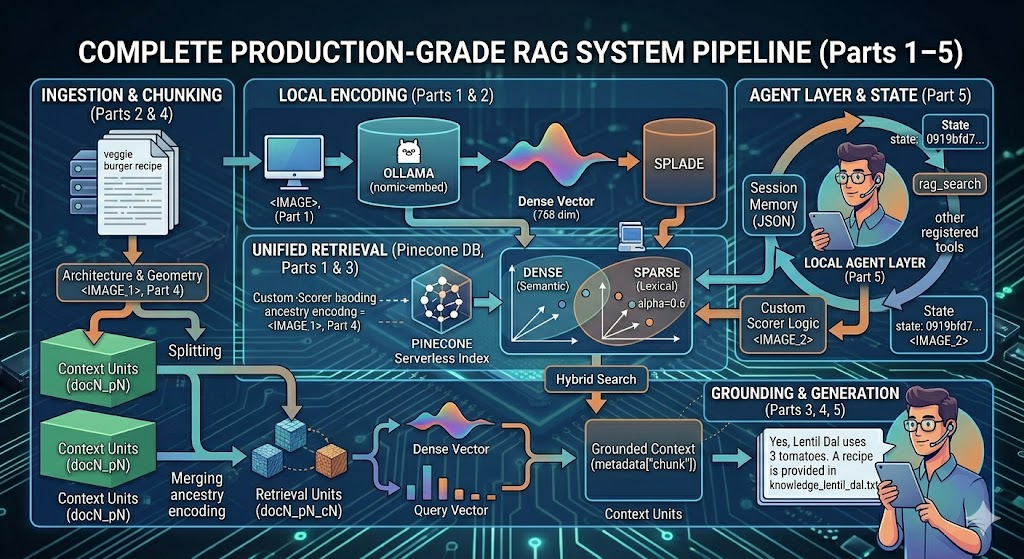
The solution is hybrid search: combining dense (semantic) vectors with sparse (keyword) vectors. This article walks through the complete architecture of a hybrid RAG system built on Pinecone, Ollama’s nomic-embed-text embedding model running locally, and SPLADE for sparse encoding. By the end of this series, you'll have a fully functioning pipeline with semantic chunking, parent-child document architecture, custom reranking, and an agent wrapper — all running without any external API keys for embeddings or inference.
The Stack
Component Tool Dense Embeddings Ollama nomic-embed-text (768 dims, local) Sparse Embeddings SPLADE via pinecone-text Vector Database Pinecone Serverless Reranking Custom hybrid scorer Agent Layer agent_framework with tool registration Package Management uv
Why Hybrid Search?
Dense embeddings capture semantic meaning. If you ask “how do I make plant-based patties,” a good embedding model will surface a veggie burger recipe even without the exact words. But dense search struggles with specificity: ingredient names, dish names, or cuisine labels that have low semantic breadth but high lexical importance.
Sparse vectors (like those produced by SPLADE) work like a learned version of BM25 — they assign importance scores to tokens based on their relevance to a query. The combination beats either approach alone.
Here’s what the hybrid scores look like at query time:
QUERY: How to make veggie burgers?
Chunk doc19_p0_c0: Dense=0.442, Sparse=0.460, Hybrid=0.453
Chunk doc19_p1_c0: Dense=0.440, Sparse=0.346, Hybrid=0.383
Chunk doc16_p1_c0: Dense=0.337, Sparse=0.142, Hybrid=0.220
Chunk doc3_p0_c0:  Dense=0.179, Sparse=0.153, Hybrid=0.164
The top result (veggie_burgers.txt) scores nearly identically on both dimensions. A generic vegetable recipe scores high on dense (semantic overlap with "vegetables") but low on sparse (no keyword match) — and the hybrid score correctly deprioritizes it.
Setting Up the Environment
The project uses uv for dependency management — faster resolution than pip and deterministic lockfiles that matter for reproducibility in ML projects.
uv init
uv venv .venv
uv add pinecone pinecone-text python-dotenv scikit-learn
uv sync
You’ll also need Ollama installed and running locally:
# Install Ollama (macOS/Linux)
curl -fsSL https://ollama.com/install.sh | sh
# Pull the embedding and chat models
ollama pull nomic-embed-text
ollama pull llama3.2
Once Ollama is running (ollama serve), it exposes an OpenAI-compatible API at http://localhost:11434/v1 — no API key required. The only external credential you need is a Pinecone key for the vector database.
Core imports:
from pathlib import Path
from typing import List
import os, math
from sklearn.metrics.pairwise import cosine_similarity
import numpy as np
from agent_framework.openai import OpenAIEmbeddingClient, OpenAIChatClient
from agent_framework import Agent
from pinecone import Pinecone, ServerlessSpec
from pinecone_text.sparse import SpladeEncoder
from dotenv import load_dotenv
Initializing the Clients
Ollama’s API is OpenAI-compatible, so you can point the same OpenAIEmbeddingClient wrapper at your local Ollama server. No real API key is needed — pass any non-empty string as a placeholder:
load_dotenv()
pinecone_key = os.getenv("PINECONE_KEY")
# Ollama embedding client — runs fully local
embeddings_client = OpenAIEmbeddingClient(
    base_url="http://localhost:11434/v1",
    api_key="ollama",           # placeholder, not validated locally
    model_id="nomic-embed-text",
)
# Ollama chat client
chat_client = OpenAIChatClient(
    base_url="http://localhost:11434/v1",
    api_key="ollama",
    model_id="llama3.2",
)
nomic-embed-text produces 768-dimensional vectors — compact, fast, and more than sufficient for domain-specific retrieval when paired with sparse search. You can verify the dimension at runtime:
test_embeddings = await get_embeddings(["Hello world", "How are you?"])
print(f"Generated {len(test_embeddings)} embeddings")
print(f"Embedding dimension: {len(test_embeddings[0]['embedding'].vector)}")
# → Generated 2 embeddings
# → Embedding dimension: 768
Creating the Pinecone Index
Hybrid search in Pinecone requires metric="dotproduct" — this is non-negotiable. Cosine similarity indexes do not support sparse vectors.
pc = Pinecone(api_key=pinecone_key)
embedding_dim = 768
index_name = "recipe-index-ollama-nomic-embed"
if not pc.has_index(index_name):
    pc.create_index(
        name=index_name,
        dimension=embedding_dim,
        metric="dotproduct",
        spec=ServerlessSpec(cloud="aws", region="us-east-1"),
    )
index = pc.Index(index_name)
splade = SpladeEncoder()
After indexing 20 recipe documents through the full pipeline, the index stats confirm the setup:
dimension: 768
metric: dotproduct
namespaces: {'recipe-index-ollama-nomic-embed': {'vector_count': 144}}
total_vector_count: 144
144 vectors from 20 documents — because each document is chunked into parent chunks, then into smaller semantic children. The exact mechanics are covered in Part 2 (Semantic Chunking) and Part 4 (Parent-Child Architecture).
The Vector Structure
Each vector upserted to Pinecone carries both a dense and sparse representation, plus rich metadata:
vector = {
    "id": f"doc{document_id}_p{parent_id}_c{child_id}",
    "values": child_chunk["embedding"].vector,       # dense: 768 floats
    "sparse_values": sparse_values,                  # sparse: SPLADE tokens
    "metadata": {
        "chunk": child_chunk["chunk"],
        "source": document_name,
        "child_id": child_id,
        "parent_id": parent_id,
        "document_id": document_id,
    }
}
The ID scheme doc19_p0_c0 encodes the full hierarchy: document 19, parent chunk 0, child chunk 0. This lets you reconstruct the parent context from any retrieved child — essential for the architecture described in Part 4.
The Query Flow
At query time, you generate both a dense and sparse representation of the query, then search with both:
results = index.query(
    namespace=index_name,
    top_k=10,
    include_metadata=True,
    include_values=True,
    vector=query_vector,
    sparse_vector=sparse_values,
    alpha=0.6
)
The alpha parameter controls the blend at the retrieval stage. Results are then reranked using a custom hybrid similarity scorer that gives you full visibility into how each signal contributed. The reranking logic is the subject of Part 3.
Why Local Embeddings with Ollama?
Running embeddings locally has several practical advantages over hosted APIs:
- No API costs — embedding 144 vectors or 144,000 vectors costs the same: nothing
- No rate limits — batch as aggressively as you want during indexing
- No data leaving your machine — relevant for sensitive or proprietary documents
- Offline capability — the full indexing and embedding pipeline works without internet (only Pinecone queries require connectivity)
The trade-off is that nomic-embed-text at 768 dims is less expressive than larger hosted models. For most domain-specific corpora with hybrid search, this is more than sufficient — the sparse SPLADE vectors compensate for semantic gaps in the dense representations, as you'll see in Part 3.
What’s Next
- Part 2 — Semantic Chunking: How sliding windows and cosine-similarity merging produce chunks that respect semantic boundaries instead of arbitrary character counts.
- Part 3 — Custom Reranking: The math behind combining dense and sparse scores post-retrieval, and why it outperforms relying on Pinecone’s built-in scoring.
- Part 4 — Parent-Child Architecture: How hierarchical chunking stores small children for precision retrieval but surfaces large parents for rich context.
- Part 5 — The Agent Layer: Wrapping the entire pipeline into a tool-augmented agent with session memory.
Building a Hybrid RAG System from Scratch: Dense + Sparse Search with Pinecone and Ollama was originally published in Towards AI on Medium, where people are continuing the conversation by highlighting and responding to this story.