Why LangChain’s DeepAgents matter if you want agents that can actually finish complex work
Most AI agents look impressive for about 30 seconds.
They can answer a question, call a tool, maybe fetch a result, and sound intelligent while doing it. But the moment you ask them to do something genuinely multi-step — research a topic, manage files, delegate subtasks, remember prior context, produce an artefact, and safely operate over time — many of them start to fall apart.
That is the gap DeepAgents is trying to close.
Built by the LangChain team, DeepAgents is an open-source framework designed for long-horizon, artifact-heavy, multi-step agent workflows. It is not just another wrapper around an LLM. It is a more opinionated agent harness built on top of LangChain primitives and the LangGraph runtime, combining planning, filesystem-backed working memory, context compression, subagents, human approval flows, and long-term memory into one coherent system.
In other words:
It is built for agents that need to do real work, not just generate a clever reply.
The core Idea
DeepAgents takes the standard tool-calling agent loop and strengthens it with the things serious agent systems usually need:
- Planning
- Subagent delegation
- Filesystem access
- Context isolation
- Context compression
- Long-term memory
- Human-in-the-loop controls
- Backend flexibility
Instead of forcing all of an agent’s work to live inside one growing conversation history, DeepAgents treats context as a systems problem. That design choice is what makes it interesting.
A long-running agent should not keep every tool result, every intermediate note, and every verbose response inside the same message thread forever. It should be able to:
- offload large outputs into files
- summarise older context
- delegate deep work to specialised subagents
- preserve durable memory separately from scratch work
- request human approval for risky actions
That is the DeepAgents philosophy.
Why this matters
Modern agentic workflows are moving beyond “chat with tools.”
The most useful AI systems today increasingly look like this:
- Understand a broad task
- Break it into smaller steps
- Gather evidence
- Produce working notes
- Delegate parts of the task
- Save artefacts
- Re-check results
- Return something polished
That workflow is difficult to implement with a thin agent loop.
DeepAgents gives you a stronger default architecture for exactly that kind of work.
What DeepAgents actually is
At a practical level, DeepAgents is a Python framework that lets you create a compiled agent graph using a function called:
from deepagents import create_deep_agent
agent = create_deep_agent(
model="openai:gpt-5.4",
tools=[internet_search],
system_prompt="You are an expert researcher."
)
This returns a LangGraph-powered agent with built-in capabilities such as:
- write_todos
- ls
- read_file
- write_file
- edit_file
- glob
- grep
- task for subagent delegation
- optional execution tools in sandbox-enabled environments
So the framework is not merely about “calling an LLM with tools.” It is about giving the agent a workspace, a planning surface, and a control model.
A mental model for DeepAgents
A useful way to think about DeepAgents is this:
LangChain gives you the building blocks. LangGraph gives you the runtime. DeepAgents gives you a batteries-included harness for long-running agent workflows.
That harness includes several built-in middleware layers.
Conceptual flow
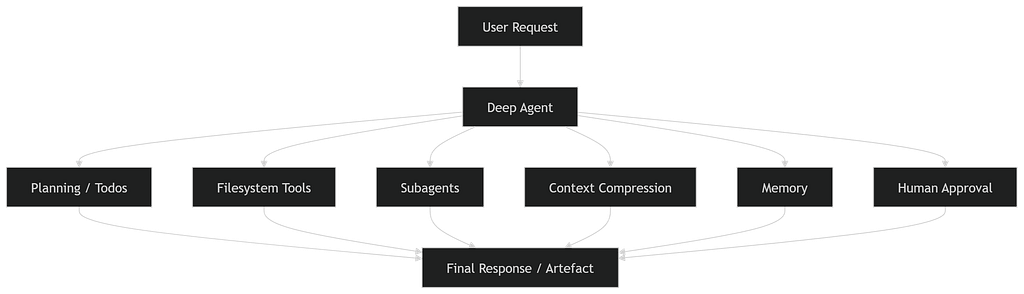
This is the big shift: the agent is treated less like a chatbot and more like a small operating system for task execution.
The architecture that makes it powerful
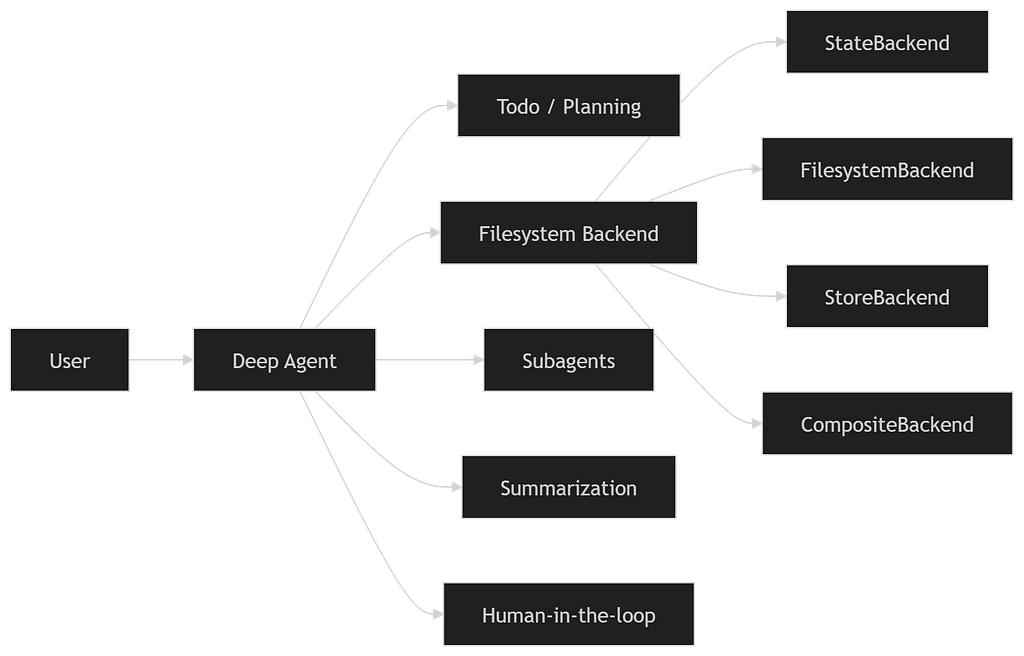
DeepAgents stands out because of how it handles state and context.
In ordinary agent setups, everything tends to pile into the prompt window. In DeepAgents, context can be distributed across:
- the active message thread
- working files in a virtual filesystem
- persistent memory
- summarised conversation history
- delegated subagent runs
That gives it a very different operational profile.
Why this matters
If a research agent pulls thousands of tokens from search, you do not necessarily want all of that shoved back into the main conversation.
Instead, the agent can:
- store large results in files
- summarise what matters
- pass only a concise output back to the supervisor
- keep the main context clean
That is a big architectural win.
Built-in backends: one of DeepAgents’ most important features
One of the strongest ideas in DeepAgents is that storage is a first-class abstraction.
It supports multiple backend styles, including:
1. StateBackend
Best for ephemeral, per-thread working files. Use this when you want the safest default behaviour and do not need host-level file access.
2. FilesystemBackend
Lets the agent interact directly with files on disk. This is powerful, but also much riskier in real deployments.
3. StoreBackend
Designed for durable storage across threads using LangGraph Store. Useful for memory-like persistence.
4. CompositeBackend
Lets you route different paths to different storage backends.For example:
- /workspace/ → ephemeral scratch files
- /memories/ → persistent stored memory
This routed storage model is one of the cleanest parts of the framework.
Context engineering is the real superpower
A lot of people think the differentiator in agent frameworks is tool count or number of models supported. In practice, one of the biggest differentiators is context management. DeepAgents explicitly treats context as a design surface. The official material highlights several categories:
- Input context
- Runtime context
- Context compression
- Context isolation
- Long-term memory
This matters because long-horizon agents fail when context becomes bloated, noisy, or contradictory.
DeepAgents addresses this through three major tactics:
1. Offloading
Large inputs or outputs can be moved into files instead of bloating the active prompt.
2. Summarisation
Older conversation history can be compressed when the context window gets too large.
3. Subagent isolation
Verbose intermediate work can stay inside subagent runs, while the main agent receives only the distilled result.
That is exactly the kind of design you want for research agents, coding assistants, analyst workflows, or document-heavy use cases.
Subagents: not just multi-agent hype
Multi-agent systems often get overhyped, but DeepAgents uses subagents in a very practical way. Subagents are useful when:
- you want specialised prompts
- you want specialised tools
- you want different models for different roles
- you want to keep detailed intermediate work out of the supervisor context
This makes DeepAgents especially strong for workflows like:
- research + synthesis
- coding + review
- analysis + reporting
- extraction + validation
Example mental model
- Supervisor: understands the full task and coordinates
- Research subagent: gathers detailed evidence
- Writer subagent: drafts the final output
- Validator subagent: checks correctness
The main benefit is not just “multiple agents.” The benefit is context quarantine.
Minimal example
Here is a simplified example in the DeepAgents style:
import os
from typing import Literal
from tavily import TavilyClient
from deepagents import create_deep_agent

tavily = TavilyClient(api_key=os.environ["TAVILY_API_KEY"])

def internet_search(
    query: str,
    max_results: int = 5,
    topic: Literal["general", "news", "finance"] = "general",
    include_raw_content: bool = False,
):
    return tavily.search(
        query,
        max_results=max_results,
        topic=topic,
        include_raw_content=include_raw_content,
    )

agent = create_deep_agent(
    model="openai:gpt-5.4",
    tools=[internet_search],
    system_prompt="""
    You are an expert researcher.
    Conduct deep research and produce a polished report.
    Use internet_search as your primary evidence source.
    """
)

result = agent.invoke(
    {
        "messages": [
            {"role": "user", "content": "What is LangGraph?"}
        ]
    }

)

print(result["messages"][-1].content)
This example looks simple, but the power comes from what DeepAgents adds around it: planning, filesystem tools, summarisation, subagent support, and configurable memory.
Adding a subagent
Here is the same idea with a dedicated research subagent:
research_subagent = {
    "name": "research-agent",
    "description": "Used for in-depth research tasks",
    "system_prompt": "You are a great researcher. Return concise, evidence-rich findings.",
    "tools": [internet_search],
    "model": "openai:gpt-5.2"
}

agent = create_deep_agent(
    model="claude-sonnet-4-6",
    tools=[internet_search],
    subagents=[research_subagent],
    system_prompt="""
    Coordinate the overall task, delegate deep research when helpful,
    and keep the main context clean.
    """
)
This pattern is where DeepAgents starts to feel different from a normal tool-calling agent.
The supervisor does not need to carry every raw search result in its own context. It can delegate, get the result back, and keep moving.
Structured output, memory, and routed storage
DeepAgents is not only about chat workflows. It also works well when you need agents to produce reliable outputs for downstream systems.
Example
from pydantic import BaseModel, Field
from deepagents import create_deep_agent
from deepagents.backends import CompositeBackend, StateBackend, StoreBackend
from langgraph.store.memory import InMemoryStore

class ReportSummary(BaseModel):
    title: str = Field(description="Short title")
    findings: list[str] = Field(description="Key findings")
    risks: list[str] = Field(description="Key risks")

agent = create_deep_agent(
    model="google_genai:gemini-3.1-pro-preview",
    system_prompt="Analyse documents and return a structured report.",
    backend=CompositeBackend(
        default=StateBackend(),
        routes={
            "/memories/": StoreBackend(),
        },
    ),
    store=InMemoryStore(),
    memory=["/memories/AGENTS.md"],
    response_format=ReportSummary,
)
This is a strong pattern for real applications:
- ephemeral workspace
- durable memory
- typed output contract
- model-driven reasoning
- agent-produced artefacts
That is closer to application architecture than chatbot scripting.
What DeepAgents is especially good at
DeepAgents feels especially well-suited to work that is:
1. Long-horizon – The task cannot be solved in one prompt.
2. Artefact-heavy – The agent needs to write, edit, read, and manage files.
3. Research-oriented – Large evidence gathering and synthesis are involved.
4. Multi-role – Different specialised agents or toolsets are useful.
5. Memory-sensitive – The system needs durable context across interactions.
6. Safety-aware – Certain actions need approval or controlled permissions.
Typical good fits include:
- deep research assistants
- coding agents
- document analysis systems
- text-to-SQL assistants
- due diligence workflows
- analyst copilots
- policy or report drafting systems
The safety story: powerful, but not safe by default
This part is important.
DeepAgents is powerful precisely because it gives agents stronger execution surfaces. But that also expands the risk surface. If you allow an agent to:
- read files
- write files
- access host storage
- run shell commands
- persist memory
- call external tools
then you need to think carefully about:
- permissions
- sandboxing
- approval flows
- secrets exposure
- prompt injection
- memory poisoning
- persistence boundaries
The practical takeaway
Use safer defaults first.
Prefer:
- StateBackend
- StoreBackend
- controlled permissions
- human-in-the-loop approvals
- remote or isolated sandbox execution
Be careful with:
- direct host filesystem access
- unrestricted shell execution
- shared mutable memory
- trusted memory files without review
This is not a flaw in DeepAgents.
It is simply the cost of moving from toy agents to real operational agents.
Human-in-the-loop is not optional polish
One of the more mature parts of DeepAgents is its support for approval flows. That matters because agent systems become materially more trustworthy when humans can intervene before risky actions happen.
Examples:
- approve file writes
- approve external sends
- approve shell execution
- edit tool arguments before execution
- reject risky steps
If you plan to use an agent in production for anything beyond passive read-only work, approval hooks should be treated as foundational.
The hidden lesson of DeepAgents
The most interesting thing about DeepAgents is not a single feature. It is the framework’s implicit thesis:
The hard part of building capable agents is not just prompting. It is runtime design.
That includes:
- how the agent plans
- where it stores work
- how it compresses context
- how it isolates subtasks
- how it remembers
- how it asks for permission
- how it executes safely
That is a much more realistic view of agent engineering than “just give the LLM tools.”
When you should use DeepAgents
You should seriously consider DeepAgents if:
- your agent needs to work over many steps
- you need filesystem-backed artefacts
- you care about context-window management
- you want subagent delegation without hand-rolling it
- you need a more production-oriented harness on top of LangGraph
- you want built-in planning and memory patterns
You probably do not need DeepAgents if:
- your task is simple question answering
- one model call plus a tool is enough
- you do not need artefacts, memory, or long-running state
- you are better served by a small custom LangGraph workflow
DeepAgents is most valuable when the problem is genuinely complex.
Final thoughts
DeepAgents is one of the clearest signals of where agent engineering is going. The industry is gradually learning that useful agents are not just “LLMs with tools.” They are systems that need:
- controlled memory
- structured delegation
- safe execution
- context discipline
- durable artefacts
- runtime orchestration
DeepAgents packages many of those ideas into a practical, open-source framework.
That makes it more than a convenience library. It is a design statement about what serious agent systems require.
If you are building research agents, coding agents, analysis assistants, or other long-horizon workflows, DeepAgents is worth studying closely — not just for what it provides out of the box, but for the architectural assumptions it gets right.
And that may be its biggest strength of all.
DeepAgents: The Open-Source Framework for Building Long-Horizon AI Agents was originally published in Towards AI on Medium, where people are continuing the conversation by highlighting and responding to this story.