A comprehensive guide to building a Retrieval-Augmented Generation (RAG) system that efficiently manages document updates, deletions, and additions without re-indexing everything.
Introduction
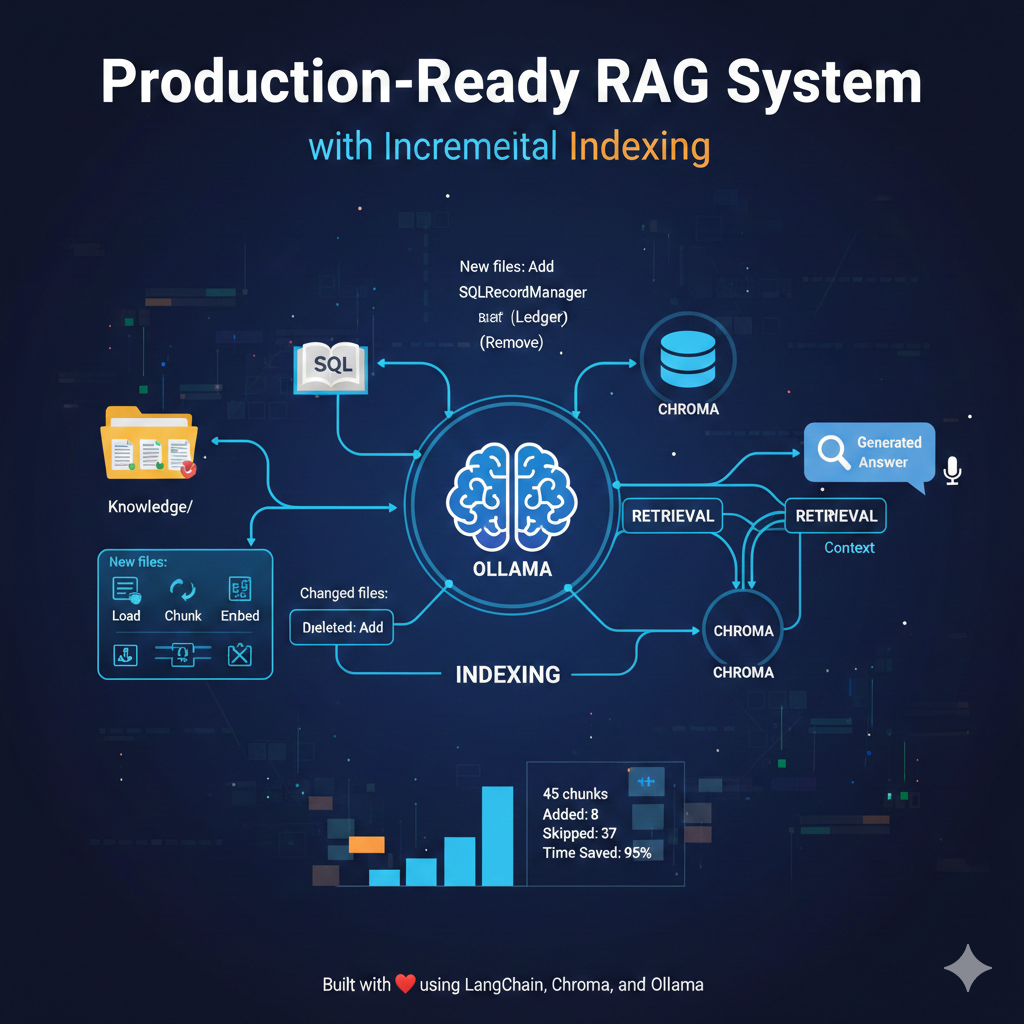
Retrieval-Augmented Generation (RAG) has become the go-to architecture for building AI applications that need to answer questions based on custom knowledge bases. However, most RAG tutorials skip over a critical production concern: how do you efficiently update your knowledge base without re-indexing everything?
In this article, I’ll walk you through building a RAG system that solves this problem using incremental indexing with SQLRecordManager, allowing you to:
- Add new documents without re-processing existing ones
- Update changed documents automatically
- Remove deleted documents from the vector store
- Track which documents have been processed
What is RAG?
RAG combines two powerful concepts:
- Retrieval: Finding relevant information from a knowledge base
- Generation: Using an LLM to generate answers based on that information
The basic flow is:
User Question → Find Relevant Docs → Pass to LLM → Generate Answer
This approach gives LLMs access to current, domain-specific information without expensive fine-tuning.
The Problem with Traditional RAG
Most RAG implementations have a critical flaw in their document management:
# Traditional approach - INEFFICIENT
def update_database():
    # Delete everything
    vector_store.delete_collection()

    # Re-load ALL documents
    docs = load_all_documents()

    # Re-chunk ALL documents
    chunks = split_documents(docs)

    # Re-embed and re-index EVERYTHING
    vector_store.add_documents(chunks)
Problems with this approach:
- Wastes time re-processing unchanged documents
- Wastes API calls re-generating embeddings
- Doesn’t detect deleted files
- Becomes slower as your knowledge base grows
- Not suitable for production environments
Our Solution: Incremental Indexing
Instead of the “delete everything and start over” approach, we use incremental indexing:
# Our approach - EFFICIENT
def sync_folder():
    # Load current documents
    docs = load_documents()

    # Let the record manager handle the magic
    stats = index(
        docs,
        record_manager,  # Tracks what's been indexed
        vectorstore,
        cleanup="full",  # Removes deleted files
        source_id_key="source"
    )

    # Only changed documents are processed!
Benefits:
- ✅ Only processes new or changed files
- ✅ Automatically removes deleted files
- ✅ Skips unchanged files entirely
- ✅ Scales efficiently with large knowledge bases
- ✅ Production-ready
Architecture Overview
Our RAG system consists of three main components:
1. Vector Store (Chroma)
Stores document embeddings for similarity search
Documents → Chunks → Embeddings → Vector Store
2. Record Manager (SQLite)
Acts as a “ledger” tracking what’s been indexed
File Path → Hash → Timestamp → Status
3. LLM (Llama 3.1)
Generates answers based on retrieved context
Question + Context → LLM → Answer
Implementation
Project Structure
RAG/
├── database.py          # Vector store and indexing logic
├── rag.py              # Query processing and LLM interaction
├── main.py             # Entry point
├── Knowledge/          # Your documents folder
│   ├── docker.txt
│   └── kubernetes.txt
├── chroma_db/          # Vector store (auto-created)
└── record_manager_cache.sql  # Indexing ledger (auto-created)
Core Configuration
# Configuration constants
CHROMA_PATH = "chroma_db"
RECORD_DB_PATH = "sqlite:///record_manager_cache.sql"
SOURCE_FOLDER = "./Knowledge"
EMBEDDING_MODEL = "nomic-embed-text"
COLLECTION_NAME = "my_rag_collection"
CHUNK_SIZE = 600
CHUNK_OVERLAP = 100
Why these values?
- Chunk size (600): Balances context completeness with retrieval precision
- Chunk overlap (100): Ensures important information isn’t split across chunks
- nomic-embed-text: Fast, efficient embedding model optimized for retrieval
Database Module (database.py)
The database module handles two critical functions:
1. Vector Store Initialization
def get_vector_store():
    embeddings = OllamaEmbeddings(model=EMBEDDING_MODEL)
    vectorstore = Chroma(
        collection_name=COLLECTION_NAME,
        persist_directory=CHROMA_PATH,
        embedding_function=embeddings
    )
    return vectorstore
This creates a persistent vector store that survives between runs.
2. Incremental Folder Sync
def sync_folder():
    # Initialize components
    vectorstore = get_vector_store()
    record_manager = SQLRecordManager(
        namespace=f"chroma/{COLLECTION_NAME}",
        db_url=RECORD_DB_PATH
    )
    record_manager.create_schema()

    # Load and split documents
    loader = DirectoryLoader(SOURCE_FOLDER, glob="**/*.*", loader_cls=TextLoader)
    text_splitter = RecursiveCharacterTextSplitter(
        chunk_size=CHUNK_SIZE,
        chunk_overlap=CHUNK_OVERLAP
    )
    docs = loader.load_and_split(text_splitter)

    # Incremental indexing - THE MAGIC
    stats = index(
        docs,
        record_manager,
        vectorstore,
        cleanup="full",
        source_id_key="source"
    )

    return stats
What happens during index()?
- Hash Calculation: Each document is hashed based on content and metadata
- Comparison: Hashes are compared with the record manager’s ledger
- Smart Updates:
- New files → Added to vector store + ledger
- Changed files → Old versions deleted, new versions added
- Deleted files → Removed from vector store + ledger
- Unchanged files → Skipped entirely (no processing)
RAG Module (rag.py)
The RAG module handles query processing:
def answer_query(question: str):
    # 1. Initialize
    db = get_vector_store()
    llm = ChatOllama(model="llama3.1:8b", temperature=0)

    # 2. RETRIEVE: Find relevant context
    results = db.similarity_search(question, k=3)
    context = "\n\n---\n\n".join([doc.page_content for doc in results])

    # 3. GENERATE: Create prompt and get answer
    prompt = f"""
    Use the context below to answer the question accurately.
    Context: {context}

    Question: {question}
    """

    response = llm.invoke(prompt)

    return response.content, results
Key Design Decisions:
- k=3: Retrieves top 3 most relevant chunks (balances context vs. noise)
- temperature=0: Ensures deterministic, factual responses
- Context separator: --- clearly delineates different source chunks
How It Works
First Run
1. User adds documents to Knowledge/ folder
2. sync_folder() is called
3. Documents are loaded and chunked
4. Embeddings are generated
5. Chunks are stored in Chroma
6. Records are saved in SQLite ledger
Output:
Added: 45
Updated: 0
Deleted: 0
Skipped: 0
Subsequent Runs (No Changes)
1. sync_folder() is called
2. Documents are loaded and chunked
3. Hashes are compared with ledger
4. All hashes match → Nothing to do!
Output:
Added: 0
Updated: 0
Deleted: 0
Skipped: 45
Time saved: ~95% (only loading time, no embedding or indexing)
When Files Change
1. User modifies docker.txt
2. sync_folder() is called
3. docker.txt hash doesn't match ledger
4. Old docker.txt chunks are deleted
5. New docker.txt chunks are added
6. Other files are skipped
Output:
Added: 8 (new docker.txt chunks)
Updated: 0
Deleted: 8 (old docker.txt chunks)
Skipped: 37 (unchanged files)
When Files Are Deleted
1. User deletes kubernetes.txt
2. sync_folder() is called with cleanup="full"
3. System compares ledger with current files
4. kubernetes.txt chunks are removed
5. Other files are skipped
Output:
Added: 0
Updated: 0
Deleted: 12 (kubernetes.txt chunks)
Skipped: 33
Usage
Installation
# Install dependencies
pip install langchain langchain-ollama langchain-chroma langchain-community
# Install Ollama
# Visit: https://ollama.ai
# Pull required models
ollama pull nomic-embed-text
ollama pull llama3.1:8b
Basic Usage
# main.py
from database import sync_folder
from rag import answer_query
# Sync your knowledge base
sync_folder()
# Ask questions
answer, sources = answer_query("What is Docker?")
print(answer)
Adding Documents
# Just add .txt files to Knowledge/ folder
echo "Docker is a containerization platform..." > Knowledge/docker.txt
# Run sync
python main.py  # Only new file will be processed
Updating Documents
# Edit existing file
nano Knowledge/docker.txt

# Run sync
python main.py  # Only changed file will be re-processed
Removing Documents
# Delete file
rm Knowledge/old-doc.txt
# Run sync with cleanup="full"
python main.py  # Deleted file chunks will be removed from vector store
Performance Benefits
Let’s compare traditional vs. incremental indexing:
Scenario: 100 documents, modify 1
Traditional Approach:
Load: 100 documents
Chunk: 100 documents
Embed: 500 chunks
Index: 500 chunks
Time: ~5 minutes
Incremental Approach:
Load: 100 documents
Chunk: 100 documents
Embed: 5 chunks (only changed file)
Index: 5 chunks (add new, delete old)
Skip: 495 chunks
Time: ~15 seconds
Savings: 95% time reduction
Advanced Features
Custom Chunk Size
# For technical documentation (more context needed)
CHUNK_SIZE = 1000
CHUNK_OVERLAP = 200
# For general text (less context needed)
CHUNK_SIZE = 400
CHUNK_OVERLAP = 50
Multiple Knowledge Sources
# Load from different folders
loaders = [
    DirectoryLoader("./docs", glob="**/*.txt"),
    DirectoryLoader("./manuals", glob="**/*.md"),
    DirectoryLoader("./code", glob="**/*.py")
]
all_docs = []
for loader in loaders:
    all_docs.extend(loader.load())
Custom Retrieval
# Increase context for complex questions
results = db.similarity_search(question, k=5)
# Use similarity scores
results_with_scores = db.similarity_search_with_score(question, k=3)
for doc, score in results_with_scores:
    print(f"Relevance: {score}")
Troubleshooting
Documents not being indexed
- Check file format (must be readable by TextLoader)
- Verify SOURCE_FOLDER path is correct
- Ensure files have content
Deletions not detected
- Make sure you’re using cleanup="full"
- Verify record manager is properly initialized
- Check that source_id_key matches document metadata
Out of memory errors
- Reduce CHUNK_SIZE
- Process documents in batches
- Use a vector store with disk persistence (we already use Chroma)
Conclusion
Building a production-ready RAG system requires more than just connecting an LLM to a vector store. Efficient document management through incremental indexing is crucial for:
- Performance: Only process what’s changed
- Cost: Minimize embedding API calls
- Scalability: Handle growing knowledge bases
- Maintenance: Easy updates without downtime
The combination of Chroma for vector storage and SQLRecordManager for tracking changes provides a robust foundation for production RAG applications.
Key Takeaways
- Use incremental indexing instead of re-indexing everything
- Track document state with a record manager
- Set cleanup=”full” to detect deleted files
- Choose appropriate chunk sizes for your use case
- Monitor statistics to understand system behavior
Next Steps
- Add support for more file types (PDF, DOCX, HTML)
- Implement batch processing for large knowledge bases
- Add caching for frequently asked questions
- Set up monitoring and logging
- Deploy with a web interface
Resources
Building a Production-Ready RAG System with Incremental Indexing was originally published in Towards AI on Medium, where people are continuing the conversation by highlighting and responding to this story.