
Documents are the dark matter of enterprise data. They’re everywhere — contracts, lab reports, invoices, insurance filings, clinical notes — and they carry the information organizations rely on to make decisions. Yet for decades, extracting structured data from them has been a painful mix of brittle templates, hand-tuned regex patterns, and OCR pipelines that fall apart the moment a table loses its gridlines or a signature sits on top of a paragraph.
LLMs made the problem feel solvable. You could paste a PDF’s text into a prompt and ask for structured output. But the operative word was text — and most documents aren’t just text. They’re layouts. Tables with merged cells. Charts where meaning lives in a visual relationship, not a sentence. Form fields scattered across a page. The flat string extraction that most OCR systems and generic LLMs rely on simply discards this structure, and with it, half the information.
LandingAI’s Agentic Document Extraction (ADE) takes a different approach: treat documents as visual objects first, run an agentic loop that plans, decides, and self-verifies, and expose the result through a clean three-API pipeline. The landingai-ade Python library, released March 11, 2026, is the developer-facing SDK for this system.
If you liked this article, please clap — and if you’re feeling generous, you can give up to 50 claps 👏
Why “Just Use an LLM” Breaks on Real Documents
Before looking at what LandingAI built, it’s worth understanding exactly where the standard approach fails.
The typical pipeline for LLM-based document extraction looks like this: run a PDF through a text extractor, feed the text to an LLM, and ask for JSON. This works for clean, text-heavy documents with predictable structure — a simple invoice, a plain contract. It degrades sharply on anything visually complex.
The problem isn’t intelligence — it’s input. A generic LLM operating on extracted text never sees the spatial relationship between a table header and its values. It sees a flat string that looks like "Revenue Q1 Q2 Q3 12.4M 15.1M 18.7M". It doesn't know which numbers belong to which column. It can't see that a value in the bottom-right cell of a merged-cell table refers to a cumulative total. It misses signatures, stamps, barcodes, and checkboxes entirely, because those are images — not text — and text extractors ignore them.
OCR helps, but traditional OCR is a character recognizer, not a document understander. It turns pixels into characters without any concept of what a table is, or that the checkmark in a form field means the answer is “yes.”
LandingAI’s position, articulated by founder Andrew Ng, is: “We’re past the era of one-size-fits-all models.” Document extraction needs a model purpose-built for documents — one that understands layout, spatial semantics, visual elements, and the structural hierarchy of pages.
LandingAI: Who’s Behind This
LandingAI is the company founded by Andrew Ng — best known for co-founding Google Brain, leading Baidu’s AI group, and co-founding Coursera — focused specifically on applied computer vision and document AI. The company’s CEO is Dan Maloney.
ADE is LandingAI’s flagship product. It sits at the intersection of computer vision and information extraction, and the product has been adopted by enterprises in financial services, insurance, healthcare, legal, and energy. Customers using the platform include Barclays, Morgan Stanley, AbbVie, AstraZeneca, Intel, AMD, and Deloitte (per LandingAI’s website, self-reported). The company reports having processed over 1 billion images and documents through the system (single source).
The Agentic Loop: More Than a Pipeline
The word “agentic” is overloaded in AI right now, so it’s worth being precise about what it means here.
A traditional document processing pipeline is a directed graph with no feedback. Input goes in, each stage transforms it, output comes out. If a table was parsed incorrectly at stage two, nothing downstream catches it.
ADE’s agentic orchestration is a loop with a quality gate. Think of it like a quality control inspector on an assembly line who can send a part back for rework rather than letting a defect pass through. The system breaks complex parsing into smaller, bounded subtasks. After each subtask, it checks whether the output meets a quality threshold. If not, it replans and retries. This continues until the result is good enough to pass, or the system escalates.
This design matters practically for two reasons:
- Complex tables. A table with merged cells and no gridlines is ambiguous. A single-pass model can hallucinate cell alignment. An agentic loop that verifies cell-level structure before proceeding is more likely to catch misalignments.
- Long documents. A 300-page report cannot be processed in a single API call. The system chunks the document, processes each chunk, verifies chunk boundaries don’t cut across logical units, and stitches results into a coherent whole.
DPT-2: The Model Architecture
Announced on September 30, 2025, DPT-2 (Document Pre-trained Transformer-2) is the core model powering ADE. It builds on the original DPT model and introduces several targeted capabilities for visually complex documents.
LandingAI describes DPT-2 as combining “structured deep learning models with agentic workflows.” The architecture processes both visual and textual elements jointly — it does not extract text first and then reason over it. It reasons over the rendered document.
Concretely, DPT-2 introduces or improves:
Agentic Table Captioning. This is the most technically significant addition. Standard table parsers work well when cells have visible borders. Real documents often have tables with merged cells, no gridlines, misaligned text, and irregular column spans. DPT-2 parses these with cell-level grounding — it outputs not just table content, but the page coordinates of each cell. This means downstream consumers can trace any extracted value back to its visual location in the document, which is critical for compliance workflows where auditability is required.
Expanded Chunk Ontology. Beyond text and tables, DPT-2 recognizes signatures, checkboxes, ID cards, barcodes, and QR codes as first-class element types. Earlier systems treated these as noise or raw images. Treating a checkbox as a structured element means you can extract “field: ‘Married’, value: true” rather than “there is a checkmark somewhere on page 3.”
Refined Figure Captioning. DPT-2 can identify logos, seals, and small figures precisely. This matters in legal and compliance documents where a notary seal or corporate logo carries meaning distinct from decorative imagery.
Smarter Layout Detection. Stamps within tables are now detected as separate elements rather than being absorbed into the table’s content. In KYC and compliance documents, stamps overlaid on tabular data were a common failure point for earlier systems.
It’s worth noting that LandingAI has not published a DPT-2 model card or technical report — the above comes from their product announcement and documentation, not from peer-reviewed benchmarks beyond DocVQA.
Three APIs, One Composable Pipeline
ADE exposes three distinct APIs that are designed to be composed sequentially: Parse → Split → Extract.

Parse: From Document to Structured Markdown
Parse is the mandatory first step. You feed it a document — a PDF, an image, a spreadsheet, a presentation — and it returns two things:
- Markdown: A human-readable, LLM-ready representation of the document content, preserving structural hierarchy (headings, tables, lists).
- JSON chunks: A hierarchical representation of every detected element, including type (text, table, figure, checkbox, barcode), content, page number, and bounding box coordinates.
The bounding boxes are what make Parse different from a text extractor. Every chunk of content comes with visual grounding — you know exactly where on the page it came from. This enables downstream auditability: if you extract a field value from a contract, you can highlight the source cell in the original PDF.
Parse handles documents with multiple formats in the same call: PDFs of any length, images supported by OpenCV, and URLs pointing to either.
Split: Classify Multi-Document Files
Many enterprise document workflows involve batched files. A KYC package might contain a passport, a proof of address, and a bank statement, all scanned into one PDF. Split takes parsed markdown and classifies segments according to user-defined document type rules, returning each sub-document with its page range.
This is particularly useful in financial services and insurance, where processing pipelines receive mixed batches rather than clean single-document inputs.
Extract: Schema-Driven Field Extraction
Extract takes the output of Parse (or Parse + Split) and pulls specific fields using a user-defined JSON schema. You define what you want — loan amount, borrower name, expiry date — and the model returns those values along with confidence scores and source coordinates.
In the Python SDK, schemas are defined using Pydantic models, which the library converts to JSON schema automatically. Every extracted field is grounded back to the document, so you can verify extraction results without re-reading the source.
The Python SDK: landingai-ade
The landingai-ade library is the official Python SDK for ADE, released March 11, 2026, replacing the legacy agentic-doc package. It supports Python 3.9+ and is built with Stainless, providing a fully-typed interface with Pydantic response models.
Installation
pip install landingai-ade
export VISION_AGENT_API_KEY=<your-api-key>
An API key from LandingAI is required.
Parsing a Document
from landingai.ade import LandingAIADE

client = LandingAIADE()

# Parse a local PDF — returns structured markdown + JSON chunks
result = client.parse.run(
    file="./invoice.pdf",
    model="dpt-2-latest",  # explicitly select DPT-2
)

# result.markdown: LLM-ready markdown string
# result.chunks: list of typed elements with coordinates
print(result.markdown)

for chunk in result.chunks:
    # Each chunk has: type, content, page, bounding_box
    print(f"[{chunk.type}] page {chunk.page}: {chunk.content[:80]}")
Splitting a Multi-Document File
# Define document types and classification rules in JSON
split_rules = [
    {"document_type": "passport", "description": "Photo ID with machine-readable zone"},
    {"document_type": "bank_statement", "description": "Financial statement with transactions"},
    {"document_type": "proof_of_address", "description": "Utility bill or lease agreement"},
]

split_result = client.split.run(
    markdown=result.markdown,  # output from Parse step
    document_types=split_rules,
)

for segment in split_result.segments:
    # Each segment: document_type, page_start, page_end, content
    print(f"{segment.document_type}: pages {segment.page_start}–{segment.page_end}")
Extracting Specific Fields
from pydantic import BaseModel, Field

# Define the schema for the fields you want to extract
class InvoiceSchema(BaseModel):
    vendor_name: str = Field(description="Name of the company issuing the invoice")
    invoice_number: str = Field(description="Unique invoice identifier")
    total_amount: float = Field(description="Total amount due including tax")
    due_date: str = Field(description="Payment due date in YYYY-MM-DD format")

extract_result = client.extract.run(
    markdown=result.markdown,
    schema=InvoiceSchema.model_json_schema(),  # SDK accepts standard JSON schema
)

# Fields come back with values, confidence scores, and source bounding boxes
for field_name, field_result in extract_result.fields.items():
    print(f"{field_name}: {field_result.value} (confidence: {field_result.confidence:.2f})")
    print(f"  → found at page {field_result.page}, bbox {field_result.bounding_box}")
Processing Long Documents Asynchronously
For documents exceeding the synchronous API’s page limit, the SDK provides an async job interface:
# Create an async parse job for a 200-page report
job = client.parse.jobs.create(file="./annual_report.pdf", model="dpt-2-latest")

# Poll until complete (or use webhooks in production)
completed_job = client.parse.jobs.wait_until_complete(job.id)
result = completed_job.result
Full Async Client
For async Python applications (FastAPI, async workers), the AsyncLandingAIADE client mirrors the sync interface:
import asyncio
from landingai.ade import AsyncLandingAIADE

async def extract_fields(filepath: str) -> dict:
    async with AsyncLandingAIADE() as client:
        parse_result = await client.parse.run(file=filepath, model="dpt-2-latest")
        extract_result = await client.extract.run(
            markdown=parse_result.markdown,
            schema=InvoiceSchema.model_json_schema(),
        )
    return {k: v.value for k, v in extract_result.fields.items()}
Error Handling
The SDK maps HTTP status codes to typed exceptions rather than returning raw HTTP errors, which makes error handling explicit:
from landingai.ade.exceptions import RateLimitError, AuthenticationError

try:
    result = client.parse.run(file="./doc.pdf")
except AuthenticationError:
    print("Invalid API key - check VISION_AGENT_API_KEY")
except RateLimitError:
    print("Rate limit hit - back off and retry")
99.16% on DocVQA: What That Number Actually Means
LandingAI reports 99.16% accuracy on DocVQA, which requires some unpacking before treating it as a universal quality signal.
What DocVQA is. DocVQA (Document Visual Question Answering) is a benchmark consisting of human-annotated question-answer pairs over scanned document images. The task is: given a document image and a natural language question, extract the correct answer from the document. It tests reading comprehension over visually rich documents — forms, tables, invoices — not just clean text.
The standard evaluation metric is ANLS (Average Normalized Levenshtein Similarity), which measures how close the predicted string is to the ground truth rather than requiring exact match.
Why 99.16% is strong, but not the full picture. Top systems on the official DocVQA leaderboard have been pushing past 90% ANLS for a couple of years. 99.16% suggests very high accuracy on this specific test set. However, DocVQA has known limitations: it skews toward English-language documents, questions are relatively constrained in scope, and the benchmark does not specifically stress-test merged-cell tables, multi-page continuations, or handwritten content.
LandingAI’s number is presented for “DocVQA tasks without images in QA scenarios” — a subset of the benchmark. This is worth noting: the qualifier “without images in QA” means the evaluated questions are answerable from text and table content, not from figures. The score on the full benchmark, or on more adversarial document types, is not stated in the available documentation.
What the number is useful for. DocVQA is a reasonable proxy for how well a system handles form-like documents with structured data. If your workload is primarily forms, invoices, and tabular reports, the 99.16% figure is a meaningful signal. For handwritten documents, complex diagrams, or non-English content at scale, you should run your own evaluation.
From agentic-doc to landingai-ade: What Changed
The legacy agentic-doc library (archived March 24, 2026) was a simpler REST wrapper. The landingai-ade replacement introduces:
- Full type safety. Every response is a Pydantic model, not a raw dict. IDE autocompletion works throughout.
- Async support. The legacy library used thread pools internally. The new SDK exposes a native AsyncLandingAIADE client built on httpx/aiohttp.
- Async job API. Long documents now use a proper create-and-poll job pattern rather than blocking indefinitely on a synchronous call.
- MCP Server. The SDK ships with an official Model Context Protocol server, which allows AI coding assistants (Cursor, VS Code with Copilot) to call ADE directly from within the IDE (single source).
- Configurable retry logic. Default 2 retries with exponential backoff, overridable per-client.
Enterprise Readiness
LandingAI holds SOC 2 Type II certification and declares GDPR and HIPAA compliance (self-reported). Data in transit is protected with TLS 1.2 or higher; data at rest uses AES-256 encryption. Enterprise SSO is supported via SAML 2.0 and OIDC.
Deployment runs on AWS infrastructure in two regions: US East (Ohio) and EU (Ireland). There is no self-hosted or on-premises option — the closest alternative is the Snowflake Native App, covered in the section below.
Processing Sensitive Documents: GDPR, Data Residency, and the Snowflake Option
This is one of the most practically important questions for anyone considering ADE in a regulated industry, so it deserves a direct answer rather than marketing-speak.
The Short Answer
Yes, you can use ADE with sensitive and GDPR-protected data — but only if you configure it correctly, and with one hard constraint: the model always runs in LandingAI’s cloud. There is no fully on-premises or self-hosted option for the DPT-2 model itself.
Standard Tier: Risky for Sensitive Data
On the default SaaS plan, LandingAI’s terms allow them to use your data “to provide and improve the services and products that LandingAI provides.” The data is not shared with other customers, but it can feed back into model training. For documents containing personal data under GDPR (patient records, financial statements, passport scans), this is a legal basis problem — you cannot claim legitimate interest or consent for passing PII to a third-party SaaS for model improvement purposes without explicit user consent.
Do not use the standard tier for sensitive documents without legal review.
Zero Data Retention (ZDR): The Right Configuration
LandingAI offers a Zero Data Retention mode where documents are processed entirely in-memory and never written to disk or storage on LandingAI’s systems. Under ZDR:
- Your document leaves your system, goes to LandingAI’s inference infrastructure, is processed in RAM, and the result is returned.
- Nothing is persisted. Nothing is used for training.
- This is the configuration required for GDPR compliance with personal data.
ZDR is an enterprise-tier option — it is not available on the pay-as-you-go plan. You need to request it explicitly when signing a contract.
EU Data Residency
For organizations subject to GDPR data residency requirements (particularly if your legal basis requires data to stay in the EU), LandingAI operates an AWS EU (Ireland) region. Setting the SDK to the EU environment routes all API calls to this region:
# All API calls go to AWS EU (Ireland) — document never leaves EU infrastructure
client = LandingAIADE(environment="eu")
Note: LandingAI’s EU-US Privacy Framework certification was listed as “coming soon” as of April 2026, meaning cross-Atlantic data flows for US-based plans still carry some legal exposure under EU privacy law. If your users are EU data subjects, use the EU region.
Healthcare: HIPAA and the BAA Requirement
HIPAA compliance requires more than just a checkbox. To lawfully process Protected Health Information (PHI) — clinical notes, lab reports, insurance claims — through ADE, you must:
- Subscribe to a HIPAA-compliant service tier (not the standard plan).
- Sign a Business Associate Agreement (BAA) with LandingAI.
Without a BAA, using ADE to process PHI exposes you to HIPAA liability regardless of the platform’s technical safeguards.
The Snowflake Native App: Maximum Data Isolation
For organizations that cannot accept any document leaving their controlled infrastructure — even in-memory on a third-party server — the Snowflake Native App is the practical alternative. It runs the ADE pipeline entirely within your own Snowflake environment. Your documents never leave your Snowflake account; LandingAI’s infrastructure only delivers the app, not the data path.
This is the closest ADE gets to a “local” or “private cloud” deployment. If you’re already running Snowflake as your data platform, this is the configuration to evaluate for maximum GDPR compliance posture.
Decision Guide: Which Configuration for Which Workload
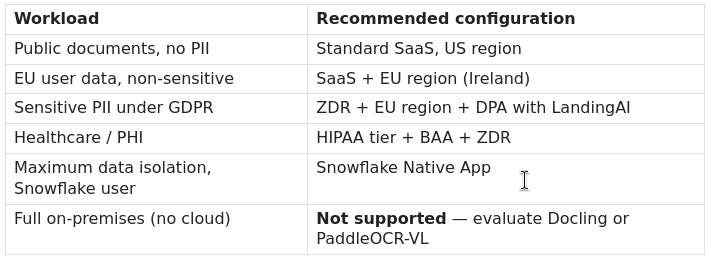
What “Compliant” Does Not Guarantee
GDPR compliance of the vendor does not make your processing compliant. You still need to:
- Establish a lawful basis for processing the personal data in your documents.
- Conduct a Data Protection Impact Assessment (DPIA) if processing at scale or processing special category data (health, biometric, financial).
- Record LandingAI as a data processor in your Records of Processing Activities (ROPA).
- Sign a Data Processing Agreement (DPA) with LandingAI — SOC 2 and self-declared GDPR compliance are not a substitute for a DPA.
Limitations and Open Questions
A few things are worth watching critically:
No open weights. DPT-2 is proprietary. The Python SDK is MIT-licensed, but the model behind it is a closed API. You cannot self-host the model, inspect its weights, or fine-tune it on your own data. Organizations that cannot send any data to a third-party cloud — even under Zero Data Retention (ZDR) — have no on-premises path with ADE.
Benchmark transparency. The 99.16% DocVQA number comes from LandingAI’s own communications, not from a third-party leaderboard submission. The DocVQA leaderboard at rrc.cvc.uab.es is the reference for independent verification — it’s worth checking whether LandingAI’s submission appears there.
Language coverage. The documentation states multi-language support without specifying which languages or at what accuracy. For non-English document processing at scale, independent evaluation is advisable.
Cost. API pricing is not published on the documentation site. For high-volume workloads (millions of pages), the cost-per-page model needs careful evaluation against open-weight alternatives like PaddleOCR-VL or Docling.
API stability. The library was rewritten once already (agentic-doc → landingai-ade) in a breaking-change migration. The architecture is still evolving, and teams building production systems on the API should track the changelog closely.
Counter-arguments and Data Gaps
The “vision-first” framing vs. hybrid systems. LandingAI positions DPT-2 as superior to “generic LLM+OCR” systems. This is a fair critique of naive implementations, but modern competitors like Docling, Azure Document Intelligence, and Amazon Textract also use vision-language models, not raw OCR. The distinction is less clear-cut than the marketing suggests.
Agentic overhead. The retry-and-verify loop adds latency. LandingAI claims under 2-second processing time for standard documents, but this likely refers to single-page or short documents. The agentic loop’s latency profile on 100+ page documents with complex tables is not publicly documented.
No peer-reviewed architecture paper. DPT-2 has no arXiv preprint or published technical report as of April 2026. Claims about its architecture are from product announcements, not peer-reviewed literature.
Sources
- GitHub — landing-ai/ade-python
- LandingAI Homepage
- ADE Technical Overview — docs.landing.ai
- DPT-2 Announcement — LandingAI News (September 30, 2025)
- HPCwire — LandingAI Introduces ADE DPT-2
- GitHub — landing-ai/agentic-doc (legacy, archived)
- LandingAI Security & Privacy — docs.landing.ai
- LandingAI Security at LandingAI
LandingAI’s DPT-2 in 2026: Why Agentic Document Extraction Finally Makes Sense was originally published in Towards AI on Medium, where people are continuing the conversation by highlighting and responding to this story.