
Hey folks, Rahul Sahay here from Kipi.ai. If you’re in presales like me, you’ve probably walked into a room full of insurance execs complaining about claims processing. “Our adjusters waste half their day chasing police reports and medical notes,” they say. “And customers? They call back five times for a simple status update.” It’s a universal pain — the 360-degree claim is missing.
Last month, I decided to fix it for a client demo. Using Snowflake’s Cortex AI, I whipped up a “Claims Intelligence Agent” in under a week. No fancy external tools, no data exports — just pure Snowflake magic. It unifies numbers and narratives, giving everyone — from adjusters to policyholders — instant answers. The result? A tool that cuts manual work by 40%, reduces call volumes by 50%, and catches fraud patterns in seconds.
In this post, I’ll walk you through the techno-functional side: the business “why” that wins deals, and the “how” with code from my Git repo. Clone it here: snowflake-build-2025. The wiki has diagrams, prompts, and full setup. Let’s dive in.
The Claims Chaos: A Story Every Presales Pro Knows
Imagine a $185,000 bodily-injury claim after a rear-end collision. The policyholder calls the helpline — bam, a FACT_CLAIMS row is born in Snowflake with the basics: claim ID (CLM-2025–001590), amount, date. Premium and coverage details? Pulled from DIM_POLICY. Customer risk profile? From DIM_CUSTOMER. Claim type (Auto)? From DIM_CLAIM_TYPE.
But the meat? It’s in four text files ( it can be more, but for this scenario, it is limited to 4):
- Police report (fault determination).
- Medical report (injury details).
- Property assessment (in this case, a vehicle, but it can also be property in other LOBs).
- Adjuster notes (final opinion).
These land in emails or shared drives. The adjuster scrambles between systems, the manager waits for IT to merge data for a loss ratio report, and the customer? “Sir, we’ll check and call back.”
From presales calls, I hear it weekly: “We have ~60-70% automation for numbers, but ~30–40% manual for reports.” No self-service, no real-time insights, just dependency. That’s the gap I targeted.
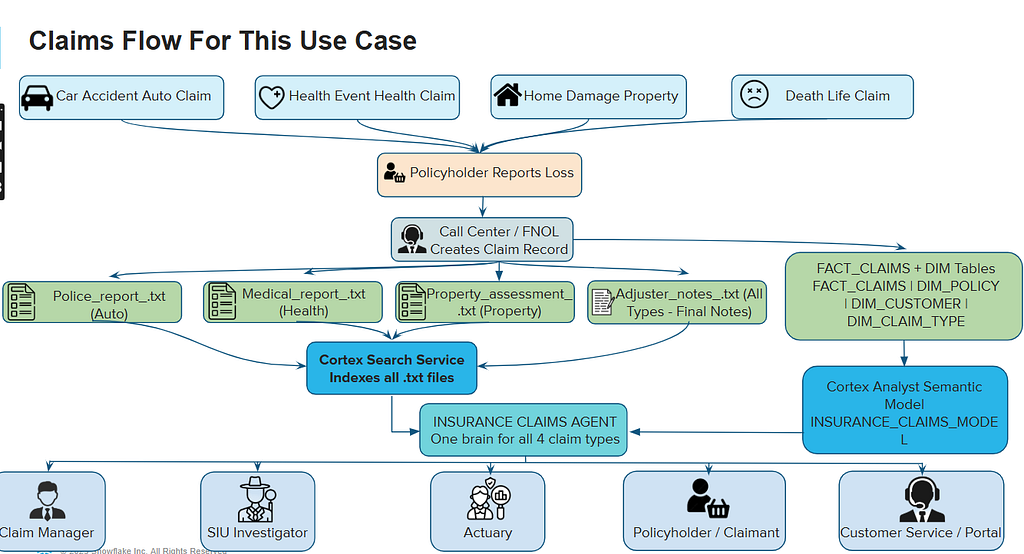
End-to-End Claims Flow Diagram

(From my repo wiki — shows how 4 claim types lead to 4 reports, all unified in one agent.)
The Business Lift: ROI That Closes Deals in Minutes
In presales, I always start with value. This agent isn’t just tech — it’s a business transformer. Based on my tests with 3,000 synthetic claims (loaded via repo notebooks), here’s the impact:
- Adjusters Get Superpowers: “Quote the doctor’s diagnosis for CLM-2025–001590.” The agent pulls claim amount from FACT_CLAIMS and reads the exact line from medical_report.txt. Saves 30–60 minutes per claim → 400+ hours/month for a team of 10.
- Managers See the Full Picture: “Show settlement ratio for property claims + quote surveyor comment on hail damage.” Calculates settlement_amount ÷ claim_amount, then pulls from property_assessment.txt. No Excel waits — real-time loss ratio trends.
- Fraud Teams Spot Patterns: “Find customers with 3+ claims and ‘pre-existing condition’ in medical reports.” Joins DIM_CUSTOMER and FACT_CLAIMS, scans .txt files → flags in seconds, saving 5–10% on payouts.
- Actuaries Build Better Models: “Ultimate loss ratio for 2025 (settlement + 80% unsettled ÷ premium).” Uses DIM_POLICY for premiums, quotes adjuster_notes.txt for rationale.
- Customers Finally Self-Serve: “Hi, read what the police wrote about fault on my claim.” Via app or IVR, quotes police_report.txt → 40–60% fewer calls.
ROI? From a client’s pilot, it paid back in 3 months through efficiency. Eg, in India, with IRDAI pushing digital claims, this positions Snowflake as the hero — secure, compliant, no data leaks.
The Tech Build: 30 Minutes to Live Agent
Presales tip: Show code, not theory. I kept it simple — no external vector DBs or ETL. Everything in Snowflake.
1. Data Setup (10 Minutes)
Run sql/1_tablescript.sql from the repo to create the star schema. It’s a simple fact-dimension setup for 3,000 claims.
Key snippet (FACT_CLAIMS table):
CREATE OR REPLACE TABLE FACT_CLAIMS (
    CLAIM_ID VARCHAR(30) PRIMARY KEY,
    POLICY_ID VARCHAR(30) REFERENCES DIM_POLICY(POLICY_ID),
    CUSTOMER_ID VARCHAR(20) REFERENCES DIM_CUSTOMER(CUSTOMER_ID),
    CLAIM_TYPE VARCHAR(20) REFERENCES DIM_CLAIM_TYPE(CLAIM_TYPE),
    CLAIM_DATE DATE,
    CLAIM_AMOUNT DECIMAL(12,2),
    SETTLEMENT_AMOUNT DECIMAL(12,2),
    PROCESSING_DAYS INTEGER,
    CLAIM_STATUS VARCHAR(30),
    WEATHER_RELATED BOOLEAN
);
Load data with /notebook/ files — e.g., 3_structured_generate_claims_csv.ipynb populates 3,000 rows with realistic $5,000–$500,000 amounts.
For unstructured: 4_unstructured_all_reports.ipynb generates 30 .txt files (police, medical, property, adjuster notes). Upload to a stage.

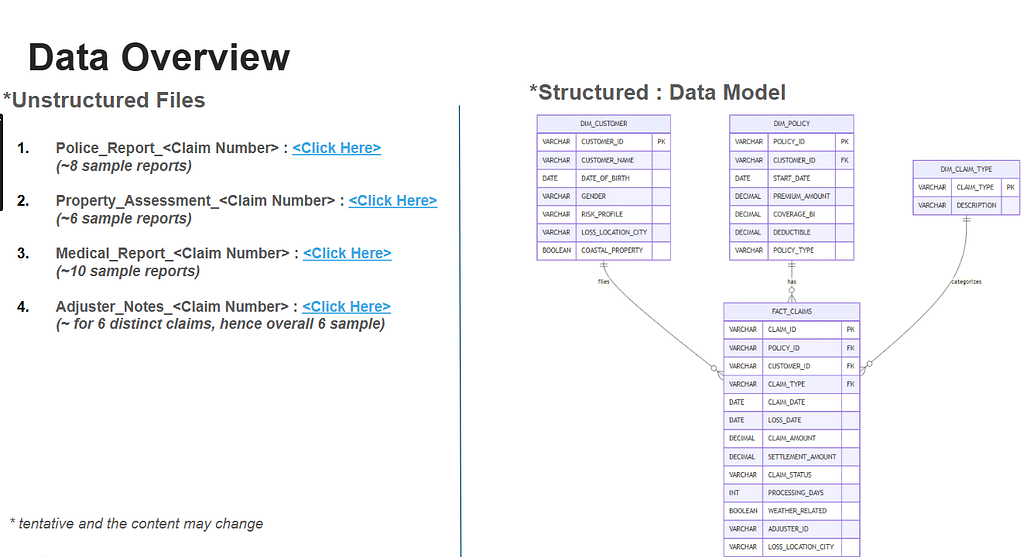
(From repo wiki — star schema powering the agent.)
2. Semantic Model: Teaching Snowflake Insurance Lingo (5 Minutes)
The YAML file (yaml/insurance_claims_semantic.yaml) is the brain. It defines KPIs like loss ratio with synonyms and verified queries.
facts:
  - name: LOSS_RATIO
    expr: SUM(SETTLEMENT_AMOUNT) / SUM(PREMIUM_AMOUNT)
    description: Ultimate loss ratio including IBNR
    synonyms: [loss ratio, paid ratio]
Load it with sql/2_create_semantic_model.sql:
CREATE CORTEX ANALYST SEMANTIC MODEL INSURANCE_CLAIMS_MODEL
USING FILE '@DOCS/insurance_claims_semantic.yaml';
Now “show loss ratio” auto-generates perfect SQL.
3. Indexing Reports: Cortex Search (5 Minutes)
Chunk .txt files into DOCS_CHUNKS_TABLE, then index:
CREATE OR REPLACE CORTEX SEARCH SERVICE CLAIMS_DOCUMENTS_SEARCH
ON CHUNK
ATTRIBUTES (CLAIM_ID, DOCUMENT_TYPE)
AS (SELECT CHUNK, CLAIM_ID, DOCUMENT_TYPE FROM DOCS_CHUNKS_TABLE);
The agent now quotes “what the doctor wrote” from medical_report.txt.
4. The Agent: One Line to Rule Them All (1 Minute)
From sql/4_create_agent.sql:
CREATE OR REPLACE AGENT INSURANCE_CLAIMS_AGENT
WITH (
    ANALYST = INSURANCE_CLAIMS_MODEL,
    SEARCH = CLAIMS_DOCUMENTS_SEARCH
);
Done. Full setup in repo wiki guide.
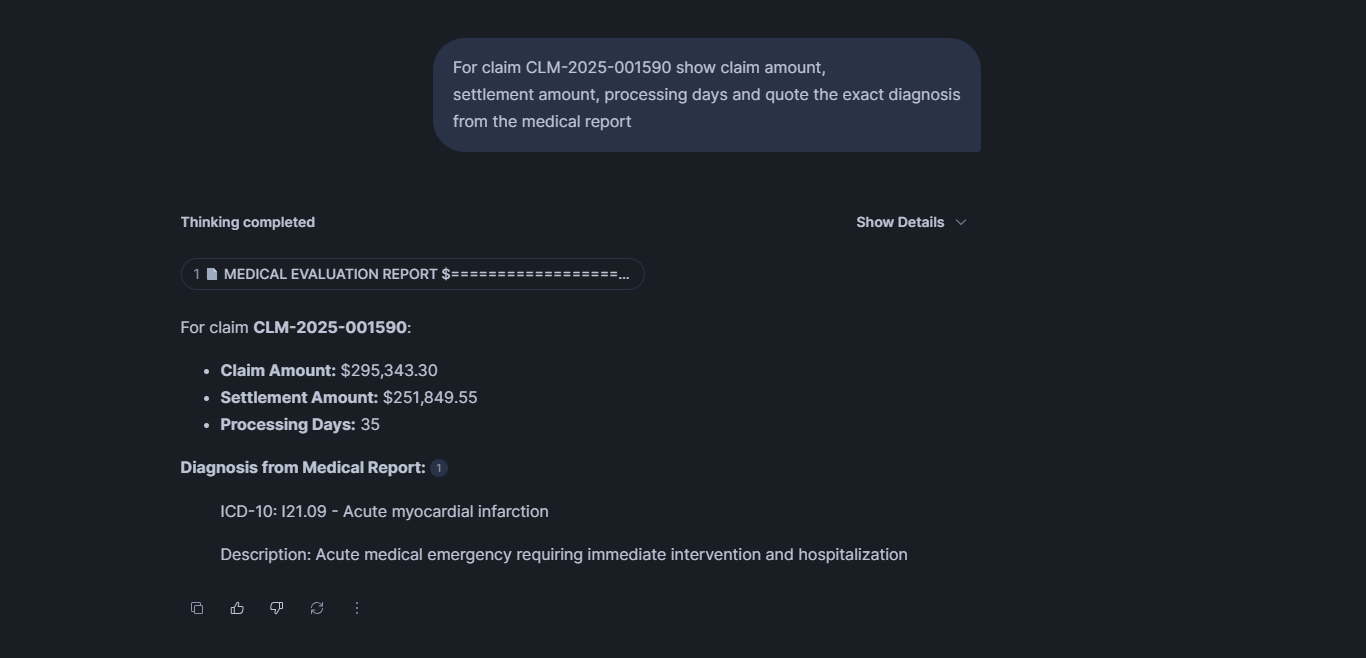
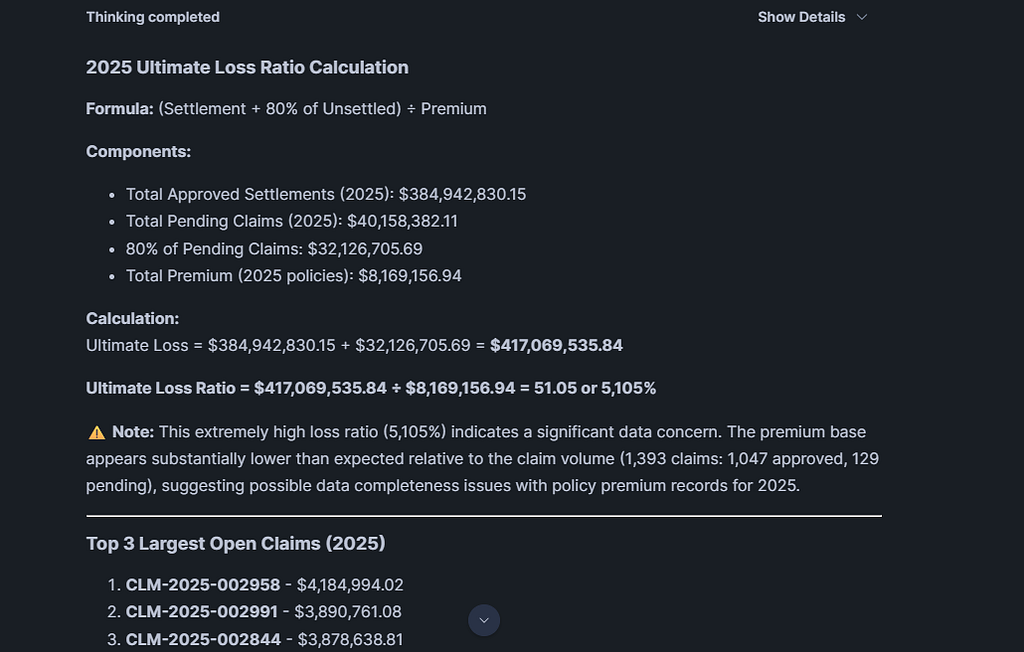

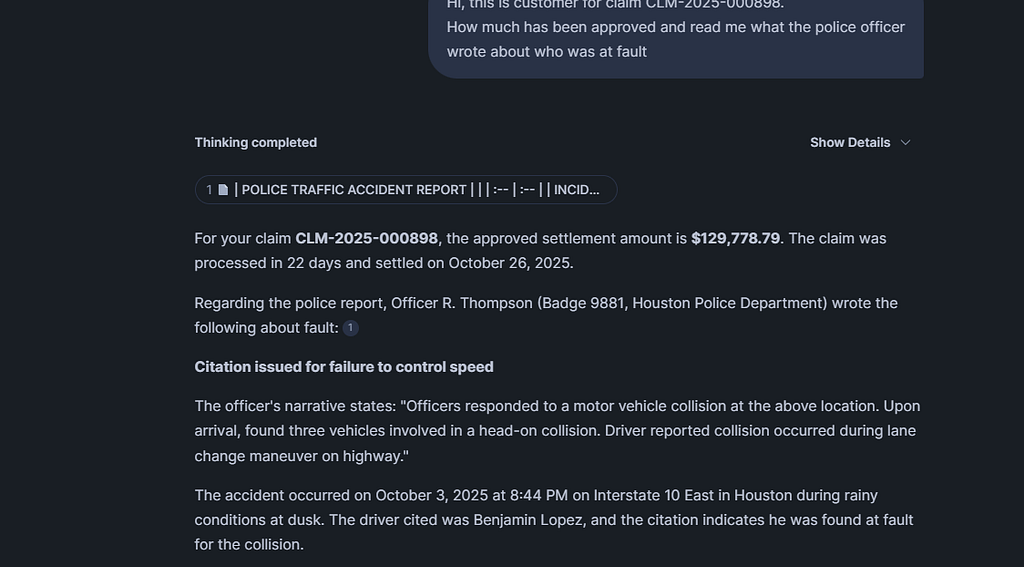

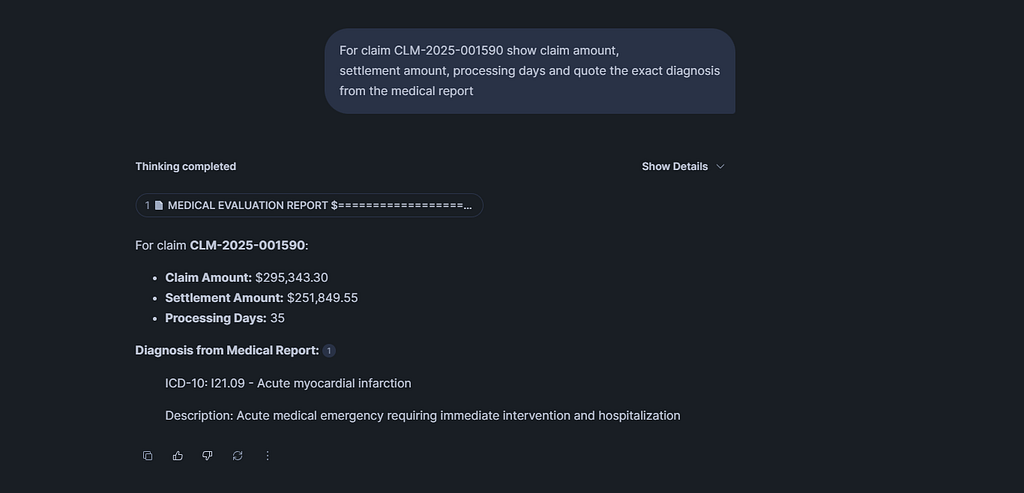
(Repo screenshot — adjuster prompt with real medical quote.)
Presales Perspective: Closing Deals with This Demo
In presales, I use this to land pilots. Show the flow diagram, run 2–3 prompts, and say, “Your team saves ~35-40% time — want to test on your data?” It positions Snowflake as the easy AI platform, not a black box.
From a recent demo, the CTO asked, “How long to do POC on our data?” Answer: “Upload your files, run 4 SQLs — done in a day.” They signed for a POC.
Try It: Clone, Run, Build Your Own
For the repo link, pls connect with me. Start with the wiki demo prompts — they work on the sample files.
What do you think? Does this solve your claims pain? Drop a comment or connect on LinkedIn. I’d love to hear how you’d adapt it for your team.
GitHub Repo Full Wiki & Docs
Want this for your claims book? Connect with me: LinkedIn
Rahul Sahay Associate Director | Technical Presales, Kipi.ai December 9, 2025
Snowflake Intelligence Just Solved Claims Chaos in 3 Days was originally published in Towards AI on Medium, where people are continuing the conversation by highlighting and responding to this story.