What I Learned Building Real-Time Voice Agents That Don’t Sound Like Robots

Everyone’s building voice AI in 2026. Very few are shipping it.
I’ve spent the last year wiring together ASR, LLMs, and TTS into production voice agents — the kind that handle 10,000+ concurrent calls without melting. Along the way, I broke things in ways the tutorials never warned me about.
This isn’t a tutorial. It’s a field guide. These are the 7 architectures that survived contact with real users — and the tradeoffs nobody tells you about.
1. The Sequential Pipeline (The “Hello World” of Voice AI)
How it works: Microphone → ASR → LLM → TTS → Speaker. Simple, linear, predictable.
This is where everyone starts, and for good reason. It’s dead simple to build. You can get a working prototype in an afternoon.
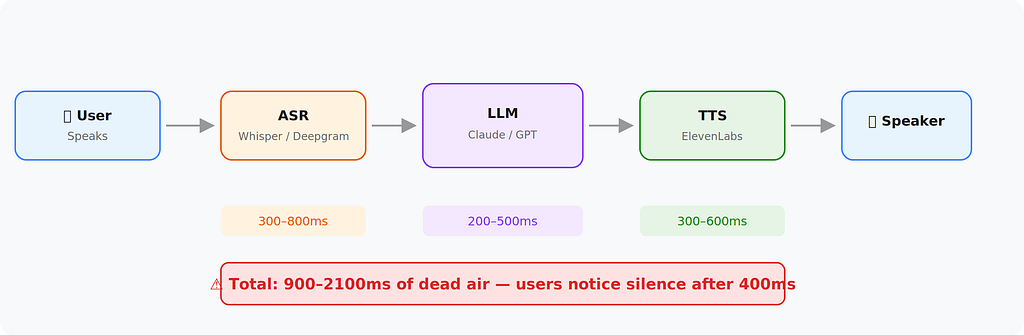
Where it breaks: Latency. Every step waits for the last one to finish. That’s one–two seconds of dead air. Humans notice silence after 400ms. Your user thinks the app crashed.
When to use it: Internal tools, async voice processing, or any case where real-time isn’t critical. Don’t use this for customer-facing call agents.
2. The Streaming Pipeline (Where Things Get Real)
How it works: Same components, but everything streams. ASR sends partial transcripts. The LLM starts generating before the user finishes speaking. TTS begins synthesizing from the first sentence.

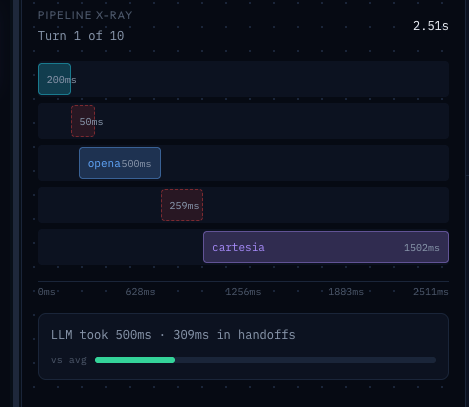
The key insight: you don’t wait for anything to finish. The LLM starts thinking the moment the user pauses. TTS starts speaking the moment the LLM completes its first sentence.
# Pseudocode for a streaming pipeline
async def handle_audio_stream(audio_chunks):
    async for partial_transcript in asr.stream(audio_chunks):
        if is_endpoint_detected(partial_transcript):
            async for llm_token in llm.stream(partial_transcript):
                async for audio_chunk in tts.stream(llm_token):
                    yield audio_chunk
Latency improvement: You can get total perceived latency down to 400–700ms. That’s the difference between “broken app” and “slightly thoughtful assistant.”
The hard part: Endpoint detection. How do you know the user is done speaking? Too aggressive and you cut them off. Too conservative and you add silence. Most production systems use a combination of Voice Activity Detection (VAD) and a short timeout (300–500ms).
3. The Interruptible Agent (The One Users Actually Like)
Here’s what nobody tells you about voice agents: users will interrupt them. Constantly.
A non-interruptible agent keeps talking even when the user says “no, stop, I meant the other one.” It feels like talking to a wall.
The interruptible architecture adds a critical component: a barge-in detector that listens to the user’s microphone even while the agent is speaking.
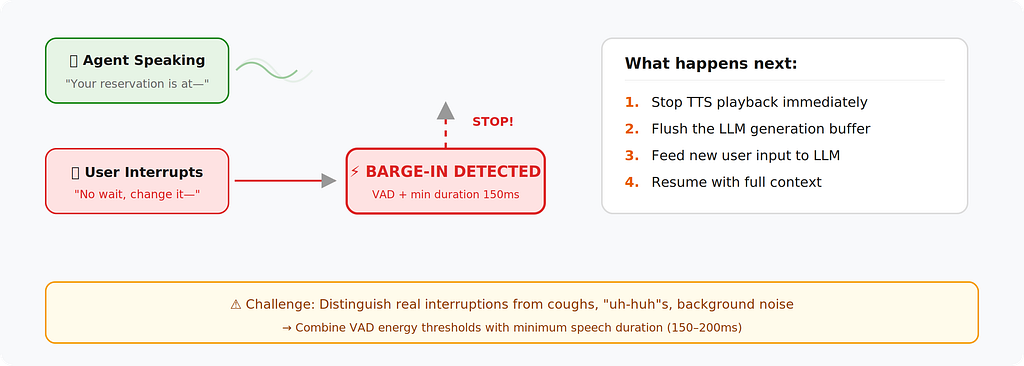
Implementation detail: When a barge-in is detected, you need to:
- Stop TTS playback immediately
- Flush the LLM generation buffer
- Feed the new user input back into the LLM with context of what was already said
- Resume generation with full context
The tricky part: Distinguishing between background noise, the user coughing, and an actual interruption. Most production systems combine VAD energy thresholds with a minimum speech duration (150–200ms) to avoid false triggers.
4. The Function-Calling Voice Agent (Where AI Meets Your Backend)
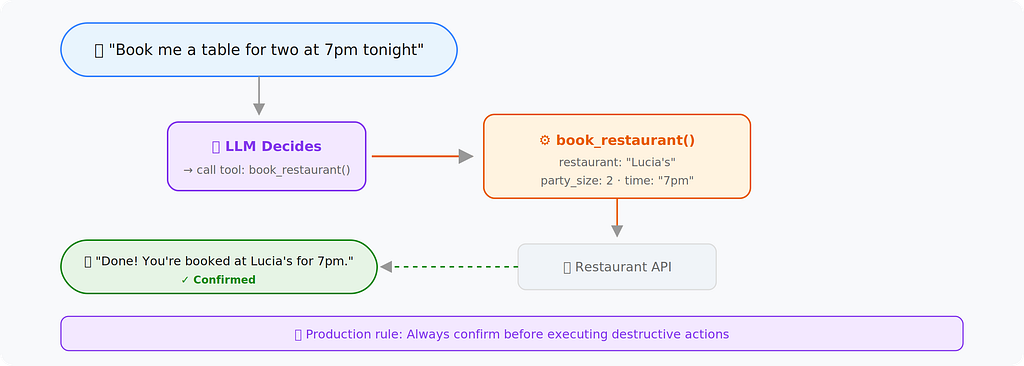
This is the architecture that turns a voice chatbot into something actually useful. The LLM doesn’t just talk — it takes actions.
tools = [
    {
        "name": "book_restaurant",
        "description": "Book a restaurant table",
        "parameters": {
            "restaurant": "string",
            "party_size": "int",
            "time": "string"
        }
    }
]
response = await claude.messages.create(
    model="claude-sonnet-4-20250514",
    messages=conversation_history,
    tools=tools
)
Production considerations:
- Confirmation loops: Never let the agent execute a destructive action without confirming. “I’ll book at Lucia’s for 7pm — does that sound right?”
- Fallback handling: What happens when the API is down? The agent needs a graceful script.
- Parallel tool calls: If the user says “book dinner and send my wife a text,” the agent should fire both actions concurrently, not sequentially.
5. The Multi-Turn Memory Architecture (Context That Actually Sticks)
Basic voice agents forget everything the moment the conversation moves on. The memory architecture fixes that by maintaining structured state.
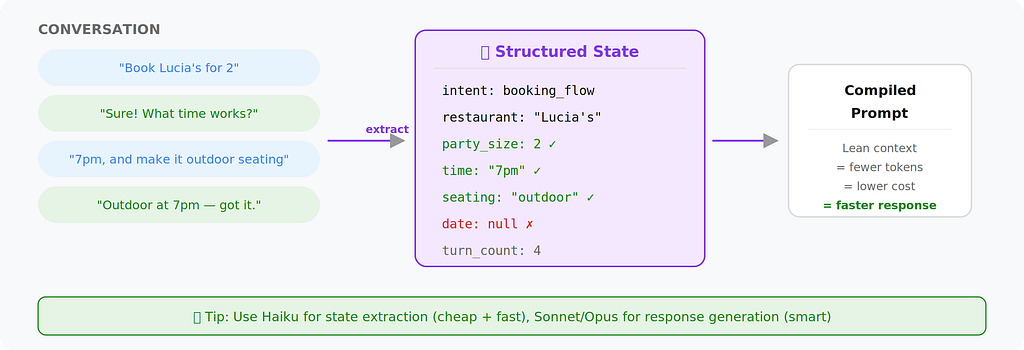
conversation_state = {
    "user_intent": "booking_flow",
    "collected_slots": {
        "restaurant": "Lucia's",
        "party_size": 2,
        "time": "7pm",
        "seating": "outdoor",
        "date": None         # Still needed
    },
    "conversation_summary": "User wants outdoor dinner at Lucia's for two at 7pm.",
    "turn_count": 4
}
Why this matters: Without structured state, your LLM prompt grows with every turn. By turn 15, you’re burning tokens re-reading the entire history. Structured state keeps the context window lean.
The architecture adds two components:
- State extractor — After each turn, a lightweight LLM call extracts structured data from the conversation.
- Context compiler — Before each LLM call, the system compiles the current state into a concise prompt.
Production tip: Use a smaller, faster model (like Haiku) for state extraction. Save your big model for response generation. This keeps latency low while maintaining context quality.
6. The Hybrid On-Device / Cloud Architecture (For When Latency Is Life)
Some use cases can’t tolerate any cloud round-trip. Medical alerts, in-car assistants, industrial floor agents — these need sub-200ms responses for common queries.
The pattern: Run a small model on-device for frequent, predictable interactions. Route complex queries to the cloud.
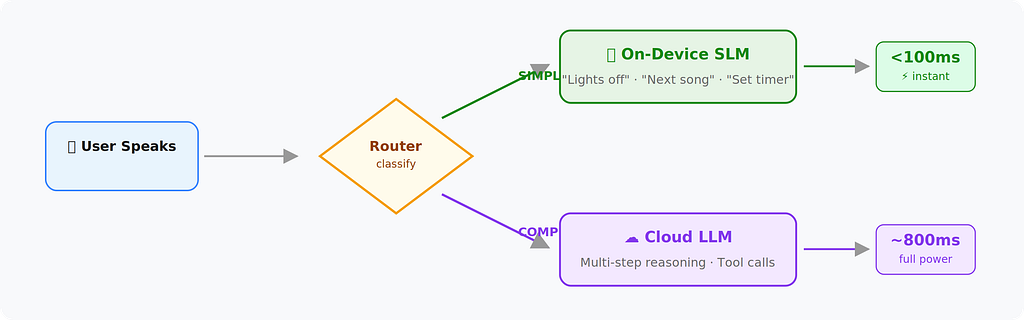
What runs on-device:
- Wake word detection
- Simple commands (“turn off the lights,” “next song”)
- Intent classification to decide routing
What goes to cloud:
- Open-ended questions
- Multi-step reasoning
- Anything requiring tool calls or external data
The router itself can be a tiny classifier (even a keyword matcher for v1). The key is keeping the on-device path under 100ms.
7. The Orchestrator Pattern (The One Running Real Call Centers)
This is the most complex architecture, and it’s what’s actually running behind enterprise voice AI deployments.
Instead of a single LLM handling everything, an orchestrator manages multiple specialized agents:
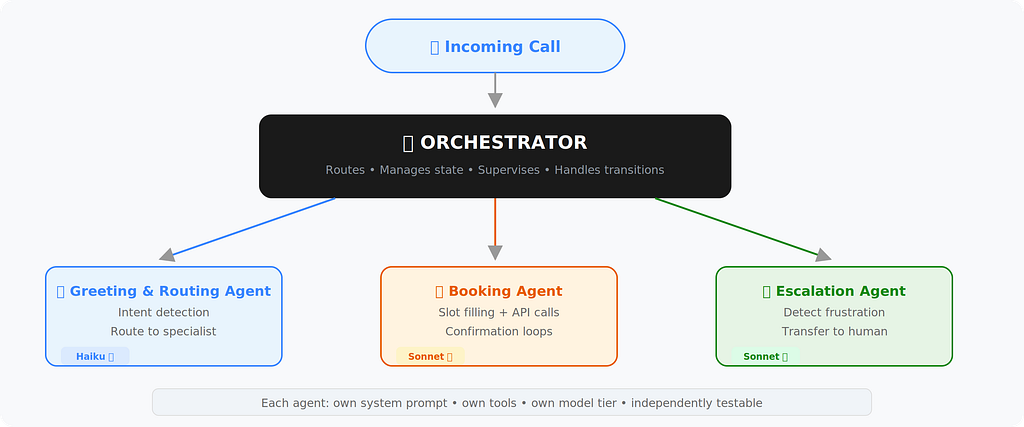
Why not one big agent? Three reasons:
- Specialization: Each agent has a focused system prompt and toolset. The booking agent only knows how to book. The escalation agent only knows how to transfer to humans.
- Testability: You can unit test each agent independently.
- Cost: The greeting agent can run on a cheaper, faster model. Only the complex agent needs the expensive model.
The orchestrator’s job:
- Detect intent from the user’s first utterance
- Route to the right specialist agent
- Handle transitions between agents (with context handoff)
- Monitor for situations that need human escalation
Production reality check: This architecture takes 3–6 months to build properly. Don’t start here. Start with Architecture #2, graduate to #4, then build toward #7 when your call volume justifies it.
Here’s the stack I’d pick today if I were building a real-time voice AI product:
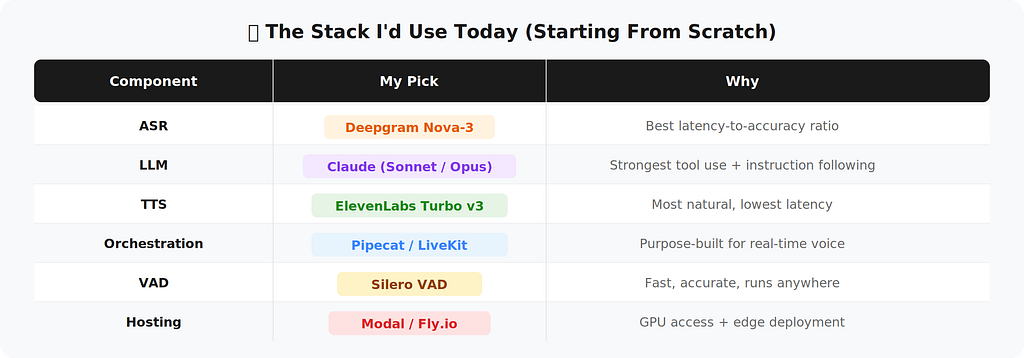
ASR (Speech-to-Text)
- Primary: Deepgram Nova-3
- Alternatives: Deepgram Nova-2, AssemblyAI Universal-3 Pro Streaming
- Why: Best balance of latency and accuracy for real-time transcription
LLM (Reasoning Layer)
- Primary: GPT-4o
- Alternatives: Claude Sonnet, GPT-4.1
- Why: Strong multimodal capabilities with fast inference and good tool calling
TTS (Text-to-Speech)
- Primary: Cartesia Sonic 3
- Alternatives: ElevenLabs Turbo v3/ Multilingual Model
- Why: Ultra-low latency with natural-sounding voice output
Orchestration (Real-time pipeline control)
- Primary: Pipecat or LiveKit (Personally prefer Livekit, enough though i’m an OSS contributor for pipecat)
- Why: Purpose-built for real-time voice interactions and streaming workflows
VAD (Voice Activity Detection)
- Primary: Silero VAD
- Why: Fast, accurate, and lightweight enough to run anywhere
The Honest Truth About Voice AI in 2026
The technology works. The hard part isn’t ASR or TTS, it’s everything in between.
It’s handling the user who says “umm” for three seconds. It’s dealing with background noise from a car window. It’s gracefully recovering when your booking API returns a 500.
The architectures above aren’t theoretical. They’re the patterns that survive real traffic, real users, and real edge cases.
Start simple. Ship fast. Let your users teach you which architecture you actually need.
If you found this useful, follow me for more practical AI engineering content. I write about the messy reality of shipping AI products, not the clean demo version.
References & Tools Mentioned:[1] Deepgram Nova-3 — deepgram.com [2] Anthropic Claude API -docs.anthropic.com [3] Cartesia Sonic 3 -cartesia.ai [4] Pipecat (Daily) -github.com/pipecat-ai/pipecat [5] LiveKit Agents-livekit.io [6] Silero VAD -github.com/snakers4/silero-vad
Seven Voice AI Architectures That Actually Work in Production was originally published in Towards AI on Medium, where people are continuing the conversation by highlighting and responding to this story.