The architecture that Cursor, Claude Code, Copilot, and Kiro all share — and why it changes how you think about production agent deployment
Part 1 of 2

You’re probably using one or more of them by now. Be it Cursor editing files and running tests, GitHub Copilot autonomously working through a task and opening a PR, or Kiro generating and refining code from a spec.
These devtools are running agents, systems that reason, plan, and take actions in a loop until a goal is reached. And they’re doing it on a compute surface you own: your developer machine.
That matters more than it sounds. Because once we understand what’s actually happening when Claude Code runs works through our prompts, we can have a more precise mental model for what production AI agents need to be — and why “just deploy the agent to Kubernetes” might turn out more complicated than it sounds.
The Agent Loop
There are many definitions of the word “agent” all over the internet now. Just for continuity here, let’s just say what separates an agent from a prompt-response interface is the loop that a model makes -> it generates a thought, takes an action, observes the result, updates its understanding, and continues. And Language models are indeed far more capable when they interleave reasoning with acting in a loop.
Every agentic system, regardless of complexity, rests on the same three foundations. This maps directly onto how we’ve always thought about software: runtime environment, integrations, and application logic. What’s new is that for AI agents, the top layer is natural language rather than compiled code.
┌──────────────────────────────────────────────────────────┐
│  LAYER 3: SKILLS                                         │
│  Procedural knowledge — what the agent knows HOW to do.  │
│  Instructions, conventions, persona, task definitions.   │
│  Stored as text, loaded at runtime.                      │
├──────────────────────────────────────────────────────────┤
│  LAYER 2: TOOLS                                          │
|  Capability — explicitly defined actions the agent can   │
│  invoke. APIs, databases, MCP, external services.        │
├──────────────────────────────────────────────────────────┤
│  LAYER 1: RUNTIME                                        │
│  Execution environment — WHERE the agent lives,          │
│  what compute it runs on, what it can execute,           │
│  what filesystem it can touch, what network it can reach │
└──────────────────────────────────────────────────────────┘
Once you see the three layers, you can reason with more precision about any agentic system: what it can do (Layer 2), what it knows (Layer 3), and what it’s allowed to touch (Layer 1). Every question about deploying, securing, or operating an agent turns out to be a question about one of these layers — (although in practice they interact, and real problems might not respect clean boundaries).
The Agent VM You’re Already Running
The clearest way to understand the three layers is through tools we are already using.
A note on accuracy: If you spot something that’s shifted, trust the official docs over this article. The three high level layers seems stable; the specific implementation details per tool are not.
Most AI coding tools today — Claude Code, Cursor, Copilot Agent Mode, Kiro — share the same Layer 1: your machine, full trust. What differs between them is mostly how they structure Layer 3, and which tools they expose in Layer 2. Let’s get into some details..
Layer 3 is where each tool has its own flavour. Claude Code uses markdown files in `~/.claude/`. Cursor uses `.cursor/rules/*.mdc` rule files (always-on) plus `SKILL.md` agent skills that activate on demand. Kiro takes a spec-first approach — `requirements.md` and `design.md` become the knowledge layer, structured specification rather than freeform instructions. Different formats, same idea: plain text loaded at runtime that tells the agent how to behave.
Layer 2 is converging. All of them either already support MCP or are moving that way. Through MCP you can wire in infrastructure tools (i.e. AWS ships official MCP servers for EKS, Terraform, CDK; there are Kubernetes MCP servers for cluster operations), GitHub, Slack, documentation systems, etc. Beyond MCP, each tool has its own built-ins: Cursor has codebase indexing and web search; Kiro has Agent Hooks that fire background AI actions on file save; etc.
Layer 1 is identical across all of them: your local machine. Read/write access to your filesystem, ability to run shell commands, network access to whatever your machine can reach. Maximum trust (with prompts for your permission) because you own the environment. It works smoothly because you are both the developer and the operator — maximum trust is appropriate.
One tool worth singling out is the GitHub Copilot Coding Agent, the asynchronous, cloud-hosted variant, because it differs heavily from the local-machine model. Instead of running on your machine, it spins up an ephemeral GitHub Actions environment per task: fresh container, no credentials, firewalled network, output gated behind a PR that only a human can merge. GitHub has essentially built the security model that production deployments might have to implement. It’s a useful reference point for what “safe by default” could look like.
Now Move it to Kubernetes
When you move an agent from a developer’s laptop to an enterprise platform — an OpenShift cluster, managed EKS, etc, you’re changing the constraint profile of Layer 1 (runtime and execution environment).
Differences between Claude Code on your MacBook and a production AI agent in a Kubernetes pod are Layer 1 changes. For example:
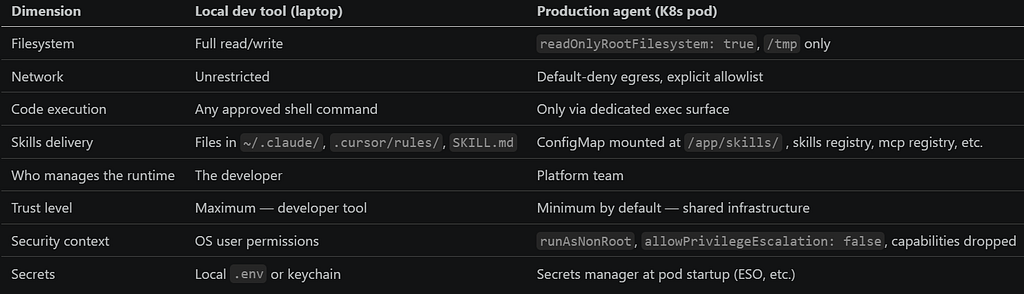
The trust boundary turns out quite different in the table above. This is why it might not be as simple as packaging your favourite agent framework into a Docker image and just deploying it. The platform might need to enforce a completely different Layer 1 profile for security reasons, and rightly so because a production workload handling user data across shared infrastructure has to be treated very differently from a developer tool running on your own laptop.
So What should the Layer 1 execution environment Actually Look Like in Kubernetes?
Once we accept that the high level agent architecture is the same and only the Layer 1 constraints differ, the practical question regarding execution becomes: what kind of execution environment does your agent actually need?
I spent time experimenting with four different patterns on a live OpenShift cluster, each representing differently how much execution capability you give the agent and how tightly you contain it:
- No-exec — the agent calls APIs only, no code execution surface at all. Layer 1 is locked down such that the agent is not able to run any generated code. This is the right starting point for agents doing synthesis, Q&A, or orchestration — and more agents fit here than you’d expect.
- Sidecar exec server — an exec server runs as a second container in the same pod. Convenient, but the agent and exec surface share a network namespace.
- Separate exec pod — the exec server runs as a separate pod with deny-all egress, isolated from the agent at the network level. A compromised exec surface can’t phone home.
- Exec dispatcher — no persistent exec surface at all. A dispatcher service spawns an ephemeral Kubernetes Job per execution request, then tears it down. Zero idle attack surface.
I do not have the answer but each pattern is a deliberate trade-off between capability, isolation, and operational complexity — and the right choice might just depend on your threat model and how much you trust the inputs your agent is processing.
In Part 2, I walk through my experimentation of all four of them; implementation details, cluster outputs, security reasoning behind each and findings.
Every AI Coding DevTool Is an Agent VM. Here’s What That Means for Kubernetes. was originally published in Towards AI on Medium, where people are continuing the conversation by highlighting and responding to this story.