A practical look at short-term memory, persistence, and the two techniques that keep your AI agents from forgetting everything on restart.
TL;DR
InMemorySaver stores state in RAM — gone on restart. Use PostgresSaver for persistence.
Context windows can overflow as conversations grow — trimming and summarization are the two main fixes.
Trimming is simpler but lossy. Summarization preserves context using a second LLM pass.
The problem with InMemory Saver
When you build an agent with LangGraph, the Checkpointer component is responsible for saving state between steps. Every interaction is tagged with a thread_id so the agent knows which conversation it's in.
By default, LangGraph ships with InMemorySaver — which does exactly what the name says: stores everything in RAM. This is fine for quick prototyping, but the moment your server restarts, all that conversation history vanishes.
RAM is volatile. If your process dies or restarts, InMemorySaver loses everything. Do not use it in production.
Moving to Postgres
LangGraph officially recommends switching to PostgreSQL as your persistent backend. Instead of memory, state is written to disk — and it survives restarts.
There are two ways to set this up:
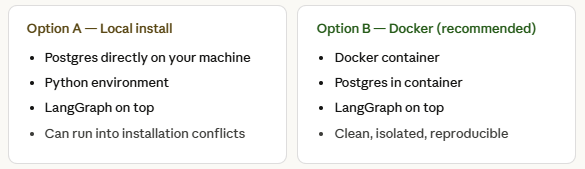
Installation issues with local setups are common, so Docker is the safer path. Here’s the full setup sequence:
- Install Docker and verify:docker --version
- Create yourdocker-compose.ymlwith the Postgres service defined
- Spin up containers:docker compose up -d
- Confirm they’re running:docker ps
- Install Python dependencies inside the container
Once that’s done, swap InMemorySaver for PostgresSaver in your graph config. The API is identical — only the backend changes.
PostgresSaver behaves just like InMemorySaver in code. The only difference is that your state now survives restarts.
The context-window overflow problem
Even with persistence solved, there’s a second, subtler problem: context window overflow.
LLMs have a fixed context window — the maximum number of tokens they can process in a single call. As conversations grow, the accumulated message history can easily exceed this limit.
The relationship looks like this:
Input tokens (your conversation) << Context window (LLM limit) ↑ This gap shrinks with every message. Eventually it overflows.
LangGraph gives you two techniques to handle this.
Technique 1 — Trimming
Trimming is the blunt instrument. You set a max_token limit, and when the conversation exceeds it, older messages are simply excluded from the next LLM call.
- Set max_token = n in your config
- If history exceeds n tokens, older messages are skipped
- Messages are still in memory — they’re just not sent to the model
- Use import trimmessage from LangGraph to implement this
Inherent flaw: trimming assumes the oldest messages are the least important. That’s often wrong — early context can be critical (e.g., the user’s original goal or constraints).
Technique 2 — Summarization
Summarization is smarter. Instead of throwing away old messages, it condenses them using a second LLM pass before they fall out of the window.
- Works like trimming but doesn’t ignore early context
- A second LLM instance reads the older messages and writes a compact summary
- That summary is kept in memory and passed forward as context
- The original messages are deleted — but the summarization is not
Think of it as compression, not deletion. The information is preserved — just in a denser form.
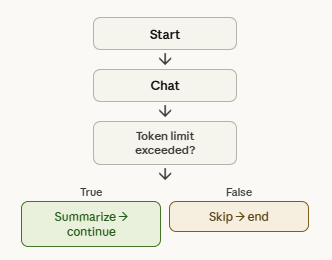
How summarization flows
The summarization loop runs automatically during a conversation:
Trimming vs summarization — when to use which
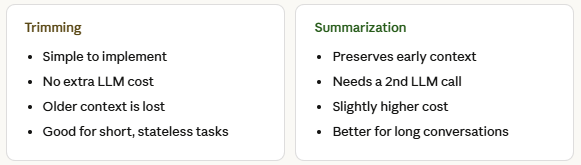
For quick Q&A agents where each turn is mostly independent, trimming is fine. For assistants that maintain long-running tasks, user goals, or multi-step plans — summarization is the right call.
Putting it all together
Here’s the mental model:
- Start with InMemorySaver for local development.
- Switch to PostgresSaver (via Docker) before any real deployment.
- Add trimmessage trimming as a baseline guard against overflow.
- If your agent needs long-running memory, layer in summarization on top.
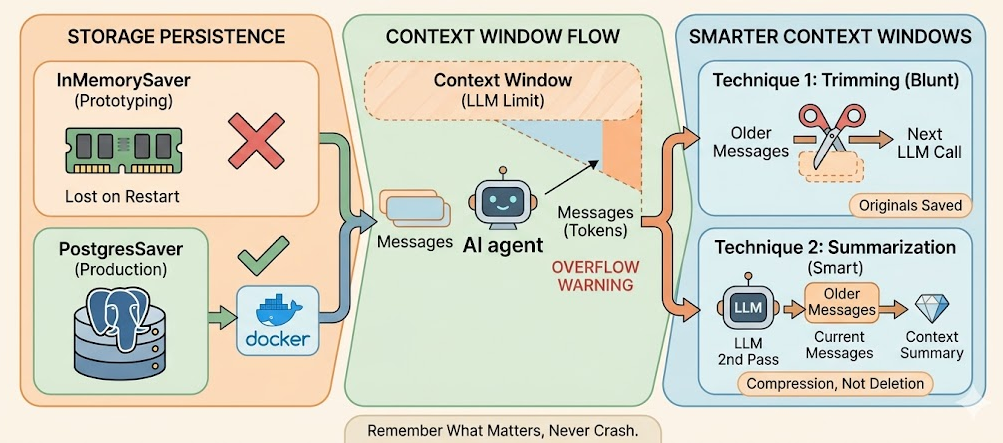
LangGraph makes all of these composable, you can swap components without rewriting your graph logic. That’s what makes it a solid foundation for production-grade memory management.
The goal is simple: your agent should remember what matters, forget what doesn’t, and never crash because it ran out of context.
Managing Memory in LangGraph: From RAM to Postgres to Smarter Context Windows was originally published in Towards AI on Medium, where people are continuing the conversation by highlighting and responding to this story.