Claude Code Section 4: Production Mastery — 7 Advanced Workflows That Make Claude Code a True Force Multiplier
This is Section 4 of a 4-part series on mastering Claude Code. If you haven’t read Sections 1–3, start there — this section assumes you have the foundations, personalization, and extensions already in place.
You’ve installed it. You’ve personalized it. You’ve connected it to external systems. And if you’ve followed along from Section 1, Claude Code has probably already saved you hours of grinding work.
But here’s what I noticed after months of daily use.
Most of us (developers) hit a ceiling. They use Claude Code the way they used autocomplete — reactive, task-by-task, one prompt at a time. Ask a question, get an answer. Fix this bug. Write that function. Close the terminal.
The ceiling isn’t a capability ceiling. It’s a workflow ceiling.
The developers who break through it aren’t using different features. We’re using the same features differently — with deliberate, repeatable patterns that compound across every task, every session, every project. We’ve stopped asking Claude to do tasks. We’ve started building systems where Claude is a full participant in the development cycle.
That’s what Section 4 is about.
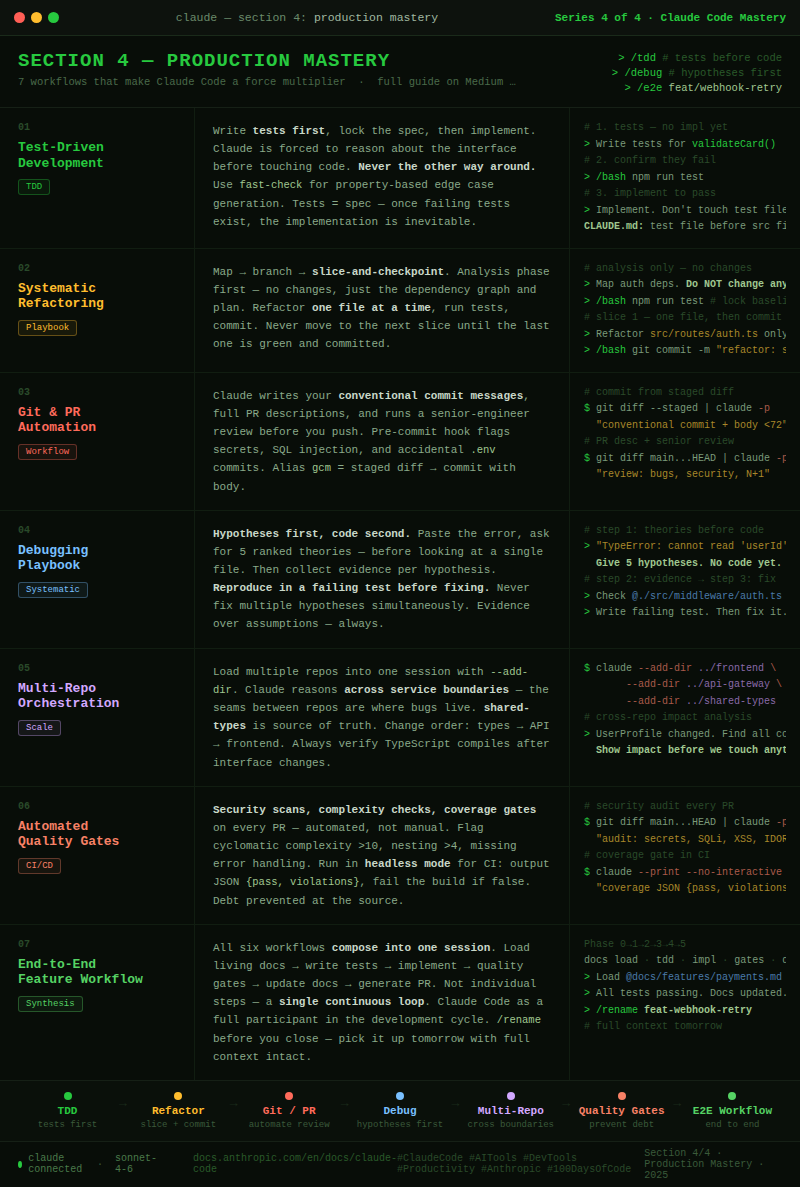
These 7 workflows are the patterns I’ve seen turn good Claude Code users into extraordinary ones. They’re not shortcuts. They’re the way the tool was designed to be used at full power.
Let’s close the loop.
Workflow 1: Test-Driven Development — Let the Tests Lead
Most of us use Claude Code to write code, then ask it to add tests afterward. This is backwards. TDD with Claude Code is one of the highest-leverage patterns in the entire toolkit — and it fundamentally changes the quality of what gets built.
The unlock: when Claude writes tests first, it’s forced to think through the interface, edge cases, and expected behavior before touching the implementation. The tests become your spec. The implementation becomes inevitable.
The TDD loop with Claude Code:
# Step 1 — Define the contract, not the implementation
> Write comprehensive tests for a validatePaymentMethod() function in
  tests/services/payment.test.ts. It should handle:
  - Valid card types (visa, mastercard, amex)
  - Expired cards
  - Invalid CVV length by card type
  - Luhn algorithm validation
  Don't implement the function yet. Tests should fail.

# Step 2 - Run the tests, confirm they fail
> /bash npm run test -- payment.test.ts
# → 12 failing tests. Good. The spec is locked.

# Step 3 - Now implement to make them pass
> Implement validatePaymentMethod() in src/services/payment.ts.
  All 12 tests in tests/services/payment.test.ts must pass.
  Don't modify the test file.

# Step 4 - Verify and refactor
> /bash npm run test -- payment.test.ts
# → 12 passing. Now ask Claude to refactor for clarity.
> Refactor validatePaymentMethod() for readability. Tests must still pass.
Property-based testing — the advanced TDD move:
# Generate edge cases Claude wouldn't think to write manually
> Using fast-check, write property-based tests for the date validation
  utilities in src/utils/dates.ts. Focus on boundary conditions:
  leap years, timezone edge cases, and invalid date strings that look valid.
The CLAUDE.md entry that locks this pattern in:
## Testing Protocol
- Always write tests before implementation (TDD)
- Test files must be created before touching src files
- Run tests after every implementation step — never assume they pass
- Never modify test files to make tests pass
- All new code requires ≥80% branch coverage
Why this pattern compounds: When Claude writes tests first, you build a safety net before the code exists. Every future change — refactors, additions, fixes — runs against that net automatically. Three months in, your test suite is comprehensive not because you disciplined yourself to write tests, but because the workflow made it the path of least resistance.
Workflow 2: The Systematic Refactoring Playbook
Refactoring large codebases is where developers are most afraid to use AI. Too many files. Too many interdependencies. Too much risk of breaking something invisible. Most people either avoid it or do it in a panic during an outage.
The systematic refactoring playbook turns this into a controlled, verifiable, low-risk process. The key is checkpoints — explicit verification gates that catch regressions before they compound.
Phase 1: Map before touching anythin
# Start with full analysis — no changes yet
> Analyze the entire authentication system across these directories:
  src/auth/, src/middleware/, src/routes/auth*, tests/auth/

  Give me:
  1. A dependency graph (what calls what)
  2. All places that directly access req.user without going through middleware
  3. Inconsistencies in how we handle auth errors
  4. A proposed refactoring sequence (which files to touch in what order)

  Do NOT make any changes. This is analysis only.
Phase 2: Branch and checkpoint
# Create a dedicated branch — Claude tracks the intent
$ git checkout -b refactor/auth-middleware-consolidation

# Establish the baseline
> /bash npm run test
# → Save this output. It's your green baseline.
# Now refactor in small, verifiable slices
> Refactor slice 1: Move all direct req.user accesses in src/routes/auth.ts
  to use the requireAuth middleware. Only this file. Run tests after.

> /bash npm run test -- auth
# → Still green? Good. Commit this slice.
> /bash git commit -m "refactor: centralize auth via middleware in auth routes"
# Slice 2 - only after slice 1 is committed and tests pass
> Refactor slice 2: Same pattern for src/routes/users.ts only.
Phase 3: The checkpoint protocol
# The rule: commit + test pass before every next slice
# If tests fail, stop immediately
> Tests are failing after that last change. Don't continue the refactor.
  Show me exactly what changed and what broke. I want to understand
  before we fix anything.

# The recovery pattern - never guess with regressions
$ git diff HEAD~1          # What changed?
$ git stash                # Roll back if needed
$ git bisect start         # For complex regressions
The CLAUDE.md refactoring protocol:
## Refactoring Rules
- Analysis phase before any code changes — output a plan first
- Refactor in slices of one file or one concern at a time
- Run tests after every slice. Never skip this step.
- Commit after every passing slice
- If tests fail mid-refactor, stop and diagnose before continuing
- Never refactor and add features in the same branch
The insight: The playbook works because it forces Claude to think in dependencies, not just files. The slice-and-checkpoint rhythm means a mistake in slice 3 never contaminates slices 1 and 2. The git history becomes a verified breadcrumb trail you can walk backward through at any point.
Workflow 3: Git & PR Automation
Most developers use Claude Code to write code and then handle everything git-related manually — typing commit messages, writing PR descriptions, doing code review in their head. This is one of the most overlooked leverage points in the entire workflow.
Commit messages that actually explain what changed:
# Weak (what everyone writes under deadline)
$ git commit -m "fix auth bug"

# Let Claude write it properly
$ git diff --staged | claude -p "Write a conventional commit message for these changes.
  Follow the format: type(scope): description
  Then add a body explaining WHY the change was made, not just what.
  Keep the subject under 72 characters."

# Even better - alias this
alias gcm='git diff --staged | claude -p "Write a conventional commit message with body. Subject under 72 chars."'
PR descriptions that reviewers actually read:
# Generate a full PR description from the branch diff
$ git diff main...HEAD | claude -p "
  Write a GitHub PR description for these changes.
  Include:
  - Summary: what this PR does in one sentence
  - Motivation: why this change is needed
  - Changes: bulleted list of what changed and why each decision was made
  - Testing: how to verify this works
  - Risks: anything a reviewer should watch carefully
  Format it in Markdown. Be specific, not generic.
Automated pre-commit review:
# In your .git/hooks/pre-commit (or via husky)
#!/bin/bash
STAGED=$(git diff --staged --name-only)
if [ -n "$STAGED" ]; then
  git diff --staged | claude -p "
    Quick pre-commit check. Flag ONLY:
    1. Security issues (hardcoded secrets, SQL injection, XSS)
    2. Obvious bugs (null dereferences, off-by-one, race conditions)
    3. Files that shouldn't be committed (.env, *.key, *.pem)
    If nothing critical: respond with 'LGTM'.
    If critical issues found: list them clearly."
fi
Claude as your first code reviewer:
# Before you push — thorough review with context
$ git diff main...HEAD | claude -p "
  You are a senior engineer reviewing this PR before it goes to the team.
  Review for:
  1. Logic errors and edge cases
  2. Security vulnerabilities
  3. Performance issues (N+1 queries, missing indexes, large payloads)
  4. Breaking API changes or contract violations
  5. Missing error handling
  6. Test coverage gaps

  Be specific. Reference line numbers. Suggest fixes, don't just flag problems."
The git workflow CLAUDE.md entry:
## Git Conventions
- Commit messages: conventional commits format (type(scope): subject + body)
- PR descriptions: always include motivation, changes, testing, and risks
- Never commit .env, *.key, *.pem, or files matching .gitignore
- Run pre-commit review for any PR touching auth, payments, or user data
Workflow 4: The Debugging Playbook
Ad-hoc debugging with Claude — “here’s my error, fix it” — works for simple bugs. It fails for complex ones. The debugging playbook is a structured approach that systematically narrows the problem space rather than guessing at solutions.
Step 1: Hypothesis-first debugging
# Don't dump the error and ask for a fix
# First generate hypotheses — before looking at code

> I'm getting this error in production:
  TypeError: Cannot read properties of undefined (reading 'userId')
  at PaymentService.processCharge (payment.service.ts:147)
  Stack: [paste full stack trace]

  Before looking at any code, give me your top 5 hypotheses for what
  could cause this. Order them by likelihood. Don't fix anything yet.
Step 2: Evidence collection per hypothesis
# Now systematically check each hypothesis
> Hypothesis 1 was "the session object is undefined when processCharge is called."
  What evidence would confirm or refute this?
  What files do we need to check?
  Don't change anything — just tell me what to look at.

> Now read @./src/services/payment.service.ts lines 130-160
  and @./src/middleware/auth.middleware.ts
  Does the evidence support or refute hypothesis 1?
Step 3: Reproduce before fixing
# The cardinal rule: reproduce the bug in a test before fixing it
> Based on our analysis, hypothesis 2 is correct — the middleware
  isn't running on the /charge endpoint.

  Before fixing: write a failing test in tests/services/payment.test.ts
  that reproduces this exact bug. The test should fail right now.
  Then fix it. Then verify the test passes.
Debugging patterns for specific scenarios:
# Memory leaks
> I suspect a memory leak in the WebSocket handler.
  Help me add structured logging to track object creation and destruction
  in src/ws/handler.ts without changing the behavior.
  We'll analyze the logs, not guess.

# Race conditions
> There's an intermittent race condition in the order processing pipeline.
  It doesn't reproduce reliably.
  Read @./src/services/order.service.ts and identify every place where
  two async operations could interleave and produce inconsistent state.
  Give me a ranked list with reproduction conditions for each.

# Performance regressions
$ cat performance-baseline.json | claude -p "
  Here's our API performance baseline from last week.
  Here's today's metrics: [paste].
  Identify which endpoints regressed and by how much.
  What changed this week that could explain each regression?"
The CLAUDE.md debugging entry:
## Debugging Protocol
- Hypotheses first, code second — always generate theories before looking
- Reproduce in a test before fixing — never fix without a failing test
- Evidence over assumptions — check, don't guess
- Fix one hypothesis at a time — don't patch multiple theories simultaneously
Workflow 5: Multi-Repo Orchestration
Modern systems aren’t single-repo projects. A feature often spans a frontend, a backend API, a shared types package, and an infrastructure repo. Without multi-repo support, Claude Code can only see one piece at a time — and the seams between repos are where bugs live.
Loading multiple repos into a single session:
# Add related repos to Claude's working context
$ claude \
  --add-dir ../frontend \
  --add-dir ../api-gateway \
  --add-dir ../shared-types \
  --append-system-prompt "We're working across three repos:
    frontend (React/TypeScript), api-gateway (Node/Express),
    and shared-types (TypeScript interfaces).
    The shared-types package is the source of truth for all interfaces."

# Now Claude can reason across all three simultaneously
> The UserProfile interface changed in shared-types.
  Find every place in the frontend and api-gateway that consumes it
  and show me what needs to change.
Contract-first cross-repo development:
# Define the interface before touching either side
> We need to add a subscription tier to UserProfile.
  First: update the interface in ../shared-types/src/user.ts
  Then: show me every consumer in ../frontend and ../api-gateway
  that needs updating, without changing them yet.
  I want to see the full impact before we touch anything.

# Then propagate changes systematically
> Now update the frontend consumers, starting with
  ../frontend/src/components/Profile - one file at a time.
  After each file, we'll verify TypeScript still compiles.
Cross-repo living docs:
# The pattern: a central docs repo that spans everything
$ claude --add-dir ../docs-central
> Our UserProfile interface just gained subscription tier.
  Update ../docs-central/api-contracts.md to reflect the new shape,
  and add a migration note for any consumer using the old interface.
CLAUDE.md for multi-repo projects:
## Multi-Repo Context
- shared-types is the source of truth for all interfaces
- Never duplicate type definitions across repos — always import from shared-types
- Cross-repo changes follow: types first → API second → frontend last
- Always verify TypeScript compilation after interface changes
- ../docs-central/api-contracts.md is the human-readable interface spec
Workflow 6: Automated Quality Gates
Quality gates are the difference between a codebase that gets better over time and one that slowly accumulates technical debt. Most developers know they should be running security scans, complexity checks, and coverage gates — but they don’t do it because the overhead of setting it up always feels too high. Claude Code eliminates that overhead.
Security scanning as a workflow step:
# Before every PR — not just on suspicious code
$ git diff main...HEAD | claude -p "
  Security audit for this diff.
  Check specifically for:
  1. Hardcoded credentials or API keys
  2. SQL injection via string concatenation
  3. XSS vulnerabilities (unescaped user input in HTML)
  4. Insecure direct object references (IDs in URLs without authorization checks)
  5. Missing input validation on new endpoints
  6. Dependency additions — flag any with known CVEs

  For each finding: severity (critical/high/medium), location, and recommended fix."
Complexity and maintainability gates:
# Run this as part of your PR review process
> Analyze the code complexity of the files changed in this PR.
  Flag any function with:
  - Cyclomatic complexity > 10
  - More than 4 levels of nesting
  - More than 50 lines
  - More than 5 parameters

  For each flagged function: explain why it's complex
  and suggest a refactoring approach.

# Dependency audit on every package.json change
$ git diff main...HEAD -- package.json | claude -p "
  New dependencies were added. For each:
  1. What does it do?
  2. Is it actively maintained? (last release, GitHub stars, open issues trend)
  3. Is there a lighter-weight alternative we might already have?
  4. Any known security issues?
  Flag anything worth reconsidering."
Coverage gates that actually enforce quality:
# In your CI pipeline (headless mode)
$ claude --print --no-interactive -p "
  Run npm run test:coverage and analyze the output.
  Flag any file in src/ with:
  - Branch coverage below 70%
  - Zero test coverage
  - Coverage that dropped since last run (baseline in coverage-baseline.json)

  Output a JSON object with:
  { 'pass': boolean, 'violations': [...], 'summary': string }
  " | jq '.pass'
# → CI fails if pass is false
The automated quality report:
# Weekly — generate a maintainability report for the team
$ find src/ -name "*.ts" | head -20 | xargs cat | claude -p "
  Generate a maintainability report for this codebase sample.
  Cover: complexity trends, test coverage gaps, dependency health,
  and the top 3 technical debt items to prioritize this sprint.
  Format as a Markdown report with an executive summary at the top."
Workflow 7: The End-to-End Feature Workflow
This is the capstone pattern — the one that ties every concept from all four sections together into a single, repeatable workflow for building a complete feature from first prompt to merged PR.
Most developers use Claude Code for individual steps. This workflow treats the entire feature lifecycle as one continuous, orchestrated session.
The complete feature workflow:
# ━━━━━━━━━━━━━━━━━━━━━━━━━━━━━━━━━━━━━━━━━
# PHASE 0: CONTEXT LOADING
# ━━━━━━━━━━━━━━━━━━━━━━━━━━━━━━━━━━━━━━━━━

# Start with living docs - not the source code
$ claude --resume payments-v2  # or start fresh
> Load @./docs/features/payments.md and @./docs/architecture.md
  We're adding webhook retry logic with exponential backoff.
  Based on these docs, tell me: what already exists, what's missing,
  and what risks I should know before we start.

# ━━━━━━━━━━━━━━━━━━━━━━━━━━━━━━━━━━━━━━━━━
# PHASE 1: TDD - TESTS FIRST
# ━━━━━━━━━━━━━━━━━━━━━━━━━━━━━━━━━━━━━━━━━
$ git checkout -b feat/webhook-retry-logic
> Write the test suite for webhookRetryQueue() in
  tests/services/webhook.test.ts. Cover:
  - Immediate retry on 5xx errors
  - Exponential backoff (1s, 2s, 4s, 8s intervals)
  - Max retries (5) then dead letter queue
  - 2xx success stops retries
  - 4xx errors do NOT retry (permanent failure)
> /bash npm run test -- webhook.test.ts
# → All failing. Good. Lock the spec.

# ━━━━━━━━━━━━━━━━━━━━━━━━━━━━━━━━━━━━━━━━━
# PHASE 2: IMPLEMENTATION
# ━━━━━━━━━━━━━━━━━━━━━━━━━━━━━━━━━━━━━━━━━
> Implement webhookRetryQueue() in src/services/webhook.service.ts.
  All tests must pass. Follow the patterns in @./docs/features/payments.md.
  Use our existing queue infrastructure in src/queues/baseQueue.ts.
> /bash npm run test -- webhook.test.ts
# → 14 passing ✓

# ━━━━━━━━━━━━━━━━━━━━━━━━━━━━━━━━━━━━━━━━━
# PHASE 3: QUALITY GATES
# ━━━━━━━━━━━━━━━━━━━━━━━━━━━━━━━━━━━━━━━━━
> Run a security and complexity audit on the new code we just wrote.
  Flag anything before I commit.
> /bash npm run test
# → Full suite. All passing.

# ━━━━━━━━━━━━━━━━━━━━━━━━━━━━━━━━━━━━━━━━━
# PHASE 4: DOCUMENTATION UPDATE
# ━━━━━━━━━━━━━━━━━━━━━━━━━━━━━━━━━━━━━━━━━
> Update @./docs/features/payments.md to document the webhook retry system.
  Include: the retry schedule, dead letter queue behavior,
  how to trigger a manual retry, and monitoring notes.

# ━━━━━━━━━━━━━━━━━━━━━━━━━━━━━━━━━━━━━━━━━
# PHASE 5: PR AUTOMATION
# ━━━━━━━━━━━━━━━━━━━━━━━━━━━━━━━━━━━━━━━━━
$ git diff main...HEAD | claude -p "
  Write a conventional commit message and GitHub PR description
  for the webhook retry logic we just built.
  Include: what it does, why it was needed,
  how to test it, and what a reviewer should focus on."
The /rename habit that makes this compound:
# Before ending any significant session:
> /rename feat-webhook-retry   # name it something you'll recognize

# Next session picks up with full context:
$ claude --resume feat-webhook-retry
> Where did we leave off? What's still on the task list?
Why this workflow is different:
Every individual step — TDD, docs, quality gates, PR automation — is something developers already know they should do. The end-to-end workflow makes skipping any step feel harder than doing it. The docs are updated because Claude already has the context and it takes one prompt. The PR description is thorough because the diff is right there. The tests come first because the workflow starts there.
The pattern doesn’t require discipline. It provides structure that makes good habits the default path.
How These 7 Workflows Connect to Everything
Here’s the complete system — all four sections, wired together:
Section 1: FOUNDATION
  Terminal → Prompts → Permissions → Tools → Context → History → Cost

Section 2: PERSONALIZATION
  CLAUDE.md → Memory → Living Docs → Compact → Model → File Access → Flags

Section 3: EXTENSION
  CLAUDE.md at Scale → Hooks → MCP Servers → Slash Commands
  → Subagents → Headless/CI-CD → Composing Workflows

Section 4: PRODUCTION MASTERY
  TDD Workflow → Refactoring Playbook → Git/PR Automation
  → Debugging Playbook → Multi-Repo → Quality Gates → E2E Feature Workflow
The compounding effect across all four sections:
CLAUDE.md         → Less re-explaining every session
Living Docs       → Less codebase archaeology before every task
TDD Workflow      → Fewer regressions from every change
Refactoring Loop  → Large changes without large risk
Git Automation    → Better history, better reviews, less manual work
Quality Gates     → Debt prevented, not accumulated
E2E Workflow      → Everything above, executed as one fluid system
This is what production mastery looks like. Not any single feature. The whole system working together.
Your Action Plan
- Start with TDD on your next feature — write the tests before a single line of implementation. Feel how it changes the quality of what you build.
- Automate your commit messages — add the gcm alias this week. Use it for one sprint. Your git history will be unrecognizable.
- Run a security audit on your last PR — pipe it through the security audit prompt right now. See what it finds.
- Write one end-to-end session — pick a small feature and run the complete Phase 0 → Phase 5 workflow. See how it feels when everything connects.
- Name every session from now on — /rename before you close. Build the habit.
The Series Complete
We’ve covered all four sections:
- Section 1: The Foundations — the 8 concepts every developer needs before anything else
- Section 2: Making Claude Personal — the 7 concepts that make Claude feel like it was built for your project
- Section 3: Extending Claude’s Reach — the 7 features that connect Claude to your entire stack
- Section 4: Production Mastery — the 7 workflows that make Claude Code a true force multiplier
The developers who get the most out of Claude Code aren’t the ones with the best prompts. They’re the ones who’ve built a system — persistent context, deliberate workflows, compounding memory — that gets better every single day.
That system is now yours to build.
Follow me on LinkedIn for the Section 4 cheat sheet and the complete series summary.
Resources:
- Official docs: docs.anthropic.com/en/docs/claude-code
Claude Code Section 4: Production Mastery — 7 Advanced Workflows That Make Claude Code a True Force… was originally published in Towards AI on Medium, where people are continuing the conversation by highlighting and responding to this story.