
In the modern data stack, the “Build” phase is usually fast, but the “Govern” phase is notoriously slow. We’ve all been there: you finish a complex Snowflake pipeline only to realize you now have to manually write descriptions for 50 tables and manually assign PII (Personally Identifiable Information) tags to your tables for compliance.
I recently set out to automate this using Snowflake Cortex AI and dbt. The goal? Every time a model runs, an LLM looks at the data, writes a business summary, and classifies the data’s sensitivity — all without a human lifting a finger.
The Vision: What I Tried to Do
The objective was simple: build dbt macros that acts as a “post-hook.”
- Sample: When a table is built, the macro takes a small sample of my data(e.g., 10 rows).
- Analyze: It sends that sample to a Snowflake Cortex LLM with a prompt: “Tell me what this data is and if there is PII here.”
- Execute: The LLM returns a JSON object. The macro then runs COMMENT ON TABLE and ALTER TABLE SET TAG to update the metadata in real-time.
- Refresh: I also did not want my macro to run everytime I ran my models because it would be a waste of credits. So I set my macro to run only when my model was a full-refresh.
Why Bother? The Competitive Advantage
Integrating AI into our transformation layer provides three massive wins:
- Instant Discoverability: New joiners can search the Snowflake Data Catalog and find meaningful descriptions immediately.
- Compliance at Scale: We no longer rely on a developer’s “best guess” for PII. The AI catches sensitive data(like Social Security numbers or health codes) automatically.
- Reduced “Documentation Debt”: We often say we’ll document “later.” Later never comes. This ensures documentation is a byproduct of the build, not a separate chore.
Doesn’t Cortex auto-generate the description?
Yes it does, but while Snowflake’s native Cortex auto-description is excellent for identifying what a column is (structural metadata), a custom dbt-Cortex workflow captures why it matters (business context). Native tools might tell you a field contains “ISO currency codes,” but our custom macro explains that this specific field is the “original transaction denomination before USD conversion for the Global Revenue Dashboard.”
Think of Snowflake’s auto-describe as a dictionary and our custom documentation as an operating manual. By controlling the prompt, we move beyond technical echoes of the schema to inject proprietary business rules and cross-model relationships. This ensures your documentation doesn’t just describe the data — it actually answers the analyst’s ultimate question: “How should I use this for my report?”
Is My Data Safe? The “Privacy” Question
One of the main concerns I had when using AI is: “Is my sensitive data being used to train a public model?”
With Snowflake Cortex, the answer is No.
- The Perimeter: Cortex is an integrated service. Our data never leaves the Snowflake security perimeter.
- No Training: Snowflake does not use our data or the prompts you send to Cortex to train the base models (like Llama or Mistral) for other customers.
- Governance: Because it’s inside Snowflake, our existing RBAC (Role-Based Access Control) applies. If a user doesn’t have access to the data, they can’t use Cortex to analyze it.
Choosing Your Engine: Snowflake Cortex Models
Snowflake provides a suite of models via SNOWFLAKE.CORTEX.COMPLETE. Choosing the right one is a balance of intelligence, speed, and cost. Here are some of the models.
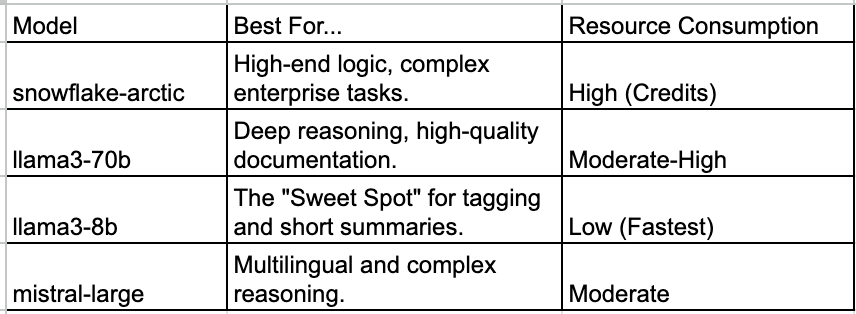
The Lesson on Time: When I first used llama3-70b, the dbt run was significantly slower. A single table documentation task could take 8–12 seconds. Switching to llama3-8b cut that time by nearly 60%, making it the better choice for high-volume tagging where speed is more important to me.
The Challenges: Bugs and Lessons Learnt
Innovation isn’t without its headaches. Here are the “gotchas” I hit while keeping the logic inside dbt macros:
1. The Case-Sensitivity Trap
Snowflake Tags are case-sensitive. If my tag expects Internal and the AI returns INTERNAL, the query fails. Lesson: Always use TRIM() and UPPER() (or specific casing) in the SQL logic to force the AI’s output to match our Tag definitions.
2. The “Connection” Ghost
In dbt v1.11, running a long LLM call inside a SQL post-hook can cause a Python error: cannot access local variable 'connection'. Lesson: This happens because the dbt adapter times out while waiting for the AI to "think." For very large projects, moving this logic to a Snowpark Python model is often more stable than a standard SQL macro.
3. The “DataVantage” Hallucination
Without strict instructions, LLMs love to make things up. I occasionally saw the AI invent company names like “DataVantage” in my documentation. Lesson: You must use “Grounding” in your prompt. Tell the AI: “Use ONLY the provided column names. Do not invent company names. If you don’t know, say ‘none’.”
4. Model Selection
During development, I initially used a smaller, faster model to save credits. However, I ran into syntax errors. The smaller models often struggled to output only the JSON object I asked for — they would add conversational filler like “Sure! Here is your classification:”. This caused the dbt macro to fail when parsing the result. Switching to mistral-large or snowflake-arctic solved this. While these models take a few extra seconds to process, they save hours of debugging by providing reliable, structured outputs.
Code Snippet: The Core Logic
Here is a simplified look at how the tagging instruction is structured within a macro:
Sample code for documenting your model.
{% macro generate_model_documentation(model='llama3-8b') %}

{# Check if the run is a full refresh and if we are in execution mode #}
{% set is_full_refresh = flags.FULL_REFRESH or flags.WHICH == 'run-operation' %}

{% if execute and is_full_refresh %}
  {{ log("Full refresh detected. Generating AI Model Summary for " ~ this.identifier, info=True) }}

  {% set query %}
    EXECUTE IMMEDIATE $$
    DECLARE
      ai_comment STRING;
    BEGIN
      -- 1. Grab sample data directly into a variable
      LET sample_data := (SELECT ARRAY_AGG(OBJECT_CONSTRUCT(*))::STRING FROM (SELECT * FROM {{ this }} LIMIT 10));

      -- 2. Call Cortex and format response for a SQL COMMENT
      ai_comment := SNOWFLAKE.CORTEX.COMPLETE('{{ model }}', [
          {'role': 'system', 'content': 'You are a Data Architect. Summary rules: 2 paragraphs, business focus, no fake names, no intro, plain text.'},
          {'role': 'user', 'content': 'Table: {{ this.identifier }}. Data: ' || :sample_data}
      ]);

      -- 3. Apply the comment directly
      EXECUTE IMMEDIATE 'COMMENT ON TABLE {{ this }} IS ' || ANY_VALUE(QUOTE_LITERAL(:ai_comment));

      RETURN 'AI Documentation complete for {{ this.identifier }}';
    END;
    $$;
  {% endset %}

  {% do run_query(query) %}
{% else %}
  {{ log("Skipping AI documentation (not a full refresh) for " ~ this.identifier, info=True) }}
{% endif %}

{% endmacro %}
Sample code for high-level tagging on your tables.
{% macro auto_table_tag(tag_name, model='mistral-large') %}

{# 1. Define configuration and check for Full Refresh #}
{% set is_full_refresh = flags.FULL_REFRESH or flags.WHICH == 'run-operation' %}

{% set config = {
    "SENSITIVITY": ["PUBLIC", "INTERNAL", "CONFIDENTIAL"],
    "DATA_TYPE": ["PHI", "PII", "PCI", "NONE"],
} %}

{% set tag_key = tag_name.upper() %}

{# 2. Validation Logic #}
{% if tag_key not in config %}
    {{ log("SKIPPING: Tag '" ~ tag_name ~ "' not in dictionary.", info=True) }}

{% elif execute and is_full_refresh %}

  {{ log("Full refresh detected. Analyzing data for tag: " ~ tag_key, info=True) }}

  {# 3. AI Analysis Query #}
  {% set query %}
    WITH data AS (SELECT ARRAY_AGG(OBJECT_CONSTRUCT(*))::STRING as sample FROM (SELECT * FROM {{ this }} LIMIT 10))
    SELECT SNOWFLAKE.CORTEX.COMPLETE('{{ model }}',
      'Output raw JSON. Key: "{{ tag_key }}". Allowed: {{ config[tag_key]|join(",") }}. Data: ' || sample)
    FROM data
  {% endset %}

  {% set ai_raw = run_query(query).columns[0][0] %}
  {% set tag_value = (ai_raw | fromjson).get(tag_key, 'NONE') if ai_raw else 'NONE' %}

  {# 4. Apply Tag Logic #}
  {% set apply_tag %}
    BEGIN
      ALTER TABLE {{ this }} SET TAG {{ tag_key }} = '{{ tag_value }}';
      RETURN 'SUCCESS: {{ this }} tagged {{ tag_key }}={{ tag_value }}';
    EXCEPTION WHEN OTHER THEN
      RETURN 'FAIL: Could not tag {{ this }}.';
    END;
  {% endset %}

  {{ log(run_query(apply_tag).columns[0][0], info=True) }}

{% elif execute %}
  {{ log("Skipping auto-tagging for " ~ this.identifier ~ " (not a full refresh).", info=True) }}
{% endif %}

{% endmacro %}
Implementation Options
- Automatic (Post-Hook) Add this to your dbt_project.yml to ensure documentation is refreshed every time the model is built:
models:
  my_project:
    marts:
      +post-hook: "{{ generate_model_documentation() }}"
      +post-hook: "{{ auto_table_tag(DATA_TYPE) }}"
2. Manual Execution Run it for a specific model via the command line:
dbt run-operation generate_model_documentation --args '{sample_size: 20}'Final Thoughts
Autogenerating documentation and tags is a “force multiplier” for data teams. While I stuck with dbt macros for this iteration (to keep everything in SQL), the journey taught me that as your project grows, the stability of the connection becomes your biggest hurdle.
Moving this logic from a SQL Macro to a dbt Python (Snowpark) model is the natural next step. Snowpark provides a much more stable environment for long-running AI calls, native JSON handling that doesn’t break on single quotes, and the ability to use Python’s robust error-handling libraries.
By automating the “boring” parts of governance, we stop treating documentation as a chore and start treating it as a standard feature of our data products. The goal isn’t just to build data — it’s to build data that people can actually understand and trust.
Scaling Data Governance: Autogenerating Documentation and Tags with Snowflake Cortex and DBT was originally published in Towards AI on Medium, where people are continuing the conversation by highlighting and responding to this story.