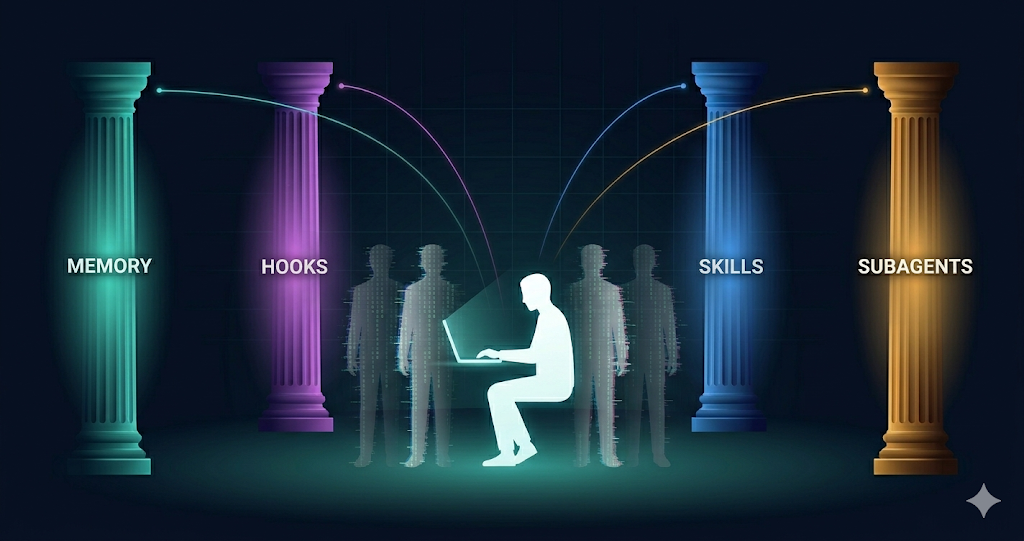
The landscape of LLM tooling is moving at a pace that keeps us in a perpetual state of catch-up. What we define as “advanced usage” this morning will likely be the industry default in six months. It’s a reality where three new features might ship in the time it takes you to read this article.
But in this fast-moving environment, the best form of “class” is consistent, deliberate progress. In this specific snapshot of what Claude Code can do, there is a singular goal worth pursuing: The total offloading of development scaffolding.
I want to write code and concentrate purely on business logic. Consistency, conventions, safety guardrails, parallelism, and automation should run reliably in the background, every single time code is generated.
I don’t want to manage context; I want the context to manage itself.
We aren’t just talking about providing better context. We are talking about automating the entire developer experience in claude code. These Five Pillars are the framework for making the scaffolding disappear so you can focus on what actually matters.
Let’s map them out.
Before the pillars — what are we actually talking about?
Claude Code ships with built-in tools: it can read files, run commands, search your codebase, access the web. Those work out of the box. You do not configure them.
The pillars are the extension layer — the things you set up once to customise how Claude behaves in your specific project. Think of them as the difference between a developer who just installed an IDE and one who has configured linters, code formatting, project-specific snippets, and automated test runners. Same tool. Very different experience.
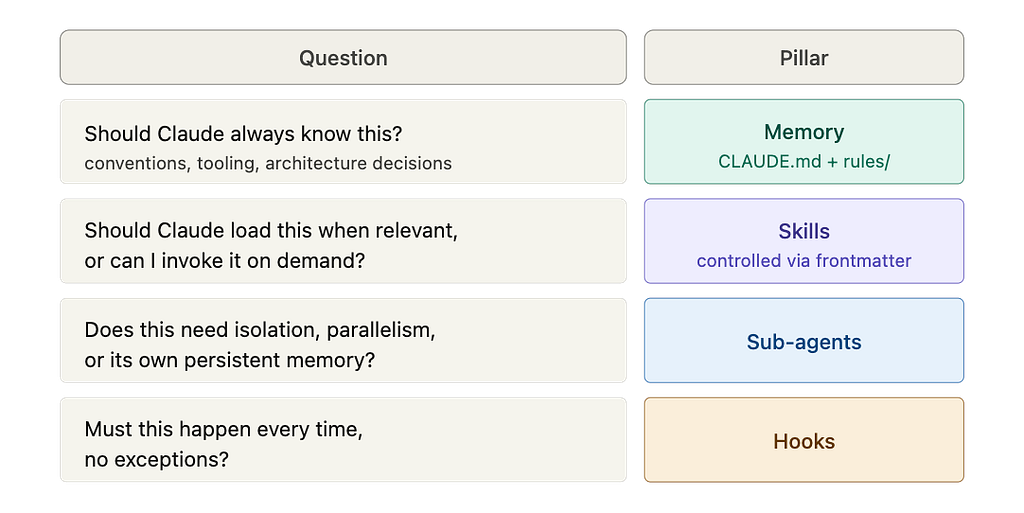
There are five categories of extensions. Before we go into each one, here is the one mental model that separates them:
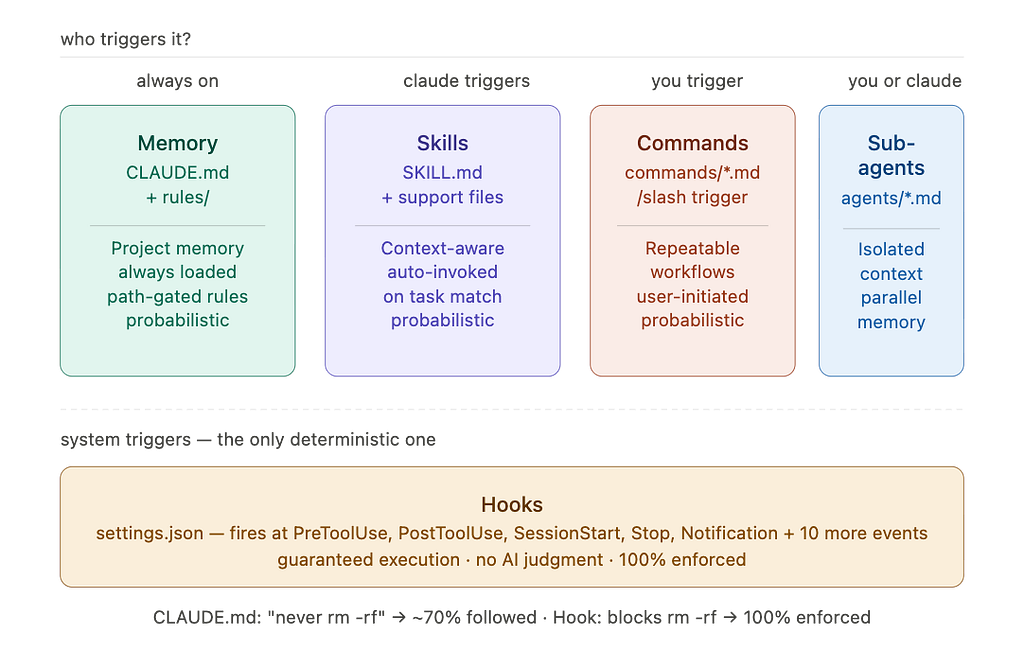
Who triggers it — and is that trigger guaranteed?
Some extensions always load. Claude triggers some based on what you are working on. You trigger others deliberately. And one category fires at the system level — outside Claude’s judgment entirely, no exceptions.
That single question is what makes each pillar distinct from the others. Here is the full picture before we go deep:
Now let’s go deep on each one.
Pillar 1 — Memory (CLAUDE.md + rules/)
One line: Claude’s persistent brain for your project — loads every session, automatically, before you type anything.
Every Claude Code session starts with a blank context window. Memory is how you pre-fill it with what Claude should always know: your team’s conventions, your architecture decisions, your tooling quirks.
Think of it like the onboarding doc you wish every new engineer read on day one — except Claude reads it perfectly, every session, without being asked.
There are two parts to this pillar:
CLAUDE.md is the foundation. A markdown file at your project root. It loads at the start of every session, always.
rules/ is the extension. A directory of smaller, topic-specific files inside .claude/. They load alongside CLAUDE.md — but with one superpower CLAUDE.md alone does not have: path-gating. A rule can be scoped to activate only when Claude is working in specific directories or file types.
CLAUDE.md               ← always loads, every session
.claude/rules/
   testing.md            ← only when Claude touches test files
   api-patterns.md       ← only when Claude touches src/api/
   security.md           ← only for auth-related code
Both merge into the same context window at startup. Same primitive, two different organisational shapes.
Real-world scenario: Your team runs a Python monorepo. Every engineer uses uv, every PR goes through pytest -x, and all external API calls must route through src/adapters/. Without Memory, you re-explain this every single session. With a tight CLAUDE.md and a path-gated rules/api-patterns.md, Claude knows the toolchain the moment a session opens — and loads the API rules only when someone is actually touching that layer. The rest of the time, those rules do not consume a single context token.
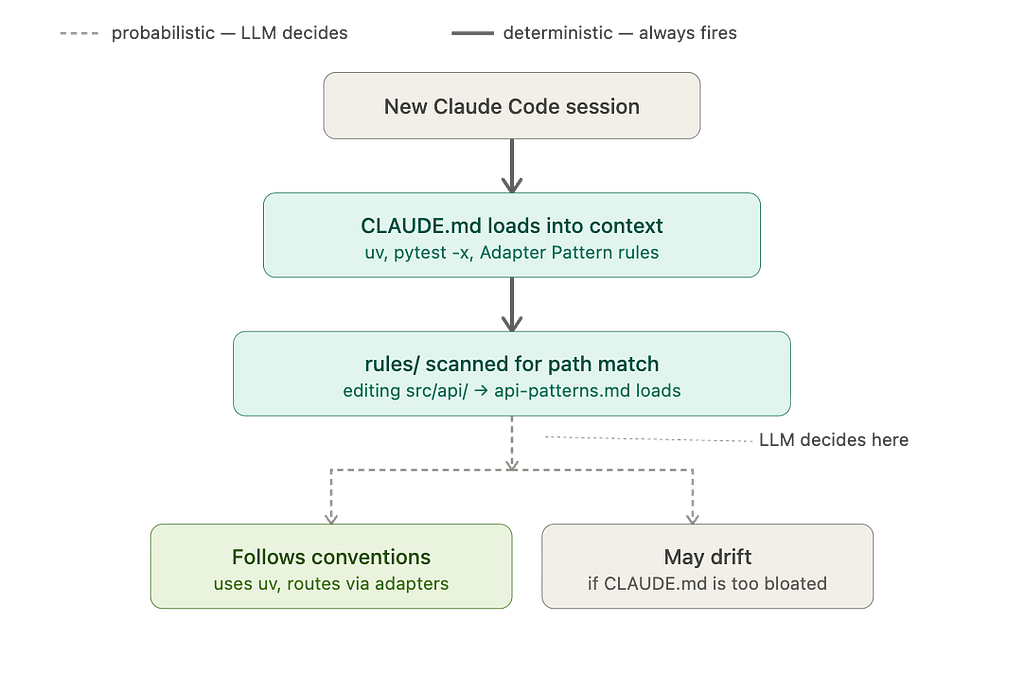
The thing most people miss: The official docs are clear — Claude treats CLAUDE.md as context, not as enforced law. Keep it under 200 lines. Every line should pass one test: “Would removing this cause Claude to make a mistake?” If not, cut it. A bloated CLAUDE.md is worse than a short one — the instructions compete with each other and Claude’s adherence degrades across all of them.
Run /init inside the chat to generate your starter CLAUDE.md automatically. Claude analyzes your codebase and bootstraps the file with build commands and patterns it discovers.
Pro-tip: You can also run claude --init directly from your terminal to run initialization hooks and setup before the session even starts.
Simple example:
# CLAUDE.md

## Tooling
- Package manager: uv (never pip directly — uv handles venvs cleanly)
- Test runner: pytest -x (fail fast; run single tests, not the full suite)

## Code Conventions
- Max function length: 40 lines
- All external API calls go through src/adapters/ — never call requests directly

## Architecture
- Adapter Pattern for all data providers
- SQLite locally, Postgres in production — never hardcode connection strings
Short. Concrete. Verifiable. Claude will follow this.
Pillar 2 — Skills (and Commands)
One line: Reusable knowledge and workflows Claude uses automatically when relevant — or you invoke directly with a slash command.
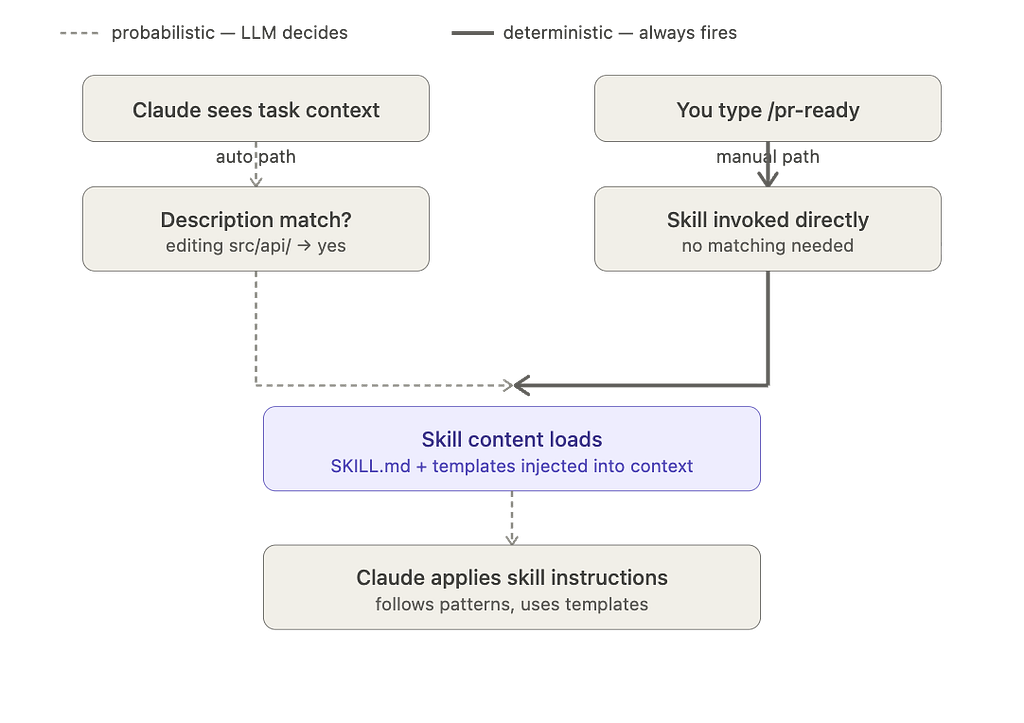
A Skill is a markdown file containing instructions, knowledge, or a workflow. Claude adds it to its toolkit. From there, it works in one of two modes:
- Auto-invoked: Claude loads the skill automatically when the task context matches its description. You do not ask. It just applies.
- Manually invoked: You type /skill-name and Claude runs it on demand.
This is the important clarification: what were previously called “Commands” (.claude/commands/deploy.md) are now the same underlying mechanism as Skills. A file in .claude/commands/ and a skill in .claude/skills/deploy/SKILL.md both create the same /deploy slash command and work identically. Commands are simply the single-file form of a Skill — useful when you do not need supporting files.
When Skills beat CLAUDE.md: If a convention only applies to part of your work, putting it in CLAUDE.md burns context window budget on every session where it is irrelevant. Skills load only when needed — keeping your main context clean.
Real-world scenario: You are building a React frontend with a strict component structure — named exports, co-located tests, React Query for data fetching. You do not want those rules loading when Claude is working on your Node backend. A react-components skill auto-activates only when Claude touches component files. Meanwhile, your /pr-ready skill sits ready to invoke whenever you want a PR review checklist run — same underlying file, two different entry points.
.claude/skills/
   react-components/
      SKILL.md            ← auto-loads when Claude works on React components
      templates/
         Component.tsx
         Component.test.tsx
   deploy/
      SKILL.md            ← invoke manually with /deploy
Simple example — a skill with two modes:
---
name: pr-ready
description: "Reviewing pull requests and staged changes for this project"
---

Review the current staged changes and:
1. Check that every changed function has an updated test
2. Flag any console.log or debug statements left in
3. Write a PR description — what changed, why, and how to verify it
4. Suggest a PR title following conventional commits format
5. Be direct — if something is missing or incomplete, say so
Claude picks this up automatically when you are reviewing changes, or you type /pr-ready to invoke it deliberately. Same file. Both work.
Deep Dive: Why is one Skill “Auto” and another “Manual”?
In the diagram above, yfinance auto-loads while backtest is manual. This isn't a limitation of the tool, but a design choice you make in the file's frontmatter:
— — Auto-Trigger: If you provide a description field, Claude uses "semantic reasoning" to pull the skill in whenever it thinks it’s relevant to your task.
— — Manual-Only: If you add disable-model-invocation: true, you effectively "hide" the skill from Claude's automatic brain. It will only run when you explicitly type the slash command.
Use Auto for general knowledge (like API docs) and Manual for token-heavy or “high-stakes” workflows (like running a full backtest suite) that you want to oversee personally.
Pillar 3 — Sub-agents
One line: Separate Claude instances with isolated context windows — for parallel work and keeping your main session clean.
Here is the problem sub-agents solve: context window pollution is the silent killer of quality in long Claude Code sessions. When your main session is deep into implementing a feature and you also need to research three libraries, investigate a flaky test, and write documentation — dumping all of that into one context degrades everything. Claude starts losing track of earlier instructions. Quality drops.
Sub-agents run their own isolated loop in a separate context window and return only a summary to your main session. Your main session stays focused on what it is doing. The heavy work happens elsewhere and you get back just what you need — a finding, a diff, a decision.
They also support persistent memory — a directory that survives across sessions. A code-reviewer agent can accumulate knowledge about your codebase over time, building better and more contextual feedback the more it reviews.
How to invoke: @agent-name in your prompt, or Claude spawns them automatically when it decides to delegate. Send one to the background with Ctrl+B and keep working in your main session while it runs.
Real-world scenario: You are implementing a payment service. Mid-session, you want a security review of the diff — but you do not want 200 lines of vulnerability analysis polluting the context window you are using to write the actual code. You call @security-reviewer. It spins up in its own isolated context, reads the diff, checks for injection vulnerabilities, unvalidated inputs, and exposed secrets, then returns a clean summary. Your main session gets the findings. The heavy scanning work never touched your context.

Simple example:
<!-- .claude/agents/code-reviewer.md -->
---
name: code-reviewer
description: Reviews code for quality, security, and project conventions
memory: user
---

You are a senior code reviewer for this project. For every review:
- Check for security vulnerabilities (injection, unvalidated input, exposed secrets)
- Verify the code follows the patterns in CLAUDE.md
- Flag performance anti-patterns
- Confirm test coverage for new logic
- Be direct — do not soften feedback

Update your agent memory with recurring patterns and issues you find.
This builds better, more contextual feedback over time.
The memory: user field means this agent accumulates knowledge across every review it does — getting sharper the more you use it.
Pillar 4 — Hooks
One line: Deterministic scripts that run automatically at specific lifecycle events — outside Claude’s judgment entirely, every time, no exceptions.
This is the primitive most developers have not found yet. And it is the one that changes how Claude Code feels on a production codebase.
Every other pillar is probabilistic. Claude should follow your CLAUDE.md. Skills usually activate correctly. Hooks? The official docs say it directly: hooks “run outside the loop entirely as deterministic scripts.” There is no AI judgment involved. There is no “Claude decided not to.”
Hooks are shell commands, prompts, or sub-agents that fire automatically at defined points in Claude’s lifecycle — before a tool runs, after a file is edited, when a session starts, when Claude finishes, and more. The most useful events:
EventFires whenCommon usePreToolUseBefore any tool runsBlock dangerous commandsPostToolUseAfter a tool completesAuto-format, auto-testSessionStartSession beginsInject context, load stateStopClaude finishes respondingVerify work is completeNotificationClaude needs your inputDesktop or Slack ping
The honest comparison — CLAUDE.md instruction vs Hook for the same rule:
ApproachCompliance”Never run rm -rf” in CLAUDE.mdClaude follows this most of the timePreToolUse hook blocking rm -rfPhysically blocked. Every time."Run prettier after editing" in CLAUDE.mdClaude usually does itPostToolUse hook running prettierAlways runs. No asking.
For anything where “usually” is not good enough — use a Hook. Configure them in .claude/settings.json, and run /hooks to inspect what is active in your current session.
Real-world scenario: Your team has two rules: every file must be formatted with prettier, and no one should ever accidentally run rm -rf on the wrong directory. You put both in CLAUDE.md. Claude follows the formatting rule maybe 80% of the time and the safety rule most of the time. You move them to Hooks. Now a PostToolUse hook runs prettier on every file Claude edits — no asking, no reminding. A PreToolUse hook validates every shell command against a safety script before it executes. Both rules are now physically enforced by the system, not suggested to the LLM.
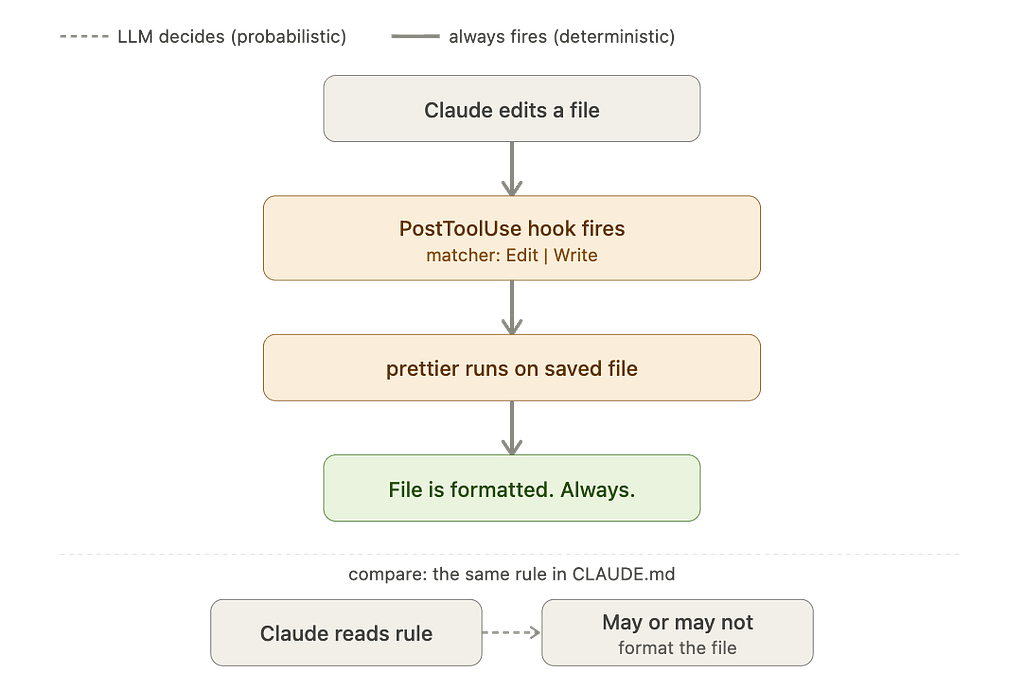
Simple example — auto-format every file Claude touches:
{
  "hooks": {
    "PostToolUse": [{
      "matcher": "Edit|Write",
      "hooks": [{
        "type": "command",
        "command": "npx prettier --write \"$FILE_PATH\""
      }]
    }]
  }
}
No prompt. No hoping. Every file Claude edits gets formatted. Every time.
A Note on Permissions: Unlike Claude’s standard environment, Hooks run with full user permissions on your local machine. They are not sandboxed. Because they are deterministic and run “no matter what,” ensure your shell commands are tested and safe. A poorly written PreToolUse hook could accidentally block or alter commands in ways that are hard to undo.
How they stack together
A real project using all four looks like this:
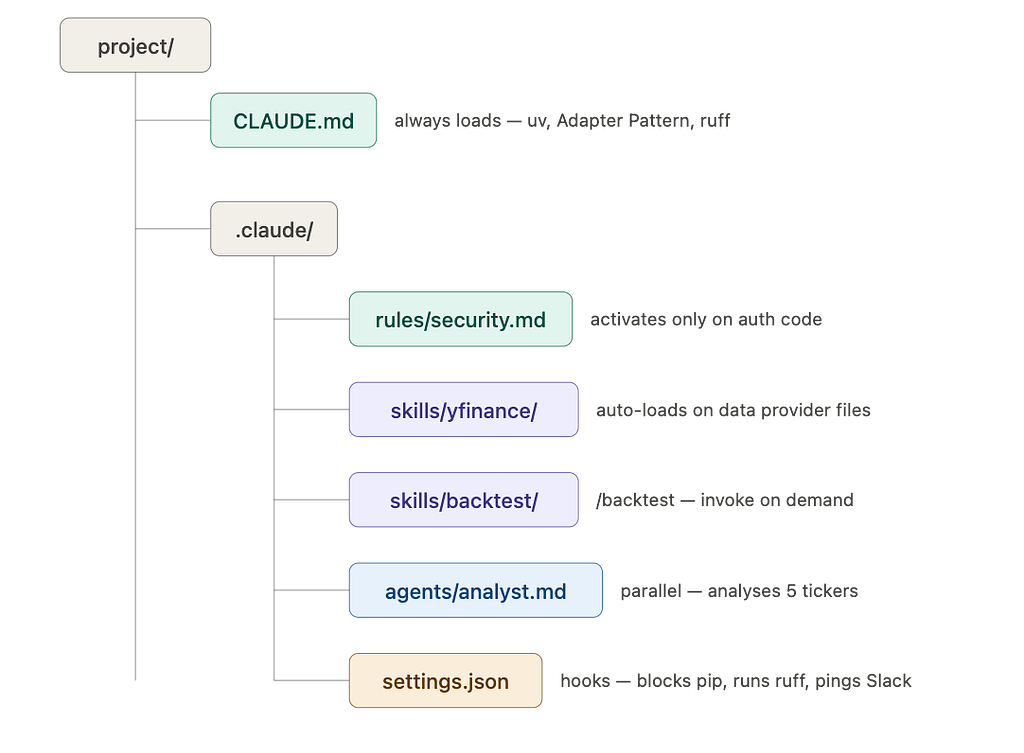
The developers who feel like Claude Code is not quite delivering are usually missing two or three of these pillars. The ones who feel like they have found a genuine force multiplier have built all four layers.
Start with a tight CLAUDE.md. Add a Hook for your most important safety rule. Build the rest from there.
The rest compounds on its own.
Force Multiplier: The 4 Pillars of Claude Code Every Developer Needs to Master was originally published in Towards AI on Medium, where people are continuing the conversation by highlighting and responding to this story.