
The fastest-growing open-source project in history — and nobody’s giving you the honest take. Until now.
250,000 GitHub stars. Queues of retirees and students outside Tencent’s Shenzhen headquarters. Chinese engineers charging $72 just to install it on a laptop. Security researchers calling it “the potential biggest insider threat of 2026.”
OpenClaw is not just another AI tool. It’s a cultural flashpoint — and the hype cycle is making it nearly impossible to figure out what’s actually going on. I spent the past week digging through the GitHub repo, the security disclosures, the Wikipedia incident logs, and a dozen deep comparisons to cut through the noise.
Here’s what the headlines are missing.
Quick Answer: OpenClaw is a free, open-source AI agent that runs locally on your device and connects to messaging apps like WhatsApp, Telegram, and Slack. It uses any LLM (Claude, GPT, DeepSeek, or local models) to autonomously execute tasks — managing email, calendars, and files — around the clock, even when you’re not at your computer. It’s not a chatbot. It’s a persistent agent with operating system-level access.
Last updated: March 2026 | Reflects the project as of v2026.3.x
Table of Contents
- What Is OpenClaw?
- How Does OpenClaw Actually Work?
- OpenClaw vs Claude Code vs ChatGPT: What’s Actually Different?
- The Security Risks Nobody Is Talking About Clearly
- Why China Went All-In (And Then Hit the Brakes)
- Who Should — and Shouldn’t — Use OpenClaw Right Now
- FAQ
- Key Takeaways
What Is OpenClaw?
OpenClaw is an autonomous AI agent — not a chatbot, not a copilot, not a productivity plugin. It’s a persistent runtime that lives on your machine, connects to messaging platforms you already use, and acts on your behalf, continuously, even when you’re asleep.
The backstory is genuinely strange. Austrian developer Peter Steinberger built the first prototype in under an hour in November 2025, originally calling it “Clawdbot” — a wink at Anthropic’s Claude. Anthropic filed a trademark complaint. The project got renamed “Moltbot” (at 5am during a Discord brainstorm, apparently). Then Steinberger decided that name “never quite rolled off the tongue” and landed on OpenClaw three days later, inspired by the lobster in the project’s logo.
The real inflection point came in late January 2026, when entrepreneur Matt Schlicht launched Moltbook — a social network designed for AI agents to interact with each other on behalf of human users. The concept went viral. OpenClaw, as the most popular agent people were actually deploying, got swept up in the wave. According to Wikipedia, the project gained 60,000 GitHub stars in just 72 hours during that moment — eventually surpassing 250,000 stars and 47,700 forks by early March 2026. For context, that’s a milestone it took Linux years to reach.
On February 14, 2026, Steinberger announced he was joining OpenAI, with the project transferring to an open-source foundation with OpenAI backing. The “vibe coder” who said “I ship code I don’t read” is now helping build the next generation of commercial AI agents. The irony is not lost on anyone.
Key Insight: OpenClaw isn’t a product in the traditional sense — it’s infrastructure. It’s a software layer that lets you wire any LLM into your life’s operating system.
How Does OpenClaw Actually Work?
This part matters, because most explanations either over-simplify or confuse OpenClaw with an LLM itself. It’s neither.
OpenClaw is not an AI model. It doesn’t have its own intelligence. It’s an agent runtime — a software framework that makes API calls to LLMs (Claude, GPT-4, DeepSeek, Kimi 2.5, or local models via Ollama) and acts on the results.
Here’s what’s actually happening under the hood:
1. The Gateway (Control Plane) OpenClaw runs a local “gateway” — essentially a WebSocket server — on your machine at port 18789. This is the central hub that receives messages from all your connected channels and routes them to the agent.
2. Channel Connections The agent connects to 30+ messaging platforms: WhatsApp, Telegram, Slack, Discord, iMessage, Signal, Microsoft Teams, and others. When you message OpenClaw through any of these, the gateway receives it and starts processing.
3. The Skill System OpenClaw’s real power comes from its Skills — modular instructions stored in directories with a SKILL.md file. The ClawHub registry hosts thousands of community-built skills: web browsing, calendar management, CRM integration, smart home control, code execution. When a task arrives, the agent can automatically search ClawHub and pull in new skills it needs.
4. The Reasoning Loop When a message arrives, OpenClaw assembles a system prompt from your workspace configuration files, feeds it to the LLM along with your request, and executes the output — which might mean browsing a website, writing a file, sending an email, or spawning a cron job that runs every morning at 7am.
5. Persistent Memory Unlike a chatbot session that resets after you close the tab, OpenClaw stores interaction history and configuration locally. It remembers. A well-configured OpenClaw instance can carry context across weeks.
The result is something genuinely different from anything most people have used before. It’s not answering you — it’s acting for you. That’s both the appeal and the problem.
OpenClaw vs Claude Code vs ChatGPT: What’s Actually Different?
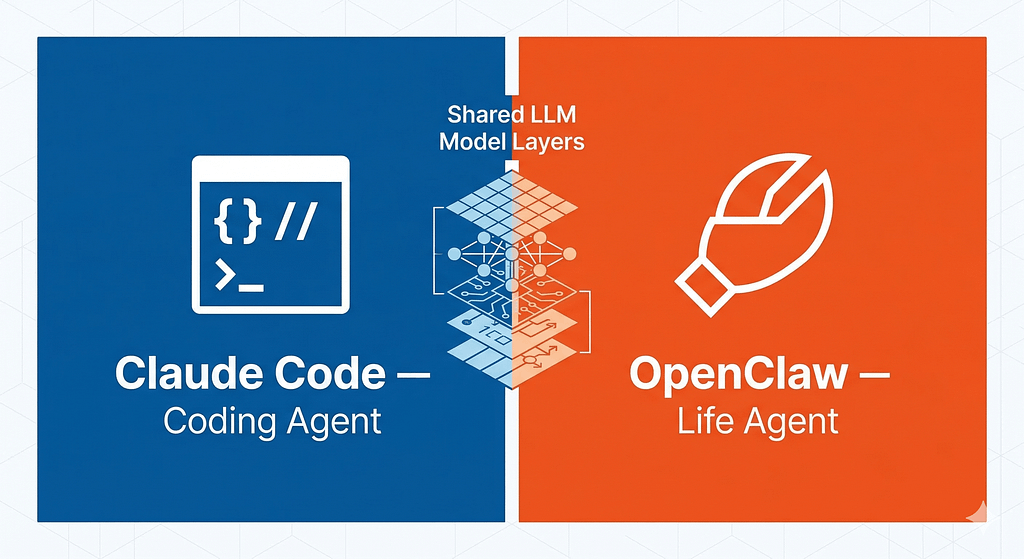
This comparison trips everyone up. Let me cut through it with a table first, then explain why the framing of “OpenClaw vs Claude Code” is itself misleading.
Feature OpenClaw Claude Code ChatGPT
Primary use Life automation via messaging Coding in terminal/IDE Conversational AI
Runs locally Yes (self-hosted) No (Anthropic cloud) No (OpenAI cloud)
Persistent memory Yes (across weeks) No (session-only) Limited (Projects)
Model agnostic Yes (any LLM) No (Claude only) No (OpenAI only)
Autonomous operation Yes (24/7 scheduled tasks) No (human-triggered) No Coding ability Basic Excellent Good
Security model Self-managed Anthropic-managed OpenAI-managed
Cost Free (you pay API costs) $20–$200/month subscription $20/month (Plus)
Setup complexity High (Node.js, CLI required) Low (install and go) Zero
The honest framing, though, is this: these tools are not competitors. They operate at different layers.
Claude Code is a coding agent. It lives in your terminal. You give it a task, it executes it, you review the result. The human is always in the loop. According to DataCamp’s comparison, “Claude Code wins the coding wars” — its tight IDE integration, codebase awareness, and Anthropic’s Opus 4.6 model give it an edge for serious development work that OpenClaw simply wasn’t designed to match.
OpenClaw is a life automation agent. Its strength isn’t writing code — it’s the things Claude Code categorically refuses to do: running autonomously without human oversight, persisting across sessions, managing your calendar at 3am, automatically triaging your inbox on a schedule. As one developer put it on Reddit: “You have to instruct Claude Code per each task. Whereas agents like OpenClaw have their own built-in driver.”
ChatGPT is a chatbot. Comparing it to OpenClaw is like comparing a notepad to a spreadsheet — both work with text, but the mental model is completely different.
The smart move, if you have the technical chops, is using both Claude Code (for coding) and OpenClaw (for everything else). Many developers do.
Key Insight: OpenClaw vs Claude Code is the wrong question. Ask yourself: do you need a coding collaborator or a life OS? The answer tells you which one you need — or whether you need both.
The Security Risks Nobody Is Talking About Clearly
Here’s where most coverage either catastrophizes or hand-waves. I’ll try to be precise.
OpenClaw is not malicious. But it is genuinely risky if you don’t understand what you’re deploying.
The CVE-2026–25253 Incident
In early 2026, security researcher Mav Levin of the depthfirst team discovered a critical vulnerability with a CVSS score of 8.8 out of 10. The attack vector: OpenClaw’s control UI accepted a gatewayUrl parameter from the query string without validation and automatically established a WebSocket connection to it. This meant visiting a malicious website could give an attacker remote code execution on your machine — no interaction required beyond a single click.
At disclosure, researchers found over 50,000 directly vulnerable exposed instances on the public internet. The vulnerability is patched in current versions. But here’s what that number tells you: a massive portion of people who installed OpenClaw exposed it to the internet without authentication.
The ClawHub Problem
On February 13, 2026, researchers found 341 compromised skills in the ClawHub registry — roughly 12% of the entire catalog at the time. Subsequent analysis put the number higher, above 800 skills. One malicious skill, disguised as a research assistant, contained a base64-encoded curl request that downloaded and executed code linked to the AMOS (Atomic macOS Stealer) infostealer.
Cisco’s AI security research team separately tested a third-party OpenClaw skill and found it performed data exfiltration and prompt injection without user awareness, noting that ClawHub “lacked adequate vetting to prevent malicious submissions.”
The Structural Risk: Prompt Injection
This one is harder to patch because it’s architectural. OpenClaw doesn’t sanitize web content before passing it to the LLM context window. A webpage can contain invisible CSS-hidden instructions that your agent reads and executes as legitimate commands. Security researcher Simon Willison calls this the “lethal trifecta” in OpenClaw’s context: access to private data + exposure to untrusted content + ability to communicate externally. That combination is genuinely dangerous.
What This Means Practically
One of OpenClaw’s own maintainers warned on Discord: “If you can’t understand how to run a command line, this is far too dangerous of a project for you to use safely.”
That’s not FUD. That’s an honest assessment. If you’re deploying OpenClaw:
- Never expose it to the public internet without authentication
- Run it in a container with limited filesystem permissions if possible
- Vet every ClawHub skill manually before installing — check commit history and reviews
- Update immediately — the project pushes security patches frequently
- Don’t connect it to accounts you can’t afford to lose access to
The risks are real and manageable, but they require technical literacy to manage.
Why China Went All-In (And Then Hit the Brakes)

The China story is the most fascinating part of this whole saga — and also the most misreported.
By early March 2026, OpenClaw had gone mainstream in China in a way that has no Western equivalent. According to Fortune, nearly 1,000 people queued outside Tencent’s Shenzhen headquarters on March 6, 2026, carrying laptops and hard drives, waiting for Tencent Cloud engineers to install the software for free. Appointment slots ran out within an hour. CNBC reported that China has already surpassed the U.S. in total OpenClaw adoption, according to cybersecurity firm SecurityScorecard.
Why did this happen so fast? A few converging forces:
The infrastructure was ready. ByteDance, Alibaba, and Tencent had collectively spent an estimated $60 billion in capital expenditure on AI infrastructure in the preceding year. Chatbot usage wasn’t generating the inference demand to justify that investment. OpenClaw changed the math overnight — a single configured instance can burn tens to hundreds of times more tokens per day than a typical chatbot user.
The tech giants piled in. Within weeks, Alibaba Cloud, Tencent Cloud, ByteDance’s Volcano Engine, JD.com, and Baidu all embraced OpenClaw or released their own variants. Tencent launched QClaw, which lets users control OpenClaw remotely via WeChat. ByteDance’s workplace app Feishu started broadcasting daily tutorials. Xiaomi announced MiClaw for smartphones and smart home devices. On March 10, 2026, Tencent officially launched a full suite of AI products built on OpenClaw, compatible with WeChat — and Tencent later became a formal GitHub sponsor of the project after Steinberger publicly called out Chinese companies for copying skills without contributing back.
Local governments added fuel. The Longgang district of Shenzhen announced subsidies for companies building OpenClaw-based projects — up to 10 million yuan ($1.4 million) for “one-person companies.” That is not a subtle signal from the Chinese government about where it sees AI heading.
The backlash came almost simultaneously. The Chinese National Internet Emergency Center and Ministry of Industry and Information Technology issued consecutive security warnings. Chinese authorities restricted state-run enterprises and government agencies from running OpenClaw on office computers. And a cottage industry of “uninstall services” emerged on platforms like Xiaohongshu, charging anywhere from tens to hundreds of yuan to remove the agent from machines that users no longer trusted.
The cynical take is that this was predictable — a technical tool with real security risks got mass-adopted before the security literacy caught up. The more interesting take is what it reveals about how China is approaching the agentic AI moment: as national productivity infrastructure, not a consumer app. That’s a fundamentally different frame from how the West is thinking about it.
Key Insight: China’s OpenClaw frenzy wasn’t irrational hype. It was the tech industry, government, and ordinary users all recognizing the same thing simultaneously: AI agents that do things are categorically different from AI that says things.
Who Should — and Shouldn’t — Use OpenClaw Right Now?
Let me be direct about this, because most coverage hedges.
OpenClaw is genuinely useful for:
- Developers and technical users who want a 24/7 AI layer that can manage email, run scheduled research tasks, monitor systems, and automate workflows across their existing tools — and who have the technical literacy to configure it safely
- Freelancers and solo operators who want to automate lead generation, client communication, and administrative tasks without paying enterprise software prices
- AI researchers and builders who want to experiment with agentic architectures, skill systems, and multi-model orchestration in an open, hackable environment
- Anyone running local models who wants a free, model-agnostic agent that works with Llama 4, Kimi 2.5, or any Ollama-compatible model
OpenClaw is not ready for:
- Non-technical users — the base setup requires Node.js, command-line familiarity, and API key management. The Chinese market got around this via tech giants offering managed installation; most of that infrastructure doesn’t exist for English-speaking users yet
- Anyone expecting enterprise-grade security — no dedicated security team, no bug bounty program, and a community skills registry that has had serious vetting problems
- Coding as the primary use case — for that, Claude Code is simply better. Purpose-built, tightly integrated, with a sandboxed execution model
- High-stakes accounts — don’t connect OpenClaw to financial accounts, production systems, or anything where a prompt injection attack could cause irreversible damage
The smart question isn’t “should I use OpenClaw?” It’s “what specific problems do I need it to solve, and do those problems justify the setup complexity and security trade-offs?”
FAQ
What is OpenClaw and how is it different from a chatbot?
OpenClaw is an autonomous AI agent — not a chatbot. A chatbot responds to your messages when you start a conversation. OpenClaw runs persistently in the background, executes scheduled tasks, maintains memory across sessions, and can take actions on your behalf across messaging platforms, email, calendars, and your local filesystem, even when you’re not actively interacting with it.
Is OpenClaw safe to use?
OpenClaw has real security risks that require technical management. A critical vulnerability (CVE-2026–25253, CVSS 8.8) was patched in early 2026, but the broader risks — prompt injection, a community skills registry with inadequate vetting, and broad system-level permissions — are architectural and ongoing. It can be used safely by technical users who understand containerization, permission scoping, and how to vet third-party code before running it.
How much does OpenClaw cost?
The OpenClaw software itself is free and open-source (MIT license). Your actual cost depends on which LLM you connect it to. If you run local models via Ollama, it can be effectively free. If you connect it to Claude or GPT-4, you pay standard API rates — which can add up quickly with autonomous, high-frequency agents. Some users report spending $10–$20 per day on API costs with active configurations.
How is OpenClaw different from Claude Code?
They serve fundamentally different purposes. Claude Code is a coding agent built for developers — it lives in your terminal, understands your codebase, and helps you write, debug, and refactor code. OpenClaw is a general-purpose life automation agent that connects to messaging platforms and executes tasks across your entire digital life. Claude Code requires human-in-the-loop interaction; OpenClaw operates autonomously. Most serious developers use both.
Can I run OpenClaw with local models, without sending data to OpenAI or Anthropic?
Yes. OpenClaw is model-agnostic. You can connect it to any LLM through Ollama, including Llama 4, Kimi 2.5, or other locally-hosted models. This is one of its most compelling features for users who prioritize data privacy, and a key reason for its popularity among privacy-conscious developers and in markets where data sovereignty matters.
Why did the creator of OpenClaw join OpenAI?
Peter Steinberger announced on February 14, 2026, that he was joining OpenAI. The project is transitioning to an open-source foundation with OpenAI backing. Steinberger has stated the community-driven nature of OpenClaw will continue, and the codebase remains fully open-source under the MIT license. Whether the OpenAI relationship changes the project’s direction over time remains an open question.
What happened with the security incidents at ClawHub?
In February 2026, researchers discovered that approximately 341 skills in the ClawHub community registry (roughly 12% of the catalog at the time) were compromised — some containing malware designed to exfiltrate data from macOS users. The project has since implemented more stringent review processes, but the fundamental challenge of vetting a fast-growing community registry remains. Always review a skill’s source code and commit history before installing.
Is OpenClaw the same project as the one that went viral in China?
Yes. The same codebase — adapted by Chinese tech giants like Tencent, Alibaba, and ByteDance into managed products like QClaw, ArkClaw, and JVS Claw. These Chinese variants typically add WeChat integration, simplified one-click deployment, and local model support (particularly DeepSeek and Kimi 2.5), but the underlying architecture is OpenClaw.
Key Takeaways
- OpenClaw is an agent runtime, not a model. It connects any LLM to your messaging apps and digital life, executing tasks autonomously and continuously — this is categorically different from a chatbot.
- The GitHub numbers are real. 250,000+ stars and 47,700 forks as of early March 2026, making it one of the fastest-growing repositories in open-source history.
- The security risks are real and require technical management. CVE-2026–25253 (CVSS 8.8) is patched, but prompt injection and an inadequately vetted skills registry represent ongoing architectural risks that require deliberate mitigation.
- OpenClaw and Claude Code are not competitors. Claude Code wins for coding; OpenClaw wins for life automation. Technical users benefit from running both.
- China’s adoption reveals where agentic AI is heading. The speed at which Chinese tech giants, local governments, and ordinary users embraced OpenClaw signals that autonomous agents are crossing from developer curiosity to mainstream productivity infrastructure — the security reckoning was predictable, and similar dynamics will play out everywhere.
- The bar for safe usage is technical. If you need a command-line explainer to set it up, you should wait. If you know what a WebSocket is and can read a SKILL.md file, OpenClaw is worth experimenting with carefully.
Found this useful? Hit the clap button and follow for weekly deep dives on AI tools that actually matter. Have you deployed OpenClaw? Tell me what’s working (or broken) in the comments — I read every response.
About the Author
I cover the AI industry — model releases, agent frameworks, and the tools that are actually changing how developers and builders work. This post is part of an ongoing series on AI agents and automation in 2026. You can find related coverage on [AI coding tool comparisons] and [the AI agent landscape].
OpenClaw AI Agent Explained: What 250,000 Developers Know That You Don’t was originally published in Towards AI on Medium, where people are continuing the conversation by highlighting and responding to this story.