Most people are still hand-crafting agent loops in LangGraph. Deep Agents is a higher-level answer to that — and it’s more opinionated than you’d expect.
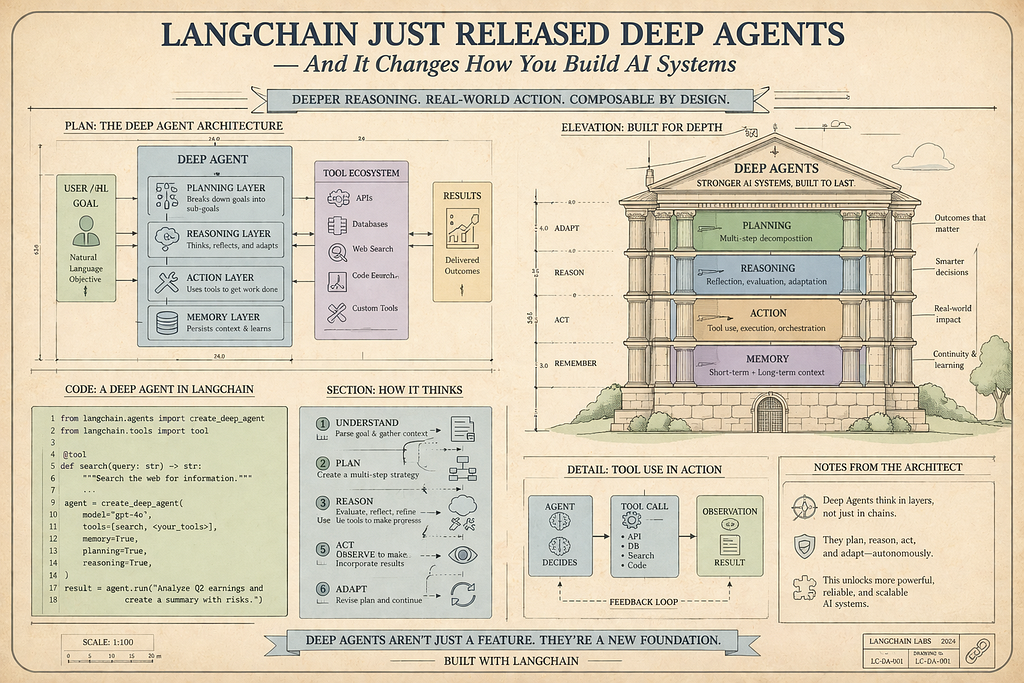
There’s a pattern I’ve watched repeat itself across almost every team that gets serious about building agents.
First, they try LangChain chains. Works fine for simple pipelines. Then the task gets complex — needs tool calls, needs to loop, needs to handle variable-length outputs — and chains stop being enough. So they reach for LangGraph, and suddenly they’re writing state schemas, conditional edges, and graph compilation logic before they’ve even gotten to the actual problem.
It’s not that LangGraph is bad. It’s extremely powerful. But it’s a runtime — a low-level primitive — and most people are using it as if it’s an application framework. LangChain noticed this, and deepagents is their answer.
What Deep Agents Actually Is
Let me be specific here, because “deep agents” sounds like it could mean anything.
deepagents is a standalone Python library — installable with pip install deepagents — that sits on top of LangChain and LangGraph. The LangChain docs describe it as an "agent harness": it provides the same core tool-calling loop as other frameworks, but with a set of built-in capabilities baked in so you don't have to reinvent them.
The central function is create_deep_agent(). In its simplest form:
from deepagents import create_deep_agent

def get_weather(city: str) -> str:
    """Get weather for a given city."""
    return f"It's always sunny in {city}!"
agent = create_deep_agent(
    tools=[get_weather],
    system_prompt="You are a helpful assistant",
)
agent.invoke(
    {"messages": [{"role": "user", "content": "What is the weather in Mumbai?"}]}
)
That’s it. One function. Under the hood, the library handles the LangGraph graph, state management, streaming, and context window management — none of which you touched.
But the real story is what comes built-in by default.
The Five Capabilities That Make This Different
1. Built-in Planning with write_todos
Every deep agent automatically has access to a write_todos tool. When given a complex task, the agent uses this to break the work into discrete steps, track their statuses (pending, in_progress, completed), and adapt the plan as the task evolves.
This matters because it’s not just a prompt trick — the to-do list is persisted in agent state. The agent can come back to it, update it, and refer to it across the full lifetime of a session. You’re not manually prompting the model to “think step by step.” The structure is baked into the harness.
2. A Virtual Filesystem
This is the one that surprised me most. Deep agents come with a set of filesystem tools by default: ls, read_file, write_file, edit_file, glob, and grep.
Why does an agent need a filesystem? Context management.
LLM context windows are finite. When an agent is doing long research tasks, running code, or handling large tool results, the conversation history can balloon fast. Deep agents handle this by offloading large content to the virtual filesystem instead of keeping everything in the context window.
When a tool result exceeds 20,000 tokens, the library automatically saves it to the configured backend and replaces it in the context with a file path reference and a 10-line preview. The agent can then read_file or grep that file when it actually needs the content. This is intelligent context compression — not chunking, not truncation, but purposeful offloading with retrieval on demand.
The filesystem can be backed by in-memory state (default), local disk, LangGraph Store for cross-thread persistence, or sandboxed environments like Modal or Daytona. The backend is pluggable.
3. Subagent Spawning
The harness includes a built-in task tool that lets the main agent spawn specialized subagents for isolated subtasks.
Here’s why this is a bigger deal than it sounds. In a long research task, if a single agent handles everything, its context fills up with intermediate steps, search results, and partial outputs. Subagents solve this elegantly: the main agent delegates a specific subtask to a fresh agent instance with its own clean context. The subagent runs autonomously, completes its work, and returns a single summary to the main agent. The main agent’s context stays clean.
You can configure custom subagents with their own tools and system prompts:
from deepagents import create_deep_agent, Subagent

code_reviewer = Subagent(
    name="code-reviewer",
    system_prompt="You are an expert code reviewer. Analyze code for bugs, style, and performance.",
    tools=[read_file_tool],
)
agent = create_deep_agent(
    tools=[internet_search],
    subagents=[code_reviewer],
    system_prompt="You are a research and engineering assistant.",
)
The default subagent — a general-purpose one with filesystem tools — is always available without any extra configuration.
4. Automatic Context Compression and Summarization
This is where the library genuinely earns its keep on long-running tasks.
When the agent’s context reaches 85% of the model’s context window limit, and there’s nothing left to offload to the filesystem, the harness triggers automatic summarization. An LLM generates a structured summary of everything that has happened — session intent, artifacts created, next steps — and that summary replaces the full conversation history in working memory. The original messages are preserved to the filesystem as a canonical record, so the agent can recover specific details if needed.
The result is that deep agents can run indefinitely on complex tasks without hitting context limits — something you’d have to engineer manually with raw LangGraph.
5. Long-term Memory Across Conversations
By default, agent state lives within a single thread. But when you configure a CompositeBackend with a LangGraph Store, the agent can persist memory across sessions and threads.
Files stored at the /memories/ path (or wherever you configure it) survive agent restarts and are accessible from any conversation thread. This is how you build an agent that remembers your preferences, your codebase conventions, or the progress of a multi-day research project.
from deepagents import create_deep_agent
from deepagents.backends import CompositeBackend, StateBackend, StoreBackend
from langgraph.store.memory import InMemoryStore

store = InMemoryStore()
backend = CompositeBackend(
    routes={"/memories/": StoreBackend(store=store)},
    default=StateBackend(),
)
agent = create_deep_agent(
    tools=[...],
    backend=backend,
    memory=["path/to/AGENTS.md"],  # persistent context file
)
How It Fits in the LangChain Ecosystem
This is where people get confused, so it’s worth being explicit.
LangChain is the framework that provides building blocks: models, tools, prompts, chains. It’s the foundation layer.
LangGraph is a runtime for durable, stateful, graph-based agent execution. It handles persistence, streaming, interrupts, and complex conditional flows. It’s the engine.
Deep Agents is a harness built on top of both. It’s not a replacement for LangGraph — it uses LangGraph under the hood for everything. What it provides is a higher-level API with opinionated defaults, so you don’t have to build the planner, the filesystem layer, the context compression, and the subagent infrastructure from scratch every time.
Think of it this way: LangGraph gives you an engine and a transmission. Deep Agents gives you a car.
For straightforward agents, LangChain’s create_agent is probably enough. For complex, long-running, multi-step tasks with large context requirements, that's where deepagents earns its abstraction cost.
Building a Research Agent: The Real Quickstart
Here’s a practical example — a research agent that can search the web and produce a structured report:
import os
from typing import Literal
from tavily import TavilyClient
from deepagents import create_deep_agent

tavily_client = TavilyClient(api_key=os.environ["TAVILY_API_KEY"])
def internet_search(
    query: str,
    max_results: int = 5,
    topic: Literal["general", "news", "finance"] = "general",
    include_raw_content: bool = False,
):
    """Run a web search and return results."""
    return tavily_client.search(
        query,
        max_results=max_results,
        include_raw_content=include_raw_content,
        topic=topic,
    )
research_instructions = """You are an expert researcher.
Your job is to conduct thorough research and then write a polished report.
Use internet_search to gather information.
Write your findings to files as you go to avoid losing context.
Use write_todos to plan your research steps before starting.
"""
agent = create_deep_agent(
    model="anthropic:claude-sonnet-4-6",  # default model
    tools=[internet_search],
    system_prompt=research_instructions,
)
result = agent.invoke({
    "messages": [{
        "role": "user",
        "content": "Research the current state of agentic AI frameworks in 2025 and write a structured report."
    }]
})
print(result["messages"][-1].content)
What happens when you run this:
- The agent calls write_todos to plan its research steps
- It runs searches, offloading large results to the virtual filesystem automatically
- If the task is complex, it spawns a subagent to handle a specific section
- It reads back relevant files as needed and synthesizes a final report
- Throughout, the harness manages context so the model never hits its window limit
You wrote none of that infrastructure. It came with the harness.
The Deep Agents CLI
One more thing worth knowing: deepagents also ships a command-line agent built on the same SDK.
pip install deepagents
deepagents  # launches the interactive CLI agent
It’s a coding agent you can run in your terminal — think Claude Code or Aider, but built on the Deep Agents SDK. It supports interactive mode, non-interactive pipe mode (-n flag for scripting), custom skills, and persistent memory. You can teach it your project conventions and it'll remember them across sessions.
This means the same SDK that powers your production research agent also powers a usable developer tool out of the box.
When You Should (and Shouldn’t) Use It
deepagents makes sense when:
- Your task requires planning and multiple steps to complete
- Tool results are large and need to be managed across a long session
- You want subagent delegation without building the infrastructure yourself
- You need persistent memory across conversation threads
- You’re building a coding agent or autonomous research system
Stick with LangChain’s create_agent or raw LangGraph when:
- Your agent is simple: one or two tool calls, short responses
- You need very fine-grained control over graph topology
- You’re already deep into a custom LangGraph workflow and don’t want the opinionated defaults
The library is honest about this in its own docs: for simpler agents, use simpler tools.
Why This Matters More Than Another Framework Release
There’s something worth noting about the timing here.
Agentic AI is at an inflection point. The basic patterns — tool calling, ReAct loops, simple RAG — are well understood. What the industry is working out now is how to make agents reliable on long-horizon tasks: tasks that require planning, large context, persistence, and delegation.
Every team building production agents has had to engineer solutions to these exact problems from scratch. Context management strategies, subagent patterns, memory architectures — these keep getting reinvented in slightly different forms across organizations.
deepagents is LangChain's bet that these solutions are common enough to be standardized. The agent harness concept — opinionated defaults, built-in infrastructure, pluggable backends — is an attempt to shift the conversation from "how do we build the plumbing?" to "what do we actually want the agent to do?"
Whether it succeeds depends on whether the defaults hold up in production. But as a design direction, it’s the right call.
Getting Started
pip install deepagents tavily-python
Set your API keys:
export ANTHROPIC_API_KEY="your-key"
export TAVILY_API_KEY="your-key"
export LANGSMITH_TRACING=true  # optional, for debugging
export LANGSMITH_API_KEY="your-key"
The full documentation — including backends, subagents, sandboxes, human-in-the-loop, and the CLI — is at docs.langchain.com/oss/python/deepagents.
If you’re building anything serious with agents right now, it’s worth an afternoon to understand where deepagents fits in your stack — even if you don't use it immediately.
Building something with Deep Agents? Especially interested in hearing from people using it for research automation, financial analysis, or coding workflows. Drop a comment.
LangChain Just Released Deep Agents — And It Changes How You Build AI Systems was originally published in Towards AI on Medium, where people are continuing the conversation by highlighting and responding to this story.