Guardrails means a set of rules that restricts a system to maintain the efficiency and reduce hallucinations in Artificial Intelligence. We are using Artificial Intelligence heavily in multiple Industries such as Hospitality, Healthcare, food services etc. but we forget to implement guardrails and it affects the efficacy of processes later. Guardrails has to be defined at the architecture level, starting from Business Process steps to Implementation of AI.
Let’s first understand the lifecycle of a project and where Guardrails should be defined
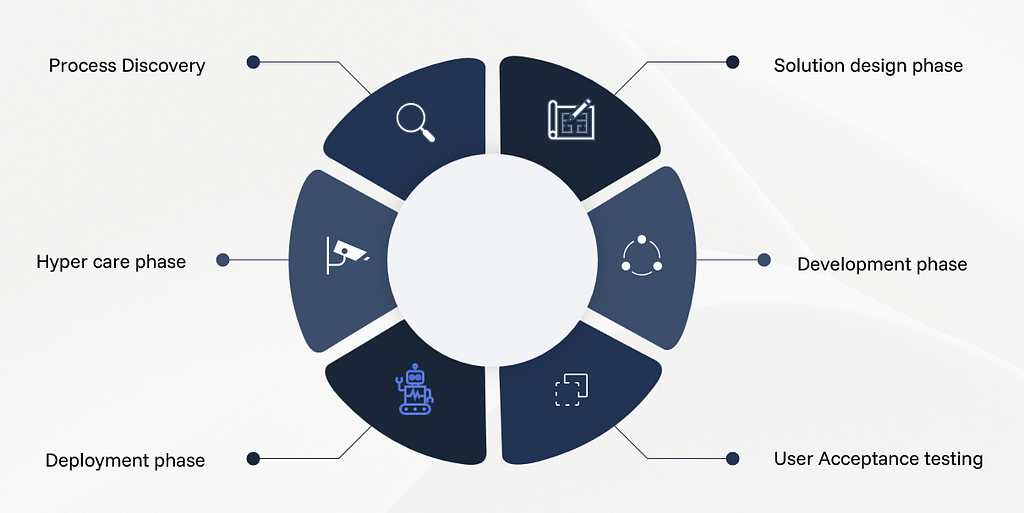
1. Process Discovery
Process discovery is a crucial part of the project lifecycle. During this phase, business analysts schedule discussions with stakeholders from different departments to understand their workflows and identify pain points. These conversations help uncover processes that are suitable candidates for automation. In a process discovery session, the client typically walks through their Standard Operating Procedures (SOPs), existing workflows, systems involved, and any niche or exceptional scenarios that occur during process execution. This walkthrough allows the business analyst to gain a comprehensive understanding of the end-to-end process.
The business analyst then documents the entire workflow in detail, including decision points, exceptions, and edge cases. These edge cases must be carefully captured and incorporated into the AI guardrails and process rules to ensure the automation behaves reliably and avoids incorrect assumptions or hallucinations when processing data.
Proper documentation during the discovery phase ensures that the automation solution is accurate, scalable, and aligned with business requirements.
1.1 ROI (Return on Investment) evaluation
As part of the process discovery phase, an ROI (Return on Investment) evaluation is also conducted. During this stage, stakeholders provide insights into the current manual effort required to perform the process, including the number of resources involved, the time spent on each task, and the overall operational cost. Business analysts use this information to calculate the current cost of the manual process and compare it with the estimated cost and efficiency of the proposed automation solution. This comparison typically includes factors such as time savings, reduction in manual effort, improved accuracy, and scalability.
Based on the ROI analysis, stakeholders and project sponsors evaluate whether the automation initiative is financially viable and strategically beneficial. If the projected benefits outweigh the implementation and operational costs, the process is approved for automation and moves forward to the solution design and development phase.
2. Solution Design
Solution design is the phase where the automation blueprint is created. Based on the insights gathered during Process Discovery, the solution architect and development team design the automation workflow, AI integration points, and system interactions.
Key activities during this phase include:
- Defining the workflow architecture: Mapping out how tasks will move between AI systems, RPA bots, and human operators.
- Selecting the right tools and technologies: Determining which AI models, RPA platforms, APIs, and databases will be used.
- Establishing Guardrails: This is the first critical point where AI guardrails are formally implemented at the solution architecture level. Guardrails ensure that AI outputs are constrained, validated, and aligned with business rules to prevent errors, hallucinations, or data inconsistencies. Examples include:
- Input validation and pre-processing rules
- Decision thresholds for AI models
- Escalation rules for ambiguous AI outputs
- Defining exception handling: Identifying scenarios where the automation may fail and outlining fallback mechanisms, such as manual intervention or reprocessing queues.
Proper solution design ensures that the automation is scalable, maintainable, and compliant with business standards while integrating guardrails at a system-wide level.
3. Development
Once the design is approved, the development team begins implementing the automation solution.
Key activities include:
- Building RPA bots and AI models: Developing scripts, configuring AI models, and integrating APIs to automate business steps.
- Implementing process rules and AI guardrails: At this stage, guardrails are codified in the system — both in business logic (e.g., approvals, thresholds) and technical controls (e.g., AI model constraints, logging).
- Unit and integration testing: Each component of the solution is tested individually and in combination with other systems to ensure functionality aligns with design specifications.
- Documentation: Developers document workflows, APIs, AI model behaviors, and guardrails so future teams can maintain the solution efficiently.
By implementing guardrails during development, businesses ensure that the automation behaves predictably, even when unexpected data or edge cases occur
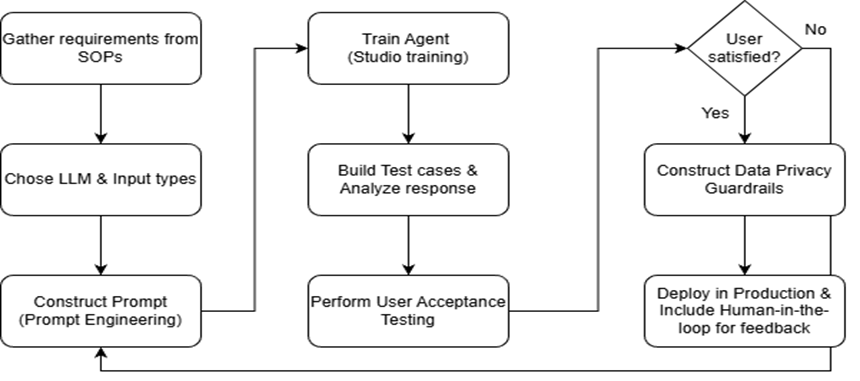
4. User Acceptance Testing
User Acceptance Testing (UAT) is a critical phase where the end-users validate the automation solution against real-world business scenarios. This ensures that the solution not only works technically but also meets business expectations and operational requirements.
Key activities during UAT include:
- Defining test cases: Test cases are derived from real business processes, including normal workflows, edge cases, and exceptional scenarios identified during Process Discovery.
- Executing test scenarios: End-users run the automation using live or representative data to confirm that the system behaves as expected.
- Validating AI outputs: Users review AI-driven decisions, recommendations, or predictions to ensure accuracy, relevance, and alignment with business rules.
- Testing guardrails: This is where AI guardrails and process rules are thoroughly validated. For example:
- Ensuring that AI does not produce outputs beyond defined thresholds
- Verifying alerts or escalations are triggered when exceptions occur
- Confirming that any manual intervention points function as intended
- Feedback collection: Users provide insights on system usability, accuracy, and workflow alignment, which may lead to minor adjustments before full production deployment.
Why UAT is important for guardrails:
Even the best-designed guardrails may not cover every real-world scenario. UAT provides an opportunity to test the system in the hands of actual users, catch gaps, and fine-tune guardrails for maximum reliability and safety.
Key Takeaways for UAT
- Validates automation from a business perspective, not just technical.
- Ensures guardrails function correctly in real-world scenarios.
- Helps refine the automation for accuracy, usability, and efficiency.
- Acts as the final checkpoint before Deployment and Hypercare
5. Deployment
Deployment is the phase where the automation solution is moved from the development or test environment into production.
Key activities include:
- Environment setup: Configuring production servers, databases, and AI platforms.
- Data migration and pre-processing: Ensuring historical data is correctly loaded and formatted for AI models.
- User training and change management: Educating stakeholders and operational teams on the automated workflow.
- Activating guardrails: In production, guardrails act as real-time safeguards, monitoring AI outputs, triggering alerts for anomalies, and ensuring compliance with business rules.
Deployment ensures the solution delivers value safely and efficiently while minimizing operational risk.
6. Hyper Care
Hypercare is the post-deployment support phase that ensures the automation performs as intended during the initial live period.
Key activities include:
- Monitoring performance and AI behavior: Using dashboards, logs, and alerts to track KPIs and AI outputs.
- Addressing exceptions and errors: Quickly resolving unexpected scenarios, edge cases, or AI mispredictions.
- Continuous optimization: Updating models, rules, and guardrails as the business evolves and new data patterns emerge.
- Knowledge transfer: Transitioning ownership of the automation to operations teams with clear documentation and standard operating procedures.
During hypercare, guardrails are critical — they act as safety nets that maintain efficiency, prevent errors, and give stakeholders confidence in the AI-driven processes.
Conclusion
The automation lifecycle highlights the critical role of guardrails in ensuring reliable, efficient, and safe AI-driven business processes. From Process Discovery to Hypercare, guardrails must be thoughtfully defined, implemented, and validated at every phase starting from workflow documentation, through solution design and development, to User Acceptance Testing and production deployment. Properly implemented guardrails not only prevent AI errors and hallucinations but also improve operational efficiency, maintain compliance with business rules, and enhance user trust in automation solutions. By embedding guardrails throughout the automation lifecycle, organizations can maximize the value of AI and RPA initiatives while mitigating risk and ensuring sustainable, scalable outcomes.
Automation Lifecycle and the Importance of Guardrails in Business Processes was originally published in Towards AI on Medium, where people are continuing the conversation by highlighting and responding to this story.