Turn any PDF into an intelligent exam preparation assistant using Retrieval-Augmented Generation (RAG)
Introduction
What if you could upload a textbook, research paper, or lecture note and instantly generate high-quality exam questions along with accurate answers?
That’s exactly what we’re building in this project.
In this article, we’ll walk through a complete Generative AI Question & Answer Creator Application built using:
- Python
- LangChain
- Groq LLMs
- Hugging Face Embeddings
- FAISS Vector Database
- Retrieval-Augmented Generation (RAG)
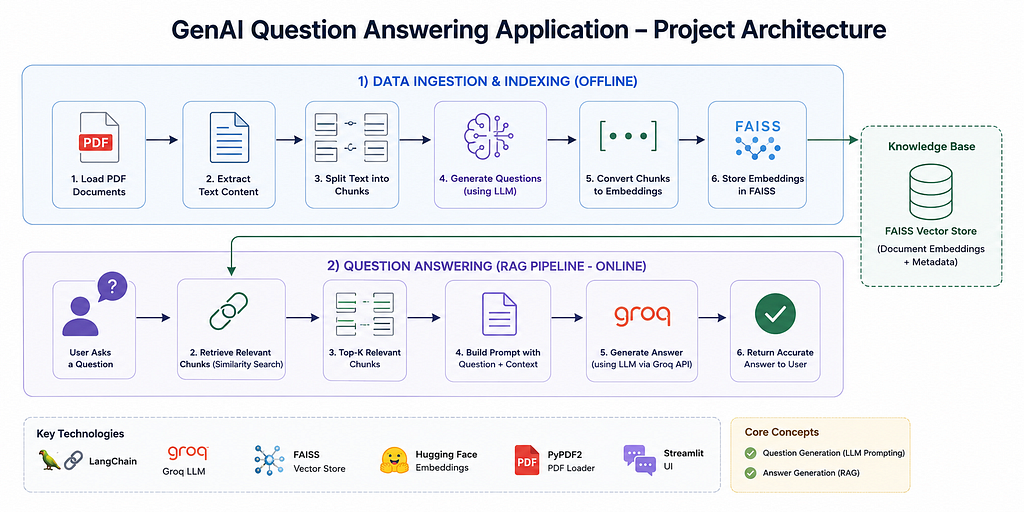
The application takes a PDF document as input, extracts its content, generates meaningful questions, stores document chunks in a vector database, and retrieves relevant context to generate accurate answers.
This project is an excellent portfolio project for anyone interested in:
- Generative AI Engineering
- LLM Applications
- RAG Pipelines
- LangChain Development
- AI-Powered Education Tools
By the end of this article, you’ll understand how modern GenAI pipelines work in production-like systems.
Project Architecture
Step 1: Setting Up the Environment
We first load environment variables and configure the Groq API key.
import os
from dotenv import load_dotenv
load_dotenv()
GROQ_API_KEY = os.getenv("GROQ_API_KEY")
os.environ["GROQ_API_KEY"] = GROQ_API_KEY
Using environment variables is a clean and secure way to manage API keys.
Step 2: Loading the PDF Document
We use LangChain’s PyPDFLoader to load the PDF.
from langchain_community.document_loaders import PyPDFLoader

file_path = "data/statistics.pdf"

loader = PyPDFLoader(file_path)
data = loader.load()
Each page becomes a LangChain Document object.
Next, we combine all page contents into a single string.
content = ""

for page in data:
    content += page.page_content
At this stage, the entire PDF becomes machine-readable text.
Step 3: Splitting the Text into Chunks
LLMs cannot process extremely large documents efficiently in a single prompt.
That’s why chunking is one of the most important steps in any RAG pipeline.
In this project, we use TokenTextSplitter.
from langchain_text_splitters import TokenTextSplitter
from transformers import AutoTokenizer

# Load tokenizer
 tokenizer = AutoTokenizer.from_pretrained("bert-base-uncased")

text_splitter = TokenTextSplitter.from_huggingface_tokenizer(
    tokenizer,
    chunk_size=200,
    chunk_overlap=50
)

chunks = text_splitter.split_text(content)
Why Chunking Matters
Chunking improves:
- Retrieval quality
- Context relevance
- Embedding performance
- LLM response accuracy
The overlap helps preserve contextual continuity between chunks.
Step 4: Converting Chunks into Documents
LangChain vector stores expect data in Document format.
from langchain_core.documents import Document

document_chunks = [Document(page_content=chunk) for chunk in chunks]
Now each chunk becomes independently searchable.
Step 5: Initializing the LLM
This project uses Groq-hosted models through LangChain.
from langchain_groq import ChatGroq

llamaChatModel = ChatGroq(
    model="llama-3.3-70b-versatile",
    temperature=0.3
)

openaiChatModel = ChatGroq(
    model="openai/gpt-oss-120b",
    temperature=0.3
)
Why Groq?
Groq provides:
- Extremely fast inference
- Low latency
- Strong open-source LLM support
- Cost-efficient experimentation
For GenAI applications requiring quick responses, Groq is becoming increasingly popular.
For question generation, we directly pass content to model. For Answer generation, we store the content in vector database and do retrieval.
Step 6: Designing the Question Generation Prompt
Prompt engineering is the heart of any LLM application.
The application uses a carefully designed prompt template.
question_prompt_template = """
You are an expert at creating questions based on given materials and documentation.
Your goal is to prepare a student for their exam by generating 10 questions.
You do this by asking questions about the text below:

------------
{text}
------------

Create questions that will prepare the students for their exams.
Make sure not to loose any important information.
Respond with only questions. No other information.

QUESTIONS:
"""
We then convert it into a LangChain PromptTemplate.
from langchain_core.prompts import PromptTemplate

question_prompt = PromptTemplate(
    template = question_prompt_template,
    input_variables = ["text"]
  )
A good prompt dramatically improves output quality.
Step 7: Refining Questions Using LCEL
The project uses a refinement strategy to improve generated questions.
refine_question_template = """
You are an expert at creating questions based on materials and documentation.
Your goal is to help a student to prepare for their exam by generating 10 questions.
We have recieved some questions to a certain extent :
{existing_answer}

We have the option to refine the existing questions or add the new ones deleting irrelevant questions (only if necessary) with some more context below.

------------
{text}
------------

Given the new context, refine the original questions in English.
If the context is not helpful, please provide the original question.
Respond with only 10 questions. No other information.

QUESTIONS:
"""
refine_question_prompt = PromptTemplate(
    input_variables = ["existing_answer","text"],
    template = refine_question_template
)
This allows iterative improvement of generated questions.
Step 8: Generating Questions
from langchain_core.output_parsers import StrOutputParser

# Define the chains using LCEL
initial_chain = question_prompt | openaiChatModel | StrOutputParser()

refine_chain = refine_question_prompt | openaiChatModel | StrOutputParser()

print("Generating questions using LCEL pattern...")

# Start with the first chunk
current_questions = initial_chain.invoke({"text": document_chunks[0].page_content})

# Iteratively refine with the rest of the chunks
for i, doc in enumerate(document_chunks[1:], start=2):
    print(f"Refining with chunk {i}/{len(document_chunks)}...")
    current_questions = refine_chain.invoke({
        "existing_answer": current_questions,
        "text": doc.page_content
    })

print("\nFinal Questions Generated!")
print(current_questions)
questions = current_questions.split("\n\n")
Step 9: Creating Embeddings
To enable semantic search, we convert chunks into vector embeddings.
from langchain_huggingface.embeddings import HuggingFaceEmbeddings

embedding_model = HuggingFaceEmbeddings(
    model_name="sentence-transformers/all-MiniLM-L6-v2"
)
Why Embeddings?
Embeddings convert text into numerical vector representations.
This enables:
- Semantic similarity search
- Context retrieval
- Intelligent document search
- RAG pipelines
Step 10: Building the FAISS Vector Store
Next, we store embeddings in FAISS.
from langchain_community.vectorstores import FAISS

vector_store = FAISS.from_documents(
    document_chunks,
    embedding_model
)
Why FAISS?
FAISS is one of the most widely used vector databases because it is:
- Fast
- Lightweight
- Efficient for similarity search
- Easy to integrate with LangChain
This becomes the knowledge base for answer generation.
Step 11: Retrieval-Augmented Generation (RAG)
This is where the project becomes truly powerful.
Instead of asking the LLM to answer from memory, we retrieve relevant document chunks.
That retrieved context is then passed to the LLM.
This significantly improves:
- Accuracy
- Hallucination reduction
- Context awareness
- Reliability
from langchain_core.runnables import RunnablePassthrough

def format_docs(docs):
    return "\n\n".join(doc.page_content for doc in docs)

prompt = PromptTemplate.from_template(
    """Answer the question based only on the context below:

{context}

Question: {question}
"""
)

retriever = vector_store.as_retriever()

answer_chain = (
    {
        "context": retriever | format_docs,
        "question": RunnablePassthrough()
    }
    | prompt
    | openaiChatModel
    | StrOutputParser()
)
This modern LCEL RAG pipeline structure is modular and production-friendly.
Step 12: Generating Final Answers
Finally, the application loops through generated questions and produces answers.
# Answer each question and save to a file

for question in questions:
    answer = answer_chain.invoke(question)
    with open("answers.txt","a") as file:
        file.write(question+"\n")
        file.write("Answer:"+answer+"\n")
        file.write("-------------------------------\n")
At this stage, the system behaves like an AI-powered study assistant.
Key Takeaways
This project demonstrates how modern Generative AI systems are built using:
- LLMs
- Embeddings
- Vector databases
- Retrieval-Augmented Generation
- Prompt engineering
- LangChain orchestration
Rather than building a simple chatbot, this application focuses on solving a real-world educational problem.
It combines multiple GenAI concepts into a single practical pipeline.
If you’re learning GenAI engineering, building projects like this is one of the best ways to understand how production AI systems work.
Final Thoughts
The future of education will heavily involve AI-powered personalization.
If you’d like to see the complete end-to-end implementation of this GenAI application — including the FastAPI backend, RAG pipeline, and full source code — check out the GitHub repository below.
Build a GenAI-Powered Question & Answer Generator with LangChain, Groq, and FAISS was originally published in Towards AI on Medium, where people are continuing the conversation by highlighting and responding to this story.