The every day apps you use such as Google Maps, Spotify, Instagram, your bank is held together by something you’ve probably never seen but absolutely depend on. It’s called an API. And it’s about time you master this topic.
If you’re just starting out as beginner, API is one of those terms that you might hear a lot, like everyone already knows what it means. But a lot of people don’t.
By the end of this article, you’ll understand how API works, what the different parts mean, and you’ll have a mental model to actually start building with them. That’s the goal of this article
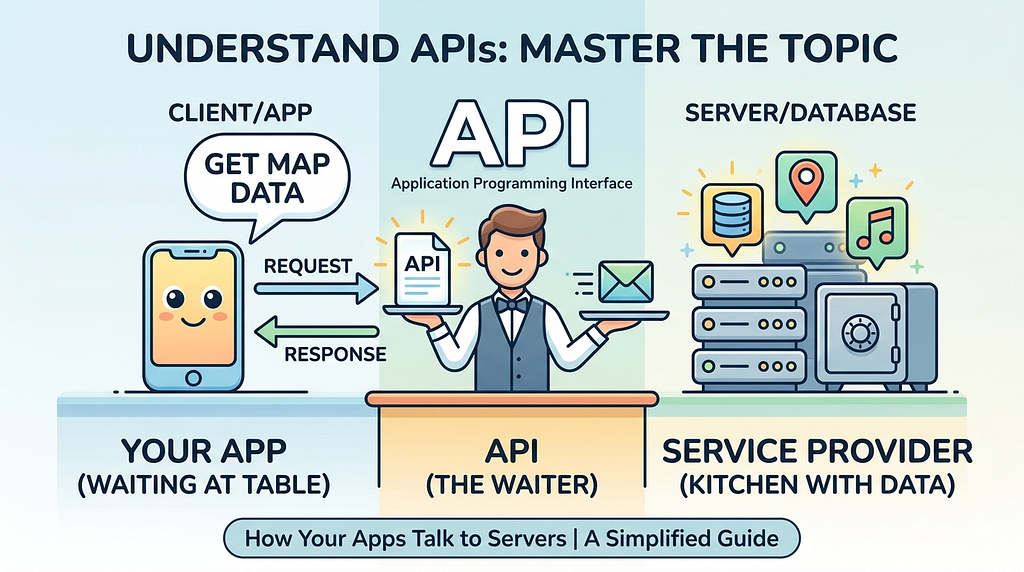
The Restaurant Analogy
You enter a restaurant. You don’t go into the kitchen yourself, pull out the ingredients, and cook your own food. That would be a chaos! Instead, you sit at the table, look at the menu, and tell the waiter what you want. The waiter goes to the kitchen, passes your order along, the kitchen makes it, and the waiter brings it back to your table.
You never see the kitchen. You don’t know how the food was made. You just got what you asked for.
The API version of this
You are the the developer. The server is the kitchen that holds all the data and logic. The API is the waiter. It takes your request, goes to where the data lives, and brings back exactly what you asked for. You never touch the server directly. The waiter i.e. the API handles everything in between.
That’s it. That’s the entire game. An API (Application Programming Interface) is a middleman that allows two different systems talk to each other in a structured way.
Real Examples
Think about how Zomato shows you a restaurant’s location on a map. Zomato doesn’t have its own mapping system. Building one from scratch is not feasible. Instead, it uses Google Maps through an API.
When you open a restaurant page, Zomato’s app sends a request to Google’s Maps API: “Give me the map for this address.” Google’s API responds with the map data. Zomato displays it. You never touch the Google’s actual database, algorithm, and code. The API was the secure messenger in between.
When you open a weather app on your phone, here’s what actually happens. Your app doesn’t have the weather data sitting inside it. It sends a message to a weather service asking: “What’s the weather in London right now?” The weather service receives that request, looks up the data, and sends back a response: temperature, humidity, wind speed. Your app reads that response and displays it on your screen.
That entire conversation of your app asking and the server answering happened through an API.
An API is just a contract. Your app agrees to ask in a specific way, and the server agrees to respond in a specific way. Both sides trust the format.
How a request actually works
When your app talks to an API, it sends something called an HTTP request. Think of it like a structured letter. It has a specific format, and the server knows exactly how to read it. Here’s the basic flow:

A request has a few important parts. First is the endpoint which is the specific URL address you’re hitting. Second is the method i.e. what action you want to perform. Third are headers, which carry extra information. And sometimes there’s a body, the actual data you’re sending. The four HTTP methods you’ll use constantly are:
GET
Read something. Fetch data. “Give me a list of songs.” You’re just reading and not modifying.
POST
Create something Send data to create a new record. “Add this new song to the database.”
PUT
Update something. Replace an existing record. “Change the title of song 10.”
DELETE
Remove something. Delete an existing record. It is irreversible, so be careful with this one.
These four together are what engineers call CRUD: Create, Read, Update, Delete.
Types of APIs
API is not a single thing. It’s a category. Like a vehicle. It could be a bicycle, a truck, and a Formula 1 car. All are vehicles but they work very differently and you will use them in completely different situations. APIs are the same. There are several types, and knowing which one to use and why is crucial.
Let’s go through each one.
1) REST
REST (Representational State Transfer) is the most popular API style. It uses standard HTTP methods (GET, POST, PUT, DELETE), returns data in JSON, and is straightforward to build and understand. When someone says we have an API, they most likely mean a REST API. The only real issue is that sometimes it over-fetches. This means it gives you more data than you actually need, like getting the whole pizza menu when you just wanted to know if they have garlic bread.
2) GraphQL
GraphQL, developed by Facebook, fixes the above problem. Instead of the server deciding what data you get, you tell the server exactly what you want. Nothing more, nothing less. If you only want a user’s name and profile photo, you ask for just those two things. It’s a single endpoint where you write a query describing exactly what you need.
3) SOAP
SOAP (Simple Object Access Protocol) is older, stricter, and uses XML instead of JSON. It has rigid rules about message format and requires much more setup. You’ll rarely build with it from scratch today, but you may encounter it if you ever work with banking systems, government services, or enterprise software where security and strict standards matter more than speed.
4) gRPC
gRPC (Google Remote Procedure Call) is built for speed. Instead of sending human-readable JSON, it sends data in binary format that machines process much faster. This makes it perfect for microservices, where dozens of internal services talk to each other thousands of times per second.
Request-response APIs are great when you’re the one initiating the conversation. But what about situations where the server needs to notify you, like a new message arriving, or a stock price changing? That’s where real-time APIs come in.
5) Webhook
A webhook reverses the normal model. Instead of your app asking “did anything happen?” every few seconds, you give the server your address and say “whenever something happens, just notify.” The server then pushes a notification to your app the moment an event occurs, such as a payment going through, or a form being submitted.
6) WebSocket
A WebSocket opens a two-way channel between your app and the server. Both sides can send messages to each other at any time, without either one having to ask first. This is how real-time chat apps work, how live sports scoreboards update, and how multiplayer games stay in sync.
7) WebRTC
WebRTC (Web Real-Time Communication) takes things one step further. Instead of having a server in the middle, it allows two browsers talk directly to each other . This is how video calls in Google Meet and browser-based calls work. The server only helps the two sides find each other initially. After that, the data flows directly between them, making it extremely fast and low-latency for audio and video.
The Netflix example
Here’s something that surprises a lot of people. APIs aren’t just for fetching lists of songs or showing maps. They’re also used in how machine learning models get deployed and used in the real world.
Think about how Netflix recommends your next show. There’s a powerful ML model running somewhere in the cloud that has learned your viewing patterns. When you open Netflix, your app sends a POST request to an API which contains a JSON payload with your user ID, watch history, and maybe the time of day. The API passes that to the model, the model runs its prediction, and the API sends back a list of recommended shows. The Netflix home screen shall render the. All this happens within a second.
What that request looks like
Your app → POST request with JSON data (who you are, what you’ve watched) → hits the API → goes to ML model in the cloud → model runs prediction → API sends back recommended shows → your screen updates.
This is why Python frameworks like Flask and Django are so popular in data science teams as they’re used to wrap ML models in an API so the rest of the engineering team can actually use them. The data scientist builds the model. API makes it accessible to the app. And because these APIs are hosted on cloud infrastructure, the same architecture scales to handle millions of users globally, routing each request to whichever server is available and closest.
Status codes
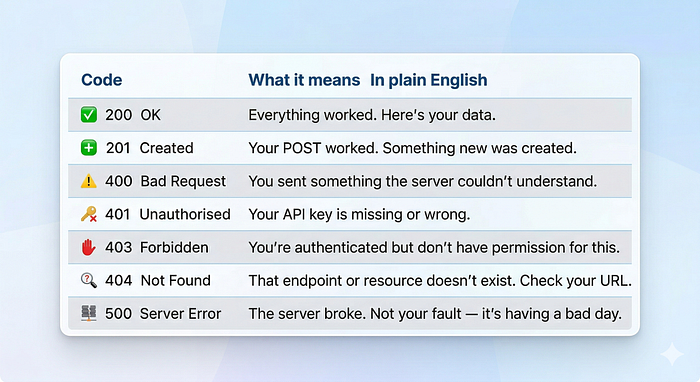
When the server responds, it sends a three-digit status code along with the data. Learning these early will save you hours of debugging. Just understand this rough rule: 2xx is good news, 4xx means you made a mistake, 5xx means the server made a mistake.
How to start working with APIs
Theoretical knowledge is important. Practical implementation is what makes you a master. Here’s a practical starting path:
- 1) Download Postman: It’s a free tool that lets you send API requests without writing any code. It’s the fastest way to see how requests and responses work in real time.
- 2) Choose a free public API to play with. OpenWeatherMap, the GitHub API, or PokeAPI are all great starting points.
- 3) Send your first GET request. Fetch some data. Look at the status code. Read the JSON that comes back. Get comfortable with it.
- 4) Try a POST request. Create something. See the 201 response. Then GET what you just created.
- 5) Try a webhook services like Stripe or GitHub let you set up webhooks in their dashboards.
- 6) Read the documentation for whatever API you’re using. Good docs are the best teacher. Get comfortable reading them as that will help in the long term.
The one thing to remember
APIs are how the modern internet works. Every app you use such as Swiggy, Instagram, is constantly making API calls in the background, routing through REST endpoints, firing webhooks, maintaining WebSocket connections. Your job as an engineer is to understand how to talk to those APIs, how to build them yourself, and how to debug them when things go wrong.
You now know what an API is. You know the difference between REST, GraphQL, SOAP, gRPC, Webhooks, WebSockets, and WebRTC. You know what endpoints, status codes, API keys, and JSON are. You now have a good understanding needed to work with APIs.
That’s more than most people know when they land in their first job. Go check out Postman and send your first request. That’s where the real learning begins.
You Use APIs Every Day — Even If You Don’t Know It was originally published in Towards AI on Medium, where people are continuing the conversation by highlighting and responding to this story.