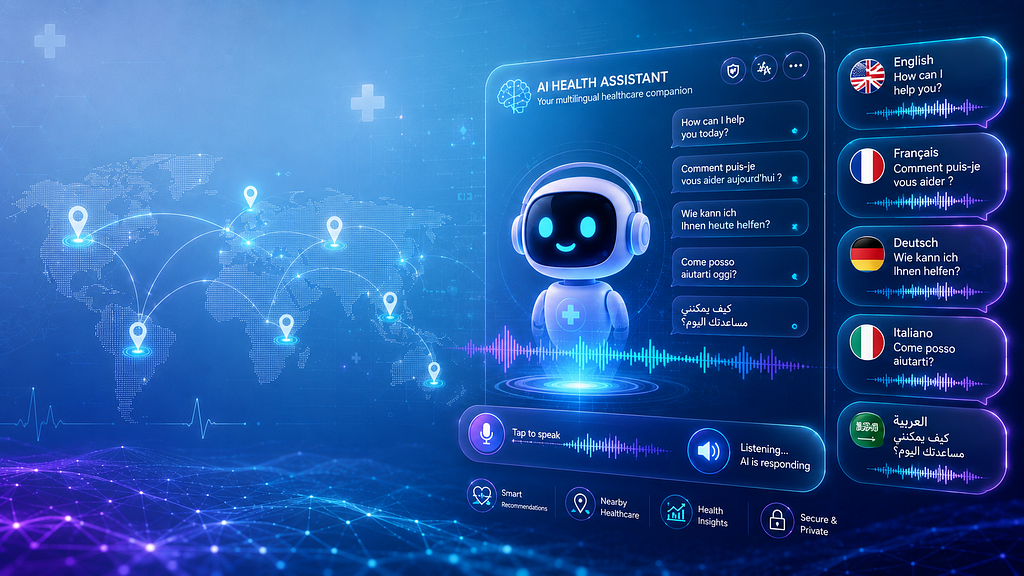
A technical walkthrough of an AI-powered symptom analyzer with 7-language support, voice I/O, a dual-engine fallback architecture and a feature that guides users to nearby care based on where they actually are.
Disclaimer: This project is for educational and portfolio purposes only. It is not intended as clinical software or a substitute for professional medical advice.
Table of Contents
- Introduction
- The Problem
- Architecture and How It Works
- Technologies Used
- The Multilingual Pipeline
- Voice Integration
- Geolocation-Based Recommendations
- What Is Next
- Conclusion
- Source Code and GitHub
Introduction
Most medical AI tools share the same set of limitations: they operate exclusively in English, rely entirely on text-based input, and fail the moment their external API becomes unavailable. For tools designed to improve healthcare accessibility, these are not minor shortcomings, they are fundamental design gaps.
This article documents the design and implementation of a multilingual medical chatbot that addresses all three of these issues. Built with Python and Streamlit, the system accepts symptom descriptions in natural language or through voice, analyzes them using a dual-engine architecture that combines the Google Gemini API with a local HuggingFace fallback, and returns a structured medical assessment in the user’s own language, accompanied by an audio response.
The project addresses challenges that most chatbot tutorials overlook: how to handle medical language across seven languages without compromising diagnostic accuracy, what to do when the primary AI service is unavailable, and how to manage audio output within a framework — Streamlit — that was not originally built for it.
By the end of this article, you will have a clear understanding of the following:
- The specific problems this system was designed to solve and why they matter
- The architectural decisions behind the dual-engine diagnosis approach
- How the multilingual pipeline operates from input detection to translated output
- How voice input and audio output were integrated and the technical challenges involved
- How the chatbot guides users to nearby hospitals, clinics, and pharmacies based on their location
The Problem
Access to reliable medical guidance is unevenly distributed, and the tools designed to bridge that gap often introduce new barriers of their own. Three specific problems motivated the development of this project.
Language: The vast majority of medical AI tools operate in English. For the roughly 80 percent of the global population that does not speak English as a first language, this represents a fundamental barrier to access rather than a minor inconvenience. A patient describing chest tightness in Arabic or persistent fatigue in French deserves the same quality of analysis as someone writing in English, and existing tools rarely account for this.
Accessibility: Composing a detailed, medically accurate symptom description requires a level of literacy, dexterity, and technical comfort that not all users possess. Voice-based input eliminates this barrier, making the tool accessible to elderly users, people with motor impairments, and those who are simply unfamiliar with text-heavy interfaces.
Reliability: The majority of chatbot projects depend on a single external API. When that API is unavailable, due to rate limiting, misconfiguration, or a network failure, the entire system breaks down. In a tool intended to provide health guidance, this kind of fragility is a critical design flaw.
Taken together, these three problems : language exclusivity, input constraints, and architectural fragility, define the core design objectives of this project: language inclusivity, voice accessibility, and architectural resilience.
Architecture and How It Works
The system is organized around two core modules. ChatBot.py serves as the backend engine, handling symptom extraction, diagnosis logic, language translation, and audio generation. app.py is the Streamlit frontend, responsible for managing the chat interface, voice recording, session state, and the medical dataset explorer.
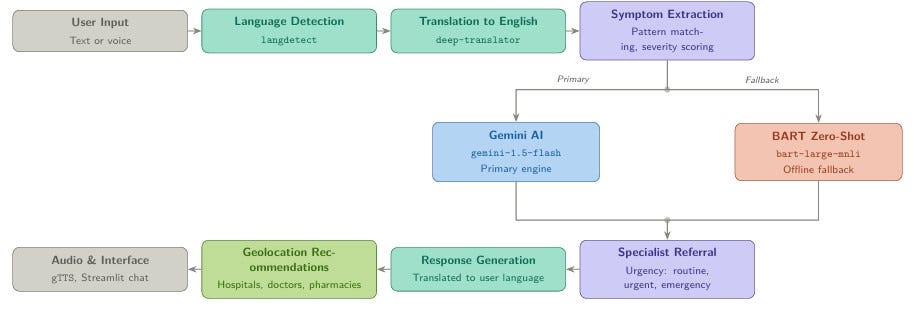
Every user interaction passes through the same processing pipeline, from raw input to final response:
The Dual-Engine Design
The most consequential architectural decision in this project is the dual-engine fallback pattern. Understanding it in detail is worthwhile because the principle it embodies extends well beyond this specific application.
The primary engine is the Google Gemini API (gemini-1.5-flash). When properly configured, it receives the user's symptom description and returns a structured JSON response containing the most likely condition, a confidence score, an urgency classification, matched symptoms, a specialist recommendation, and a set of actionable recommendations. This is the high-quality path: Gemini produces contextually rich, nuanced responses that go considerably beyond simple keyword matching.
The following prompt structure drives that analysis:
Prompt = “ You are a medical AI assistant. Analyze the following sysmptoms and provide a professional assessment”
Patient Information:
- Symptoms: {symptoms_text}
- Age: {age}
- Gender: {gender}
Respond only in JSON format:
{{
    "primary_condition": "Most likely condition",
    "confidence": 0.85,
    "specialist": "Recommended specialist type",
    "urgency": "routine/urgent/emergency",
    "recommendations": ["rec1", "rec2", "rec3"],
    "severity": "mild/moderate/severe"
}}
"""
response = self.model.generate_content(prompt)
Requesting a structured JSON response rather than free-form text is an important design choice. It makes the output predictable, easy to parse, and straightforward to render consistently in the interface, regardless of how the model phrases its internal reasoning.
When Gemini is unavailable, whether due to a missing API key, a rate limit, or a service interruption, the system automatically falls back to a local zero-shot classification model, facebook/bart-large-mnli, loaded through HuggingFace Transformers. This model runs entirely offline, requires no external credentials, and ensures that the chatbot remains functional regardless of the state of any external service. The fallback produces less detailed output, but it never fails silently: the user always receives a meaningful response.
The underlying principle is that graceful degradation must be a design requirement, not an afterthought. A system that functions correctly 95 percent of the time and fails completely in the remaining 5 percent cannot be considered reliable, particularly in a health-related context.
Symptom Extraction
Before diagnosis can begin, the system extracts structured symptom data from free-form text through an enhanced pattern-matching approach. Each recognized symptom is mapped to a list of natural language variations, broadening the range of inputs the system can handle reliably:
symptom_variations = {
    "fever": [
        "fever", "temperature", "hot", "burning up",
        "chills", "feverish", "high temp"
    ],
    "shortness of breath": [
        "shortness of breath", "difficulty breathing",
        "breathless", "out of breath", "hard to breathe"
    ],
    "nausea": [
        "nausea", "sick", "queasy", "vomiting",
        "throw up", "nauseated", "feel sick"
    ],
    # ... additional symptoms
}
Once a symptom is identified, it is assigned a severity score based on intensity modifiers present in the surrounding text. The modifier “mild” maps to a score of 0.3, "severe" to 0.9, and "excruciating" to 1.0. These scores feed directly into the confidence calculation used during diagnosis, ensuring that the system weighs more serious symptom descriptions accordingly:
severity_modifiers = {
    "mild": 0.3,   "slight": 0.3,  "minor": 0.3,
    "moderate": 0.6, "average": 0.6,
    "severe": 0.9,  "intense": 0.9, "extreme": 1.0,
    "excruciating": 1.0, "unbearable": 1.0
}
def _analyze_severity(self, text: str) -> float:
max_severity = 0.5 # default when no modifier is found
for modifier, value in severity_modifiers.items():
if modifier in text:
max_severity = max(max_severity, value)
return max_severity
Urgency Assessment and Specialist Referral
Every diagnosis produced by the system is tagged with one of three urgency classifications, routine, urgent, or emergency, and paired with a specialist recommendation drawn from either an external CSV mapping file or a built-in dictionary covering more than 50 conditions. When the urgency level reaches "emergency," the interface displays a prominent alert alongside international emergency contact numbers. This layer transforms a raw diagnostic output into something genuinely actionable for the user.
Technologies Used
- Frontend / User Interface: Streamlit for building an interactive and user-friendly web interface.
- AI / Large Language Model: Google Gemini API using Gemini 1.5 Flash for conversational AI and intelligent response generation.
- Natural Language Processing: Hugging Face Transformers with facebook/bart-large-mnli for text classification and inference tasks.
- Translation & Language Detection: deep-translator (GoogleTranslator) and langdetect for multilingual support.
- Speech Recognition: SpeechRecognition and PyAudio for voice input processing.
- Text-to-Speech: gTTS and pyttsx3 for audio response generation.
- Data Processing: pandas and NumPy for data manipulation and preprocessing.
- Audio Processing: soundfile and Wave module for audio input/output handling.
The Multilingual Pipeline
Supporting seven languages — English, French, Spanish, German, Italian, Portuguese, and Arabic — required solving three distinct problems in sequence: reliably detecting the language of the input, normalizing all analysis through English, and returning the final response in the user’s original language. Each step involves specific implementation choices and trade-offs that are worth examining in detail.
Step 1 — Language Detection
Every input is passed through langdetect before any further processing begins. If the detected language belongs to the supported set, it governs all subsequent translation and audio synthesis decisions for that session. If detection fails or returns an unsupported language code, the system falls back silently to English without interrupting the user experience:
def detect_language(self, text: str) -> str:
    try:
        detected_lang = detect(text)
        return detected_lang if detected_lang in self.supported_languages else 'en'
    except Exception:
        return 'en'  # Silent fallback to English on detection failure
Step 2 — Translating Input to English
All diagnosis logic runs in English, regardless of the user’s original language. This is a deliberate architectural choice rather than a limitation. The symptom pattern dictionary, the severity scoring vocabulary, and the Gemini API prompt are all English-based, and maintaining parallel versions of these structures across seven languages would introduce substantial complexity and long-term maintenance overhead.
Non-English inputs are therefore translated to English before symptom extraction begins, using deep-translator's GoogleTranslator. Every translation call is wrapped in a try/except block so that a translation failure does not halt the pipeline, if the translation cannot be completed, the original text is passed through and processing continues:
def translate_text(self, text: str, target_lang: str) -> str:
    try:
        translator = GoogleTranslator(source='auto', target=target_lang)
        return translator.translate(text)
    except Exception as e:
        print(f"Translation error: {e}")
        return text  # Return original text if translation fails
Step 3 — Translating the Response Back
Once the full diagnosis and its associated recommendations have been generated in English, the complete response is translated back into the user’s original language before it is displayed and converted to audio. The same translate_text function handles both directions, which keeps the implementation consistent and ensures that failure handling behaves identically at every stage of the pipeline.
Step 4 — Session-Level Language Switching
Users are not required to commit to a single language at the start of a session. If a user changes the selected language mid-conversation, the system retranslates the entire message history into the new language before rerendering the interface, preserving conversational continuity without requiring a fresh session:
def translate_chat_history(self, target_lang: str):
    for message in st.session_state.messages:
        if message["role"] == "assistant":
            message["content"] = self.translate_text(
                message["content"], target_lang
            )
Voice Integration
Integrating voice support was one of the more technically demanding aspects of this project, primarily because Streamlit was not built with real-time audio interaction in mind. Producing a stable implementation required working around several framework-level constraints that are not well documented.
Voice Input
Audio capture is handled through PyAudio. When the user activates the voice input feature, the application opens a microphone stream and records for five seconds, displaying a real-time progress bar and countdown throughout. Once recording is complete, the audio is written to a temporary .wav file and passed to SpeechRecognition for transcription:
# Open microphone stream and capture audio
stream = p.open(format=FORMAT, channels=CHANNELS,
                rate=RATE, input=True,
                frames_per_buffer=CHUNK)
The transcription call includes the currently active session language, which means voice input operates correctly across all seven supported languages without requiring any additional per-language configuration:
text = self.recognizer.recognize_google(
    audio,
    language=st.session_state.current_language  # e.g. 'fr', 'ar', 'de'
)
Once transcription is complete, the temporary audio file is deleted immediately. No voice data is retained beyond the duration of a single recording cycle.
Audio Output
All responses are converted to speech using gTTS (Google Text-to-Speech), which provides native support for all seven languages used in the system. Before the response text reaches gTTS, it is preprocessed to remove markdown formatting characters and special symbols that would produce unnatural-sounding output:
def generate_audio_response(self, text: str, language: str) -> str:
    # Strip markdown and special characters before synthesis
    clean_text = text.replace('**', '').replace('*', '').replace('#', '')
    clean_text = re.sub(r'[^\w\s.,!?-]', '', clean_text)
The Stateless Rendering Problem
The most technically involved challenge in this section did not stem from audio processing itself, it stemmed from a fundamental characteristic of how Streamlit operates, and it is worth understanding clearly for any developer working with dynamic media in this framework.
Streamlit re-executes the entire application script from top to bottom on every user interaction. As a result, any file generated during one execution cycle including audio files, can become inaccessible by the time the next render cycle attempts to reference it. Storing a file path in session state proved insufficient, because the file itself might no longer exist at that path when the component tried to load it.
The solution was to read the audio file into memory as raw bytes immediately after generation, and store those bytes in st.session_state alongside the associated message:
# Read audio into memory immediately after generation
if audio_path and os.path.exists(audio_path):
    with open(audio_path, 'rb') as audio_file:
        message["audio_data"] = audio_file.read()
    os.remove(audio_path)  # Clean up the file
Unlike file paths, byte objects stored in session state persist reliably across re-runs. This pattern applies broadly to any situation involving dynamically generated media in Streamlit applications.
Geolocation-Based Recommendations
Beyond symptom analysis, the chatbot includes an optional feature that extends the value of each consultation into the physical world: geolocation-based care recommendations. Once a diagnosis has been delivered, the chatbot asks the user whether they would like help finding nearby medical facilities. If the user agrees and provides their location, the system uses that input to suggest relevant options in their vicinity.
Depending on the urgency classification of the diagnosis, the recommendations are tailored accordingly. For routine assessments, the chatbot may suggest nearby general practitioners, pharmacies, or outpatient clinics. For urgent or emergency classifications, it prioritizes hospitals and emergency care centers. This distinction matters: directing a user with a high-severity diagnosis toward the nearest pharmacy would be unhelpful at best and misleading at worst.
The interaction is structured as a simple confirmation step following the main response:
# After delivering the diagnosis response
if diagnosis.urgency in ("urgent", "emergency"):
    follow_up = (
        "Based on your symptoms, you may need in-person medical attention. "
        "Would you like me to suggest nearby hospitals or emergency centers? "
        "If so, please share your city or general location."
    )
else:
    follow_up = (
        "Would you like me to recommend nearby doctors, clinics, "
        "or pharmacies based on your location?"
    )
The location provided by the user is used solely to generate the recommendation query. No location data is stored in the session beyond the scope of that single exchange, which is consistent with the privacy-conscious design of the rest of the system.
This feature bridges the gap between digital health guidance and real-world action, moving the user from an informed understanding of their condition to a concrete next step, without requiring them to leave the interface or conduct a separate search.
What Is Next
The current implementation is functional and complete as a portfolio project, but several targeted improvements would move it closer to production quality: replacing the pattern-matching symptom extractor with a medical NER model fine-tuned on clinical text, adding conversational memory so the chatbot can refine its analysis across turns, and packaging the application for cloud deployment with proper secrets management. On the security side, API keys should be loaded from environment variables or Streamlit’s secrets.toml from the very first commit, a habit worth building regardless of project scale.
Conclusion
What started as an attempt to fix three specific problems: language exclusivity, text-only input, and single-point API failure, turned into a broader exercise in designing systems that hold together under real conditions. The dual-engine fallback, the translate-through-English pipeline, the byte-level audio storage, and the geolocation layer are each simple in isolation. Together, they produce something meaningfully more useful than a standard chatbot demo.
The problems they solve are not specific to medical applications. Any Python project that integrates external APIs, handles multilingual data, or manages dynamic media will encounter versions of the same constraints. That generalizability is, ultimately, what makes projects like this worth building and documenting.
Source Code and GitHub
The complete source code for this project, including both core modules, the Streamlit interface, and the dataset integration, is publicly available on GitHub. Contributions, issue reports, and pull requests are welcome.
- GitHub Repository: multilingual-medical-chatbot
- GitHub Profile: https://github.com/Hafsa06rd
If you found this article useful, consider following for more writing on data science, NLP, and applied AI system design.
From Symptoms to the Nearby Care: Building a Multilingual Medical Chatbot with Voice & Geolocation was originally published in Towards AI on Medium, where people are continuing the conversation by highlighting and responding to this story.