How Exactly AI Tools Are Leaking Your Secrets

How many people at your company used an AI tool this week?
How many of them know where that data went? If the answer to the second question is “not many,” you’re in not alone. According to a 2025 LayerX Security report, 45% of enterprise employees are actively using generative AI platforms, and 67% of those interactions happen on personal accounts, which means IT teams can’t monitor or restrict them. So nearly half your company is regularly handing data to systems you have no visibility into, via accounts you can’t touch, from browsers you definitely don’t control.
Berrysbay shared a diagram explaining what’s actually happening when someone at your company hits “send” on an AI tool. Most people only think about AI tools using this mental model:
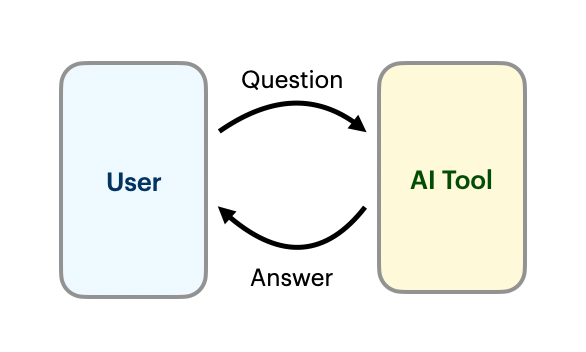
Clean, simple, and …wrong.
What actually happens involves more than a dozen distinct systems, several of which are operated by people your users have never heard of, at companies your legal team has never reviewed.
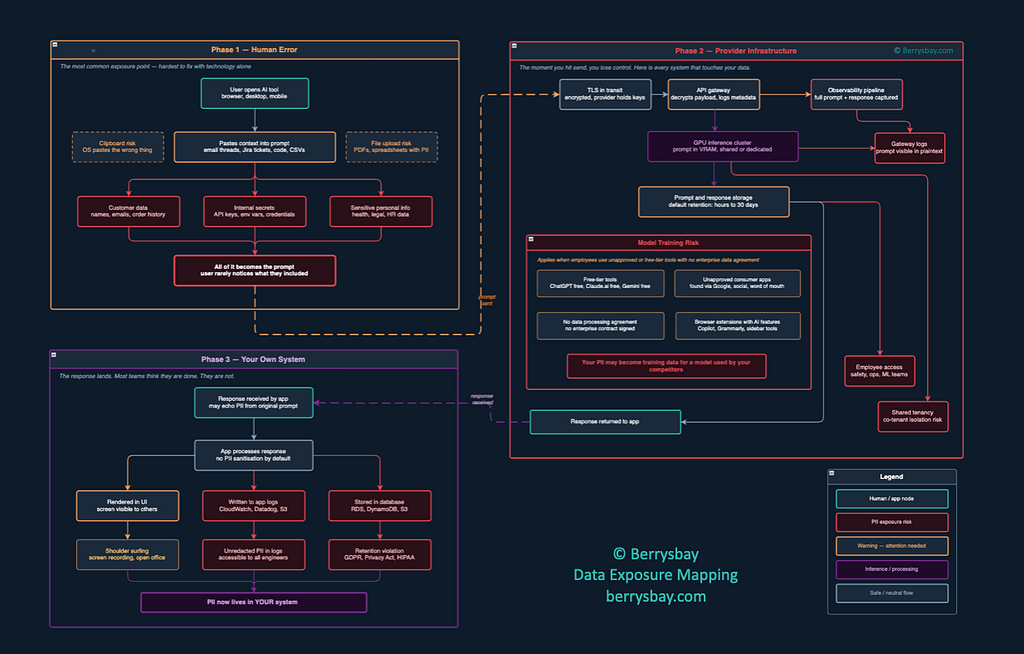
Will will zoom in and walk through it now.
Phase 1: Human Error (a.k.a. The Part That’s Already Happened)
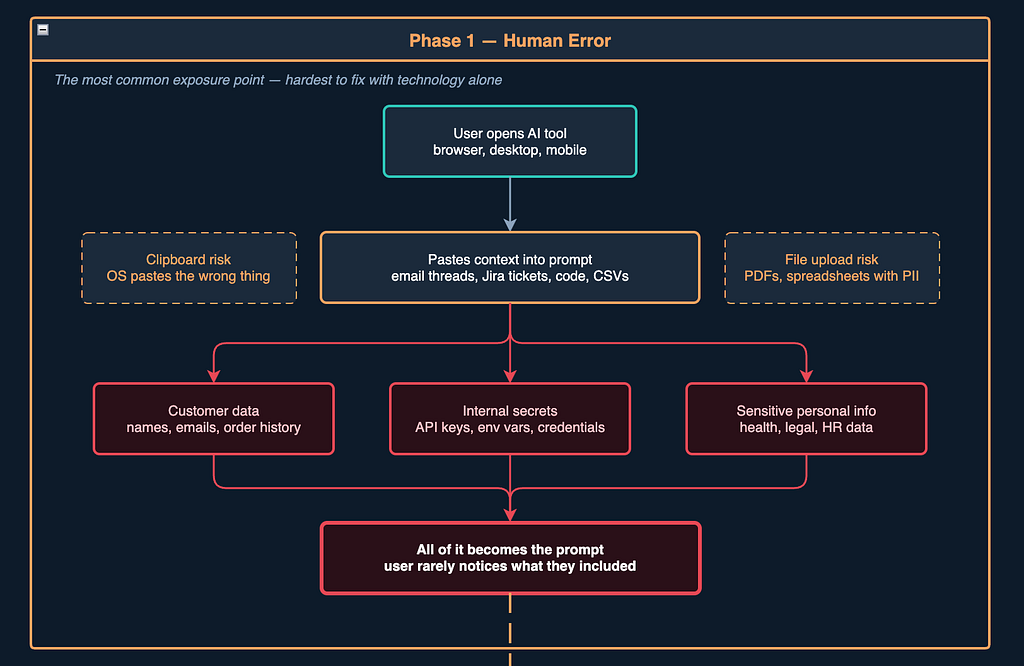
Here’s the thing about Phase 1 — by the time you’re worried about it, it’s usually already done.
The most famous example is probably Samsung’s scandal. In early 2023, three separate incidents occurred within just 20 days. One engineer pasted buggy source code from a semiconductor database into ChatGPT to fix errors. Another pasted code for identifying defective equipment for optimisation. A third recorded an internal meeting, transcribed it, and fed it into ChatGPT to generate meeting minutes. Samsung had, to their credit, already warned employees about this. The employees did it anyway — not because they were malicious, but because it was faster and easier than any approved alternative.
This is the sad truth of shadow AI: none of these people intended to leak trade secrets. They were most likely didn’t understand the risk.
Zooming out from Samsung, the numbers are alarming at scale. More than 50% of paste events into AI tools include corporate information, and nearly 40% of uploaded files contain personally identifiable information or payment card industry data. One in three employees who admit to sharing sensitive information with chatbots says they’ve shared employer information specifically. I think I need to highnight this:
One in three employees who admit to sharing sensitive information with chatbots says they’ve shared employer information specifically.
How it can happen in your company:
The Copy-Paste Trap. Someone in your customer support team gets a tricky complaint. They copy the whole thread into ChatGPT to draft a response. The thread contains the customer’s full name, email address, order history, shipping address, and payment method. None of that was necessary to draft the reply. All of it is now in a third-party system.
The Code Review. A developer pastes a snippet into an AI assistant to debug it. The snippet pulls config from environment variables — which are also in the paste. The API key that took your security team three months to rotate is now in a prompt. If you think this sounds unlikely, ask a developer near you when they last checked what was actually in the file before they pasted it.
The File Upload. Most AI tools now accept file uploads. An analyst uploads a CSV to summarise it. The CSV is a CRM export — 10,000 customer records, completely unfiltered, with phone numbers and email addresses.
The Clipboard Accident. This one is almost too embarrassing to include, but it happens constantly. Someone copies a password from their vault manager. They switch windows. Their brain, running on autopilot, hits Ctrl+V in the AI chat. Congratulations: your production database password is now a prompt.
This ieven not the full list of possible scenarious. Employees doing their jobs with the most capable tools available to them — which, increasingly, are AI tools that your company hasn’t formally approved, reviewed, or put any guardrails around.
Phase 2: Provider Infrastructure (a.k.a. The Part Nobody Talks About at AI Tool Sales Pitch)
This is where people think HTTPS saves them. It does not.
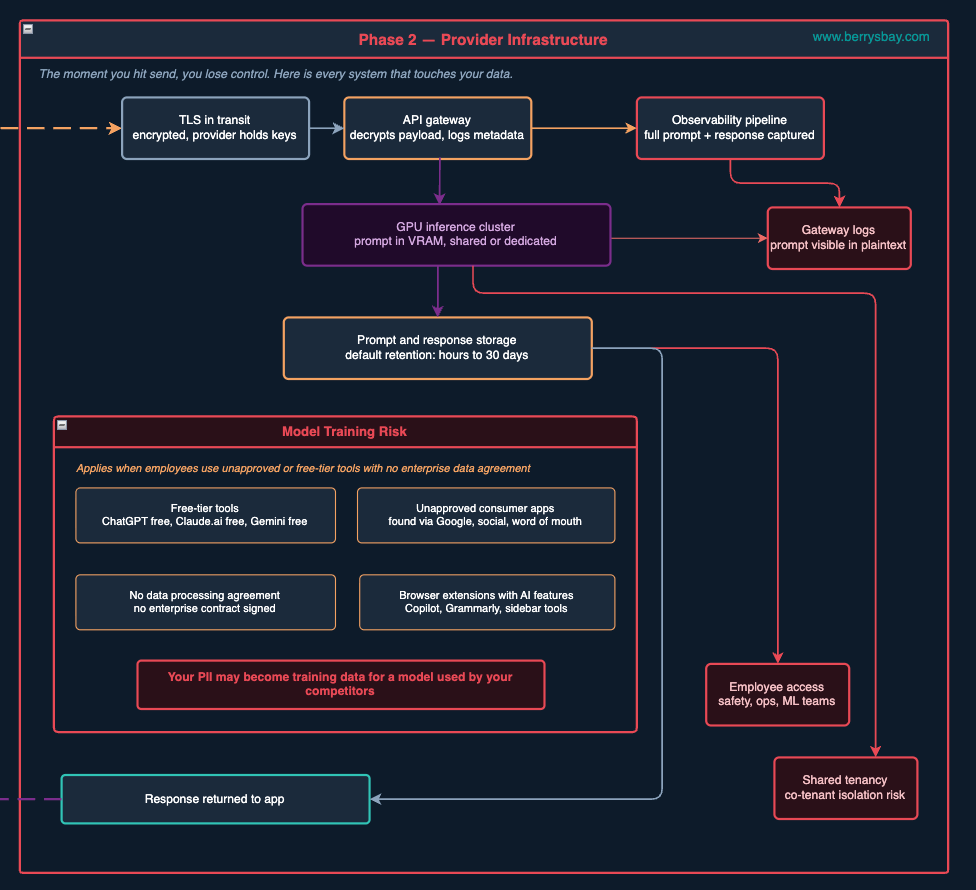
Yes, your data might be encrypted in transit. Transport Layer Security is doing its job. But TLS only protects the wire — the pipe between your employee’s browser and the provider’s front door. The moment the request arrives at that front door, it gets decrypted. From that point on, it passes through systems that you have no visibility into, no contract with (in many cases), and no ability to audit.
Here’s the actual journey your prompt very likely takes:
Stop 1: The API Gateway. This is the front door. It handles authentication, rate limiting, and routing. It also logs. Potentially every request gets a record — and in many configurations, that record includes the full request payload. Your prompt. In plaintext. Now it is sitting in a log file somewhere.
Stop 2: The Observability Pipeline. Every serious AI platform runs telemetry. They have to — it’s how they monitor reliability, debug problems, and understand usage patterns. Depending on the company, that pipeline captures your full prompt text, the response, the token count, and the latency. All of it is indexed, searchable, and retained. The person at the provider who debugs a weird inference failure on a Thursday afternoon may, as a routine part of their job, look at a conversation that contains your customer’s medical history.
Stop 3: The GPU Cluster. Your prompt runs on a GPU. The model tokenises it, runs a forward pass across billions of parameters, and generates a response. On consumer or standard API plans, you’re on shared infrastructure — your prompt runs on the same physical hardware that processes other organisations’ requests. The provider uses software isolation (process boundaries, memory management). That’s generally solid engineering. But it’s not the same as a dedicated machine, and it’s worth knowing.
Stop 4: Storage. After inference, the prompt and response are written to a data store. Default retention varies — it can be 30 days, it can be longer. This is where it starts to get genuinely complicated, because in 2025, several major providers changed their policies in ways that most users didn’t notice.
The Policy Change
In August 2025, in what can only be described as a privacy-pivot relay race, OpenAI, Google, and Anthropic all updated their data policies within weeks of each other. Three major AI companies almost simultaneously announced sweeping policy changes that transform AI conversations by default into permanent training data subject to law enforcement monitoring and corporate surveillance.
The Anthropic change is instructive because they’d built their brand on being the privacy-conscious alternative. Previously, Anthropic’s consumer products deleted prompts and conversation outputs from their back end within 30 days. Under the new policy, users on Claude Free, Pro, and Max plans would need to actively opt out if they didn’t want their conversations used to train future models. Opting in — which was the default — extends data retention to five years.
The opt-out toggle existed. It was just, as observers noted, set to “On” automatically, positioned below a prominent “Accept” button in much smaller text. You can draw your own conclusions about the UX intent there.
To be clear: enterprise API customers were protected. In some contracts it was stated that API inputs and outputs are automatically deleted after 7 days and never used for model training. But the consumer and Pro plans — the ones employees signed up for on their personal Gmail addresses — those are a different story.
Which brings us to the part of Phase 2 that should worry us most.
The Model Training Risk: When “Free” Means “You’re the Dataset”
This is the scenario that rarely gets mentioned in AI adoption discussions, possibly because it’s so uncomfortable.
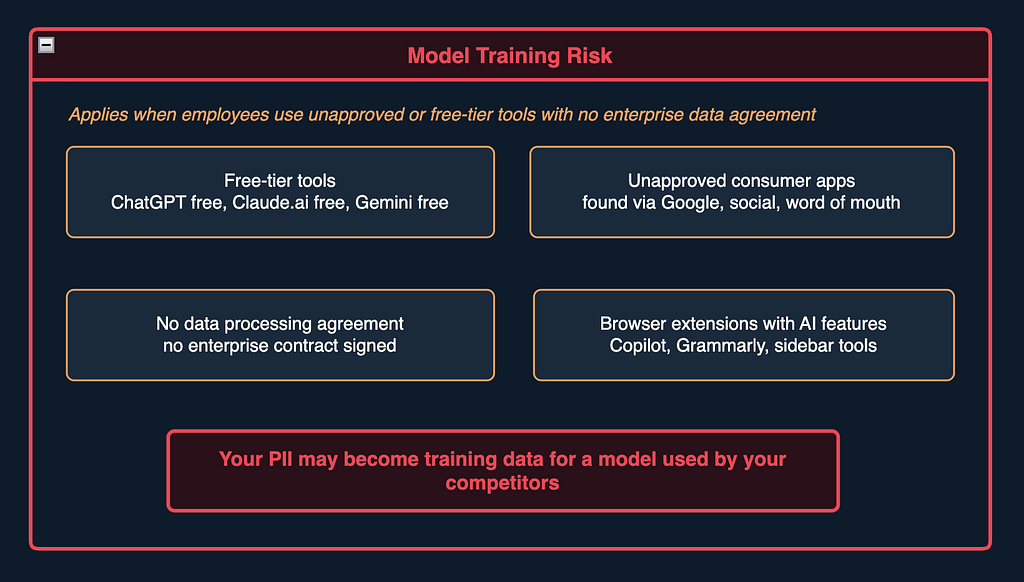
When an employee uses an unapproved free-tier tool for work — and 67% of AI usage in enterprises happens through personal, non-corporate accounts — their prompts may not just be logged and eventually deleted. They may be used to train the model. Which means the customer data, internal strategy document, or HR conversation they pasted in doesn’t just sit in a server somewhere. It potentially influences what the model suggests to its next users.
Including your competitors, who are presumably also using the same model.
This is not speculation. The Samsung incident is the case study: as ChatGPT is a machine learning platform, all data inputted is used to train its algorithm, meaning that proprietary information is available to all those using the platform. Samsung responded by banning ChatGPT internally and implementing a 1024-byte limit on prompts in their own internal AI tool. That’s a very Samsung solution — technically correct, operationally insane — but at least they responded.
The tools most likely to train on your data are:
- Free-tier versions of any major AI platform
- Consumer plans that haven’t been opted out (many paid “Pro” plans still qualify as consumer tiers for data purposes)
- Browser extensions with AI features — sidebar AI tools, anything that reads your tab content
- Any AI tool your employees found themselves, via Google, and started using without telling anyone
To fix this you need an approved tool list, data processing agreements with every provider on it, and some way of knowing which tier of which plan your employees are actually using. None of that is particularly exciting, but neither is explaining to a customer that their data appeared in someone else’s AI response.
You can also reduce the risk before the data ever leaves your environment. Tools like InBay run locally on the user’s device to detect and remove sensitive information from documents before they are shared with external AI tools. Because the processing happens on-device, sensitive data does not need to be uploaded to another service first.
Phase 3: Your Own System (a.k.a. The One That Gets You At Audit)
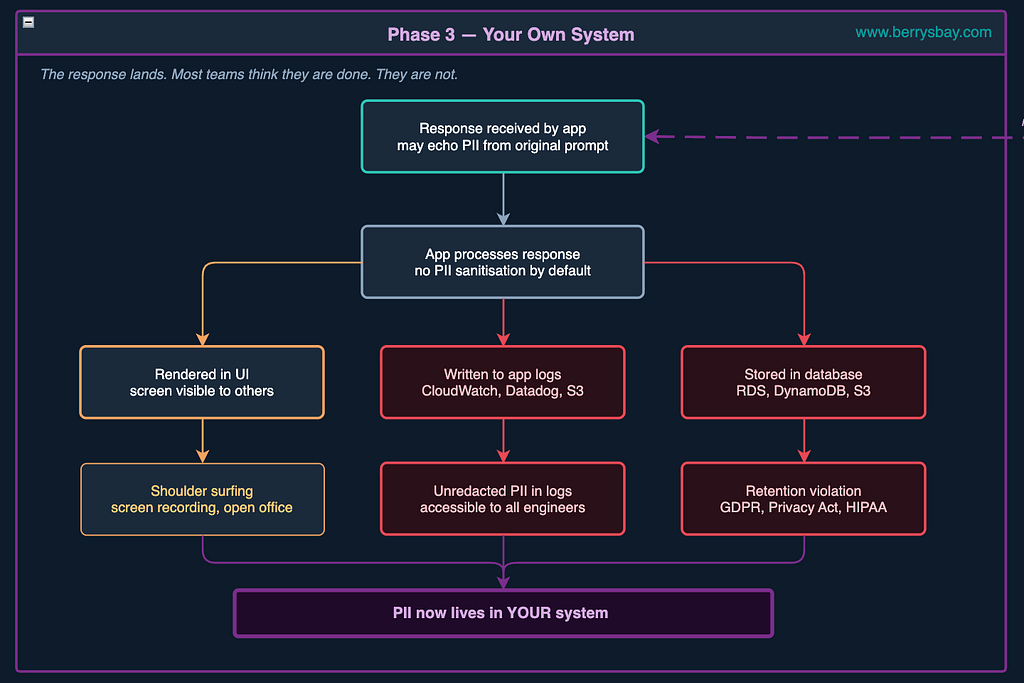
The response comes back.
This map assumes you’ve built your own system that integrates with AI APIs. But the same phase exists whether you own the system or not.
If your team is using third-party AI tools, everything described here still happens — just outside your visibility and control.
Let’s just have a closer look at this system.
Most developers breathe a sigh of relief at this point because the scary provider infrastructure part is done. The data is back in their system. Under their control.
Except it’s not under control at all, if nobody thinks about what happens to it next.
The Logging Problem. Your application almost certainly logs requests. This is good engineering — you need to debug when things go wrong. But if your prompts contain customer data (and we’ve just established that they probably do), then your CloudWatch logs are now a PII store. They get shipped to Datadog. They’re indexed in Splunk. They’re searchable by your whole engineering team, your intern included. Under GDPR, if a customer invokes their right to erasure, can you find and delete every mention of them across your entire logging infrastructure? In most organisations I’ve worked with, the honest answer is no.
The Storage Problem. Chat history is excellent UX. Users love being able to return to a previous conversation. But when you persist conversation history, you’re persisting everything the user said — including whatever they accidentally included in their prompt. A DynamoDB table with no TTL, no field-level encryption, and no data classification flag is one misconfigured IAM policy away from a breach that exposes thousands of conversations. This is the default architecture, from my experience.
The UI Problem. The response renders on screen. But their work laptop has monitoring software installed. The PII that entered as a prompt can exit as a screen visible to people who were never supposed to see it.
For organisations bound by regulations like GDPR, HIPAA, and SOX, such exposure creates a ticking compliance time bomb. JPMorgan discovered this in 2023 when employees were found to be summarising confidential client communications and trading data in ChatGPT. Law firms found it in 2024 when associates were using ChatGPT to draft privileged client communications. Healthcare organisations found it when employees shared patient data without the Business Associate Agreements that HIPAA requires.
The question a regulator will ask is not “did you have an AI policy?” It’s “did you know what data was flowing through your AI systems, was it necessary, where it went, how long it was kept, and who had access?” If you can’t answer all parts of that question, you might have a problem.
How Exposed You Are?
Here are the three questions that will tell you how exposed you actually are:
- Do you have a clear data classification policy, and is it enforced at the point of use?
Do you classify data as public, internal, confidential, or regulated? More importantly, do employees understand the difference when they are about to paste something into an AI tool or upload a file? Before data leaves your environment, it should be reduced to what is strictly necessary. That can mean creating a redacted copy first, ideally on-device, so sensitive information is removed before the file reaches an external AI system. - Do you have a list of approved AI tools, including which plan/tier each one is? Not “we use Microsoft Copilot.” Which plan, which product? If your employees are having AI subscriptions, you need to know what they’re subscribing to.
- Do you have data processing agreements with your AI providers? This is a boring legal document that is also the only thing standing between you and “our provider’s terms say they can do whatever they want with your data.” Enterprise contracts with Anthropic, OpenAI, and Google all have data processing addenda that limit retention and exclude training. Consumer terms do not.
- Do you have data sovereignty obligations? For some organisations, the issue is where the data is stored, processed, backed up, logged, and accessed from. For example here in Australia, some organisations have legal, contractual, government, client, or sector-specific obligations that affect whether certain data can be disclosed offshore or processed outside Australia. Yet another reason to redact sensitive information before it leaves your environment.
- Are your own application logs becoming a PII store?
If customer email addresses, names, or account details are appearing in your logs, it may point to a broader logging hygiene issue that existed before AI entered the picture. Add AI into that workflow, and the risk grows: you may not only be logging simple identifiers, but also full prompts, responses, or conversation threads containing whatever users pasted in.

Why is it hard to fix?
Here’s the thing that makes this genuinely hard to fix: it’s invisible. Unlike ransomware, phishing, or network intrusions, accidental data leakage through AI platforms leaves minimal traces.
Your perimeter security, your DLP tools, your SIEM — they’re built to catch file attachments, suspicious downloads, and outbound emails. AI conversations look like normal web traffic, even when they contain confidential information. They bypass traditional data-loss prevention tools entirely.
Unfortunately some organisations will only discover these gaps when they are forced to explain to a regulator, a journalist, or a very unhappy customers, why the right controls were not in place.
The diagram I’ve been describing in this post isn’t a worst-case scenario. In most cases it is the default scenario — what happens when you use an AI tool without thinking about data governance. The risk surface is a customer support representative copy-pasting an email thread on a Tuesday morning because their boss encouraged them to explore AI productivity tips.
“We use AI responsibly” should mean more than a slide in the next all-hands. In practice, it requires understanding the real risks, knowing your responsibilities, and being able to explain what data is being shared, why it is allowed, who can access it, and where it goes.
If shadow AI or weak controls are already showing up in your company’s workflows, I’d love to hear what you’re seeing. Share your thoughts in the comments or join the conversation on LinkedIn.
We also have a free, in-person AI risk awareness workshop for Sydney SMEs coming soon. Details will be announced on the Berrysbay page. Follow along, share this with someone who might benefit, or message me if you want to talk through your organisation’s data exposure risks in the era of AI.
How Exactly AI Tools Are Leaking Your Secrets. was originally published in Towards AI on Medium, where people are continuing the conversation by highlighting and responding to this story.