You’ve been using Claude like a search engine. Here’s what it can actually do to your working week — and why the difference is larger than you think.
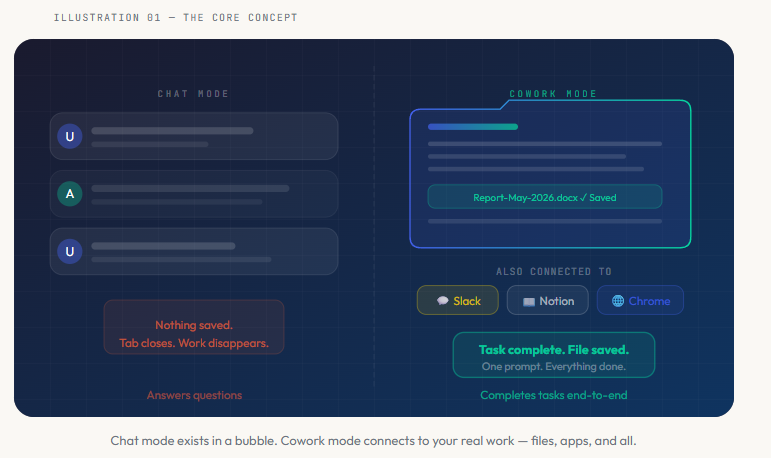
Most people use AI the same way they use Google. Type a question. Read the answer. Close the tab. Maybe copy something into a document if you’re feeling productive. That pattern is fine. But it’s roughly equivalent to hiring a Formula 1 driver and asking them to park your car. Technically employed. Catastrophically underused.
Claude Cowork is not a chatbot. It is a desktop automation system — one that reads your actual files, writes finished documents back to your computer, browses live websites, posts results to Slack, pushes pages to Notion, and sends emails on your behalf. All triggered by a single typed instruction, while you do something else entirely.
Understanding this distinction isn’t a minor technical point. It changes what you believe is possible before breakfast on a Tuesday.
The toggle that changes everything
When you install Claude Desktop and open it, you’re in Chat mode by default. This is the familiar interface — a conversation box, a response box, and nothing else. Claude here is extraordinarily capable at answering questions, drafting text, explaining concepts, and solving problems in dialogue. But when you close the window, it’s all gone.
Cowork mode is a toggle in the top bar of the desktop app. Flip it on, and the interface shifts. You’re now asked to connect a folder on your computer. That folder is Claude’s working space — the place it reads from and saves to. And once you give it that folder, you’ve fundamentally changed what Claude can do.
It can now read a 47-page PDF report. Process three Excel exports. Write a structured Word document that synthesises all of them. Apply your company’s tone guidelines from a brand voice file. Flag every metric below target in red. Save the result with the exact filename you specified. All from one prompt.
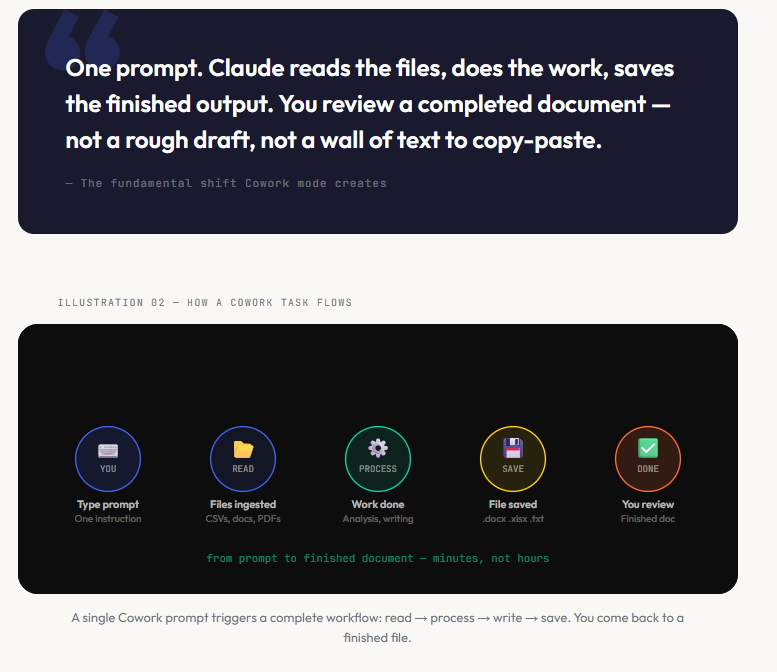
The three components that make it work
Cowork is built on three interlocking components. Each one matters independently, but together they create a system that’s qualitatively different from anything you’ve used before.
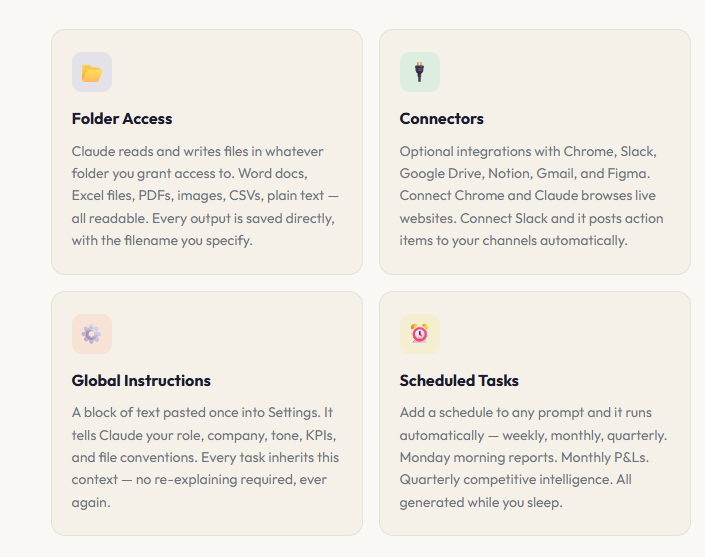
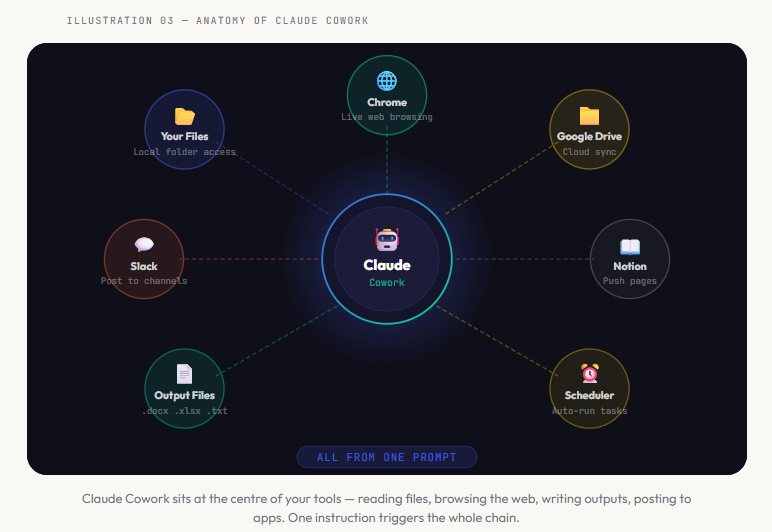
A concrete example that makes it real
Let’s take a typical scenario. You’re a marketing manager. Every month you need to produce a campaign performance report — pulling data from Google Ads, Meta, and GA4, writing an executive summary, flagging the underperformers, and comparing to the previous month.
Without Cowork: export three CSVs, wrangle them into a spreadsheet, calculate variances, write a narrative, format a table, apply conditional formatting, add your interpretation, review, fix the formatting that broke, send. Two to three hours. Every month. Without fail.
With Cowork: drop three CSV exports into your campaign folder. Run this prompt once:
EXAMPLE PROMPT
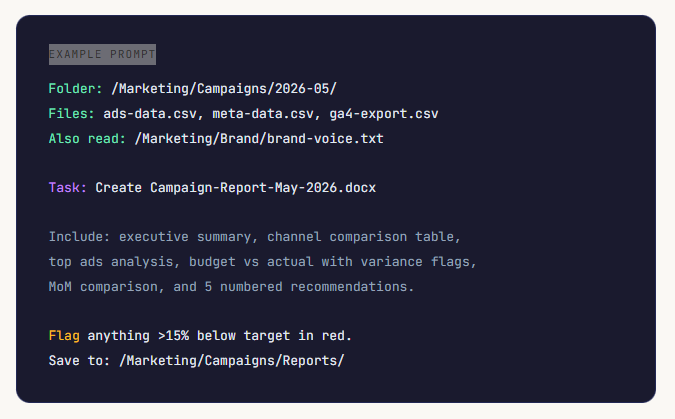
Come back twelve minutes later. Open a finished Word document. Formatted tables. Colour-coded flags. Narrative written in your brand voice. Month-on-month comparison pulled from last month’s report. Five specific recommendations. A document you could send to the director, as-is, without editing a word.
That is the magnitude of the change.

Who benefits most from Cowork
Cowork delivers the greatest value to people whose jobs involve producing recurring documents on a regular schedule. Not one-off creative projects. Not brainstorming sessions. The repeating, structured, data-driven document work that happens every week or every month without fail.
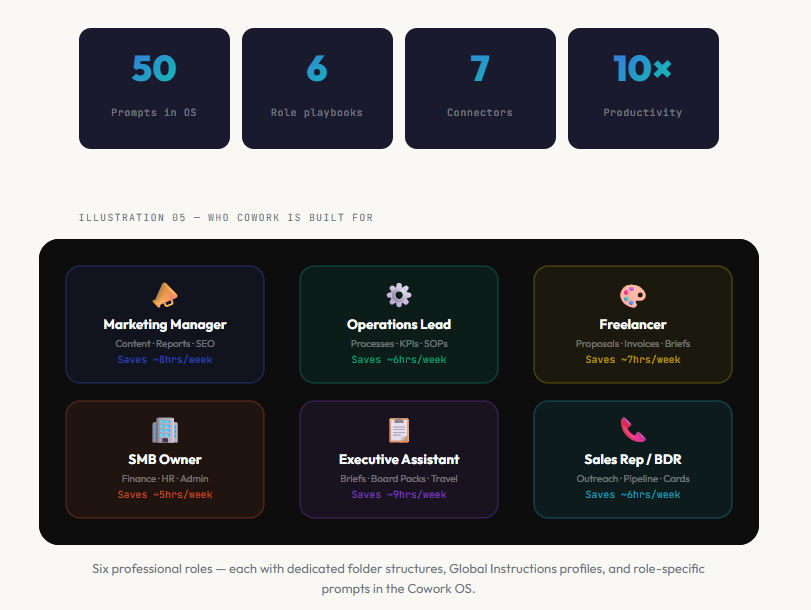
Six professional archetypes find Cowork transformative almost immediately:
Marketing managers who build content calendars, campaign reports, SEO briefs, and social caption batches. Operations leads who process meeting transcripts, build KPI dashboards, and write SOPs. Freelancers and solopreneurs who write proposals, generate invoices, and produce client reports. Small business owners who need P&L reports, expense processing, and HR documents without a finance team. Executive assistants who prepare board packs, daily briefings, and travel documents. Sales reps and BDRs who build outreach sequences, research prospects, and create competitive battle cards.
What Cowork is not
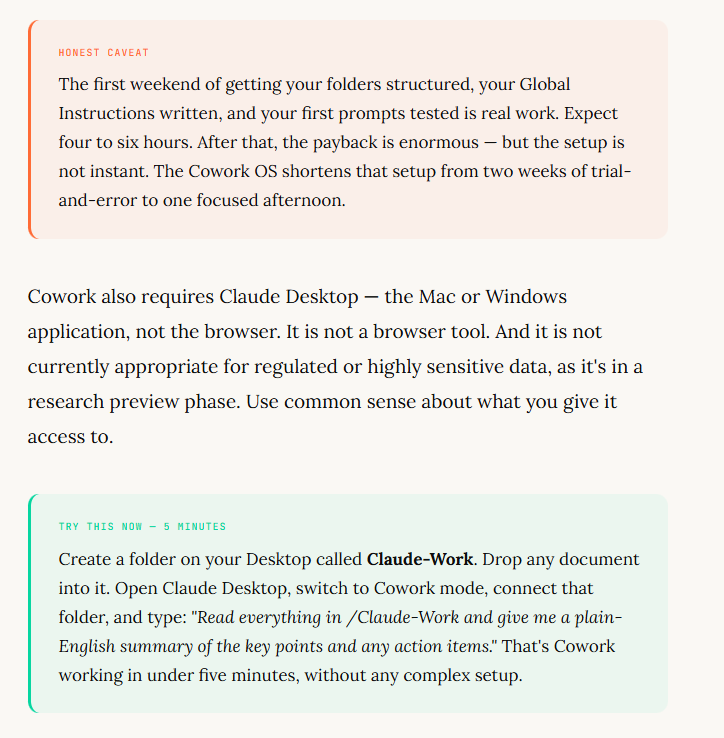
Honesty matters here, because overselling AI tools is the original sin of this entire industry. Cowork is not magic, and it’s not a replacement for your judgment.
The quality of what it produces is directly proportional to the quality of your setup. A vague prompt produces a vague output. An inconsistent folder structure produces incomplete results. Missing context — no brand voice file, no CONTEXT.txt, no Global Instructions — means Claude is working with less information than it could have, and the output shows it.
The bigger shift
There’s a moment that happens to most people the first time a Cowork task completes. You’ve been half-expecting to need to clean up the output, edit the structure, reformat the tables. Instead you open the file and it’s… fine. More than fine. It’s the document you would have made, just without you having made it.
The feeling is not quite wonder and not quite unease. It’s something closer to recalibration — a quiet adjustment of what you thought the tool was capable of, and therefore what you thought was possible in your working week.
That recalibration is the point. Cowork is not about doing tasks faster. It’s about shifting what you spend your professional time on. The production work — the formatting, the data wrangling, the report-writing — goes to Claude. The thinking, the judgment, the strategy, the relationships — that stays with you.
Which is, as it turns out, exactly where your best work has always lived.
Get Started Today
The Claude Cowork OS — Complete Edition 2026
6 role playbooks · 50 copy-paste prompts · 7 connector guides · 12 Global Instructions profiles · Scheduled task library · Master cheatsheet
Independent educational resource · Not affiliated with or endorsed by Anthropic
What Is Claude Cowork — and Why It’s Different From a Chatbot was originally published in Towards AI on Medium, where people are continuing the conversation by highlighting and responding to this story.