I built an AI agent for outbound teams. Two weeks to ship. Saves 2–3 hours a day. Here’s exactly how.
What happens when you give your outbound reps a researcher that never sleeps, never context-switches, and delivers a brief in 80 words or fewer?
I’m a GTM engineer at a B2B SaaS company. A few weeks ago I got a simple mandate: make our outbound more effective using AI.
I could have automated emails. I could have built a prospecting tool. Instead, I went after the part that hurts most: research.
Two weeks later, I had a working agent deployed to GCP, integrated with Salesforce and Outreach, and in the hands of ten internal users. A senior AE opened it on his first account and wrote back:
“wow, this looks immediately brilliant.”
Here’s what I built, what worked.
The real cost of research
A typical outbound motion has nine steps: account mapping, prospecting, research, email sequencing, scheduling, conversion, and cleanup.
Most of them can be systematised. But steps 3, 4, and 5 are pure thinking work: Account Research, Person Research, and crafting the Outreach Trigger. There’s no shortcut. You have to understand the company, the person, and why right now is the right moment to reach out.
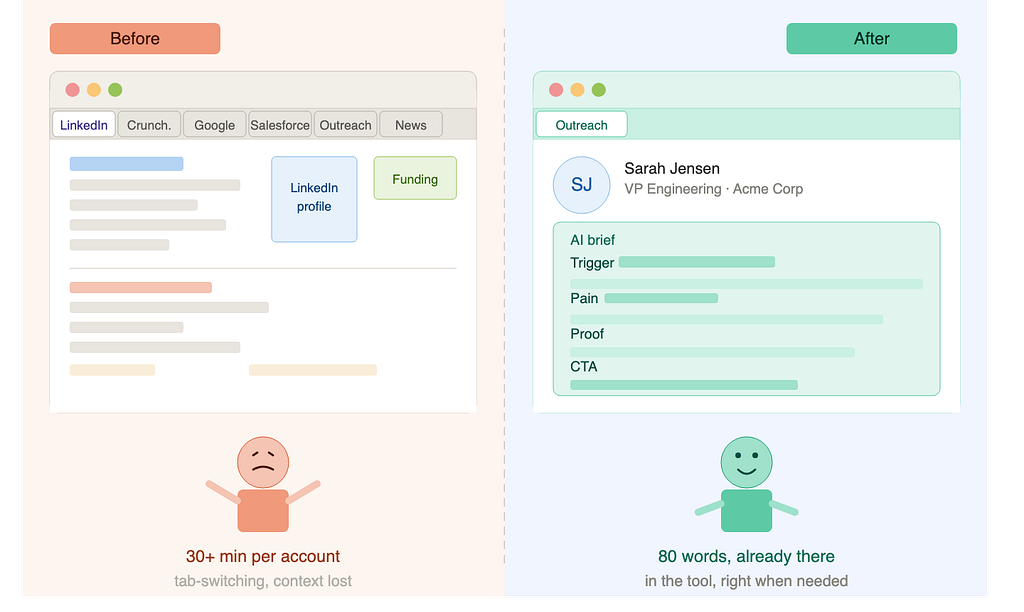
A good rep was spending 30+ minutes per account on just these three steps, tab-switching between LinkedIn, Crunchbase, Salesforce, Google News, and Outreach before writing a single word.
Multiply that by 10 accounts a day. That’s six hours of context-switching that produces no pipeline.
That’s the problem worth solving.
What the agent actually does
A deep research agent built on LangChain. You give it an account and a prospect. It gives you a brief.
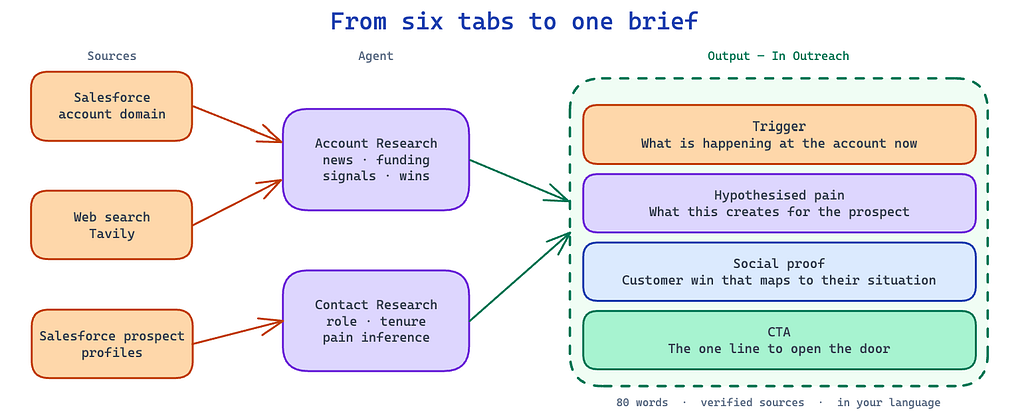
Company research:
- Pulls the account from Salesforce via domain, not name (more on why that matters)
- Searches the web with Tavily: recent news, press releases, hiring signals, funding rounds, strategic announcements
- Pulls structured company data: employee count, industry, tech stack, growth signals
- Cross-references against your win stories and positioning: who else like them have you helped, and how
Person research:
- Researches the prospect: LinkedIn role, tenure, recent activity, likely priorities
- Infers the pain based on their role, seniority, and what’s happening at their company right now
Output:
- Returns a brief in under 80 words, live inside Outreach when the rep opens the account
Trigger → what’s happening at this account right now
Hypothesised pain → what problem this creates for this person
Social proof → a customer win that maps to their situation
CTA → the one line to open the door
Not a report. Not a dashboard. 80 words, right where the rep already is.
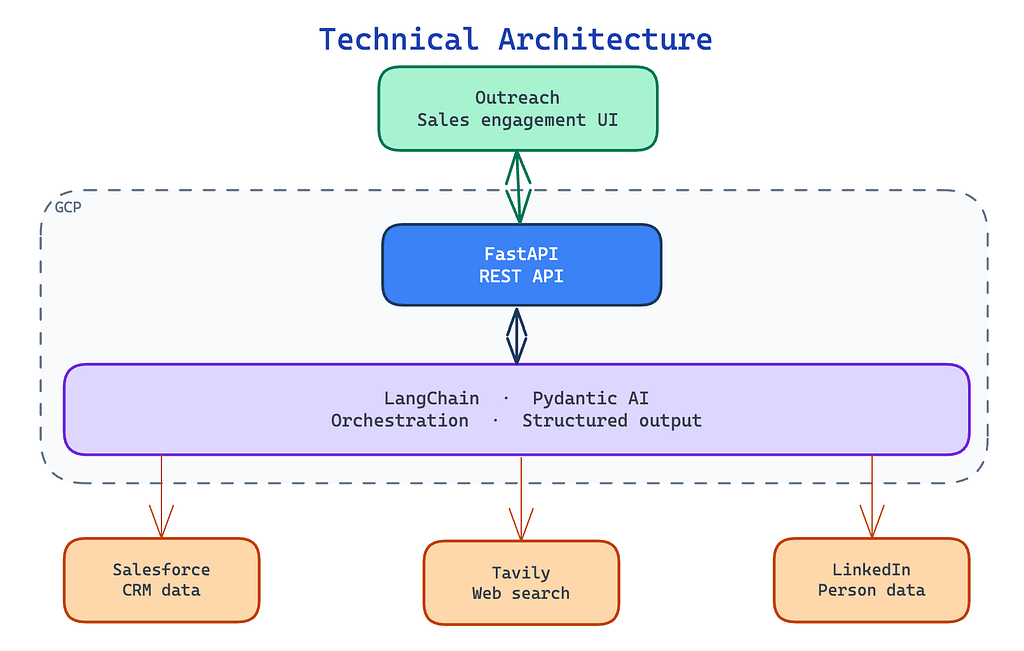
Stack: LangChain · Tavily · GCP · Outreach · Pydantic AI · FastAPI
The design decisions that actually mattered
Research with proof: every claim is a link.
Outbound reps don’t trust AI by default. And they shouldn’t. If a rep pastes a hallucinated fact into a cold email and gets called out, they never touch the tool again.
So every statement the agent makes comes with a source link. Not buried in a footnote. Clickable, inline, right next to the claim. The rep can verify anything in one click before they use it.
This changed adoption more than any other decision. Reps stopped asking “is this accurate?” and started asking “which of these do I use?” That’s the shift you’re looking for.
Build with your users, not for them.
The best thing I did was sit next to our top outbound reps and watch them use it on real accounts in real time. Not a demo. Not a survey. Just them, their pipeline, and the tool.
That one session changed the output format entirely. They showed me what they actually needed at 4pm on a Friday, when they’re on their 30th account and running out of time. No manager can tell you that. No product spec captures it.
I kept doing this throughout the build. Every major decision about what to show, how many words, what to skip came from watching reps work, not from asking what they wanted.
Don’t interrupt the flow of work. Become part of it.
A rep’s day has a rhythm: open Salesforce, pull up the account, open Outreach, write the email. Every extra step outside that rhythm is a reason not to use your tool.
The brief appears inside Outreach when the rep opens the account. No new tab. No copy-paste. No login. It’s just there, exactly when they need it, inside the tool they’re already in.
AI that fits the flow gets used. AI that interrupts it gets ignored, no matter how good the output is.
Results
Ten pilot users across the outbound team (SDRs and AEs). One month in.
- (Expected) +40 well-researched touches per rep per week
- (Expected) 2x open rates
- (Expected) 2x approved opportunities
- 2–3 hours saved per rep per day
From a senior sales leader:
“Absolutely unbelievable. This is a real step forward.”
At scale (15 outbound reps): 40–48 new meetings per month.
If you’re building something similar
- Design the output format first, then build backward. What does the rep need to see, in what format, in how many words? Start there.
- Ship to where work already happens. Outreach, Salesforce, Slack.
- Validate with the person who actually does the work. Managers approve. ICs adopt.
- The AI is the easy part. Research quality, data sources, and that last-mile formatting are where it breaks.
I’m building GTM AI, modular AI agents for revenue teams. If you’re working on outbound AI, prospecting automation, or GTM tooling and want to swap notes, reach out on LinkedIn.
I Built an AI Outbound Agent. Here’s What Actually Worked. was originally published in Towards AI on Medium, where people are continuing the conversation by highlighting and responding to this story.