
You have been there. A 2GB CSV lands on your desk, you fire up Jupyter Notebook, run `pd.read_csv()`, and watch your laptop fan spin up like a jet engine. Five minutes later, your kernel crashes. You restart, try again with `low_memory=False`, and pray. This is the Pandas experience at scale, and if you have been in data science or engineering for any length of time, it is painfully familiar.
But here is the thing most tutorials will not tell you: Pandas was never designed for big data. It was built in 2008 for small-to-medium tabular data manipulation, and it does that job brilliantly. The problem is that the world has changed. Datasets have grown from megabytes to gigabytes to terabytes, yet many of us are still reaching for the same hammer we learned in our first Python course.
The good news? The Python data ecosystem has evolved. Today, we have Polars for blazing single-machine speed, DuckDB for SQL-first analytics on massive files, and PySpark for distributed computing at true big data scale. The bad news? Choosing between them is confusing. Every Reddit thread and Hacker News comment section devolves into a religious war. So let us cut through the noise with a practical, engineering-focused comparison.
The Problem: One Tool Cannot Rule Them All
If you are still using Pandas for every data task, you are leaving speed, memory, and scalability on the table. I see this pattern constantly in production environments:
- Data scientists pulling 5GB Parquet files into Pandas and wondering why their 16GB RAM MacBook Pro freezes
- Engineers writing complex groupby operations that take twenty minutes when they could take twenty seconds
- Teams spinning up entire Spark clusters for 500MB datasets because “that is what the big data playbook says”
These are not skill issues. They are tool-selection issues.
The reality is that each framework was built with different constraints, assumptions, and optimization targets. Pandas optimizes for flexibility and ecosystem compatibility. Polars optimizes for raw query speed on a single machine. DuckDB optimizes for analytical SQL workloads without loading data into memory. PySpark optimizes for distributed computation across clusters.
Understanding these differences is not academic trivia. It directly impacts your pipeline runtime, infrastructure costs, and sanity during debugging.
What Defines a Great Data Tool?
Data tool selection is the practice of matching your computation’s execution model, memory constraints, and scale requirements to the framework that was explicitly optimized for that profile.
A great data tool is not just fast. It is fast _for your specific workload_ while respecting your hardware and team constraints. That means we need to evaluate these frameworks across four pillars:
- Execution Strategy — How does the tool process your instructions?
- Memory Efficiency — How much RAM does it need relative to your data size?
- Syntax & Learning Curve — How quickly can your team write and debug code?
- Speed, Scale, and Best Use Case — Where does each tool truly shine?
Let us walk through each pillar with real comparisons.
Pillar 1: Execution Strategy — Eager vs Lazy
Pandas uses eager execution. When you write `df.groupby(“category”).agg({“sales”: “mean”})`, Pandas executes that operation immediately. It materializes the full intermediate result in memory, then moves to the next line. There is no global optimization. If you filter a column and then drop it two lines later, Pandas still computed that filter.
Polars, DuckDB, and PySpark use lazy execution. They build a logical query plan first, optimize it, and only compute what is strictly necessary. If you select three columns, filter rows, and then groupby, the optimizer might reorder operations, push filters down, or skip unused columns entirely.
Here is why this matters in practice. Imagine this Pandas pipeline:
import pandas as pd

# Bad: Pandas computes every intermediate step eagerly
df = pd.read_csv("large_file.csv")
df = df[df["region"] == "APAC"]           # Step 1: full scan + filter
df = df[["user_id", "revenue"]]           # Step 2: full copy with subset
df = df.groupby("user_id").sum()          # Step 3: aggregation
Pandas executes steps one, two, and three sequentially, creating intermediate copies at each stage. The filter in step one still touches every column, even though we only need two columns in the end.
Now look at the Polars equivalent:
import polars as pl

# Good: Polars optimizes the entire plan before execution
result = (
    pl.read_csv("large_file.csv")
    .lazy()
    .filter(pl.col("region") == "APAC")
    .select(["user_id", "revenue"])
    .group_by("user_id")
    .agg(pl.col("revenue").sum())
    .collect()
)
Polars sees the entire pipeline before running it. It knows it only needs `region`, `user_id`, and `revenue` from the CSV. It pushes the filter down to skip irrelevant rows early. The result is less memory pressure and faster execution.
DuckDB and PySpark behave similarly, though PySpark’s lazy execution is distributed across a cluster coordinator. The core principle is the same: look before you leap.
Pillar 2: Memory Efficiency — The RAM Factor
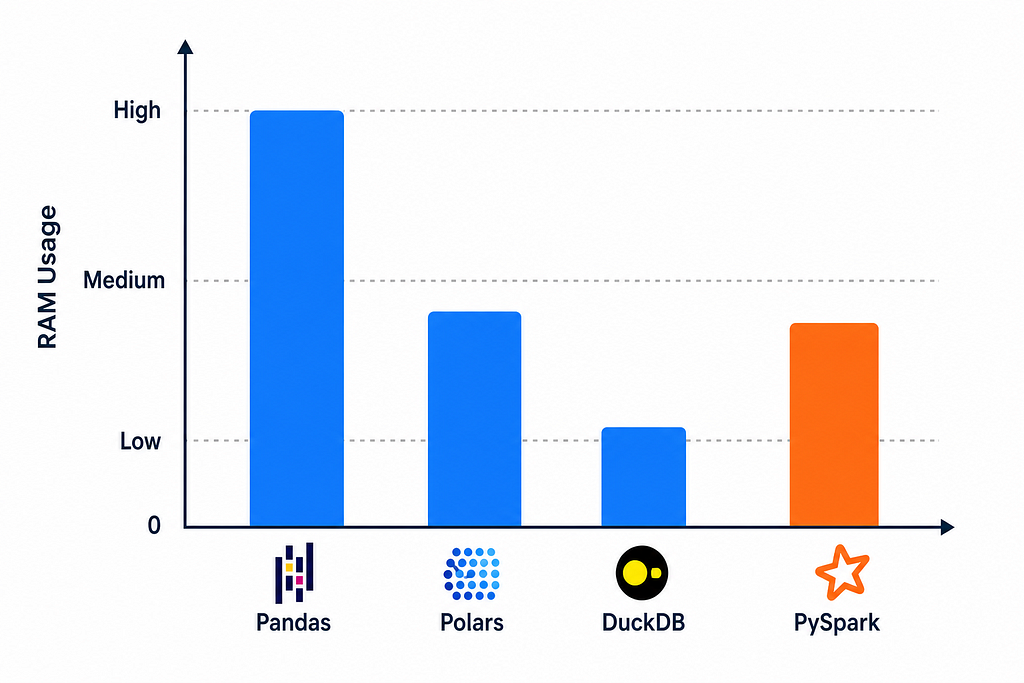
If execution strategy is about how the tool thinks, memory efficiency is about how much it eats.
Pandas: The RAM Hog
Pandas typically requires 5x to 10x more RAM than your raw dataset size. This is not a bug. It is a consequence of its design. Pandas stores data as Python objects and NumPy arrays with heavy type boxing. Every operation creates intermediate copies. A 500MB CSV can easily balloon to 4GB or 5GB in memory after a few transformations.
This is why the rule of thumb is: only use Pandas if your data is under 1GB, or under roughly one-quarter of your available RAM.
Polars: Arrow-Powered Efficiency
Polars is built on Apache Arrow, a columnar memory format designed for zero-copy data sharing. It avoids the object overhead that plagues Pandas and parallelizes operations across all CPU cores natively. For the same 500MB CSV, Polars might use 600MB to 800MB total. It is not magic — it is just better memory layout and multithreading.
DuckDB: The Out-of-Core King
DuckDB’s superpower is out-of-core execution. It can process datasets larger than your RAM by streaming data from disk in chunks. If you have a 20GB Parquet file on a laptop with 8GB RAM, DuckDB can query it without breaking a sweat. It acts like an analytical database that happens to run inside your Python process.
PySpark: Designed for Terabytes
PySpark was built for the regime where data does not fit on one machine, period. It breaks data into partitions and spreads them across a cluster. Each worker node processes its chunk independently, and the driver coordinates results. The memory footprint on any single node is small, but you pay the coordination overhead and infrastructure complexity.
Pillar 3: Syntax and Learning Curve
Speed and memory mean nothing if your team cannot write readable, debuggable code. Here is how the four frameworks compare in daily use.
Pandas: The Industry Standard (With Baggage)
Pandas has the most tutorials, StackOverflow answers, and library integrations. Scikit-Learn, Plotly, and most ML frameworks expect Pandas DataFrames. But the syntax is notoriously inconsistent. Sometimes you use `.apply()`, sometimes `.map()`, sometimes vectorized operations. The index is powerful but confusing. And performance optimization often requires dropping down to NumPy or rewriting in a vectorized form that is harder to read.
Polars: The Expression API
Polars uses a consistent Expression API that reads like a recipe:
df.select(["col1", "col2"]).filter(pl.col("col1") > 10).group_by("col2").agg(...)Everything is explicit. There is no hidden index. The API surface is smaller and more regular than Pandas. The learning curve is steeper for Pandas veterans who need to unlearn old habits, but newcomers often find it cleaner.
DuckDB: SQL-Native
DuckDB’s killer feature is that if you know SQL, you already know DuckDB. You can write standard SQL queries against CSVs, Parquets, and Pandas DataFrames without loading them into a separate database.
For SQL-first teams, this is a massive productivity win. DuckDB also offers a Python relational API for those who prefer method chaining over strings.
PySpark: Distributed DataFrames
PySpark’s DataFrame API looks similar to Polars but with Java/Scala DNA. The syntax is readable, but debugging is painful. Errors often surface as Java stack traces buried deep in JVM logs. A simple typo in a column name might produce a 200-line exception from the Spark executor. The mental model is also harder because you must think about partitions, shuffles, and driver memory.
Let us look at the same simple groupby operation across all four frameworks:
# Pandas
import pandas as pd

df_pd = pd.read_csv("data.csv")
result_pd = (
    df_pd.groupby("category")
    .agg({"sales": "mean"})
    .reset_index()
)

# Polars
import polars as pl

df_pl = pl.read_csv("data.csv")
result_pl = (
    df_pl.group_by("category")
    .agg(pl.col("sales").mean())
)

# DuckDB
import duckdb

result_duck = duckdb.sql("""
    SELECT category, AVG(sales) AS sales
    FROM 'data.csv'
    GROUP BY category
""").df()

# PySpark
from pyspark.sql import SparkSession
from pyspark.sql.functions import avg

spark = SparkSession.builder.getOrCreate()
df_spark = spark.read.csv("data.csv", header=True, inferSchema=True)
result_spark = (
    df_spark.groupBy("category")
    .agg(avg("sales").alias("sales"))
)
Notice how Polars eliminates the `.reset_index()` dance and DuckDB eliminates DataFrame manipulation entirely. Each framework makes different trade-offs between verbosity and control.
Pillar 4: Speed, Scale, and Best Use Case
Here is where theory meets practice. Let us look at where each tool wins and where it falls over.
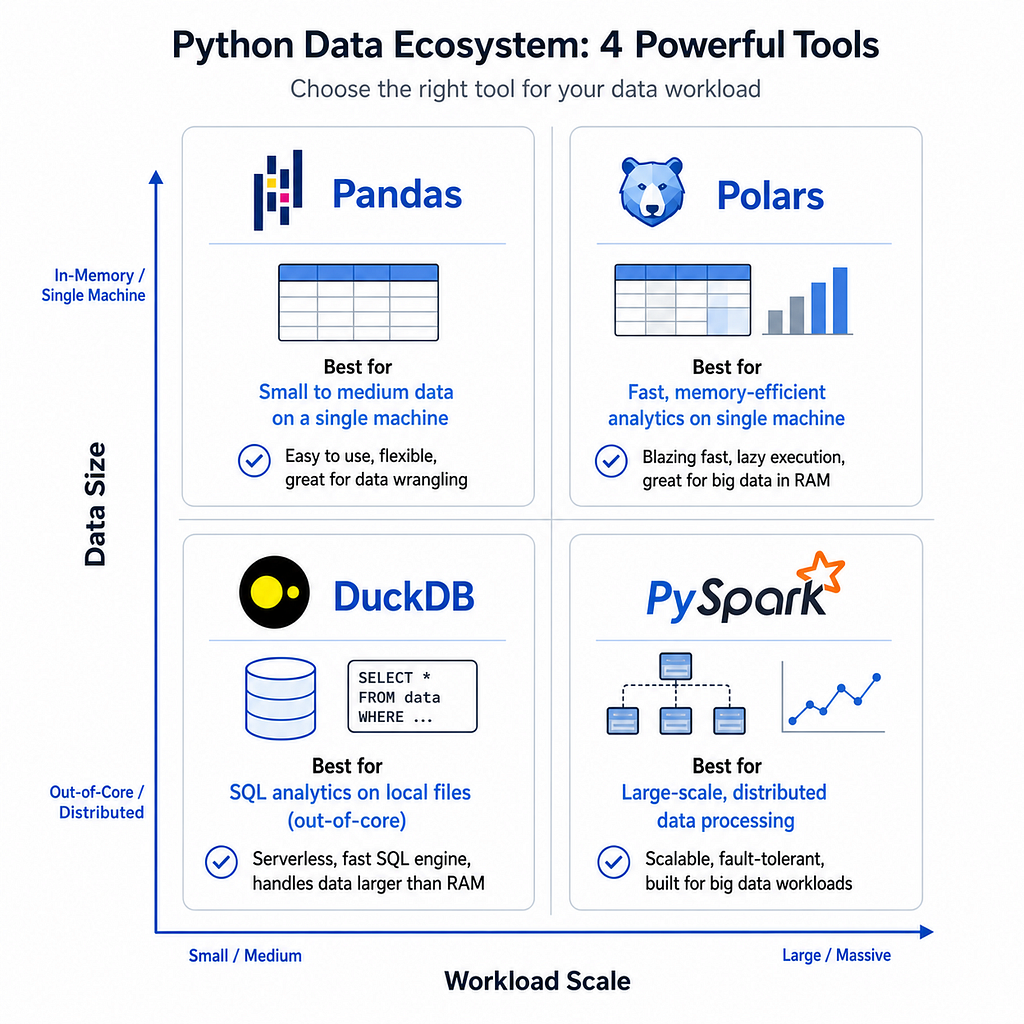
- Pandas is unbeatable for quick exploratory data analysis on small files. Need to inspect a 50MB CSV, plot distributions, and join with a lookup table? Pandas is perfect. The ecosystem integration is unmatched. But once you cross the 1GB threshold, you are fighting the framework instead of using it.
- Polars is the fastest option on a single machine. Benchmarks consistently show Polars outperforming Pandas by 5x to 50x on aggregation and join operations, depending on data size and query complexity. If your data fits on one server and you want maximum throughput, Polars is the answer.
- DuckDB shines when you need to query large files without loading them. Have a 10GB Parquet file on S3? DuckDB can run SQL directly against it. Need to join a CSV with a JSON file? DuckDB handles heterogeneous sources gracefully. It is also excellent for analytical workloads with complex window functions and CTEs.
- PySpark is the only choice when your data physically cannot fit on one machine or when you need fault-tolerant distributed processing. If you are processing terabytes of clickstream data or training on billion-row datasets, Spark is the industry standard. For anything smaller, it is overkill.
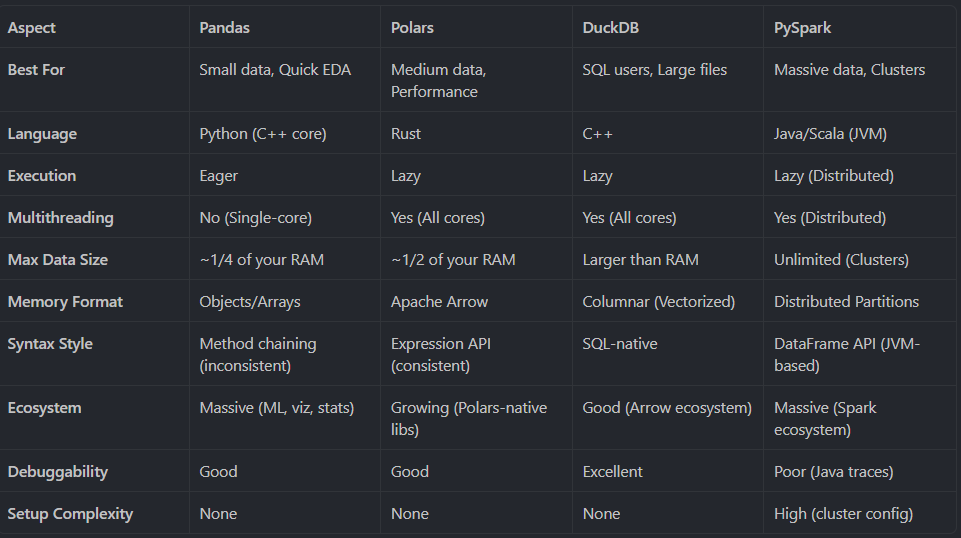
The Full Comparison Table
A Real-World Decision Framework
Theory is useful, but decisions happen in context. Here is how I think about tool selection in practice:
- Scenario 1: You are a data scientist exploring a 200MB customer dataset.
Use Pandas. The data fits in memory, you need quick plots and Scikit-Learn compatibility, and your time is better spent on feature engineering than framework optimization.
- Scenario 2: You are an ML engineer building a feature pipeline that processes 5GB of Parquet files nightly.
Use Polars. The data fits on one machine, but Pandas would be painfully slow. Polars gives you 10x speedup with minimal syntax changes and full Arrow compatibility.
- Scenario 3: You are an analyst who needs to run ad-hoc SQL queries across a 50GB log archive stored on disk.
Use DuckDB. You do not want to spin up a database server or load 50GB into RAM. DuckDB queries the files directly with standard SQL.
- Scenario 4: You are a platform engineer processing 2TB of sensor data daily across a cloud cluster.
Use PySpark. The data cannot fit on one node, and you need fault tolerance if a worker dies mid-job. Spark was built exactly for this.
Performance in Practice: A Simple Benchmark
Let us make this concrete with a reproducible benchmark. The script below generates a synthetic dataset and runs an identical aggregation across Pandas, Polars, and DuckDB. PySpark is omitted here because it requires a running cluster, but the pattern is analogous.
import time
import pandas as pd
import polars as pl
import duckdb
import numpy as np

"""
Performance Benchmark: Pandas vs Polars vs DuckDB

This script generates a synthetic dataset with 10 million rows and runs
an identical aggregation across Pandas, Polars, and DuckDB to compare
execution speed on a single machine.

Run this script from the command line:
    python performance_benchmark.py
"""


def generate_data(n_rows: int = 100_000_000, output_path: str = "benchmark_data.csv") -> None:
    """Generate synthetic sales data and write to CSV."""
    data = {
        "category": np.random.choice(["A", "B", "C", "D"], n_rows),
        "region": np.random.choice(["NA", "EU", "APAC"], n_rows),
        "sales": np.random.randn(n_rows) * 100 + 500,
    }
    pd.DataFrame(data).to_csv(output_path, index=False)
    print(f"Generated {n_rows:,} rows -> {output_path}\n")


def benchmark_pandas(csv_path: str) -> float:
    """Run aggregation using Pandas and return elapsed time."""
    start = time.time()
    df = pd.read_csv(csv_path)
    result = df.groupby("category").agg({"sales": "mean"}).reset_index()
    elapsed = time.time() - start
    print(f"Pandas: {elapsed:.2f}s")
    return elapsed


def benchmark_polars(csv_path: str) -> float:
    """Run aggregation using Polars and return elapsed time."""
    start = time.time()
    df = pl.read_csv(csv_path)
    result = df.group_by("category").agg(pl.col("sales").mean())
    elapsed = time.time() - start
    print(f"Polars: {elapsed:.2f}s")
    return elapsed


def benchmark_duckdb(csv_path: str) -> float:
    """Run aggregation using DuckDB and return elapsed time."""
    start = time.time()
    result = duckdb.sql(f"""
        SELECT category, AVG(sales) AS avg_sales
        FROM '{csv_path}'
        GROUP BY category
    """).df()
    elapsed = time.time() - start
    print(f"DuckDB: {elapsed:.2f}s")
    return elapsed


def main() -> None:
    csv_path = "benchmark_data.csv"
    n_rows = 100_000_000

    # Generate data
    generate_data(n_rows, csv_path)

    # Run benchmarks
    pandas_time = benchmark_pandas(csv_path)
    polars_time = benchmark_polars(csv_path)
    duckdb_time = benchmark_duckdb(csv_path)

    # Summary
    print("\n--- Speedup Summary ---")
    print(f"Polars is {pandas_time / polars_time:.1f}x faster than Pandas")
    print(f"DuckDB is {pandas_time / duckdb_time:.1f}x faster than Pandas")


if __name__ == "__main__":
    main()
On a typical modern laptop, you will see Polars and DuckDB finish in 2x to 5x less time than Pandas for this workload, with Polars often edging ahead on CSV reads and DuckDB shining on repeated analytical queries. The exact numbers vary by hardware, but the directional result is consistent. I tried this on Google Colab and got the following results:
Generated 100,000,000 rows -> benchmark_data.csv

Pandas: 40.87s
Polars: 15.12s
DuckDB: 23.13s

--- Speedup Summary ---
Polars is 2.7x faster than Pandas
DuckDB is 1.8x faster than Pandas
Final Thoughts
The best data engineers do not force one tool to do everything. They match the framework to the data size, the team’s skills, and the infrastructure constraints. Pandas is not obsolete. Polars is not always the answer. DuckDB will not replace your data warehouse. PySpark is not worth the overhead for a 500MB file.
What matters is intentional selection. Before you write `import pandas as pd` out of habit, pause and ask: How big is this data? Do I need SQL? Will this run on one machine or fifty? The thirty seconds you spend answering those questions will save you hours of memory crashes and slow pipelines down the road.
Here are several key takeaways from this article:
- Pandas excels at small data and ecosystem compatibility, but hits a hard memory wall around 1GB.
- Polars offers the best single-machine performance with a clean Expression API and native multithreading.
- DuckDB is the analytical query engine for large files — SQL-native and out-of-core by default.
- PySpark is for distributed scale— use it only when data cannot fit on one server.
- Lazy execution matters — Polars, DuckDB, and Spark optimize your queries globally; Pandas does not.
- Memory efficiency is not a nice-to-have— it determines whether your pipeline runs at all.
Thank you for reading this article! I hope you found it helpful. If you have any questions or feedback, please feel free to reach out to me.
#DataScience #DataEngineering #Python #Pandas #Polars #DuckDB #PySpark #BigData
Pandas vs Polars vs DuckDB vs PySpark: The Data Engineer’s Guide to Choosing the Right Tool was originally published in Towards AI on Medium, where people are continuing the conversation by highlighting and responding to this story.