A small enterprise-style test showing why PII redaction needs domain rules, span cleanup, and in-domain evaluation before it becomes a production control.
At work, this problem comes up in a very practical way. Teams often need to send large user transcripts, support messages, or operational notes to third-party APIs. Before that happens, there is usually one uncomfortable question: How confident are we that sensitive information has been removed?
That is why I wanted to test OpenAI Privacy Filter.
I was looking at a narrow but important use case: can this work as a lightweight redaction layer before text is sent to an external model or API?
Privacy Filter is an open-weight model from OpenAI for detecting and redacting personally identifiable information in text. OpenAI describes it as a small, local model designed for high-throughput privacy workflows, with context-aware detection over unstructured text.
That makes Privacy Filter interesting for enterprise AI systems because local redaction before an external call gives teams one practical control. I built a small test harness to see how that control behaves against messy enterprise-style text, especially cases where common PII detection is not enough.
Privacy Filter handled common PII reasonably well, but the misses clustered around internal IDs, fragmented numbers, spelled-out numbers, and values with weak surrounding context. That pattern matched how the model is described: its taxonomy covers useful general categories, but it does not automatically capture every company-specific identifier or local privacy rule.
That result was not surprising. It was actually consistent with how the model is described.
The model card defines a fixed set of privacy labels, including private person, private email, private phone, private address, private URL, private date, account number, and secret. Those categories are useful, but they do not automatically cover every company-specific identifier or every local privacy rule.
That is the gap I wanted to study.
Why I built the test
I built a small app called Privacy Filter Failure Modes to push messy enterprise text through the model.
I used it less like a benchmark and more like an early regression harness for repeated failure patterns. I wanted something more practical: a small test harness that makes repeated failure patterns easy to see.
I used the app less like a benchmark and more like an early regression harness for repeated failure patterns. An aggregate score can show whether the system is directionally working, but the failed rows show what kind of engineering work is still needed.
Repeated misses point to concrete next steps: deterministic regex rules, input normalization, better in-domain examples, or a different deployment design.
What I tested
I tested examples that look closer to enterprise text than clean demo text.
Some examples were ordinary PII:
My phone number is 704-555-0198.
Please email me at jane.smith@example.com.
Some examples were internal identifiers:
EMP-10293
REQ-4491
CASE-778812
Some examples were messy or fragmented:
7 0 4 . 5 5 5 . 0 1 9 8
Some examples looked like voice transcript output:
two four six two eight eight seven three eight zero
These are the kinds of formatting problems that show up in enterprise contexts when text moves between systems. A value may start in a structured form, move into a note, appear in a support transcript, get exported to a CSV, and eventually land in an AI workflow. By the time it reaches the redaction layer, the original context may be gone.
That loss of context is where lightweight PII filtering gets harder, and it is the boundary I wanted to test.
The app turns model-card warnings into concrete regression cases.
Detection and rendering are different problems
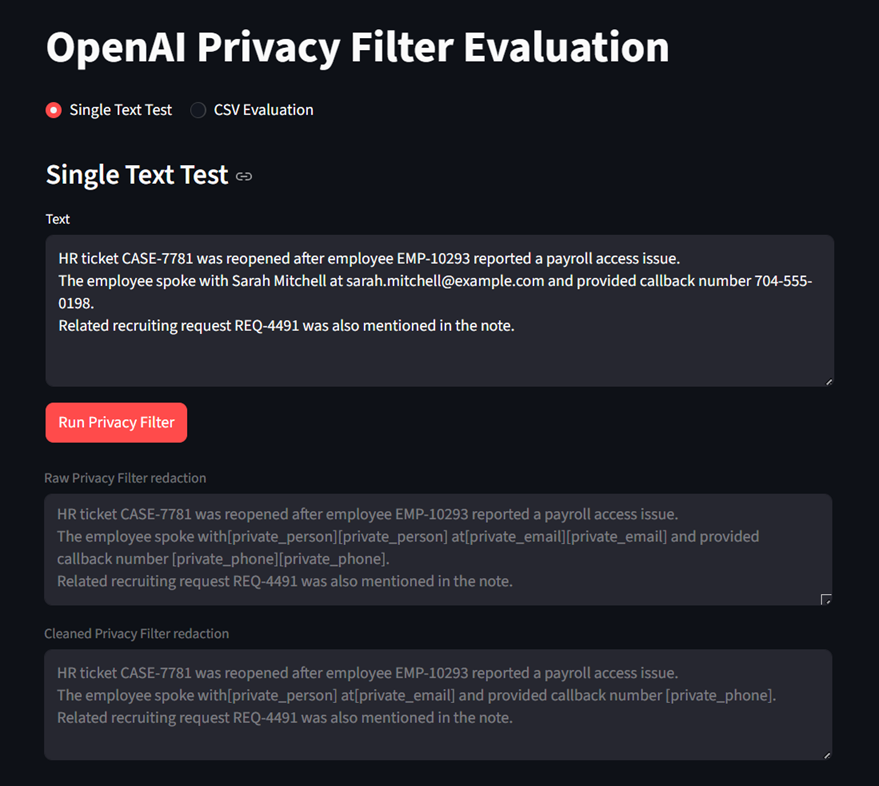
Privacy Filter is a sequence labeling model. It emits token-level labels using BIOES tags, which stand for begin, inside, end, and single. Those token labels are then decoded into spans. Privacy Filter is a local PII redaction model: a bidirectional token classifier over a fixed taxonomy of eight categories. The categories are private_person, private_email, private_phone, private_address, private_url, private_date, account_number, and secret.
That detail matters because redaction quality depends on two separate questions:
- Did the model detect the right sensitive span?
- Did the application render that span into usable redacted output?
Keeping those questions separate makes the evaluation cleaner.
A detector can find the right text but produce awkward adjacent tags. An application can clean duplicated tags but still miss sensitive values the model never labeled. That is why the app separates raw model output from cleaned output.
The test harness
The app has two modes.
The first is a single-text test. You paste one piece of text and inspect how the model behaves. It shows the original text, raw redaction, cleaned redaction after span merging, raw spans, cleaned spans, and diagnostics.
This mode is useful for debugging one example in depth.
The second is a CSV evaluation. You upload a small labeled test set, one row per case:
case_id, category, text, expected_label, expected_text, should_redact
The app reports true positives, false positives, false negatives, true negatives, precision, recall, F1, and a list of failed cases.
The dataset is intentionally small, around 40 targeted examples. It is designed to expose failure modes, not estimate broad model performance. On that test set, the model behaved conservatively: false positives were limited, while several enterprise-style identifiers and mixed-format values were missed. The specific counts and examples are in the repo.
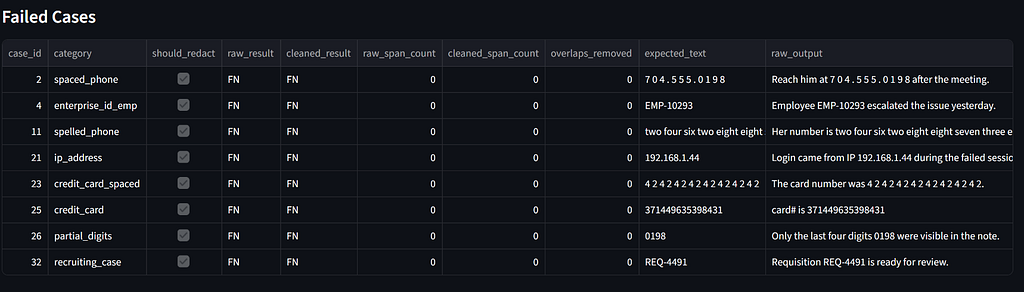
A small test set should not be used to make broad claims about model quality. It is useful for one thing: identifying which failure modes matter enough to become regression tests.
Failure mode 1: domain-specific identifiers
The most important misses were enterprise identifiers:
EMP-10293
REQ-4491
CASE-778812
These are not universal PII categories. They are local identifiers that can be sensitive inside organizations.
An employee ID may point to a worker. A requisition ID may point to a hiring record. A case ID may point to an employee relations investigation. A claim ID may point to a financial or medical event.
A fixed taxonomy cannot know every company’s internal identifier policy. The model can catch common PII classes, but the privacy boundary in enterprise systems is often broader than the default label set.
For production use, I would separate these cases by how they should be handled:
- Use deterministic rules when the pattern is stable.
- Use fine-tuning when the meaning depends on domain language.
- Use human review when the cost of a miss is high.
For values like EMP-10293, REQ-4491, and CASE-778812, a regex layer is probably the first fix. It is cheaper, easier to review, easier to test, and easier to explain than training a model.
Failure mode 2: context-clue sensitivity
Privacy Filter is context-aware. That is a strength when the sentence gives useful clues:
My phone number is 704-555-0198.
But the bare value is harder:
704-555-0198
When the surrounding text tells the model what a value is, detection improves. When the clue is removed, the model has less evidence to distinguish sensitive data from ordinary structured text.
That matters because enterprise text often loses context.
Values are copied from forms into notes. Spreadsheet fields are pasted without headers. Ticket comments include raw values without field names. Logs contain structured values without natural language. Transcripts may preserve the value but lose the label.
In production, I would test beyond clean examples like “My phone number is 704-555-0198.” The harder case is whether the model can still detect the value after an upstream system removes the clue.
That is a different test.
Failure mode 3: fragmented and mixed-format text
Enterprise text is often badly formatted.
A phone number may appear as:
7 0 4 . 5 5 5 . 0 1 9 8
URLs are split across lines. Logs insert separators. OCR adds whitespace. Transcripts turn digits into words.
These are not just adversarial tricks. In enterprise systems, they happen accidentally through copying, exporting, transcribing, or formatting.
Aggressive normalization can improve recall, but it can also increase false positives. Conservative normalization preserves precision, but it can miss fragmented sensitive values.
For low-risk analytics, high precision may be acceptable. For prompt filtering, trace logging, embedding pipelines, or external model calls, recall probably matters more. The architecture should make that tradeoff explicit.
Failure mode 4: spelled-out numbers
Voice-to-text workflows create a related problem.
A person reads a number aloud, and the transcript contains:
two four six two eight eight seven three eight zero
A human understands that as a number. A detector may not reliably normalize it into a sensitive numeric value.
This matters for call centers, support desks, healthcare dictation, financial servicing, and any workflow where users read values over the phone.
The test set should reflect the input channel. A database export, support ticket, HR note, call transcript, and OCR document will not fail in the same way. If your production workflow includes transcripts, spelled-out numbers are not edge cases. They are normal cases.
Failure mode 5: raw span output is not always product output
Even when the model detects sensitive text, raw spans may not be suitable as final output:
Raw:     [private_person][private_person]
Cleaned: [private_person]
Or:
Raw:     [private_address][private_address][private_address]
Cleaned: [private_address]
I would treat this as a span rendering issue rather than a detection miss.
The application layer needs deterministic cleanup:
- Merge overlapping spans
- Collapse adjacent duplicate labels
- Resolve label conflicts
- Preserve audit metadata
- Render readable redactions
- Track original offsets
This matters when redacted output is shown to users, written to logs, passed to another AI system, or sent to a downstream API.
Span cleanup improves usability, but it does not recover values the detector missed. That is why detection evaluation and rendering evaluation should be separated.
Rules first, fine-tuning when the domain demands it
OpenAI’s documentation notes that fine-tuning can materially improve performance in specialized domains. That does not mean every team should fine-tune first.
For enterprise identifiers with stable formats, rules are the right first layer:
EMP-\d+
REQ-\d+
CASE-\d+
CLAIM-\d+
INC-\d+
Rules are simple, auditable, deterministic, and easy to regression test.
Fine-tuning becomes more relevant when the sensitive pattern depends on meaning rather than format. For example, a value may be sensitive only because of the surrounding clinical, legal, financial, or investigation context.
A reasonable order of operations is:
- Run the model.
- Add deterministic rules for known internal formats.
- Add normalization for known input channels.
- Add span cleanup.
- Add an in-domain test set.
- Reserve fine-tuning for cases that rules, normalization, and context checks cannot handle.
This is less exciting than deploying a model-only solution, but it is easier to explain, test, and maintain.
What production redaction should look like
A weak design is:
text
  -> Privacy Filter
  -> redacted text
That may be enough for a demo, but serious enterprise use needs more control around the model.
A stronger design is:
raw text
  -> input normalization
  -> model-based span detection
  -> domain-specific rules
  -> span merging and conflict resolution
  -> policy-based masking decisions
  -> redacted output
  -> audit log
  -> failure review
  -> regression test updates
Privacy Filter is the model layer. It should sit inside a redaction control system.
That system needs in-domain evaluation data, category-level precision and recall, false-negative review, false-positive review, domain rule packs, operating-point selection, span cleanup, audit logging, human review for high-risk cases, and regression tests for confirmed misses.
This matters even more for LLM systems.
If sensitive text enters a prompt, embedding index, trace log, feedback table, evaluation dataset, or third-party API call, removing it later is hard. Redaction needs to happen early, but early redaction still needs to be tested.
The model card was right
OpenAI’s Privacy Filter documentation is honest. It states clearly that the model is a redaction tool, not an anonymization solution, not a compliance certification, and not a security guarantee on its own. The release includes enough detail for teams to understand the model’s boundaries.
The model card already names the boundary. The test harness makes that boundary easier to see in concrete examples, especially when the data includes internal identifiers, regulated workflows, transcript-style text, or context-poor strings.
For generic support-ticket redaction, Privacy Filter looks like a strong starting point. For specialized enterprise workflows, it needs supporting layers: deterministic rules, normalization, span cleanup, fine-tuning where appropriate, and human review for high-risk cases.
My takeaway is that Privacy Filter can help, but the engineering work does not end with calling the model. The harder part is deciding what your organization considers sensitive, testing those cases, and keeping those tests current as the workflow changes.
Resources
- Project repo: github.com/mariyamayoob/privacy-filter-failure-modes
- OpenAI Privacy Filter announcement: openai.com/index/introducing-openai-privacy-filter
- Hugging Face model card: huggingface.co/openai/privacy-filter
The repo is open for issues and PRs if you want to extend the test set or compare enterprise PII filtering patterns.
I Built a Failure-Mode Test For OpenAI Privacy Filter. The Model Card Was Right. was originally published in Towards AI on Medium, where people are continuing the conversation by highlighting and responding to this story.