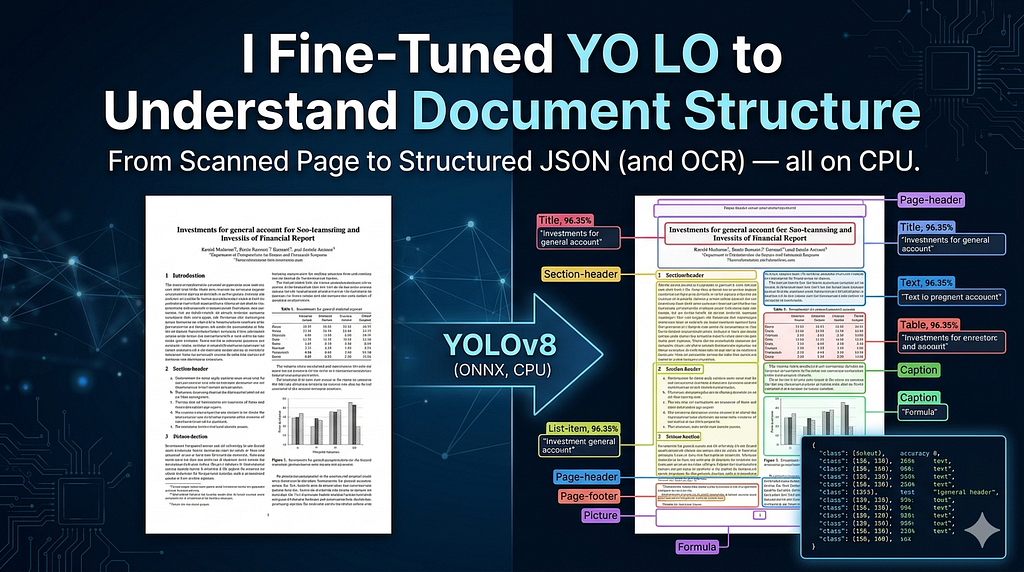
There’s a class of problem in document AI that sounds deceptively simple: look at a page, figure out what’s on it.
Not read the text. Not classify the document. Just answer: where is the table? where does the body text start? is that a footnote or a caption?
This is document layout detection — and it’s the unsexy foundation underneath every serious document processing pipeline. If you’re building something that ingests PDFs, scanned reports, financial statements, or academic papers, you almost certainly need it. And it’s surprisingly hard to get right with off-the-shelf tools.
This is the story of how I fine-tuned a YOLO model to do exactly this, exported it to ONNX, built an OCR pipeline on top of it, and deployed it as a live Streamlit app anyone can use.
The Problem With Generic OCR
Most people’s first instinct with document processing is to throw an OCR tool at it. Run Tesseract, call an API, get text back. Done.
But raw OCR output is flat. It gives you strings. It doesn’t tell you that this string is a section heading, that block is part of a table, those two paragraphs belong to separate logical sections. You’re left with a wall of text and no structure.
What you actually need — especially for downstream tasks like RAG, document QA, or data extraction — is to understand the semantic regions of the page before you run OCR. Detect first, extract second.
That’s the gap this project fills.
What the Model Detects
The model classifies page regions into 11 categories:
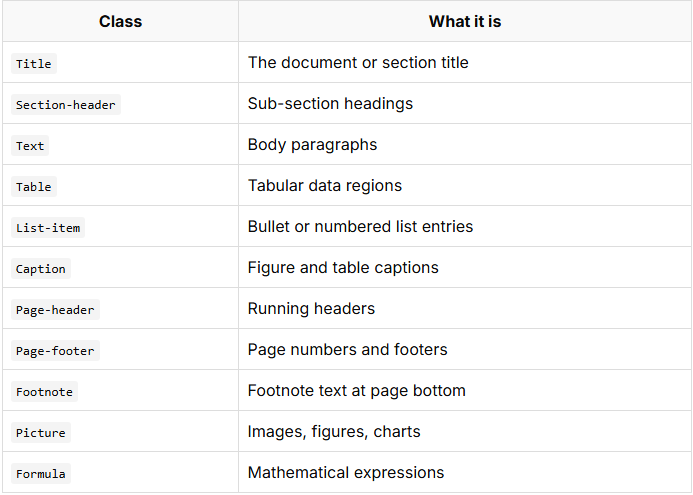
Given a document image, the model outputs bounding boxes with confidence scores for each region. For text-bearing regions, PaddleOCR then extracts the actual content. Visual-only regions (tables, pictures, formulas) are flagged and skipped for OCR — you’d want a specialized model for those anyway.
The Architecture
The pipeline has three stages:
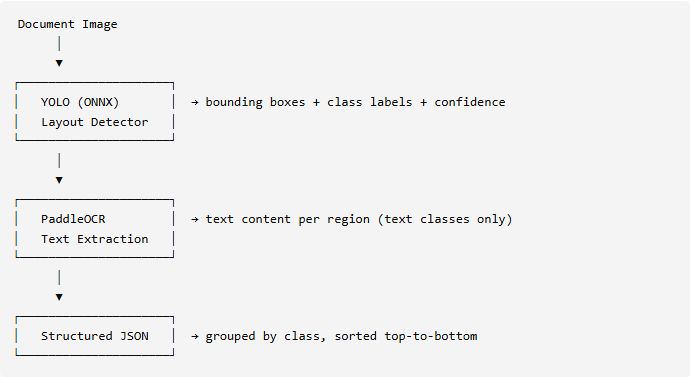
The output is a clean JSON structure grouped by class — every detected region with its pixel coordinates, confidence score, and extracted text. It’s designed to plug directly into whatever downstream pipeline you’re building.
{
  "Section-header": [
    {
      "coordinates": { "l": 117.0, "t": 362.0, "r": 331.0, "b": 375.0 },
      "accuracy": 80.80,
      "text": "Investments for general account"
    }
  ],
  "Table": [
    {
      "coordinates": { "l": 115.0, "t": 176.0, "r": 904.0, "b": 341.0 },
      "accuracy": 96.35,
      "text": null
    }
  ]
}
Model Details
The model is YOLOv8 fine-tuned on a dataset of document pages covering financial reports, academic papers, and general structured documents. It’s exported to ONNX v7 (via PyTorch 1.11.0), which means:
- No PyTorch dependency at inference time — just ONNX Runtime
- Runs on CPU — no GPU required for reasonable throughput
- Cross-platform — works on Windows, Linux, Mac, cloud VMs
The ONNX model properties:
Format:    ONNX v7
Producer:  PyTorch 1.11.0
Stride:    32
Input:     Variable size (rescaled internally)
Preprocessing is standard YOLO: resize to model input dimensions, normalize to [0, 1], convert to NCHW float32. Postprocessing applies confidence thresholding and Non-Maximum Suppression to clean up overlapping detections.
The Code Structure
The project is organized as a proper Python package rather than a collection of scripts:
doclayout-yolo/
├── app.py                       # Streamlit demo
├── config/
│   └── metadata.yaml            # Class name mapping
├── examples/                    # Sample images + outputs
├── layout_detector/
│   ├── detector.py              # DetectFunction class
│   ├── session.py               # ONNX Runtime session factory
│   └── utils.py                 # OCR extraction + JSON builder
├── scripts/
│   └── run_detection.py         # CLI script
├── requirements.txt             # Deployment (no OCR)
└── requirements-local.txt       # Full local setup with PaddleOCR
The layout_detector package exposes a clean public API:
from layout_detector import DetectFunction, create_session, build_output_structure

# One-time setup
session_args = create_session("best.onnx", "config/metadata.yaml")
# Per-image inference
image = cv2.imread("document.png")
h, w = image.shape[:2]
detector = DetectFunction(
    model_path="best.onnx",
    class_mapping_path="config/metadata.yaml",
    original_size=(w, h),
)
detections = detector.detect(image, session_args)
# With OCR
from paddleocr import PaddleOCR
ocr = PaddleOCR(use_angle_cls=True, lang="en", use_gpu=False)
structured = build_output_structure(image, "document.png", detections, ocr)\
Building the Streamlit App
The Streamlit app was the most interesting engineering challenge — not for the UI, but for the deployment constraints.
The model weights problem
ONNX models can’t live in a GitHub repo — they’re too large and that’s what Releases are for. But Streamlit Cloud clones your repo and runs it, so if best.onnx isn't there, the app crashes before it renders anything.
The solution is to download the model at runtime from GitHub Releases, using @st.cache_resource to ensure it only happens once per cold start:
@st.cache_resource(show_spinner="Downloading model weights…")
def ensure_model() -> bool:
    if not os.path.exists(MODEL_PATH):
        urllib.request.urlretrieve(MODEL_URL, MODEL_PATH)
    return os.path.exists(MODEL_PATH)

# Called at module level - before anything else renders
model_ready = ensure_model()
The PaddleOCR problem
Streamlit Cloud has PaddleOCR pre-installed in their base environment — but it’s version 3.x, which completely broke the constructor API from 2.x. Passing use_angle_cls=True raises a ValueError on 3.x. Worse, the 3.x result structure is different, so even if you get past instantiation the downstream parsing breaks.
The cleanest solution is to detect the cloud environment at import time and disable OCR entirely there:
_IS_CLOUD = bool(
    os.environ.get("STREAMLIT_SHARING_MODE")
    or os.environ.get("IS_STREAMLIT_CLOUD")
    or os.environ.get("HOSTNAME", "").startswith("streamlit")
)

def _check_ocr_available() -> bool:
    if _IS_CLOUD:
        return False  # never touch paddleocr on cloud
    try:
        import paddleocr
        return True
    except ImportError:
        return False
OCR_AVAILABLE = _check_ocr_available()
When OCR is unavailable, the sidebar checkbox is greyed out with a note telling users to run locally with requirements-local.txt. The layout detection itself works fine on cloud — you just don't get text extraction.
Two requirements files
This led to a clean pattern worth adopting for any ML project that deploys to constrained environments:
requirements.txt — for Streamlit Cloud (headless OpenCV, no PaddlePaddle):
opencv-python-headless>=4.8.0
onnxruntime>=1.16.0
numpy>=1.24.0
Pillow>=10.0.0
PyYAML>=6.0
streamlit>=1.28.0
requirements-local.txt — full setup with OCR:
opencv-python>=4.8.0
onnxruntime>=1.16.0
numpy>=1.24.0
Pillow>=10.0.0
PyYAML>=6.0
streamlit>=1.28.0
paddlepaddle>=2.6.2
paddleocr==2.7.3
opencv-python (the full version) requires libGL.so.1 — a GUI library that doesn't exist on Streamlit Cloud's headless Linux servers. opencv-python-headless is identical for all inference work, it just strips the display modules you don't need on a server anyway.
What I Learned
1. Separation of inference and I/O matters more than you think. The original codebase passed cv2, np, os, json as function arguments because it was designed to be imported without triggering top-level imports. This was an artifact of a specific deployment constraint that no longer existed. Cleaning it up — letting modules just import what they need — made the code dramatically easier to read and test.
2. Pre-installed packages on cloud platforms are a trap. Streamlit Cloud’s base environment includes packages you didn’t ask for, at versions you don’t control. Always detect the environment explicitly rather than inferring availability from importability alone.
3. ONNX is the right choice for this kind of project. Exporting to ONNX removed the PyTorch dependency at inference time, cut the Docker image size significantly, and made the model portable across environments with a single file. If you’re building anything that ends up as a deployed service, seriously consider ONNX export as a final step.
4. Two requirements files is a legitimate pattern. Not a hack. Major projects do this. The key is making it obvious in the README which file is for what.
Try It Yourself
Live demo: doclayout-yolo.streamlit.app (Layout detection works live. OCR requires local setup.)
GitHub: github.com/chirag4862/doclayout-yolo
To run locally with full OCR:
git clone https://github.com/chirag4862/doclayout-yolo.git
cd doclayout-yolo
pip install -r requirements-local.txt

# Download best.onnx from GitHub Releases and place in project root
streamlit run app.py
Or use the CLI directly:
python scripts/run_detection.py \
    --image your_document.png \
    --output result.json \
    --save-image annotated.png
What’s Next
A few things on the roadmap:
- Table structure extraction — right now tables are detected but not parsed. Adding a table structure model (like Microsoft’s Table Transformer) would make the pipeline genuinely end-to-end.
- PDF support — accepting PDFs directly and handling multi-page documents.
- Reading order — the current sort (top-to-bottom, left-to-right) is a heuristic. A proper reading order model would handle multi-column layouts correctly.
- Better formula handling — Formula regions are detected but skipped for OCR. LaTeX OCR (like Pix2Tex) could fill that gap.
If you build something with this or have ideas for improvements, open an issue or reach out. The repo is fully open — weights included in the releases.
Thanks for reading. If this was useful, the GitHub repo link is above — a star helps more people find it.
I Fine-Tuned YOLO to Understand Document Structure — Here’s How It Works was originally published in Towards AI on Medium, where people are continuing the conversation by highlighting and responding to this story.