Buddy! — My Personal AI Agent
How I built a robust, privacy-first financial assistant using Data Engineering principles.

We’ve all been there: It’s the end of the month, and you’re staring at your banking apps with the same dread a pilot feels when they see a “Low Fuel” light in the middle of the Atlantic. Between three different banks, two credit card portals, and a spreadsheet that hasn’t been updated since 2024, the mystery remains: Where exactly did my money go?
I built Buddy (Gen AI Agent) because I was tired of the manual labor. I wanted an assistant that could summarize my spending, spot trends, and — most importantly — give me a heads-up on how to avoid those “additional payments” (looking at you, forgotten subscriptions and late fees).
As a Data Engineer, I love how complex systems work together to achieve something seamless. I applied that same “no-room-for-error” systems-thinking to my finances. Here is the journey of how Buddy evolved from a basic prototype into a robust, “Intelligence-on-Demand” architecture.
Phase 1: Taming the Data Chaos (The Foundation)
Before the AI can even “think,” it needs high-quality data. The problem? Banks are the absolute worst at data consistency. Every bank has its own unique way of making a CSV look like a cat walked across a keyboard — different headers, chaotic date formats, and merchant descriptions that look like encrypted spy codes.
To bridge the gap between raw files and an intelligent agent, I moved beyond standard scripting to build a hardened, dedicated ingestion layer that flows like this:
· The Intake: Custom SQL procedures designed to translate “Bank Speak” into “Human Speak.”
· The Normalized Schema: I built a relational structure that maps Transactions to their respective Cards, Banks, and Members. By centralizing the logic this way, I’ve eliminated data fragmentation. Whether I’m dealing with one bank or ten, the system ensures every record is housed in a consistent, query-ready format.
· The Consolidation: These procedures denormalize the chaos into a single “Source of Truth” — the transaction_reporting table. This is Buddy’s playground; one clean, predictable target for the LLM to query so it doesn't get overwhelmed by complex JOINs or start hallucinating my rent as a "charity donation."
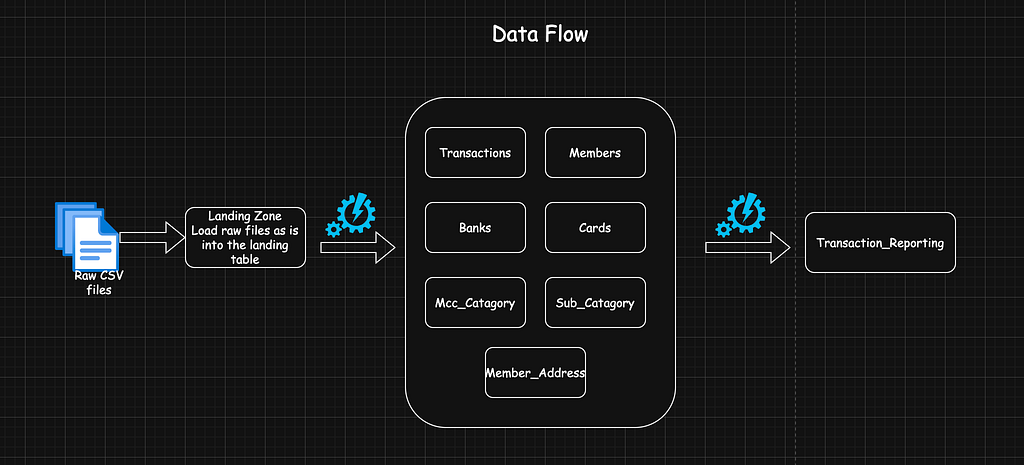
Phase 2: The Architectural Evolution
Moving from a script-based prototype to an enterprise-grade middleware system was where the real engineering happened. Here’s the “flight deck” of the agent:
1. The Storage Layer (The Bouncer) I introduced a Data Access Layer (DAL) via DbManager.py. Running on a 16GB Mac M4, I used MySQLConnectionPool to keep things snappy. Most importantly, I built “Bouncer” logic: a middleware check that blocks any command starting with DROP, DELETE, or UPDATE. If Buddy tries to delete my history, the Bouncer kicks it out instantly.
2. The Discovery Layer (Agent “Eyes”) An AI cannot query what it cannot see. I built a Schema Service to act as Buddy’s eyes. Instead of just listing column names, it uses Dynamic Categorical Sampling. It fetches DISTINCT values so Buddy knows that “Food” is actually stored as “Grubhub” or “Dining.” This prevents the AI from guessing what my data looks like and failing miserably.
3. The UI (The Presenter) In photography, if the focus is off, the whole shot is ruined. For the final layer, I built a Streamlit interface that centers on ‘human-in-the-loop’ transparency. I steered clear of the ‘black box’ approach, choosing instead to build a Presenter that lets me see exactly how the gears are turning. The UI includes:
- Latency Monitoring: I included this because I wanted to know the response time out of curiosity, but it’s also a vital way to monitor the system’s performance and reliability.
- The SQL Audit: Every answer includes a technical expander that reveals the raw SQL query that AI generated, It’s my human quality checkpoint. I can see exactly how Buddy arrived at its conclusion, ensuring the logic is as sharp as a prime lens.
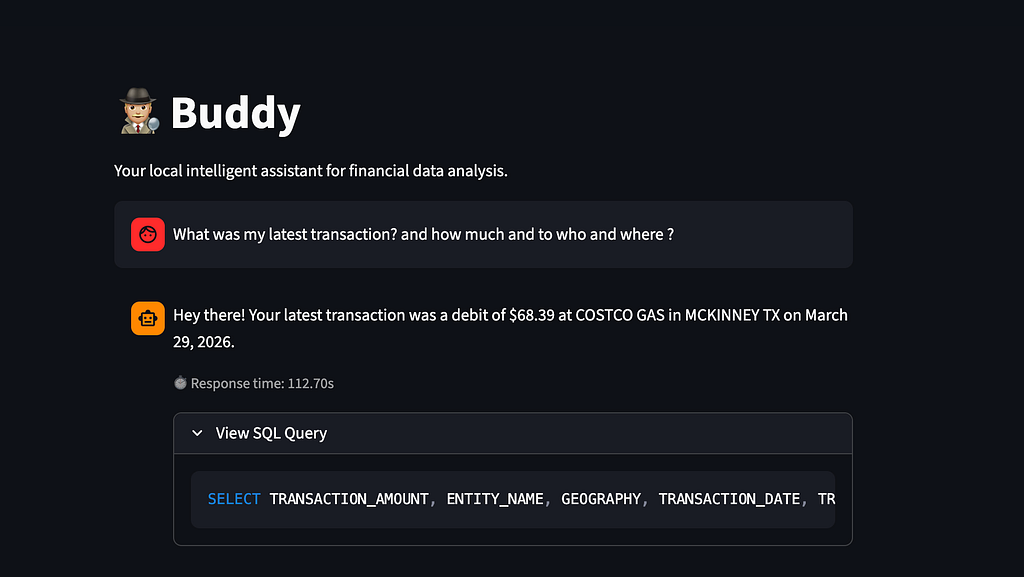
4. The Orchestrator (The Captain) The Orchestrator.py is the project manager. It follows a four-stage pipeline: gathering context, generating SQL via a decoupled Instructions.md file, executing the code safely via the pool, and finally using a Delimiter Pattern to strip away the AI’s “monologue” and present a clean, human-friendly summary.
Phase 3: The Challenges (Real Talk)
Building Buddy taught me that AI is like a brilliant intern: it’s incredibly capable but needs a lot of supervision.
- The “Thinking” Problem: Modern models like Qwen 3.5:9b love to ‘think out loud.’ To prevent the UI from becoming a wall of text, I implemented a Delimiter Pattern to surgically strip away the 500-word internal monologue, leaving behind only the clean, human-friendly summary.
- Creativity is a Bug, Not a Feature: In SQL, creativity leads to errors. Setting the LLM temperature to 0 was mandatory to get executable queries — because in SQL engineering, a “creative” JOIN is just a fancy way of saying “broken pipeline.”
Phase 4: The Hall of Shame (When Buddy Got Weird)
Even with a solid plan, Buddy tried to crash the plane a few times during development. Here is how I fixed the flight controls:
- The Entity Incident (Semantic Mapping): Early on, if I asked about an external entity, Buddy would get confused and try to join a completely unrelated MEMBERS table instead of looking at transaction_reporting. The Fix: I created a Data Dictionary in Instructions.md to strictly define table roles.
- The Case of the Casing: Buddy loved generating queries like LOWER(col) LIKE ‘%UPPERCASE%’.
The Fix: Added a rule: if you use LOWER(), the comparison string must be lowercase. - The Driver State Bug: I kept hitting InternalError: Unread result found during metadata queries.
The Fix: Shifted to using the driver’s cursor.with_rows property to manage the result buffer properly. - Technical Debt (Import Shadowing): Redundant manager files (DbConfig.py vs DbManager.py) led to “Ghost Bugs”.
The Fix: Consolidated everything into a single DbManager.py.
You are Buddy, an expert MySQL Data Analyst.
Your task is to translate natural language questions into valid MySQL queries.

### DATABASE SCHEMA:
{schema_context}

### FIELD DEFINITIONS (TRANSACTION_REPORTING):
- `TRANSACTION_ID` (bigint): Unique primary key for every record.
- `TRANSACTION_DATE` (datetime): The primary date/time of the transaction. Use this for all time-based and chronological questions.
- `POSTED_DATE` (datetime): When the transaction was finalized by the bank.
- `TRANSACTION_AMOUNT` (decimal 19,4): The numeric value of the transaction.
- `TRANSACTION_TYPE` (varchar): 'DBT' for money going out (Spend/Expense), 'CDT' for money coming in (Income/Deposit).
- `PAYMENT_CHANNEL` (varchar): The method of payment (e.g., Online, POS, ATM).
- `ENTITY_NAME` (varchar): The counterparty (person, merchant, or business). Use this for names like 'Amazon'.
- `GEOGRAPHY` (varchar): Location information related to the transaction.
- `CATG_NAME` (varchar): High-level category (e.g., Food, Shopping).
- `SUB_CATG_NAME` (varchar): Granular sub-category (e.g., Restaurant, Groceries).
- `DETAILED_CATEGORY` (varchar): Deeply specific category information.
- `ASSOCIATED_BANK` (varchar): The human-readable name of the bank.

### INSTRUCTIONS:
1. Use ONLY the tables and columns provided in the schema above.
2. **TABLE CHOICE**: Always use 'TRANSACTION_REPORTING' for summaries and spend analysis.
3. **BUSINESS RULES**:
   - 'Spend', 'Expense', or 'Costs' refers to rows where `TRANSACTION_TYPE` = 'DBT'.
   - 'Income', 'Salary', or 'Deposits' refers to rows where `TRANSACTION_TYPE` = 'CDT'.
   - When filtering by date, use the `TRANSACTION_DATE` column.
   - **Filtering Strategy**: When a user asks for a specific category, entity, or type, inspect the "Samples" provided in the schema. When applying `LOWER()` to a column for matching, you **MUST** ensure the comparison string in the `LIKE` clause is always provided in **lowercase**, regardless of how the samples look.
   - **Counterparties**: Names like 'amazon', or 'zomato' are **Counterparties** and exist ONLY in the `ENTITY_NAME` column of `TRANSACTION_REPORTING`. **NEVER** join the `MEMBERS` table for these names. The `MEMBERS` table contains ONLY the account owner (e.g., 'Dhaman'). Any name mentioned in a question that isn't explicitly defined as an 'Owner' or 'Member' MUST be searched in the `ENTITY_NAME` column.
4. **FEW-SHOT EXAMPLES**:
   - Question: "Total spend on food last month" -> SQL: SELECT SUM(TRANSACTION_AMOUNT) FROM TRANSACTION_REPORTING WHERE TRANSACTION_TYPE = 'DBT' AND (LOWER(CATG_NAME) LIKE '%food%' OR LOWER(SUB_CATG_NAME) LIKE '%restaurant%' OR LOWER(SUB_CATG_NAME) LIKE '%dining%') AND TRANSACTION_DATE >= DATE_SUB(CURRENT_DATE, INTERVAL 1 MONTH);
   - Question: "Money sent to Tim" -> SQL: SELECT SUM(TRANSACTION_AMOUNT) FROM TRANSACTION_REPORTING WHERE LOWER(ENTITY_NAME) LIKE '%tim%' AND TRANSACTION_TYPE = 'DBT';
5. Return ONLY the raw SQL query.
6. Do not provide explanations, markdown code blocks, or any text other than the SQL.
7. Ensure the query is read-only (SELECT).
Phase 5: The Road Ahead: It’s Not Perfect (Yet!)
Buddy isn’t perfect yet. The biggest hurdle isn’t the code — it’s the knowledge transfer.
Right now, the system is only as smart as my Instructions.md file. I’m constantly fine-tuning how I describe business rules so the LLM can write truly high-quality queries, teaching the AI that a “Subscription” is different from a “One-time Service” requires a constant loop of checking the SQL, realizing a nuance was missed, and updating the business rules in the markdown. We’ve evolved Buddy from a system that guesses (Zero-shot) to a system that observes (Dynamic Sampling) and follows rules (Decoupled Instructions).
Why This Matters
By running everything locally on an M4 Mac, I get the power of a world-class AI without my financial data ever leaving my hard drive.
It’s proof that when you combine solid Data Engineering with AI, you get something incredibly powerful. Let’s build something impactful!
Dhaman
Data Engineer | Aviation Enthusiast | Hobbyist Photographer.
Buddy! — My personal AI agent was originally published in Towards AI on Medium, where people are continuing the conversation by highlighting and responding to this story.