
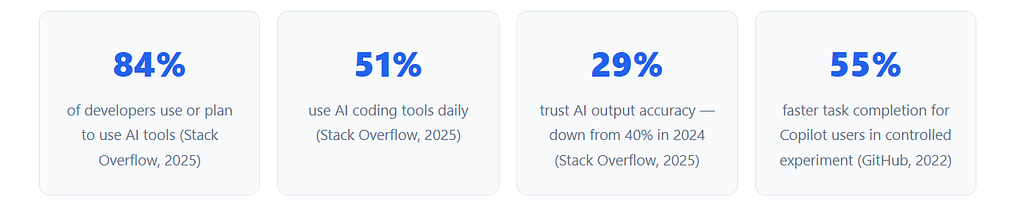
Eighty-four percent of developers now use or plan to use AI tools in their workflow — and 51% use them every single day, according to the Stack Overflow 2025 Developer Survey (33,662 respondents). That’s not a niche trend anymore. AI coding tools have crossed into standard professional practice, as normal as version control or a linter.
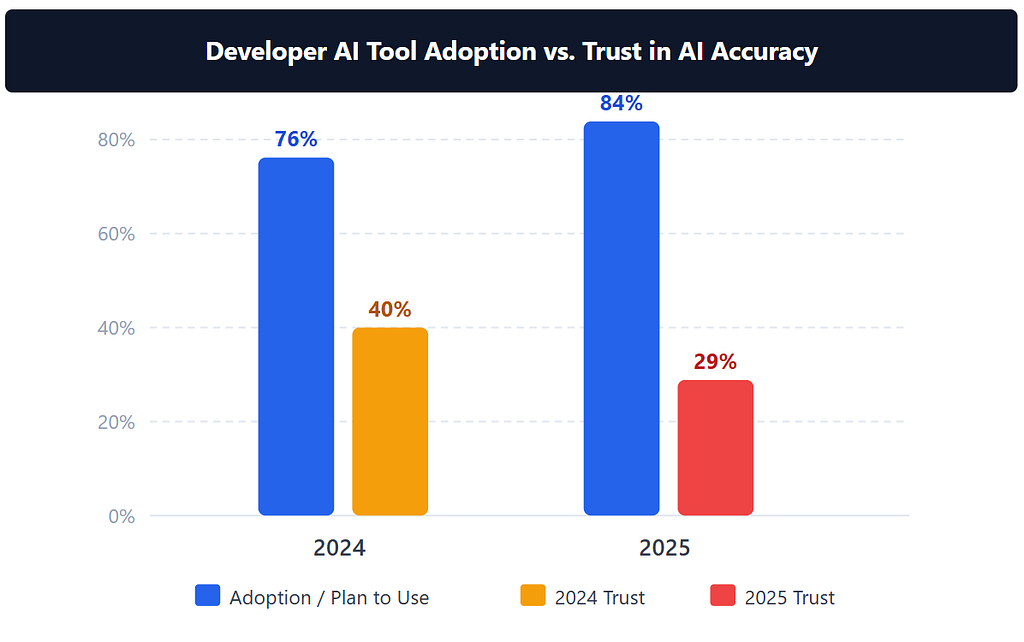
But here’s the paradox nobody talks about enough: adoption is at an all-time high, yet trust is falling. Only 29% of developers trust AI output accuracy in 2025 down from 40% a year earlier. More tools, more usage, less confidence. So which tools are actually earning their place in a developer’s workflow, and which ones are generating impressive-looking code that quietly breaks things?
This list covers the eight tools that developers keep coming back to, with verified data on what makes each one worth the attention.
TL;DR: The 8 AI coding tools worth your attention in 2026 are GitHub Copilot, Cursor, Windsurf, Claude Code, Amazon Q Developer, Aider, Continue.dev, and Tabnine. Copilot users complete tasks 55% faster in controlled experiments. The right pick depends on your stack, your team’s privacy needs, and whether you want a GUI or a terminal.
How AI Coding Tools Changed and Why 2026 Is Different
According to the Stack Overflow 2025 Developer Survey, 84% of developers now use or plan to use AI in their workflow, with 51% doing so daily. Yet trust in AI accuracy has dropped 11 percentage points year-over-year, falling from 40% in 2024 to just 29% in 2025. More developers are using these tools than ever and more developers are burned by them, too.
What changed in 2026? The tools got genuinely more capable — but the use cases diverged sharply. The gap between a developer using Cursor to autocomplete boilerplate and one using Claude Code to autonomously run a multi-file refactor is enormous. These aren’t the same category of tool anymore, even if they share a label.
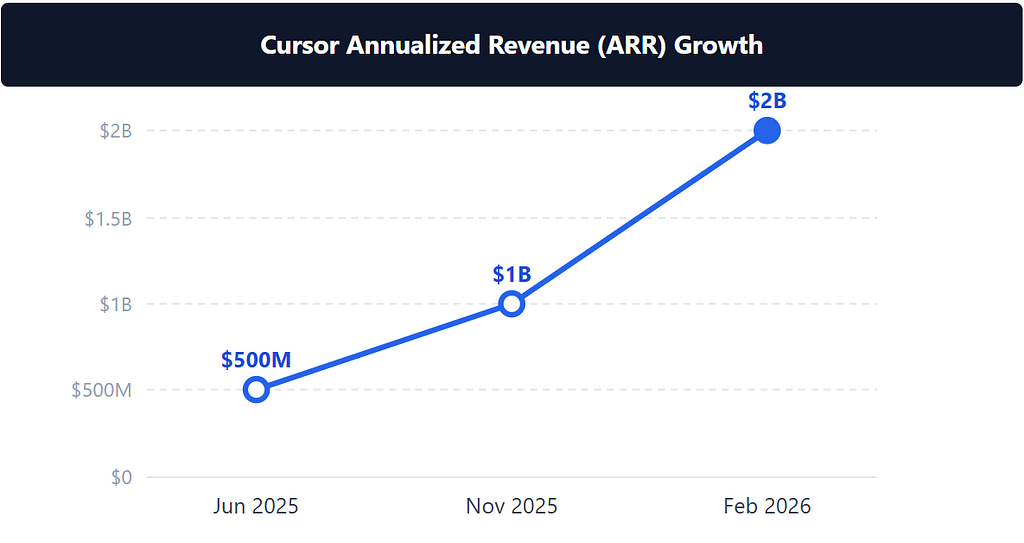
The 2026 crop also introduced persistent project memory, agentic task execution, and deep IDE integration that earlier generations couldn’t touch. GitHub Copilot will move to usage-based billing in June 2026. Windsurf released its own SWE-1 model. Cursor crossed $2B in annualized revenue. The tools that felt experimental three years ago now run on Fortune 500 production stacks.
Citation capsule: Developer AI tool adoption reached 84% in 2025, with 51% using tools daily, yet trust in AI accuracy fell to 29% — an 11-point drop from 40% in 2024. Sixty-six percent of developers report spending more time fixing “almost-right” AI code than they save generating it. Source: Stack Overflow 2025 Developer Survey (Dec 2025, 33,662 respondents).
The 8 AI Coding Tools Worth Your Attention in 2026
These tools were selected based on verified adoption data, active development, and documented productivity impact not vendor press releases. The list covers every major use-case category: IDE extension, AI-native editor, terminal agent, cloud-native assistant, and enterprise privacy play. There’s something here regardless of whether you’re a solo developer or an engineering team of 200.

1. GitHub Copilot — The Established Standard
AI pair programmerFree / Pro $10/mo / Business $19/user/mo / Enterprise $39/user/moBest for: Teams already in the GitHub ecosystem
GitHub Copilot has 4.7 million paid subscribers as of January 2026 — up 75% year-over-year — and is used by 90% of Fortune 100 companies. That adoption didn’t happen by accident. Copilot’s integration with GitHub’s pull request flow, code review, and Actions pipelines makes it feel like a native part of the development process rather than a third-party add-on bolted on afterward.
The productivity case is backed by research that the industry still cites: developers using Copilot completed tasks 55% faster in a controlled experiment with 95 developers finishing in 1 hour 11 minutes versus 2 hours 41 minutes for the control group. Enterprise customers get the added benefit of fine-tuning on their organization’s private codebase, which meaningfully improves suggestion relevance for proprietary conventions and internal APIs.
One thing worth watching: Copilot is moving to usage-based billing in June 2026. That’s a meaningful shift for teams on predictable budgets. It could make Copilot cheaper for light users and noticeably more expensive for the heavy ones.
2. Cursor — The AI-Native Editor Taking Over
AI-native code editor (VS Code fork)Free (2-week Pro trial) / Pro $20/mo / Business $40/user/moBest for: Individual developers who want maximum AI integration
Cursor crossed $2 billion in annualized revenue by February 2026 up from $500M ARR just eight months earlier — and is now valued at $29.3 billion. That growth rate is effectively unprecedented in SaaS history. Developers aren’t just trying it; they’re switching their primary editor.
The reason is Cursor’s “Tab” mode. It doesn’t just complete code you’ve started typing it predicts your next edit before your cursor moves there, learning your editing pattern mid-session. The multi-file Composer agent can handle tasks that span dozens of files simultaneously, which is where most AI coding tools fall apart. You describe a feature in plain language; Cursor writes it, opens the relevant files, and shows you a diff before touching anything.
Because it’s a VS Code fork, your existing extensions, themes, and keybindings transfer in minutes. That’s a lower switching cost than almost any other tool on this list. The free tier includes a two-week Pro trial, which is long enough to make a real judgment about whether it fits your workflow.
3. Windsurf — Agentic Flows with Persistent Memory
AI-native IDEFree / Pro $15/mo / Pro Plus $35/mo / Teams $25/user/mo / Enterprise $60/user/moBest for: Developers who want persistent project memory and agentic flows
Windsurf (formerly Codeium) now has 1 million+ active users, generates 70 million+ lines of AI-written code per day, and is actively used by 59% of Fortune 500 companies as of March 2026. It was acquired by Cognition — the team behind Devin — which signals where the product is heading: deeper autonomous execution, not just assisted editing.
The key differentiator is Cascade, Windsurf’s agentic assistant that maintains persistent memory of your project across sessions. It doesn’t ask you to re-explain the codebase every time. It knows what you’ve built, what you’ve changed, and what the conventions are a practical advantage on any project that lasts longer than a few days. Codemaps gives Cascade a bird’s-eye view of the repository for navigation and cross-file reasoning.
The SWE-1 model runs credit-free on Windsurf, which matters on the Pro plan where users otherwise burn through AI credits quickly. If you’ve been frustrated watching a usage meter drop on other tools, SWE-1 changes that calculus meaningfully.

4. Claude Code — Terminal-Native, No GUI, Maximum Power
Terminal-native agentic coding agentClaude Pro $20/mo / Max $100–$200/mo / API pay-per-tokenBest for: Developers who live in the terminal and want autonomous multi-step agents
Claude Code has no graphical interface. That’s the point. It runs entirely in the terminal, which makes it composable with every other tool in a developer’s workflow: shell scripts, CI pipelines, git hooks, Makefiles. You give it a task; it reads your codebase, runs tests, edits files across the repository, and commits the result — without switching windows. It’s writing posts like this one (yes, including this one).
The demand signal is extreme. Power users reportedly exhausted 20x their usage limits within 70 minutes of their monthly reset — not because Claude Code is broken, but because it’s producing so much output so fast that the cap feels inadequate. Anthropic introduced the Max plan ($100–$200/month) specifically to address this. The large context window means it can hold an entire large codebase in memory, not just the file you have open.
The trade-off is the learning curve. There’s no autocomplete UI to ease you in. Claude Code rewards developers who know what they want and can express it clearly. If you’re comfortable in a terminal and want an agent that can run unsupervised on complex multi-step tasks, nothing else on this list touches it for sheer output per session.
5. Amazon Q Developer — Built for AWS Teams
AI coding assistant + AWS operations agentFree Tier (50 agentic interactions/mo) / Pro $19/user/moBest for: Teams building on AWS
Amazon Q Developer did something that stopped the industry cold: it upgraded Amazon’s own 1,000 production apps from Java 8 to Java 17 in two days — a migration that “typically takes months” according to AWS. That’s not a demo. That’s production infrastructure at massive scale, completed in the time it would take most teams to finish sprint planning.
The reason Q Developer performs differently for AWS teams is deep service integration. It doesn’t just generate code it can list your Lambda functions, diagnose errors in the AWS console, generate CLI commands for your specific infrastructure configuration, and explain what a CloudFormation stack does. That operational awareness is something no general-purpose tool provides. Audible used Q Developer to raise test coverage from 10% to 100% on a legacy package — another data point suggesting the agent handles legacy modernization unusually well.
The free tier includes 50 agentic interactions per month, which is tight for daily use but enough to evaluate whether AWS specific capabilities are genuinely useful for your team. Pro at $19/user/month is competitive pricing for a tool with this level of AWS context built in.

6. Aider — Git-Native, Open-Source, Any LLM
Open-source terminal AI coding agentFree (Apache 2.0) pay only LLM API tokensBest for: Developers who want full control, git-native workflow, any LLM
Aider has 39,000+ GitHub stars, 4.1 million installations, and processes approximately 15 billion tokens per week making it the largest deployed user base of any open-source coding CLI in 2026. It’s entirely free under the Apache 2.0 license; you pay only for the LLM API tokens you consume, which gives cost-conscious developers full control over their spending.
What sets Aider apart from every other tool on this list is its git integration. Every code change Aider makes becomes a git commit, automatically. Every session produces a reviewable branch. You don’t need to trust Aider’s output blindly every edit is tracked, diffable, and reversible through normal git workflows. That auditability matters when you’re using AI on production code you actually care about.
Aider also supports nearly every LLM available: Claude, GPT-4o, DeepSeek, Gemini, and local models via Ollama. It generates a “repo map” a compressed representation of the entire codebase so it maintains relevant context even on large projects. If you’ve felt uncomfortable with tools that operate on your code without a clear paper trail, Aider is the answer.
7. Continue.dev — Open-Source, Zero Lock-In, Inside Your IDE
Open-source AI IDE extensionFree (Apache 2.0) use your own API keysBest for: Developers who want zero LLM lock-in inside their existing IDE
Continue.dev has 32,000+ GitHub stars and 2.4 million VS Code installs, making it the most-installed open-source AI coding assistant plugin as of March 2026. It works as a native extension inside VS Code and JetBrains IDEs — so you don’t need to switch editors, learn a new interface, or adjust any existing workflows. Just install, configure your API key, and it works.
The defining feature is LLM portability. You plug in any model — Claude, GPT-4o, Gemini, DeepSeek, or a local model running through Ollama — and swap between them without leaving the IDE. For teams under strict data governance policies, that ability to point at a self-hosted model is significant. Continue also ships MCP tool integrations with GitHub, Sentry, Snyk, and Linear out of the box.
The GitHub Actions integration is a capability most people haven’t noticed yet: Continue can run AI agents as status checks on every pull request, automatically reviewing code quality, catching regressions, and flagging issues before a human reviewer even opens the PR. That’s the kind of workflow automation that compounds over time on an active codebase.
8. Tabnine — The Enterprise Privacy Play
Enterprise AI coding assistantDev Preview free / Dev $9/mo / Enterprise $39/user/moBest for: Regulated industries, security-sensitive teams, air-gapped environments
Tabnine is a Gartner Magic Quadrant Visionary for AI Code Assistants (September 2025), has 9.1 million VS Code installs, and more than 1 million active developers. It won InfoWorld Technology of the Year 2025. Those are the kinds of credentials that procurement teams and CISOs care about when approving software for production environments.
What makes Tabnine genuinely different from every other tool on this list is its air-gapped deployment capability. Showcased with Dell at NVIDIA GTC 2025 specifically for finance, defense, and healthcare use cases, Tabnine can run entirely inside a private network with zero data leaving the organization. No telemetry, no training on your code, no data retention whatsoever backed by SOC 2, ISO 27001, and GDPR certifications.
For most individual developers, this level of isolation isn’t necessary. But for a team building financial infrastructure or handling patient records, it’s the only tool on this list that satisfies strict security requirements without forcing a compromise on capability. The Dev plan at $9/month is also the lowest entry price for a personal paid plan among all eight tools listed here.
The Productivity Paradox: Why Experienced Developers Get a Surprise
Most AI coding tool coverage focuses on speed gains. The METR study published in July 2025 tells a more complicated story one that most roundups quietly skip. In a randomized controlled trial with 16 experienced developers across 246 real open-source software issues, researchers found that AI-assisted developers took 19% longer to complete tasks than those working without AI. At the same time, those developers estimated they were 20% faster. They felt accelerated while actually slowing down.
This isn’t an argument against AI coding tools. It’s an argument for being specific about which tasks you apply them to. The METR study used experienced developers on complex, open-ended open-source issues exactly the kind of tasks where the cognitive overhead of reviewing and correcting “almost-right” AI output adds up faster than the generation speed saves. Compare that to the GitHub research showing 55% faster task completion — which used a more constrained task type. Both are real. The difference is the task, not the tool. AI coding tools are fastest on well-defined, bounded work: writing tests, generating boilerplate, converting data formats, filling in a known pattern. They’re riskiest on complex architectural decisions where the cost of a plausible-but-wrong answer is high. The developers seeing the best results from this generation of tools are the ones who’ve drawn that line clearly.
Citation capsule: In a July 2025 randomized controlled trial, 16 experienced developers working on 246 real open-source issues took 19% longer with AI assistance than without while estimating they were 20% faster. The study suggests AI tools may reduce accuracy of self-assessment alongside genuine performance effects on complex tasks. Source: METR Research Blog, Jul 10, 2025.
How to Pick the Right Tool for Your Situation
According to Gartner (Apr 2024), 90% of enterprise software engineers will use AI code assistants by 2028 — up from under 14% in 2024. That means most developers will eventually land on a tool. The question isn’t whether to adopt, it’s which tool fits your actual constraints. Here’s the comparison that makes that decision faster.
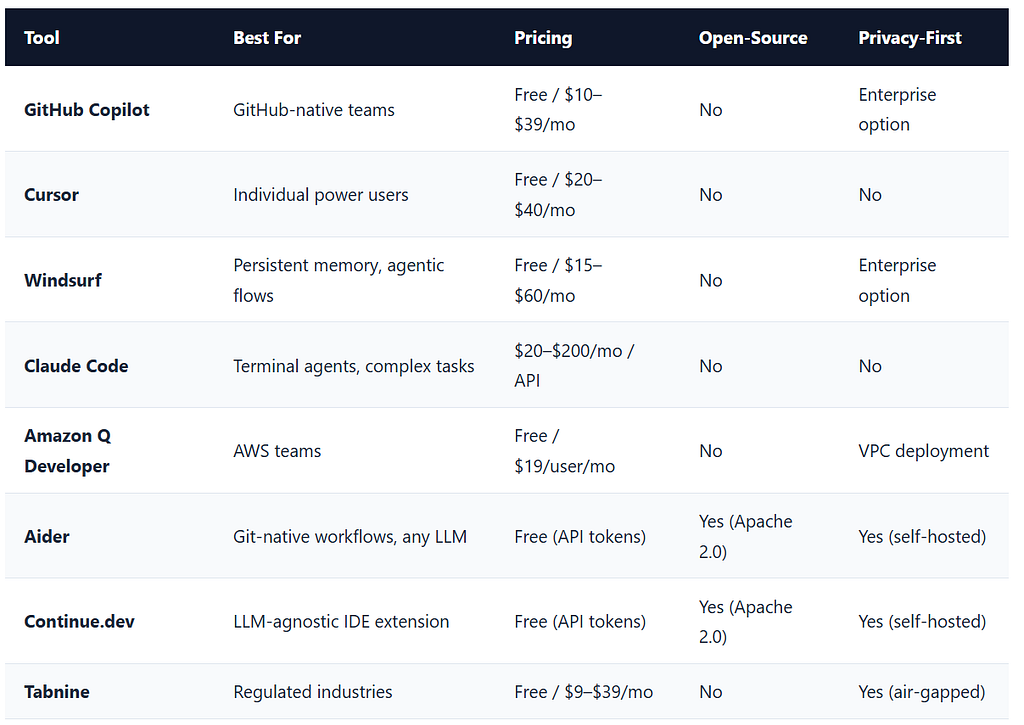
A quick decision framework: If you’re on a team using GitHub daily, start with Copilot. If you want to replace your editor with something AI-native, Cursor or Windsurf. If you live in the terminal and want an autonomous agent, Claude Code or Aider. If you’re on AWS, Q Developer is almost unfair in its integrations. If your team has strict data rules, Tabnine is the only tool with a genuine air-gapped story. For LLM portability without leaving your IDE, Continue.dev is the answer.
Frequently Asked Questions About AI Coding Tools in 2026
Which AI coding tool is best for beginners?
GitHub Copilot or Cursor are the easiest entry points. Copilot works inside VS Code, JetBrains, and most other editors with a one-click install no configuration required. Cursor is a full VS Code fork that imports your existing setup automatically. Both have free tiers. The Stack Overflow 2025 Survey shows 51% of developers use AI tools daily, which suggests the onboarding curve is short once you start. Avoid terminal-only tools like Aider or Claude Code until you’re comfortable with what AI-generated code looks like and how to review it critically.
Are AI coding tools worth it for solo developers?
The productivity data says yes with caveats. GitHub’s research found developers complete tasks 55% faster on well-defined work. But the METR study (Jul 2025) found experienced developers took 19% longer on complex, open-ended tasks. The tools deliver clear value for boilerplate, tests, and repetitive patterns. On architectural decisions and novel problems, treat output as a first draft that needs careful review, not a finished answer. At $10–$20/month, the ROI on bounded tasks is strong for most solo developers.
What’s the best open-source AI coding tool?
Aider leads on raw GitHub traction: 39,000+ stars and 4.1 million installations, processing around 15 billion tokens per week. It’s completely free under Apache 2.0 you only pay for LLM API tokens. Continue.dev is the stronger choice if you want something that lives inside VS Code or JetBrains rather than a terminal. It has 32,000+ GitHub stars and 2.4 million installs. Both support self-hosted LLMs via Ollama for teams with data residency requirements.
Do AI coding tools work with languages other than Python and JavaScript?
Yes. Aider supports 100+ programming languages, and Copilot and Cursor handle virtually every language with mainstream adoption: Go, Rust, Java, C++, TypeScript, Ruby, PHP, Swift, Kotlin, and more. The quality of suggestions varies by how much training data exists for a given languagePython and JavaScript see the best output because they’re most represented in public code. For niche languages or proprietary DSLs, Copilot Enterprise’s codebase fine-tuning and Continue.dev’s ability to bring custom models are both worth exploring.
Start With One Tool, Not Eight
The breadth of capable AI coding tools in 2026 is both impressive and paralyzing. Don’t try to use all eight at once. Pick the one that maps most directly to your current biggest friction point: IDE autocomplete, multi-file editing, terminal automation, AWS operations, enterprise security, or open-source flexibility.
The Gartner projection of 90% enterprise adoption by 2028 isn’t a distant prediction anymore. It’s an accelerating reality. The developers building fluency with these tools now — including the discipline to know when to review output critically will have a genuine advantage over those who start from zero in two years.
Use AI for what it’s fast at. Review it on what matters. Ship more. That’s the whole playbook.
8 AI Coding Tools So Good They Feel Illegal in 2026 was originally published in Towards AI on Medium, where people are continuing the conversation by highlighting and responding to this story.