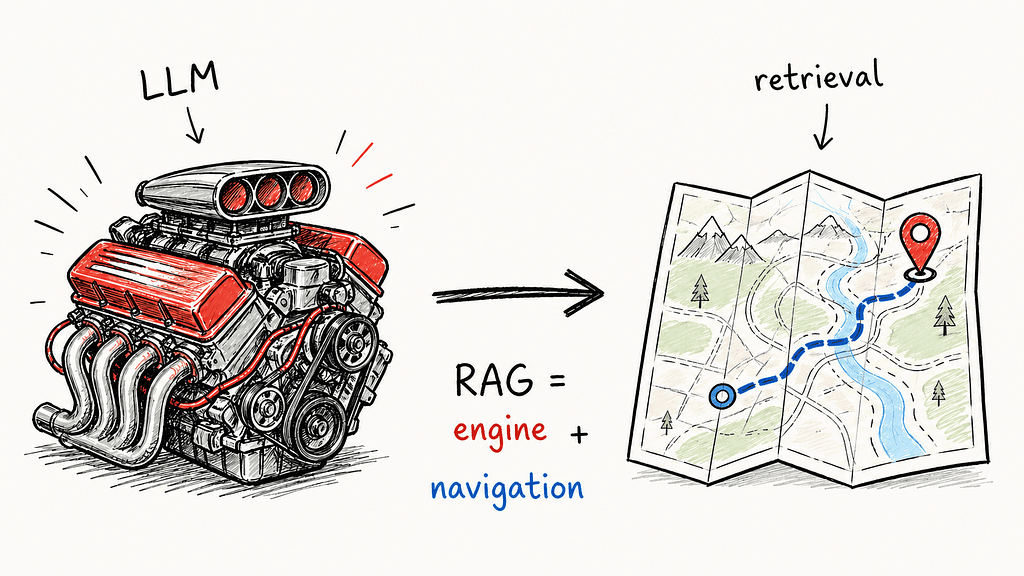
Hi everyone. With all the updates in the LLM stack over the past year, I decided to put together a practical list of RAG approaches that are actually useful in production or at least worth understanding if you are building LLM-based products.
This is based on my own experience, research, and the patterns I keep seeing in real-world cases.
What is RAG, in simple terms?
RAG stands for Retrieval-Augmented Generation.
It is an approach where the LLM does not answer only from its internal weights. Instead, it receives relevant context from an external knowledge base for a specific user query.
The simple flow looks like this:
user question → retrieve relevant chunks from a knowledge base → pass them to the LLM as context → generate an answer with references to the sources
Why is this useful?
Because the model itself does not know your internal documentation, support tickets, policies, product updates, or yesterday’s news. RAG fixes that without fine-tuning. It is cheaper, faster to update, easier to maintain, and much easier to explain to security teams, compliance teams, and regulators.
Now let’s look at how different RAG approaches work and when each one makes sense.
1. Basic / 2-Step RAG
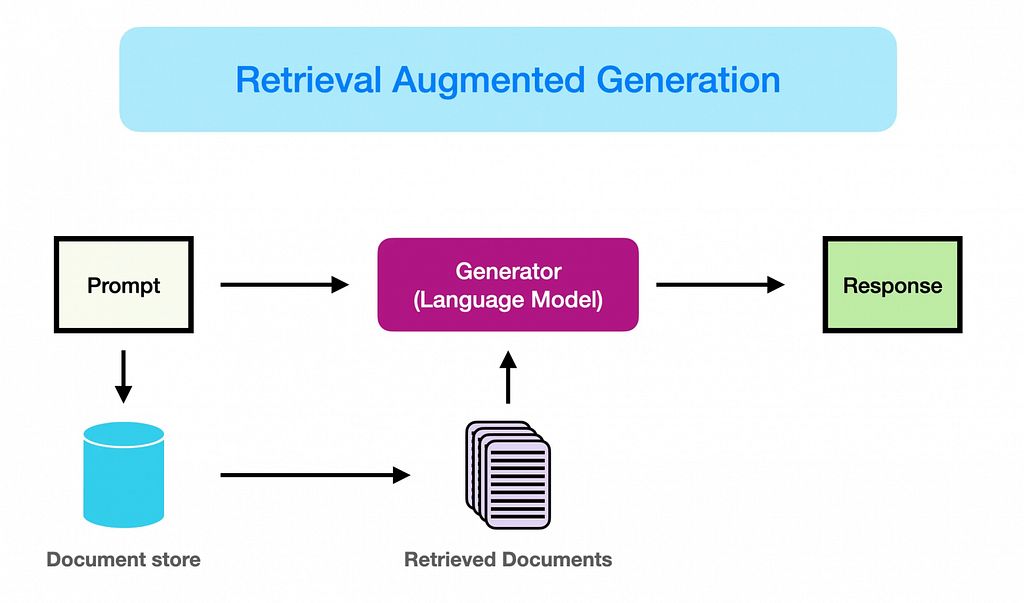
This is the simplest RAG setup, and usually the first one teams build.
Imagine an assistant that has access to a folder with relevant materials. When you ask a question, it first searches through that folder, finds several relevant fragments, uses them as context, and then generates an answer.
In technical terms, the flow looks like this:
user question → vector search over the document database → top-N chunks are passed to the LLM → the LLM generates the final answer
That is enough to build your first MVP. LangChain, LlamaIndex, and many other frameworks provide tutorials that can be assembled in a day: split documents into chunks, create embeddings, store them in Chroma, FAISS, Qdrant, or another vector database, and put an LLM on top.
Main limitations
- Chunk size is hard to get right.
If chunks are too small, you lose context and the answer becomes incomplete. If chunks are too large, the model receives too much noise. There is no universal chunk size. You have to measure and iterate. - Vector search does not always distinguish precise details.
For example, a query about “version 2.4” may return chunks about versions 2.3 and 2.5 because they are semantically close. - Confident hallucinations.
If retrieval returns irrelevant chunks, the LLM may still produce a confident answer based on weak or incorrect context. Garbage in, confident garbage out.
What to keep in mind
Use Basic RAG to test whether your problem can be solved with retrieval at all. It is a good baseline and usually takes one or two weeks to validate.
But do not stay there for too long. In production, Basic RAG should be treated as a baseline architecture, not a final solution. It helps you prove the concept, but it usually breaks once users start asking real, messy questions.
From day one, log which chunks were sent to the LLM. Without this, you cannot understand whether the issue is in retrieval or generation.
2. Hybrid RAG: BM25 + Vector Search
Hybrid RAG is usually the first serious upgrade after Basic RAG.
It solves one of the biggest weaknesses of pure vector search: the gap between semantic similarity and exact keyword matching.
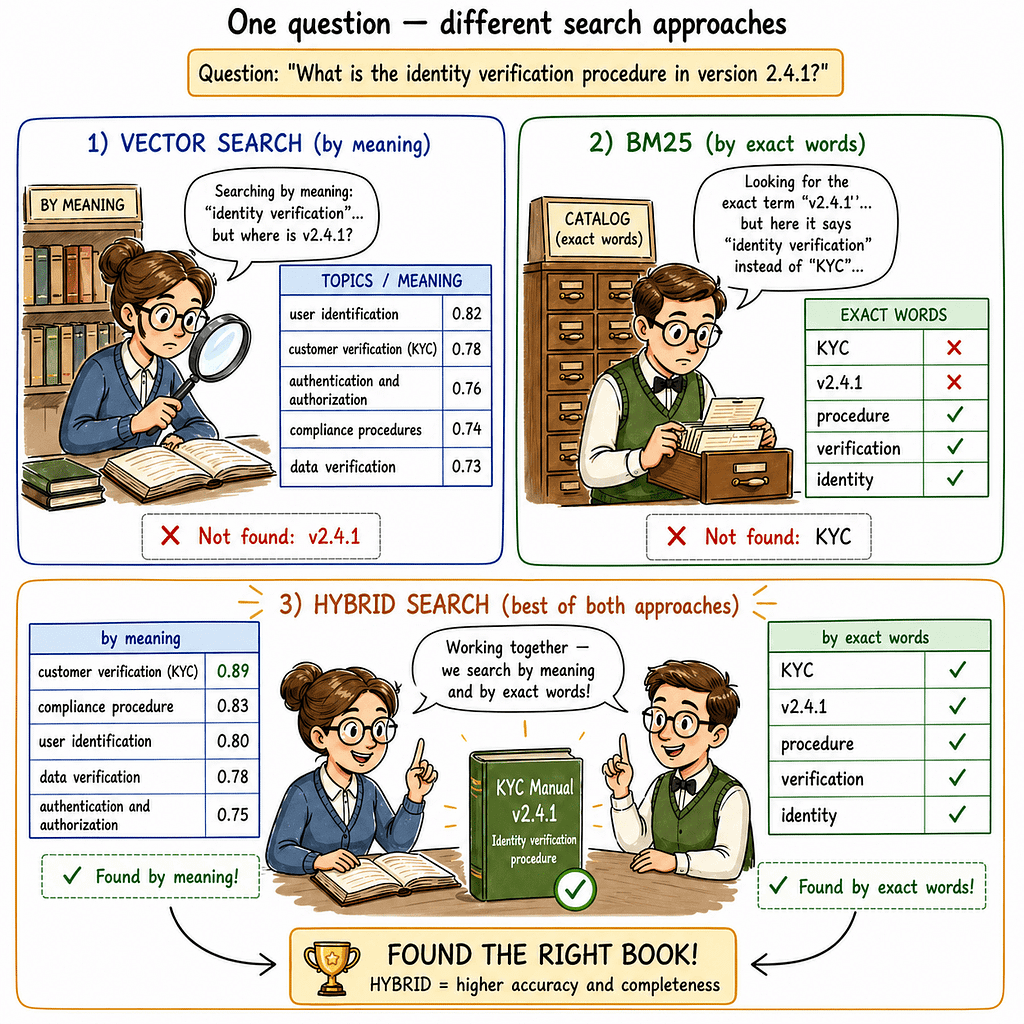
Imagine a library with two librarians.
The first one, vector search, understands meaning. If you ask, “How can I deal with insomnia?”, it may find books about sleep, anxiety, meditation, and mental health. The second one, BM25, remembers exact words, names, IDs, version numbers, and titles. If you ask for “Ivanov’s handbook, 2023 edition, chapter 4,” it will find the exact match quickly.
In practice, you need both.
Vector search is great at semantic understanding because of embeddings, but it often fails on exact details: product versions, SKUs, names, IDs, error codes, legal terms, or internal abbreviations.
BM25 is great at exact matches, but it can miss synonyms and paraphrases. Hybrid search combines the strengths of both.
How it works
You run two searches in parallel:
- semantic search using embeddings;
- keyword search using BM25 or another lexical search method.
- then you merge the two result lists.
Usually this is done through weighted scoring:
alpha × vector_score + (1 — alpha) × bm25_score
Or through Reciprocal Rank Fusion, which combines rankings without forcing scores into the same scale.
Many search and vector database tools now support hybrid search: Pinecone supports sparse-dense vectors, Weaviate has hybrid queries, and Qdrant/OpenSearch can also be used for this pattern.
What to keep in mind
- Add hybrid search as soon as you move from MVP to something more serious. The quality improvement is often noticeable, and the engineering effort is not that high.
- Do not blindly use alpha = 0.5. It is a decent starting point, but rarely optimal. If your domain has many specific terms, IDs, codes, product names, or legal wording, move more weight toward BM25. If the queries are mostly semantic and conversational, move more weight toward vector search.
- Also, do not forget language-specific preprocessing. For morphologically rich languages, BM25 without stemming or lemmatization may treat different forms of the same word as unrelated.
3. Reranking RAG
If hybrid search is the first major improvement, reranking is usually the second.
Here is the idea:
Imagine hiring for a company. You receive 200 resumes. The first recruiter quickly scans all of them and selects the top 30 based on keywords. This is fast, but rough. The second recruiter takes those 30 resumes and reads them carefully, comparing each candidate against the actual job requirements.
Vector search is like the first recruiter. It is fast and scalable, but not always precise.
A reranker is like the second recruiter. It takes a query and a candidate document, looks at them together, and decides how relevant the document really is to the query.
The typical pipeline looks like this:
vector or hybrid search retrieves 30–100 candidate chunks → reranker selects the top 5 → top 5 chunks are passed to the LLM
Which rerankers to use
- Cohere Rerank 3.5 / 4.0
A production-grade API option with multilingual support and easy integration. - BGE Reranker, for example BAAI/bge-reranker-v2-m3
A strong open-source multilingual option that can be hosted locally. - Jina Reranker
Another open-source alternative worth considering.
Cohere shows how Embed + Rerank + Chat can be combined into an end-to-end RAG pipeline. Elastic also describes reranking as a final relevance layer on top of keyword, semantic, or hybrid retrieval.
Latency cost
Reranking usually adds extra latency, often a few hundred milliseconds depending on the model, the number of candidate chunks, and infrastructure.
For chatbots where total latency is already around 2–3 seconds because of LLM generation, this is usually acceptable.
For high-throughput APIs with strict latency requirements, reranking may be expensive. In that case, you may need caching, smaller candidate sets, or conditional reranking only for difficult queries.
What to keep in mind
- If your system has low precision (meaning it retrieves the wrong chunks) — add a reranker before changing the embedding model.
- And do not use reranking without logging. You need to see what the initial retriever returned, how the reranker reordered the results, and which chunks finally went into the LLM. Otherwise, you will not know whether the reranker helps or silently makes things worse.
4. Query Transformation RAG
One of the biggest problems in RAG chatbots is that users do not write perfect search queries.
They write like humans:
“How does this work?”
“What about the second point?”
“And what about the settings?”
“Can I do it there?”
For vector search, words like “this,” “there,” or “it” often carry no useful meaning. The retriever may return random or weakly related chunks.
Query Transformation is a layer that turns a messy user query into a better retrieval query.
Usually this is done with one additional LLM call before retrieval.
HyDE example
HyDE stands for Hypothetical Document Embeddings. Instead of searching directly with a short user query, you first ask the LLM to generate a hypothetical answer to that query.
That answer may be factually wrong and that is fine. The important part is that it is structurally similar to real documents in your knowledge base. Its embedding may be closer to the right documents than the embedding of the original short query.
This can work especially well in specialized domains such as legal, medical, fintech, or technical documentation.
What to keep in mind
- Standalone-question rewriting is almost mandatory if your product is a real chat and not just a single-turn Q&A tool.
- Try HyDE when your users write short queries but your documents contain long, detailed explanations.
- Use multi-query and RAG-Fusion for broad or ambiguous queries, but always watch the cost. More queries mean more retrieval calls, more reranking, and potentially more latency.
5. Metadata / Structured RAG
This is one of the most underrated RAG patterns, especially in B2B and enterprise products.
Think about how you search on Amazon:
You do not just type “fridge” and scroll through 10,000 results. First, you filter by category, price, rating, brand, size, delivery date, and so on. Only then do you look at the results.
Metadata RAG applies the same idea to documents.
Instead of running semantic search across the entire corpus, you first filter documents using structured fields: date, document type, country, version, department, product, access level, tenant ID, and so on.
Then you run semantic search inside the filtered subset.
Example
User query:
“Show me the AML policy for the US that became effective after January 2025.
Pure vector search may return semantically similar but incorrect documents: an old US policy, a policy for another country, or a general compliance document.
Metadata RAG first applies filters:
country = “US”
doc_type = “policy”
effective_date > “2025–01–01”
Then it performs semantic search only inside the remaining documents. This can dramatically improve precision.
Main limitations
- Weak metadata schema.
If your index only contains filename and page number, filtering will be limited. Metadata has to be designed during indexing, not after everything is already broken. - Metadata must be inherited by chunks.
If a document has 50 chunks, each chunk should inherit fields such as country, document type, date, version, and tenant ID. Otherwise filtering may work only at the document level and fail at the chunk level. - LLM-generated filters can hallucinate.
If you let the LLM generate filters, it may invent field names or enum values that do not exist. Always validate filters before executing them.
What to keep in mind
Start with a metadata audit. Even filename, creation date, source, author, document type, and department can already cover many B2B use cases.
Good retrieval depends heavily on good metadata design. Do not rush indexing. First define what filters your users will actually need.
And never forget security. In multi-tenant systems, metadata filtering is critical. Without tenant_id or access-level filtering, a user from Company A may accidentally retrieve documents from Company B. That is not a bug. That is a security incident wearing a retrieval costume.
6. Conversational / History-Aware RAG
This is technically a specific case of Query Transformation, but it is important enough to discuss separately.
The problem is simple: users do not interact with chatbots through isolated questions. They have conversations.
Example:
User: “Tell me about the trial offer.”
Assistant: “Sure, here is how the trial offer works…”
User: “Why does it convert badly?”
If retrieval only sees the latest message — “Why does it convert badly?” — it has no idea what “it” refers to. The embedding of “it” does not mean anything concrete.
So you need a layer that turns the follow-up question plus chat history into a standalone question:
“Why does the trial offer convert badly?”
The common alternative that usually fails
Many teams simply put the entire chat history into the final LLM prompt and hope that the model will figure it out.
This works for a few turns, but then problems appear:
- the context window fills up quickly;
- every request starts consuming thousands of extra tokens;
- retrieval still searches only by the last message, so the core retrieval problem remains unsolved;
- cost grows linearly with conversation length.
Standalone-question rewriting solves both issues with one small LLM call before retrieval. It is usually cheaper, more reliable, and easier to debug.
What to keep in mind
Use this whenever you are building a real conversational interface rather than a simple Q&A search bar.
Do not pass the full conversation history to the rewriting step. Usually the last 4–6 messages are enough. Full history only adds noise and cost.
7. Agentic RAG
This is where RAG stops being a fixed pipeline and becomes an agent that decides what to do next.
Imagine a detective investigating a case:
After finding one clue, the detective does not follow a fixed script. They decide whom to interview next, which archive to check, whether a lead is relevant, whether to ask another question, or whether to change direction entirely.
Agentic RAG works in a similar way.
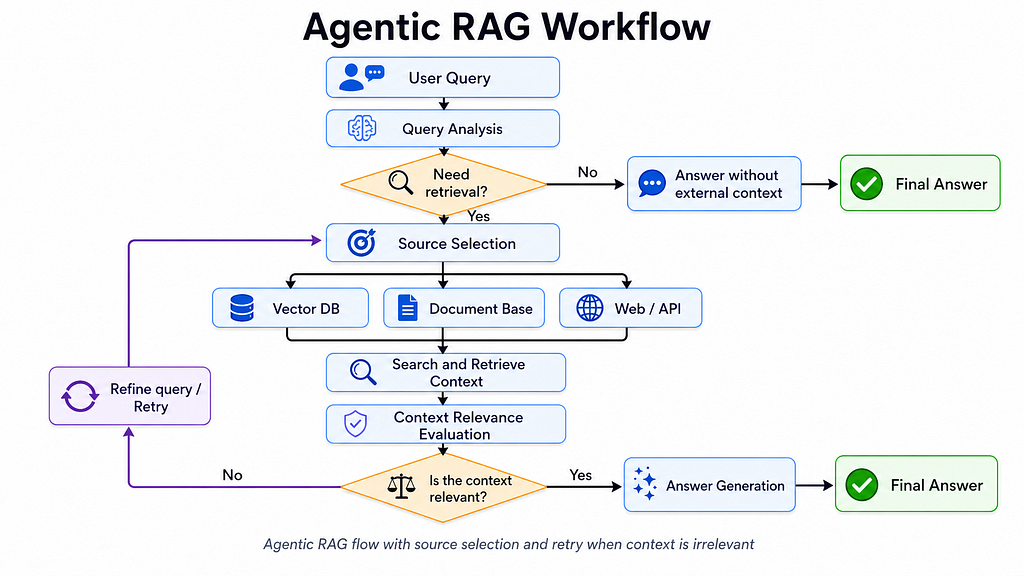
At each step, the agent decides:
Do I need retrieval?
If yes, which source should I use: docs, SQL, Slack, GitHub Issues, web?
Is the retrieved information relevant?
Should I search again?
Is there enough evidence to answer?
Should I admit that I do not know?
LangChain and LangGraph describe this as an approach where the agent reasons step by step and can be represented as a graph of decisions and tools.
What to keep in mind
Every agent decision is usually another LLM call.
A simple Basic RAG query may take one LLM call. The same request in an agentic pipeline can easily become 4–7 calls:
- decide whether retrieval is needed;
- choose a tool;
- evaluate relevance;
- decide whether to continue searching;
- generate the final answer.
This increases both latency and cost.
For a consumer product with high traffic, $500/day in LLM costs can quickly become $2,000–$3,000/day if you agentify everything without thinking.
Use a calculator before using the word “agentic” in an architecture meeting.
When Agentic RAG makes sense
- Multiple heterogeneous sources.
For example: Docs, SQL, Slack, GitHub Issues. In this case, Agentic RAG can be useful because the agent can dynamically choose the right source for each query instead of relying on a rigid pipeline. - Tool-use on top of retrieval.
When the system needs not only to find information, but also to act: create a ticket, update a record, send a message, trigger a workflow. - Dynamic search expansion.
If the first search fails, the agent can rewrite the query, choose another source, or continue searching before answering.
When it does not make sense
If you have one source, a narrow domain, and predictable user queries, you probably do not need Agentic RAG.
A simple if-else in code may be cheaper, faster, safer, and easier to debug.
Not everything needs an agent. Sometimes the best agent is a boring conditional statement with good logging.
8. Self-Corrective / Corrective RAG
The idea is simple and very human:
Before answering confidently, check whether you actually retrieved the right evidence.
Think of a student in an exam:
A weak student writes the first thing that comes to mind. A strong student writes an answer, rereads it, checks whether it actually answers the question, and corrects it if needed.
Corrective RAG does something similar for retrieval.
The pipeline looks like this:
- Retrieve chunks.
- Use a judge — an LLM or a specialized model — to evaluate whether the retrieved chunks are relevant.
- If they are relevant, generate the answer.
- If they are not relevant, rewrite the query and retrieve again, use web search, or honestly say there is not enough information.
The original CRAG paper proposes three evaluator actions:
- Correct — use retrieved knowledge as is;
- Incorrect — discard local retrieval and use web search;
- Ambiguous — combine local retrieval with web search.
Self-RAG goes further. It trains the model to generate reflection tokens that indicate whether retrieval is needed, whether a passage is relevant, and whether the answer is supported.
That usually requires fine-tuning, so it is less common in everyday production systems.
A practical minimum
You do not need full Self-RAG with fine-tuning to get most of the benefit.
A practical version looks like this:
- Retrieve.
- Ask an LLM grader: “Are these chunks sufficient to answer the question? Yes/no, and why?”
- If yes, generate the answer.
- If no, rewrite the query using the grader’s reason and retrieve one more time.
- If still no, answer honestly: “There is not enough information.”
This gives a large part of the benefit with much less complexity.
The key is to refuse when the evidence is weak instead of producing confident nonsense.
What to keep in mind
Use this in high-risk domains: medicine, law, finance, compliance, enterprise support, security, internal knowledge systems.
In many consumer products, it may be overkill. Users may correct the bot faster than you can justify an extra LLM call on every request.
At minimum, add a fallback rule: if retrieved chunks have very low similarity scores, do not force the model to answer. Better to say “I do not have enough data” than to generate a polished hallucination.
9. GraphRAG
GraphRAG is powerful, but it is not for everyone.
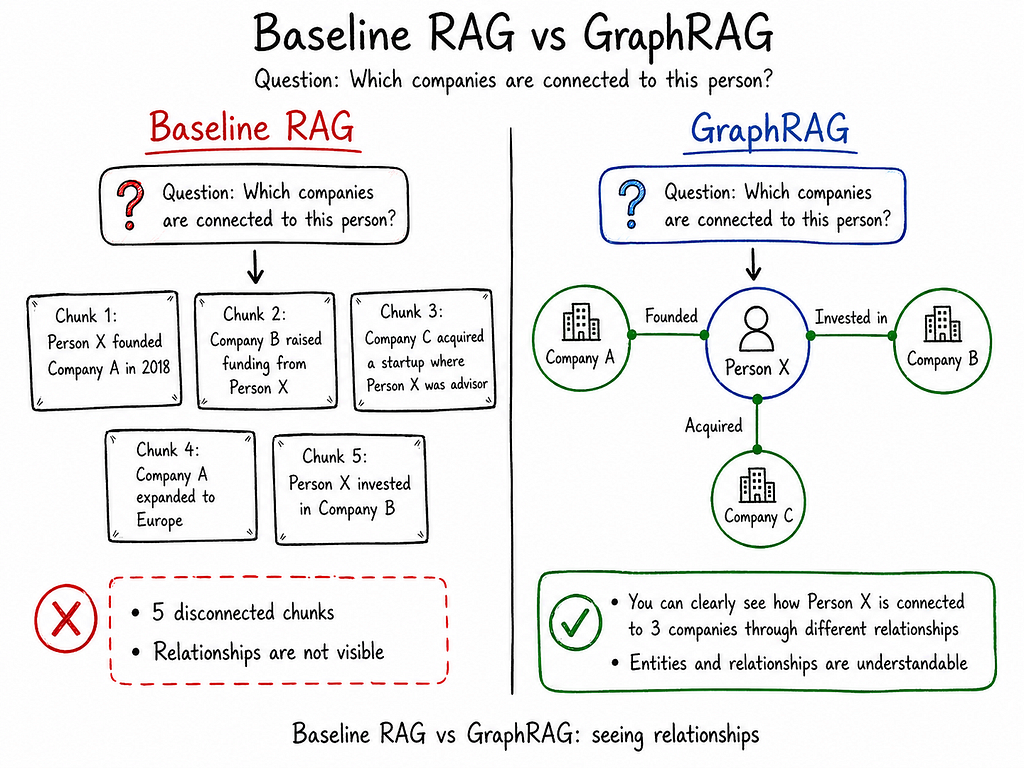
Think of detective movies where an investigator stands in front of a board with photos of suspects connected by strings. Each string has a label: “worked with,” “married to,” “invested in,” “acquired,” “met in 2022.”
That board is a knowledge graph. It shows not just facts, but relationships between facts.
If the question is:
“Which people were connected to Company X in 2022?”
then a graph can answer better than isolated document chunks.
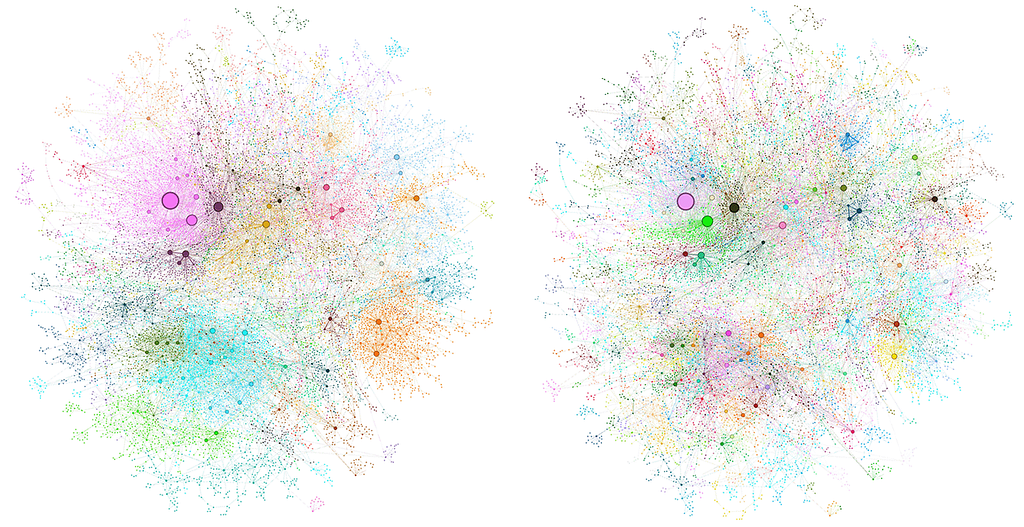
GraphRAG applies this idea to text corpora. During indexing, an LLM extracts:
- entities: people, companies, events, products, teams;
- relationships between those entities;
- summaries of clusters or communities of related entities.
The result is a graph that can be queried in different ways.
Two query modes
Local query
A question about a specific entity:
“What do we know about Company X?”
The system starts from Company X, follows its neighboring entities and relationships, and builds an answer.
Global query
A question about the whole corpus:
“What are the main themes across 500 customer interviews?”
The system uses precomputed community summaries to reason over the corpus as a whole.
Microsoft Research showed that GraphRAG can outperform baseline RAG on global questions, especially when the answer requires understanding themes and relationships across the entire dataset.
What to keep in mind
GraphRAG is expensive.
Indexing usually requires running LLM-based extraction and summarization over the corpus. For large datasets, this can become a serious cost and time investment.
Maintenance is also harder. When documents change, parts of the graph may need to be updated or recalculated.
When to use GraphRAG
Use it for questions about relationships:
- “Which companies are connected to this person?”
- “How did the project strategy change over the year?”
- “What hidden dependencies exist between departments?”
Use it for corpus-level analysis:
- “What are the recurring themes in 500 user interviews?”
- “What patterns appear across all compliance reports?”
Use it for investigations and compliance cases where reconstructing a network of participants, events, and relationships matters.
When not to use GraphRAG
Do not use GraphRAG for a normal FAQ bot or a small documentation assistant.
If you have 30 pages of product documentation, building a graph is probably unnecessary. Hybrid search + reranking + metadata will likely solve 95% of the problem at a fraction of the cost.
10. Multimodal RAG
If your knowledge base is not just text, text-only RAG loses a lot of information.
Think about PDFs with tables, slide decks, screenshots, UI mockups, scanned documents, financial reports, charts, and diagrams.
A normal text-only pipeline may extract the surrounding text but miss the actual meaning inside tables, images, or charts.
Multimodal RAG fixes this.
Imagine an analyst reading a quarterly report. Half of the important information is in revenue charts and metric tables. If the analyst only reads the text around the charts, they may understand that “revenue grew,” but not by how much, in which segment, or in which region.
The same applies to RAG. Tables, charts, and images contain information that must be indexed and retrieved.
Two main patterns
Pattern 1: Image embeddings, or true multimodal retrieval
You use a multimodal embedding model such as CLIP, Cohere Embed, Voyage Multimodal, or a similar model that can encode both text and images into the same vector space.
Then a query like “revenue chart for Q3” can retrieve both text descriptions and the chart image itself.
This is architecturally clean, but multimodal embedding quality is still not always as strong as mature text-only retrieval.
Pattern 2: Image-to-text summaries
You extract images, tables, and charts from documents and pass them through a vision LLM such as GPT-4o, Claude, or another model.
The model generates a textual description of each visual element. You then index those descriptions as regular text.
At retrieval time, you can pass both the description and the original image/table to the LLM.
This is more expensive during indexing, but often works better in practice because text embeddings are more mature and easier to debug.
For PDFs with tables and charts, the second pattern is often more reliable.
What to keep in mind
- If your corpus is mostly PDFs with tables, charts, reports, presentations, or regulatory documents, multimodal RAG can be a major quality improvement.
- If your corpus is mostly Markdown, support tickets, code, or plain text documentation, postpone it. It is probably not your bottleneck.
- Start with image-to-text summaries — they are easier to inspect, easier to debug, and usually good enough for real products.
You can return to true multimodal embeddings later when the tooling and models are mature enough for your use case.
Final Thoughts
Not every RAG approach is a separate architecture. Some are retrieval improvements, some are orchestration patterns, and some are advanced architectures for specific use cases.
A practical production path usually looks like this:
- Start with Basic RAG to validate the problem.
- Add hybrid search to improve retrieval coverage.
- Add reranking to improve precision.
- Add metadata filtering for structured and enterprise use cases.
- Add query rewriting for real conversational behavior.
- Add corrective, agentic, graph, or multimodal patterns only when your product actually needs them.
The biggest mistake is not choosing the wrong RAG framework.vThe biggest mistake is building an advanced architecture before you have measured where the system actually fails.
Most RAG systems do not fail because they lack agents, graphs, or fancy diagrams.
They fail because nobody logged the retrieved chunks, nobody evaluated retrieval quality, and nobody checked whether the user’s question was even answerable from the available data.
Start simple. Measure aggressively. Add complexity only where the bottleneck is real.
If you enjoyed this article, I’d be grateful for your support
I’m a Product Manager with an engineering background (ex SWE), focused on building, scaling and growing products. I’m especially interested in new technologies, particularly AI/ML, and how they can be applied in real workflows.
Email: akzhankalimatov@gmail.com
✅ Connect with me on LinkedIn, X (Twitter)
✅ Press and hold the 👏 to give up to 50 claps for this article
10 Practical RAG Approaches: What Is Actually Useful and When to Use Each One was originally published in Towards AI on Medium, where people are continuing the conversation by highlighting and responding to this story.