I use AI assistance for basically all of my work, for many hours, every day. My colleagues do the same. Recent surveys suggest >50% of Americans have used AI to help with their work in the last week. My architect recently started sending me emails that were clearly ChatGPT generated.[1]
Despite that, I know surprisingly little about how other people use AI assitance. Or at least how people who aren't weird AI-influencers sharing their marketing courses on Twitter or LinkedIn use AI. So here is a list of 10 concrete times I have used AI in some at least mildly creative ways, and how that went.
1) Transcribe and summarize every conversation spoken in our team office
Using an internal Lightcone application called "Omnilog" we have a microphone in our office that records all of our meetings, transcribes them via ElevenLabs, and uses Pyannote.ai for speaker identification. This was a bunch of work and is quite valuable, but probably a bit too annoying for most readers of this post to set up.
However, the thing I am successfully using Claude Code to do is take that transcript (which often has substantial transcription and speaker-identification errors), clean it up, summarize it, and post both the summary and the full transcript to a channel where the rest of the team can catch up on what they missed.
This is powered by Claude Code's recurring task feature. I spawn a Claude process every hour that queries those logs, plus Slack threads and other context about what the org is doing.[2]
This seems to be working pretty well![3]
My prompt for the hourly recurring task
Query the remote Omnilog Neon DB for transcripts in the team room within the last 2 hours (including speaker identities) with the "Team Room" speaker profile. Then clean up those transcripts into nice readable prose. Then write a summary of the transcript.

**CRITICAL: Only use `remote_browser_microphone` as the capture source.** The `desktop_microphone` captures Oliver's personal calls, meetings, and other audio that is NOT from the team room. The team room conference mic feeds through `remote_browser_microphone`. Never post transcripts from `desktop_microphone` -- those are private.

When requesting the transcripts get at least the top 3 speaker confidences for each span, and think about whether the speaker assignments from Pyannote are wrong.

Search the #listencone-livestream channel for what part of the transcript you are analyzing has already been posted. Then post in the channel with the summary of the conversation at the top level, and the full transcript in a reply.

**Posting to Slack:** Use the Slack API directly via curl with the Lightcone Factotum bot token instead of the Slack MCP tool, so posts appear from the bot rather than from Oliver's account. The token is in `/Users/habryka/Lightcone/lightcone-factotum/.env.local` as `SLACK_BOT_TOKEN`. Post with:
```
source /Users/habryka/Lightcone/lightcone-factotum/.env.local
curl -X POST https://slack.com/api/chat.postMessage \
  -H "Authorization: Bearer $SLACK_BOT_TOKEN" \
  -H "Content-Type: application/json" \
  -d '{"channel":"C0AFGB94E3W","text":"your message"}'
```
For thread replies, add `"thread_ts":"<parent_ts>"` to the JSON body. You can still use the Slack MCP tools for reading/searching channels.

If no substantial conversation occurred according to the transcripts, just do nothing.
2) Try to automatically fix any simple bugs that anyone on the team has mentioned out loud, or complained about in Slack
Again using Claude Code on an hourly task, I query...
- all transcripts from my laptop microphone,
- our team room microphone,
- all recent activity in our Slack,
- and whatever projects I have been working on,
- and any relevant Github issues
...and ask Claude to identify any bugs that were mentioned or reported. Then I ask it to identify one that seems particularly likely to have a simple fix, make a branch with a proposed fix, and link to it in Slack.
The first few iterations of this sucked. Claude would either be overly ambitious and try to implement features that would take far too long to review and increase technical debt, or fix bugs we had already fixed, or attempt bugs we had previously decided didn't have an easy fix. But after iterating on the prompt and making sure it really captures all the relevant context that exists, the hit rate has gone up quite markedly. We are now merging something on the order of 1 bugfix a day made this way.
My prompt for the hourly recurring task
Query my Omnilog transcript data for the last few hours to identify whether we discussed any important bugs or features in the Lightcone team room or in any meetings I was in.

Then search the Slack for any recent conversations about this feature as well to get relevant context. Especially make sure to search through the last month of the #m_bugs_channel and #teamcone_automations to see whether this feature or bug has been discussed there and you can find relevant context. In #m_bugs_channel, if a bug has a checkmark reaction it is already fixed, and if a bug has a plus reaction it is high-priorty. Also make sure there aren't any recent PRs that already address the bug or feature. Really make sure to fetch the full thread of any top-level message that you see discussing the bugs or features.

In addition to looking at forum_magnum_bugs, also look at forum_magnum_product. If a thread proposes a concrete change (as opposed to something nebulous), consider implementing it, and replying to it in a thread with a link to your branch.

If a fix or change affects a particular page, then in addition to linking the front page of the preview deployment, also generate a deep link to a relevant page inside the preview deployment. Eg if a change affects all post pages, link to <preview-deployment-base-url>/posts/bJ2haLkcGeLtTWaD5/welcome-to-lesswrong.

After finding the relevant context for each feature, decide whether any one of them is an appropriate feature for you to implement. Do not try to fix a bug or implement a feature that you already created a thread for in #teamcone_automations, unless a reply to a previous attempt communicates substantial feedback about a previous attempt. If you decide to do nothing, don't bother posting an update (we don't want you to spam hourly updates).

If so, make a branch on the appropriate repository (ForumMagnum, lightcone-factotum, omnilog, etc.), and commit an implementation of that feature or fix for that bug to the branch. Use a single commit (or flatten your commits). Then post in #teamcone_automations with a link and a short summary, and, if there is a relevant slack thread, also post as a reply there. The format for linking to a branch is `https://github.com/{org}/{repo}/{compare}/{base}...{branch}`. Make sure the commit message has the word "preview" in it, which ensures that we create a preview deployment, making it easier to review the changes. Keep branch names to 26 characters or shorter so Vercel doesn't truncate them and add a hash. Then have the commit message and any Slack messages link to `https://baserates-test-git-{branchname}-lesswrong.vercel.app`.

Make sure the commit message links to any important Slack threads (most importantly any mentions in #m_bugs_channel), and respond to any threads explicitly discussing this bug with a link to the branch. Check out master before you make your PR! Do not make a PR, just create the branch and link to it from Slack.

IF YOU LEAVE ANY COMMENTS ANYWHERE, PLEASE INDICATE THAT YOU ARE CLAUDE AND NOT ME, EVEN IF YOU ARE USING MY ACCOUNTS. DO NOT SPEAK IN MY VOICE.

**Posting to Slack:** Use the Slack API directly via curl with the Lightcone Factotum bot token instead of the Slack MCP tool, so posts appear from the bot rather than from Oliver's account. The token is in `/Users/habryka/Lightcone/lightcone-factotum/.env.local` as `SLACK_BOT_TOKEN`. Post with:
```
source /Users/habryka/Lightcone/lightcone-factotum/.env.local
curl -X POST https://slack.com/api/chat.postMessage \
  -H "Authorization: Bearer $SLACK_BOT_TOKEN" \
  -H "Content-Type: application/json" \
  -d '{"channel":"CHANNEL_ID","text":"your message"}'
```
For thread replies, add `"thread_ts":"<parent_ts>"` to the JSON body. You can still use the Slack MCP tools for reading/searching channels.
3) Design 20+ different design variations for nowinners.ai
Rob Bensinger wrote an essay a bit ago compiling arguments and evidence related to pausing or substantially slowing down AI, and political buy-in for that. He thought it might be a good idea to put it up on its own website to make it easier to link to, but we really weren't sure what the best way to present the information in the essay was, and what vibe the website should have.
So I asked Claude Code to just make me 20+ variations trying out different designs and design principles:
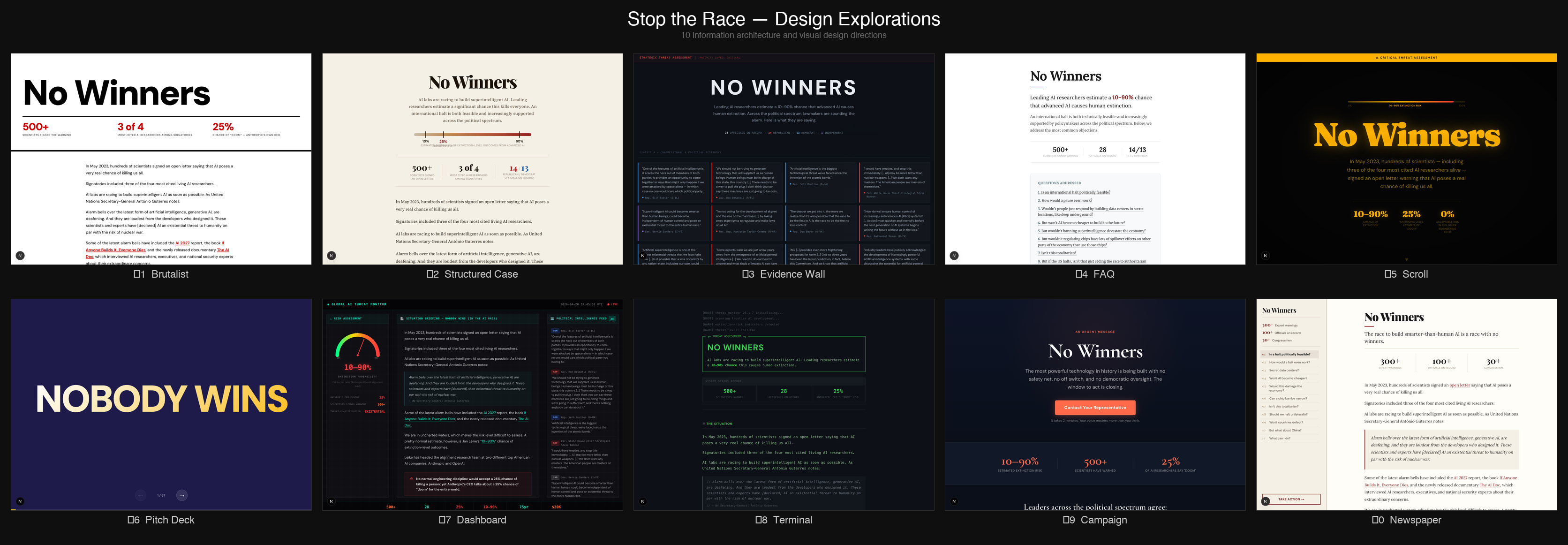
Most of the designs were pretty bad, but I liked the direction 1-2 were going, and then I iterated from there to arrive at the current design (now live at nowinners.ai).
4) Review my LessWrong essays for factual accuracy and argue with me about their central thesis
I do not like using LLMs for editing my writing.[4] However, I don't mind having LLMs fact-check my posts, or check whether anything in it seems egregiously wrong, or has any obvious unaddressed counter-arguments.
The hit rate on this is pretty low (on the order of 30% of objections or critiques are things I end up wanting to address), but the cost is also pretty low, so I do it pretty reliably before I publish a top-level post. Most recently this resulted in me updating my model about the exact relationship between color rendering index and light spectrograms.
The LessWrong editor exposes an API that lets Claude post and read inline comments on any draft, which makes this all a pretty ergonomic experience.
My prompt for requesting feedback
I'm writing a post on LessWrong.
The post is located at https://www.lesswrong.com/editPost?postId=<ID>&key=<sharingKey>.
Please remember to follow the guidelines and review structure in LessWrong's SKILL.md that I attached.
Please read the post and give me overall feedback on its thesis and fact-check any factual claims. I want you to think really hard about this. Ultrathink, if you must. I would like this post to be good!
5) Remove unnecessary clauses, sentences, parentheticals and random cruft from my LessWrong posts before publishing
My biggest writing weakness is that I am too wordy. While you can rip my epistemic qualifiers from my cold dead hands, probably, I sometimes grudgingly admit that the sentences I write have a certain kind of meandering quality to them, often going on for so long that by the time the reader has reached its end, the reader will have forgotten how it started.
That is the one editing task that I ask Claude to do for me.
This doesn't work flawlessly. In-particular, Claude loves replacing my long meandering sentences with em-dash contraptions that while not actually introducing any new turns of phrases, or classical LLM-isms, still give me an LLM vibe. But mostly, Claude successfully identifies random clauses, and places to start new sentences, and unnecessarily repetitive constructions, and removes them successfully.
I again use the LessWrong editor for this which allows Claude to directly suggest changes on my drafts.
Most recent prompt example of asking Claude to cut things down
<In a chat that started with fact-checking and feedback on the overall thesis>
Can you use the suggested inline edit tool to help me cut things. I am often far too wordy, and a pass to fix that seems good
6) Pair vibe-coding
Everyone on the Lightcone team uses LLMs to drive their programming work. Unfortunately, as a result of that, pair programming has become much less prevalent across the organization. Pair programming previously served a crucial role: creating traction on ill-defined product tasks, getting people to think about the product from first principles, and providing a social context that made it easier to work instead of getting distracted by Twitter.
The problem with pair programming in an LLM world is the usual cognition that would go into talking to your programming partner now goes into writing messages to your LLM. Also, in a world where people primarily work with LLMs on their code, they tend to often juggle multiple tasks in-parallel as they wait on the LLM getting back to them.
But recently we finally had some initial success with a pair vibecoding session. The basic setup was:
- Robert and I talked through a complicated refactor for ~20 minutes, then had Claude Code fetch the transcript of that conversation and produce an implementation plan. While it worked, we kept talking through likely issues.
- Once the plan was ready, we reviewed it out loud, then had Claude fetch the transcript of *that* conversation and update the plan accordingly.
- After one more round of review, we had Claude implement the changes. As code came in, we looked it over together, called out problems out loud, and had Claude fix them.
This really worked surprisingly well! The usual pattern, where someone disappears for minutes at a time to give feedback on an AI-proposed plan or to write a long instruction essay providing all the necessary context, was gone. Instead we simply talked about it, and Claude implemented things in the background.
7) Mass-creating 100+ variations of Suno songs using Claude Cowork desktop control
When I make a new Fooming Shoggoths song, I usually sample hundreds, sometimes thousands of song completions for a given broad concept to get something that has the right kind of vibe. Then, after I have something that seems promising or interesting, I iterate on it using Suno's "Cover" and "Persona" features until I have something I am happy with. In my most recent sprint for getting the second album ready for April 1st, I experimented with having Claude drive more of the generation process here.
I gave Claude the lyrics of all my previous songs and a list of concepts I wanted to explore for the new album, and had it take control of my Suno tab in Chrome to submit a huge cross product of styles and lyrics.
Then I listened to the first few seconds of a random sampling, gave Claude some high-level feedback, and had it generate more variations.
This did not produce anything that even remotely made it into the album, but it did end up making me think there was a particularly promising intersection of Indie-Rock, "The National" vibes, and a song about AI timelines, which resulted in "Friday's Far Enough For Milk", which is my third favorite song I've ever made.
8) Ask Claude to read a book about songwriting, then critique my lyrics
Since the last Fooming Shoggoth album focused on lyrics that try to capture specific vibes not covered in any other music, I was thinking a lot about songwriting. In my quest to get better at that, Buck pointed me towards his favorite book on songwriting: Song Building: "Mastering Lyric Writing (1) (SongTown Songwriting Series)"
Of course, I didn't want to wait until I had read/skimmed the whole book before getting value out of it, so I just asked Claude to read it for me and use it to critique the lyrics I had written.
Claude took a total of 35 seconds to read the 100+ page book and apply it to my lyrics. Most of the feedback was terrible, because Claude is not that good at poetry or lyric writing. But some of it was quite good, and having Claude reference and apply the book's principles directly to my lyrics made me understand the book much better and faster than if I had skimmed it and tried to apply it myself.
9) Find things I keep explaining to people so often I should make a blogpost about it
In addition to recording conversations in our team room and with my laptop microphone, Omnilog also captures the contents of my screen every 15 seconds (unless it detects I'm looking at something private), which means it has a remarkably complete record of what I've been doing.
So I asked ChatGPT to go through everything it has from me in the last 2 months and collate themes in things I've kept explaining over and over, that I maybe should write a blogpost about, following Gwern's "rule of three" for blogposts:
Rule of three: if you (or someone else) have explained the same thing 3 times, it is time to write that down.
It is clearly interesting enough to keep going back to, and you now have several rough drafts to work with.
It produced a total of 40 candidate blogposts[5]. Practically all of them were terrible. As it noticed that I had complained a few times out loud that our LessWrong drafts page shows drafts with no title and zero words in them, it suggested I write a post about that!
Untitled Drafts With Zero Words Shouldn’t Exist
Thesis: product surfaces should not show users objects that are technically real but psychologically meaningless.
Easy because: one small UI observation can carry 500 words.
One of the 40 post titles it recommended seemed promising: "AIs Writing Like Claude Are Silencing My Alarm Bells". While the title is (of course) truly atrocious, I did find myself in the last few weeks pointing out a few times how LLM writing seems optimized to be non-offensive in a way that makes it dangerous for internal memos or high-stakes communication.
My guess is Claude writing is optimized to use ambiguity exactly in places where an absence of ambiguity might cause the reader to notice they disagree strongly with the content, which is the opposite from how I usually try to optimize my writing!
10) Build tiny interactive embeds for my LessWrong posts
My last two LessWrong posts featured interactive widgets that IMO did a much better job at explaining the core concepts I was trying to get across than any number of words could done:
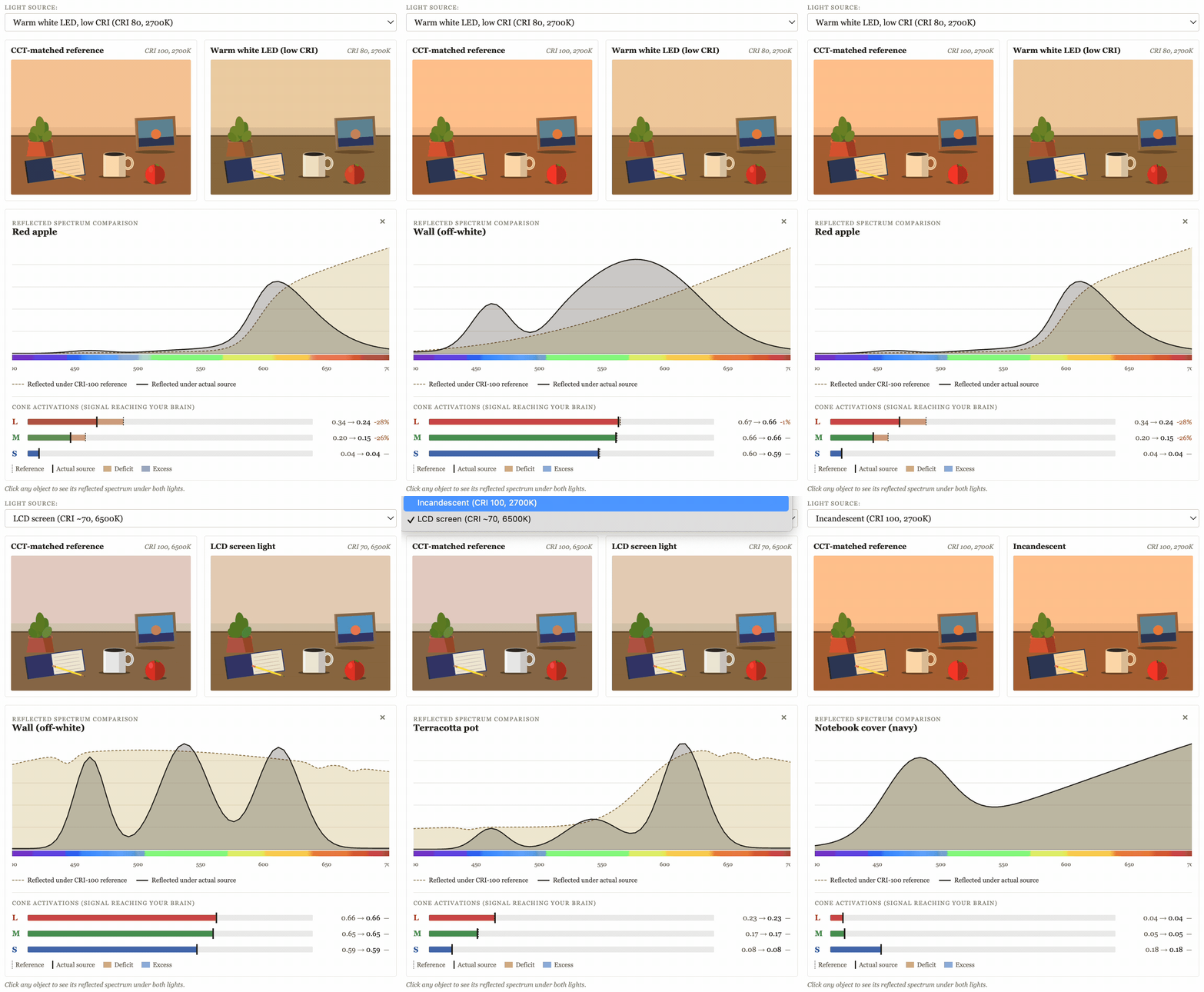
This was very fast, very straightforward, and IMO made those posts much better.
That's it. Hopefully these 10 concrete examples will be helpful to someone. Also feel free to post your own in the comments! My sense is people are currently undersharing creative uses of LLMs.
- ^
Yes, this is mildly concerning, but I assure you that the structural safety of Lighthaven is not impacted... probably
- ^
This does mean that this only happens when my laptop is running and has the Claude app open, which makes this not enormously reliable, but it's been reliable enough to get most of the value
- ^
It's not perfect (in-particular the Omnilog pipeline has recently started messing up speaker identification, so transcripts have been more degraded) but it's still good enough to give you a sense of what you're missing.
- ^
I do of course use them extensively for research, and they have replaced more than 50% of my previous Google searches, which I consider so mundane as to not deserve a spot on this post.
- ^
It initially produced 10, but I prodded it to keep going multiple times
Discuss